Yes! You can use AI to fill out Dealer’s Heavy Equipment Inventory Tax Statement (Form 50-266)
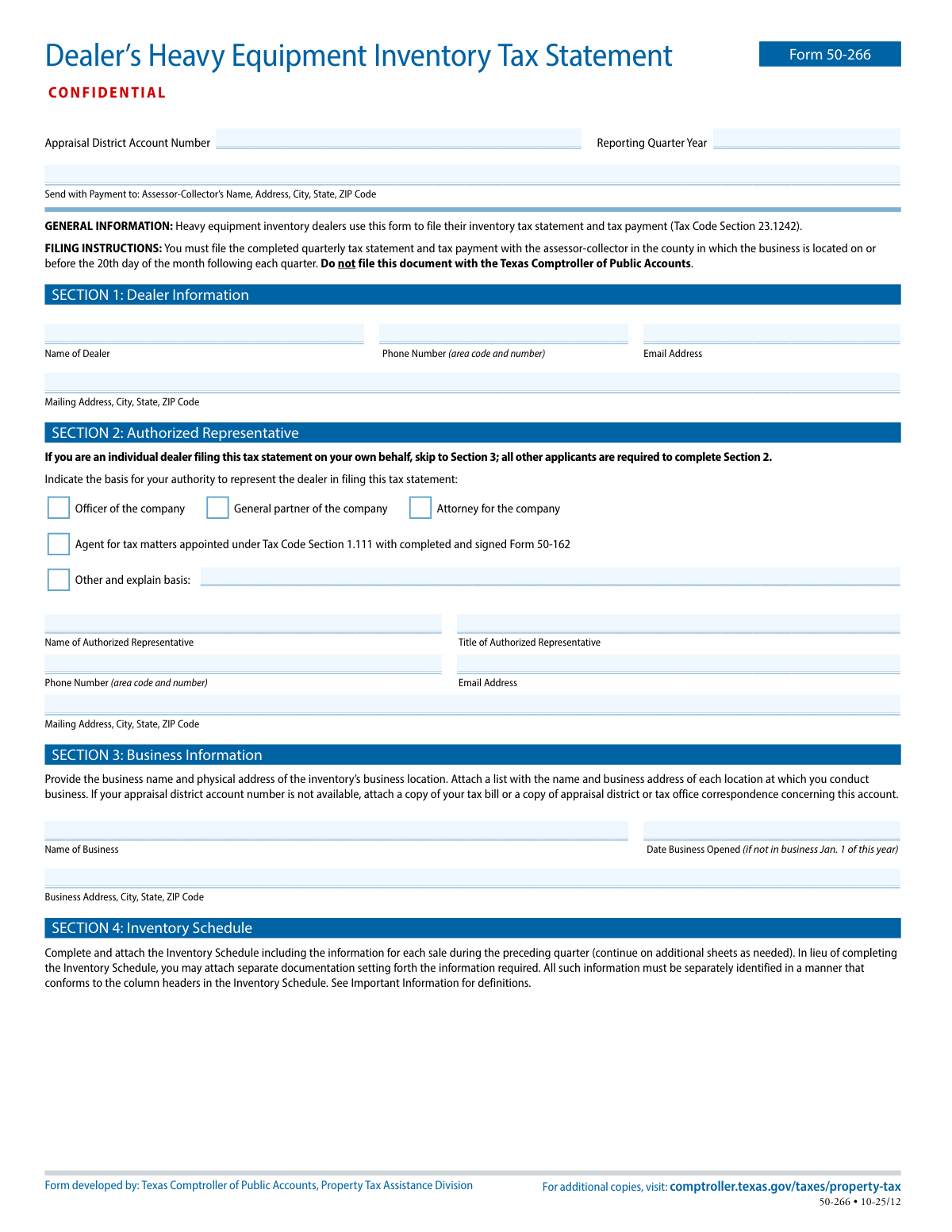
Form 50-266 is a confidential quarterly property tax statement required for dealers who hold heavy equipment inventory in Texas. It reports each item of heavy equipment sold, leased, or rented during the preceding quarter and calculates the unit property tax due using the local unit property tax factor. The form must be filed with payment to the county tax assessor-collector (not the Texas Comptroller) by the 20th day of the month following each quarter. Timely filing is important to avoid statutory penalties and to document compliance with recordkeeping and audit requirements.
Our AI automatically handles information lookup, data retrieval, formatting, and form filling.
It takes less than a minute to fill out Form 50-266 using our AI form filling.
Securely upload your data. Information is encrypted in transit and deleted immediately after the form is filled out.
Form specifications
| Form name: | Dealer’s Heavy Equipment Inventory Tax Statement (Form 50-266) |
| Number of pages: | 4 |
| Filled form examples: | Form Form 50-266 Examples |
| Language: | English |
Instafill Demo: filling out a legal form in seconds
How to Fill Out Form 50-266 Online for Free in 2026
Are you looking to fill out a FORM 50-266 form online quickly and accurately? Instafill.ai offers the #1 AI-powered PDF filling software of 2026, allowing you to complete your FORM 50-266 form in just 37 seconds or less.
Follow these steps to fill out your FORM 50-266 form online using Instafill.ai:
- 1 Enter the appraisal district account number (or attach supporting documentation if unavailable) and the reporting quarter and year, and confirm the correct county assessor-collector mailing address for submission with payment.
- 2 Complete Section 1 with the dealer’s identifying information (dealer name, phone, email, and mailing address).
- 3 If applicable, complete Section 2 by identifying the authorized representative, selecting the basis of authority (e.g., officer, partner, attorney, or tax agent with Form 50-162), and providing representative contact and mailing information.
- 4 Complete Section 3 with the business name and the physical address of the inventory location; attach a list of all business locations where you conduct business and any required account documentation.
- 5 Prepare Section 4 (Inventory Schedule) by listing each sale/lease/rental from the preceding quarter (description, type code, price or payment amount, date, item name/serial number, purchaser/lessee/renter) and compute unit property tax using the current unit property tax factor; attach additional sheets or substitute documentation that matches the column headers.
- 6 Complete Section 5 by summarizing the number of units and transaction amounts for the quarter by category (Net Heavy Equipment Inventory, Fleet Transactions, Dealer Sales, Subsequent Sales) and total the unit property tax due for the quarter.
- 7 Sign and date Section 6 certification (dealer or authorized representative), then submit the completed form and the quarterly tax payment to the county assessor-collector by the filing deadline.
Our AI-powered system ensures each field is filled out correctly, reducing errors and saving you time.
Why Choose Instafill.ai for Your Fillable Form 50-266 Form?
Speed
Complete your Form 50-266 in as little as 37 seconds.
Up-to-Date
Always use the latest 2026 Form 50-266 form version.
Cost-effective
No need to hire expensive lawyers.
Accuracy
Our AI performs 10 compliance checks to ensure your form is error-free.
Security
Your personal information is protected with bank-level encryption.
Frequently Asked Questions About Form Form 50-266
Form 50-266 is used by heavy equipment inventory dealers to report heavy equipment sold, leased, or rented during the prior quarter and to submit the related quarterly unit property tax payment under Texas Tax Code Section 23.1242.
Any dealer that holds heavy equipment inventory and sells, leases, or rents heavy equipment must file this quarterly statement. Even if you had no transactions during the quarter, you must still file a statement indicating no sales, leases, or rentals.
File the completed form and payment with the county tax assessor-collector in the county where the business is located. Do not file this form with the Texas Comptroller of Public Accounts.
The statement and payment are due on or before the 20th day of the month following each quarter. For example, Q1 is due by April 20, Q2 by July 20, Q3 by October 20, and Q4 by January 20.
You’ll need your appraisal district account number (if available), the reporting quarter and year, dealer contact information, business location details, and transaction records for each sale/lease/rental in the preceding quarter (including dates, amounts, and buyer/lessee/renter details).
If the account number is not available, attach a copy of your tax bill or appraisal district/tax office correspondence that shows the account. The form instructions specifically allow this as a substitute.
If you are an individual dealer filing on your own behalf, you can skip Section 2. All other filers must complete Section 2 and indicate the basis of authority (e.g., officer, general partner, attorney, or appointed agent).
If you are an agent appointed under Tax Code Section 1.111, you must have a completed and signed Form 50-162. Indicate that option in Section 2 and ensure the appointment documentation is in place.
Report the business name and the physical address of the inventory’s business location. If you conduct business at multiple locations, attach a list showing the name and business address of each location.
List each item sold, leased, or rented in the preceding quarter with the item description/name, identification/serial number, transaction type, date, purchaser/lessee/renter, and the sale/lease/rental amount. You may use additional sheets or attach separate documentation as long as it matches the schedule’s column headers.
HE is net heavy equipment inventory transactions; FL is fleet transactions (5+ items to the same buyer in a calendar year); DL is dealer sales; SS is certain dealer-financed subsequent sales. Unit property tax is generally calculated for HE transactions, while FL/DL/SS transactions that are not included in net heavy equipment inventory have unit property tax of $0.
For a sale, multiply the sales price by the unit property tax factor. For a lease or rental, multiply the monthly lease/rental payment received by the unit property tax factor.
The unit property tax factor is one-twelfth of the aggregate tax rate for the location where the inventory is located on January 1 of the current year. Contact the tax assessor-collector or the appraisal district to obtain the current factor (the form also explains how it is calculated).
A late-filed statement can trigger a $500 penalty for each month (or part of a month) it is late. If unit property tax is not remitted when due, a 5% penalty applies, plus an additional 5% if not paid within 10 days after the due date.
You must retain complete and accurate records documenting the disposition of each item sold, leased, or rented for at least four years from the item’s disposition date. The chief appraiser or collector may examine your records under the cited Tax Code sections.
Compliance Form 50-266
Validation Checks by Instafill.ai
1
Appraisal District Account Number presence and format validation
Validates that the Appraisal District Account Number is provided and matches the expected local account number format (e.g., allowed characters, length, and no placeholder text). This is critical to correctly associate the filing and payment with the dealer’s account in the county system. If missing or malformed, the submission should be rejected or routed to an exception queue for manual resolution because payment may be misapplied.
2
Reporting Quarter and Year completeness and valid range check
Ensures the Reporting Quarter and Year are present, the quarter is one of Q1–Q4, and the year is a valid four-digit year within an acceptable range (e.g., current year ± a configured tolerance). This prevents misclassification of the filing period and incorrect delinquency/penalty calculations. If invalid, the system should block submission and prompt the filer to correct the reporting period.
3
Dealer identity fields required (Section 1) and non-placeholder text check
Checks that the dealer name and mailing address are completed and not left blank or filled with underscores/placeholder characters. These fields are required to identify the taxpayer and to support correspondence and payment reconciliation. If incomplete, the form should fail validation and require completion before acceptance.
4
Dealer phone number format validation (Section 1)
Validates that the dealer phone number includes an area code and contains only valid phone characters, and normalizes to a standard format (e.g., 10 digits for US numbers). A valid phone number is important for resolving discrepancies quickly and for compliance follow-up. If the phone number is missing or invalid, the system should flag the record and require correction (or allow submission with a warning if policy permits).
5
Email address format validation (Dealer and Authorized Representative)
Ensures any provided email address conforms to standard email syntax (local-part@domain) and is not obviously invalid (e.g., missing '@' or domain). Email is often used for confirmations and deficiency notices, so invalid emails reduce successful communication. If invalid, the system should reject the email field and require correction or allow submission only if email is optional per configuration.
6
Authorized Representative section requiredness and authority selection logic (Section 2)
If the filer is not an individual dealer filing on their own behalf, validates that Section 2 is completed, including at least one authority basis checkbox selection. This ensures the person signing has legal authority to file and certify the statement. If no authority is selected (or Section 2 is blank when required), the submission should be rejected as unauthorized.
7
Agent for tax matters requires Form 50-162 attachment indicator
When the authority basis selected is 'Agent for tax matters appointed under Tax Code Section 1.111', validates that the submission includes an indicator/attachment reference for a completed and signed Form 50-162. This is required to document the appointment and protect against unauthorized filings. If missing, the system should fail validation and request the required authorization documentation.
8
Business information completeness and physical address validation (Section 3)
Validates that the business name and physical business location address are provided (not just a mailing address) and include city, state, and ZIP code. The physical location is needed to apply the correct unit property tax factor and jurisdictional processing. If incomplete or clearly non-physical (e.g., PO Box only), the submission should be flagged for correction or manual review.
9
Date Business Opened format and logical constraint check (Section 3)
If provided, validates that Date Business Opened is a real calendar date and is not in the future; additionally, it should be required when the business was not in operation on Jan. 1 of the reporting year (as indicated by filer workflow). This date supports eligibility and correct period treatment. If invalid or required-but-missing, the system should block submission until corrected.
10
Inventory Schedule presence or 'no transactions' declaration validation (Section 4)
Validates that either (a) an Inventory Schedule (or conforming separate documentation) is attached/provided for the preceding quarter, or (b) the dealer explicitly indicates there were no sales/leases/rentals in the quarter. This is essential because the form requires a statement even when there are no transactions. If neither schedule nor a 'no transactions' indicator is present, the submission should be rejected as incomplete.
11
Inventory line item required fields and column conformity check (Section 4)
For each reported transaction, validates presence of key fields: item name/description, identification/serial number, type code, transaction amount, date of transaction, and purchaser/lessee/renter name. It also checks that any attached documentation maps clearly to the required column headers to ensure auditability. If required fields are missing or the attachment does not conform, the system should fail validation or route to manual review.
12
Type of Sale/Lease/Rental code validation and allowed set enforcement
Validates that the 'Type of Sale, Lease or Rental' value is one of the allowed codes defined in the form’s Important Information (e.g., HE, FL, DL, SS or other configured codes used by the jurisdiction). Correct coding drives whether unit property tax is computed or forced to $0 for certain transaction types. If an invalid code is used, the system should reject the line item and require correction.
13
Transaction amount and sale/lease/rental amount numeric validation
Ensures sale price/lease/rental amount fields are numeric, non-negative, and within reasonable bounds (e.g., not exceeding configured maximums), with proper currency precision (typically two decimals). This prevents calculation errors and reduces fraud/typos (e.g., extra zeros). If invalid, the system should block submission or require correction of the affected line items.
14
Unit Property Tax Factor presence, numeric format, and reasonableness check
Validates that the Unit Property Tax Factor Used is provided, numeric, and within a plausible range (e.g., greater than 0 and less than a configured upper bound based on typical aggregate rates divided by 12). The factor is required to compute unit property tax for taxable transactions and must align with jurisdictional rates. If missing or out of range, the system should prevent finalization and prompt the filer to confirm/correct the factor.
15
Unit property tax calculation consistency by transaction type
Checks that unit property tax equals (sale price Ă— factor) for sales and (monthly lease/rental payment received Ă— factor) for leases/rentals, using consistent rounding rules; and enforces that unit property tax is $0 for fleet transactions, dealer sales, and subsequent sales that are not included in net heavy equipment inventory. This ensures statutory calculation compliance and correct payment amount. If mismatched, the system should recalculate (if permitted) or flag discrepancies and require correction before acceptance.
16
Totals reconciliation across schedule pages and quarterly totals (Sections 4 and 5)
Validates that 'Total for this page only' sums match the line items on that page, and that 'Total unit property tax this quarter' equals the sum of all page totals. It also checks that Section 5 counts and transaction amount totals are consistent with the Inventory Schedule (e.g., number of units and dollar totals by category reconcile to the detailed transactions). If totals do not reconcile, the submission should be rejected or flagged for correction to prevent under/overpayment.
17
Certification and signature completeness with date validation (Section 6)
Ensures the printed name of the dealer or authorized representative is present, a signature is provided (wet or compliant e-signature), and the signature date is a valid date. Certification is legally required and supports enforcement under the cited penal code provisions. If any element is missing or the date is invalid, the system should not accept the filing as complete.
Common Mistakes in Completing Form 50-266
People often see “Texas Comptroller” on the form and mistakenly mail the statement and payment to the Comptroller rather than the county tax assessor-collector where the business is located. This can result in the filing being treated as not received, triggering late-file penalties and delayed posting of payments. Always send the completed Form 50-266 and payment to the county assessor-collector listed for the business location, and keep proof of mailing/payment.
A frequent error is filing after the 20th day of the month following the quarter, or entering the wrong “Reporting Quarter Year,” especially around year-end. Late filing can lead to a $500-per-month penalty for late statements and additional penalties for late remittance of unit property tax. Confirm the quarter you’re reporting (preceding quarter) and calendar the due date (20th of the next month) before submitting.
Dealers sometimes don’t know the appraisal district account number and leave it empty without attaching a tax bill or appraisal district/tax office correspondence as instructed. This can slow processing, cause misapplication to the wrong account, or prompt follow-up requests that push the filing past deadlines. If the account number is unavailable, attach the required documentation and ensure the business name/address match what the county has on file.
Many submissions mix the “Name of Dealer” (legal entity), “Name of Business,” mailing address, and the physical address where the inventory is located. This creates mismatches that can affect the unit property tax factor (which depends on location) and can cause the account to be credited incorrectly. Enter the legal dealer name in Section 1, the business name and physical inventory location in Section 3, and use the correct mailing address for correspondence.
Non-individual dealers often skip Section 2 or check an authority box without providing the representative’s details or required appointment documentation. If an agent is filing, the form specifically references Tax Code Section 1.111 and a completed/signed Form 50-162, which is commonly omitted. Incomplete authorization can lead to rejection, delays, or requests for resubmission—complete Section 2 fully unless you are an individual dealer filing for yourself.
A common mistake is submitting only totals (or a generic sales report) without the item-by-item details required by the Inventory Schedule, or attaching documentation that doesn’t match the schedule’s column headers. This can prevent the assessor-collector from verifying unit property tax calculations and may trigger audits or requests for corrected filings. Attach the schedule (or a substitute report) that clearly maps to each required column: description, type code, amount, date, serial/ID, purchaser/lessee/renter, and unit property tax.
Dealers frequently miscode transactions or treat fleet transactions, dealer sales, and subsequent sales as taxable net inventory when they may be excluded from net heavy equipment inventory. Misclassification can inflate or understate the unit property tax due and create inconsistencies between Section 4 and Section 5. Use the definitions provided (HE, FL, DL, SS), apply them consistently per transaction, and ensure Section 5 counts/amounts reconcile to the schedule.
People often reuse last year’s factor, use the wrong location’s factor, or miscompute it (e.g., forgetting to convert a rate “per $100” by dividing by 100 before dividing by 12). This leads to incorrect unit property tax amounts and can result in underpayment penalties or the need for amended filings. Obtain the current factor from the assessor-collector/appraisal district for the correct location and document the factor used on the form.
For leases and rentals, filers commonly multiply the factor by the full lease term or contract total rather than the monthly lease/rental payment received, as the instructions require. This can significantly overstate tax due and complicate reconciliation with accounting records. For each lease/rental entry, use the monthly payment received for the period and multiply that amount by the unit property tax factor.
Missing dates, incomplete serial/identification numbers, or vague purchaser/lessee/renter names are frequent data-entry issues, especially when pulling from invoices that use internal shorthand. Incomplete details reduce traceability, increase audit risk, and often trigger follow-up requests that delay acceptance. Use source documents to enter full legal names, exact transaction dates, complete serial/ID numbers, and amounts that match invoices/receipts.
Some dealers assume that if there were no sales, leases, or rentals, they do not need to file—however, the instructions state a statement is still required indicating no activity. Skipping the filing can trigger the $500-per-month late statement penalty even when no tax is due. Submit the quarterly statement on time and clearly indicate that there were no transactions for the preceding quarter.
Forms are often submitted without the printed name, signature, or date, or signed by someone who is not the dealer or properly authorized representative. An unsigned/undated certification can invalidate the filing and lead to rejection or requests for resubmission, risking late penalties. Ensure the signer matches Section 1/2, print the name clearly, sign, and date the form before mailing with payment.
Saved over 80 hours a year
“I was never sure if my IRS forms like W-9 were filled correctly. Now, I can complete the forms accurately without any external help.”
Kevin Martin Green
Your data stays secure with advanced protection from Instafill and our subprocessors
Robust compliance program
Transparent business model
You’re not the product. You always know where your data is and what it is processed for.
ISO 27001, HIPAA, and GDPR
Our subprocesses adhere to multiple compliance standards, including but not limited to ISO 27001, HIPAA, and GDPR.
Security & privacy by design
We consider security and privacy from the initial design phase of any new service or functionality. It’s not an afterthought, it’s built-in, including support for two-factor authentication (2FA) to further protect your account.
Fill out Form 50-266 with Instafill.ai
Worried about filling PDFs wrong? Instafill securely fills dealers-heavy-equipment-inventory-tax-statement-fo forms, ensuring each field is accurate.