Yes! You can use AI to fill out Form CN 10328, State Tax Complaint Packet
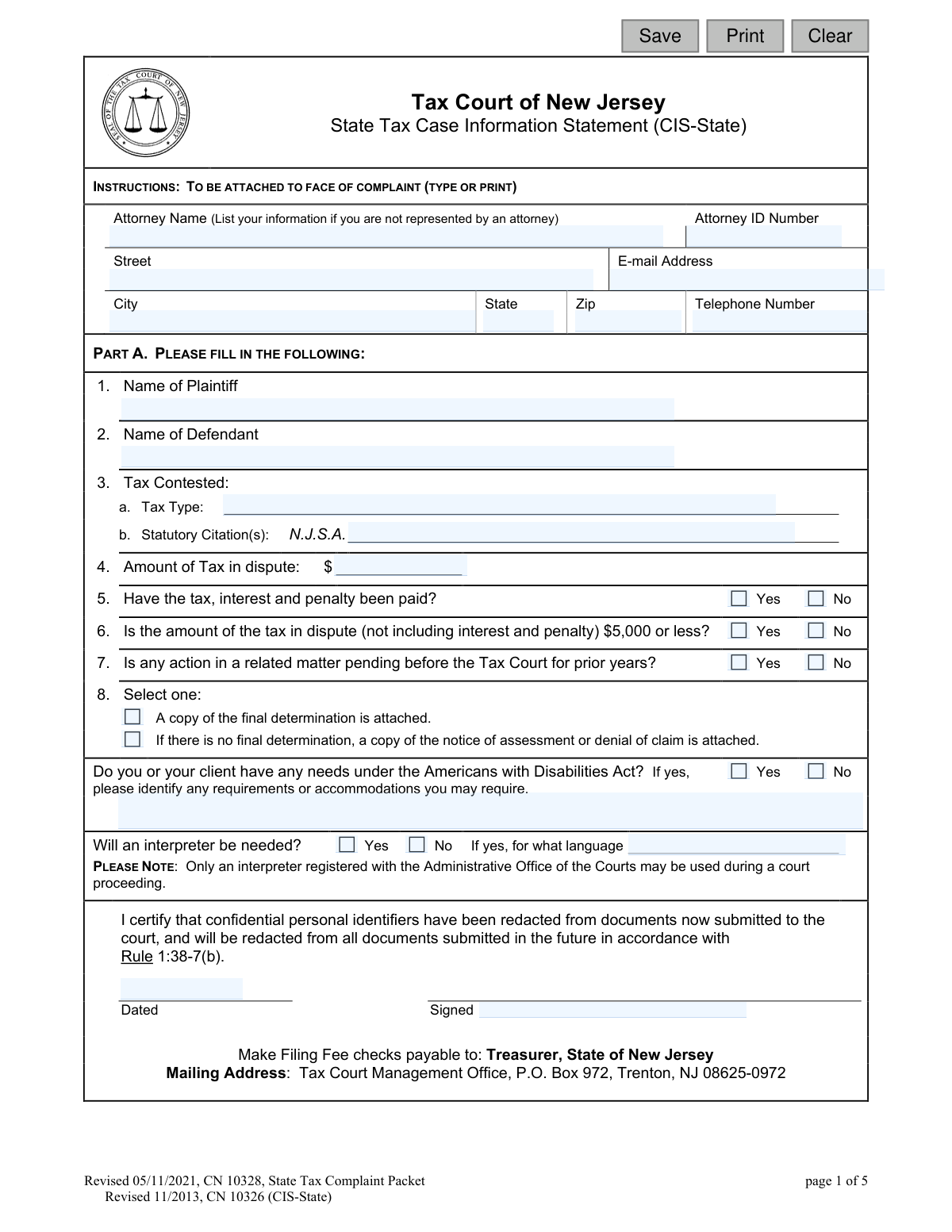
The State Tax Complaint Packet, Form CN 10328, is the official set of documents required to file a complaint with the Tax Court of New Jersey to contest a state tax assessment or the denial of a refund. Filing this packet correctly is a critical first step in the legal process to challenge a tax-related decision made by a state agency. Today, this form can be filled out quickly and accurately using AI-powered services like Instafill.ai, which can also convert non-fillable PDF versions into interactive fillable forms.
Our AI automatically handles information lookup, data retrieval, formatting, and form filling.
It takes less than a minute to fill out CN 10328 using our AI form filling.
Securely upload your data. Information is encrypted in transit and deleted immediately after the form is filled out.
Form specifications
| Form name: | Form CN 10328, State Tax Complaint Packet |
| Number of fields: | 50 |
| Number of pages: | 1 |
| Language: | English |
Instafill Demo: How to fill out PDF forms in seconds with AI
How to Fill Out CN 10328 Online for Free in 2026
Are you looking to fill out a CN 10328 form online quickly and accurately? Instafill.ai offers the #1 AI-powered PDF filling software of 2026, allowing you to complete your CN 10328 form in just 37 seconds or less.
Follow these steps to fill out your CN 10328 form online using Instafill.ai:
- 1 Navigate to Instafill.ai and upload the State Tax Complaint Packet (Form CN 10328) or select it from their template library.
- 2 Use the AI assistant to accurately fill in the plaintiff's or filing attorney's information, including name, address, and contact details.
- 3 Complete the State Tax Case Information Statement (CIS-State) by providing details about the plaintiff, defendant, tax type, and the amount in dispute.
- 4 Clearly articulate the facts and contentions for the complaint, explaining the basis for contesting the tax assessment or refund denial.
- 5 Attach all required supporting documents, such as the final determination, notice of assessment, or certificate of debt.
- 6 Review all entered information for accuracy, then electronically sign and date the complaint and the Proof of Service sections.
- 7 Download the completed packet and follow the official instructions to serve the complaint to the Division of Taxation and the Attorney General, and file it with the Tax Court Management Office.
Our AI-powered system ensures each field is filled out correctly, reducing errors and saving you time.
Why Choose Instafill.ai for Your Fillable CN 10328 Form?
Speed
Complete your CN 10328 in as little as 37 seconds.
Up-to-Date
Always use the latest 2026 CN 10328 form version.
Cost-effective
No need to hire expensive lawyers.
Accuracy
Our AI performs 10 compliance checks to ensure your form is error-free.
Security
Your personal information is protected with bank-level encryption.
Frequently Asked Questions About Form CN 10328
This packet is used to file a formal complaint with the Tax Court of New Jersey to legally contest a state tax assessment or the denial of a refund claim from the Director of the Division of Taxation.
Any taxpayer or their attorney who wishes to dispute a final determination, assessment, or refund denial related to New Jersey state taxes must file this complaint to have their case heard in Tax Court.
The CIS-State is a mandatory summary sheet that captures key details about your case. It must be completed and attached to the front of your complaint when you file.
You must attach a copy of the final determination you are contesting. If you do not have a final determination, you must attach a copy of the notice of assessment or the denial of your claim for a refund.
Yes, the complaint must be received in the Tax Court Administrator's Office within the 90-day time period specified by court rules after the date of the notice you are contesting.
Mail the original complaint, supporting documents, and filing fee to the Tax Court Management Office in Trenton. You must also serve copies to the Director of the Division of Taxation and the Office of the Attorney General, preferably via the email addresses provided on the form.
Yes, a filing fee is required. You must include a check made payable to 'Treasurer, State of New Jersey' with your mailed complaint packet.
You are required to remove or black out sensitive information like Social Security numbers, driver's license numbers, and full financial account numbers from all documents you submit to the court to protect your privacy.
This section is your sworn statement certifying the date and method you used to deliver a copy of the complaint to both the Director of the Division of Taxation and the Attorney General of New Jersey.
The form asks whether the tax, interest, and penalty have been paid, but it does not state that payment is a prerequisite for filing. You should answer the question accurately based on your situation.
You must indicate on the Case Information Statement if the disputed tax amount is $5,000 or less. This information helps the court determine if your case might be handled under small claims procedures.
Yes, services like Instafill.ai use AI to accurately auto-fill form fields, which can save you time and help prevent errors. This is especially useful for entering your name, address, and other details that appear multiple times.
Simply upload the State Tax Complaint Packet PDF to the Instafill.ai platform. The AI will identify all the fields, allowing you to enter your information once and have it automatically and accurately populated throughout the document.
You can use a service like Instafill.ai, which is designed to convert flat, non-fillable PDFs into interactive, fillable forms. This allows you to easily type your information directly into the fields online before printing for submission.
Compliance CN 10328
Validation Checks by Instafill.ai
1
Ensures Plaintiff or Attorney Contact Information is Complete
This check verifies that the primary contact information, including name, address, and telephone number, is fully provided for either the attorney or the self-represented plaintiff. This information is critical for all official court correspondence and notifications. A failure to provide complete contact details would prevent the court from processing the complaint, as there would be no way to communicate with the filing party.
2
Verifies Consistency of Plaintiff and Defendant Names
This validation ensures that the Plaintiff and Defendant names entered on the Case Information Statement (page 1) are identical to the names entered on the Complaint form (page 2). Inconsistent names can create legal ambiguity, confusion in court records, and issues with case indexing. A mismatch would require an amended filing, delaying the legal proceedings.
3
Validates Format of 'Amount of Tax in Dispute'
This validation confirms that the value entered in the 'Amount of Tax in dispute' field is a valid numerical or currency format, without any text or special characters other than those appropriate for currency. An invalid format could cause data corruption or misinterpretation of the case's value. The system should reject submissions with invalid characters to ensure data integrity for court records and proper case classification.
4
Cross-Validates Disputed Tax Amount with Small Claims Question
This check verifies logical consistency between the numerical 'Amount of Tax in dispute' and the answer to the question 'Is the amount of the tax in dispute... $5,000 or less?'. If the amount entered is greater than $5,000, the answer to the question must be 'No', and if it is $5,000 or less, the answer must be 'Yes'. This validation prevents procedural errors and ensures the case is correctly routed and categorized from the outset.
5
Requires ADA Accommodation Details if Needed
This validation ensures that if the user answers 'Yes' to needing accommodations under the Americans with Disabilities Act, the corresponding description field identifying the requirements is not left empty. This is crucial for the court to make the necessary arrangements to ensure accessibility. Failure to provide details would prevent the court from fulfilling its obligation to provide a required accommodation, potentially delaying hearings.
6
Requires Language Specification for Interpreter
This check confirms that if the user indicates an interpreter is needed by selecting 'Yes', they must also specify the required language in the associated text field. The court cannot arrange for a qualified interpreter without knowing the specific language needed. This validation prevents delays and ensures the participant's right to be understood during court proceedings is met.
7
Verifies Attachment of Determination or Assessment Notice
This check ensures the user has selected one of the options under item 8, confirming that either 'a copy of the final determination is attached' or 'a copy of the notice of assessment or denial of claim is attached.' As per court rule 8:3-5(b)(1), this documentation is a mandatory part of the complaint. The validation serves as a critical reminder that the filing is incomplete without the required supporting document.
8
Confirms Certification of Personal Identifier Redaction
This validation requires the user to acknowledge and certify that confidential personal identifiers have been redacted from all submitted documents in accordance with Rule 1:38-7(b). This is a critical step to protect personal privacy and comply with court rules. Failure to provide this certification could result in the rejection of the filing or sanctions for non-compliance.
9
Validates Proof of Service Dates
This check ensures that the dates entered for service upon the Director of the Division of Taxation and the Attorney General are valid calendar dates. The dates must not be in the future, as service must have already occurred at the time of filing. This validation prevents logically impossible entries and ensures the accuracy of the official court record regarding when legal service was completed.
10
Validates Attorney Email Address Format
This check verifies that the email address provided for the attorney or self-represented plaintiff follows the standard '[email protected]' format. A valid email address is essential for electronic communication and service from the court. An invalid format would prevent the filer from receiving critical case updates, notices, and orders, jeopardizing their case.
11
Ensures Basis of Complaint is Selected
This validation requires the plaintiff to check one of the two options under 'Plaintiff contests': either (a) a tax assessment or (b) the denial of a refund claim. This selection is fundamental as it defines the core nature of the legal challenge. A filing would be considered incomplete and ambiguous without this critical information, leading to its rejection.
12
Requires Date for All Signatures
This check ensures that whenever a signature is provided (for the complaint or the proof of service), the corresponding date field is also filled out. A signature on a legal document is typically considered invalid without an accompanying date. This validation upholds the legal formality of the filing and prevents ambiguity about when the document was executed.
Common Mistakes in Completing CN 10328
Filers often misunderstand the service requirements, sending the complaint only to the court or to just one of the two required state agencies. This can lead to the complaint being deemed improperly filed and potentially dismissed for missing the statutory deadline. To avoid this, carefully follow the instructions on page 5, ensuring the complaint is served on both the Director of the Division of Taxation and the Office of the Attorney General using the specified email addresses.
A frequent and critical error is failing to attach a copy of the final determination, notice of assessment, or denial of claim being contested. This happens when filers overlook the explicit instructions in Part A and the notes on page 3. Without this document, the court has no basis for the complaint, which will lead to rejection of the filing and significant delays.
People often forget to redact confidential information like Social Security numbers or full bank account numbers from their submitted documents, as required by Court Rule 1:38-7(b). This oversight exposes sensitive personal data and violates court rules, creating potential identity theft risks. Before filing, meticulously review every page to black out all confidential personal identifiers listed on page 3 of the packet.
The 'Proof of Service' on page 4 is often left blank, unsigned, or undated after the filer has served the documents. An invalid Proof of Service can nullify the entire filing, as the court has no evidence that the defendant was properly served. This can lead to case dismissal, especially if the filing deadline passes before the error is corrected.
Submitting the complaint without the required filing fee, or making the check payable to the wrong entity (e.g., 'Tax Court' instead of 'Treasurer, State of New Jersey'), is a common administrative mistake. This happens due to simple oversight of the instructions at the bottom of page 1. Such errors will prevent the complaint from being officially filed, which can be fatal if the 90-day deadline passes before the error is corrected.
The plaintiff may incorrectly name the defendant as the 'State of New Jersey' or the 'IRS' instead of the 'Director, Division of Taxation' as required for most state tax disputes. This error occurs from a misunderstanding of legal procedure and can cause the complaint to be procedurally defective, requiring amendment and causing delays. Always verify the correct defendant, which is typically the director of the specific state agency that issued the assessment.
In the 'Facts and contentions' section, filers often provide vague statements like 'the tax is wrong' without detailing the specific facts, arguments, or legal reasons for their dispute. A weak or unsupported statement can result in the complaint being deemed insufficient, potentially leading to a motion to dismiss from the defendant. You must clearly explain why you believe the assessment or denial is incorrect.
Filers sometimes enter slightly different names, addresses, or contact details on the Case Information Statement (page 1) and the Complaint form (page 2). This manual data entry error creates confusion and can lead to important court notices being sent to the wrong address. Since this form is a non-fillable PDF, using a tool like Instafill.ai can convert it to a fillable version and help ensure consistency by auto-populating information across sections.
When filling out Part A, question 4, people frequently include penalties and interest in the 'Amount of Tax in dispute' field. The form specifically asks for the base tax amount, which is used to determine if the case qualifies for the Small Claims Division. An incorrect amount can lead to the case being misclassified, affecting the procedures and timeline of the dispute.
Filers, especially those without legal representation, often leave the 'Statutory Citation(s)' field (N.J.S.A.) empty because they don't know what it is or where to find it. This information is usually located on the notice of assessment or final determination from the Division of Taxation. Omitting the specific tax law being contested makes the complaint incomplete and can cause processing delays.
Saved over 80 hours a year
“I was never sure if my IRS forms like W-9 were filled correctly. Now, I can complete the forms accurately without any external help.”
Kevin Martin Green
Your data stays secure with advanced protection from Instafill and our subprocessors

Robust compliance program
Transparent business model
You’re not the product. You always know where your data is and what it is processed for.
ISO 27001, HIPAA, and GDPR
Our subprocesses adhere to multiple compliance standards, including but not limited to ISO 27001, HIPAA, and GDPR.
Security & privacy by design
We consider security and privacy from the initial design phase of any new service or functionality. It’s not an afterthought, it’s built-in, including support for two-factor authentication (2FA) to further protect your account.
Fill out CN 10328 with Instafill.ai
Worried about filling PDFs wrong? Instafill securely fills form-cn-10328-state-tax-complaint-packet forms, ensuring each field is accurate.