
Yes! You can use AI to fill out Colorado Form DR 0026, Tax Statement for Leased Motor Vehicle
Don't type 44 fields by hand. Tell our AI about yourself, or upload your driver's license, and it fills every field in seconds. You check it, then download, print or sign.
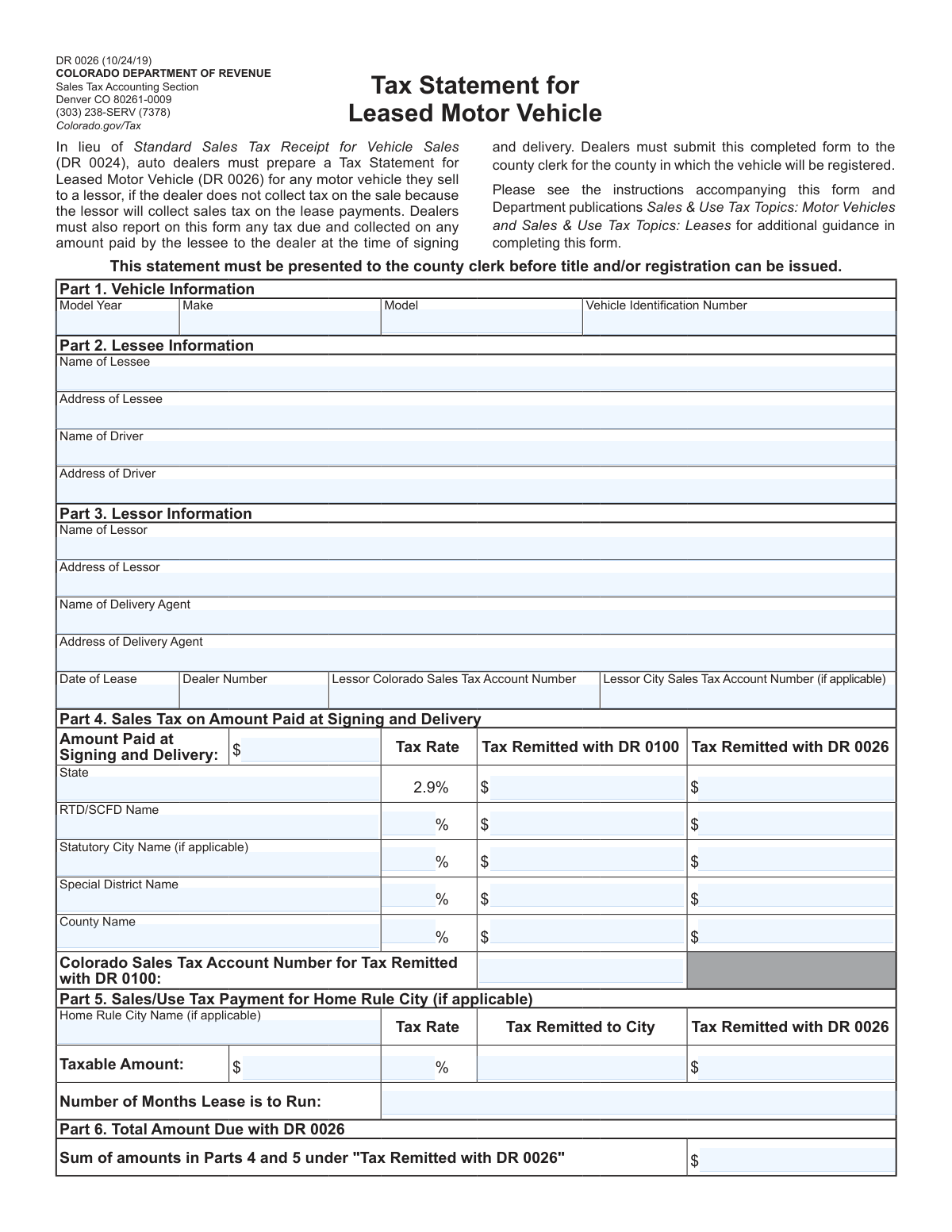
The AI does the filling. You just check it.
No typing into boxes, nothing to install.
What this form asks for
The AI fills all of it, from your answers or your documents.
The AI checks your answers before you download
12 checks built for this form, so a wrong date or a missing answer is caught before anyone else sees it.
This check ensures the Vehicle Identification Number (VIN) adheres to the standard 17-character alphanumeric format. It verifies the length and character types, and may include a checksum validation to detect typos. An invalid VIN prevents proper vehicle identification and registration, so failure would block form submission until a valid VIN is entered.
This validation confirms that the 'Model Year' is a 4-digit number and falls within a reasonable range (e.g., not in the distant past or more than one year into the future). This prevents data entry errors that could cause issues with vehicle registration and tax calculation. If the year is invalid, the user will be prompted to correct it.
This check validates that the 'Date of Lease' is in a proper date format (e.g., MM/DD/YYYY) and is not a date in the future. The lease date is a critical legal and financial data point that cannot be post-dated. A failed validation would require the user to enter a date that is on or before the current day.
This validation ensures that all required fields in Part 1 (Vehicle Information), Part 2 (Lessee Information), and Part 3 (Lessor Information) are filled out. These sections contain the core data for the transaction, identifying the asset and the primary parties involved. Incomplete information would make the form invalid for county clerk processing, so submission is blocked until all required fields are complete.
This check performs a calculation to verify data integrity for the state tax row. It confirms that the sum of 'State Tax Remitted with DR 0100' and 'State Tax Remitted with DR 0026' equals the 'Amount Paid at Signing and Delivery' multiplied by the fixed 2.9% state tax rate. This is crucial for ensuring accurate tax reporting and remittance, and a mismatch would indicate a calculation error that must be corrected.
For each local tax row in Part 4 (RTD/SCFD, Statutory City, etc.) with a non-zero tax rate, this check validates that the sum of tax remitted with DR 0100 and DR 0026 equals the 'Amount Paid at Signing and Delivery' multiplied by the specified tax rate. This ensures that all jurisdictional taxes are calculated correctly based on the provided rates. A failure indicates a mathematical error that needs to be fixed before submission.
And 6 more checks
- Conditional Requirement for DR 0100 Sales Tax Account Number
- Validates Home Rule City Tax Calculation in Part 5
- Ensures Lease Duration is a Positive Integer
- Verifies Final Summation in 'Total Amount Due with DR 0026'
- Validates Presence of Lessor's Colorado Sales Tax Account Number
- Conditional Requirement for Tax Jurisdiction Names
Let AI fill out your DR 0026
No typing. Every field filled in seconds, checked, ready to sign.
How to Fill Out DR 0026 Online for Free in 2026
What the AI walks you through.
- Navigate to Instafill.ai and upload or select the Colorado DR 0026 form.
- Use the AI assistant to automatically fill in vehicle details like year, make, model, and VIN in Part 1.
- Provide information for the lessee, driver, and lessor in Parts 2 and 3, letting the AI guide you through each required field.
- In Part 4, enter the amount paid at signing and delivery, and let the AI help calculate the applicable state, county, and special district taxes based on the provided rates.
- Complete Part 5 for any Home Rule City taxes, if applicable, by entering the taxable amount and tax rate.
- Review all the auto-filled and calculated information for accuracy, including the total amount due calculated in Part 6.
- Securely download, print, or share the completed DR 0026 form for submission to the appropriate county clerk.
Common Mistakes in Completing DR 0026
The ones the AI is built to catch.
Incorrect Vehicle Identification Number (VIN)
Confusing Lessee and Driver Information
Missing or Incorrect Lessor Tax Account Numbers
Using Incorrect Local Tax Rates
Misallocating Tax Remittance Between Forms
Mathematical Errors in Tax Calculations
Incomplete Identification of Special Taxing Districts
Incorrectly Handling Home Rule City Taxes
Errors in Final Summation for Total Amount Due
Using a PO Box for a Physical Address
Frequently Asked Questions About DR 0026
Is it really free for 7 days?
Can I fill other forms too?
How do I cancel?
How does the AI fill out DR 0026?
What happens to my information?
How complex is DR 0026 to fill out?
What is the purpose of Form DR 0026, and who needs to complete it?
When should I use Form DR 0026 instead of the standard sales tax receipt, Form DR 0024?
Where do I submit the completed Form DR 0026?
What should be included in the 'Amount Paid at Signing and Delivery' in Part 4?
What is the difference between tax 'Remitted with DR 0100' and tax 'Remitted with DR 0026' in Part 4?
Why do I need to provide information for both the lessee and the driver?
What do I need to do for a vehicle leased in a Home Rule City?
Where can I find the 'Lessor Colorado Sales Tax Account Number' required in Part 3?
Can I use an AI tool to help me fill out Form DR 0026?
How can I fill out Form DR 0026 online?
The PDF version of Form DR 0026 I have is not fillable. What can I do?
What does the 'Total Amount Due with DR 0026' in Part 6 represent?
Who is considered the 'Delivery Agent' in Part 3?
Get your DR 0026 filled out by AI
$0 today. Cancel before Nov 3 and you pay nothing.
Other forms like this one
DMV forms: California Department of Motor Vehicles (DMV) Form REG 135, Bill of Sale, California DMV Form REG 17 (Rev. 7/2012), Special Interest License Plate Application, California DMV Form REG 17 (Rev. 7/2012), Special Interest License Plate Application, Application for Renewal or Duplicate of Alabama Driver License or ID card, Form 40-5122, Travel License / Identification Application, Form 735-501, Vehicle Bill of Sale, Form D1, Driver License, Permit or Identification Card Transaction Application, Form DR 2020SP, Exception Processing Application, Form MV-82TON, Application for Title, Form OL 75, Auto Broker Log, Form REG 227, Application for Replacement or Transfer of Title, Form VR-005, Application for Certificate of Title, Letter of Authorization - County of Kauai Department of Finance, Division of Motor Vehicles & Licensing, Form REG 343, Application for Title or Registration (Rev. 2/2012), REG 230, Motorized Bicycle Application
tax forms: W-9, Request for Taxpayer Identification Number and Certification, Form W-2, Wage and Tax Statement, Form 1040-X, Amended U.S. Individual Income Tax Return, Form 130, Taxpayer's Notice to Initiate an Appeal, Form 1040-C, U.S. Departing Alien Income Tax Return, Form 940, Employer’s Annual FUTA Tax Return, Form 720, Quarterly Federal Excise Tax Return, Form 982, Reduction of Tax Attributes, Form 4137, Social Security and Medicare Tax on Unreported Tip Income, Form 911, Request for Taxpayer Advocate Service Assistance, Form 8960, Net Investment Income Tax, Form 8959, Additional Medicare Tax, Form 8919, Uncollected Social Security and Medicare Tax, Form 8801, Credit for Prior Year Minimum Tax, Form 990-T, Exempt Org Business Income Tax Return, Form 945, Annual Return of Withheld Federal Income Tax, Form 5330, Return of Excise Taxes, Form FTB 3514, California Earned Income Tax Credit, Form 100, CA Corp Tax Return, Form 8288, U.S. Withholding Tax Return
state tax forms: Form W-2, Wage and Tax Statement, Form W-8IMY (Rev. October 2021), Certificate of Foreign Intermediary, Foreign Flow-Through Entity, or Certain U.S. Branches for United States Tax Withholding and Reporting, Form W-2, Wage and Tax Statement (2025), Dealer’s Heavy Equipment Inventory Tax Statement (Form 50-266), Form W-8BEN-E, Certificate of Status of Beneficial Owner for United States Tax Withholding and Reporting (Entities), Form W-2, Wage and Tax Statement, Form 706-NA, United States Estate (and Generation-Skipping Transfer) Tax Return Estate of Nonresident Not a Citizen of the United States, Form W-2, Wage and Tax Statement, Form 1310, Statement of Person Claiming Refund Due a Deceased Taxpayer, Form ST-120, New York State and Local Sales and Use Tax Resale Certificate, Form 1120-REIT, U.S. Income Tax Return for Real Estate Investment Trusts, State of Michigan, Form MC 52, Request and Writ for Garnishment (Income Tax Refund/Credit), Tax Court of New Jersey, State Tax Complaint, State Tax Case Information Statement (CIS-State), Form CN 10328, State Tax Complaint Packet, Tax Court of New Jersey Case Information Statement - Correction of Error in Assessment, Form 1041, U.S. Income Tax Return for Estates and Trusts (2023), Form 1041, U.S. Income Tax Return for Estates and Trusts (2025), Form 3911, Taxpayer Statement Regarding Refund (Rev. 10-2022), Form 3911, Taxpayer Statement Regarding Refund (Rev. 1-2018)
PA state forms: Form 1095-A, Health Insurance Marketplace Statement, Form W-2, Wage and Tax Statement, Form 593, Real Estate Withholding, Form 8938, Statement of Specified Foreign Financial Assets, Form CMS-2567, Statement of Deficiencies, Form 1098, Mortgage Interest Statement, Form 1098-T, Tuition Statement, Form 1099-S, Proceeds From Real Estate Transactions, Form 1098-E, Student Loan Interest Statement, Form DS-3053, Statement of Consent, Form DS-86, Statement of Non-Receipt of a U.S. Passport, Form DS-86, Statement of Non-Receipt of a U.S. Passport, Form 108, Statement of Intention, Form 107, Statement of Financial Affairs, Form 121, Statement About Your SSNs, Form 122A-1, Chapter 7 Statement of Current Monthly Income, Center for Infertility & Reproductive Surgery – New Patient Questionnaire and Patient/Guarantor Statement (Brigham and Women’s Hospital, Department of Obstetrics and Gynecology), Adult Travel Document Application for Stateless and Protected Persons in Canada (16 years of age or over) (PPTC 190), Form W-8IMY (Rev. October 2021), Certificate of Foreign Intermediary, Foreign Flow-Through Entity, or Certain U.S. Branches for United States Tax Withholding and Reporting, Form W-2, Wage and Tax Statement (2025)
NJ state forms: Form 1095-A, Health Insurance Marketplace Statement, Form W-2, Wage and Tax Statement, Form 593, Real Estate Withholding, Form 8938, Statement of Specified Foreign Financial Assets, Form CMS-2567, Statement of Deficiencies, Form 1098, Mortgage Interest Statement, Form 1098-T, Tuition Statement, Form 1099-S, Proceeds From Real Estate Transactions, Form 1098-E, Student Loan Interest Statement, Form DS-3053, Statement of Consent, Form DS-86, Statement of Non-Receipt of a U.S. Passport, Form DS-86, Statement of Non-Receipt of a U.S. Passport, Form 108, Statement of Intention, Form 107, Statement of Financial Affairs, Form 121, Statement About Your SSNs, Form 122A-1, Chapter 7 Statement of Current Monthly Income, Center for Infertility & Reproductive Surgery – New Patient Questionnaire and Patient/Guarantor Statement (Brigham and Women’s Hospital, Department of Obstetrics and Gynecology), Adult Travel Document Application for Stateless and Protected Persons in Canada (16 years of age or over) (PPTC 190), Form W-8IMY (Rev. October 2021), Certificate of Foreign Intermediary, Foreign Flow-Through Entity, or Certain U.S. Branches for United States Tax Withholding and Reporting, Form W-2, Wage and Tax Statement (2025)
Colorado tax forms: Form DR 0024, Standard Sales Tax Receipt for Vehicle Sales
Colorado DR forms: Colorado Judicial Department Form JDF 1111SC (Form 35.2), Sworn Financial Statement, University of Colorado 403(b) Plan – DSW Scudder Enrollment and Beneficiary Designation Form, Colorado OBH Critical Incident Report, City of Lakewood, Colorado, Certificate of Water Service Availability
motor vehicle forms: Form 8910, Alternative Motor Vehicle Credit, State of Florida Department of Highway Safety and Motor Vehicles (FLHSMV) Form HSMV 82993, Separate Odometer Disclosure Statement and Acknowledgment, California Department of Motor Vehicles (DMV) Form REG 135, Bill of Sale, Letter of Authorization - County of Kauai Department of Finance, Division of Motor Vehicles & Licensing, Form 735-501, Vehicle Bill of Sale, Form DR 0024, Standard Sales Tax Receipt for Vehicle Sales, Form DR 2020SP, Exception Processing Application, Form MV-82TON, Application for Title, Form VR-005, Application for Certificate of Title, Georgia Department of Revenue Form T-7, Bill of Sale, Form MV-104, Report of Motor Vehicle Accident, Form DTF-802, Statement of Transaction – Sale or Gift of Motor Vehicle, Trailer, All-Terrain Vehicle (ATV), Vessel (Boat), or Snowmobile, Form HSMV 82050, Notice of Sale and/or Bill of Sale for a Motor Vehicle, Mobile Home, Off-Highway Vehicle or Vessel, Power of Attorney for a Motor Vehicle, Mobile Home, or Vessel, Emancipated Minor's Application to California Department of Motor Vehicles, Form PLD-PI-001(1), Cause of Action—Motor Vehicle, Small Claims Complaint - Motor Vehicle - Appendix XI-D, Supplemental Plea Form for Eluding (N.J.S.A. 2C:29-2b) or Theft of a Motor Vehicle or Unlawful Taking of a Motor Vehicle (N.J.S.A. 2C:20-2.1) (Plea 07), Complaint and Proposed Form of Order for Action Seeking Title to Motor Vehicle, Form REG 343, Application for Title or Registration (Rev. 2/2012)
Let AI fill out your DR 0026
Your trial starts once a card is added. You pay nothing before Nov 3.
Our AI already knows this form, all 44 fields of it. Skip the typing: tell it about yourself, or upload what you have, and it fills the whole form in seconds.
- AI fills every field on the form, checkboxes included
- No typing into boxes: answer a few questions, or upload your driver's license, an old copy of this form, a photo of a document
- The AI checks the answers; you review and change anything before you download
- Download the finished PDF, print it, or sign it online
- Encrypted, and never used to train AI
Cancel before Nov 3 and you pay nothing.
A card is needed to start the trial. Cancel in two clicks from your account.
Terms · Privacy