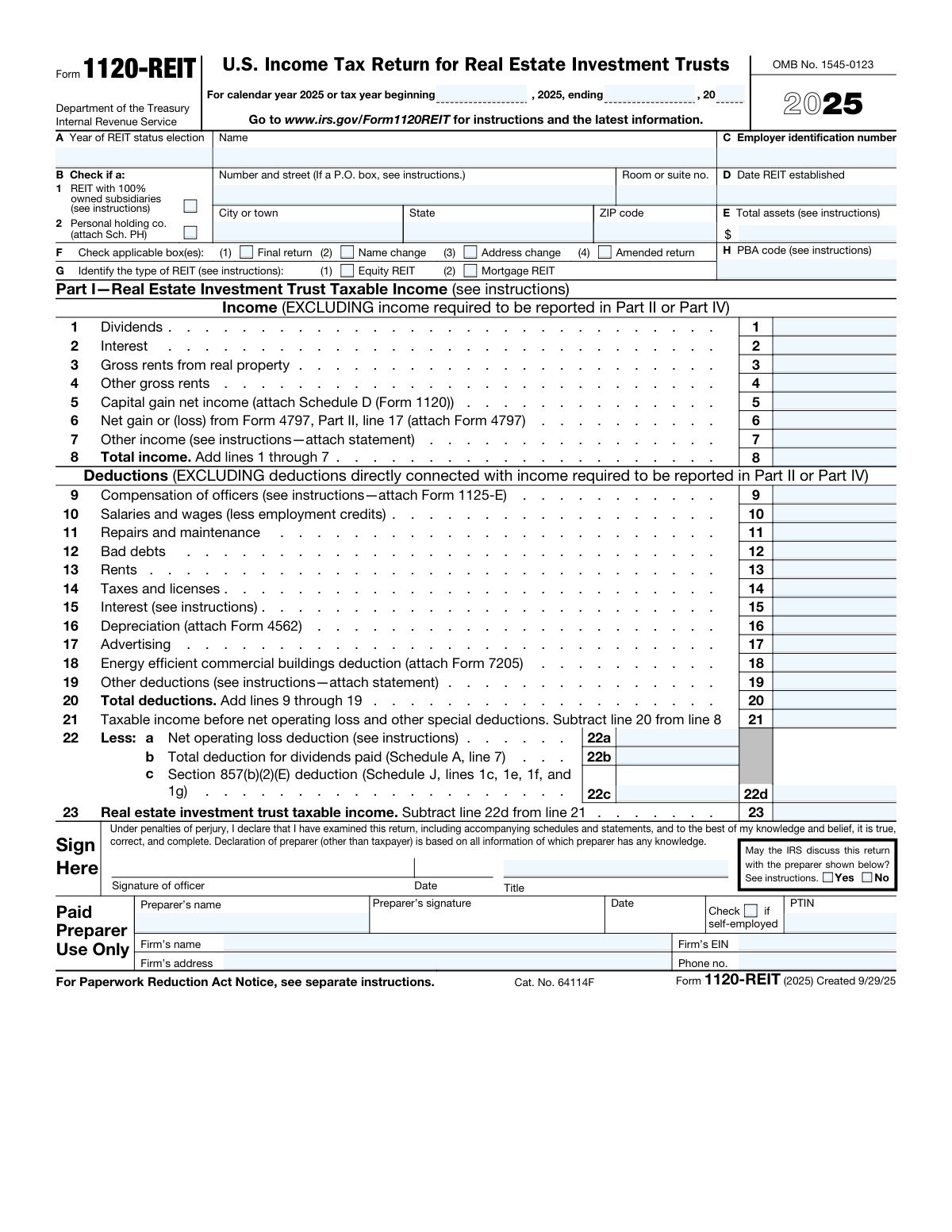
Yes! You can use AI to fill out Form 1120-REIT, U.S. Income Tax Return for Real Estate Investment Trusts

Form 1120-REIT is the U.S. Income Tax Return for Real Estate Investment Trusts, filed annually with the IRS. It is a comprehensive document used by REITs to report their financial activities, including income from rents and investments, as well as deductions and credits, to determine their tax obligations. Proper and timely filing is crucial for a REIT to maintain its special tax status and comply with federal regulations. Today, this form can be filled out quickly and accurately using AI-powered services like Instafill.ai, which can also convert non-fillable PDF versions into interactive fillable forms.
Our AI automatically handles information lookup, data retrieval, formatting, and form filling.
It takes less than a minute to fill out 1120-REIT using our AI form filling.
Securely upload your data. Information is encrypted in transit and deleted immediately after the form is filled out.

Form specifications

Form name: Form 1120-REIT, U.S. Income Tax Return for Real Estate Investment Trusts
Number of fields: 346
Number of pages: 5
Language: English
main-image

Instafill Demo: How to fill out PDF forms in seconds with AI

How to Fill Out 1120-REIT Online for Free in 2026

Are you looking to fill out a 1120-REIT form online quickly and accurately? Instafill.ai offers the #1 AI-powered PDF filling software of 2026, allowing you to complete your 1120-REIT form in just 37 seconds or less.
Follow these steps to fill out your 1120-REIT form online using Instafill.ai:
  1. 1 Navigate to Instafill.ai and upload or select the Form 1120-REIT document.
  2. 2 Provide the REIT's basic information, such as its name, Employer Identification Number (EIN), and address, allowing the AI to populate these details.
  3. 3 Enter all sources of income, including dividends, interest, gross rents, and capital gains, into the designated fields for Part I.
  4. 4 Input all applicable deductions, such as officer compensation, salaries, repairs, interest, and depreciation, as prompted by the service.
  5. 5 Complete the tax calculation sections, including payments, credits, and any tax due or overpayment, letting the AI assist with the calculations.
  6. 6 Review the entire form after the AI has filled in the data, verifying all figures and information for accuracy before finalizing.
  7. 7 Sign the form electronically, have the paid preparer (if any) complete their section, and download the completed Form 1120-REIT for filing.

Our AI-powered system ensures each field is filled out correctly, reducing errors and saving you time.

Why Choose Instafill.ai for Your Fillable 1120-REIT Form?

Speed

Complete your 1120-REIT in as little as 37 seconds.

Up-to-Date

Always use the latest 2026 1120-REIT form version.

Cost-effective

No need to hire expensive lawyers.

Accuracy

Our AI performs 10 compliance checks to ensure your form is error-free.

Security

Your personal information is protected with bank-level encryption.

Frequently Asked Questions About Form 1120-REIT

Form 1120-REIT is the U.S. Income Tax Return for Real Estate Investment Trusts. Any corporation, trust, or association that has elected to be treated as a REIT must file this form to report its income, deductions, gains, losses, and tax liability.

An Equity REIT, as indicated in section G, primarily holds and operates income-producing real property. A Mortgage REIT primarily invests in real estate loans, mortgages, or mortgage-backed securities and derives most of its income from interest.

In section F of the form, check the 'Name change' box if the REIT's legal name has changed since the last return. Similarly, check the 'Address change' box if the mailing address has changed.

If this is the last tax return the REIT will file, you must check the 'Final return' box in section F. This indicates that the entity will no longer operate or file Form 1120-REIT.

Your nine-digit Employer Identification Number (EIN) should be entered in the box labeled 'Employer Identification Number (EIN)' in section A of the form.

You will need to report various sources of income, including dividends, interest, gross rents from real property, other gross rents, capital gain net income, and other income. Each type of income has a specific line in the 'Income' section.

Deductible expenses such as compensation of officers, salaries and wages, and repairs and maintenance are reported on lines 9 through 19. The total of these deductions is then entered on line 20.

Yes, if you have an overpayment on line 29, you can have it refunded. You must provide your bank's routing number, account number, and specify whether it is a checking or savings account in the designated section.

If you used a paid preparer, they must provide their name, Preparer Tax Identification Number (PTIN), and signature. If they are not self-employed, they must also include their firm's name, address, EIN, and phone number.

Yes, services like Instafill.ai use AI to accurately auto-fill form fields, which can save you significant time and help prevent errors. This is especially useful for complex forms like the 1120-REIT.

You can use a service like Instafill.ai to fill out your form online. Simply upload the form, and the platform will make it fillable, allowing you to type your information directly into the fields and sign it electronically.

If you have a non-fillable or 'flat' PDF, you can use Instafill.ai to convert it into an interactive, fillable form. This allows you to easily complete and manage the form digitally without needing to print it.

This line is for the total deduction for dividends paid by the REIT, which is calculated on Schedule A. This is a key deduction for REITs to maintain their tax-advantaged status.

Income and deductions from foreclosure property are calculated in Part II of the form. The tax on the net income from this property is calculated on line 6 of Part II and then entered on Schedule J.

Compliance 1120-REIT
Validation Checks by Instafill.ai

1
Validates Employer Identification Number (EIN) Format
This check ensures the Employer Identification Number (EIN) is a nine-digit number, typically formatted as XX-XXXXXXX. The EIN is the primary identifier for the business entity with the IRS, and an incorrect or malformed number will cause the return to be rejected. This validation prevents processing delays and ensures the return is associated with the correct entity.
2
Verifies Logical Tax Year Period
This validation confirms that the 'Tax year beginning date' occurs before the 'Tax year ending date'. An illogical date range, such as an ending date before the beginning date, makes the entire reporting period invalid. This check is fundamental to ensuring the tax return's context is correct, and failure would result in an immediate rejection by the IRS.
3
Confirms Total Income Calculation (Line 8)
This check verifies that the value entered in 'Total income (Line 8)' is the correct arithmetic sum of the income fields on lines 1 through 7. This is a critical cross-check to ensure the base income figure is accurate before any deductions are applied. A mismatch would invalidate all subsequent tax calculations and likely trigger an IRS notice.
4
Confirms Total Deductions Calculation (Line 20)
This validation ensures that the amount on 'Total deductions (Line 20)' correctly equals the sum of all individual deduction fields from line 9 through line 19. Accurate calculation of total deductions is essential for determining the correct taxable income. If this sum is incorrect, the entity's taxable income and final tax liability will be misstated.
5
Validates Taxable Income Before NOL Calculation (Line 21)
This check verifies that the amount on 'Taxable income before NOL and special deductions (Line 21)' is the result of subtracting 'Total deductions (Line 20)' from 'Total income (Line 8)'. This is a primary calculation on the form that establishes the income base for further adjustments. An error here means the starting point for applying special deductions and calculating tax is flawed, making the entire return inaccurate.
6
Ensures Preparer Firm Details are Conditionally Required
This check verifies that if the 'Check if self-employed' box for the paid preparer is NOT checked, then the 'Firm's Name', 'Firm's Address', and 'Firm's EIN' fields must be completed. This rule ensures complete information is provided for preparers who work for a firm, as required by IRS regulations. Failure to provide this information when required can result in penalties for the preparer.
7
Validates Exclusive Selection of REIT Type
This validation ensures that only one of the REIT type checkboxes ('Equity REIT' or 'Mortgage REIT') is selected. A REIT must be classified as one or the other for reporting purposes, but cannot be both simultaneously. Selecting both would create an ambiguity in the entity's classification that could cause processing errors or require manual clarification from the IRS.
8
Validates Mutually Exclusive Tax Due and Overpayment
This check confirms that either 'Tax due (Line 28)' or 'Overpayment (Line 29)' has a value, but not both. The correct field is determined by comparing total payments and credits to the total tax liability. This validation prevents the submission of a return with contradictory information about its financial outcome, which would require correction.
9
Verifies Refund Details for Refund Amount
This validation ensures that the bank routing number, account number, and account type fields are completed if and only if the 'Amount refunded' field contains a value greater than zero. This prevents the unnecessary collection of sensitive bank information when no refund is being issued. It also flags an incomplete refund request if an amount is specified but the required account details are missing.
10
Validates Preparer Tax Identification Number (PTIN) Format
This check ensures the PTIN begins with the letter 'P' and is followed by eight digits (PXXXXXXXX). The IRS requires all paid tax preparers to have and use a valid PTIN on returns they prepare. An invalid or missing PTIN can lead to the rejection of the return and penalties for the preparer.
11
Validates 'Date REIT established' Conditional Logic
This check ensures the 'Date REIT established' is filled only if the 'REIT with 100% owned subsidiaries' box is checked, as per the form's instructions. It also verifies that the establishment date is a valid date that occurs on or before the 'Tax year beginning date'. This prevents illogical data entry and ensures compliance with field dependencies on the form.
12
Validates Overpayment Allocation Sum
This check ensures that the sum of the 'Amount credited to... estimated tax' and the 'Amount refunded' equals the total 'Overpayment (Line 29)'. This confirms the filer has accounted for the entire overpayment amount, either by applying it to a future tax year or requesting a refund. An imbalance would create a discrepancy that the IRS would need to resolve, delaying the processing of the overpayment.
13
Ensures Officer Signature is Present
This validation verifies that the 'Signature of officer' field is not empty. A signature from a responsible corporate officer is a legal requirement, certifying under penalty of perjury that the return is true, correct, and complete. A missing signature will render the entire filing invalid and cause it to be rejected by the IRS.
14
Validates Exclusive Selection for IRS Discussion Authorization
This check ensures that only one of the two 'May the IRS discuss this return with the preparer' options ('Yes' or 'No') is selected. The filer must provide a clear, unambiguous choice. Selecting both or neither would leave the authorization status unclear and require follow-up.

Common Mistakes in Completing 1120-REIT

Incorrect Employer Identification Number (EIN)

Entering the wrong nine-digit Employer Identification Number (EIN) is a frequent and critical error. This often happens due to a simple typo or by referencing an outdated document. An incorrect EIN can lead to the IRS being unable to process the return, generating notices, delaying refunds, and misapplying payments. To avoid this, always verify the EIN against official IRS documentation before entry. AI-powered form filling tools like Instafill.ai can help by storing and accurately auto-populating the correct EIN, reducing the risk of manual typos.

Mathematical Errors in Totals and Subtotals

The form requires numerous calculations, such as summing 'Total income' (Line 8) and 'Total deductions' (Line 20). Manual calculation errors are extremely common and directly impact the final 'REIT taxable income' and tax due. A simple arithmetic mistake can lead to an incorrect tax liability, resulting in overpayment, underpayment, and potential penalties. To prevent this, use software with built-in calculators or meticulously double-check all figures. Advanced tools like Instafill.ai can automate these calculations and perform validation checks to ensure accuracy.

Forgetting to Attach Required Schedules and Statements

Many lines, such as 'Capital gain net income' (Line 5), 'Other income' (Line 7), and 'Other deductions' (Line 19), explicitly require attaching supporting schedules or statements. Filers often overlook these instructions, leading to an incomplete return. Failure to attach required documents can result in the disallowance of deductions, adjustments to income, processing delays, and correspondence from the IRS. Always create a checklist of required attachments as you complete the form to ensure all necessary documents are included with the submission.

Failing to Indicate Name or Address Changes

A common oversight is updating the REIT's name or address in the mailing address section without checking the corresponding 'Name change' or 'Address change' box in Section F. The IRS uses these checkboxes to officially update their master files. Neglecting to check the box means official correspondence may continue to be sent to the old address or use the old name, causing critical notices to be missed. Always check the appropriate box if this information has changed since the prior filing.

Incorrect Bank Account Information for Direct Deposit

When an overpayment is due to be refunded, filers often opt for direct deposit but make typos in the bank routing or account numbers. A single incorrect digit can cause the refund to be rejected, significantly delayed while a paper check is issued, or deposited into the wrong account. This error can be costly and time-consuming to resolve. Before submitting, it is crucial to triple-check the account and routing numbers against a check or bank statement. AI-powered tools like Instafill.ai can securely store and populate this information, minimizing the risk of data entry errors.

Misclassifying Income or Deduction Items

This complex form has very specific lines for different types of income and deductions. Filers may incorrectly categorize items, such as reporting rental income on the 'Other gross rents' line instead of the 'Gross rents from real property' line. Such misclassification can distort the REIT's financial profile and inadvertently suggest non-compliance with the strict income tests required for REIT status, potentially triggering an IRS review. Carefully review the instructions for each line to ensure all amounts are reported correctly.

Improper or Missing REIT Type Classification

In Section G, the filer must identify the entity as either an 'Equity REIT' or a 'Mortgage REIT'. Some filers forget to check either box, or they may be unsure and select the wrong one. This classification is fundamental to how the IRS reviews the return for compliance with REIT-specific rules. An incorrect or missing selection can lead to processing delays and questions from the IRS about the REIT's primary activities and qualification.

Incomplete or Incorrect Paid Preparer Information

The 'Paid Preparer' section is often the last part to be filled out and can be rushed, leading to errors. Common mistakes include the preparer forgetting to enter their Preparer Tax Identification Number (PTIN), failing to check the 'self-employed' box when applicable, or omitting the firm's EIN. These omissions can lead to penalties for the preparer and processing complications for the client's return. The preparer must ensure all their professional details are entered completely and accurately.

Ignoring Conditional Field Logic

The form contains numerous fields with conditional logic, such as the 'Firm's EIN' which should only be filled if the preparer is not self-employed. Filers often miss these instructions, either providing unnecessary information or, more critically, omitting required data when a condition is met. This can lead to a return that is confusing or appears incomplete, potentially triggering requests for clarification from the IRS. If the form is a non-fillable PDF, tools like Instafill.ai can convert it into a smart, fillable version that can help guide the user through this conditional logic.

Incorrect Tax Year Beginning and Ending Dates

Filers, particularly those on a fiscal year or filing an initial or final return, sometimes enter incorrect start and end dates for the tax period. A common mistake is defaulting to a calendar year (Jan 1 - Dec 31) when a different fiscal period applies. An incorrect tax year can cause the return to be rejected or misapplied against the wrong period in the IRS system, leading to significant administrative hassle and erroneous penalty notices. Always confirm the exact period the return covers before entering the dates.
Saved over 80 hours a year

“I was never sure if my IRS forms like W-9 were filled correctly. Now, I can complete the forms accurately without any external help.”

Kevin Martin Green

Your data stays secure with advanced protection from Instafill and our subprocessors

Robust compliance program

Transparent business model

You’re not the product. You always know where your data is and what it is processed for.

ISO 27001, HIPAA, and GDPR

Our subprocesses adhere to multiple compliance standards, including but not limited to ISO 27001, HIPAA, and GDPR.

Security & privacy by design

We consider security and privacy from the initial design phase of any new service or functionality. It’s not an afterthought, it’s built-in, including support for two-factor authentication (2FA) to further protect your account.

Fill out 1120-REIT with Instafill.ai

Worried about filling PDFs wrong? Instafill securely fills form-1120-reit-us-income-tax-return-for-real-estate-investment-trusts forms, ensuring each field is accurate.