Yes! You can use AI to fill out Form DE-160/GC-040, Inventory and Appraisal (Declaration of Representative/Guardian/Conservator or Small Estate Claimant and Declaration of Probate Referee)
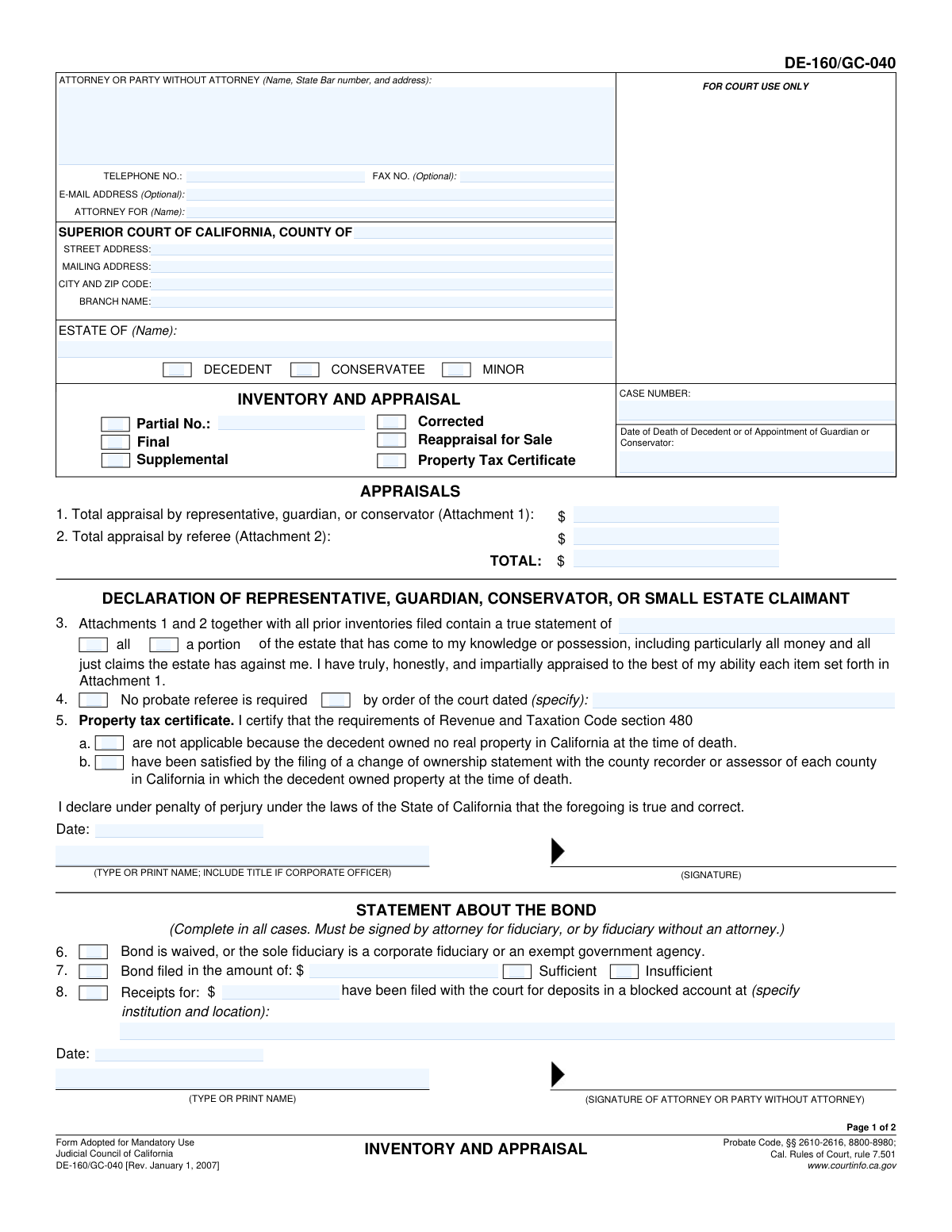
Form DE-160/GC-040 (Inventory and Appraisal) is a mandatory California Judicial Council probate form used to list estate assets and provide their appraised values, separating items the representative can appraise (Attachment 1) from assets that must be appraised by a probate referee (Attachment 2). It also includes required declarations under penalty of perjury and bond-related statements that help the court verify the completeness and accuracy of the inventory and the fiduciaryās compliance. The form is important because it establishes the official valuation record used for court oversight, administration, and related tax/property reporting. Today, this form can be filled out quickly and accurately using AI-powered services like Instafill.ai, which can also convert non-fillable PDF versions into interactive fillable forms.
Our AI automatically handles information lookup, data retrieval, formatting, and form filling.
It takes less than a minute to fill out DE-160/GC-040 using our AI form filling.
Securely upload your data. Information is encrypted in transit and deleted immediately after the form is filled out.
Form specifications
| Form name: | Form DE-160/GC-040, Inventory and Appraisal (Declaration of Representative/Guardian/Conservator or Small Estate Claimant and Declaration of Probate Referee) |
| Number of pages: | 2 |
| Filled form examples: | Form DE-160/GC-040 Examples |
| Language: | English |
| Categories: | court forms |
Instafill Demo: filling out a legal form in seconds
How to Fill Out DE-160/GC-040 Online for Free in 2026
Are you looking to fill out a DE-160/GC-040 form online quickly and accurately? Instafill.ai offers the #1 AI-powered PDF filling software of 2026, allowing you to complete your DE-160/GC-040 form in just 37 seconds or less.
Follow these steps to fill out your DE-160/GC-040 form online using Instafill.ai:
- 1 Go to Instafill.ai and upload the DE-160/GC-040 PDF (or select it from the form library).
- 2 Enter case details: county, court address/branch, case number, estate name, and indicate whether it involves a decedent, conservatee, or minor, plus the date of death/appointment.
- 3 Choose the filing type (Partial number, Final, Supplemental, Corrected, Reappraisal for Sale) and indicate whether the inventory covers all or a portion of the estate.
- 4 Use AI-assisted prompts to complete Attachment 1 totals and the fiduciary declaration (representative/guardian/conservator/small estate claimant), including any court order stating no probate referee is required and the property tax certificate statements, as applicable.
- 5 If a probate referee is required, complete Attachment 2 totals and the probate referee declaration, including statutory commission and expenses.
- 6 Complete the bond section (waived vs. filed), blocked account/receipts information if applicable, and add attorney/party contact details and signatures/dates; then have Instafill.ai validate required fields and formatting.
- 7 Download the completed form for e-filing/printing, save a copy for records, and share/export to counsel or the court filing system as needed.
Our AI-powered system ensures each field is filled out correctly, reducing errors and saving you time.
Why Choose Instafill.ai for Your Fillable DE-160/GC-040 Form?
Speed
Complete your DE-160/GC-040 in as little as 37 seconds.
Up-to-Date
Always use the latest 2026 DE-160/GC-040 form version.
Cost-effective
No need to hire expensive lawyers.
Accuracy
Our AI performs 10 compliance checks to ensure your form is error-free.
Security
Your personal information is protected with bank-level encryption.
Frequently Asked Questions About Form DE-160/GC-040
This form is used in California probate, guardianship, and conservatorship cases to report the estateās assets and their values. It includes declarations by the representative/guardian/conservator (Attachment 1) and, when required, a probate referee (Attachment 2).
The personal representative, guardian, conservator, or small estate claimant completes the Inventory and Appraisal and signs the declaration for Attachment 1. If a probate referee is required, the referee completes and signs the declaration for Attachment 2.
Attachment 1 is for assets the representative/guardian/conservator appraises themselvesātypically cash, bank accounts, and certain lump-sum payable-to-estate benefits. Attachment 2 is for all other estate assets that must be appraised by a probate referee.
Select the box that matches what you are filing: Partial (some assets), Final (complete inventory), Supplemental (additional assets discovered later), Corrected (fixing errors), or Reappraisal for Sale (updated value for a sale). If youāre unsure, check your courtās filing instructions or your attorneyās guidance.
Assets are generally appraised as of the date of death (for a decedentās estate) or the date of appointment (for a guardian or conservator). The form instructions specify fair market value as of that date.
Youāll need the county, court address/branch, the estate name, the case number, and the date of death or date of appointment. You also must indicate whether the matter involves a decedent, conservatee, or minor by checking the appropriate box.
A probate referee is typically required to appraise most non-cash assets listed on Attachment 2. You may check āNo probate referee is requiredā only if the court has issued an order stating that, and you should enter the date of that court order.
This section addresses California change-of-ownership reporting requirements (Revenue & Taxation Code section 480). You certify either that itās not applicable because the decedent owned no California real property, or that the requirements were satisfied by filing change-of-ownership statements with the appropriate county recorder/assessor.
This section reports whether bond is waived, not required due to an exempt/corporate fiduciary, or has been filed, and whether blocked account receipts are sufficient. It must be signed by the attorney for the fiduciary, or by the fiduciary if there is no attorney.
A blocked account is a restricted account where funds canāt be withdrawn without a court order, often used in guardianships/conservatorships. If the court required deposits into a blocked account, list the financial institution/location, the amount, and whether receipts filed are sufficient.
If you list joint tenancy or other non-probate assets for appraisal purposes only, they must be separately listed on additional attachments. Their value must be excluded from the total valuation of Attachments 1 and 2.
Yesāif the minor or conservatee is or has been confined in a state hospital under the Department of Mental Health or Department of Developmental Services during the guardianship/conservatorship, you must mail a copy to the appropriate department director in Sacramento.
Processing times vary by county and court workload, and the court may also require corrections if information is missing. For the most accurate estimate, check your local Superior Court probate divisionās timelines or ask the clerk/your attorney.
YesāAI form-filling services like Instafill.ai can help auto-fill form fields, reduce typing errors, and save time. You should still review everything carefully and ensure asset values and attachments match your supporting records.
You can upload the PDF to Instafill.ai, provide the case and asset details, and let the AI map your information into the correct fields for DE-160/GC-040. If the PDF is flat/non-fillable, Instafill.ai can convert it into an interactive fillable form before auto-filling.
Compliance DE-160/GC-040
Validation Checks by Instafill.ai
1
Validates Court County and Court Address Completeness
Checks that the 'SUPERIOR COURT OF CALIFORNIA, COUNTY OF' field is present and non-empty, and that the court address block (street address, city, and ZIP code) is sufficiently complete to identify the filing location. This is important because the courtās jurisdiction and routing depend on the county and branch location details. If missing or incomplete, the submission should be flagged as incomplete and prevented from filing until corrected.
2
Validates City/ZIP Code Format for Court Address
Ensures the 'CITY AND ZIP CODE' field contains a recognizable city name and a valid 5-digit ZIP code (optionally ZIP+4). Proper formatting reduces mailing/notice errors and supports downstream validation and indexing. If the ZIP code is malformed or missing, the system should return a format error and request correction.
3
Ensures Exactly One Party Type is Selected (Decedent vs. Conservatee vs. Minor)
Validates that exactly one of the checkboxes 'DECEDENT', 'CONSERVATEE', or 'MINOR' is selected to indicate the case type. This is critical because the formās meaning and the date field interpretation (date of death vs. date of appointment) depend on the selected type. If none or multiple are selected, the submission should fail validation and require the filer to choose a single applicable category.
4
Validates Estate Name Presence and Consistency Across Pages
Checks that 'ESTATE OF (Name)' is provided and that the same estate name appears consistently wherever it is repeated (page 1 and page 2 sections). Consistency is important for court indexing and to avoid mismatching attachments or pages to the wrong matter. If the estate name is missing or inconsistent, the system should block submission and prompt for correction.
5
Validates Case Number Format and Consistency Across Pages
Ensures 'CASE NUMBER' is present and matches an expected court case-number pattern (court-specific alphanumeric with separators) and is identical on both pages. The case number is essential for docketing and associating the inventory/appraisal with the correct proceeding. If missing, malformed, or inconsistent, the system should reject the filing or route it to an exception queue.
6
Validates Date of Death/Appointment Format and Logical Plausibility
Checks that 'Date of Death of Decedent or of Appointment of Guardian or Conservator' is a valid date (e.g., MM/DD/YYYY) and is not in the future. This date anchors valuation timing and statutory deadlines, so invalid dates can undermine the appraisalās legal accuracy. If the date is invalid or future-dated, the system should fail validation and require a corrected date.
7
Validates Inventory Scope Selection (All vs. A Portion) and Partial Number Requirement
Ensures that exactly one of 'all' or 'a portion' is selected, and if 'a portion' is selected then 'Partial No.' is required and must be a positive integer. This is important to track multiple partial inventories and prevent missing assets across filings. If 'a portion' is selected without a valid partial number (or both/neither scope options are selected), the submission should be rejected.
8
Validates Filing Type Selection (Final/Supplemental/Corrected/Reappraisal for Sale) Rules
Checks that the filing type section is logically completed: at least one filing type is selected, and mutually exclusive options are enforced where applicable (e.g., 'Final' should not be combined with 'Supplemental' or 'Corrected' unless the courtās rules explicitly allow it). Correct classification affects court processing and whether prior inventories are expected. If the selection is missing or contradictory, the system should prompt the filer to correct the filing type selection.
9
Validates 'No Probate Referee Required' Court Order Date When Selected
If 'No probate referee is required' is checked, validates that 'by order of the court dated (specify)' contains a valid date in proper format. This is important because exemption from referee appraisal must be supported by a court order and date for auditability. If checked without a valid order date, the submission should fail validation.
10
Validates Property Tax Certificate Selection and Mutual Exclusivity
Ensures that exactly one property tax certificate statement is selected: either (a) not applicable because no California real property was owned, or (b) requirements satisfied by filing change of ownership statements. These statements are legally significant and mutually exclusive, and selecting both (or neither) creates ambiguity about compliance with Revenue and Taxation Code section 480. If invalid, the system should require the filer to select exactly one and provide any required supporting details.
11
Validates Representative/Attorney Signature and Date Presence
Checks that the declaration section includes a signature (either attorney or party without attorney, as applicable) and a corresponding 'Date' that is a valid date and not in the future. Signatures and dates are required for the perjury declaration and enforceability of the filing. If missing or invalid, the system should block submission as unsigned/undated.
12
Validates Printed Name and Title Requirement for Signer
Ensures '(TYPE OR PRINT NAME; INCLUDE TITLE IF CORPORATE OFFICER)' is completed, and if the filer indicates a corporate fiduciary/officer context, a title is included (e.g., 'Trust Officer', 'VP'). This supports identity verification and authority to act on behalf of an entity. If the printed name is missing (or title required but absent), the system should flag the submission for correction.
13
Validates Bond Statement: Exactly One Bond Status and Required Details
Checks that exactly one of 'Bond is waived...' or 'Bond filed' is selected, and enforces dependent fields: if 'Bond filed' is selected, the bond amount must be provided and be a valid currency value greater than zero. Bond status affects fiduciary qualification and court oversight, so incomplete bond information can invalidate the filing. If the bond selection is missing, multiple, or lacks required details, the submission should be rejected.
14
Validates Blocked Account Deposit Details When Receipts Are Indicated
If the form indicates receipts/deposits in a blocked account (e.g., 'have been filed with the court for deposits in a blocked account'), validates that the financial institution name and location are provided and that the deposit amount and 'Receipts for: $' are valid non-negative currency values. This is important for safeguarding estate/conservatorship funds and for court verification of restricted accounts. If institution/location or amounts are missing/invalid, the system should fail validation or route to manual review.
15
Validates Attorney/Party Contact Information Formats (Phone/Fax/Email)
Ensures 'TELEPHONE NO.' is present and matches a valid phone format (10 digits with optional punctuation), 'FAX NO.' if provided matches a valid fax/phone format, and 'E-MAIL ADDRESS' if provided matches a standard email pattern. Accurate contact information is necessary for court communication and deficiency notices. If the required phone number is missing or any provided contact field is malformed, the system should prompt for correction (fax/email may be optional but must be valid if entered).
16
Validates Probate Referee Declaration Totals and Commission/Expense Arithmetic
For the referee section (Attachment 2), validates that 'Statutory commission' and 'Expenses (specify)' are valid currency values (non-negative) and that 'TOTAL' equals commission plus expenses. Arithmetic accuracy is important for fee approval and prevents over/understatement of charges. If the total does not reconcile or values are invalid, the system should reject the submission or require correction before acceptance.
Common Mistakes in Completing DE-160/GC-040
People often focus on the asset information and forget the top caption fields (County of, branch name, street/mailing address, and especially the case number). Courts use these fields to route and file the inventory correctly; missing or inconsistent header data can cause rejection or misfiling. Copy the case number exactly as it appears on prior probate/guardianship filings and ensure the county/branch match the court where the case is pending. AI-powered tools like Instafill.ai can auto-populate these repeated caption fields and flag missing required header items before you submit.
This form is used in multiple contexts, and filers sometimes check the wrong box (DECEDENT, CONSERVATEE, or MINOR) or check more than one. Selecting the wrong type can create confusion about which statutes apply and which date controls valuation (date of death vs. date of appointment). Confirm whether you are filing for a decedentās estate, a conservatorship, or a guardianship and check only the applicable box. Instafill.ai can help by asking clarifying questions and preventing incompatible selections.
Filers frequently select āFinalā when they are actually submitting a partial or supplemental inventory, or they forget to enter the āPartial No.ā when required. The wrong designation can lead to an inaccurate record of what has already been inventoried and appraised, and may trigger court questions or require a corrected filing. Review prior inventories filed in the case and choose the status that matches what you are submitting; if āPartial,ā include the correct partial number. Instafill.ai can track prior entries and prompt for the partial number when āPartialā is selected.
A common misunderstanding is valuing assets as of ātodayā rather than the required date (date of death for a decedentās estate, or date of appointment for a guardian/conservator). Incorrect valuation dates can distort totals, affect bond calculations, and may require reappraisal or amended filings. Always confirm the controlling date and ensure Attachment 1 and Attachment 2 values are as of that date. Instafill.ai can enforce date logic and remind you which date applies based on the case type you selected.
People often list all assets on Attachment 1 or forget that Attachment 2 is for āall other assetsā appraised by the probate referee. This can cause missing referee appraisal where required, incorrect totals, and delays while the court requests corrections. Put cash, bank accounts, and similar items the representative can appraise on Attachment 1, and place other assets (e.g., real property, business interests, valuable personal property) on Attachment 2 for the referee. If the form is only available as a flat non-fillable PDF, Instafill.ai can convert it into a fillable version and guide correct asset placement with validation rules.
Some filers check āNo probate referee is requiredā but do not have an order, or they forget to enter the court order date. If a referee is required and not used, the inventory may be rejected or you may be ordered to obtain a referee appraisal, causing significant delay. Only check this box if you have a specific court order and enter the exact date of that order. Instafill.ai can prompt for the order date and warn you if the selection is incomplete.
Filers often check the wrong statement about whether the decedent owned California real property, or they check both options (a and b). Incorrect certification can create compliance issues with Revenue and Taxation Code section 480 and may lead to follow-up requirements or penalties. Verify whether the decedent owned any California real property at death; if yes, ensure change of ownership statements were filed in each relevant county and select only the applicable option. Instafill.ai can help by prompting for county details and preventing mutually exclusive selections.
The bond portion is frequently inconsistentāpeople mark bond waived when it is not, omit the bond amount, or fail to complete the blocked account institution/location and receipt amounts. These mistakes can lead to the court finding the bond insufficient, requiring additional filings, or delaying appointment/authority. Confirm whether bond is waived by order or statute, or whether a bond was filed, and if blocked accounts are used, provide the institution name, location, deposit amount, and receipt totals. Instafill.ai can validate that required subfields appear when you select āBond filedā or āblocked accountā information.
A very common issue is arithmetic errors or leaving the total fields blank, especially when multiple partial/supplemental inventories exist. Incorrect totals can affect bond sufficiency determinations and create confusion about the estateās value, often resulting in a request to correct and refile. Recalculate totals carefully and ensure the āTotal appraisal by representativeā plus āTotal appraisal by refereeā matches the overall TOTAL shown. Instafill.ai can automatically sum line items and cross-check totals to prevent mismatches.
Because the form contains multiple declarations (representative/guardian/conservator and probate referee, plus attorney/party signature for the bond statement), people often sign one section but miss another, or forget to date and print names/titles. Unsigned or undated declarations are typically rejected and can require re-submission under penalty of perjury requirements. Confirm every signature block you are responsible for is signed, dated, and includes a typed/printed name (and corporate title if applicable). Instafill.ai can highlight incomplete signature/date blocks and generate a completion checklist before printing or e-filing.
On page 2, filers sometimes enter the refereeās statutory commission and expenses themselves, leave expenses unspecified, or omit the refereeās signature. This section must reflect the refereeās true account and is tied to compensation; errors can lead to disputes, court questions, or a need for corrected paperwork. Ensure the probate referee completes and signs the commission/expenses portion and itemizes expenses where required. Instafill.ai can separate role-based sections and indicate which fields must be completed by the referee versus the fiduciary/attorney.
Saved over 80 hours a year
āI was never sure if my IRS forms like W-9 were filled correctly. Now, I can complete the forms accurately without any external help.ā
Kevin Martin Green
Your data stays secure with advanced protection from Instafill and our subprocessors

Robust compliance program
Transparent business model
Youāre not the product. You always know where your data is and what it is processed for.
ISO 27001, HIPAA, and GDPR
Our subprocesses adhere to multiple compliance standards, including but not limited to ISO 27001, HIPAA, and GDPR.
Security & privacy by design
We consider security and privacy from the initial design phase of any new service or functionality. Itās not an afterthought, itās built-in, including support for two-factor authentication (2FA) to further protect your account.
Fill out DE-160/GC-040 with Instafill.ai
Worried about filling PDFs wrong? Instafill securely fills form-de-160gc-040-inventory-and-appraisal-declaration-of-representativeguardianconservator-or-small-estate-claimant-and forms, ensuring each field is accurate.



