Yes! You can use AI to fill out Form 1041, U.S. Income Tax Return for Estates and Trusts

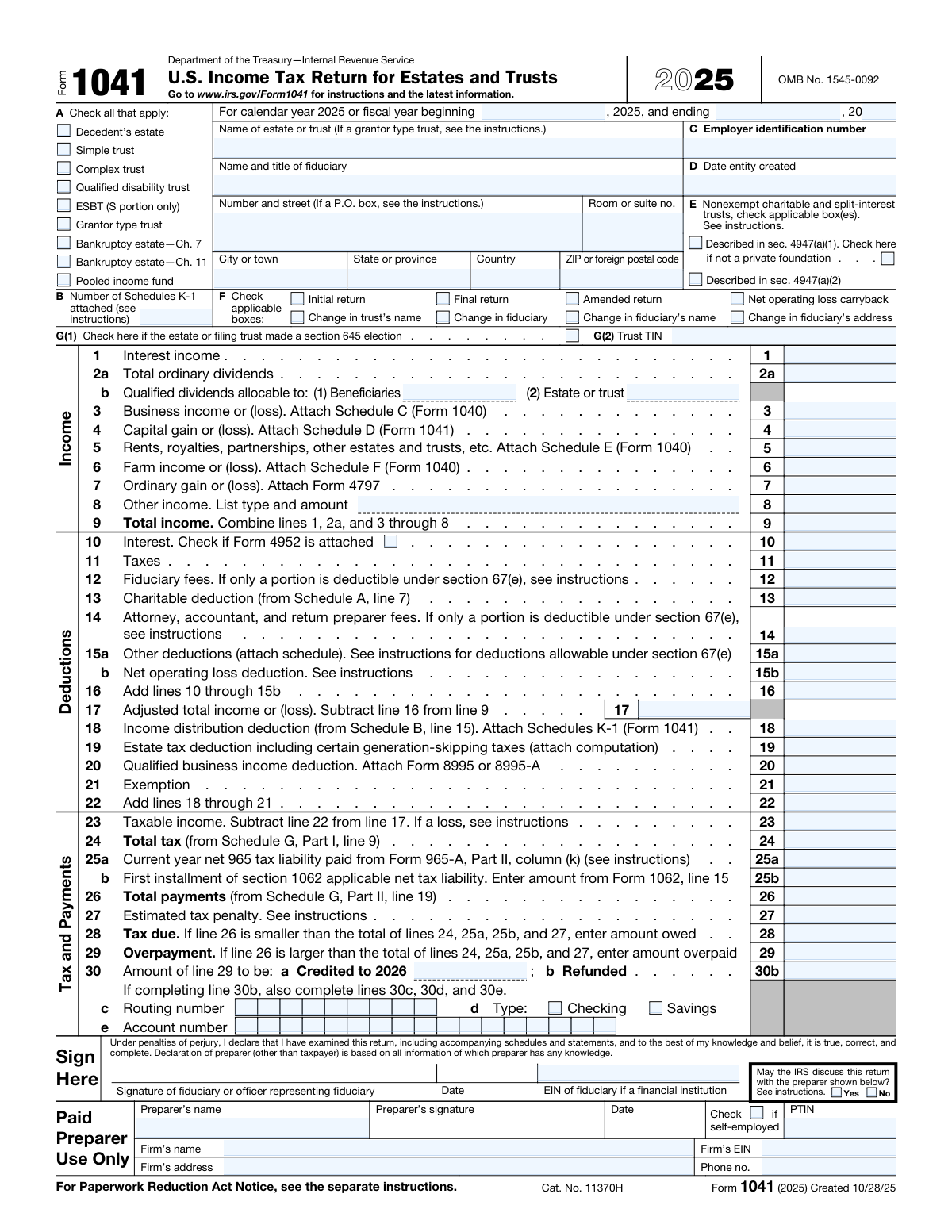
Form 1041, U.S. Income Tax Return for Estates and Trusts, is an IRS tax return that fiduciaries—such as executors, trustees, or personal representatives—must file annually to report the income, deductions, capital gains, and tax liability of estates and trusts. It is used to determine the taxable income of the estate or trust, calculate the tax owed, and report distributions made to beneficiaries via Schedule K-1. Filing this form correctly is essential for compliance with federal tax law and for ensuring beneficiaries receive accurate information about their share of income. Today, Form 1041 can be filled out quickly and accurately using AI-powered services like Instafill.ai, which can also convert non-fillable PDF versions into interactive fillable forms.
Our AI automatically handles information lookup, data retrieval, formatting, and form filling.
It takes less than a minute to fill out Form 1041 using our AI form filling.
Securely upload your data. Information is encrypted in transit and deleted immediately after the form is filled out.

Form specifications

Form name: Form 1041, U.S. Income Tax Return for Estates and Trusts
Number of pages: 3
Language: English
Categories: tax forms, IRS forms, trust tax forms
main-image

Instafill Demo: filling out a legal form in seconds

How to Fill Out Form 1041 Online for Free in 2026

Are you looking to fill out a FORM 1041 form online quickly and accurately? Instafill.ai offers the #1 AI-powered PDF filling software of 2026, allowing you to complete your FORM 1041 form in just 37 seconds or less.
Follow these steps to fill out your FORM 1041 form online using Instafill.ai:
  1. 1 Navigate to Instafill.ai and search for or upload Form 1041 (U.S. Income Tax Return for Estates and Trusts) to begin the guided filling process.
  2. 2 Enter the identification information for the estate or trust, including the entity name, fiduciary name and title, EIN, date created, mailing address, and the applicable fiscal year dates.
  3. 3 Select the correct entity type (e.g., Decedent's estate, Simple trust, Complex trust, Grantor type trust, Bankruptcy estate, etc.) and check any applicable boxes in sections E, F, and G.
  4. 4 Complete the Income section (Lines 1–9) by entering all sources of income such as interest, dividends, capital gains, rents, royalties, farm income, and other income, then fill in the Deductions section (Lines 10–22) including interest, taxes, fiduciary fees, charitable deductions, and the income distribution deduction.
  5. 5 Fill out Schedules A, B, and G to calculate the charitable deduction, income distribution deduction, and total tax liability, including any credits, alternative minimum tax, and other applicable taxes.
  6. 6 Enter tax payment information (Lines 23–30b), including total tax, estimated tax payments, any overpayment or tax due, and direct deposit banking details if requesting a refund.
  7. 7 Review all entries for accuracy, provide the fiduciary's signature and preparer information (including PTIN and firm details), then submit or print the completed Form 1041.

Our AI-powered system ensures each field is filled out correctly, reducing errors and saving you time.

Why Choose Instafill.ai for Your Fillable Form 1041 Form?

Speed

Complete your Form 1041 in as little as 37 seconds.

Up-to-Date

Always use the latest 2026 Form 1041 form version.

Cost-effective

No need to hire expensive lawyers.

Accuracy

Our AI performs 10 compliance checks to ensure your form is error-free.

Security

Your personal information is protected with bank-level encryption.

Frequently Asked Questions About Form Form 1041

Form 1041 is the U.S. Income Tax Return for Estates and Trusts. It must be filed by the fiduciary (executor, administrator, or trustee) of a decedent's estate, simple trust, complex trust, qualified disability trust, grantor-type trust, bankruptcy estate (Chapter 7 or 11), ESBT, or pooled income fund that has taxable income, gross income of $600 or more, or a beneficiary who is a nonresident alien.

In Section A, check the box that best describes the filing entity — options include Decedent's estate, Simple trust, Complex trust, Qualified disability trust, ESBT (S portion only), Grantor type trust, Bankruptcy estate (Ch. 7 or Ch. 11), or Pooled income fund. Only one box should be checked, and it determines which sections of the form apply to your filing.

An EIN is a unique nine-digit number issued by the IRS to identify the estate or trust for tax purposes. Every estate or trust filing Form 1041 must have its own EIN — it cannot use the decedent's or grantor's Social Security Number. You can apply for an EIN online at IRS.gov or by filing Form SS-4.

Schedule K-1 (Form 1041) reports each beneficiary's share of the estate's or trust's income, deductions, and credits. You must prepare and attach a separate Schedule K-1 for each beneficiary, and enter the total count in Box B on the front of Form 1041.

The income distribution deduction (reported on line 18) allows the estate or trust to deduct amounts distributed to beneficiaries, reducing the entity's taxable income. It is calculated on Schedule B and equals the smaller of the tentative income distribution deduction (line 13) or the distributable net income minus adjusted tax-exempt interest (line 14).

Box F contains several checkboxes for special circumstances: check 'Initial return' if this is the first return filed, 'Final return' if the estate or trust is terminating, 'Amended return' if correcting a prior filing, or the appropriate box if there has been a change in the trust's name, fiduciary, fiduciary's name, or fiduciary's address. You may check more than one box if applicable.

A Section 645 election allows a qualified revocable trust to be treated as part of the decedent's estate for tax purposes, enabling them to file a combined return. Check Box G(1) if such an election was made, and then enter the trust's Taxpayer Identification Number (TIN) in Box G(2).

If your total payments (line 26) exceed the total tax owed, enter the overpayment on line 29. You can then choose to apply part or all of it as a credit toward your 2026 estimated tax (line 30a) and/or request a refund of the remainder (line 30b). If requesting a direct deposit refund, you must also provide your bank routing number, account number, and account type.

Allowable deductions include interest expense (line 10), taxes paid (line 11), fiduciary fees (line 12), charitable contributions (line 13, from Schedule A), attorney and accountant fees (line 14), other deductions (line 15a), net operating loss deduction (line 15b), income distribution deduction (line 18), estate tax deduction (line 19), qualified business income deduction (line 20), and the applicable exemption (line 21).

Schedule A calculates the charitable deduction for amounts paid or permanently set aside from gross income for charitable purposes. The deduction equals the sum of qualifying amounts (adjusted for tax-exempt income and capital gains allocated to corpus) minus any Section 1202 exclusion allocable to charitable capital gains. The final amount from Schedule A, line 7 is carried to page 1, line 13.

Yes, if a paid preparer prepared the return, they must sign it and provide their full name, PTIN (Preparer Tax Identification Number), and indicate whether they are self-employed. If they work for a firm, the firm's name, address, EIN, and phone number must also be included. You must also indicate whether the IRS may discuss the return with the preparer by checking Yes or No.

Yes — AI-powered services like Instafill.ai can help you accurately auto-fill Form 1041 by guiding you through each field and reducing errors. These tools save significant time, especially for complex multi-schedule returns like Form 1041 that involve income calculations, deductions, and beneficiary allocations.

To fill out Form 1041 online, visit Instafill.ai and upload your Form 1041 PDF. The AI will walk you through each field — from entity identification and income lines to deductions and tax calculations — and auto-fill the form accurately based on your inputs. Once complete, you can download the filled form ready for signature and submission.

If you have a flat, non-fillable (scanned) version of Form 1041, Instafill.ai can convert it into an interactive fillable form so you can type directly into the fields. This eliminates the need to print and handwrite the form, making the process faster and more accurate.

You must enter the beginning and ending month/day of the fiscal year, plus the last two digits of the ending calendar year (e.g., '25' for 2025). If the estate or trust uses a standard calendar year (January 1 – December 31), enter '01/01' as the beginning date and '12/31' as the ending date with the appropriate year digits.

Compliance Form 1041
Validation Checks by Instafill.ai

1
Exactly One Entity Type Must Be Selected
Validates that one and only one entity type checkbox is checked among: Decedent's estate, Simple trust, Complex trust, Qualified disability trust, ESBT (S portion only), Grantor type trust, Bankruptcy estate — Ch. 7, Bankruptcy estate — Ch. 11, and Pooled income fund. The entity type determines the applicable tax rules, exemption amounts, and required schedules, so selecting multiple types or none would result in an invalid return. If no entity type is selected, required identification fields and schedules cannot be properly associated with the return.
2
EIN Format Validation
Validates that the Employer Identification Number (EIN) for the estate or trust follows the standard IRS format of exactly nine digits with a hyphen after the second digit (e.g., 12-3456789). An incorrectly formatted EIN will prevent the IRS from matching the return to the correct taxpayer account, potentially causing processing delays or rejection. This field is required whenever any entity type is selected.
3
Fiscal Year Date Format and Logical Consistency
Validates that the fiscal year beginning and ending dates are entered in MM/DD format (e.g., 01/01 and 12/31), and that the two-digit year field contains a valid two-digit year (e.g., 25 for 2025). Additionally, the system must confirm that the fiscal year ending date logically follows the beginning date when combined with the year, and that the period does not exceed 12 months. An invalid or illogical fiscal year period would cause the return to be associated with the wrong tax period.
4
Required Identification Fields Completeness When Entity Type Is Selected
Validates that when any entity type checkbox is marked, all required identification fields are populated: Name of estate or trust, Name and title of fiduciary, street address (Number and street), City or town, State or province, Country, ZIP or foreign postal code, EIN, and Date entity created. These fields are essential for the IRS to identify and process the return correctly. Missing identification information will result in the return being unprocessable or returned to the filer.
5
Date Entity Created Format Validation
Validates that the 'Date entity created' field is entered in a valid date format (MM/DD/YYYY) and represents a real calendar date that is not in the future. The creation date establishes the legal existence of the estate or trust and must be consistent with the type of entity selected (e.g., a decedent's estate cannot have a creation date after the decedent's death). An invalid or future date would raise a processing error and may trigger IRS scrutiny.
6
Total Income Calculation Accuracy (Line 9)
Validates that the value entered on Line 9 (Total income) equals the sum of Line 1 (Interest income), Line 2a (Total ordinary dividends), Line 3 (Business income or loss), Line 4 (Capital gain/loss), Line 5 (Rents/royalties/partnerships), Line 6 (Farm income/loss), Line 7 (Ordinary gain/loss), and Line 8 (Other income amount). Arithmetic errors in this total will cascade through the entire return, affecting taxable income, tax due, and overpayment calculations. If the entered total does not match the computed sum, the return will likely be flagged for correction.
7
Total Deductions Calculation Accuracy (Line 16 and Line 22)
Validates that Line 16 equals the sum of Lines 10 through 15b, and that Line 22 equals the sum of Lines 18 through 21. These intermediate totals feed directly into the taxable income calculation on Line 23, so any discrepancy will produce an incorrect tax liability. The system should flag any mismatch between the entered totals and the computed sums of their component lines.
8
Taxable Income and Tax Due/Overpayment Logical Consistency
Validates that Line 23 (Taxable income) equals Line 17 minus Line 22, and that either Line 28 (Tax due) or Line 29 (Overpayment) is populated — but not both simultaneously. Line 28 should only be populated when Line 26 is less than the sum of Lines 24, 25a, 25b, and 27, while Line 29 should only be populated when Line 26 exceeds that sum. Populating both lines or populating the wrong line based on the arithmetic relationship would indicate a fundamental error in the tax computation.
9
Overpayment Allocation Must Equal Line 29
Validates that when Line 29 (Overpayment) is greater than zero, the sum of Line 30a (Amount credited to 2026 estimated tax) and Line 30b (Amount to be refunded) exactly equals the Line 29 overpayment amount. Allocating more or less than the total overpayment is not permitted and would result in a processing error. Both Line 30a and Line 30b should only be completed when Line 29 is greater than zero.
10
Bank Routing Number Format and Account Type Selection for Direct Deposit
Validates that when Line 30b (Amount to be refunded) is greater than zero and direct deposit is requested, the routing number is exactly 9 digits and begins with a valid Federal Reserve routing symbol (first two digits between 01–12 or 21–32). Additionally, exactly one account type (Checking or Savings) must be selected, and the account number field must be populated. Missing or invalid banking information will prevent the IRS from processing the direct deposit and may delay the refund.
11
Preparer PTIN Format Validation
Validates that the Preparer's PTIN is entered in the correct IRS format, beginning with the letter 'P' followed by exactly eight digits (e.g., P12345678). A PTIN is required for all paid preparers and must be current and valid. An incorrectly formatted or missing PTIN will cause the return to be flagged as improperly prepared and may result in penalties for the preparer.
12
Firm Details Required When Preparer Is Not Self-Employed
Validates that when the 'Check if self-employed' box is not checked, the firm's name, address, EIN, and phone number are all populated. Firm details identify the preparation firm for IRS correspondence and compliance purposes, and omitting them when a firm is involved constitutes an incomplete return. The firm's EIN must follow the standard XX-XXXXXXX format, and the phone number must include an area code.
13
Section 645 Election Requires Trust TIN
Validates that when the G(1) Section 645 election checkbox is marked, the G(2) Trust TIN field is populated with a valid taxpayer identification number. The Trust TIN is required to link the electing trust to the estate's return under the Section 645 election, and without it the election cannot be properly processed by the IRS. The TIN entered must conform to standard EIN or SSN formatting rules.
14
Schedule A Charitable Deduction Cross-Reference to Line 13
Validates that the amount entered on Schedule A, Line 7 (Charitable deduction, calculated as Line 5 minus Line 6) matches the amount entered on page 1, Line 13 (Charitable deduction). These two fields must be identical since Schedule A, Line 7 is the source for the page 1 deduction. A discrepancy between these values indicates a transcription error that would result in an incorrect total deduction and taxable income.
15
Schedule B Income Distribution Deduction Cross-Reference to Line 18
Validates that the amount on Schedule B, Line 15 (Income distribution deduction, the lesser of Line 13 or Line 14) matches the amount entered on page 1, Line 18 (Income distribution deduction). Schedule B, Line 15 must also be the smaller of Lines 13 and 14, and if Line 7 minus Line 2 is zero or less, Line 14 must be entered as zero. Any mismatch between Schedule B Line 15 and page 1 Line 18 will produce an incorrect taxable income calculation.
16
Schedule G Total Tax Cross-Reference to Page 1 Line 24
Validates that Schedule G, Part I, Line 9 (Total tax, the sum of Lines 3 through 8) matches the amount entered on page 1, Line 24 (Total tax). Additionally, Line 1e must equal the sum of Lines 1a through 1d, Line 2e must equal the sum of Lines 2a through 2d, and Line 3 must equal Line 1e minus Line 2e (with a floor of zero). Any arithmetic inconsistency within Schedule G or a mismatch with page 1 Line 24 will result in an incorrect tax liability being reported.

Common Mistakes in Completing Form 1041

Selecting the wrong entity type or checking multiple entity type boxes

Filers sometimes check the wrong entity type box (e.g., checking 'Simple trust' when the trust is actually a 'Complex trust') or accidentally check more than one entity type box. This mistake happens because the distinctions between trust types—such as simple vs. complex, or grantor-type vs. ESBT—can be subtle and require careful review of the trust document and tax rules. Checking the wrong entity type can result in incorrect exemption amounts, wrong distribution deduction calculations, and potential IRS scrutiny. Review the trust instrument and IRS instructions carefully to confirm the correct entity classification before checking any box, and ensure only one box is selected. Tools like Instafill.ai can help guide you to the correct entity type based on your inputs.

Entering incorrect or misformatted fiscal year dates

Filers frequently enter the fiscal year beginning and ending dates in the wrong format or confuse the month/day fields with the year field. For example, entering '2025' in the month/day field instead of '01/01', or entering four digits instead of just the last two digits in the fiscal year ending year field. This can cause the IRS to misidentify the tax period, potentially leading to processing delays or misapplied payments. Always use MM/DD format for the beginning and ending date fields, and enter only the last two digits (e.g., '25' for 2025) in the year field. Instafill.ai can automatically validate and format these date fields correctly.

Using an incorrect or unformatted Employer Identification Number (EIN)

A common error is entering the EIN without the required hyphen (e.g., '123456789' instead of '12-3456789'), entering a Social Security Number instead of an EIN, or using an EIN that belongs to the decedent rather than the estate or trust. Estates and trusts must obtain their own EIN from the IRS; using the wrong number can cause the return to be misprocessed or rejected. Double-check that the EIN on the return matches the IRS-issued number for the estate or trust, and always include the hyphen in the correct position. Instafill.ai can validate EIN format automatically to prevent formatting errors.

Miscounting or omitting Schedule K-1 attachments

Filers often enter an incorrect count in the 'Number of Schedules K-1 attached' field—either forgetting to count all beneficiaries or entering a number that does not match the actual K-1s submitted with the return. This discrepancy can trigger IRS notices and delay processing, as the IRS cross-checks the count against the attached forms. Count every Schedule K-1 prepared for each beneficiary before completing this field, and verify the count matches the physical or electronic attachments. Using a checklist or an automated tool like Instafill.ai can help ensure the count is accurate.

Failing to check the correct status boxes in Section F (Initial, Final, or Amended return)

Filers sometimes forget to check 'Initial return' for the first filing, fail to check 'Final return' when the estate or trust is terminating, or neglect to check 'Amended return' when correcting a previously filed return. Omitting these boxes means the IRS cannot properly track the filing history of the estate or trust, which can cause confusion about open tax years or duplicate filings. Review the filing history of the estate or trust before completing the return and check all applicable boxes in Section F. Also remember to check 'Change in fiduciary' or 'Change in fiduciary's address' if those changes occurred during the year.

Incorrectly calculating or transferring the income distribution deduction (Schedule B, Line 15)

One of the most frequent errors on Form 1041 is miscalculating the income distribution deduction on Schedule B, particularly failing to take the smaller of line 13 or line 14, or not properly reducing distributable net income (DNI) by tax-exempt interest. Filers also commonly forget to transfer the Schedule B, line 15 amount to page 1, line 18. An incorrect income distribution deduction directly affects the taxable income of the estate or trust and the amounts reported on beneficiaries' Schedule K-1s. Carefully follow the Schedule B line-by-line instructions, verify the DNI calculation, and confirm the line 15 amount is correctly carried to page 1, line 18.

Entering an incorrect bank routing or account number for direct deposit

When requesting a refund via direct deposit, filers frequently transpose digits in the 9-digit routing number or account number, or confuse the routing number with the account number. An incorrect routing or account number will cause the refund to be sent to the wrong account or returned to the IRS, resulting in significant delays in receiving the refund. Always verify the routing and account numbers directly from a voided check or official bank statement, and double-check each digit before submitting. Instafill.ai can help validate routing number formats to reduce transcription errors.

Omitting or incorrectly entering the preparer's PTIN

Paid preparers often forget to enter their Preparer Tax Identification Number (PTIN) or enter an outdated or incorrectly formatted PTIN (e.g., missing the 'P' prefix or entering an SSN instead). The IRS requires a valid, current PTIN for all paid preparers, and omitting or entering an incorrect PTIN can result in penalties and processing issues. Ensure the PTIN is current (PTINs must be renewed annually), begins with the letter 'P', and is entered exactly as issued by the IRS. Also remember to check the 'self-employed' box if applicable and to complete all firm details if working for a firm.

Misallocating qualified dividends between beneficiaries and the estate or trust (Line 2b)

Line 2b requires filers to separately report qualified dividends allocable to beneficiaries and those allocable to the estate or trust, but many filers enter the total qualified dividend amount in only one column or report the same amount in both columns. This error affects the tax rates applied to qualified dividends for both the entity and its beneficiaries and can result in incorrect Schedule K-1 reporting. Carefully allocate qualified dividends according to the trust instrument and distribution rules, and ensure the two sub-amounts on line 2b are consistent with the income distribution deduction on Schedule B.

Failing to attach required supporting forms and schedules

Filers frequently omit required attachments such as Form 4952 when claiming investment interest expense on line 10, Form 8995 or 8995-A for the QBI deduction on line 20, Schedule I for the alternative minimum tax on Schedule G line 1c, or Form 8960 for net investment income tax. Missing attachments can cause the IRS to disallow deductions or credits and may trigger correspondence audits. Review the instructions for each line that references an attached form, prepare all required supporting forms before completing the main return, and include them with the filing. Instafill.ai can flag fields that require attachments and remind you to include them.

Incorrectly handling the Section 645 election and Trust TIN (Section G)

When a Section 645 election has been made, filers sometimes check the G(1) box but leave the Trust TIN field (G(2)) blank, or enter the estate's EIN instead of the electing trust's separate TIN. The Section 645 election allows a qualified revocable trust to be treated as part of the decedent's estate, and the trust's TIN is required to properly link the two entities for IRS processing. If a Section 645 election applies, always complete both G(1) and G(2), entering the trust's own taxpayer identification number in G(2), not the estate's EIN.

Incorrectly computing or omitting the charitable deduction (Schedule A and Line 13)

Filers often fail to reduce the charitable deduction by the portion of tax-exempt income allocable to charitable contributions (Schedule A, line 2), or forget to subtract the Section 1202 exclusion on line 6, resulting in an overstated deduction. Additionally, the final Schedule A, line 7 amount is frequently not transferred to page 1, line 13. An overstated charitable deduction reduces taxable income improperly and can trigger IRS adjustments or penalties. Complete all lines of Schedule A carefully, ensure tax-exempt income is properly allocated, and confirm the line 7 amount is carried forward to page 1, line 13.
Saved over 80 hours a year

“I was never sure if my IRS forms like W-9 were filled correctly. Now, I can complete the forms accurately without any external help.”

Kevin Martin Green

Your data stays secure with advanced protection from Instafill and our subprocessors

Robust compliance program

Transparent business model

You’re not the product. You always know where your data is and what it is processed for.

ISO 27001, HIPAA, and GDPR

Our subprocesses adhere to multiple compliance standards, including but not limited to ISO 27001, HIPAA, and GDPR.

Security & privacy by design

We consider security and privacy from the initial design phase of any new service or functionality. It’s not an afterthought, it’s built-in, including support for two-factor authentication (2FA) to further protect your account.

Fill out Form 1041 with Instafill.ai

Worried about filling PDFs wrong? Instafill securely fills form-1041-us-income-tax-return-for-estates-and-trusts forms, ensuring each field is accurate.