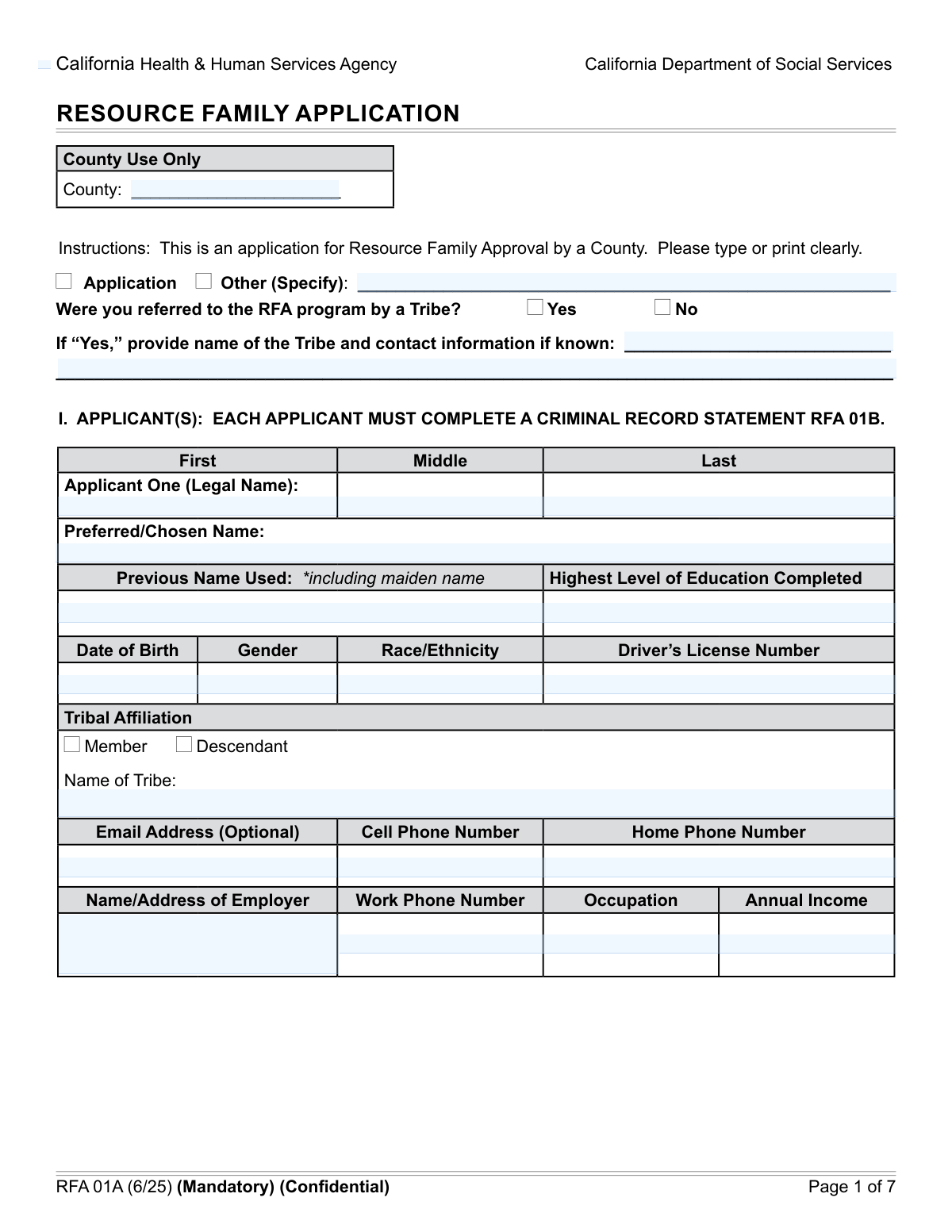
Yes! You can use AI to fill out Resource Family Application

The Resource Family Application (RFA) is a detailed document used by social service agencies to assess individuals or couples applying to provide foster care or adopt a child. It collects comprehensive information about the applicants' personal background, financial stability, home environment, and any previous experience with child care or licensing to ensure they can provide a safe and nurturing home. This application is the foundational step in the approval process for becoming a resource for children in need. Today, this form can be filled out quickly and accurately using AI-powered services like Instafill.ai, which can also convert non-fillable PDF versions into interactive fillable forms.
Our AI automatically handles information lookup, data retrieval, formatting, and form filling.
It takes less than a minute to fill out RFA Application using our AI form filling.
Securely upload your data. Information is encrypted in transit and deleted immediately after the form is filled out.

Form specifications

Form name: Resource Family Application
Number of fields: 249
Number of pages: 7
Language: English
Categories: resource family forms
main-image

Instafill Demo: How to fill out PDF forms in seconds with AI

How to Fill Out RFA Application Online for Free in 2026

Are you looking to fill out a RFA APPLICATION form online quickly and accurately? Instafill.ai offers the #1 AI-powered PDF filling software of 2026, allowing you to complete your RFA APPLICATION form in just 37 seconds or less.
Follow these steps to fill out your RFA APPLICATION form online using Instafill.ai:
  1. 1 Navigate to Instafill.ai and upload the Resource Family Application form, or select it from their library of official documents.
  2. 2 Allow the AI to scan and process the form, identifying all fields for personal details, employment, and background information for both applicants.
  3. 3 Complete the sections for Applicant One, providing your legal name, contact information, employment history, and background details as prompted by the guided process.
  4. 4 If applying with a co-applicant, fill in the corresponding sections for Applicant Two, including their personal, employment, and background information.
  5. 5 Provide details about your household, including your physical address, information about other residents, and details about any minor children in the home.
  6. 6 Answer questions regarding your preferences for child placement (age, sibling groups) and disclose any history of prior licenses, approvals, or denials related to foster care or adoption.
  7. 7 Carefully review all the entered information for accuracy, then use the platform's tools to electronically sign and date the application in the designated signature fields before submitting.

Our AI-powered system ensures each field is filled out correctly, reducing errors and saving you time.

Why Choose Instafill.ai for Your Fillable RFA Application Form?

Speed

Complete your RFA Application in as little as 37 seconds.

Up-to-Date

Always use the latest 2026 RFA Application form version.

Cost-effective

No need to hire expensive lawyers.

Accuracy

Our AI performs 10 compliance checks to ensure your form is error-free.

Security

Your personal information is protected with bank-level encryption.

Frequently Asked Questions About Form RFA Application

This form is an application for the Resource Family Approval (RFA) program, which assesses and approves families to provide care for children in the foster care system, including through adoption or guardianship.

This application should be completed by any individual or couple who wishes to become a Resource Family to provide foster care or adopt a child. All adults applying must provide their information.

No, if you are applying as a single individual, you only need to complete the sections for 'Applicant One.' The 'Applicant Two' sections can be left blank.

This applies if a Native American Tribe recommended you for the program. If you check 'Yes,' you will need to provide the name of the Tribe and their contact information.

You must list any adult (18 years or older) who resides in your home or is regularly present, even if they are not applying with you. This includes relatives, roommates, or partners not listed as Applicant Two.

This information is collected for safety assessment purposes to ensure the well-being of children placed in the home. Having weapons or a pool does not typically lead to automatic disqualification, but you will need to demonstrate that proper safety measures are in place.

Yes, you must disclose any previous denials, suspensions, or revocations of licenses or approvals related to foster care or adoption. Providing complete and honest information is crucial for the approval process.

You should choose references who know you well and can speak to your character, stability, and ability to care for children. These individuals should not be related to you.

The form asks for 'Annual Income,' which typically refers to your gross annual income before taxes and other deductions. This information helps assess your financial stability to support a child.

The form mentions signatures by 'RFA Program Staff,' indicating you will likely submit it directly to your local Resource Family Approval agency. Please contact the agency that provided the form for specific submission instructions.

Yes, services like Instafill.ai use AI to simplify filling out complex forms by accurately auto-filling fields from your saved profile. This can save you significant time and help prevent errors on lengthy applications like this one.

Simply upload the form to the Instafill.ai platform, and its AI will identify the fields. You can then use your saved profile information to auto-fill personal details, employment history, and other recurring data with a single click.

If you have a non-fillable or 'flat' PDF, you can use a service like Instafill.ai to convert it into an interactive, fillable form. This allows you to type your answers directly into the fields, sign electronically, and save or print the completed document.

Compliance RFA Application
Validation Checks by Instafill.ai

1
Conditional Requirement for 'Other Application Type'
This check ensures that if the 'Other (Specify)' checkbox for Application Type is selected, the corresponding 'Other Application Type' text field is not empty. It is important for data completeness and to understand the specific nature of the application when a standard category is not chosen. If this validation fails, the user will be prompted to either deselect 'Other' or provide the required specification.
2
Conditional Requirement for Tribe Referral Information
This validation verifies that if the applicant indicates they were referred by a Tribe ('Yes' is checked), then both the 'Tribe Name' and 'Tribe Contact Information' fields are filled out. This information is crucial for program tracking, communication, and potential verification with the referring Tribe. A failure will result in an error message requiring the user to provide the Tribe's details or change the referral answer to 'No'.
3
Applicant Date of Birth Validity and Age Check
This check validates that the 'Date of Birth' for both Applicant One and Applicant Two is a valid date format and that the calculated age is over 18 years. This is critical to ensure the applicant meets the legal age requirements to apply for the RFA program. If the date is invalid or indicates the applicant is a minor, the form submission will be blocked until a valid adult birth date is entered.
4
Applicant Contact Information Format
This validation ensures that the 'Email Address' field contains a valid email format (e.g., [email protected]) and that the 'Cell Phone Number' and 'Home Phone Number' fields contain a valid phone number format (e.g., 10 digits). Correct contact information is essential for communication throughout the application process. If the formats are incorrect, the user will receive an error and must correct the entries before proceeding.
5
Logical Consistency of Partnership Status
This check verifies that an applicant does not simultaneously claim to be 'Married' or in a 'Domestic Partnership' with the co-applicant while also providing information in the 'Current Partnership with Non-Applicant' section. These two statuses are mutually exclusive and indicate a logical error in the data entry. A validation failure would require the user to correct their partnership information to reflect only one current primary partnership status.
6
Conditional Requirement for Previous Partnerships Count
This validation ensures that if an applicant checks 'Yes' for having 'Previous Partnerships', the 'Previous Partnerships Count' field must contain a numeric value greater than zero. This data is necessary for a complete background history. If 'Yes' is checked and the count is missing or zero, the form will prompt the user to enter the correct number of previous partnerships.
7
Minor Child Age Verification
This check validates that the date of birth entered for any child listed in the 'Minor Child Information' sections corresponds to an age of less than 18 years. This is important to correctly classify dependents as minors according to legal definitions. If a date of birth results in an age of 18 or older, the system will flag an error, as that individual should be listed in the 'Other Adult' section instead.
8
Conditional Requirement for Prior Approval Details
This validation ensures that if an applicant selects 'Yes' for 'Approved for Foster Care/Adoption', the 'Approving Agency Name' and 'Type of License or Approval' fields must be filled. This information is mandatory for verifying the applicant's history with other agencies. Failure to provide these details will block submission and prompt the user to complete the required fields.
9
Conditional Requirement for License Denial History
This check verifies that if an applicant answers 'Yes' to the 'Previous License/Certification Denial History' question, the 'Agency Name(s) for Previous Denial' field is not left empty. Disclosing this information and the associated agency is a critical part of the background check and assessment process. If the agency name is missing, the user will be required to provide it before the form can be submitted.
10
Completeness of Applicant One Legal Name
This validation ensures that the 'Applicant One First Name' and 'Applicant One Last Name' fields are not empty. The applicant's full legal name is a fundamental and mandatory piece of information for identification, background checks, and all official documentation. If either of these fields is left blank, the form cannot be submitted.
11
Physical Address Zip Code Format
This check validates that the 'Zip Code' field under 'Physical Address' contains a valid 5-digit (or 9-digit ZIP+4) numerical format. A correct and properly formatted zip code is essential for mail delivery and for verifying the applicant's location. An invalid entry will trigger an error message requiring the user to input a valid US zip code.
12
Signature Date Logical Check
This validation ensures that the 'Applicant One Signature Date' and 'Applicant Two Signature Date' are valid dates and are not set in the future. The signature date legally attests to the accuracy of the information on the date of signing. A future date is logically impossible and would invalidate the signature, so the system will reject it and require a current or past date.
13
Conditional Requirement for Desired Sibling Group Size
This check ensures that if the '5 or more' checkbox is selected for 'Desired Sibling Group Size', the corresponding text field specifying the number must be filled with a number equal to or greater than 5. This provides specific data on the applicant's preferences for larger sibling groups. If the checkbox is ticked but the number is missing or less than 5, an error will be shown.
14
Exclusivity of Yes/No Checkboxes
This validation applies to all pairs of 'Yes'/'No' checkboxes, such as for 'Tribe Referral' or 'Weapons in Home'. It ensures that for each pair, only one of the two options can be selected at a time. This prevents contradictory answers and ensures data integrity. If a user tries to select both, the system should automatically deselect the previous choice or show an error.

Common Mistakes in Completing RFA Application

Filling Out 'County Use Only' Field

Applicants often mistakenly fill in the 'County' field, which is explicitly marked for 'County Use Only'. This happens when filers try to be thorough and complete every box they see, overlooking the instruction. While usually not a critical error, it can cause minor processing delays as staff may need to verify or correct the entry, and it signals that the applicant may have missed other important instructions.

Mismatched Conditional Responses

This form contains many fields that depend on a previous answer, such as providing a 'Tribe Name' only after selecting 'Yes' for a 'Tribe Referral'. Applicants frequently make mistakes by either checking 'Yes' and forgetting to provide the required details, or providing details in a field that should have been left blank because they answered 'No'. These inconsistencies require follow-up, delaying the application process. AI-powered tools like Instafill.ai can prevent this by automatically showing or hiding relevant fields based on user input.

Incomplete Employer or Address Information

Fields like 'Employer Name and Address' or 'Partnership Place (City and State)' require multiple pieces of information in a single entry. A common error is providing only a partial response, such as the employer's name without the full street address, city, state, and zip code. This incomplete data prevents proper verification and can lead to the application being returned for correction. To avoid this, carefully read the field label and provide all requested components.

Confusing Legal and Preferred Names

Applicants sometimes enter their preferred or chosen name in the 'Legal Name' fields and their legal name in the 'Preferred/Chosen Name' field, or use a nickname for both. It is critical that the 'Legal Name' fields (First, Middle, Last) match official government-issued documents exactly for background checks and identity verification. Using an incorrect name can cause significant delays or even rejection of the application. Always double-check that your legal name is entered as it appears on your driver's license or birth certificate.

Incorrectly Handling 'Other (Specify)' Fields

Several sections, such as 'Application Type' and 'Relationship between Applicants', have an 'Other' option with a corresponding field to specify details. A frequent mistake is checking the 'Other' box but leaving the specification field blank, or writing a description without checking the 'Other' box. This leaves the reviewer guessing at the applicant's intent and requires clarification, halting the review process. Ensure that if you select 'Other', you always provide a clear explanation in the associated text field.

Errors in Partnership History Sections

The sections detailing current and previous partnerships are complex and a common source of confusion. Applicants may forget to check 'N/A' when not applicable, or incorrectly fill out the section for a 'Current Partnership with Non-Applicant' when they are single or applying with their partner. These errors can misrepresent an applicant's marital history and household composition, which are critical for assessment. It is vital to read each question carefully and answer only the sections that apply to your specific situation.

Misinterpreting Ambiguous Questions

The question about 'Bodies of Water' in the home is vague and can be easily misinterpreted, leading to inconsistent answers. Applicants may wonder if this includes bathtubs, jacuzzis, large aquariums, or only swimming pools, causing them to either over-report or under-report. This ambiguity can result in unnecessary follow-up questions from the agency. When faced with an unclear question, it is best to answer based on the most significant interpretation (e.g., a pool) or contact the agency for clarification.

Signing in the Incorrect Section

The form has distinct signature sections for an initial 'Application' and a 'Resubmission'. A critical error is signing the wrong section, for example, signing the 'Resubmission' area on a brand new application. This can invalidate the signature and date, forcing the entire form to be returned for proper signing. Always verify the type of submission you are making and locate the exact corresponding signature, city/county, and date fields before signing.

Inconsistent Information Between Co-Applicants

When two applicants fill out the form, they may provide conflicting information for shared details like their relationship status, address, or household information. For example, Applicant One might state they 'Own' the home while Applicant Two states they 'Rent'. Such discrepancies raise red flags and require the agency to contact the applicants for clarification, delaying the approval process. Co-applicants should review the form together to ensure all shared information is consistent.

Failing to Disclose Prior Application History

The sections on prior licenses, approvals, denials, or complaints are extremely important for background assessment. Applicants may forget, misremember, or intentionally omit information about a previous application denial or a revoked license, and then fail to provide the required agency name. Omitting this information can be discovered during background checks and may lead to immediate disqualification for failure to disclose. It is crucial to be honest and thorough in these sections. If the form is a non-fillable PDF, a tool like Instafill.ai can convert it to a fillable version, making it easier to navigate these complex sections without missing a field.
Saved over 80 hours a year

“I was never sure if my IRS forms like W-9 were filled correctly. Now, I can complete the forms accurately without any external help.”

Kevin Martin Green

Your data stays secure with advanced protection from Instafill and our subprocessors

Robust compliance program

Transparent business model

You’re not the product. You always know where your data is and what it is processed for.

ISO 27001, HIPAA, and GDPR

Our subprocesses adhere to multiple compliance standards, including but not limited to ISO 27001, HIPAA, and GDPR.

Security & privacy by design

We consider security and privacy from the initial design phase of any new service or functionality. It’s not an afterthought, it’s built-in, including support for two-factor authentication (2FA) to further protect your account.

Fill out RFA Application with Instafill.ai

Worried about filling PDFs wrong? Instafill securely fills resource-family-application forms, ensuring each field is accurate.