Yes! You can use AI to fill out RFA 03, Resource Family Home Health and Safety Assessment Checklist
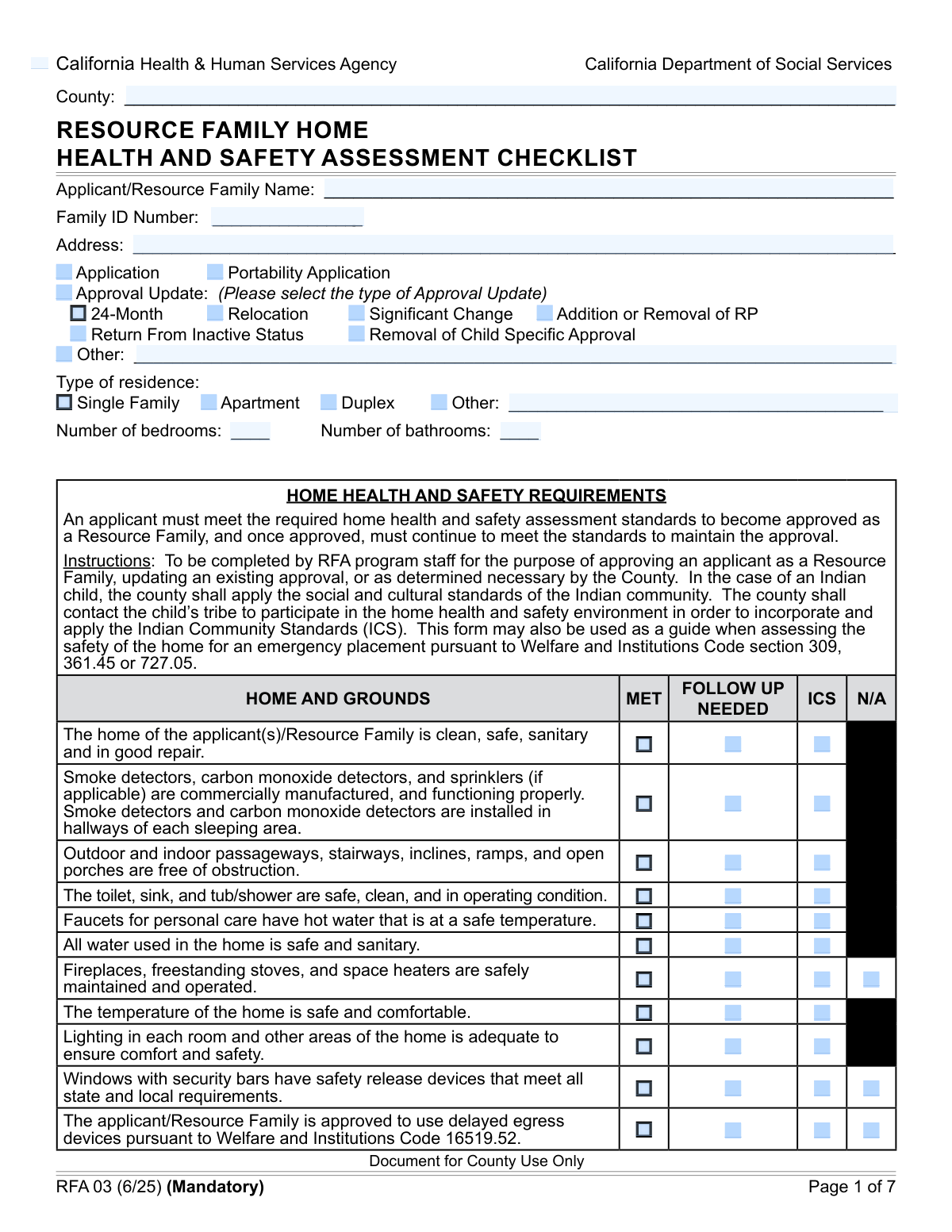
Form RFA 03, the Resource Family Home Health and Safety Assessment Checklist, is a detailed evaluation tool used by agencies to ensure a prospective resource family's home meets all required safety and health standards. It is a crucial part of the approval process, systematically verifying everything from fire safety and sanitation to appropriate sleeping arrangements and emergency preparedness to protect children and nonminor dependents. Today this form can be filled out quickly and accurately using AI-powered services like Instafill.ai, which can also convert non-fillable PDF versions into interactive fillable forms.
Our AI automatically handles information lookup, data retrieval, formatting, and form filling.
It takes less than a minute to fill out RFA 03 using our AI form filling.
Securely upload your data. Information is encrypted in transit and deleted immediately after the form is filled out.
Form specifications
| Form name: | RFA 03, Resource Family Home Health and Safety Assessment Checklist |
| Number of fields: | 241 |
| Number of pages: | 7 |
| Language: | English |
| Categories: | AFE forms, health forms, resource family forms |
Instafill Demo: How to fill out PDF forms in seconds with AI
How to Fill Out RFA 03 Online for Free in 2026
Are you looking to fill out a RFA 03 form online quickly and accurately? Instafill.ai offers the #1 AI-powered PDF filling software of 2026, allowing you to complete your RFA 03 form in just 37 seconds or less.
Follow these steps to fill out your RFA 03 form online using Instafill.ai:
- 1 Navigate to Instafill.ai and upload or select the RFA 03 form to begin.
- 2 Use the AI-powered interface to input the applicant/resource family's information, including name, address, and Family ID number.
- 3 Systematically complete the home assessment checklist, marking whether each standard (e.g., home condition, smoke detectors, plumbing) is met, needs follow-up, or meets Indian Community Standards (ICS).
- 4 Detail specific assessments for bedroom sharing arrangements, animal safety, storage of hazardous materials, and emergency preparedness, adding notes where necessary.
- 5 Document all assessment and follow-up dates, and if applicable, provide a summary of any Indian Community Standards applied in collaboration with a Tribal representative.
- 6 Review the completed checklist for accuracy and completeness, ensuring all required sections are filled.
- 7 The RFA program staff and the resource family applicant(s) can then digitally sign and date the form to certify the assessment findings and acknowledge receipt.
Our AI-powered system ensures each field is filled out correctly, reducing errors and saving you time.
Why Choose Instafill.ai for Your Fillable RFA 03 Form?
Speed
Complete your RFA 03 in as little as 37 seconds.
Up-to-Date
Always use the latest 2026 RFA 03 form version.
Cost-effective
No need to hire expensive lawyers.
Accuracy
Our AI performs 10 compliance checks to ensure your form is error-free.
Security
Your personal information is protected with bank-level encryption.
Frequently Asked Questions About Form RFA 03
This form is a Home Health and Safety Assessment used to evaluate if a home meets the required standards for Resource Family Approval (RFA). It ensures a safe and suitable environment for children and nonminor dependents (NMDs) and is used for initial applications, reviews, and updates.
An RFA program staff member completes the assessment checklist during a home visit. The Resource Family applicant(s) then sign the form to acknowledge they have received a copy of the assessment report.
An 'Application' is for a new Resource Family. A 'Portability Application' is for a family transferring their existing approval from another agency. An 'Approval Update' is for current families reporting a change, such as a relocation or a 24-month review.
If an item is marked 'Follow Up Needed', it means the home did not meet that specific health or safety standard during the initial assessment. Corrective action is required, and a subsequent assessment will verify that the issue has been resolved.
'ICS' stands for Indian Community Standards. This option is used when the assessment is conducted in partnership with a Tribe, and their specific community standards for health and safety are being applied to the home evaluation.
Your pool, spa, or other body of water must be inaccessible to children. The form requires you to indicate the safety features used, such as an enclosure, a pool cover, or alarms, and confirm the pool is clean and maintained.
Firearms must be stored unloaded in a locked container or secured with an approved locking device. Ammunition must be stored separately from firearms in its own locked container.
Generally, children do not share a bedroom with an adult, and no more than four children of the same gender share a room. Exceptions can be made for siblings, young children, or with an approved plan for a child with special needs.
You will need to provide the full name of the applicant or Resource Family, your complete street address, the county you reside in, and your assigned Family ID Number.
The signed form becomes part of your official file for Resource Family Approval. If all standards are met, it helps finalize your approval; if follow-up is needed, it documents the required corrections for your home.
Yes, services like Instafill.ai use AI to help you accurately auto-fill your personal information fields, which can save time and reduce errors. This is helpful for preparing the applicant sections of the form before the assessor's visit.
You can use a service like Instafill.ai to easily fill out this form online. Simply upload the document, and the platform will make it interactive, allowing you to type directly into the fields and check the necessary boxes.
If you have a non-fillable or 'flat' PDF, you can upload it to Instafill.ai. The service's AI can convert it into an interactive, fillable form that you can complete, sign, and share from your computer or mobile device.
You should list all pets or animals that reside in the home. The assessor will use this information and their observations to evaluate whether the animals pose any health or safety risks to children.
This standard refers to a caregiver's ability to make careful, sensible decisions about a child's participation in age-appropriate activities, much like a parent would. It ensures children have opportunities for normal childhood experiences.
Compliance RFA 03
Validation Checks by Instafill.ai
1
Exclusive Selection of Application Purpose
This check verifies that the user has selected only one primary purpose for the form submission: 'Application', 'Portability Application', or 'Approval Update'. Selecting multiple options would create ambiguity in how the form is processed and routed. If more than one is selected, the system should display an error and require the user to choose a single, definitive purpose.
2
Conditional Requirement for 'Other' Text Fields
This validation ensures that if a user selects an 'Other' checkbox (e.g., 'Approval Update: Other', 'Type of Residence: Other'), the corresponding text field for details must be filled out. This is crucial for capturing necessary information that falls outside standard categories. Failure to provide this detail will result in an error message prompting the user to describe the 'Other' selection.
3
Mutually Exclusive Assessment Status
This validation rule ensures that for each safety and home assessment category (e.g., Home Condition, Plumbing Fixtures), only one status checkbox is selected from the available options like 'Met Standard', 'Follow Up Needed', or 'ICS'. A home cannot simultaneously meet the standard and need follow-up for the same item. An error will be triggered if multiple statuses are checked for a single assessment item, ensuring clear and non-contradictory results.
4
Consistent Family ID Number
This validation confirms that the 'Family ID Number' entered in different sections of the form is identical. Inconsistent IDs could lead to misfiling the report, associating it with the wrong family, or data corruption in the system. The check ensures data integrity by flagging any discrepancies and requiring the user to enter a single, consistent ID across the entire form.
5
Logical Date Sequence for Assessments
This check validates that a 'Requirements Met Date' is not before its corresponding 'Assessment Date'. It is logically impossible for requirements to be met before the assessment even took place. This rule prevents data entry errors and ensures the timeline of events is chronologically sound. If the met date precedes the assessment date, the user will be prompted to correct the dates.
6
Required Tribal Representative for ICS
This rule ensures that if any assessment item is marked as being evaluated under 'Indian Community Standards (ICS)', the information for the participating Tribal Representative must be provided. This is critical for compliance and maintaining a record of collaboration with the Tribe. If an 'ICS' box is checked but the 'Tribal Representative Name' field is empty, the form submission will be blocked until the required information is entered.
7
Mandatory Justification for Follow-Up
This rule requires the user to provide an explanation in a notes field whenever an assessment item is marked as 'Follow Up Needed'. Simply flagging an issue without context is insufficient for subsequent review and action. This validation ensures that every required follow-up action is accompanied by a descriptive note, facilitating clear communication and efficient resolution.
8
Logical Consistency for Firearms and Ammunition Storage
This check enforces consistency between the firearms and ammunition storage fields. If 'Firearms/Weapons Storage Not Applicable' is selected, it implies there are no firearms, and therefore 'Ammunition Storage N/A' must also be selected. This prevents contradictory information where a user indicates no firearms but provides details about ammunition storage. An error will prompt the user to align these selections.
9
Exclusive Final Assessment Outcome
This validation ensures a single, unambiguous final outcome for the home assessment is recorded. The user must select either 'Meets standards' or 'Does not meet standards', but not both or neither. This is the ultimate conclusion of the report, and any ambiguity would render the form's purpose moot. The system will require a single selection before allowing submission.
10
Valid and Present Signature Dates
This check verifies that all signature dates entered on the form are in a valid format (e.g., MM/DD/YYYY) and are not set in the future. A signature attests to an action on a specific day, which cannot be a day that has not yet occurred. This rule prevents typographical errors and ensures the legal and procedural integrity of the signed document.
11
Conditional Pool Safety Feature Specification
This validation is triggered if 'Pool Spa Accessibility Met' is checked. It ensures that at least one specific safety feature ('Enclosure', 'Pool Cover', or 'Alarms') is also selected to document how the standard is being met. This prevents incomplete safety documentation and ensures the method of compliance for a present pool or spa is explicitly recorded.
12
Valid Bedroom and Bathroom Count
This validation ensures that the values entered for 'Number of Bedrooms' and 'Number of Bathrooms' are valid, non-negative whole numbers. This prevents users from entering text, decimals, or negative numbers, which are nonsensical in this context. Maintaining clean, numeric data is essential for reporting and data analysis regarding housing capacity.
13
Required Applicant Identification
This validation ensures that fundamental identifying information for the applicant, including 'Applicant/Resource Family Name', 'County', and 'Address', is provided. This information is the primary key for identifying the subject of the assessment and is absolutely essential for the form to be processed. The system will not allow submission if these core fields are left blank.
14
Conditional RFA Standard Logic
This check ensures that the 'Reasonable and Prudent Parent Standard' and 'Responsibility for Providing Care and Supervision' sections are only filled if the 'Application' checkbox is 'No'. The field descriptions indicate these sections are not for initial applications. This validation prevents users from filling out irrelevant sections, reducing confusion and ensuring the data collected is appropriate for the submission type.
Common Mistakes in Completing RFA 03
Applicants often check a box for 'Other' (e.g., 'Type of Residence: Other' or 'Approval Update: Other') but fail to provide the required written details in the corresponding text field. This happens due to oversight or assuming the checkbox is sufficient. This omission leaves critical information missing, forcing reviewers to follow up and delaying the application process. To avoid this, always double-check that any 'Other' selection is accompanied by a clear, specific description in the space provided.
Users frequently make errors in the 'Approval Update' section by either checking a specific update type (e.g., 'Relocation', '24-Month') without selecting the main 'Approval Update' parent checkbox, or vice-versa. This creates a logical inconsistency that confuses the purpose of the submission. To prevent this, ensure that if the form is an approval update, you select both the main 'Approval Update' option and one of the specific sub-categories that applies to your situation.
When an applicant checks a 'Follow Up Needed' box for any of the numerous safety standards, they often forget to provide the necessary context or notes in the 'Assessment Record' or 'Notes/Comments' sections. This leaves the reviewer without information on what the issue is or what steps are being taken. This lack of detail requires a manual follow-up, delaying approval. Always provide clear, concise notes explaining why a follow-up is required whenever you select this option.
The 'ICS' option is frequently misunderstood. Applicants may select it without being in collaboration with a Tribe, or they select it correctly but then fail to complete the mandatory 'Tribal Representative Information' and 'Summary of Indian Community Standards' sections. This invalidates the ICS assessment and can cause significant processing delays. This option should only be used after direct consultation with a tribal partner, and all related fields must be filled out completely.
For sections like 'Firearms Storage' or 'Window Security Bars', applicants who don't have these items may leave the entire section blank instead of checking the 'Not Applicable' box. This creates ambiguity for the reviewer, who cannot be sure if the applicant forgot the section or if it genuinely does not apply. This forces a clarification request. To ensure clarity, always explicitly check 'Not Applicable' for any standard that does not apply to your home.
The 'Family ID Number' is requested in multiple locations throughout this multi-page form. It is a common data entry error for applicants to type the number differently on different pages or forget to fill it in on subsequent pages. This inconsistency can cause significant data matching issues in the agency's system, potentially delaying the processing of the entire file. Using an AI-powered tool like Instafill.ai can prevent this by auto-populating recurring fields consistently across the document.
The form contains very specific and complex rules for bedroom sharing, with exceptions for age, gender, and sibling relationships. Applicants often misinterpret these rules, leading to an incorrect assessment of their living situation. This can result in a 'Follow Up Needed' status or even a denial if the arrangement is non-compliant. Carefully read all notes and exceptions for each bedroom sharing scenario before making a selection.
When an applicant indicates a pool or spa is present and that it 'Met' accessibility standards, they are required to check the specific safety features in use ('Enclosure', 'Pool Cover', 'Alarms'). A common mistake is to check 'Pool Spa Accessibility Met' but then neglect to select any of the corresponding feature checkboxes. This incomplete information requires a follow-up to verify compliance with safety regulations. Always specify the exact safety measures in place.
A form of this importance requires signatures from multiple parties (RFA Staff, Applicant 1, Applicant 2, etc.), each with a corresponding date. It is extremely common for one or more signatures or dates to be missing, which renders the document incomplete and legally non-binding. This is often the final hurdle that causes a submission to be rejected. Always perform a final review of all signature blocks before submitting the form to ensure every required line is signed and dated.
Within a single assessment standard, such as 'Home Condition', applicants sometimes accidentally check both 'Met Standard' and 'Follow Up Needed'. This creates a direct logical conflict that the system or reviewer cannot resolve without manual intervention. This error often happens due to haste or mis-clicking. To avoid this, carefully review each standard and select only one status: 'Met Standard', 'Follow Up Needed', or another applicable option like 'ICS' or 'N/A'.
Saved over 80 hours a year
“I was never sure if my IRS forms like W-9 were filled correctly. Now, I can complete the forms accurately without any external help.”
Kevin Martin Green
Your data stays secure with advanced protection from Instafill and our subprocessors

Robust compliance program
Transparent business model
You’re not the product. You always know where your data is and what it is processed for.
ISO 27001, HIPAA, and GDPR
Our subprocesses adhere to multiple compliance standards, including but not limited to ISO 27001, HIPAA, and GDPR.
Security & privacy by design
We consider security and privacy from the initial design phase of any new service or functionality. It’s not an afterthought, it’s built-in, including support for two-factor authentication (2FA) to further protect your account.
Fill out RFA 03 with Instafill.ai
Worried about filling PDFs wrong? Instafill securely fills rfa-03-resource-family-home-health-and-safety-assessment-checklist forms, ensuring each field is accurate.