Yes! You can use AI to fill out Pharmaceutical Benefits Scheme (PBS) Safety Net application and amendment for a PBS Safety Net card form

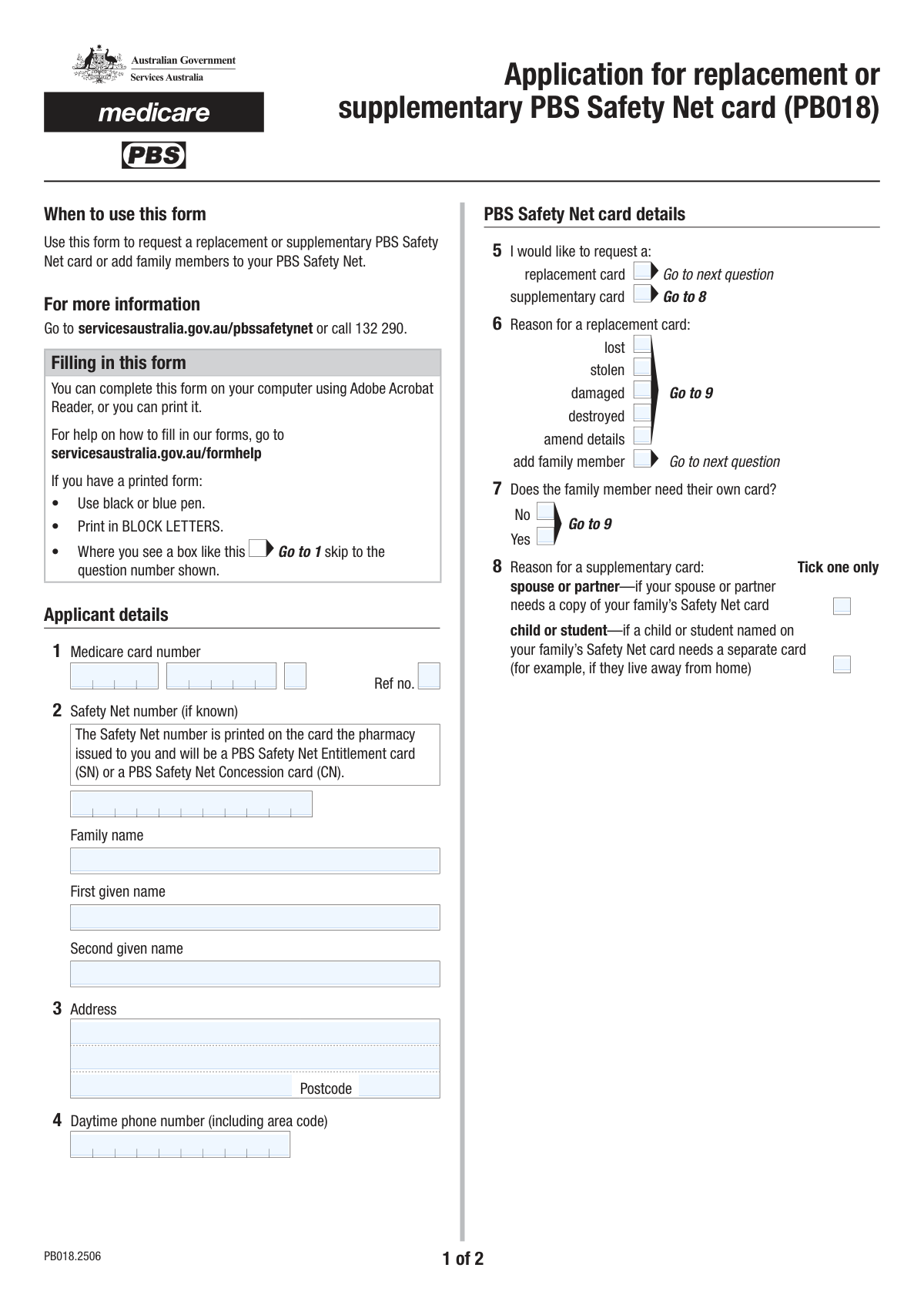
Form PB241 is an official Australian government document for managing a Pharmaceutical Benefits Scheme (PBS) Safety Net card. It is used to apply for a new card, request a replacement for a lost or damaged one, or update family details to combine prescription costs. This is important for reaching the Safety Net threshold sooner, which reduces the cost of medicines for the rest of the year. Today this form can be filled out quickly and accurately using AI-powered services like Instafill.ai, which can also convert non-fillable PDF versions into interactive fillable forms.
PB241 is part of the AFE forms, benefit forms and CAR forms categories on Instafill.
Our AI automatically handles information lookup, data retrieval, formatting, and form filling.
It takes less than a minute to fill out PB241 using our AI form filling.
Securely upload your data. Information is encrypted in transit and deleted immediately after the form is filled out.

Form specifications

Form name: Pharmaceutical Benefits Scheme (PBS) Safety Net application and amendment for a PBS Safety Net card form
Number of fields: 83
Number of pages: 2
Filled form examples: Form PB241 Examples
Language: English
main-image

Instafill Demo: How to fill out PDF forms in seconds with AI

How to Fill Out PB241 Online for Free in 2026

Are you looking to fill out a PB241 form online quickly and accurately? Instafill.ai offers the #1 AI-powered PDF filling software of 2026, allowing you to complete your PB241 form in just 37 seconds or less.
Follow these steps to fill out your PB241 form online using Instafill.ai:
  1. 1 Navigate to Instafill.ai and upload the PB241 form or select it from the template library.
  2. 2 Provide your personal details, including your name, address, contact information, and Medicare card number when prompted by the AI assistant.
  3. 3 Specify the purpose of your application by selecting whether you need a replacement or supplementary card and the reason for the request.
  4. 4 If adding family members, enter their personal details, including names, Medicare numbers, and dates of birth, into the designated sections.
  5. 5 Review all the information pre-filled by the AI to ensure accuracy, then provide your digital signature and the current date.
  6. 6 Download the completed form and submit it to Services Australia as per the official instructions.

Our AI-powered system ensures each field is filled out correctly, reducing errors and saving you time.

Why Choose Instafill.ai for Your Fillable PB241 Form?

Speed

Complete your PB241 in as little as 37 seconds.

Up-to-Date

Always use the latest 2026 PB241 form version.

Cost-effective

No need to hire expensive lawyers.

Accuracy

Our AI performs 10 compliance checks to ensure your form is error-free.

Security

Your personal information is protected with bank-level encryption.

Frequently Asked Questions About Form PB241

This form is used to manage your PBS Safety Net card. You can use it to request a replacement card, get a supplementary card for a family member, or add new family members to your Safety Net record.

Any individual who holds a PBS Safety Net card and needs to replace it, amend details, or request an additional card for a spouse, partner, or dependent child should complete this form.

You will need your Medicare card, your PBS Safety Net number, and the personal details for any family members you are adding, including their full name, Medicare card number, and date of birth.

Your PBS Safety Net number is printed on your current PBS Safety Net Entitlement card (SN) or PBS Safety Net Concession card (CN).

A 'replacement card' is for when your original card is lost, stolen, or damaged. A 'supplementary card' is an extra copy of the family's card for a specific member, like a spouse or a child living away from home.

You should check the box for 'Replacement card' under the 'Request Type' section, and then check the 'Stolen' box under the 'Reason for Replacement Card' section.

Check the 'Supplementary card' box and then select the 'Child or Student' option. You must also fill in your child's details in the 'Family Member Details' section of the form.

The relationship code is a short code that identifies the family member's relationship to the primary cardholder (e.g., spouse, dependent child). The form's instructions should provide a list of codes to use.

Yes, for each family member being added or listed, you must provide their complete Medicare card number, including the individual reference number that appears next to their name on the card.

Submission instructions are typically provided separately from the form itself. Generally, you can mail the completed form or submit it in person at a designated service centre.

Yes, you can use AI-powered services like Instafill.ai to help fill out this form. These tools can auto-fill your information accurately, saving you time and helping to prevent errors.

Simply upload the form to the Instafill.ai platform. The service will make the form fillable online, and you can use its AI capabilities to automatically populate your saved personal information into the correct fields.

If you have a non-fillable PDF, you can use a tool like Instafill.ai. It can convert flat PDFs into interactive, fillable forms, allowing you to type your answers directly onto the document.

Compliance PB241
Validation Checks by Instafill.ai

1
Medicare Number Structure Validation
Checks that the combined Medicare Card Number parts (Part 1, 2, 3) for the applicant and any family members form a valid 10-digit number. This is crucial for correctly identifying individuals in the Medicare system. If the number is malformed, the application cannot be processed and will be rejected, causing delays.
2
Applicant Name Completeness
Verifies that both the 'Family Name' and 'First Given Name' fields for the primary applicant are filled. These fields are fundamental for identifying the individual applying for the card. A submission without a complete name is invalid and cannot be used to issue or update any records.
3
Address Completeness and Postcode Format
Ensures that 'Address Line 1' and 'Postcode' are provided. It also validates that the 'Postcode' field contains a 4-digit number, consistent with standard Australian postcode format. This is critical for mailability and ensuring the applicant receives their card without delay.
4
Conditional Replacement Reason Required
Ensures that if the 'Replacement card' checkbox is selected, at least one of the corresponding 'Reason for Replacement Card' options (e.g., Lost, Stolen, Damaged) is also selected. This logic is vital for understanding the context of the replacement request for processing and record-keeping. Failure to provide a reason will result in an incomplete and un-processable request.
5
Conditional Supplementary Reason Required
Validates that if the 'Supplementary card' checkbox is selected, a 'Reason for Supplementary Card' (e.g., Spouse or Partner, Child or Student) is also chosen. This information is necessary to determine eligibility and the type of supplementary card to issue. Without this reason, the request is ambiguous and will be flagged for clarification.
6
Family Member Record Integrity
Checks that if any information is entered for a family member (e.g., Family Member 1 Name), then all required fields for that family member (First Name, DOB, full Medicare Number) are also complete. This prevents partial, unusable data from being submitted. An incomplete family member record would require manual follow-up and delay the application.
7
Valid Past Date of Birth
Verifies that the Date of Birth (Day, Month, Year) provided for each family member constitutes a valid calendar date that is not in the future. This check prevents data entry errors like 'April 31st' or a birth year of '2050'. An invalid DOB would lead to rejection by the backend system and is a critical piece of identity verification.
8
Valid Signature Date
Confirms that the 'Signature Date' (Day, Month, Year) is a valid calendar date and is not set to a future date. The signature date legally attests to when the form was completed and signed. A future date is logically impossible and would invalidate the declaration, requiring the form to be re-signed.
9
Daytime Phone Number Format
Checks that the 'Daytime Phone Number' is a valid Australian phone number, including the area code (e.g., 10 digits for landlines and mobiles). This is important so that the processing authority can contact the applicant if there are any issues with their application. An invalid number would hinder communication and problem resolution.
10
Relationship Code Validity
Ensures the 'Relationship Code' provided for each family member is from a predefined list of valid codes (e.g., 'SP', 'DC', 'DS'). This code is essential for establishing the correct family structure within the Safety Net system. An invalid code would cause a processing error and require manual correction.
11
Signature Presence Check
Verifies that the 'Applicant Signature' field is not empty and contains data representing a signature. A signature is a legal requirement that confirms the applicant's consent and the accuracy of the provided information. Forms submitted without a signature are legally incomplete and will be rejected immediately.
12
Mutually Exclusive Request Reasons
This validation ensures that only one 'Reason for Replacement Card' can be selected at a time (e.g., a card cannot be both 'Lost' and 'Stolen'). This prevents conflicting data and ensures the request is clear and unambiguous for processing. If multiple reasons are selected, the form should prompt the user to choose only the most applicable one.
13
Request Type Selection
Validates that at least one of the main request types, 'Replacement card' or 'Supplementary card', has been selected. The primary purpose of the form is to fulfill one of these requests. A submission with neither selected is an empty request and cannot be processed, requiring it to be returned to the applicant.

Common Mistakes in Completing PB241

Incorrectly Transcribing Medicare Card Numbers

The form requires the Medicare number to be entered in four separate parts, including the individual reference number. People often make transcription errors, swap the order of the parts, or miss a digit, especially when entering numbers for multiple family members. An incorrect Medicare number will cause a data mismatch and lead to the immediate rejection or significant delay of the application. To avoid this, carefully check each number against the physical card before submission. AI-powered tools like Instafill.ai can help by storing your details securely and auto-filling them correctly every time, reducing the risk of manual entry errors.

Inconsistent Request Type and Reason Selection

The form uses conditional logic where a reason for a card (e.g., 'Lost', 'Stolen') should only be selected if a request type ('Replacement card' or 'Supplementary card') is also checked. Applicants frequently check a reason without selecting the corresponding request type, or vice versa. This creates an ambiguous request that cannot be processed, forcing the agency to return the form for correction. Always ensure that if you select a reason, you have also selected the primary request type it relates to.

Leaving Family Member Sections Incomplete

When adding multiple family members, it is easy to miss a field in the repetitive sections, such as a date of birth, Medicare reference number, or relationship code. Each family member's record must be complete for them to be correctly added or updated on the PBS Safety Net card. An incomplete entry for even one member can halt the processing for the entire family. It's crucial to review each family member's section row by row to ensure all required information is provided.

Using Incorrect or Missing Relationship Codes

The form asks for a 'Relationship Code' (e.g., SP, DC, DS) for each family member without always providing a clear key on the form itself. Applicants may leave this field blank, guess the code, or write out the full relationship (e.g., "Spouse"), which can cause data entry errors on the processing side. This mistake can lead to incorrect family linking or require the processing agent to contact you for clarification, delaying your application. Always refer to the form's instructions to find the correct codes; if they are missing, contact the issuing agency for guidance.

Address Formatting Errors in Split Fields

The address is split into 'Address Line 1', 'Address Line 2', and 'Postcode', which often causes confusion. People may incorrectly place their suburb or unit number in the wrong line, or combine them in a way that automated systems cannot read. This can result in mail, including the new card, being returned as undeliverable. A good practice is to put the street number and name on Line 1, the apartment/unit number on Line 2, and ensure the suburb and postcode are in their dedicated fields.

Confusing Applicant and Family Member Medicare Details

When filling out details for multiple family members, applicants sometimes accidentally enter their own Medicare number or reference number in a field meant for their spouse or child. This is especially common in long, repetitive sections where focus can wane. This error creates a critical data conflict that will be flagged during verification, causing the application to be rejected. To prevent this, complete one person's information at a time and cross-reference with each individual's Medicare card as you go.

Forgetting to Sign or Date the Application

An unsigned or undated form is legally invalid and is one of the most common reasons for immediate rejection. Applicants often focus on filling out the complex details and simply forget to complete the final signature and date section at the end. This oversight means the entire form must be returned, signed, and resubmitted, restarting the application process. Always perform a final check specifically for the signature and date fields before submitting any form.

Incorrect Date Formatting in Separated Fields

The form separates dates (both Date of Birth and Signature Date) into individual Day, Month, and Year fields. Users often enter dates in the wrong format, such as using a single digit for the day/month (e.g., '7' instead of '07') or a two-digit year instead of four ('24' instead of '2024'). This can lead to data entry errors or ambiguity, particularly with dates of birth. To avoid this, use the DD/MM/YYYY format consistently and ensure the year is always four digits.

Confusing the PBS Safety Net Number with the Medicare Number

The form asks for both a 'Medicare Card Number' and a 'Safety Net Number'. These are two distinct numbers, but applicants sometimes mistakenly enter their Medicare number in the Safety Net field or leave it blank if they are unsure. The Safety Net number is found on a separate PBS Safety Net card (SN or CN) and is essential for linking your family's medicine costs. Entering the wrong number or leaving it blank can prevent your family from being correctly registered for the Safety Net.

Submitting a Form with Illegible Handwriting

If the form is printed and filled out by hand, poor handwriting can make critical information like names and numbers impossible for data entry staff to read accurately. This can lead to errors, rejection, or delays while the agency clarifies the information. To prevent this, print clearly in block letters. If the form is a non-fillable PDF, a service like Instafill.ai can convert it into an interactive, fillable form, eliminating handwriting issues entirely.
Saved over 80 hours a year

“I was never sure if my IRS forms like W-9 were filled correctly. Now, I can complete the forms accurately without any external help.”

Kevin Martin Green

Your data stays secure with advanced protection from Instafill and our subprocessors

Robust compliance program

Transparent business model

You’re not the product. You always know where your data is and what it is processed for.

ISO 27001, HIPAA, and GDPR

Our subprocesses adhere to multiple compliance standards, including but not limited to ISO 27001, HIPAA, and GDPR.

Security & privacy by design

We consider security and privacy from the initial design phase of any new service or functionality. It’s not an afterthought, it’s built-in, including support for two-factor authentication (2FA) to further protect your account.

Fill out PB241 with Instafill.ai

Worried about filling PDFs wrong? Instafill securely fills pharmaceutical-benefits-scheme-pbs-safety-net-application-and-amendment-for-a-pbs-safety-net-card-form forms, ensuring each field is accurate.