
Yes! You can use AI to fill out Foot Conditions, Including Flatfoot (Pes Planus) Disability Benefits Questionnaire
Don't type 790 fields by hand. Tell our AI about yourself, or upload a document you already have, and it fills every field in seconds. You check it, then download, print or sign.
The AI does the filling. You just check it.
No typing into boxes, nothing to install.
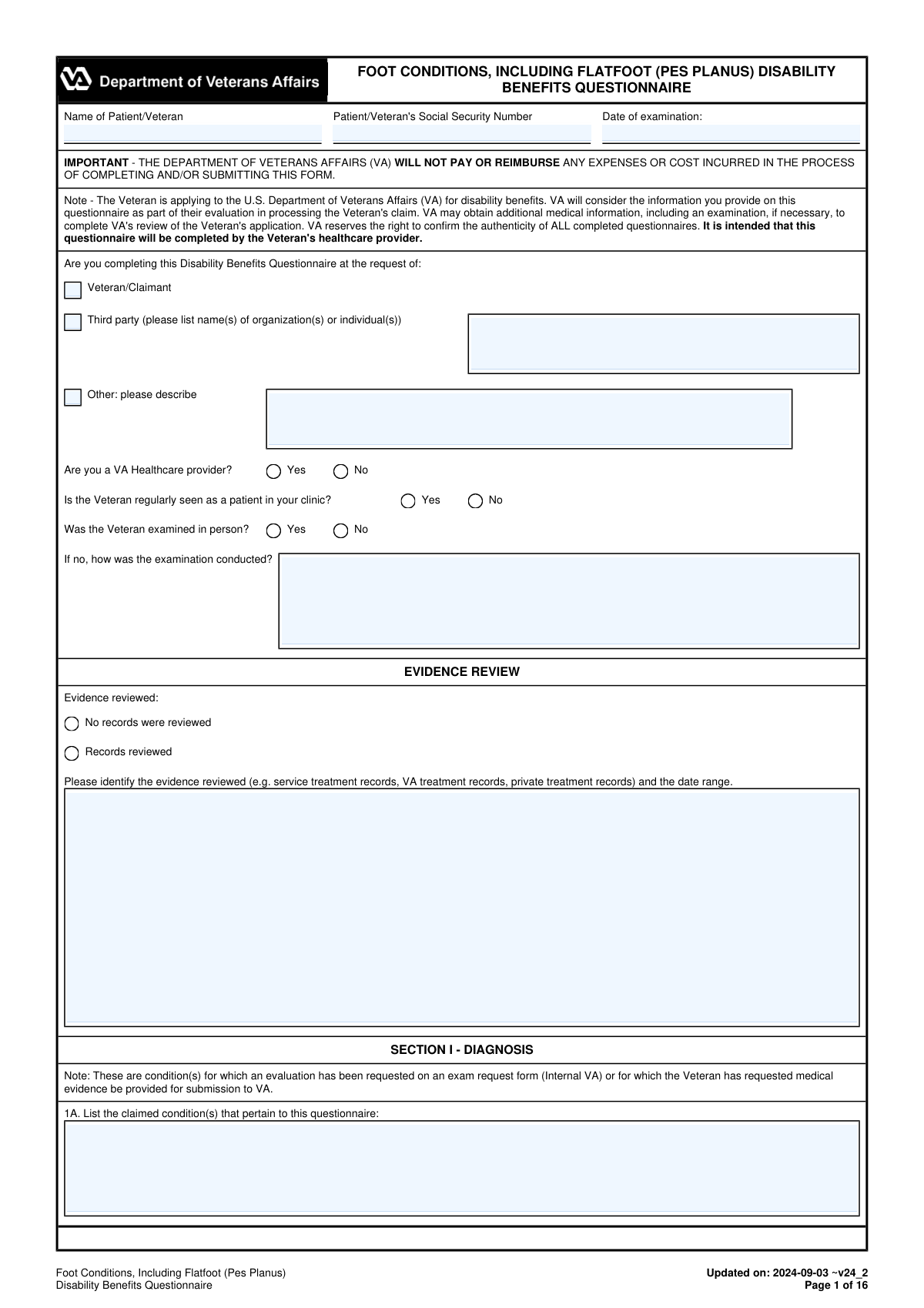
What this form asks for
The AI fills all of it, from your answers or your documents.
The AI checks your answers before you download
16 checks built for this form, so a wrong date or a missing answer is caught before anyone else sees it.
Validates that the Patient/Veteran name and Social Security Number (SSN) fields are not blank and that the SSN matches an accepted format (e.g., 9 digits with optional dashes). This is critical to correctly associate the DBQ with the right claimant and prevent misfiling into another Veteran’s record. If validation fails, the submission should be rejected or routed to manual review with a clear error indicating which identifier is missing/invalid.
Checks that 'Date of examination' and 'Date Signed' are present and parseable as valid calendar dates (MM/DD/YYYY or system-approved format). Also verifies that the signature date is on or after the examination date and not in the future beyond an allowed tolerance. If the dates are invalid or inconsistent, the form should be flagged because it undermines the legal/clinical validity of the attestation and exam timing.
Ensures exactly one requester type is selected (Veteran/Claimant, Third party, or Other) and that required follow-up text is provided when applicable. If 'Third party' is selected, at least one organization/individual name must be entered; if 'Other' is selected, a description must be provided. If validation fails, the submission should be blocked because the request context affects authorization, provenance, and downstream processing.
Validates that 'Was the Veteran examined in person?' is answered, and if 'No' is selected, the 'how was the examination conducted?' field is completed with a meaningful method (e.g., telehealth, records review only). This is important because certain findings may require physical examination and VA may weigh evidence differently based on exam modality. If missing, the form should be returned for completion or flagged for adjudicator review.
Checks that the evidence review section is internally consistent: either 'No records were reviewed' is selected or 'Records reviewed' is selected, but not both. If 'Records reviewed' is selected, the evidence types and a date range must be provided (start and end dates, or a clearly stated single date). If validation fails, the submission should be flagged because the basis for medical opinions and diagnosis dating becomes unclear.
Ensures 1A (claimed conditions) is not blank and that the claimed conditions reasonably map to at least one diagnosis selection in 1B or an explicit statement that no current diagnosis exists. This prevents submissions where the DBQ is completed without specifying what is being evaluated. If the claimed conditions are missing or do not align with the diagnosis section, the form should be rejected or routed to manual review.
And 10 more checks
- Diagnosis Selection Mutual Exclusivity (No Diagnosis vs. Any Diagnosis)
- Diagnosis Detail Completeness: Side Affected, ICD Code, and Date of Diagnosis
- Conditional Narrative Requirements for Yes/No Questions (Pain, Flare-ups, Functional Loss)
- Side-Affected Required When a Symptom/Sign Is Marked Present
- Orthopedic Shoes/Appliances Improvement Fields Must Match Trigger Conditions
- Plantar Fasciitis Treatment Pathway Consistency (Non-surgical vs Surgical vs Recommended)
- Hallux Valgus Surgery Details Required When Surgery Is Yes
- Foot Surgery Section XII Completeness and Residuals Dependency
- Pain on Physical Exam vs. Reported Pain Rationale Requirement
- Examiner Credentialing and Contact Information Format Validation (NPI, License, Phone/Fax)
Let AI fill out your VA DBQ (Foot Conditions/Flatfoot)
No typing. Every field filled in seconds, checked, ready to sign.
How to Fill Out VA DBQ (Foot Conditions/Flatfoot) Online for Free in 2026
What the AI walks you through.
- Enter Veteran/patient identifiers and exam details (name, SSN, date of examination) and indicate who requested the DBQ and whether the exam was in person.
- Complete the Evidence Review section by listing which records were reviewed (service, VA, private) and the applicable date ranges.
- Fill out Section I (Diagnosis) by selecting all applicable foot diagnoses, specifying side affected, ICD codes (if available), and dates of diagnosis; add any additional diagnoses as needed.
- Complete the Medical History section by summarizing onset/course, documenting pain, flare-ups, and any reported functional loss in the Veteran’s own words.
- Work through the condition-specific sections (e.g., Flatfoot, Plantar Fasciitis, Morton’s Neuroma/Metatarsalgia, Hammer Toes, Hallux Valgus/Rigidus, Pes Cavus, Malunion/Nonunion, Other Foot Injuries) and answer all symptom/severity and side-affected questions that apply.
- Document pain findings, functional loss factors, assistive devices, remaining effective function, diagnostic testing/imaging results, and occupational functional impact, adding comments/remarks where clarification is needed.
- Complete the examiner certification and signature block (printed name/title, specialty, date signed, contact info, NPI, license details, and address) and generate a final review copy for submission to VA.
Common Mistakes in Completing VA DBQ (Foot Conditions/Flatfoot)
The ones the AI is built to catch.
Missing patient identifiers and exam date
Not indicating who requested the DBQ (Veteran vs third party vs other)
Inconsistent answers about in-person examination and evidence review
Selecting a diagnosis without completing the corresponding sections
Side mismatch (Right/Left/Both) across the form
Leaving ICD codes and diagnosis dates blank or using non-specific dates
Contradictory pain reporting between history and physical exam
Incomplete flare-up and repeated-use functional loss details
Misunderstanding arch supports/orthotics questions (relief vs tried)
Not documenting treatment history details for plantar fasciitis and surgeries
Failing to confirm arthritis with imaging or not listing imaging results
Missing examiner certification details (signature, credentials, NPI, license, address)
Frequently Asked Questions About VA DBQ (Foot Conditions/Flatfoot)
Is it really free for 7 days?
Can I fill other forms too?
How do I cancel?
How does the AI fill out VA DBQ (Foot Conditions/Flatfoot)?
What happens to my information?
How complex is VA DBQ (Foot Conditions/Flatfoot) to fill out?
What is the Foot Conditions (Including Flatfoot/Pes Planus) Disability Benefits Questionnaire (DBQ) used for?
Who is supposed to complete this DBQ—the Veteran or a medical provider?
Will VA pay my doctor or reimburse costs for completing this form?
Does the exam have to be done in person?
What records should the examiner review and list in the Evidence Review section?
What diagnoses can be documented on this DBQ?
How do we indicate whether the condition affects the right foot, left foot, or both?
What should be included in the Medical History section about pain, flare-ups, and functional loss?
In the Flatfoot (Pes Planus) section, what does “pain accentuated on use/manipulation” mean?
How should arch supports or built-up shoes be documented for flatfoot?
What information is needed for plantar fasciitis treatment history?
Do X-rays or imaging studies have to be done for this DBQ?
How is “functional loss” evaluated on this DBQ?
What if the Veteran reports pain but the examiner does not find pain on physical exam?
What does the question about “amputation with prosthesis would equally serve the Veteran” mean?
Get your VA DBQ (Foot Conditions/Flatfoot) filled out by AI
$0 today. Cancel before Nov 1 and you pay nothing.
Other forms like this one
disability forms: Form SSA-3368-BK, Disability Report - Adult, Form SSA-16, Application for Disability Benefits, Form SSA-3820-BK, Disability Report - Child, Form SSA-454-BK, Continuing Disability Review, Form 21-526EZ, Application for Disability Compensation, Form N-648, Medical Certification for Disability Exceptions, Form DBQ, Knee and Lower Leg Disability Benefits, Form DBQ, Heart Conditions Disability Benefits, Form DBQ, Hypertension Disability Benefits, Form DBQ, Scars/Disfigurement Disability Benefits, Form DBQ, Diabetes Mellitus Disability Benefits Questionnaire, Form DBQ, Endocrine Diseases Disability Benefits, Form DBQ, Diabetes Mellitus Disability Benefits Questionnaire, Back (Thoracolumbar Spine) Conditions Disability Benefits Questionnaire, Ankle Conditions Disability Benefits Questionnaire, Back (Thoracolumbar Spine) Conditions Disability Benefits Questionnaire, Elbow and Forearm Conditions Disability Benefits Questionnaire, Hip and Thigh Conditions Disability Benefits Questionnaire, Knee and Lower Leg Disability Benefits Questionnaire, Neck (Cervical Spine) Conditions Disability Benefits Questionnaire
benefit forms: Form SSA-16, Application for Disability Benefits, Form SSA-1-BK, Application for Retirement Benefits, Form SSA-2-BK, Application for Spouse's Benefits, Form SSA-4-BK, Application for Child's Insurance Benefits, Form SSA-10, Application for Widow's or Widower's Insurance Benefits, Form SSA-10, Widow's or Widower's Benefits, Form SSA-4-BK, Application for Social Security Benefits, Form SSA-5-BK, Application for Mother's or Father's Benefits, Form DBQ, Knee and Lower Leg Disability Benefits, Form DBQ, Heart Conditions Disability Benefits, Form DBQ, Hypertension Disability Benefits, Form DBQ, Scars/Disfigurement Disability Benefits, Form DBQ, Diabetes Mellitus Disability Benefits Questionnaire, Form DBQ, Endocrine Diseases Disability Benefits, Form DBQ, Diabetes Mellitus Disability Benefits Questionnaire, Back (Thoracolumbar Spine) Conditions Disability Benefits Questionnaire, Ankle Conditions Disability Benefits Questionnaire, Back (Thoracolumbar Spine) Conditions Disability Benefits Questionnaire, Elbow and Forearm Conditions Disability Benefits Questionnaire, Hip and Thigh Conditions Disability Benefits Questionnaire
benefit plan forms: Form 5500, Annual Return/Report of Employee Benefit Plan, Fidelity NetBenefits Auditor's Guide: An Overview of Fidelity's 2024 Plan Year Reporting Package, New York State Deferred Compensation Plan Benefit Distribution Request, Form 5500, Annual Return/Report of Employee Benefit Plan, Form SC ISP-1300, Canada Pension Plan Survivor's Pension and Surviving Child's Benefit Application, SC ISP-2519, Medical Report for Canada Pension Plan Disability Benefits (2025-05-08), SC ISP-2519, Medical Report for Canada Pension Plan Disability Benefits (2024-05-17), Fidelity Plan-to-Plan Direct Rollover Form, Plan-to-Plan Direct Rollover Form
disability benefits forms: Form SSA-769, Request for Change in Time/Place of Disability Hearing, Form SSA-16, Application for Disability Benefits, Form DBQ, Knee and Lower Leg Disability Benefits, Form DBQ, Heart Conditions Disability Benefits, Form DBQ, Hypertension Disability Benefits, Form DBQ, Scars/Disfigurement Disability Benefits, Form DBQ, Diabetes Mellitus Disability Benefits Questionnaire, Form DBQ, Endocrine Diseases Disability Benefits, Back (Thoracolumbar Spine) Conditions Disability Benefits Questionnaire, Ankle Conditions Disability Benefits Questionnaire, Back (Thoracolumbar Spine) Conditions Disability Benefits Questionnaire, Elbow and Forearm Conditions Disability Benefits Questionnaire, Hip and Thigh Conditions Disability Benefits Questionnaire, Knee and Lower Leg Disability Benefits Questionnaire, Neck (Cervical Spine) Conditions Disability Benefits Questionnaire, Shoulder and Arm Conditions Disability Benefits Questionnaire, Wrist Conditions Disability Benefits Questionnaire (DBQ), Back (Thoracolumbar Spine) Conditions Disability Benefits Questionnaire, Back (Thoracolumbar Spine) Conditions Disability Benefits Questionnaire, Ankle Conditions Disability Benefits Questionnaire (DBQ)
Let AI fill out your VA DBQ (Foot Conditions/Flatfoot)
Your trial starts once a card is added. You pay nothing before Nov 1.
Our AI already knows this form, all 790 fields of it. Skip the typing: tell it about yourself, or upload what you have, and it fills the whole form in seconds.
- AI fills every field on all 16 pages, tables and checkboxes included
- No typing into boxes: answer a few questions, or upload a document you already have, an old copy of this form, a photo of a document
- The AI checks the answers; you review and change anything before you download
- Download the finished PDF, print it, or sign it online
- Encrypted, and never used to train AI
Cancel before Nov 1 and you pay nothing.
A card is needed to start the trial. Cancel in two clicks from your account.
Terms · Privacy