
Yes! You can use AI to fill out Form 79, Law Enforcement Officers Safety Act Application
Don't type 75 fields by hand. Tell our AI about yourself, or upload a document you already have, and it fills every field in seconds. You check it, then download, print or sign.
The AI does the filling. You just check it.
No typing into boxes, nothing to install.
What this form asks for
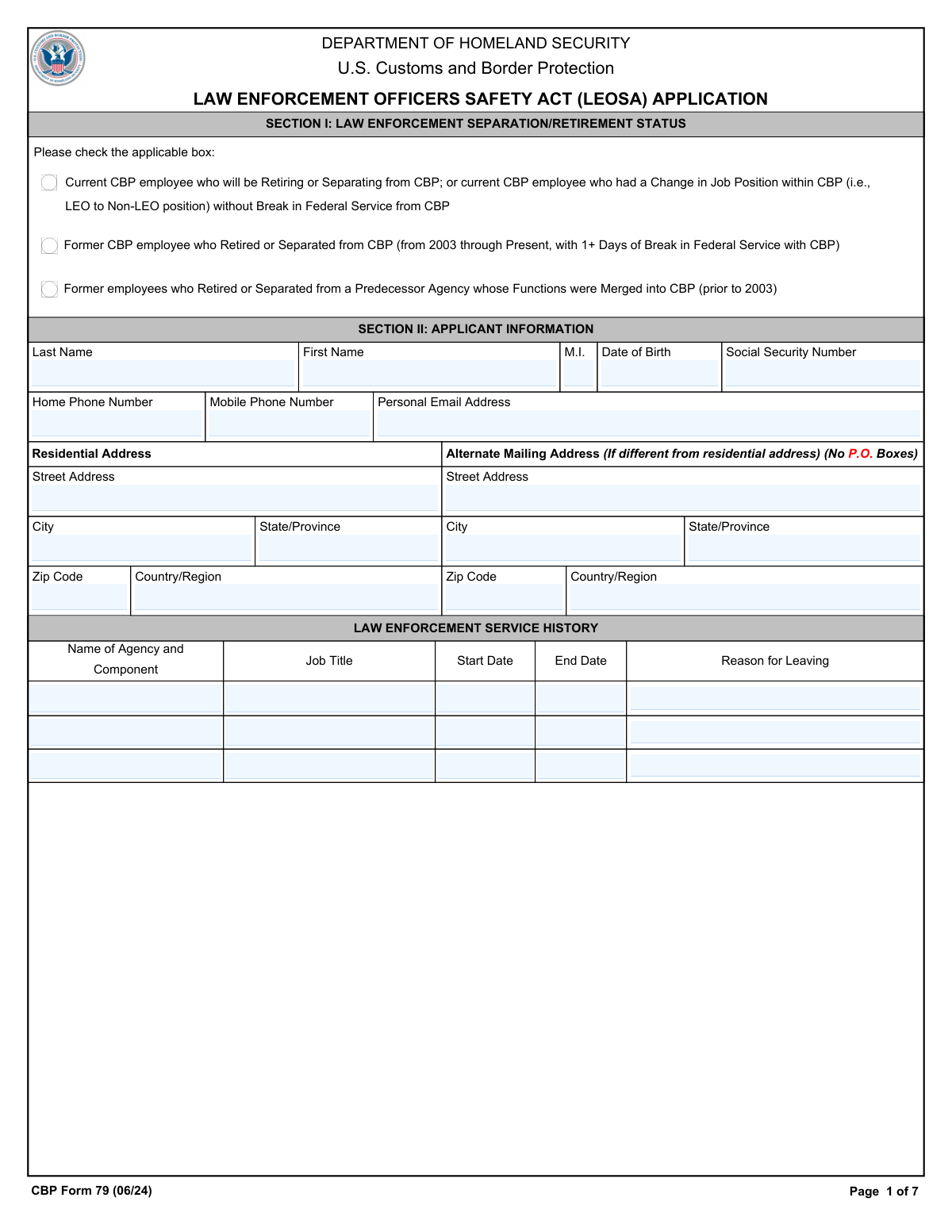
The AI fills all of it, from your answers or your documents.
The AI checks your answers before you download
15 checks built for this form, so a wrong date or a missing answer is caught before anyone else sees it.
This validation check ensures that the applicant has accurately indicated their Law Enforcement Separation or Retirement Status by selecting the correct option in Section I. It confirms that the selection aligns with the applicant's current status, which is crucial for the processing of the application. The check verifies that no boxes are left unchecked, as this could lead to delays or complications in the application review process. By enforcing this requirement, the software helps maintain the integrity of the application data.
This validation check verifies that all personal details provided in Section II are complete and accurate. It ensures that the Last Name, First Name, Middle Initial, Date of Birth, and Social Security Number are filled out correctly, as these details are essential for identity verification. The software cross-references the format and completeness of each field to prevent any errors that could hinder the application process. By confirming these details, the software enhances the reliability of the applicant's information.
This validation check ensures that the applicant has provided a valid residential address in Section II, explicitly prohibiting the use of a P.O. Box. It verifies that the address is a physical location, which is necessary for the proper identification and verification of the applicant. The software checks the format of the address to confirm that it meets the required standards for residential addresses. By enforcing this rule, the software helps to ensure that all communications and verifications can be conducted effectively.
This validation check verifies that the applicant has entered both a valid Home Phone Number and a Mobile Phone Number in Section II. It ensures that the numbers are formatted correctly and are capable of receiving calls, which is essential for communication regarding the application. The software checks for the presence of both numbers, as having multiple contact methods enhances the ability to reach the applicant if needed. By confirming these details, the software helps facilitate timely communication throughout the application process.
This validation check ensures that if an Alternate Mailing Address is provided, it must be distinct from the residential address and cannot include a P.O. Box. It verifies that the alternate address is a legitimate physical location, which is important for accurate correspondence. The software checks for any similarities between the residential and alternate addresses to prevent confusion in mail delivery. By enforcing this requirement, the software helps maintain clear and effective communication channels.
This validation check ensures that the applicant has accurately filled out their Law Enforcement Service History. It verifies that all required details are included, such as country/region, state/province, city, street address, and zip code. By confirming the completeness of this information, the check helps to establish the applicant's eligibility under the Law Enforcement Officers Safety Act. Any missing or incorrect details could lead to delays or denials in the application process.
And 9 more checks
- Self Attestation Initials
- Pending Actions Verification
- Substance Influence Check
- Applicant Acknowledgment Signature
- Validates that the witness signature is provided by a current CBP supervisor or a Notary Public
- Confirms that the applicant has reviewed the Privacy Act Statement
- Ensures that all required documents are gathered and submitted
- Validates that the application package is submitted via the correct method
- Checks that the applicant understands the process for obtaining a replacement for lost or damaged identification
Let AI fill out your Form 79
No typing. Every field filled in seconds, checked, ready to sign.
Common Mistakes in Completing Form 79
The ones the AI is built to catch.
Not checking the correct retirement status box
Missing or incorrect personal details
Using a P.O. Box for alternate mailing address
Omitting required law enforcement service history details
Failing to initial all self-attestation statements
Not providing a written explanation for pending actions
Inaccurate or missing signature and date in acknowledgment
Witness not verifying identity with valid ID
Neglecting to review the Privacy Act Statement
Failing to include all required documents
Not password protecting PII when emailing
Mailing application to a P.O. Box instead of residential address
Not resubmitting a new application for lost ID
Frequently Asked Questions About Form 79
Is it really free for 7 days?
Can I fill other forms too?
How do I cancel?
How does the AI fill out Form 79?
What happens to my information?
How complex is Form 79 to fill out?
What is the purpose of the CBP Form 79?
Who is eligible to apply for the CBP LEOSA Photographic Identification?
What are the requirements to be considered a 'qualified retired law enforcement officer' under LEOSA?
How do I submit my application for the CBP LEOSA Photographic Identification?
What documents are required to complete the CBP LEOSA application?
Can I apply for the CBP LEOSA Photographic Identification if I have a break in service?
What should I do if I lose my CBP LEOSA Photographic Identification?
Is there a fee associated with applying for the CBP LEOSA Photographic Identification?
What happens if my application for the CBP LEOSA Photographic Identification is incomplete?
How long does it take to process the CBP LEOSA application?
What should I do if I am under investigation or have pending charges?
Can I carry a concealed firearm with just the CBP LEOSA Photographic Identification?
What are the responsibilities of the applicant regarding firearms testing certification?
Does the CBP LEOSA Photographic Identification confer law enforcement authority?
What should I do if I no longer meet the requirements to carry a firearm under LEOSA?
How does LEOSA interact with state laws regarding concealed firearms?
What is the Privacy Act Statement related to the CBP LEOSA application?
What should I do if I have been convicted of a crime or have a domestic violence court order?
Can I apply for the CBP LEOSA Photographic Identification if I am currently employed in a non-LEO position?
What is the preferred method for submitting the CBP LEOSA application?
Get your Form 79 filled out by AI
$0 today. Cancel before Oct 31 and you pay nothing.
Other forms like this one
AFE forms: State of Florida Department of Highway Safety and Motor Vehicles (FLHSMV) Form HSMV 82993, Separate Odometer Disclosure Statement and Acknowledgment, Form F11645, Public Safety Officer Distribution Request, Maryland Department of Public Safety and Correctional Services Application for Pardon, Form 12.995(c), Safety-Focused Parenting Plan, RFA 03, Resource Family Home Health and Safety Assessment Checklist, Pharmaceutical Benefits Scheme (PBS) Safety Net application and amendment for a PBS Safety Net card form, Adoption and Safe Families Act (ASFA) Survey
law enforcement forms: CLETS-001, Confidential Information for Law Enforcement (Judicial Council of California), CLETS-001, Confidential Information for Law Enforcement (Judicial Council of California), CLETS-001, Confidential Information for Law Enforcement (Judicial Council of California), Florida Supreme Court Approved Family Law Form 12.902(d), Uniform Child Custody Jurisdiction and Enforcement Act (UCCJEA) Affidavit, Florida Supreme Court Approved Family Law Form 12.941(a), Petition for Enforcement of Out-of-State Custody Decree and for Order to Pick Up Minor Child(ren), Form CLETS-001, Confidential Information for Law Enforcement, TCOLE Personal History Statement for Texas Law Enforcement, Form CLETS-002, Confidential Information for Law Enforcement—Criminal, Form SUM-145, Summons—Enforcement of State Housing Law
law enforcement application forms: Brighton Police Department Police Officer Employment Application
Let AI fill out your Form 79
Your trial starts once a card is added. You pay nothing before Oct 31.
Our AI already knows this form, all 75 fields of it. Skip the typing: tell it about yourself, or upload what you have, and it fills the whole form in seconds.
- AI fills every field on all 5 pages, checkboxes included
- No typing into boxes: answer a few questions, or upload a document you already have, an old copy of this form, a photo of a document
- The AI checks the answers; you review and change anything before you download
- Download the finished PDF, print it, or sign it online
- Encrypted, and never used to train AI
Cancel before Oct 31 and you pay nothing.
A card is needed to start the trial. Cancel in two clicks from your account.
Terms · Privacy