Yes! You can use AI to fill out Priority Health Small Group Renewal Decision Form
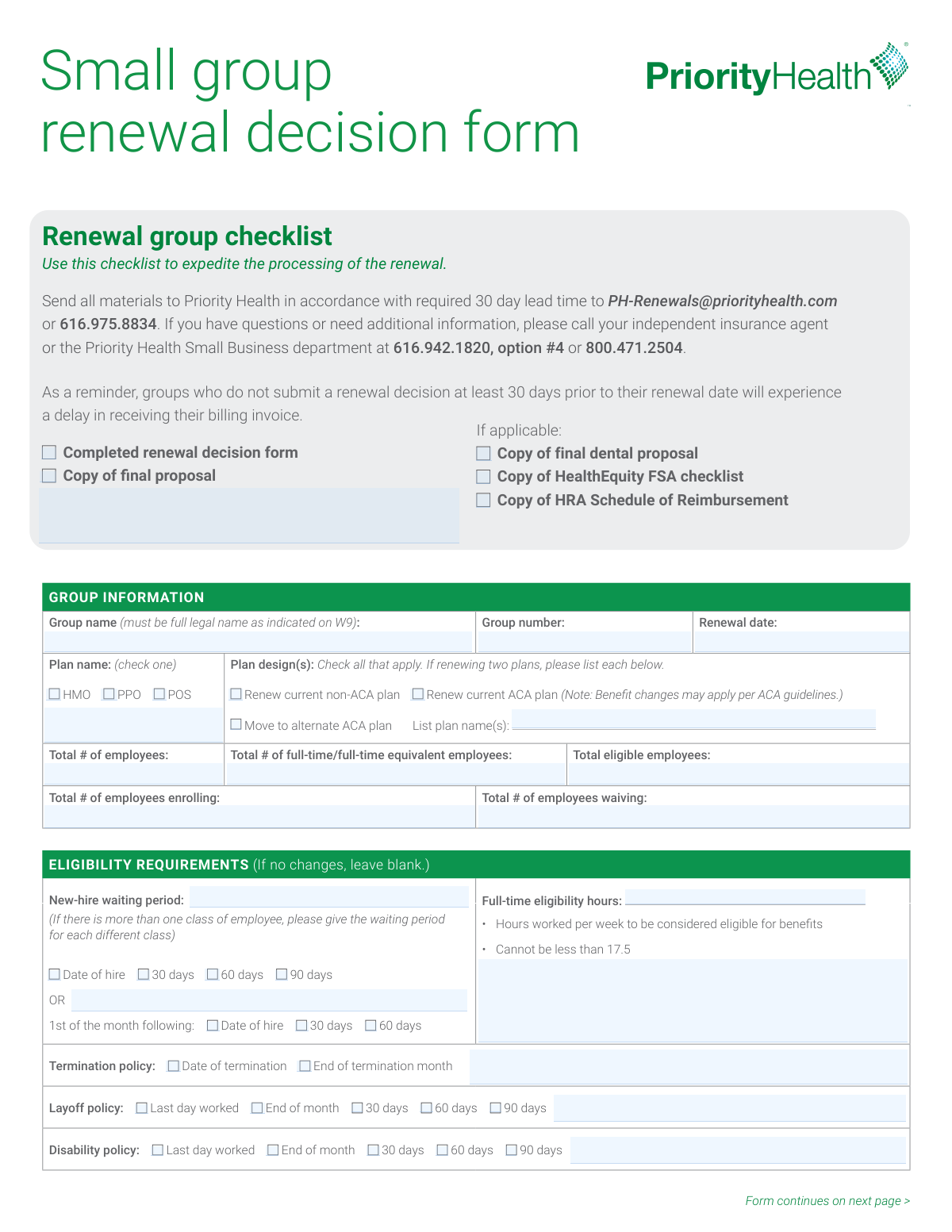
The Priority Health Small Group Renewal Decision Form is an employer form used to document a small group’s renewal election (renew current plan or move to an alternate ACA plan) and key group eligibility and administrative details. It captures employee counts, enrollment/waiver totals, waiting periods, eligibility hours, and termination/leave policies that affect who can enroll and when coverage starts or ends. The form also includes required compliance questions (employee-count thresholds and Section 111/pediatric dental attestations) and optional add-ons like HealthEquity HSA/FSA and domestic partner coverage. Submitting it at least 30 days before the renewal date helps avoid processing delays and late billing invoices.
Our AI automatically handles information lookup, data retrieval, formatting, and form filling.
It takes less than a minute to fill out Small Group Renewal Decision Form (Priority Health) using our AI form filling.
Securely upload your data. Information is encrypted in transit and deleted immediately after the form is filled out.
Form specifications
| Form name: | Priority Health Small Group Renewal Decision Form |
| Number of pages: | 2 |
| Filled form examples: | Form Small Group Renewal Decision Form (Priority Health) Examples |
| Language: | English |
Instafill Demo: filling out a legal form in seconds
How to Fill Out Small Group Renewal Decision Form (Priority Health) Online for Free in 2026
Are you looking to fill out a SMALL GROUP RENEWAL DECISION FORM (PRIORITY HEALTH) form online quickly and accurately? Instafill.ai offers the #1 AI-powered PDF filling software of 2026, allowing you to complete your SMALL GROUP RENEWAL DECISION FORM (PRIORITY HEALTH) form in just 37 seconds or less.
Follow these steps to fill out your SMALL GROUP RENEWAL DECISION FORM (PRIORITY HEALTH) form online using Instafill.ai:
- 1 Enter group identifiers: full legal group name (as on W-9), group number, renewal date, and employer contact/billing/decision-maker information (update only if changed).
- 2 Complete workforce and enrollment counts: total employees, full-time/FTE counts, total eligible employees, number enrolling, and number waiving.
- 3 Select the renewal plan option and plan type (HMO/PPO/POS), then indicate whether renewing a non-ACA plan, renewing an ACA plan, or moving to an alternate ACA plan and list plan design name(s).
- 4 Fill in group eligibility rules: new-hire waiting period (by employee class if applicable), full-time eligibility hours (must be at least 17.5 hours/week), and termination/layoff/disability coverage end policies.
- 5 Answer employer size threshold questions (20+ employees for 20+ weeks; 100+ employees for 50% of business days) and provide the requested dates based on your answers.
- 6 Complete Section 111 / Pediatric Dental attestation (as applicable for ACA-compliant renewals) and any additional coverage elections (HealthEquity HSA/FSA, domestic partner coverage, early retiree coverage, dependent eligibility age-26 rule).
- 7 Sign and date the form (agent signature required; employer signature optional), attach any required checklist items (final proposal, dental proposal, FSA checklist, HRA schedule if applicable), and submit via email to [email protected] or fax 616.975.8834 at least 30 days before renewal.
Our AI-powered system ensures each field is filled out correctly, reducing errors and saving you time.
Why Choose Instafill.ai for Your Fillable Small Group Renewal Decision Form (Priority Health) Form?
Speed
Complete your Small Group Renewal Decision Form (Priority Health) in as little as 37 seconds.
Up-to-Date
Always use the latest 2026 Small Group Renewal Decision Form (Priority Health) form version.
Cost-effective
No need to hire expensive lawyers.
Accuracy
Our AI performs 10 compliance checks to ensure your form is error-free.
Security
Your personal information is protected with bank-level encryption.
Frequently Asked Questions About Form Small Group Renewal Decision Form (Priority Health)
This form tells Priority Health what your small group employer is choosing for the upcoming renewal (renew current plan, renew ACA plan, or move to an alternate ACA plan). It also confirms key eligibility and administrative details needed to set up the renewal correctly.
The employer group (often the group administrator) typically completes it, and your independent insurance agent must sign it. The employer signature is listed as optional, but your agent signature is required.
Submit it at least 30 days prior to your renewal date. If you submit less than 30 days before renewal, Priority Health notes you may experience delays in receiving your billing invoice.
Email the materials to [email protected] or fax them to 616.975.8834. The form also lists the Small Business department phone numbers if you need help.
Include the completed renewal decision form and a copy of the final proposal. If applicable, also include the final dental proposal, the HealthEquity FSA checklist, and the HRA Schedule of Reimbursement.
Use the full legal group name exactly as it appears on your W-9. This helps ensure the renewal is applied to the correct employer account.
Enter totals for employees, full-time/full-time equivalent employees, eligible employees, and how many are enrolling versus waiving coverage. These counts help confirm eligibility and participation for the renewal.
Check the plan type (HMO, PPO, or POS) and then select the plan design option(s) that apply (renew non-ACA, renew ACA, or move to an alternate ACA plan). If renewing two plans, list each plan name in the space provided.
List the waiting period for each class of employee if they differ. You can choose options like date of hire, 30/60/90 days, or “1st of the month following” with the applicable timing.
This is the number of hours worked per week required for an employee to be eligible for benefits. The form states it cannot be less than 17.5 hours per week.
Select the option that matches when coverage ends for each situation (for example, date of termination vs. end of termination month, or last day worked vs. end of month/30/60/90 days). These selections define how long coverage continues in each scenario.
If your eligibility rules are staying the same as your current setup, you can leave that section blank. Only fill it out if you are changing eligibility requirements.
These questions help determine whether certain employer thresholds were met based on employee counts (including part-time, intermittent, leased, and seasonal employees, excluding self-employed individuals). If you answer “Yes,” you must provide the date the threshold was reached (or the requested prior-year date).
If you are a small group not purchasing coverage on the Health Insurance Marketplace, the form states pediatric dental is required as part of Essential Health Benefits under health care reform, even if you have no children under age 19. You must indicate whether you already have certified stand-alone pediatric dental, intend to purchase it, or qualify for the N/A option for renewing a 2013 plan design.
You can indicate whether you want HealthEquity as the HSA banking partner and/or add a HealthEquity FSA (and include the FSA checklist if yes). You can also specify domestic partner coverage type (limited/enhanced/no), whether you offer early retiree coverage, and whether dependent eligibility ends at the end of the month or end of the calendar year when the dependent turns 26.
Compliance Small Group Renewal Decision Form (Priority Health)
Validation Checks by Instafill.ai
1
Validates Group Name is the full legal name matching W-9
Checks that the Group name field is present and appears to be the full legal entity name as indicated on the W-9 (not a DBA-only name, acronym, or shortened version). This is important because carrier enrollment and billing must align to the legal tax entity to avoid contract and invoicing issues. If validation fails, the submission should be flagged for correction and may be held from processing until the legal name is confirmed.
2
Ensures Group Number is present and in an acceptable identifier format
Verifies the Group number is provided and matches expected formatting rules (e.g., numeric or alphanumeric length constraints used by the system). This is critical to route the renewal to the correct existing group record and prevent misapplication to another account. If the group number is missing or malformed, the form should be rejected or routed to manual review for identification.
3
Validates Renewal Date is a complete, valid calendar date
Checks that the Renewal date is present and entered as a valid date (e.g., MM/DD/YYYY) with a real month/day combination. Renewal timing drives plan effective dates, billing cycles, and required lead times. If invalid or missing, the system should block submission or request correction because downstream effective-date calculations will be unreliable.
4
Validates 30-day lead time requirement relative to Renewal Date
Compares the submission/received date to the Renewal date to ensure the renewal decision is submitted at least 30 days prior, as stated on the form. This prevents delays in billing invoice generation and renewal processing. If the lead time is not met, the system should warn the submitter, flag the case as late, and route to expedited/manual handling rules if available.
5
Employee count fields are complete, non-negative integers, and logically consistent
Validates that Total # of employees, Total # of full-time/full-time equivalent employees, Total eligible employees, Total # enrolling, and Total # waiving are all provided (when required) and are whole numbers ≥ 0. It also checks logical relationships such as full-time/FTE ≤ total employees and eligible employees ≤ total employees. If any value is negative, non-integer, or violates these relationships, the submission should be rejected or flagged for correction to prevent incorrect eligibility and rating.
6
Enrollment and waiver totals reconcile to eligible employees
Checks that Total # of employees enrolling plus Total # of employees waiving equals Total eligible employees (or, if the business rules allow exceptions, that the difference is explained/flagged). This reconciliation is important to ensure the group’s participation and contribution requirements can be evaluated correctly. If the totals do not reconcile, the system should require correction or an exception reason before processing.
7
Plan type selection is exclusive and exactly one of HMO/PPO/POS
Validates that exactly one plan type checkbox is selected among HMO, PPO, and POS. This is necessary because plan type drives network rules, benefit configuration, and plan mapping. If none or multiple are selected, the submission should be blocked and the user prompted to select a single plan type.
8
Plan design choice is valid and required plan names are provided when applicable
Checks that at least one plan design option is selected (Renew current non-ACA, Renew current ACA, or Move to alternate ACA). If “Move to alternate ACA plan” is selected or the form indicates renewing two plans, the Plan name(s) field must be populated with each plan’s name. If the selection is missing or plan names are absent when required, the submission should fail validation because the carrier cannot determine the intended renewal configuration.
9
New-hire waiting period selection is complete and not contradictory
Validates that the waiting period is specified using one coherent method: either the first set (Date of hire / 30 / 60 / 90 days) or the “1st of the month following” set, and that only one option is selected within the chosen set. This prevents ambiguous effective-date rules for new hires. If multiple conflicting options are selected or none are selected, the system should require clarification before acceptance.
10
Full-time eligibility hours meets minimum threshold and is numeric
Checks that Full-time eligibility hours is provided as a numeric value (allowing decimals if permitted) and is not less than 17.5, per the form instruction. This is important for compliance with the plan’s eligibility definition and to avoid enrolling ineligible employees. If the value is missing, non-numeric, or below 17.5, the submission should be rejected or flagged for correction.
11
Termination policy selection is present and mutually exclusive
Validates that exactly one termination policy is selected (Date of termination or End of termination month). This ensures consistent coverage end-date rules and accurate premium proration. If both or neither are selected, the system should block submission and request a single selection.
12
Layoff and disability policy selections are valid and mutually exclusive
Checks that exactly one option is selected for Layoff policy and exactly one option is selected for Disability policy from the provided list (Last day worked, End of month, 30/60/90 days). These policies affect continuation of coverage and billing. If multiple or no options are selected for either policy, the submission should be flagged as incomplete and not processed until corrected.
13
20+ employees threshold question requires a single Yes/No and a valid associated date
Validates that the question about having 20 or more employees for 20 or more calendar weeks has exactly one response selected (Yes or No). If Yes is selected, the “date threshold was reached” must be a complete valid date; if No is selected, “today’s date” must be a complete valid date. If the response is missing, both selected, or the required date is invalid/missing, the submission should fail because it impacts regulatory and administrative handling.
14
100+ employees threshold question requires a single Yes/No and a valid associated date
Validates that the question about having 100 or more employees during 50% of business days has exactly one response selected. If Yes is selected, the form requires entry of 1/1 of the previous calendar year as a valid date; if No is selected, today’s date must be provided as a valid date. If the selection or required date is missing/invalid, the system should block submission because the answer can affect compliance categorization and processing.
15
Pediatric dental attestation is consistent with ACA plan selection
Checks that a pediatric dental option (Yes/No/N/A) is selected when renewing with an ACA-compliant plan, as indicated by the form. It also validates logical consistency: selecting “N/A, renewing my 2013 plan design” should not be allowed if the plan design selected is ACA-compliant or “Move to alternate ACA plan.” If inconsistent or missing when required, the submission should be flagged for correction because pediatric dental is an Essential Health Benefit requirement in this context.
16
Required agent signature and signature date are present and properly formatted
Validates that the Agent signature field is completed and the Agent signature date is present and a valid date format. This is required to confirm authorized submission and to establish an audit trail for the renewal decision. If missing or invalid, the submission should be rejected or routed to obtain the required signature before processing.
Common Mistakes in Completing Small Group Renewal Decision Form (Priority Health)
People often enter a trade name, abbreviation, or “doing business as” name because that’s what they use day-to-day. This can cause mismatches with tax and billing records, delaying renewal processing or generating incorrect invoices. Always copy the full legal entity name exactly as it appears on the group’s W-9 (including punctuation like Inc., LLC, or PC).
These fields are easy to overlook because they’re at the top and often assumed to be “known by the carrier.” Missing or incorrect renewal dates can lead to processing delays, incorrect effective dates, or late billing. Confirm the group number from prior invoices/ID cards and enter the renewal date in a clear MM/DD/YYYY format.
A very common error is entering totals that don’t add up (e.g., enrolling + waiving ≠total eligible) or mixing “total employees” with “total eligible employees.” This creates underwriting and billing discrepancies and can trigger follow-up requests that slow approval. Before submitting, cross-check that each count is based on the same snapshot date and that the math ties out across all employee count fields.
Groups frequently enter only full-time headcount and ignore part-time hours that contribute to FTE, or they put the same number in both fields. This can affect determinations tied to thresholds (e.g., 20+ or 100+ employee questions) and may lead to incorrect compliance handling. Use payroll reports to calculate FTE properly and keep documentation in case the carrier requests support.
People often check a plan type based on what they think they have, not what the proposal lists, especially when renewing or moving to an alternate ACA plan. A mismatch can result in the wrong plan being set up, incorrect networks, or incorrect rates. Verify the plan type directly from the final proposal and ensure the checked option matches the plan name(s) you list.
When multiple plans are offered, groups sometimes check “renew” options but fail to list each plan name, or they check both “Renew current” and “Move to alternate” without clarifying. This ambiguity forces the carrier to follow up and can delay the renewal setup. If renewing two plans, list each plan name exactly as shown on the proposal and only select the design option(s) that apply to each plan.
The form provides two different structures (e.g., “Date of hire/30/60/90 days” versus “1st of the month following…”), and people sometimes mark options in both or leave it unclear. This can cause eligibility effective dates to be applied incorrectly, leading to coverage gaps or retroactive corrections. Choose only one waiting-period method and, if there are multiple employee classes, clearly specify the waiting period for each class.
Some employers default to 15 or 20 hours without noticing the stated minimum (“Cannot be less than 17.5”), or they omit the field entirely. This can create noncompliant eligibility rules or require rework before the renewal can be finalized. Confirm your intended eligibility threshold is at least 17.5 hours per week and enter a single, clear number (e.g., 30 hours/week).
It’s common to select different end dates across termination, layoff, and disability without realizing the administrative impact, or to leave one of these policies unselected. Inconsistent policies can cause coverage end-date errors, billing disputes, and employee complaints. Review your HR policy and select one option for each category, ensuring the choices align with how you actually administer coverage.
These questions are often skipped because they appear later in the packet and include specific counting rules (including part-time, seasonal, leased, etc.). Incorrect answers or missing dates can lead to compliance misclassification and follow-up requests. Use payroll/HR records to determine whether you met the thresholds and provide the exact date requested (or today’s date when answering “No”).
Groups frequently assume pediatric dental is optional if they have no dependents under 19, or they miss that it’s required for small groups not on the Marketplace when renewing ACA-compliant plans. An incorrect or missing attestation can delay renewal approval or create compliance issues. If renewing an ACA-compliant plan, select the appropriate pediatric dental statement and ensure it matches your actual dental coverage arrangement.
The agent signature is required, but it’s often missed, and contact fields are sometimes partially filled (missing title, phone, or email) or left outdated even when changes occurred. This can stall processing and make it difficult to resolve billing or eligibility questions quickly. Ensure the agent signs and dates the form, and update administration/billing/CEO contact details whenever they have changed.
Saved over 80 hours a year
“I was never sure if my IRS forms like W-9 were filled correctly. Now, I can complete the forms accurately without any external help.”
Kevin Martin Green
Your data stays secure with advanced protection from Instafill and our subprocessors

Robust compliance program
Transparent business model
You’re not the product. You always know where your data is and what it is processed for.
ISO 27001, HIPAA, and GDPR
Our subprocesses adhere to multiple compliance standards, including but not limited to ISO 27001, HIPAA, and GDPR.
Security & privacy by design
We consider security and privacy from the initial design phase of any new service or functionality. It’s not an afterthought, it’s built-in, including support for two-factor authentication (2FA) to further protect your account.
Fill out Small Group Renewal Decision Form (Priority Health) with Instafill.ai
Worried about filling PDFs wrong? Instafill securely fills priority-health-small-group-renewal-decision-form forms, ensuring each field is accurate.



