Yes! You can use AI to fill out Medicare Enrolment Application (Australia) – Enrol in Medicare, Re-enrol/Extend Eligibility, Enrol a Newborn, and Register for My Health Record

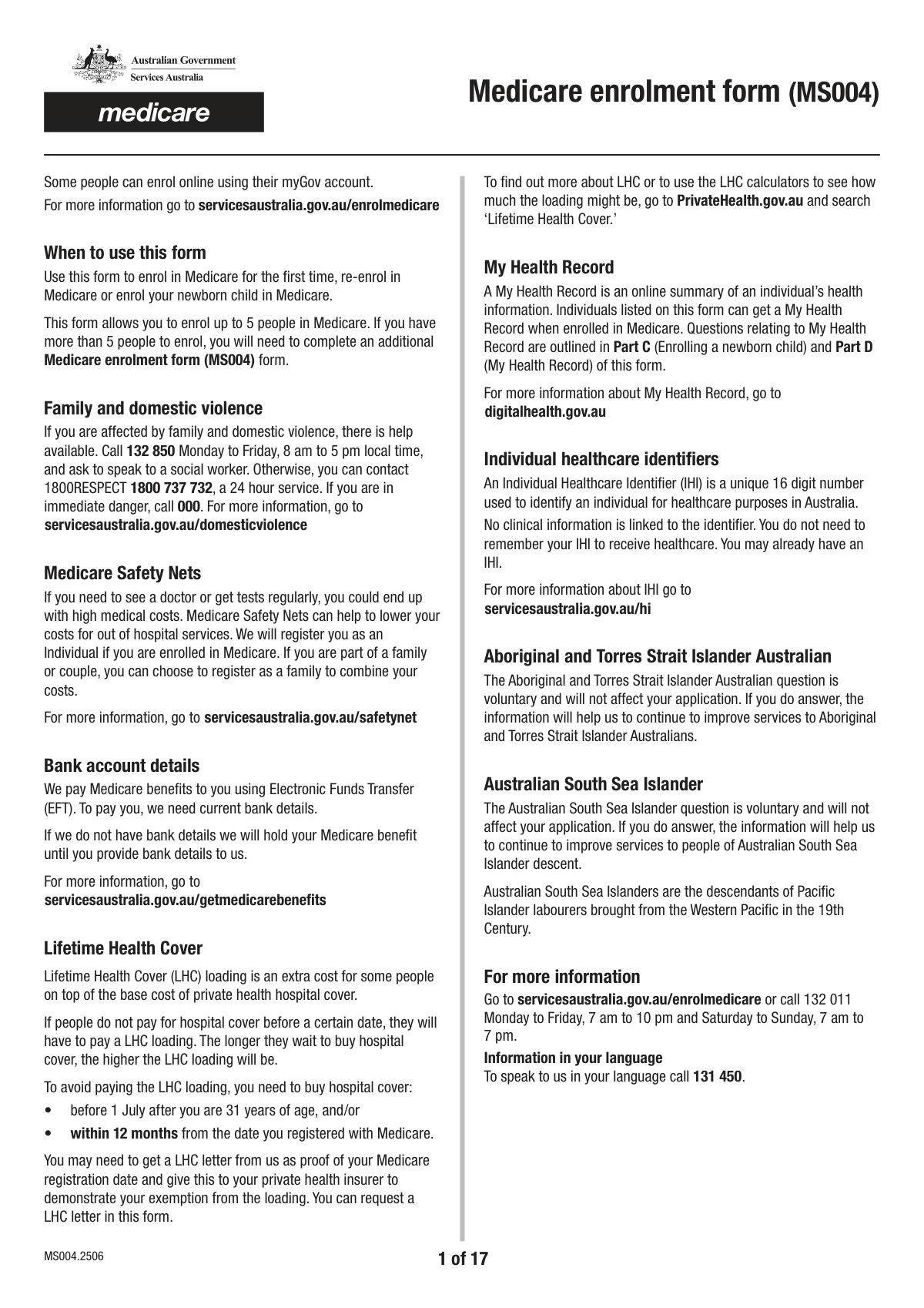
This is an Australian Services Australia/Medicare application form used to capture personal details, eligibility category (citizenship/visa/reciprocal arrangements), contact information, and declarations needed to enrol in Medicare or to re-enrol/extend Medicare eligibility. It also includes sections to add additional people (dependants/partners) and a pathway to register the listed people for My Health Record, including consent and signature dates. Completing it accurately is important because Medicare eligibility and correct personal details affect access to subsidised healthcare services and the issuance/updates of Medicare cards and identifiers. Today, this form can be filled out quickly and accurately using AI-powered services like Instafill.ai, which can also convert non-fillable PDF versions into interactive fillable forms.
Our AI automatically handles information lookup, data retrieval, formatting, and form filling.
It takes less than a minute to fill out Medicare Enrolment / My Health Record Registration Form using our AI form filling.
Securely upload your data. Information is encrypted in transit and deleted immediately after the form is filled out.

Form specifications

Form name: Medicare Enrolment Application (Australia) – Enrol in Medicare, Re-enrol/Extend Eligibility, Enrol a Newborn, and Register for My Health Record
Number of pages: 17
Filled form examples: Form Medicare Enrolment / My Health Record Registration Form Examples
Language: English
Categories: CAR forms
main-image

Instafill Demo: filling out a legal form in seconds

How to Fill Out Medicare Enrolment / My Health Record Registration Form Online for Free in 2026

Are you looking to fill out a MEDICARE ENROLMENT / MY HEALTH RECORD REGISTRATION FORM form online quickly and accurately? Instafill.ai offers the #1 AI-powered PDF filling software of 2026, allowing you to complete your MEDICARE ENROLMENT / MY HEALTH RECORD REGISTRATION FORM form in just 37 seconds or less.
Follow these steps to fill out your MEDICARE ENROLMENT / MY HEALTH RECORD REGISTRATION FORM form online using Instafill.ai:
  1. 1 Go to Instafill.ai and upload the Medicare enrolment/My Health Record registration form (or select it from the form library).
  2. 2 Choose the purpose/type of enrolment in Question 1 (first-time enrolment, re-enrol/extend eligibility, enrol a newborn, and/or register for My Health Record).
  3. 3 Complete the contact person details (title, names, previous name if applicable, date of birth, gender, postal address, phone, email, and interpreter/language preferences).
  4. 4 Enter Medicare/health identifiers and eligibility details as relevant (e.g., Medicare card number fields, Individual Healthcare Identifier (IHI), citizenship/visa category, reciprocal/overseas residence and travel dates).
  5. 5 Add additional people (Part A/Part B style sections) such as dependants/partner/newborn details, including names, DOB, gender, relationship, contact details, and any required eligibility questions.
  6. 6 Provide banking details if requested/needed (bank name, BSB, account number, account name) and review all declarations/consents for Medicare and My Health Record sections.
  7. 7 Use Instafill.ai to validate required fields, then e-sign/enter signature full name and dates where prompted, generate the final completed PDF, and download/submit it per the form’s instructions.

Our AI-powered system ensures each field is filled out correctly, reducing errors and saving you time.

Why Choose Instafill.ai for Your Fillable Medicare Enrolment / My Health Record Registration Form Form?

Speed

Complete your Medicare Enrolment / My Health Record Registration Form in as little as 37 seconds.

Up-to-Date

Always use the latest 2026 Medicare Enrolment / My Health Record Registration Form form version.

Cost-effective

No need to hire expensive lawyers.

Accuracy

Our AI performs 10 compliance checks to ensure your form is error-free.

Security

Your personal information is protected with bank-level encryption.

Frequently Asked Questions About Form Medicare Enrolment / My Health Record Registration Form

This form is used to enrol in Medicare (first time), re-enrol or extend Medicare eligibility, enrol a newborn child born in Australia, and optionally register for a My Health Record for people listed on the form.

Choose “Enrolling in Medicare for the first time / returning visitor previously enrolled” if you’re new to Medicare or a returning RHCA visitor previously enrolled. Choose “Re-enrolling in Medicare or extending Medicare eligibility” if you’re returning to Australia permanently or need to extend an existing eligibility. Choose “Enrolling a newborn child” only for a baby born in Australia up to their 1st birthday.

Yes—select the My Health Record registration option if you want to register for a My Health Record for the people listed in Part A and Part B. Do not complete this My Health Record section if you selected the newborn enrolment option.

Tick the box that matches your status, such as Australian citizen, child born overseas to an Australian citizen, New Zealand citizen residing in Australia, permanent resident, applied for permanent residency/protection visa, RHCA visitor, or other eligible visa holder covered by a Ministerial Order. If you’re unsure, use the category that best matches your current visa/citizenship situation.

“Returning to reside in Australia permanently” is for people coming back to live in Australia long-term after being overseas. “Extend my Medicare eligibility” is for people who already have eligibility (e.g., Reciprocal or Interim card holders) and need to extend it without leaving Australia.

The contact person is the person Medicare should contact about this application. Enter that person’s title, name, date of birth, gender, postal address, phone number, and email address in the contact person fields.

Select “Yes – used or been known by another name” and enter your full previous name in the “Previous name” field. If you have never used another name, select “No – never used or been known by another name.”

These dates are split into separate Day, Month, and Year fields, so enter each part in the matching box. For example, enter the day number in the Day field, the month number in the Month field, and the full year in the Year field.

Select “Interpreter required - Yes” and enter your preferred spoken language (and a secondary language if applicable). If you don’t need an interpreter, select “Interpreter required - No.”

An IHI is a unique identifier used in Australia’s health system. If you know it, you can enter it, but the field is typically optional unless specifically required for your situation.

Use the additional person sections (e.g., Add1, Add2, Add3, Add4) to enter each person’s name, previous names (if any), date of birth, gender, contact details, interpreter needs, and other requested details. Complete only the sections you need for the number of people you’re including.

Select the “Enrolling a newborn child (born in Australia)” option in Question 1, then complete the newborn fields (name, DOB, relationship to the child, address, contact details, and declaration/signature). This option is intended for babies up to their 1st birthday.

Some sections include bank name, BSB, account number, and account name fields, which may be needed for Medicare payments or claims arrangements. If the form asks for bank details for your situation, ensure the account information matches the account holder name you provide.

Yes—AI tools can help reduce errors and save time by auto-filling fields from your information. Services like Instafill.ai use AI to map your details into the correct form fields and help you complete the form faster.

Upload the PDF to Instafill.ai, provide your details once, and the AI will auto-fill the matching fields (including multi-person sections) for you to review before downloading. If the PDF is flat/non-fillable, Instafill.ai can convert it into an interactive fillable form so you can complete and sign it more easily.

Compliance Medicare Enrolment / My Health Record Registration Form
Validation Checks by Instafill.ai

1
Enrolment purpose selection is present and mutually exclusive (Question 1)
Validates that exactly one enrolment purpose is selected in Question 1 (first time/returning visitor, re-enrolling/extending, enrolling a newborn, registering for My Health Record). This is critical because downstream required sections and eligibility rules depend on the selected purpose. If none or multiple are selected, the submission should be rejected and the user prompted to choose a single purpose.
2
My Health Record option not allowed when enrolling a newborn (Question 1 rule)
Checks that 'Question 1 - Registering for a My Health Record' is not selected when 'Question 1 - Enrolling a newborn child (born in Australia)' is selected, per the form instruction. This prevents contradictory processing paths and ensures the correct parts of the form are completed. If the rule is violated, block submission and instruct the user to deselect the My Health Record option or change the enrolment type.
3
Citizenship/visa category selection required for first-time enrolment (Part A Q2)
When the user indicates they are enrolling in Medicare for the first time/returning visitor, validates that exactly one Part A Q2 category is selected (Australian citizen, child born overseas to Australian citizen, NZ citizen residing in Australia, permanent resident, applied for PR/protection, RHCA visitor, other visa holders). This ensures the correct eligibility pathway and evidence requirements are applied. If missing or multiple categories are selected, fail validation and require a single clear category.
4
Medicare eligibility request type required for re-enrol/extend flows
If the user selects 'Re-enrolling in Medicare or extending Medicare eligibility', validates that one (and only one) of 'Returning to reside in Australia permanently' or 'Extend my Medicare eligibility' is selected. This is important because the date/overseas-residency questions and supporting documentation differ by request type. If neither or both are selected, prevent submission and request a single selection.
5
Title selection is consistent and 'Other title' is conditionally required
Validates that at most one standard title checkbox is selected (Mr/Mrs/Miss/Ms/Mx), and that 'Contact person title (Other)' is filled only when none of the standard titles are selected. This avoids ambiguous salutations and ensures consistent identity formatting. If multiple titles are selected or 'Other' is provided alongside a standard title, fail validation and require correction.
6
Contact person name fields completeness and character validity
Ensures 'Contact person family name' and 'Contact person first given name' are provided and contain only valid name characters (letters, spaces, hyphens, apostrophes) with reasonable length limits. Names are core identifiers used for matching and correspondence, and invalid characters can break downstream systems. If missing or invalid, reject submission and highlight the specific field(s).
7
Previous name logic (Yes/No) and conditional previous name requirement
Checks that exactly one of 'No – never used or been known by another name' or 'Yes – used or been known by another name' is selected. If 'Yes' is selected, 'Previous name' must be populated with a plausible full name; if 'No' is selected, 'Previous name' must be empty. If the selection and data conflict, fail validation to prevent incomplete identity history.
8
Date of birth is a valid calendar date and age constraints for newborn flows
Validates that Date of birth Day/Month/Year form a real date (including leap years) and is not in the future. Additionally, when enrolling a newborn child, validates the child’s DOB indicates the child is under 1 year old (up to their 1st birthday) as stated. If invalid or outside allowed range, block submission and request a corrected DOB.
9
Gender selection is mutually exclusive per person
Ensures that for each person block (contact person and any additional people/child/newborn sections), only one gender option is selected (Male/Female/Non-binary) where provided. This prevents contradictory demographic data and improves data quality for reporting and matching. If multiple or none are selected where required, fail validation and prompt for a single selection.
10
Postal address completeness and Australian postcode format
Validates that postal address line 1, suburb/town, and postcode are provided for the relevant person/address section, and that postcode is exactly 4 digits (Australian format). Address completeness is required for card delivery and official correspondence, and invalid postcodes cause delivery failures. If any required component is missing or postcode format is wrong, reject submission and request corrections.
11
Phone number format validation (including area code) and minimum digits
Checks that the contact phone number includes an area code and contains only allowed characters (digits, spaces, parentheses, leading +) and meets a minimum digit count appropriate for AU numbers (e.g., 10 digits for domestic, longer for international). This is important for contacting applicants about eligibility or missing documents. If the number is malformed or too short, fail validation and require a valid phone number.
12
Email address format validation
Validates that the email address is syntactically valid (single @, valid domain, no spaces) for the contact person and any additional person sections where email is captured. Email is often used for notifications and follow-up, and invalid addresses lead to communication failures. If invalid, block submission or require correction depending on whether email is mandatory for the selected flow.
13
Interpreter requirement logic and conditional language fields
Ensures exactly one of 'Interpreter required - No' or 'Interpreter required - Yes' is selected for each relevant person section. If 'Yes' is selected, 'Preferred spoken language' must be provided and 'Secondary language' (if present) must be either empty or a valid language value; if 'No' is selected, both language fields must be empty. If inconsistent, fail validation to ensure interpreter services can be arranged correctly.
14
IHI (Individual Healthcare Identifier) format validation
Validates that the IHI, if provided, is exactly 16 digits and passes the standard IHI check-digit (Luhn) validation. This is important for accurate linkage to health records and avoiding misidentification. If the IHI is present but fails format or checksum, reject the value and require correction or removal.
15
Medicare card number (MCN) segmented fields completeness and numeric constraints
For any MCN captured as segmented fields (e.g., 1.MCN_1..1.MCN_4, DepMCN, NewB_MCN, Part_MCN, Add*_MCN), validates that all segments are present when the MCN is required by the selected pathway and that each segment is numeric with expected segment lengths. This prevents partial/garbled card numbers that cannot be matched in Medicare systems. If any segment is missing, non-numeric, or wrong length, fail validation and prompt for a complete MCN.
16
Bank details validation (BSB, account number, account name) and declaration gating
When bank details are provided/required (e.g., 1.Bank_* and Add*_Bank* sections), validates BSB is exactly 6 digits, account number is numeric with a reasonable length (commonly 6–10 digits), and account name is non-empty and contains valid characters. Also validates that any bank/declaration checkbox (e.g., BankDeclaration) is affirmed when bank details are supplied, to support consent and payment processing. If bank fields are incomplete/invalid or declaration is not accepted, block submission to prevent failed payments or unauthorized banking changes.

Common Mistakes in Completing Medicare Enrolment / My Health Record Registration Form

Selecting the wrong enrolment purpose in Question 1

People often tick the wrong box (first-time enrolment vs re-enrol/extend vs newborn) because the scenarios sound similar, especially for returning residents or reciprocal visitors. This can route the application to the wrong processing pathway and trigger requests for different evidence, delaying approval. Re-read the examples in each option and choose the one that matches your current status and reason for applying today. AI-powered tools like Instafill.ai can reduce this by prompting the correct pathway based on your answers and preventing incompatible selections.

Ticking multiple mutually exclusive checkboxes (purpose, titles, gender, yes/no questions)

This form contains many yes/no and single-choice groups (e.g., interpreter required, previous names, gender, title), and applicants sometimes tick both options or multiple titles. Conflicting selections can make the form invalid or force manual follow-up to confirm the correct answer. Only select one option per group and clear any accidental ticks before submitting. Instafill.ai can automatically enforce single-choice logic and flag contradictions before you lodge the form.

Filling conditional fields when they should be left blank (or leaving them blank when required)

Several fields are explicitly conditional, such as “Previous name” (only if ‘Yes’), “Preferred spoken language” (only if interpreter is ‘Yes’), and My Health Record sections (only in certain scenarios). People either enter data in fields that should be blank (creating inconsistencies) or forget to complete required follow-up fields after selecting ‘Yes’. This can lead to processing delays or requests for clarification. Follow the “Fill only if
” instructions carefully; Instafill.ai can guide you through conditional logic and only present the fields that apply.

Using an incorrect citizenship/visa category in Part A Question 2

Applicants frequently choose the wrong eligibility category (e.g., permanent resident vs applied for permanent residency vs reciprocal visitor vs other visa covered by Ministerial Order) because they are unsure which one matches their documentation. Selecting the wrong category can result in the wrong evidence being assessed, rejection, or a request to resubmit. Confirm your current legal status and use the category that matches your visa/citizenship documentation exactly. Instafill.ai can help by validating the category against the details you provide and prompting for the right supporting information.

Date entry errors across split day/month/year fields

The form uses separate fields for day, month, and year (e.g., Date of birth, arrival/departure dates, signature dates), which increases mistakes like swapping day/month, entering a 2-digit year, or leaving one part blank. Incorrect dates can affect eligibility assessment (especially for newborns up to 1st birthday) and can invalidate declarations if signature dates are incomplete. Enter dates in the correct order, use leading zeros where needed (e.g., 03), and ensure all three components are filled. Instafill.ai can format and validate dates automatically to prevent incomplete or impossible date combinations.

Medicare card number (MCN) entered in the wrong format or wrong boxes

MCN fields are split into multiple boxes (e.g., MCN_1 to MCN_4 and DepMCN fields), and people often paste the full number into one box, transpose digits, or mix the main card number with dependent/reference numbers. This can prevent Medicare from matching your record and may cause delays or incorrect linking of family members. Carefully enter each segment into the correct MCN boxes and double-check against your card. Instafill.ai can split and validate MCN formatting automatically and flag digit-length issues before submission.

Inconsistent names across contact person, additional people, and declarations

This form repeats name fields in multiple sections (contact person, Add1–Add4, newborn/partner sections, and declaration full name fields). People often use nicknames in one place, omit middle names in another, or forget to update a declaration name after changing earlier fields. Inconsistencies can trigger identity verification issues and requests for additional documentation. Use your legal name exactly as shown on identity documents consistently across all sections; Instafill.ai can reuse verified name data across repeated fields to keep everything consistent.

Not completing overseas residence/travel details when ‘Yes’ is selected

Fields like “Contact_OS_yes” and related items (previous country, years/months, arrival/departure dates, and whether you reside in Australia) are easy to partially complete. Missing country names or incomplete duration/date details can affect eligibility decisions for returning residents and reciprocal visitors and often results in follow-up questions. If you select ‘Yes’, complete every related field (country, duration, and dates) and ensure the timeline makes sense. Instafill.ai can check that all dependent travel fields are completed and that durations align with the dates entered.

Banking details mistakes (BSB/account number/name mismatch)

Applicants commonly enter the wrong BSB length, include spaces or dashes inconsistently, transpose digits, or provide an account name that doesn’t match the bank’s records. Incorrect banking details can cause payment/rebate issues or require re-verification, delaying processing. Enter BSB and account number exactly as provided by your bank and ensure the account name matches the account holder. Instafill.ai can validate common BSB/account formatting rules and reduce transcription errors.

My Health Record section completed when not eligible (or skipped when requested)

The form states My Health Record registration should be filled only if the newborn enrolment option is not selected, and it also includes multiple “want to enrol/add people/currently have” yes/no pathways. People often complete My Health Record fields alongside newborn enrolment or forget to complete the required declarations and sign dates for each person added. This can lead to the My Health Record request being ignored or delayed even if Medicare enrolment proceeds. Follow the My Health Record eligibility instruction and ensure each selected ‘Yes’ pathway includes the corresponding declaration name and signature date fields; Instafill.ai can enforce these rules and prevent incompatible combinations.

Missing signatures/declaration confirmations and incomplete sign dates

There are multiple declaration fields (e.g., Contact_Declaration, NewB_Declaration, Part_Declaration, MHR declarations) and separate signature date components. People often forget to tick the declaration confirmation, omit the printed full name, or enter only part of the date. Missing or incomplete declarations can make the submission invalid and require resubmission. Before submitting, verify every relevant section has the declaration ticked, the full name entered, and day/month/year completed; Instafill.ai can highlight missing declaration elements and ensure all signature dates are complete.
Saved over 80 hours a year

“I was never sure if my IRS forms like W-9 were filled correctly. Now, I can complete the forms accurately without any external help.”

Kevin Martin Green

Your data stays secure with advanced protection from Instafill and our subprocessors

Robust compliance program

Transparent business model

You’re not the product. You always know where your data is and what it is processed for.

ISO 27001, HIPAA, and GDPR

Our subprocesses adhere to multiple compliance standards, including but not limited to ISO 27001, HIPAA, and GDPR.

Security & privacy by design

We consider security and privacy from the initial design phase of any new service or functionality. It’s not an afterthought, it’s built-in, including support for two-factor authentication (2FA) to further protect your account.

Fill out Medicare Enrolment / My Health Record Registration Form with Instafill.ai

Worried about filling PDFs wrong? Instafill securely fills medicare-enrolment-application-australia-enrol-in-medicare-re-enrolextend-eligibility-enrol-a-newborn-and-register-for forms, ensuring each field is accurate.