
Yes! You can use AI to fill out DHS-6696-ENG, Minnesota Health Care Programs Application (MNsure/DHS)
Don't type 601 fields by hand. Tell our AI about yourself, or upload your insurance card, and it fills every field in seconds. You check it, then download, print or sign.
The AI does the filling. You just check it.
No typing into boxes, nothing to install.
What this form asks for
The AI fills all of it, from your answers or your documents.
The AI checks your answers before you download
16 checks built for this form, so a wrong date or a missing answer is caught before anyone else sees it.
Validates that Person 1 (the required contact person) has First Name, Last Name, Date of Birth, Sex, and Marital Status completed. These fields are foundational for eligibility determination, identity matching, and downstream notices. If any are missing or invalid, the submission should be flagged as incomplete and routed for correction before eligibility processing continues.
Checks that every date provided (e.g., DOB, due date, pregnancy end date, move date, emergency begin/end, date of entry, temporary absence dates, military tour end date, signature date) is in MM/DD/YYYY format and represents a real calendar date. This prevents parsing errors and incorrect eligibility timelines. If validation fails, the system should reject the specific field(s) and request corrected dates.
Validates that the 'under legal control of a parent' question is answered only when the person is under 18 based on DOB, and is not answered (or is ignored) for adults. This ensures the form logic is followed and avoids contradictory household/guardianship assumptions. If an adult has this answered or a minor is missing it, the record should be flagged for review or the applicant prompted to correct.
If SSN is provided, validates it is exactly 9 digits (allowing standard formatting like XXX-XX-XXXX) and not an obvious invalid value (e.g., all zeros). If the applicant indicates they have an SSN, the SSN field must be present; if they indicate no SSN, then either 'applied for SSN' must be answered or a valid reason must be selected when applicable. Failures should trigger a hard error when SSN is required by the applicant’s own selection, or a soft stop when optional but inconsistent.
If 'homeless' is checked, validates that the county where the person usually stays is provided and that a full home street address is not required. If not homeless, validates that Home Address includes street, city, state, ZIP, and county, and that the home address is not a PO Box. If the Safe at Home Program is used, validates that home address contains at least county and ZIP and that the Safe at Home address is placed in Mailing Address; failures should prompt correction to prevent misdirected mail and privacy risks.
Validates that state values are valid US state abbreviations and that ZIP codes are 5 digits (or ZIP+4 if allowed), and cross-checks that Minnesota residency questions are consistent with a Minnesota address when coverage is requested. This reduces eligibility errors tied to residency and county-based administration. If the address is outside MN while the applicant claims MN residency, the submission should be flagged for manual review or additional proof.
And 10 more checks
- Phone number format and contact preference dependency
- Language and interpreter request consistency
- Tax filing intent and spouse/dependent sub-question logic
- Marital status vs tax filing selections consistency
- Pregnancy details completeness and plausibility
- Minnesota residency question set completeness when applying for coverage
- Citizenship/immigration section branching and document field validation
- Medical emergency and MA retroactive coverage date logic
- Employment selection vs required job/income fields
- Income amount, frequency, and numeric constraints validation
Let AI fill out your DHS-6696-ENG
No typing. Every field filled in seconds, checked, ready to sign.
How to Fill Out DHS-6696-ENG Online for Free in 2026
What the AI walks you through.
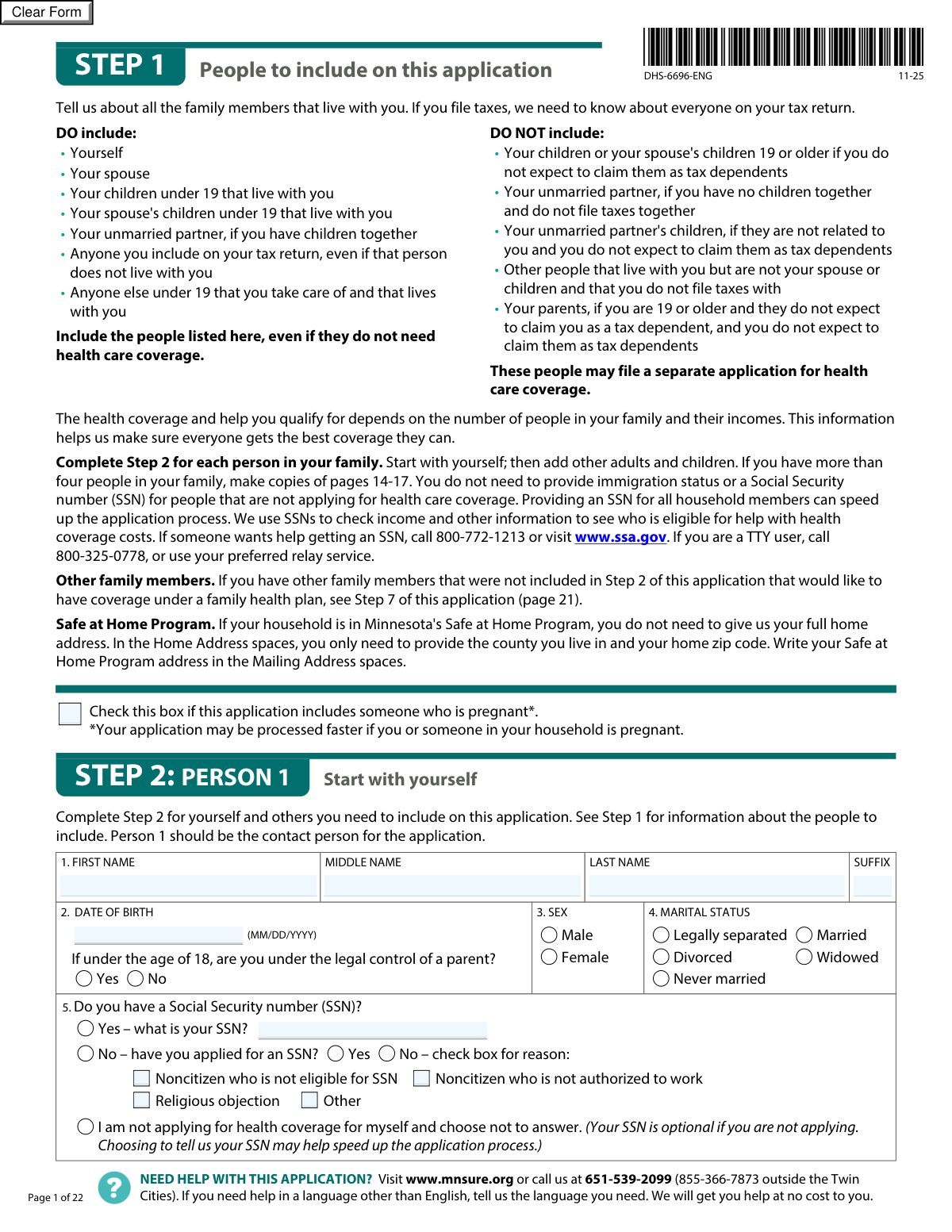
- Review Step 1 rules to determine who must be included in the household (tax household and people living with you), and note whether anyone is pregnant or in the Safe at Home Program.
- Complete Step 2 for Person 1 (the contact person): personal details, SSN/immigration (if applying), addresses, contact preferences, tax filing plans, pregnancy questions, and Minnesota residency questions.
- Add each additional household member by completing Step 2 for Person 2, Person 3, etc. (make copies of the additional-person pages if needed), including whether each person is applying for coverage.
- Enter job and income details for each person as applicable (employment, self-employment, seasonal income, other income, and adjustments), and provide projected annual income information when requested.
- Complete Step 3 (current coverage, offers of employer coverage, accident/injury care) and any required appendices (e.g., Appendix A for job-based coverage offers, Appendix B for American Indian/Alaska Native status, Appendix C for an authorized representative).
- Complete Step 4 and Step 5 household details and changes (military service, incarceration, foster care, disability/long-term care needs, temporary absence from Minnesota, and recent changes affecting eligibility).
- Complete Step 6 consents and acknowledgments, sign and date the application, then submit the signed form and any appendices by fax, mail, or in person as instructed in Step 8.
Common Mistakes in Completing DHS-6696-ENG
The ones the AI is built to catch.
Including the wrong people in the household (Step 1)
Not listing tax dependents because they are not seeking coverage (Step 2 Q24b / Person 2 Q8b)
Mixing up “applying for coverage” vs. “included on the application” (Step 2 Q26 / Person 2 Q10)
Entering SSN information incorrectly or leaving the SSN section inconsistent (Step 2 Q5 / Person 2 Q6)
Using a PO Box as the home address or not following Safe at Home instructions (Step 2 Q7a and Safe at Home note)
Leaving contact preferences incomplete (phone type, email, interpreter, method of contact) (Step 2 Q18–Q22)
Incorrect tax filing answers (joint filing, MFS due to abuse/abandonment, or being claimed as a dependent) (Step 2 Q24 / Person 2 Q8)
Reporting wages as net pay or choosing the wrong frequency (Step 2 Q35/Q37)
Omitting employer details or confusing EIN with other numbers (Step 2 Q34/Q36 and job change section Q33)
Listing income types that the form says NOT to include (Step 2 Q40/Q24 for Person 2)
Misreporting Social Security benefits by using the net deposit amount (Step 2 Q40 Social Security benefits)
Skipping past-coverage and prior-month medical assistance questions (Step 3 Q1 and Step 2 Q32/Person 2 Q16)
Frequently Asked Questions About DHS-6696-ENG
Is it really free for 7 days?
Can I fill other forms too?
How do I cancel?
How does the AI fill out DHS-6696-ENG?
What happens to my information?
How complex is DHS-6696-ENG to fill out?
What is this application (DHS-6696) used for?
Who should I include on the application in Step 1?
Who should I NOT include on the application?
Do I have to list people who are not applying for health coverage?
Do I have to provide a Social Security number (SSN) for everyone?
What if I don’t have an SSN or I’m not eligible for one?
What address should I use if I’m in Minnesota’s Safe at Home Program?
What if I’m homeless—how do I complete the address section?
How do I answer the tax filing questions in Step 2 (Question 24/8)?
I’m pregnant (or someone in my household is). Do I need to report it?
Do I have to answer the ethnicity and race questions?
What if I’m not a U.S. citizen—can I still apply?
What does it mean to request help for a medical emergency (Questions 30/14)?
Can I get help paying medical bills from the past three months?
How do I report income if my hours or pay change from week to week?
What income should I NOT list in the “Other income” section?
What are “adjustments to income,” and why should I include them?
What if someone in my household has job-based insurance available but isn’t enrolled?
How do I submit the completed application, and where do I send it?
Get your DHS-6696-ENG filled out by AI
$0 today. Cancel before Nov 1 and you pay nothing.
Other forms like this one
CAR forms: Form SSA-44, Medicare Income-Related Monthly Adjustment Amount - Life-Changing Event, Form I-90, Application to Replace Permanent Resident Card, Form 2441, Child and Dependent Care Expenses, Form WH-380-E, Certification of Health Care Provider, Form 4137, Social Security and Medicare Tax on Unreported Tip Income, Form 8959, Additional Medicare Tax, Form 8919, Uncollected Social Security and Medicare Tax, Form CMS-1763, Request for Termination of Medicare Coverage, Form CMS-855O, Medicare Enrollment Application, Form CMS-460, Medicare Participation Agreement, Form CMS-4040, Request for Enrollment in Medicare Part B, Form WH-380-F, Certification of Health Care Provider, Form W-10, Dependent Care Provider’s Identification, Form 1099-K, Payment Card and Third Party Network Transactions, Form CMS-40B, Application for Enrollment in Medicare Part B, Form SS-5-FS, Application for a Social Security Card, Form REG 195, Disabled Person Placard, Form AR-11, Alien's Change of Address Card, Form I-905, Application for Authorization to Issue Certification for Health Care Workers, Form I-131A, Application for Carrier Documentation
health care forms: Form WH-380-E, Certification of Health Care Provider, Form WH-380-F, Certification of Health Care Provider, Form I-905, Application for Authorization to Issue Certification for Health Care Workers, Form CH-006: PA-BH-Res-PCS, Oregon Behavioral Health Support Program Plan of Care Authorization (Plan of Care Request for Behavioral Health Residential or Personal Care Services), Prior Authorization (PA) Request Form – Adult Palliative Care (Alameda Alliance for Health), Medicare Enrolment Application (Australia) – Enrol in Medicare, Re-enrol/Extend Eligibility, Enrol a Newborn, and Register for My Health Record, Alameda Alliance for Health Prior Authorization (PA) Request Form – Adult Palliative Care, Health Assessment – Ontario Health atHome (Fixing Long-Term Care Act, 2021) (Form 4768-69E), Health Assessment - Ontario Health atHome (Fixing Long-Term Care Act, 2021) — Form 4768-69E, Request for Transfer of Records (Adelaide Health Care) – AHC-0013-05-PS (Version 2), Application for Access to Health Care Records (Nepean Blue Mountains Local Health District) – NBMA-431, L.A. Care Behavioral Health Treatment Applied Behavioral Analysis Authorization Request Form, Medicaid Managed Care Applied Behavior Analysis — Authorization Request (Healthy Blue Louisiana, BLAPEC-1989-20), Iowa Advance Directive: Durable Power of Attorney for Health Care and Declaration (Living Will), Direct Rollover Request for Appalachian Regional Healthcare, Inc. Voluntary Plan, Molina Healthcare Prior Authorization Request Form, UnitedHealthcare Prior Authorization Request Form, Optum Rx / UnitedHealthcare Prior Authorization Request Form, Texas Standard Prior Authorization Request Form for Health Care Services, Form T-3, Children with Special Health Care Needs (CSHCN) Services Program Application
L.A. Care forms: Form SSA-44, Medicare Income-Related Monthly Adjustment Amount - Life-Changing Event, Form 2441, Child and Dependent Care Expenses, Form WH-380-E, Certification of Health Care Provider, Form 4137, Social Security and Medicare Tax on Unreported Tip Income, Form 8959, Additional Medicare Tax, Form 8919, Uncollected Social Security and Medicare Tax, Form CMS-1763, Request for Termination of Medicare Coverage, Form CMS-855O, Medicare Enrollment Application, Form CMS-460, Medicare Participation Agreement, Form CMS-4040, Request for Enrollment in Medicare Part B, Form WH-380-F, Certification of Health Care Provider, Form W-10, Dependent Care Provider’s Identification, Form CMS-40B, Application for Enrollment in Medicare Part B, Form I-905, Application for Authorization to Issue Certification for Health Care Workers, California Department of Social Services (CDSS) Community Care Licensing Child Care Forms Packet (LIC 9150, LIC 282, LIC 627, LIC 700, LIC 995A, CDPH 286, LIC 9227), State of Illinois Department of Human Services (IDHS) – Bureau of Child Care and Development Child Care Application (Form IL444-3455), Form CH-006: PA-BH-Res-PCS, Oregon Behavioral Health Support Program Plan of Care Authorization (Plan of Care Request for Behavioral Health Residential or Personal Care Services), State of Illinois Department of Children and Family Services Medical Report on an Adult in a Child Care Facility (CFS 602), Carer Payment and Carer Allowance – Medical Report (SA431) for a child under 16 years, Pennsylvania Application for Subsidized Child Care (CY 868)
health forms: Form 1095-A, Health Insurance Marketplace Statement, Form 8889, Health Savings Accounts, Form WH-380-E, Certification of Health Care Provider, Form 7206, Self-Employed Health Ins. Ded., Form 8885, Health Coverage Tax Credit, Form WH-380-F, Certification of Health Care Provider, Form 1095-C, Employer-Provided Health Insurance Offer and Coverage, Form 1095-B, Health Coverage, Form I-905, Application for Authorization to Issue Certification for Health Care Workers, Form BHVH, Outpatient Behavioral Health – ABA Treatment Request, Form SHA, Separation Health Assessment, Geisinger Health Plan Behavioral Health Professional Services Questionnaire, Priority Health Small Group Renewal Decision Form, Form CH-006: PA-BH-Res-PCS, Oregon Behavioral Health Support Program Plan of Care Authorization (Plan of Care Request for Behavioral Health Residential or Personal Care Services), Form 7206 (2025), Self-Employed Health Insurance Deduction, HIPAA Authorization Form, Authorization for the Release of Protected Health Information, Prior Authorization (PA) Request Form – Adult Palliative Care (Alameda Alliance for Health), Medicare Enrolment Application (Australia) – Enrol in Medicare, Re-enrol/Extend Eligibility, Enrol a Newborn, and Register for My Health Record, Alameda Alliance for Health Prior Authorization (PA) Request Form – Adult Palliative Care, Health Assessment – Ontario Health atHome (Fixing Long-Term Care Act, 2021) (Form 4768-69E)
health care program forms: Form T-3, Children with Special Health Care Needs (CSHCN) Services Program Application, Form CH-006: PA-BH-Res-PCS, Oregon Behavioral Health Support Program Plan of Care Authorization (Plan of Care Request for Behavioral Health Residential or Personal Care Services), Indiana Health Coverage Programs (IHCP) Managed Care Entity (MCE) Provider Enrollment Form, New York State Department of Health Medicare Savings Program Application
Minnesota health forms: Minnesota Standard Consent Form to Release Health Information, Medicaid of Minnesota (Administered by HealthPartners of Minnesota) EDI Trading Partner Enrollment Form
Let AI fill out your DHS-6696-ENG
Your trial starts once a card is added. You pay nothing before Nov 1.
Our AI already knows this form, all 601 fields of it. Skip the typing: tell it about yourself, or upload what you have, and it fills the whole form in seconds.
- AI fills every field on all 13 pages, tables and checkboxes included
- No typing into boxes: answer a few questions, or upload your insurance card, an old copy of this form, a photo of a document
- The AI checks the answers; you review and change anything before you download
- Download the finished PDF, print it, or sign it online
- Encrypted, and never used to train AI
Cancel before Nov 1 and you pay nothing.
A card is needed to start the trial. Cancel in two clicks from your account.
Terms · Privacy