Yes! You can use AI to fill out Form N161, Appellant’s notice (All appeals except small claims track appeals and appeals to the Family Division of the High Court)
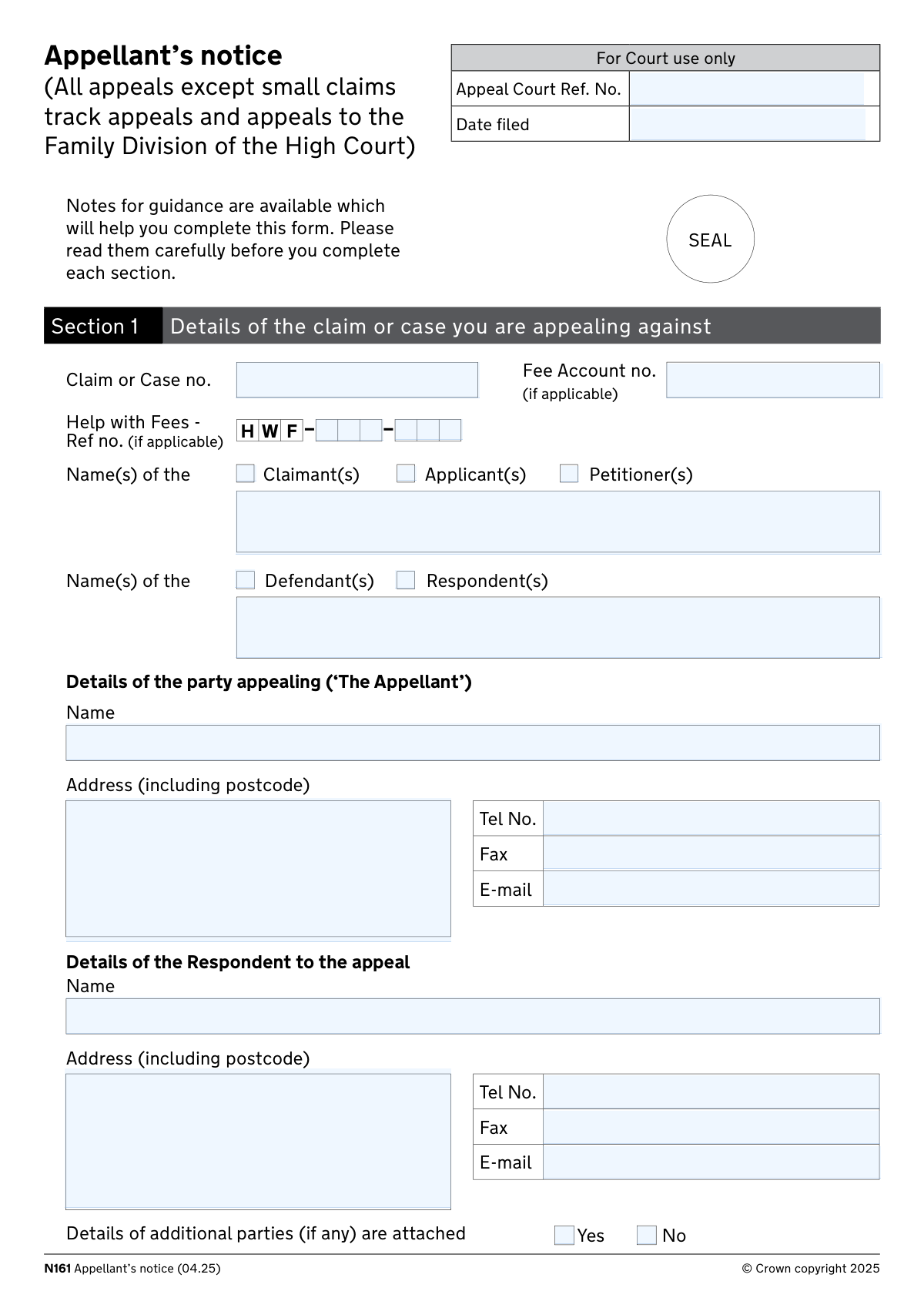
Form N161 is the HM Courts & Tribunals Service “Appellant’s notice” used to commence an appeal and provide the appeal court with key case details, the order being appealed, permission-to-appeal information, and any related applications (such as a stay or extension of time). It also requires confirmation that grounds of appeal (and, where appropriate, a skeleton argument) are attached or will be filed, and it includes a statement of truth and a checklist of supporting documents to file. Completing it accurately is important because it affects whether the appeal is accepted, processed on time, and supported by the correct evidence and documents. Today, this form can be filled out quickly and accurately using AI-powered services like Instafill.ai, which can also convert non-fillable PDF versions into interactive fillable forms.
Our AI automatically handles information lookup, data retrieval, formatting, and form filling.
It takes less than a minute to fill out N161 using our AI form filling.
Securely upload your data. Information is encrypted in transit and deleted immediately after the form is filled out.
Form specifications
| Form name: | Form N161, Appellant’s notice (All appeals except small claims track appeals and appeals to the Family Division of the High Court) |
| Number of pages: | 11 |
| Filled form examples: | Form N161 Examples |
| Language: | English |
Instafill Demo: filling out a legal form in seconds
How to Fill Out N161 Online for Free in 2026
Are you looking to fill out a N161 form online quickly and accurately? Instafill.ai offers the #1 AI-powered PDF filling software of 2026, allowing you to complete your N161 form in just 37 seconds or less.
Follow these steps to fill out your N161 form online using Instafill.ai:
- 1 Go to Instafill.ai and upload the Form N161 PDF (or select Form N161 from the form library).
- 2 Let the AI detect and map the fields, then confirm the form version and court/appeal type (N161 for appeals other than small claims track and certain Family Division appeals).
- 3 Enter the court and case identifiers (claim/case number, appeal court reference if known, filing date if applicable) and fee details (fee account or Help with Fees reference).
- 4 Fill in party details: claimant/applicant/petitioner and defendant/respondent names, then provide appellant and respondent contact information and indicate any additional parties (attach details if needed).
- 5 Complete appeal details: originating court, judge name and status, decision date, whether it is a previous appeal decision, and legal aid status; then add legal representation details for both sides if applicable.
- 6 Complete permission and appeal content: indicate whether permission is needed/granted, specify the order being appealed, attach the Grounds of Appeal (and skeleton argument now or confirm it will follow within 14 days where permitted), and complete any Aarhus Convention claim section if relevant.
- 7 Add any additional applications (stay, extension of time, other orders) with supporting evidence in Section 11, address vulnerability questions, complete the Statement of Truth, tick the supporting documents checklist, then e-sign/export for filing and service.
Our AI-powered system ensures each field is filled out correctly, reducing errors and saving you time.
Why Choose Instafill.ai for Your Fillable N161 Form?
Speed
Complete your N161 in as little as 37 seconds.
Up-to-Date
Always use the latest 2026 N161 form version.
Cost-effective
No need to hire expensive lawyers.
Accuracy
Our AI performs 10 compliance checks to ensure your form is error-free.
Security
Your personal information is protected with bank-level encryption.
Frequently Asked Questions About Form N161
Form N161 is used to start an appeal against a decision/order in most civil cases, except small claims track appeals and appeals to the Family Division of the High Court. It tells the appeal court what decision you are appealing, why, and what outcome you want.
The party bringing the appeal (the “Appellant”) must complete it, either personally or through their legal representative. If you are appealing a judge’s order or decision from the County Court, High Court, Family Court, or another listed court/tribunal route, this is typically the form you use.
You’ll need the claim/case number, the names of all parties as shown on the original case, the court you are appealing from, the judge’s name and status, and the date of the decision. You should also have a copy of the sealed (stamped) order you are appealing.
List the main claimant/applicant/petitioner and defendant/respondent names as required, and attach a separate sheet for “additional parties” if there are more than the form allows. Tick the box confirming that additional party details are attached.
Tick the correct court type (e.g., “The County Court at” or “The Family Court at”) and write the specific court location/name in the space provided. If it’s not listed, tick “Other” and specify the court.
Tick the option that matches the title of the judge who made the decision you are appealing. If you are unsure, check the sealed order or judgment heading, which usually states the judge’s title.
Some appeals require permission; the form asks you to state whether permission is needed and whether it has been granted. If permission has not been granted, you complete Box B to request permission from the appeal court (and include the required supporting information).
The Grounds of Appeal are your numbered reasons explaining why the judge’s decision was wrong. They must be on a separate sheet titled “Grounds of Appeal,” with your case number and full name in the top right corner, and you tick the box confirming they are attached.
A skeleton argument is a structured written argument supporting your grounds of appeal. If appropriate, you either attach it with the notice or confirm it will follow within 14 days of filing the Appellant’s Notice (as referenced to CPR Practice Direction 52B).
In Section 5 you must indicate whether the notice is in time; if it is late, you generally need to apply for an extension of time in Section 10 (Part B) and explain the delay with evidence in Section 11. Provide clear dates, reasons, and what steps you took after the decision.
You can ask the appeal court to set aside the order, vary the order (and state the substitute order you want), or order a new trial. Choose the option that matches the outcome you are seeking and be specific if requesting a substitute order.
Complete Section 10 only if you are making additional applications such as a stay of execution or an extension of time, or requesting another order. Section 11 is where you set out the reasons and evidence supporting those applications.
It allows you to tell the court if you or a witness is vulnerable and what adjustments or support you need (for example, special measures or accessibility needs). You should answer it if it applies, because it helps the court plan the process fairly.
Common required documents include copies of the Appellant’s Notice and Grounds of Appeal, the sealed order being appealed, any order granting/refusing permission and the judge’s reasons, and (if applicable) a Civil Legal Aid certificate. The form also lists additional documents depending on whether you are in the County Court/High Court or the Court of Appeal (e.g., transcript, skeleton argument, witness statement for applications).
Yes—AI tools can help you complete the form faster and more accurately by extracting details from your case documents and placing them into the correct fields; services like Instafill.ai can auto-fill form fields and reduce errors. If your PDF is flat/non-fillable, Instafill.ai can convert it into an interactive fillable form and then guide you through completing and exporting it for filing.
Compliance N161
Validation Checks by Instafill.ai
1
Validates core case identifiers are present and correctly formatted (Claim/Case No., Appeal Court Ref No., Date Filed)
Checks that the Claim or case number is provided and matches an allowed pattern (letters/numbers plus permitted separators such as dashes or slashes) and is not just whitespace. If an Appeal Court Reference Number is provided (often court-use), it must also match the same character constraints and length limits to prevent invalid references. Validates Date Filed is a real calendar date in an accepted format and is not in the future. If any of these fail, the submission should be rejected or routed to manual review because the court cannot reliably match the notice to the correct case.
2
Ensures exactly one party-role group is selected for the Claimant/Applicant/Petitioner section and names are supplied accordingly
Validates that at least one of Claimant(s), Applicant(s), or Petitioner(s) is selected, and prevents contradictory or ambiguous selections if the business rule requires a single role (or, if multiple are allowed, ensures the names field clearly covers all selected roles). If any of these role checkboxes are selected, the Claimant/Applicant/Petitioner name(s) field must be populated with at least one full name and must not contain placeholder text (e.g., 'N/A'). This is important because the appeal record must reflect the correct procedural role(s) from the originating proceedings. If validation fails, the form should not be accepted because the parties cannot be correctly identified.
3
Ensures exactly one party-role group is selected for the Defendant/Respondent section and names are supplied accordingly
Checks that at least one of Defendant(s) or Respondent(s) is selected and that the Name(s) of Defendant(s)/Respondent(s) is completed when a role is selected. Validates the names field supports multiple parties (e.g., comma-separated) and enforces reasonable length and character rules (no control characters, no purely numeric values). This matters because the appeal must be served on the correct respondent(s) and the court must know who is on the other side. If it fails, the submission should be blocked or flagged for correction before filing/serving.
4
Validates Appellant and Respondent contact blocks are complete and usable (name, address, postcode, email/phone)
Ensures Appellant name and address (including postcode) are present, and Respondent name and address (including postcode) are present, because these are essential for correspondence and service. Validates UK postcode format (allowing standard spacing variations) and rejects clearly invalid postcodes (e.g., too short/long or illegal character sequences). Also validates that at least one reliable contact method is provided for each party (e.g., phone or email), if required by the implementation, and that fields are not filled with placeholders. If validation fails, the system should prevent submission because the court and parties may be unable to contact or serve documents.
5
Validates telephone and fax number formats (UK/international) and prevents invalid characters
Checks that telephone and fax numbers contain only permitted characters (digits, spaces, parentheses, leading '+') and meet minimum/maximum length constraints to avoid unusable numbers. Where a fax number is provided, it must pass the same formatting rules; where it is blank, it should be accepted. This is important to ensure contact details can be used without manual correction and to reduce failed service/communication attempts. If validation fails, the user should be prompted to correct the number format before submission.
6
Validates email address format for all provided email fields (Appellant, Respondent, representatives)
Ensures any entered email address matches a practical email pattern (local@domain) and rejects common invalid inputs (missing '@', spaces, trailing punctuation). Also enforces length limits and normalizes case/whitespace to reduce bounce risk. This matters because courts and representatives may rely on email for correspondence and service where permitted. If validation fails, the system should block submission or require correction for any email field that is populated.
7
Validates 'From which court is the appeal being brought?' selection is consistent and location/specification fields are completed
Checks that exactly one origin court pathway is selected among County Court, Family Court, High Court, or Other (unless the form design explicitly allows multiple, in which case it must still be logically consistent). If County Court is selected, County Court location must be provided; if Family Court is selected, Family Court location must be provided; if Other is selected, the 'Other court (please specify)' text must be provided. If High Court is selected, at least one division (King’s Bench, Chancery, Family) should be selected where required by process. If this validation fails, the appeal may be routed to the wrong jurisdiction, so submission should be stopped until corrected.
8
Ensures exactly one Judge status is selected and Judge name is present
Validates that one (and only one) Judge status checkbox is selected (e.g., District Judge, Circuit Judge, Master, etc.) to avoid ambiguity about the decision-maker. Also requires the Judge name field to be completed with a plausible name (not empty, not purely numeric, within length limits). This is important because appeal routes and permission requirements can depend on the judge level and the court needs to identify the decision under appeal. If validation fails, the system should require correction before accepting the notice.
9
Validates decision date is a real date and logically consistent with filing date
Checks that the Date of decision is present and is a valid calendar date in an accepted format. Validates that the decision date is not after the Date Filed (if Date Filed is provided) and is not unreasonably far in the future/past based on system rules. This matters because appeal time limits are calculated from the decision date and incorrect dates can invalidate the filing. If validation fails, the submission should be blocked or flagged for urgent manual review.
10
Validates 'Previous appeal decision' Yes/No is answered and triggers additional document expectations where applicable
Ensures exactly one of 'Previous appeal decision - Yes' or 'No' is selected. If 'Yes' is selected, the system should require (or at least strongly prompt for) the supporting documents indicated in Section 13 for prior-appeal situations (copy of first order, reasons, and prior appellant’s notice) or require an entry in the 'document not supplied' table explaining absence. This is important because second appeals have additional procedural requirements and missing context can prevent listing or determination. If validation fails, the submission should be halted or routed to a deficiency workflow.
11
Validates legal representation branching logic for Appellant and Respondent representative details
If the Appellant is marked as legally represented, the representative’s name, address (with postcode), and at least one contact method (phone or email) must be provided; if not represented, those fields should be empty or ignored to prevent conflicting data. If the Respondent is marked as legally represented, the respondent representative details must be provided under the same completeness rules. This matters because service and correspondence may need to go to representatives and incorrect branching causes mis-service. If validation fails, the system should prompt the user to either complete the representative block or change the representation selection.
12
Validates representative type selection is consistent with 'legally represented' and is not contradictory
When 'Are you legally represented?' is Yes, validates that exactly one representative type is selected (solicitor vs direct access counsel conducting litigation vs direct access counsel hearings-only), unless the business rules allow multiple (in which case it must still be consistent). When 'legally represented' is No, these type checkboxes must not be selected. This is important because different representative types have different service and conduct-of-litigation implications. If validation fails, the system should block submission until the representation type is clarified.
13
Validates permission-to-appeal logic (need permission, granted/not granted, and Box A/Box B completion)
Checks that the user answers whether permission is needed, and if permission has been granted. If permission has been granted, Box A must be completed with the date of the order granting permission (valid date) and the name of the judge granting permission; if permission has not been granted, Box B must include the name of the person seeking permission. Also validates that the 'granted in part' follow-up (seek permission for refused grounds Yes/No) is only answered when permission is granted in part and is not contradictory. If validation fails, the appeal may be procedurally defective, so the system should prevent filing until corrected.
14
Validates timeliness and extension-of-time dependency (Section 5 vs Section 10 Part B and Section 11 evidence)
Ensures exactly one of 'lodged in time' Yes/No is selected. If 'not lodged in time' is selected, then Section 10 Part B (extension of time) must be selected and Section 11 must contain reasons for delay and steps taken, with a minimum content threshold to avoid blank/meaningless entries. This is important because late appeals generally require an extension application supported by evidence, and missing this can lead to immediate refusal. If validation fails, the system should block submission and direct the user to complete the required sections.
15
Validates Grounds of Appeal attachment confirmation and minimum content expectations
Requires the 'grounds of appeal are attached' confirmation to be checked and enforces that an attachment record exists (or, in systems without file upload, that the user has indicated the grounds are provided as a separate sheet). Optionally validates that the grounds are structured in numbered paragraphs (basic pattern check) if text is captured, or at least that the attachment is not empty/zero bytes. This matters because the appeal cannot proceed without grounds and the court needs them to assess permission and case management. If validation fails, the submission should be rejected as incomplete.
16
Validates Section 9 relief sought is selected and 'vary/substitute order' text is provided when required
Checks that at least one outcome is selected in Section 9 (set aside, vary/substitute, or new trial). If 'vary the order and substitute' is selected, the substitute order text must be provided and must meet a minimum length/clarity threshold (not just 'see attached' unless attachments are explicitly supported for that field). This is important because the appeal court must know what order is being requested to manage the appeal and draft directions. If validation fails, the system should require the user to specify the relief sought before submission.
Common Mistakes in Completing N161
People often try to complete the Appeal Court Ref. No. and Date Filed because they look like required identifiers, but these are typically completed/confirmed by the court when the notice is processed. Entering guessed or outdated references can cause confusion, misfiling, or delays while staff reconcile the correct record. Leave these blank unless the court has already issued the reference/date and you are copying it exactly from official correspondence. AI-powered tools like Instafill.ai can help by flagging court-only fields and preventing accidental entry.
A very common error is typing an incomplete case number, dropping prefixes/suffixes, or changing the format (missing letters, dashes, or spaces) compared with the sealed order or claim form. This can lead to the appeal being linked to the wrong case or rejected for administrative correction. Always copy the claim/case number exactly as it appears on the court paperwork, including all characters. Instafill.ai can reduce this risk by extracting and validating the case number format from your source documents.
Users frequently tick the wrong party-type boxes or enter the wrong names in the claimant/defendant sections, especially when the appellant is not the original claimant or when there are multiple parties. Mislabeling parties can cause service problems, incorrect case captions, and delays while the court requests clarification. Check the original order/claim form to confirm each party’s exact role and name spelling, and ensure the “Appellant” is the party bringing the appeal and the “Respondent” is the opposing party to the appeal. Instafill.ai can help by mapping party names/roles consistently across the form.
People often provide partial addresses (missing postcode) or use an old address/email, assuming the court will use details already on file. In appeals, incorrect contact details can result in missed deadlines, failed service, and important notices not reaching you. Provide complete postal addresses including postcodes for appellant and respondent, and confirm the email address you actively monitor. Automated form filling/validation (e.g., Instafill.ai) can prompt for missing postcodes and standardize address formatting.
A frequent mistake is ticking “County Court” or “Family Court” without specifying the location, or selecting “High Court” without indicating the correct division (King’s Bench/Chancery/Family). This can route the appeal incorrectly and trigger administrative queries that delay issue/processing. Use the sealed order to identify the originating court and enter the exact court location (e.g., “The County Court at [town/court name]”). Instafill.ai can help by validating that a location is provided when a court option is selected.
Applicants often enter only a surname, misspell the judge’s name, or tick more than one judge-status category (e.g., both District Judge and Circuit Judge) because they are unsure of the judge’s title. Wrong judge identification can complicate record checks and may delay listing or permission decisions. Copy the judge’s full name and title/status from the order or judgment heading and tick only the single status that applies. Instafill.ai can help by enforcing “select one” logic and formatting names consistently.
Many people enter the hearing date, the date they received the order, or a date from a different related order rather than the date of the decision being appealed. This can affect time-limit calculations and may require an extension application if the court treats the appeal as late. Use the date shown on the sealed order/decision you are appealing and enter it in a clear UK format (DD/MM/YYYY) consistent with the form. Instafill.ai can help by validating date formats and cross-checking against uploaded orders.
A common problem is ticking that permission has been granted but not completing Box A (date/judge), or ticking that permission has not been granted but failing to complete Box B (who seeks permission). Inconsistent permission information can lead to the notice being treated as incomplete and can delay progression of the appeal. Confirm from the order whether permission was granted/refused (and whether it was partial), then complete only the relevant box and fields. Instafill.ai can prevent these logic conflicts by requiring the correct dependent fields based on your selections.
People often write grounds in the wrong place, forget to attach them, or provide unnumbered narrative rather than numbered paragraphs on a separate sheet titled “Grounds of Appeal” with the claim/case number and full name in the top right. Missing or improperly formatted grounds can result in the appeal being rejected, stayed for correction, or weakened because the issues are unclear. Prepare a separate document with concise, numbered grounds focused on legal/decision errors, and tick the confirmation box that it is attached. Instafill.ai can help by generating a checklist and ensuring required attachments are included and correctly labeled.
Applicants frequently tick both skeleton-argument options, attach nothing while claiming it is attached, or tick “will follow within 14 days” and then miss the deadline. This can harm case management, lead to directions against you, or reduce the effectiveness of your appeal presentation. Tick only one option: either attach the skeleton argument now (where appropriate) or diarise and file it within 14 days if that option applies. Instafill.ai can help by preventing contradictory ticks and by reminding you of follow-up filing deadlines.
When the notice is filed out of time, people often tick “not in time” but forget to apply for an extension (Section 10 Part B) and provide reasons/evidence in Section 11. Similarly, they request a stay of execution but do not include supporting evidence, which can lead to refusal or urgent hearings without adequate material. If you are late, you must request an extension and explain the delay and steps taken; if you seek a stay or other order, provide clear reasons and evidence in Section 11. Instafill.ai can guide conditional completion so that selecting “late” or “stay” automatically prompts the required evidence fields.
People commonly forget to sign Section 14, sign the Statement of Truth without ticking the correct capacity (applicant/litigation friend/legal representative), or omit the date and full name. Missing or incorrect signatures can invalidate the filing, cause rejection, or create serious risk if the Statement of Truth is not properly made. Ensure the correct person signs, tick the matching capacity box, print the full name, and complete the day/month/year fields; then sign the notice of appeal where required. Instafill.ai can reduce signature/checkbox mismatches by validating that the signer details align with the selected role.
Saved over 80 hours a year
“I was never sure if my IRS forms like W-9 were filled correctly. Now, I can complete the forms accurately without any external help.”
Kevin Martin Green
Your data stays secure with advanced protection from Instafill and our subprocessors
Robust compliance program
Transparent business model
You’re not the product. You always know where your data is and what it is processed for.
ISO 27001, HIPAA, and GDPR
Our subprocesses adhere to multiple compliance standards, including but not limited to ISO 27001, HIPAA, and GDPR.
Security & privacy by design
We consider security and privacy from the initial design phase of any new service or functionality. It’s not an afterthought, it’s built-in, including support for two-factor authentication (2FA) to further protect your account.
Fill out N161 with Instafill.ai
Worried about filling PDFs wrong? Instafill securely fills form-n161-appellants-notice-all-appeals-except-small-claims-track-appeals-and-appeals-to-the-family-division-of-the forms, ensuring each field is accurate.




