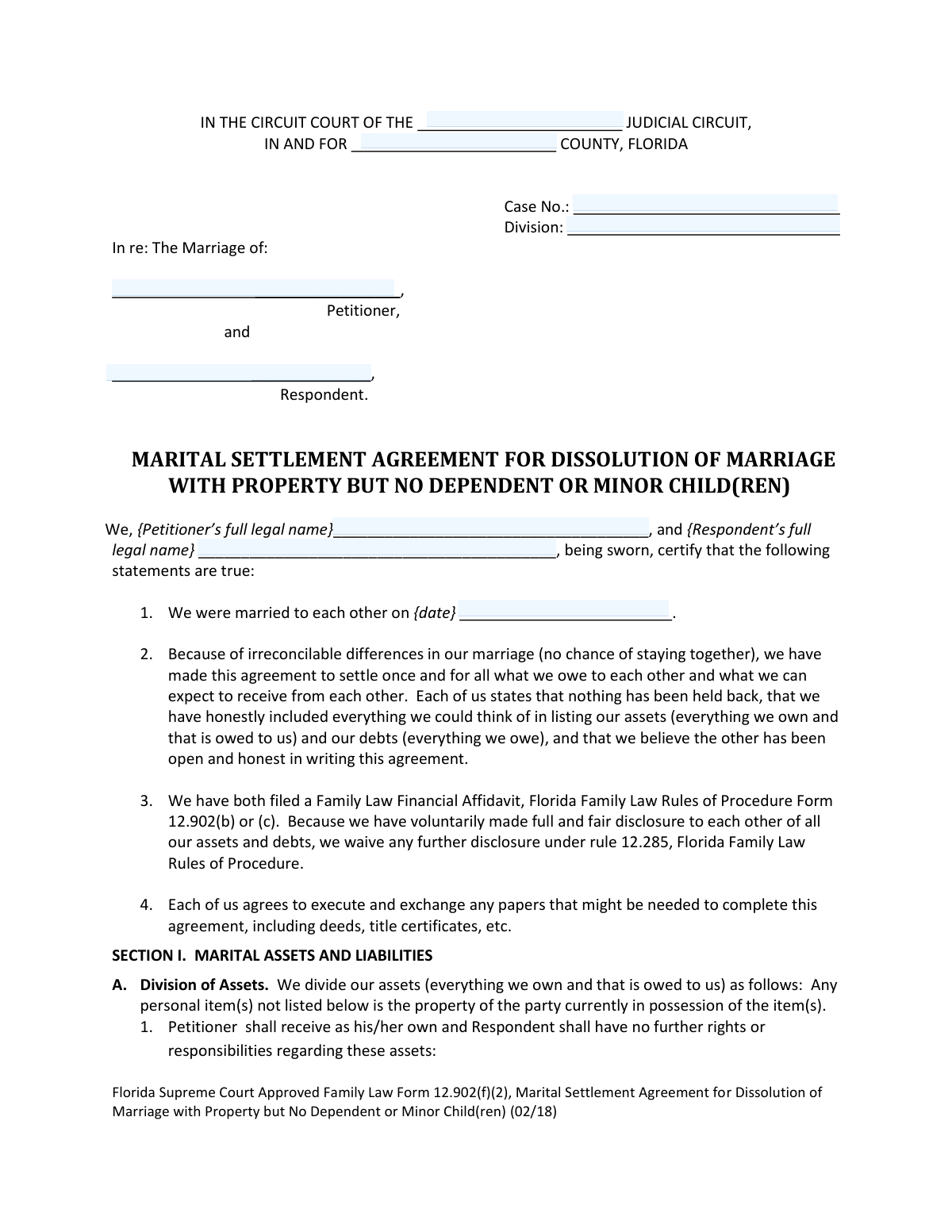
Yes! You can use AI to fill out Florida Supreme Court Approved Family Law Form 12.902(f)(2), Marital Settlement Agreement for Dissolution of Marriage with Property but No Dependent or Minor Child(ren)
Florida Form 12.902(f)(2) is a Marital Settlement Agreement used by divorcing couples in Florida who have property to divide but no dependent children. This legally binding document outlines how assets and liabilities will be split, and addresses spousal support, ensuring all financial matters are settled before the dissolution of marriage is finalized. Today, this form can be filled out quickly and accurately using AI-powered services like Instafill.ai, which can also convert non-fillable PDF versions into interactive fillable forms.
Form 12.902(f)(2) is part of the
family court forms, family law forms, divorce forms, marriage dissolution forms and property agreement forms categories on Instafill.
Our AI automatically handles information lookup, data retrieval, formatting, and form filling.
It takes less than a minute to fill out Form 12.902(f)(2) using our AI form filling.
Securely upload your data. Information is encrypted in transit and deleted immediately after the form is filled out.
Form specifications
| Form name: | Florida Supreme Court Approved Family Law Form 12.902(f)(2), Marital Settlement Agreement for Dissolution of Marriage with Property but No Dependent or Minor Child(ren) |
| Number of fields: | 646 |
| Number of pages: | 1 |
| Language: | English |
Instafill Demo: How to fill out PDF forms in seconds with AI
How to Fill Out Form 12.902(f)(2) Online for Free in 2026
Are you looking to fill out a FORM 12.902(F)(2) form online quickly and accurately? Instafill.ai offers the #1 AI-powered PDF filling software of 2026, allowing you to complete your FORM 12.902(F)(2) form in just 37 seconds or less.
Follow these steps to fill out your FORM 12.902(F)(2) form online using Instafill.ai:
- 1 Navigate to Instafill.ai and upload or select the Florida Form 12.902(f)(2).
- 2 Provide the personal and case information for both the Petitioner and Respondent as prompted by the AI.
- 3 Carefully list all marital assets in Section I, detailing which party will receive each item and its current market value.
- 4 Document all marital liabilities in Section I, clearly assigning responsibility for payment of each debt to either the Petitioner or Respondent.
- 5 Complete Section II to specify the terms of spousal support (alimony), or to indicate that both parties are waiving their rights to it.
- 6 Review the entire agreement for accuracy, then follow the guided steps to have both parties sign the document in the presence of a notary public.
- 7 Download the finalized, signed agreement and file it with the clerk of the circuit court in the appropriate Florida county.
Our AI-powered system ensures each field is filled out correctly, reducing errors and saving you time.
Why Choose Instafill.ai for Your Fillable Form 12.902(f)(2) Form?
Speed
Complete your Form 12.902(f)(2) in as little as 37 seconds.
Up-to-Date
Always use the latest 2026 Form 12.902(f)(2) form version.
Cost-effective
No need to hire expensive lawyers.
Accuracy
Our AI performs 10 compliance checks to ensure your form is error-free.
Security
Your personal information is protected with bank-level encryption.
Frequently Asked Questions About Form Form 12.902(f)(2)
This form, the Marital Settlement Agreement, is for divorcing couples in Florida with property to divide but no minor or dependent children. It is used to formally document how assets and debts will be split between the two parties.
This form should be used by a Petitioner and Respondent in a Florida Dissolution of Marriage case who have property but no children, and who have reached an agreement on some or all of their financial issues.
Before completing this agreement, both parties must have filed a Family Law Financial Affidavit, either Form 12.902(b) or (c). This agreement confirms that you have made a full and fair disclosure of your finances to each other.
In Section I, you must create separate lists of assets and debts that the Petitioner and Respondent will each receive or be responsible for. Describe each item clearly and provide its current fair market value or the total amount owed.
If you have not reached an agreement on alimony, you can write 'n/a' in the spaces provided in Section II. If you have agreed to waive alimony, you must check the box stating that you both give up any right to it.
No, this form does not act to transfer title to property. A separate legal document, such as a deed or title certificate, must be executed to officially transfer ownership.
Both parties must sign the form in the presence of a notary public or deputy clerk. The original, signed document should then be filed with the clerk of the circuit court in the county where the divorce petition was filed.
Filing this agreement is a key step, but it does not finalize your divorce. You must still follow the court's procedures to set a final hearing where a judge can approve the agreement and issue a Final Judgment of Dissolution of Marriage.
If your PDF is not interactive, you can use a service like Instafill.ai to convert it into a fillable form. This allows you to easily type your information directly into the fields online.
Yes, AI-powered services like Instafill.ai can help you complete this form more efficiently. These tools can auto-fill fields accurately, saving you time and helping to prevent common errors.
Simply upload the form to the Instafill.ai platform. The AI will identify all the form fields, allowing you to enter your information quickly and easily before downloading the completed document.
While Florida courts encourage e-filing, self-represented litigants are generally not required to do so for this form. If you do choose to e-file, you must follow the specific rules of your judicial circuit.
You can still use this form to document the matters you have agreed upon. Use Section IV, 'We have not agreed on the following issues,' to list any items that are still in dispute.
Compliance Form 12.902(f)(2)
Validation Checks by Instafill.ai
1
Case Information Completeness
This check ensures that the 'Case No.', 'COUNTY NAME', and 'Division' fields are all populated. These fields are essential for correctly filing the document with the circuit court and associating it with the proper legal case. A failure to provide this information would result in the clerk rejecting the form, delaying the legal proceedings.
2
Party Name Completeness
Validates that the 'Petitioner’s full legal name' and 'Respondent’s full legal name' fields are not empty. These names must be the full, legal names of the individuals as they appear on other court documents to ensure the agreement is legally binding and correctly identifies the parties involved. An incomplete name could render the agreement invalid.
3
Marriage Date Validity
This validation confirms that the 'We were married to each other on date' field contains a valid date that occurs in the past, specifically before the date of signing the agreement. This date establishes the legal marriage that is being dissolved and is a foundational fact for the agreement. An invalid or future date would be a logical impossibility and would invalidate the document's premise.
4
Asset Value Format
Ensures that all 'Current Fair Market Value' fields in the asset division tables contain only valid numeric or currency data. This is crucial for accurately calculating the total assets being divided between the parties. Non-numeric entries would cause calculation errors and could lead to disputes over the fairness of the asset distribution.
5
Total Assets Calculation Accuracy
This check automatically calculates the sum of all individual asset values listed for a party and compares it to the value entered in the 'Total Assets to Petitioner' or 'Total Assets to Respondent' field. This validation prevents mathematical errors and ensures the summary total accurately reflects the detailed list of assets. A discrepancy could lead to the agreement being contested or rejected by the court.
6
Total Liabilities Calculation Accuracy
Verifies that the 'Total Debts to Be Paid' fields are the correct sum of the individual 'Current Amount Owed' values listed for each party. This ensures the financial summary of debts is accurate and consistent with the itemized list. Incorrect totals can misrepresent the financial obligations each party is assuming, which is a critical component of the settlement.
7
Asset and Liability Description Requirement
This check ensures that if a monetary value is entered for an asset or liability, the corresponding description field is not empty. This prevents orphaned numbers in the financial tables and ensures every value is clearly associated with a specific item or debt. Without a description, the entry is ambiguous and could lead to future disagreements about what was being divided.
8
Alimony Section Mutual Exclusivity
Validates that only one of the primary alimony options in Section II is selected: either the parties waive alimony (item 1) OR they agree to alimony payments (item 2). The system should prevent both checkboxes from being selected simultaneously. This is critical to avoid contradictory terms in the agreement, which would make the alimony provision unenforceable.
9
Alimony Payment Details Completeness
If the checkbox for agreeing to pay alimony (Section II, item 2) is selected, this validation ensures all subsequent required fields are filled out. This includes selecting an Obligor (Petitioner or Respondent), entering a dollar amount, choosing a payment frequency, and providing a start date. Missing any of this information would result in an incomplete and unenforceable alimony clause.
10
Alimony Frequency Specificity
In the alimony section, if the 'other' payment frequency checkbox is selected, this validation ensures the adjacent text field is filled in to specify the custom payment schedule. This prevents ambiguity in the payment terms. An empty 'other' field would leave the payment schedule undefined, making it impossible to enforce the alimony agreement as written.
11
Email Address Format Validation
This check verifies that the text entered into the 'Designated E-mail Address(es)' field for both parties follows a standard email format (e.g., '[email protected]'). Since Florida courts require or allow e-service of documents, a valid email address is crucial for legal communication. An invalid format would lead to failed delivery of important legal notices.
12
Signature Date Logic
Ensures the 'Dated' field in the signature block is a valid date that is not in the future. The signature date legally marks when the agreement was executed by the party. A future date is logically invalid, and a missing date can call into question when the agreement became effective.
13
Nonlawyer Assistant Information Completeness
This validation is triggered if the form indicates a nonlawyer provided assistance. It checks that all fields in the nonlawyer section (name, business, address, and telephone number) are fully completed as required by Florida Family Law Rules. This rule is in place for transparency and to provide a record of who assisted in the form preparation, and failure to comply can have procedural consequences.
Common Mistakes in Completing Form 12.902(f)(2)
Parties often write generic descriptions like 'car' or 'credit card' instead of specific details like '2022 Toyota RAV4 VIN...' or 'Chase Sapphire Visa ending in 1234'. This ambiguity can lead to future disputes over which specific asset or debt was assigned to whom, potentially requiring further legal action to clarify. To avoid this, provide unique identifiers for all items, including vehicle VINs, real estate parcel numbers, and the last four digits of account numbers.
People frequently estimate the value of assets like homes, cars, and collectibles without proper research. An inaccurate valuation can lead to an inequitable division of property, causing one party to receive significantly less than they are entitled to. Always use objective sources like recent bank statements, Kelley Blue Book for vehicles, or a property appraisal to determine the 'Current Fair Market Value' for each asset.
The form requires specifying whether an asset or debt is in one spouse's name or both, but this is often overlooked. This information is critical because it determines the legal steps needed to transfer ownership or responsibility, such as refinancing a mortgage or retitling a vehicle. Failing to include this can complicate and delay the finalization of the divorce decree and property transfer.
Spouses may inadvertently or intentionally omit smaller assets like a store credit card, a small pension, or a personal loan from a family member. The agreement requires a 'full and fair disclosure,' and failure to list everything can be grounds for the court to set aside the entire agreement later. To prevent this, review financial records from the last few years for both parties to ensure every single asset and liability is accounted for.
Manually adding the long columns of asset values and debt amounts often leads to calculation mistakes in the 'Total Assets' and 'Total Debts' fields. These errors misrepresent the financial settlement and can cause the judge to reject the agreement for being inaccurate. Use a calculator to double-check all totals before submission. AI-powered tools like Instafill.ai can eliminate this risk by performing automatic calculations as you enter the data.
In Section II, parties might write vague terms for when alimony ends, such as 'when the recipient is financially stable.' This creates uncertainty and is a common source of future litigation. The agreement requires a specific date or a clear, legally recognized event (e.g., 'the death of either party,' 'the remarriage of the recipient,' or 'June 1, 2030'). Always define the end of alimony with precise, unambiguous language.
A very common mistake is for parties to sign the agreement at home and then take the signed document to a notary. A notary's purpose is to witness the act of signing, so the signature must be made in the notary's physical presence. A pre-signed document cannot be properly notarized and will be rejected by the court, causing delays and requiring the form to be re-executed correctly.
The form asks for 'full legal name' but people sometimes use nicknames, initials, or shortened versions of their names. This can create legal ambiguity and issues with transferring titles for property, bank accounts, and other assets, as the name on the agreement may not match the name on the legal titles. Always use the complete legal name as it appears on your government-issued ID, birth certificate, or passport.
Filers often leave the 'Case No.' and 'Division' fields blank or enter incorrect information at the top of the form. This information is essential for the clerk of court to correctly file the agreement with your specific divorce case. Submitting a form with missing or wrong case details will result in it being rejected or misfiled, delaying the entire legal process until it is corrected and resubmitted.
The instructions require the form to be typed or printed, but many people submit handwritten forms that are difficult to read. Illegible entries for asset descriptions, values, or names can lead to misinterpretation by the court and processing delays. Since the original PDF is often a non-fillable 'flat' document, using a service like Instafill.ai to convert it into an easily fillable version ensures all entries are typed, clear, and professional.
Users sometimes make conflicting choices in Section II, for example, by checking the box to 'forever give up any right to spousal support' while also filling out the details for alimony payments. This contradiction makes the agreement unenforceable and confusing for the court. Carefully select only one option—either waiving alimony or specifying its terms—to ensure your intent is clear.
Saved over 80 hours a year
“I was never sure if my IRS forms like W-9 were filled correctly. Now, I can complete the forms accurately without any external help.”
Kevin Martin Green
Your data stays secure with advanced protection from Instafill and our subprocessors

Robust compliance program
Transparent business model
You’re not the product. You always know where your data is and what it is processed for.
ISO 27001, HIPAA, and GDPR
Our subprocesses adhere to multiple compliance standards, including but not limited to ISO 27001, HIPAA, and GDPR.
Security & privacy by design
We consider security and privacy from the initial design phase of any new service or functionality. It’s not an afterthought, it’s built-in, including support for two-factor authentication (2FA) to further protect your account.
Fill out Form 12.902(f)(2) with Instafill.ai
Worried about filling PDFs wrong? Instafill securely fills florida-supreme-court-approved-family-law-form-12902f2-marital-settlement-agreement-for-dissolution-of-marriage-with forms, ensuring each field is accurate.