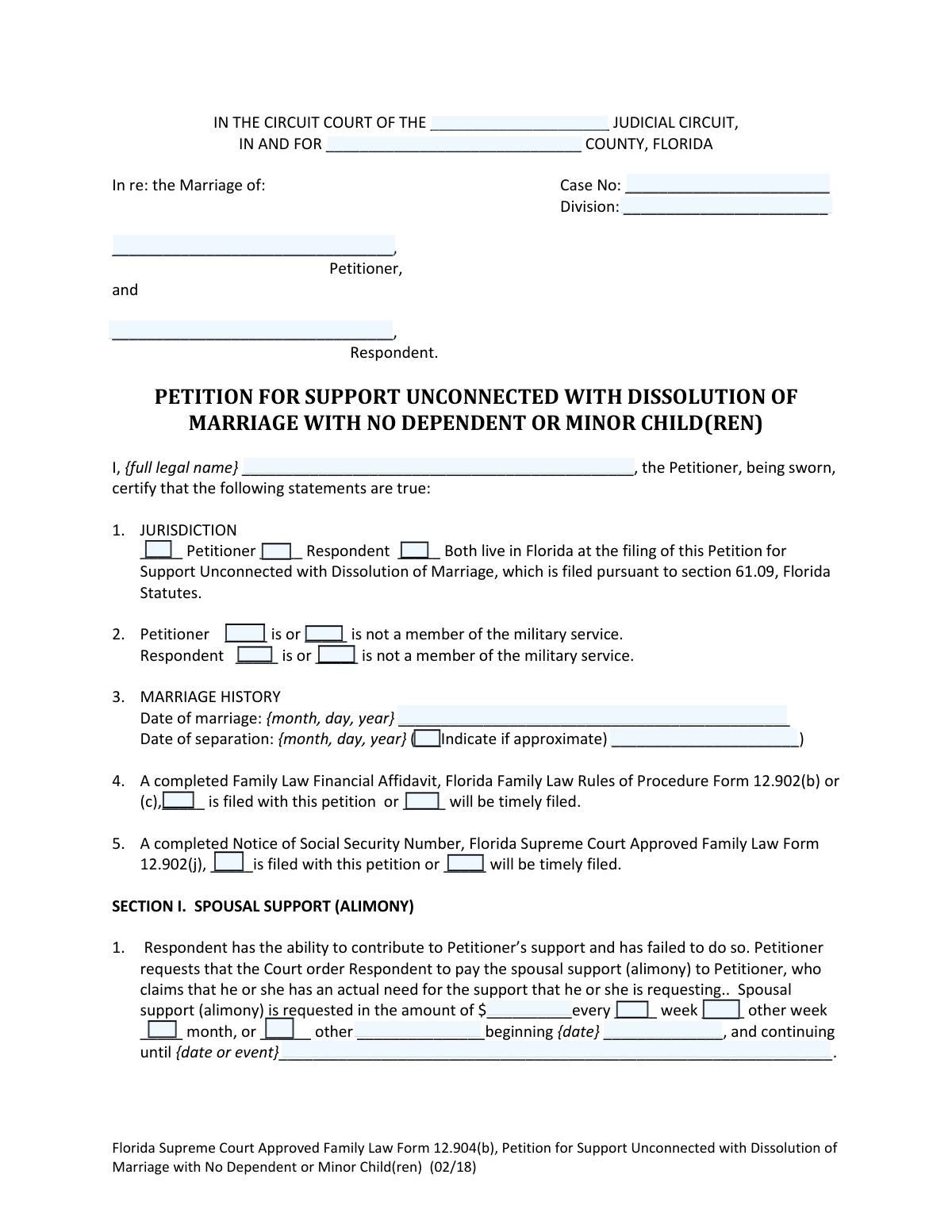
Yes! You can use AI to fill out Florida Supreme Court Approved Family Law Form 12.904(b), Petition for Support Unconnected with Dissolution of Marriage with No Dependent or Minor Child(ren)
Florida Form 12.904(b) is a legal petition used by a spouse to request alimony from their partner when a divorce case has not been initiated and no dependent children are involved. It formally asks the court to order financial support based on one spouse's need and the other's ability to pay, without addressing property or debt division. Today, this form can be filled out quickly and accurately using AI-powered services like Instafill.ai, which can also convert non-fillable PDF versions into interactive fillable forms.
Form 12.904(b) is part of the
family court forms, family law forms, family petition forms, divorce forms and marriage dissolution forms categories on Instafill.
Our AI automatically handles information lookup, data retrieval, formatting, and form filling.
It takes less than a minute to fill out Form 12.904(b) using our AI form filling.
Securely upload your data. Information is encrypted in transit and deleted immediately after the form is filled out.
Form specifications
| Form name: | Florida Supreme Court Approved Family Law Form 12.904(b), Petition for Support Unconnected with Dissolution of Marriage with No Dependent or Minor Child(ren) |
| Number of fields: | 51 |
| Number of pages: | 1 |
| Language: | English |
Instafill Demo: How to fill out PDF forms in seconds with AI
How to Fill Out Form 12.904(b) Online for Free in 2026
Are you looking to fill out a FORM 12.904(B) form online quickly and accurately? Instafill.ai offers the #1 AI-powered PDF filling software of 2026, allowing you to complete your FORM 12.904(B) form in just 37 seconds or less.
Follow these steps to fill out your FORM 12.904(B) form online using Instafill.ai:
- 1 Navigate to Instafill.ai and upload your Form 12.904(b) or select it from their template library.
- 2 Provide your personal details as the Petitioner and the details of your spouse as the Respondent, including names and residency information.
- 3 Enter the key dates for your marriage history, such as the date of marriage and the date of separation.
- 4 Detail your request for spousal support (alimony), specifying the amount, payment frequency (weekly, monthly), and the reasons why you need support.
- 5 Indicate which required supporting documents, like the Family Law Financial Affidavit and Notice of Social Security Number, are being filed with the petition.
- 6 Review all the information populated by the AI for accuracy, then electronically sign and date the petition in the designated fields.
- 7 Download the completed form, ready for filing with the appropriate Florida circuit court and for service to the Respondent.
Our AI-powered system ensures each field is filled out correctly, reducing errors and saving you time.
Why Choose Instafill.ai for Your Fillable Form 12.904(b) Form?
Speed
Complete your Form 12.904(b) in as little as 37 seconds.
Up-to-Date
Always use the latest 2026 Form 12.904(b) form version.
Cost-effective
No need to hire expensive lawyers.
Accuracy
Our AI performs 10 compliance checks to ensure your form is error-free.
Security
Your personal information is protected with bank-level encryption.
Frequently Asked Questions About Form Form 12.904(b)
This form is used to petition a court for spousal support (alimony) when you are married but a dissolution of marriage (divorce) case has not been filed. It is specifically for couples who do not have any dependent or minor children.
You should use this form if you are married, require financial support from your spouse, and have not yet filed for divorce. This form is only applicable if there are no minor or dependent children involved.
No. If a petition for dissolution of marriage has already been filed, you must use the Motion for Temporary Support with No Dependent or Minor Child(ren), Form 12.947(c), instead.
No, this form only addresses the issue of alimony. It cannot be used to ask the court to divide marital property or debts.
You must also file a Notice of Social Security Number (Form 12.902(j)) and a Family Law Financial Affidavit (Form 12.902(b) or (c)). The financial affidavit can be filed with the petition or within 45 days of serving your spouse.
The form should be typed or printed in black ink, signed before a notary or deputy clerk, and filed with the clerk of the circuit court in the county where you live. You must keep a copy for your records.
After filing, you must arrange for personal service on your spouse, who then has 20 days to file a response. Depending on their response, your case will proceed as uncontested, contested, or by default.
If your spouse is an active member of the U.S. military, additional steps and forms are required for proper service. It is highly recommended to consult an attorney in this situation.
You can obtain an Application for Determination of Civil Indigent Status from the clerk's office. If you qualify, the court may allow you to defer the filing fees.
In Section I of the form, you must state the dollar amount you are requesting and the payment frequency. You should also explain why you need support and specify the type of alimony you are seeking, such as durational, rehabilitative, or permanent.
Yes, services like Instafill.ai use AI to accurately auto-fill form fields, which can save you time and help prevent common errors. This ensures your petition is completed correctly and efficiently.
You can use a service like Instafill.ai to complete the form online. Simply upload the PDF, and the platform will make it an interactive, fillable document that you can complete, sign, and download.
If you have a non-fillable or 'flat' PDF, you can use a tool like Instafill.ai to instantly convert it into an interactive, fillable form. This allows you to easily type your information directly into the fields before printing.
Compliance Form 12.904(b)
Validation Checks by Instafill.ai
1
Validates Marriage and Separation Date Logic
This check ensures that the 'Date of separation' is on or after the 'Date of marriage'. It is logically impossible for a separation to occur before the marriage began. If the separation date precedes the marriage date, the form submission will be rejected, and the user will be prompted to correct the dates to ensure the legal timeline is accurate.
2
Ensures Jurisdictional Requirement is Met
This validation confirms that at least one of the checkboxes for residency ('Petitioner', 'Respondent', or 'Both live in Florida') is selected in Section 1. This is a critical requirement to establish that the Florida court has jurisdiction over the case. Failure to select an option will result in an error, as the court's authority to hear the case cannot be determined without this information.
3
Verifies Petitioner Name Consistency
This check verifies that the petitioner's name is entered consistently across all required fields: the case caption header, the certification line ('I, {full legal name}...'), and the 'Printed Name' field in the signature block. Consistency is crucial for creating a legally sound and unambiguous document. A mismatch could lead to rejection of the filing or future legal challenges, so the system will flag any discrepancies for correction.
4
Validates Alimony Amount Format
This check ensures that the value entered for the requested spousal support amount is a valid, positive number. The system should prevent the entry of text, negative numbers, or zero, as these are not valid monetary requests for support. This validation is important for data integrity and ensures the court receives a clear and actionable financial request.
5
Confirms Alimony Payment Frequency Selection
This validation ensures that one and only one payment frequency checkbox ('week', 'other week', 'month', or 'other') is selected for the requested alimony. A clear payment schedule is essential for any potential court order to be enforceable. If no option or multiple options are selected, the form will be considered incomplete and prompt the user to specify a single payment frequency.
6
Enforces Conditional 'Other' Frequency Description
This check is triggered if the 'other' checkbox for alimony payment frequency is selected. It validates that the adjacent text field, which is meant to describe the custom frequency, is not empty. This prevents incomplete requests and ensures that if a non-standard payment schedule is proposed, it is clearly defined for the court. An error will be shown if the 'other' box is checked but the description is missing.
7
Ensures Military Status Declaration for Both Parties
This validation confirms that a military service status ('is' or 'is not') has been selected for both the Petitioner and the Respondent. This information is legally significant due to specific laws, like the Servicemembers Civil Relief Act (SCRA), that provide protections for active military personnel. Failing to declare the status for both parties will block submission, as it is required to determine if special service procedures apply.
8
Verifies Declaration for Required Accompanying Forms
This check ensures that a selection has been made for both the 'Family Law Financial Affidavit' (Section 4) and the 'Notice of Social Security Number' (Section 5). The petitioner must indicate whether each form 'is filed' or 'will be timely filed'. This is a procedural requirement, and failing to make a selection for either form will result in a validation error, preventing the submission of an incomplete petition package.
9
Validates Petitioner Contact Information Completeness
This check verifies that the petitioner's full address (Address, City, State, Zip) and telephone number are filled out in the signature section. This contact information is essential for the court and the opposing party to send official notices and communications. An incomplete address or missing phone number will trigger an error, as it can impede the legal process.
10
Enforces Completeness of Nonlawyer Assistant Information
This validation rule applies if any field in the 'IF A NONLAWYER HELPED YOU' section is filled out. It ensures that all other fields in that section (name, business, full address, and telephone number) are also completed. This is required for transparency and compliance with rules governing nonlawyer assistance. The system will flag an incomplete section to ensure full disclosure is provided.
11
Validates Date of Marriage Format and Plausibility
This check ensures the 'Date of marriage' is a complete and valid date that occurs in the past, prior to the petition's filing date. It validates the format (e.g., MM/DD/YYYY) and checks that the date is not in the future. This is a foundational fact of the case, and an invalid or future date would render the petition logically unsound, causing a validation failure.
12
Requires Alimony Justification if Amount is Requested
This validation ensures that the text area for explaining the need for alimony is not empty if a monetary amount for alimony has been requested in Section I. A petitioner must state the grounds for their request, such as need and the other party's ability to pay. A request for money without any justification is incomplete and will be flagged for the user to provide the necessary explanation.
13
Validates Notary Identification Method Selection
This check ensures that in the notary block, either 'Personally known' or 'Produced identification' is checked to indicate how the notary verified the petitioner's identity. If 'Produced identification' is selected, it also validates that the type of identification is specified in the corresponding field. This is a legal requirement for a valid notarization, and an omission will result in an error to ensure the document is properly executed.
14
Ensures Case Header Information is Complete
This validation verifies that the essential case identification fields at the top of the form, specifically 'Judicial Circuit', 'County', and 'Case No.', are filled out. This information is critical for the clerk of court to correctly file the document and assign it to the proper case and division. The submission will be blocked if this core identifying information is missing.
Common Mistakes in Completing Form 12.904(b)
Petitioners mistakenly use this form when a dissolution of marriage (divorce) case is already in progress. This form is exclusively for seeking support when no dissolution has been filed. Using the wrong form will lead to its rejection or dismissal, causing significant delays and requiring the petitioner to refile with the correct one, which is typically Form 12.947(c) for temporary support in an existing case.
Self-represented litigants often leave the header fields for Judicial Circuit, County, Case Number, and Division blank because they don't have the information yet. This is critical for the clerk to properly file the document and route it to the correct judge. Leaving this information blank will result in the filing being rejected, and the petitioner will need to get the information from the clerk's office before they can successfully file.
The form requires a specific dollar amount, payment frequency (e.g., weekly, monthly), and a start date for the requested alimony. Many filers leave these fields blank or write ambiguous phrases like 'a reasonable amount.' This forces the court to guess at the petitioner's needs and can result in a less favorable or even no award. To avoid this, calculate a specific amount based on your financial affidavit and clearly state it in the petition.
Simply requesting money is not enough; the petition includes a section to explain *why* support is needed and how the other party has the ability to pay. Filers often provide a weak or non-existent explanation, which significantly weakens their legal argument. To prevent this, clearly state the facts supporting your claim, referencing factors like the length of the marriage, disparity in income, and your specific financial needs.
This petition must be filed with or quickly followed by a 'Family Law Financial Affidavit' and a 'Notice of Social Security Number.' People often forget to prepare and file these separate, mandatory forms. This will halt all progress on the case until the required documents are submitted, causing major delays. Always create a checklist of all required forms before filing.
This petition is a sworn statement and must be signed in the physical presence of a Notary Public or Deputy Clerk. A common error is signing the document at home and then taking it to be notarized, which invalidates the oath and will cause the court to reject the filing. Always bring your unsigned petition and a valid photo ID to the notary. If the form is a non-fillable PDF, a tool like Instafill.ai can convert it into a fillable version to be completed before printing for signature.
The form requires the petitioner to declare the military service status of both themselves and their spouse. This is often overlooked but is legally critical, as active-duty servicemembers have special protections under federal law that affect how a case can proceed. Failure to correctly state the military status can lead to procedural errors and potential reversal of any orders granted.
With courts increasingly relying on electronic service, providing a designated e-mail address is crucial for receiving official notices and documents from the court and the other party. Omitting this information can lead to missed hearings, deadlines, and important updates, potentially resulting in the case being dismissed. AI-powered tools like Instafill.ai can help ensure this and other contact information is filled in accurately and consistently across all related forms.
The form requires the date of marriage and date of separation, which are key facts for determining alimony. Users often enter dates in ambiguous formats like '01/02/03', which can be misinterpreted. This can lead to incorrect calculations regarding the length of the marriage and potential challenges from the other party. Always use a clear, unambiguous format such as 'Month Day, Year' (e.g., 'January 2, 2003') to avoid confusion.
Section III of the petition is a summary checklist where you formally indicate to the court what you are asking for. Even if the details are provided earlier in the form, filers sometimes forget to check the corresponding boxes in this final section. This oversight can create ambiguity and may lead to the court overlooking a specific request. Always double-check that this summary section accurately reflects all relief you are seeking.
Saved over 80 hours a year
“I was never sure if my IRS forms like W-9 were filled correctly. Now, I can complete the forms accurately without any external help.”
Kevin Martin Green
Your data stays secure with advanced protection from Instafill and our subprocessors

Robust compliance program
Transparent business model
You’re not the product. You always know where your data is and what it is processed for.
ISO 27001, HIPAA, and GDPR
Our subprocesses adhere to multiple compliance standards, including but not limited to ISO 27001, HIPAA, and GDPR.
Security & privacy by design
We consider security and privacy from the initial design phase of any new service or functionality. It’s not an afterthought, it’s built-in, including support for two-factor authentication (2FA) to further protect your account.
Fill out Form 12.904(b) with Instafill.ai
Worried about filling PDFs wrong? Instafill securely fills florida-supreme-court-approved-family-law-form-12904b-petition-for-support-unconnected-with-dissolution-of-marriage forms, ensuring each field is accurate.