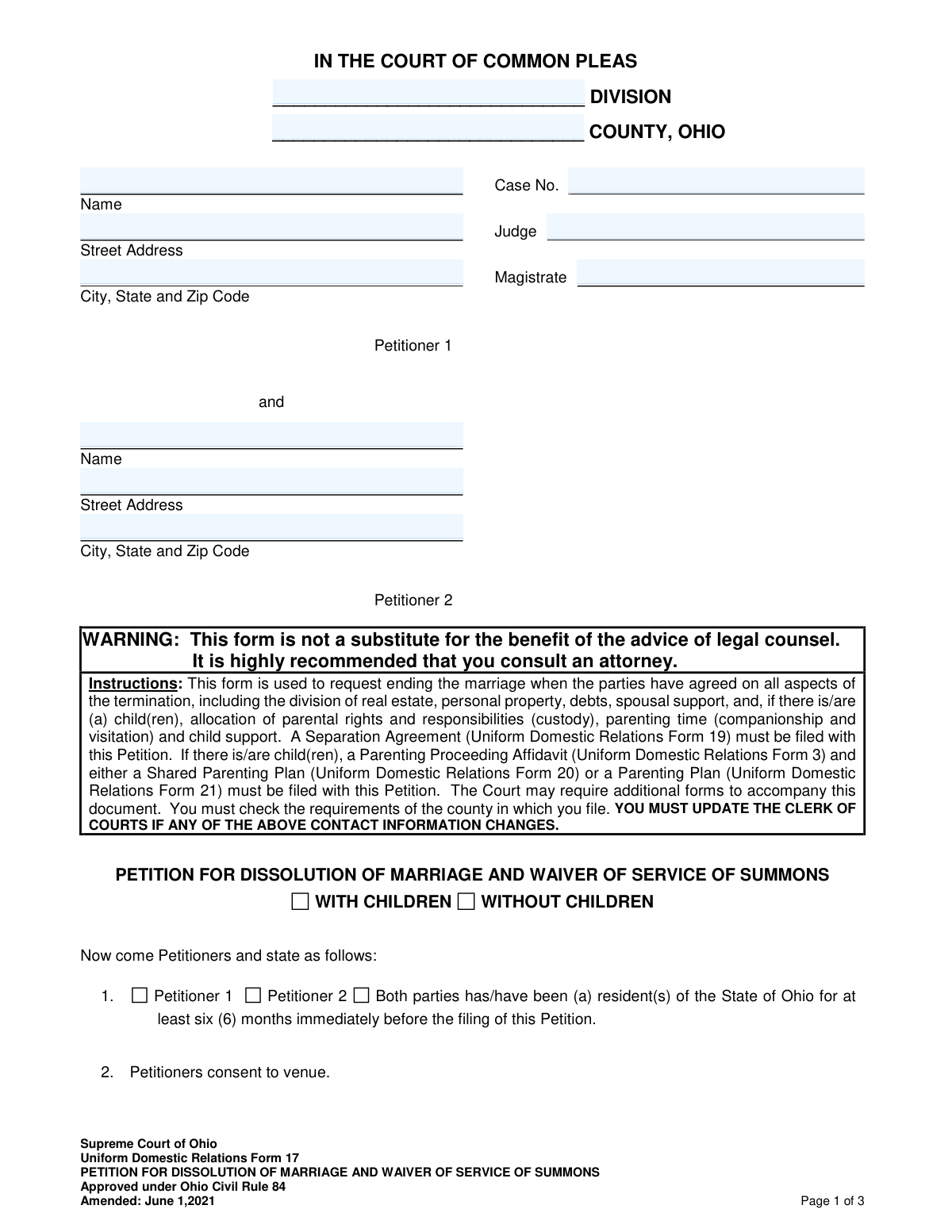
Yes! You can use AI to fill out Supreme Court of Ohio Uniform Domestic Relations Form 17, Petition for Dissolution of Marriage and Waiver of Service of Summons

The Ohio Uniform Domestic Relations Form 17 is a legal document filed jointly by a married couple in an Ohio Court of Common Pleas to initiate the process of ending their marriage. This form is used only when both parties have reached a complete agreement on all matters, including property division, debt, and child-related issues, which are detailed in a required accompanying Separation Agreement. Today, this form can be filled out quickly and accurately using AI-powered services like Instafill.ai, which can also convert non-fillable PDF versions into interactive fillable forms. Filing this petition signifies that both parties waive the formal service of summons, streamlining the legal process.
Uniform Domestic Relations Form 17 is part of the court forms, domestic relations forms, marriage dissolution forms, marriage forms and UK court forms categories on Instafill.
Our AI automatically handles information lookup, data retrieval, formatting, and form filling.
It takes less than a minute to fill out Uniform Domestic Relations Form 17 using our AI form filling.
Securely upload your data. Information is encrypted in transit and deleted immediately after the form is filled out.

Form specifications

Form name: Supreme Court of Ohio Uniform Domestic Relations Form 17, Petition for Dissolution of Marriage and Waiver of Service of Summons
Number of fields: 91
Number of pages: 3
Filled form examples: Form Uniform Domestic Relations Form 17 Examples
Language: English
main-image

Instafill Demo: How to fill out PDF forms in seconds with AI

How to Fill Out Uniform Domestic Relations Form 17 Online for Free in 2026

Are you looking to fill out a UNIFORM DOMESTIC RELATIONS FORM 17 form online quickly and accurately? Instafill.ai offers the #1 AI-powered PDF filling software of 2026, allowing you to complete your UNIFORM DOMESTIC RELATIONS FORM 17 form in just 37 seconds or less.
Follow these steps to fill out your UNIFORM DOMESTIC RELATIONS FORM 17 form online using Instafill.ai:
  1. 1 Navigate to Instafill.ai and upload or select the Ohio Uniform Domestic Relations Form 17.
  2. 2 Provide the court and case information, such as the county and division, along with the full names and addresses for both petitioners.
  3. 3 Enter details about the marriage, declare residency status for both parties, and indicate whether the dissolution involves minor children.
  4. 4 If children are involved, provide their names and dates of birth, and specify which accompanying documents (like a Shared Parenting Plan) are being filed.
  5. 5 Complete the sections regarding military service status, name restoration requests, and confirm that a Separation Agreement is attached.
  6. 6 Review all the information auto-filled by the AI for accuracy and completeness, making any necessary edits before finalizing.
  7. 7 Print the completed form for both petitioners to sign and file with the appropriate Ohio Court of Common Pleas.

Our AI-powered system ensures each field is filled out correctly, reducing errors and saving you time.

Why Choose Instafill.ai for Your Fillable Uniform Domestic Relations Form 17 Form?

Speed

Complete your Uniform Domestic Relations Form 17 in as little as 37 seconds.

Up-to-Date

Always use the latest 2026 Uniform Domestic Relations Form 17 form version.

Cost-effective

No need to hire expensive lawyers.

Accuracy

Our AI performs 10 compliance checks to ensure your form is error-free.

Security

Your personal information is protected with bank-level encryption.

Frequently Asked Questions About Form Uniform Domestic Relations Form 17

This form is used to start the legal process of ending a marriage in Ohio when both parties have already agreed on all issues, such as property division, debt, and child custody.

Both spouses (referred to as Petitioner 1 and Petitioner 2) must complete and sign this form together. It is for couples who are in complete agreement and are filing jointly to end their marriage.

You must file a Separation Agreement (Form 19) with this petition. If you have minor children, you must also include a Parenting Proceeding Affidavit (Form 3) and either a Shared Parenting Plan (Form 20) or a Parenting Plan (Form 21).

This means both parties agree they have received notice of the dissolution action and are giving up their right to be formally served legal papers by the court. Since a dissolution is a joint filing, this simplifies the process.

At least one of the petitioners must have been a resident of the State of Ohio for a minimum of six months immediately before filing the petition.

This form is only for uncontested dissolutions where you agree on all terms. If you have disagreements, you cannot use this form and should seek legal advice about filing for a divorce instead.

Yes, Section 10 of the form provides a space for either petitioner to request that the court restore their former name as part of the final decree.

You must list the full name and date of birth for any minor children, and indicate if they were born before or during the marriage, have a disability, or are subject to an existing court order.

Yes, Section 6 requires you to declare whether either petitioner is an active-duty servicemember of the U.S. military, as this can affect the legal proceedings.

Yes, services like Instafill.ai use AI to help you accurately auto-fill form fields, which saves time and reduces the risk of errors, especially when filling out multiple related legal forms.

You can use a service like Instafill.ai to upload the PDF. The platform makes the form interactive, allowing you to type your information directly into the fields and then download or print the completed document.

If you have a non-fillable or 'flat' PDF, you can upload it to a platform like Instafill.ai. It uses technology to convert the document into an interactive, fillable form that you can easily complete on your computer.

While you are not required to have a lawyer, the form itself strongly recommends consulting an attorney. A dissolution involves important legal rights, and legal counsel can ensure your interests are protected.

After you file the petition and all required documents with the Clerk of Courts, the court will schedule a final hearing. Both petitioners must attend this hearing for the judge to grant the dissolution.

Compliance Uniform Domestic Relations Form 17
Validation Checks by Instafill.ai

1
Mutually Exclusive Children Status
This check ensures that either the 'WITH CHILDREN' or 'WITHOUT CHILDREN' checkbox is selected, but not both. This selection is fundamental as it dictates which subsequent sections of the form are required, such as the parenting plan and child details. If both or neither are selected, the form is logically inconsistent and cannot be processed correctly, leading to an error prompting the user to make a single, valid choice.
2
Ohio Residency Requirement
Validates that at least one of the residency checkboxes in Section 1 ('Petitioner 1', 'Petitioner 2', or 'Both parties') is selected. This is a critical jurisdictional requirement, as the court can only hear cases where at least one party has been an Ohio resident for six months. Failure to meet this requirement will result in the court rejecting the petition for lack of jurisdiction.
3
Valid Marriage Date
Ensures the 'date of marriage' entered in Section 3 is a valid, full date (MM/DD/YYYY) that occurs in the past, prior to the filing date of the petition. This confirms the existence of a marriage to be dissolved. An invalid, future, or blank date would render the petition legally nonsensical and will be flagged for correction.
4
Conditional Parenting Plan Selection
This check verifies that if the 'WITH CHILDREN' box is checked, one of the two options in Section 8 ('Shared Parenting Plan' or 'Parenting Plan') is also selected. A dissolution involving children legally requires an accompanying plan for their care and support. If this condition is not met, the submission will be considered incomplete and rejected until a parenting plan type is chosen.
5
Conditional Child Information Entry
Verifies that if any checkbox in Section 5 is checked (e.g., 'The following child(ren) was/were born from or adopted during this marriage'), then the name and date of birth for at least one child is entered in the corresponding subsection. This prevents petitioners from indicating the presence of children without providing the necessary identifying details. A failure will trigger a message requiring the user to either provide the child's information or uncheck the box.
6
Logical Child Birth Date
This validation cross-references a child's date of birth with the date of marriage. If a child is listed as 'born from or adopted during this marriage', their birth date must be on or after the marriage date. This logical check helps ensure the accuracy of the information provided about the children's relationship to the marriage, which can have legal implications.
7
Complete Petitioner Information
Ensures that the full name, street address, city, state, and ZIP code are provided for both Petitioner 1 and Petitioner 2. This contact information is mandatory for the Clerk of Courts to send official notices and correspondence related to the case. Incomplete information will halt the filing process until all required fields are properly filled.
8
Mandatory Pregnancy Status Declaration
Confirms that one of the two mutually exclusive options in Section 4 ('Neither party is pregnant' or 'A party is pregnant') is selected. The pregnancy status of the parties is a critical legal fact that can affect child support, custody, and the timing of the final decree. The form cannot be processed without this declaration, and the user will be prompted to select one option.
9
Mandatory Military Service Declaration
This check ensures that one of the military service options in Section 6 has been selected. Federal laws, such as the Servicemembers Civil Relief Act (SCRA), provide specific legal protections for active-duty military personnel, which can affect the dissolution proceedings. A failure to declare the military status of both parties will result in an incomplete filing.
10
Valid Name Restoration Request
Validates that if a 'former name' is entered in Section 10, the name of the petitioner requesting the change is also provided and matches the name of either Petitioner 1 or Petitioner 2. This ensures the request is clear, unambiguous, and properly associated with the correct party. An incomplete or mismatched request will be flagged to prevent errors in the final court decree.
11
Petitioner Signature Presence
Verifies that the signature fields for both Petitioner 1 and Petitioner 2 are completed. The signatures signify that both parties have read, understood, and voluntarily agree to the terms of the petition and the attached separation agreement. A petition lacking either signature is invalid and will be immediately rejected by the court.
12
Attorney Registration Number Format
If an attorney is representing a petitioner, this check validates that the 'Supreme Court Reg No.' is provided and follows a plausible format (e.g., a sequence of numbers). This number is used to verify that the attorney is in good standing and licensed to practice law in the state. An invalid or missing number could delay proceedings while the attorney's credentials are confirmed.
13
ZIP Code Format Validation
This check ensures that all ZIP code fields for petitioners and their attorneys contain a valid 5-digit or 9-digit (ZIP+4) numeric format. Correctly formatted ZIP codes are essential for the mail service to deliver court documents and correspondence without delay. An invalid format will trigger an error, prompting the user to correct the entry before submission.
14
Consistency of Children Sections
This validation ensures that if 'WITHOUT CHILDREN' is selected, then Sections 5 (Child Details) and 8 (Parenting Plan) are left blank. Filling out child-related information while simultaneously declaring there are no children creates a direct contradiction. The system should prevent or flag this inconsistency to ensure the petition is coherent and accurate.

Common Mistakes in Completing Uniform Domestic Relations Form 17

Failure to Attach Mandatory Accompanying Forms

The form instructions clearly state that a Separation Agreement (Form 19) must be filed with this petition, and if children are involved, a Parenting Proceeding Affidavit (Form 3) and a Parenting Plan (Form 20 or 21) are also required. Filers often overlook these instructions and submit only the petition, leading to immediate rejection by the court clerk. This wastes time and filing fees, requiring the filer to return with a complete packet. To avoid this, create a checklist of all required documents before filing.

Incomplete or Incorrect Case Caption Information

Pro se filers often leave the top section (Case Caption) partially blank, particularly the 'Division,' 'Case No.,' 'Judge,' and 'Magistrate' fields, because this information is assigned by the court upon filing. However, failing to enter the correct 'County' and 'Division' (e.g., Domestic Relations) can cause processing delays. Incorrectly guessing at a Case Number or Judge can lead to the document being misfiled. It is best to fill in the known information (County, Division) and leave the rest for the clerk to stamp.

Confusing or Inaccurate Information in the Children's Section

Section 5, which details information about children, is complex and a frequent source of errors. Filers may list a child in multiple categories, forget to check the primary box for a section they are filling out, or provide incomplete dates of birth. These mistakes create legal ambiguity regarding jurisdiction and support obligations, forcing the court to issue deficiency notices and delay the case. Carefully read each sub-section and list each child only once in the most appropriate category with complete information.

Improperly Requesting a Name Restoration

In Section 10, a petitioner can request to be restored to a former name, but the wording often causes confusion. Common mistakes include writing the petitioner's current name in the 'former name' blank or failing to specify which petitioner is making the request. This can result in the request being denied in the final decree. To prevent this, the petitioner's full current name must be in the first blank, and the desired full former name in the second.

Mismatch Between Petition and Separation Agreement

The Petition and the attached Separation Agreement must be perfectly consistent, but parties sometimes make last-minute changes to one document without updating the other. For example, the Separation Agreement may list assets that are not mentioned in the petition's context, or a name change request is in one but not the other. A judge will spot these inconsistencies, which halts the proceedings until the documents are amended and refiled, causing significant delays.

Incorrect Residency Declaration

Section 1 requires a declaration that at least one party has been a resident of Ohio for six months prior to filing. Filers may misunderstand this jurisdictional requirement, file prematurely, or incorrectly check the 'Both parties' box when only one meets the criteria. An invalid residency declaration can lead to the court dismissing the case for lack of jurisdiction, even after filing fees have been paid. It is crucial to verify residency dates before signing.

Failure to Update Contact Information

The form explicitly warns filers that they must update the Clerk of Courts if their contact information changes. People often provide an address and then move during the dissolution process without notifying the court. This is a critical error, as all official notices, including hearing dates, are sent to the address on file. Missing a court notice can have severe legal consequences, including dismissal of the case. AI-powered tools like Instafill.ai can help by using a centralized profile to ensure contact information is always current and correct.

Ambiguous or Conflicting Checkbox Selections

The form contains numerous sections where a single choice must be made from multiple options (e.g., 'With Children' vs. 'Without Children,' pregnancy status, military service). A common mistake is leaving all boxes in a section blank or checking multiple conflicting options. This forces the court to guess the petitioners' intent, leading to delays and requests for amended filings. Since this form is a non-fillable PDF, tools like Instafill.ai can convert it to a fillable version, making it easier to clearly select the correct checkboxes and avoid stray marks or ambiguity.

Incorrect Military Service Declaration

Section 6 asks about active-duty military status, which carries significant legal weight under the Servicemembers Civil Relief Act (SCRA). Filers may not understand the definition of 'active-duty' or may simply overlook the section entirely. An incorrect declaration can seriously complicate or delay the dissolution, as specific legal protections and procedures apply to active-duty servicemembers. It is crucial to accurately determine the military status of both parties and check the correct box.
Saved over 80 hours a year

“I was never sure if my IRS forms like W-9 were filled correctly. Now, I can complete the forms accurately without any external help.”

Kevin Martin Green

Your data stays secure with advanced protection from Instafill and our subprocessors

Robust compliance program

Transparent business model

You’re not the product. You always know where your data is and what it is processed for.

ISO 27001, HIPAA, and GDPR

Our subprocesses adhere to multiple compliance standards, including but not limited to ISO 27001, HIPAA, and GDPR.

Security & privacy by design

We consider security and privacy from the initial design phase of any new service or functionality. It’s not an afterthought, it’s built-in, including support for two-factor authentication (2FA) to further protect your account.

Fill out Uniform Domestic Relations Form 17 with Instafill.ai

Worried about filling PDFs wrong? Instafill securely fills supreme-court-of-ohio-uniform-domestic-relations-form-17-petition-for-dissolution-of-marriage-and-waiver-of-service-of forms, ensuring each field is accurate.