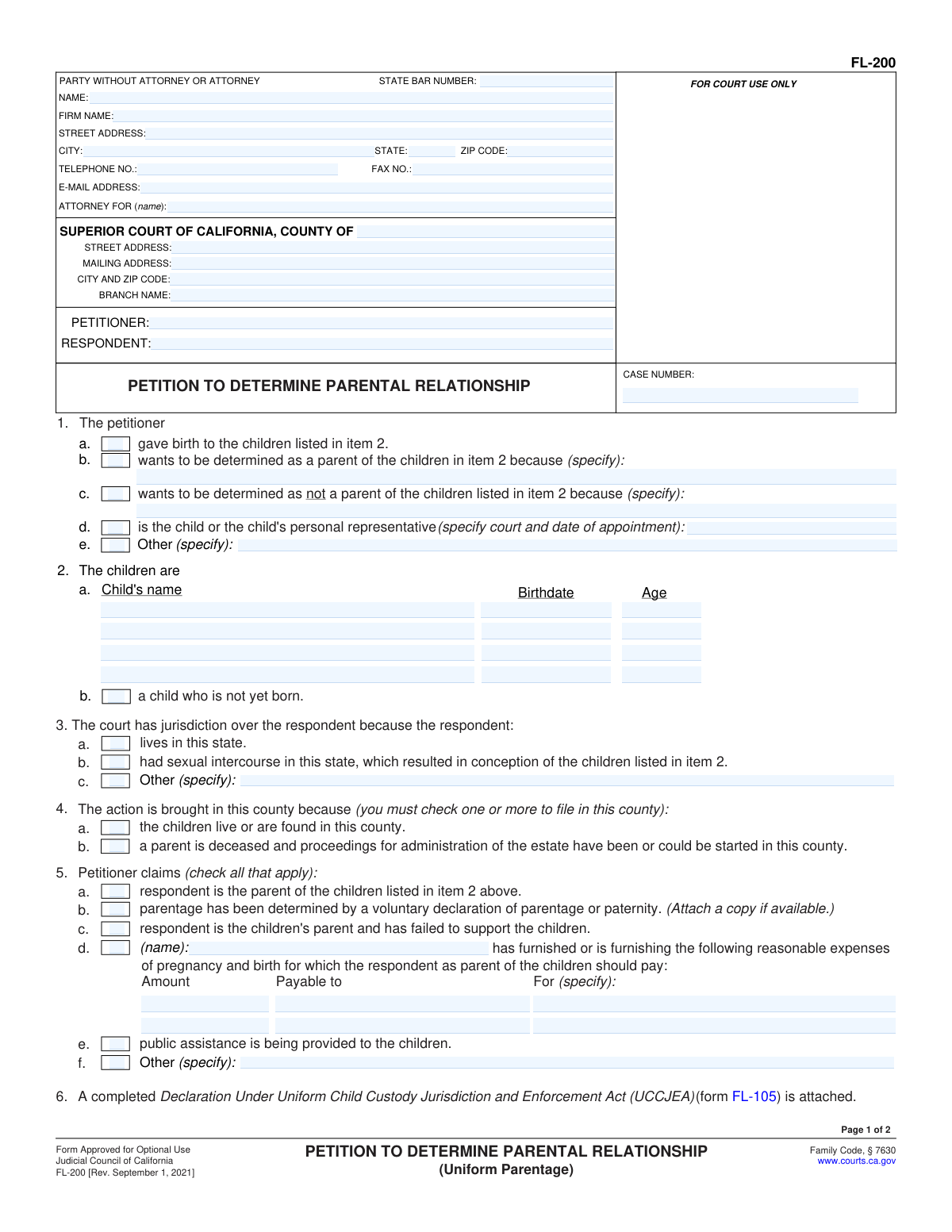
Yes! You can use AI to fill out Form FL-200, Petition to Determine Parental Relationship (Uniform Parentage)
California Form FL-200, Petition to Determine Parental Relationship, is a legal document filed with the Superior Court to start a case establishing a child's legal parents. This is a crucial first step in cases involving child custody, visitation (parenting time), and child support when the parents were not married. It can be filed by a parent, a person who believes they are a parent, or a child's representative. Today, this form can be filled out quickly and accurately using AI-powered services like Instafill.ai, which can also convert non-fillable PDF versions into interactive fillable forms.
FL-200 is part of the
California court forms, California rental forms, family court forms, family law forms and family petition forms categories on Instafill.
Our AI automatically handles information lookup, data retrieval, formatting, and form filling.
It takes less than a minute to fill out FL-200 using our AI form filling.
Securely upload your data. Information is encrypted in transit and deleted immediately after the form is filled out.
Form specifications
| Form name: | Form FL-200, Petition to Determine Parental Relationship (Uniform Parentage) |
| Number of fields: | 122 |
| Number of pages: | 1 |
| Language: | English |
Instafill Demo: How to fill out PDF forms in seconds with AI
How to Fill Out FL-200 Online for Free in 2026
Are you looking to fill out a FL-200 form online quickly and accurately? Instafill.ai offers the #1 AI-powered PDF filling software of 2026, allowing you to complete your FL-200 form in just 37 seconds or less.
Follow these steps to fill out your FL-200 form online using Instafill.ai:
- 1 Navigate to Instafill.ai and upload or select the Form FL-200, Petition to Determine Parental Relationship.
- 2 Provide your personal information as the Petitioner, information for the Respondent, and details for the specific Superior Court of California where you are filing.
- 3 Enter the names, birthdates, and ages of the children involved in the petition.
- 4 Specify the legal basis for your petition, such as whether you gave birth, believe you are a parent, or want to be determined as not a parent.
- 5 Clearly state your requests to the court, including determinations on parentage, child custody, visitation, child support, and any other related orders.
- 6 Allow the AI to populate the form, then carefully review all sections, including the Declaration Under UCCJEA (Form FL-105), to ensure all information is accurate and complete.
- 7 Electronically or manually sign and date the petition, then file it with the court clerk and serve a copy to the Respondent as required by law.
Our AI-powered system ensures each field is filled out correctly, reducing errors and saving you time.
Why Choose Instafill.ai for Your Fillable FL-200 Form?
Speed
Complete your FL-200 in as little as 37 seconds.
Up-to-Date
Always use the latest 2026 FL-200 form version.
Cost-effective
No need to hire expensive lawyers.
Accuracy
Our AI performs 10 compliance checks to ensure your form is error-free.
Security
Your personal information is protected with bank-level encryption.
Frequently Asked Questions About Form FL-200
This form is used to ask a California court to legally establish who a child's parents are when the parents were not married or in a domestic partnership. It also allows you to request court orders for child custody, visitation (parenting time), and child support.
A parent, a person who believes they are a parent, a person who wants to prove they are not a parent, or a child's representative can file this form. It is for unmarried parents who need a court order to establish parental rights and responsibilities.
The UCCJEA (Declaration Under Uniform Child Custody Jurisdiction and Enforcement Act, Form FL-105) is a mandatory attachment. You must complete it to provide the court with the child's address history, which helps the court determine if it has the authority to make custody orders.
You can use this form to ask the court to order genetic (DNA) testing to determine parentage. You would make this request by checking the appropriate box in item 7c on the second page.
The Petitioner is the person who starts the court case by filling out and filing this form. The Respondent is the other person involved in the case who will be served with the papers and has the right to file a response.
Yes, you can file this petition for a child who is not yet born. You would indicate this by checking box 2b on the first page of the form.
After filing, you must have another adult 'serve' (legally deliver) a copy of the petition and a Summons (Form FL-210) to the Respondent. The Respondent then has 30 days to file a response with the court.
Legal custody refers to the right to make important decisions for your child, such as healthcare and education. Physical custody refers to which parent the child lives with most of the time.
Even if you signed a Voluntary Declaration, you still need to file this petition to get court orders for custody, visitation, and support. You should check box 5b and attach a copy of the signed declaration to your petition.
This refers to the Standard Family Law Restraining Orders on the Summons (Form FL-210). Once you file, you cannot take the child out of state; once the Respondent is served, they are also bound by these same orders.
Yes, services like Instafill.ai use AI to accurately auto-fill form fields, which saves time and helps reduce errors. This is particularly useful for complex legal forms like the FL-200.
Simply upload the FL-200 form to the Instafill.ai platform. The AI will identify all the fields, allowing you to enter your information into an easy-to-use interface and complete the document quickly.
Instafill.ai can convert flat, non-fillable PDFs into interactive, fillable forms. Just upload your document, and the platform will make it easy for you to complete and download.
Compliance FL-200
Validation Checks by Instafill.ai
1
Petitioner and Respondent Names Required
This check ensures that the 'PETITIONER' (Party1_ft) and 'RESPONDENT' (Party2_ft) fields are not empty. These names are fundamental to identifying the parties in the legal action and are used throughout the document and in all subsequent court proceedings. A failure to provide these names would make the petition invalid and unprocessable by the court clerk.
2
Petitioner's Basis for Filing Selection
Validates that at least one checkbox is selected in item 1 ('The petitioner...'). This selection is legally required to establish the petitioner's standing, or their right to bring this action before the court. If a checkbox with a corresponding text field (1b, 1c, 1d, or 1e) is selected, this also validates that the text field is not empty, ensuring the reason is specified.
3
Child Identification Requirement
This check ensures that information about the child or children is provided in item 2. The user must either list at least one child's name and birthdate in item 2a or select the checkbox for 'a child who is not yet born' in item 2b. A petition cannot be filed without identifying the child who is the subject of the parental relationship determination.
4
Child's Birthdate Validity
Verifies that any date entered in the 'Birthdate' fields for children in item 2a is a valid, complete date in the past. This prevents data entry errors like typos, invalid formats, or future dates, which are logically impossible. An invalid birthdate would cause significant issues in establishing the child's identity and age for legal purposes like child support calculations.
5
Child's Age and Birthdate Consistency
This validation cross-references the child's entered 'Birthdate' with their entered 'Age' in item 2a. The system calculates the age based on the birthdate and flags a mismatch if the user-entered age is different. This check helps catch typographical errors in either the birthdate or the age field, improving the accuracy of the legal record.
6
Jurisdictional Basis Selection
Ensures that at least one of the checkboxes in item 3 ('The court has jurisdiction...') is selected. This is a critical, mandatory requirement for the court to have the legal authority to hear the case and make orders concerning the respondent. Without a valid basis for jurisdiction, the case is subject to immediate dismissal.
7
Venue Basis Selection
Validates that at least one checkbox in item 4 ('The action is brought in this county because...') is selected, as explicitly required by the form. This establishes the proper venue, or the correct county court, to file the petition based on the child's residence or other legal factors. Filing in the wrong county can lead to case delays or transfer.
8
Conditional Requirement for Expense Details
If the petitioner checks box 5d to claim reimbursement for pregnancy and birth expenses, this validation ensures the associated fields ('Amount', 'Payable to', 'For (specify)') are filled out. This is important because a claim for money must be specific to be considered by the court. An incomplete claim cannot be adjudicated and will be rejected.
9
Expense Amount Format
This check verifies that the 'Amount' field in item 5d contains a valid numerical or currency value. It prevents the entry of non-numeric text, ensuring that the data is in the correct format for financial calculations and court orders. Failure to enter a valid amount makes the financial claim ambiguous and unenforceable.
10
Logical Consistency in Parentage Request
This validation prevents the selection of contradictory requests in item 7 ('PARENT-CHILD RELATIONSHIP'). For example, a user cannot simultaneously check a box stating the 'Petitioner is the parent' (7a) and another stating the 'Petitioner is not the parent' (7b). This check ensures the petitioner's request is clear and logical, preventing a petition with conflicting goals from being filed.
11
Custody Request Prerequisite
Verifies that if any requests for child custody or visitation are made in item 8, at least one born child is listed in item 2a. Custody orders can only apply to living children, not to an unborn child. This check prevents legally untenable requests and ensures that custody orders are linked to an identified child.
12
Signature Date Validation
This check ensures the 'Date' field next to the petitioner's signature is filled out with a valid date that is not in the future. The signature on this legal document is made 'under penalty of perjury,' and the date establishes when this declaration was made. An invalid or future date would call the validity of the entire declaration into question.
Common Mistakes in Completing FL-200
Item 6 states that a completed Declaration Under Uniform Child Custody Jurisdiction and Enforcement Act (UCCJEA, Form FL-105) is attached. Many filers overlook this and fail to include the separate form. Without the UCCJEA, the court cannot establish proper jurisdiction over the child, leading to the clerk rejecting the entire filing and causing significant delays. Always ensure Form FL-105 is fully completed and submitted along with this petition.
Individuals representing themselves (pro per) often get confused by the top section labeled 'ATTORNEY FOR'. They may leave it blank or write 'Self'. The correct procedure is to enter their own name, address, and contact information in this section. An incorrectly filled header can cause confusion and delays in court communications and processing. Using a tool like Instafill.ai can help populate these fields correctly based on user identity.
In Item 2, filers often make errors such as misspelling a child's name, entering an incorrect birthdate, or miscalculating the age. These inconsistencies can create serious legal problems later, as court orders for custody and support must be precise. Double-check that all names are spelled exactly as they appear on the birth certificate and that birthdates are correct to prevent future amendments and legal challenges.
The top of page 2 requires the Petitioner, Respondent, and Case Number to be re-entered. It is a very common mistake for filers to overlook these fields, leaving them blank. This can cause page 2 to become separated or misfiled, rendering the petition incomplete and potentially invalidating the requests made on that page. Always ensure all pages are fully completed with the correct case information.
Filers sometimes check conflicting boxes, such as 1b ('wants to be determined as a parent') and 1c ('wants to be determined as not a parent'), which makes the petition's purpose unclear. Additionally, when specifying a reason, they may provide a vague statement like 'for legal reasons'. This lack of clarity will require the court to seek clarification, halting the case. The petition must clearly state the filer's goal and the factual basis for it.
Item 4 specifies the legal reasons for filing in a particular county, primarily that the child resides there. A common error is filing in the county where the petitioner lives, even if the child lives elsewhere. This results in the case being dismissed or transferred, which wastes time and filing fees. Always confirm the child's county of residence and file in the correct Superior Court for that location.
In Item 8, filers often check boxes for 'Joint' legal and physical custody without providing a specific parenting plan or attaching the required forms (e.g., FL-311, FL-341). This ambiguity forces the court to issue vague temporary orders and requires additional hearings to establish a clear schedule. To avoid this, attach a detailed proposed parenting time schedule to provide the court with a clear and enforceable plan.
An unsigned or undated petition is legally invalid and will be immediately rejected by the court clerk upon submission. This simple oversight is a frequent cause of filing delays, requiring the petitioner to make another trip to the courthouse. Always perform a final review to ensure the signature and date fields on page 2 are properly completed before filing. AI-powered tools like Instafill.ai can highlight required signature fields to prevent this error.
The form allows filers to reference other documents, such as a 'voluntary declaration of parentage' in Item 5b or a separate declaration for custody facts in Item 8e. A frequent mistake is checking the box indicating a document is attached but then forgetting to include the actual document with the filing. This weakens the legal argument and forces the court to request the missing information, delaying the case. If this form is a non-fillable PDF, a tool like Instafill.ai can convert it to a fillable version and help manage attachments.
Saved over 80 hours a year
“I was never sure if my IRS forms like W-9 were filled correctly. Now, I can complete the forms accurately without any external help.”
Kevin Martin Green
Your data stays secure with advanced protection from Instafill and our subprocessors

Robust compliance program
Transparent business model
You’re not the product. You always know where your data is and what it is processed for.
ISO 27001, HIPAA, and GDPR
Our subprocesses adhere to multiple compliance standards, including but not limited to ISO 27001, HIPAA, and GDPR.
Security & privacy by design
We consider security and privacy from the initial design phase of any new service or functionality. It’s not an afterthought, it’s built-in, including support for two-factor authentication (2FA) to further protect your account.
Fill out FL-200 with Instafill.ai
Worried about filling PDFs wrong? Instafill securely fills form-fl-200-petition-to-determine-parental-relationship-uniform-parentage forms, ensuring each field is accurate.