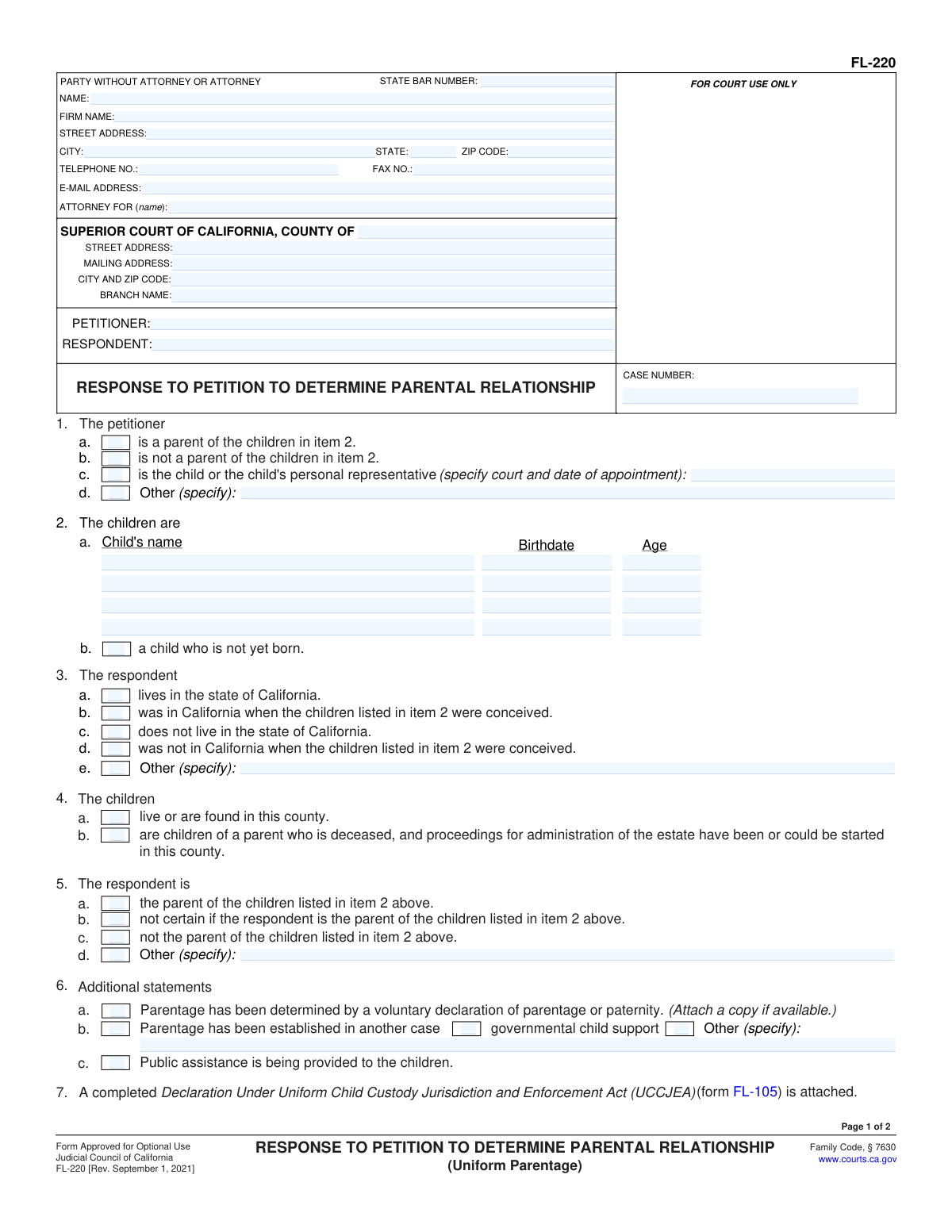
Yes! You can use AI to fill out Form FL-220, Response to Petition to Determine Parental Relationship (Uniform Parentage)
Form FL-220 is a legal document used in California family court for a person (the respondent) to formally reply to a 'Petition to Determine Parental Relationship.' It allows the respondent to agree with, disagree with, or state uncertainty about the petitioner's claims regarding parentage and to request specific court orders for child custody, visitation, child support, and allocation of birth-related expenses. Today, this form can be filled out quickly and accurately using AI-powered services like Instafill.ai, which can also convert non-fillable PDF versions into interactive fillable forms.
FL-220 is part of the
California court forms, California rental forms, court response forms, family court forms, family law forms and family petition forms categories on Instafill.
Our AI automatically handles information lookup, data retrieval, formatting, and form filling.
It takes less than a minute to fill out FL-220 using our AI form filling.
Securely upload your data. Information is encrypted in transit and deleted immediately after the form is filled out.
Form specifications
| Form name: | Form FL-220, Response to Petition to Determine Parental Relationship (Uniform Parentage) |
| Number of fields: | 114 |
| Number of pages: | 1 |
| Language: | English |
Instafill Demo: How to fill out PDF forms in seconds with AI
How to Fill Out FL-220 Online for Free in 2026
Are you looking to fill out a FL-220 form online quickly and accurately? Instafill.ai offers the #1 AI-powered PDF filling software of 2026, allowing you to complete your FL-220 form in just 37 seconds or less.
Follow these steps to fill out your FL-220 form online using Instafill.ai:
- 1 Navigate to Instafill.ai and upload or select Form FL-220.
- 2 Enter your personal details, attorney information (if any), and the court case information, including the county, parties' names, and case number.
- 3 Complete sections 1-4 by providing information about the petitioner, the children involved, and your residency status.
- 4 In sections 5-7, state your position on whether you are the parent, if parentage has been determined elsewhere, and attach a completed UCCJEA declaration.
- 5 Specify your requests to the court in sections 8-11, including your desired parent-child relationship determination, child custody and visitation arrangements, and how pregnancy/birth expenses and litigation costs should be paid.
- 6 If applicable, request a name change for the children in section 12 and list any other orders you are requesting in section 13.
- 7 Carefully review all entered information for accuracy, then date and sign the form under penalty of perjury before filing it with the appropriate court.
Our AI-powered system ensures each field is filled out correctly, reducing errors and saving you time.
Why Choose Instafill.ai for Your Fillable FL-220 Form?
Speed
Complete your FL-220 in as little as 37 seconds.
Up-to-Date
Always use the latest 2026 FL-220 form version.
Cost-effective
No need to hire expensive lawyers.
Accuracy
Our AI performs 10 compliance checks to ensure your form is error-free.
Security
Your personal information is protected with bank-level encryption.
Frequently Asked Questions About Form FL-220
Form FL-220, the 'Response to Petition to Determine Parental Relationship,' is used to respond to a court case started by someone else to establish a child's legal parents. It allows you to agree or disagree with what the other person has asked for and to make your own requests to the court.
You need to fill out this form if you have been served with a 'Petition to Determine Parental Relationship' (Form FL-210) and a 'Summons' (Form FL-210). You are the 'Respondent' in the case, and this is your official response to the court.
You must also complete and attach a 'Declaration Under Uniform Child Custody Jurisdiction and Enforcement Act (UCCJEA)' (Form FL-105). If you previously signed a 'Voluntary Declaration of Parentage,' you should attach a copy of that as well.
In item 5, you should check box 5b, which states you are 'not certain if the respondent is the parent.' You can then formally ask the court for genetic testing in item 8c of the form.
To request a DNA (genetic) test, you must check the box in item 8c. This asks the court to order genetic testing to determine whether you or the petitioner is the parent of the children listed.
Legal custody (item 9a) refers to the right to make important decisions for your child, like healthcare and education. Physical custody (item 9b) refers to where the child lives most of the time. You can request that these be granted to one parent, or jointly to both.
This form does not calculate child support, but it puts the court on notice that support is an issue. The form states that the court is required to make child support orders based on both parents' incomes, so you should be prepared to provide financial information later.
After you complete and sign the form, you must file the original with the court clerk and serve a copy on the Petitioner. You must follow specific legal procedures for filing and 'service,' so it's important to understand the rules or seek legal advice.
Yes, you can. In item 2 of the form, you would check box 2b, which indicates the case involves 'a child who is not yet born.'
The form refers to the Standard Family Law Restraining Orders found on the back of the Summons (FL-210). These orders automatically apply to you once you are served, preventing you from doing things like removing the child from the state or changing insurance policies until the court says otherwise.
Yes, services like Instafill.ai use AI to help you fill out forms like the FL-220 accurately and efficiently. The AI can auto-fill fields, reducing repetitive data entry and saving you time.
You can use a service like Instafill.ai to fill out the form online. Simply upload the FL-220 PDF to their platform, and it will become an interactive form that you can type into, save, and download.
If you have a non-fillable or 'flat' PDF, you can use a tool like Instafill.ai to make it interactive. Their service can convert the document into a fillable format, so you can easily type your answers directly into the fields.
Compliance FL-220
Validation Checks by Instafill.ai
1
Case Number Consistency Across Pages
This validation ensures that the 'CASE NUMBER' entered on Page 1 is identical to the 'CASE NUMBER' entered on Page 2. Case number consistency is critical for legal document integrity, ensuring all pages are correctly associated with the same court file. A mismatch could lead to filing rejection or incorrect processing by the court clerk.
2
Child Information Completeness
Checks that if Item 2a is selected, at least one child's full name and birthdate are provided. The children are the subject of the petition, and their identification is fundamental to the case. Failure to provide this information makes the response incomplete and may cause the court to reject the filing or delay proceedings until the information is supplied.
3
Child Birthdate and Age Consistency
This validation compares the child's birthdate in Item 2a with the entered age to ensure they are logically consistent. The age should be automatically calculated or verified against the provided birthdate and the current date. This check prevents simple data entry errors and ensures the court has accurate, reliable information about the child's age, which is relevant for custody and support decisions.
4
Mutually Exclusive Child Status
Verifies that the user has not selected both Item 2a ('The children are...') and Item 2b ('a child who is not yet born'). These two options are mutually exclusive as a response cannot simultaneously address both born and unborn children in this section. If this validation fails, the form is ambiguous and requires correction to clarify the subject of the response.
5
Conditional 'Other (specify)' Field Requirement
Ensures that if an 'Other (specify)' checkbox is selected in items like 1d, 3e, or 5d, the corresponding text field is not empty. This is important because selecting 'Other' without providing a specification leaves the response incomplete and ambiguous. The court requires a specific explanation to understand the respondent's position, and failure to provide it will necessitate a request for clarification.
6
Parent-Child Relationship Contradiction
This check prevents a user from making contradictory statements in Item 8, 'PARENT-CHILD RELATIONSHIP'. For example, it flags an error if the user checks that the 'Respondent is the parent' (8a) and also that the 'Respondent is not the parent' (8b). Such contradictions make the legal position unclear and would require amendment before the court can proceed.
7
Exclusive Custody Request
For 'Legal custody' (Item 9a) and 'Physical custody' (Item 9b), this validation ensures that only one option (Petitioner, Respondent, Joint, or Other) is selected for each. Requesting custody be granted to multiple, separate parties in a single category is logically invalid and creates an ambiguous request. The form must present a clear, singular request for each type of custody.
8
Name Change Specification Requirement
Validates that if the checkbox in Item 12, 'Children's names be changed', is selected, the corresponding text field specifying the old and new names is filled out. Checking the box indicates an intent to request a name change, which is a significant legal action requiring specific details. An empty specification field would render the request void and unprocessed.
9
Mandatory Signature and Date
This check confirms that the 'Date' and 'TYPE OR PRINT NAME' fields in the signature block are both completed before submission. The signature, name, and date are required to execute the declaration 'under penalty of perjury,' giving the document its legal weight. An unsigned or undated form is not legally valid and will be rejected by the court.
10
Valid Child Birthdate
Ensures that any date entered in the 'Birthdate' fields in Item 2a is a valid calendar date and occurs in the past. A future or invalid date is a logical impossibility for a child's birthdate and indicates a data entry error. Correct dates are essential for calculating age, determining jurisdiction, and establishing child support obligations.
11
Party Name Consistency Across Pages
This validation verifies that the 'PETITIONER' and 'RESPONDENT' names entered in the header of Page 1 match the names entered in the header of Page 2. Consistent party identification throughout the document is crucial for clarity and legal accuracy. Discrepancies can cause confusion and potential administrative rejection of the document.
12
Exclusive Choice Validation for Respondent's Status
This check ensures that for Item 5 ('The respondent is...'), only one of the options (a, b, c, or d) is selected. These options represent distinct and mutually exclusive legal positions regarding parentage. Selecting more than one option would create a logical contradiction in the respondent's declaration, making the filing invalid until corrected.
Common Mistakes in Completing FL-220
Item 7 requires that a completed Declaration Under Uniform Child Custody Jurisdiction and Enforcement Act (UCCJEA, Form FL-105) be attached. This is one of the most common reasons for a filing to be rejected by the court clerk, as it provides essential information for establishing jurisdiction. Always complete and attach Form FL-105 with your response. If you only have a flat, non-fillable PDF of the required forms, tools like Instafill.ai can convert them into fillable versions to simplify the process.
Filers often confuse the 'Petitioner' and 'Respondent' fields or forget to include the Case Number from the original petition. The person filing this FL-220 form is the Respondent. These errors can lead to the court clerk rejecting the form or serious delays in the case. To avoid this, carefully copy the party names and case number exactly as they appear on the Summons (FL-210) you received.
An unsigned or undated form is legally invalid and will be rejected by the court, halting your response. This simple oversight on page 2 requires you to refile the entire document. Always perform a final review, ensuring you have physically signed and dated the form under penalty of perjury before submission.
Parties representing themselves ('in pro per') often get confused by the attorney information box on page 1. They may leave it blank or incorrectly fill it out. You must enter your own name, address, and phone number, and then write your name again or 'In Pro Per' on the line for 'ATTORNEY FOR (name):'. Using an AI-powered tool like Instafill.ai can help prevent this by guiding you to place the correct information in the right fields.
The top of page 2 requires the Petitioner, Respondent, and Case Number to be filled in again, which is often overlooked. If the pages get separated, the second page containing your specific requests becomes unidentifiable and may be disregarded by the court. AI form-filling tools like Instafill.ai can prevent this by automatically populating recurring information across all pages of the document.
Filers sometimes make conflicting statements, such as denying parentage in Item 5 but then requesting custody in Item 9, or requesting genetic testing in Item 8c while also definitively claiming they are the parent. These contradictions weaken your legal position and create confusion for the court. Ensure your responses are consistent across all sections to present a clear and logical request.
In Item 2, filers may enter incorrect birthdates, misspell a child's name, or forget to list all children involved in the case. Such inaccuracies can create significant problems and delays when the court establishes custody, visitation, and child support orders. To ensure accuracy, double-check all details against official documents like birth certificates before submitting the form.
Respondents sometimes leave Item 9 (Child Custody and Visitation) blank, assuming the court will create a fair plan or that they agree with the petitioner. However, this means the court only has the other party's proposal to consider, and you waive the opportunity to have your own preferences heard. You must always clearly state your requests for legal custody, physical custody, and visitation to protect your parental rights.
In Item 9, when requesting a specific visitation schedule, the form directs you to use other attachments like Form FL-311 (Child Custody and Visitation Application Attachment). A common mistake is to check the box for an attachment but then forget to complete and include the actual form. This leaves the court without the necessary details to grant your specific requests, likely resulting in a generic or undesired order.
If you check box 6a, indicating parentage was determined by a voluntary declaration, you are required to attach a copy of that signed declaration. The declaration is the legal evidence the court needs to confirm this claim. Forgetting to attach it can undermine your position and force the court to proceed as if parentage has not yet been legally established, potentially leading to orders for genetic testing.
Saved over 80 hours a year
“I was never sure if my IRS forms like W-9 were filled correctly. Now, I can complete the forms accurately without any external help.”
Kevin Martin Green
Your data stays secure with advanced protection from Instafill and our subprocessors

Robust compliance program
Transparent business model
You’re not the product. You always know where your data is and what it is processed for.
ISO 27001, HIPAA, and GDPR
Our subprocesses adhere to multiple compliance standards, including but not limited to ISO 27001, HIPAA, and GDPR.
Security & privacy by design
We consider security and privacy from the initial design phase of any new service or functionality. It’s not an afterthought, it’s built-in, including support for two-factor authentication (2FA) to further protect your account.
Fill out FL-220 with Instafill.ai
Worried about filling PDFs wrong? Instafill securely fills form-fl-220-response-to-petition-to-determine-parental-relationship-uniform-parentage forms, ensuring each field is accurate.