
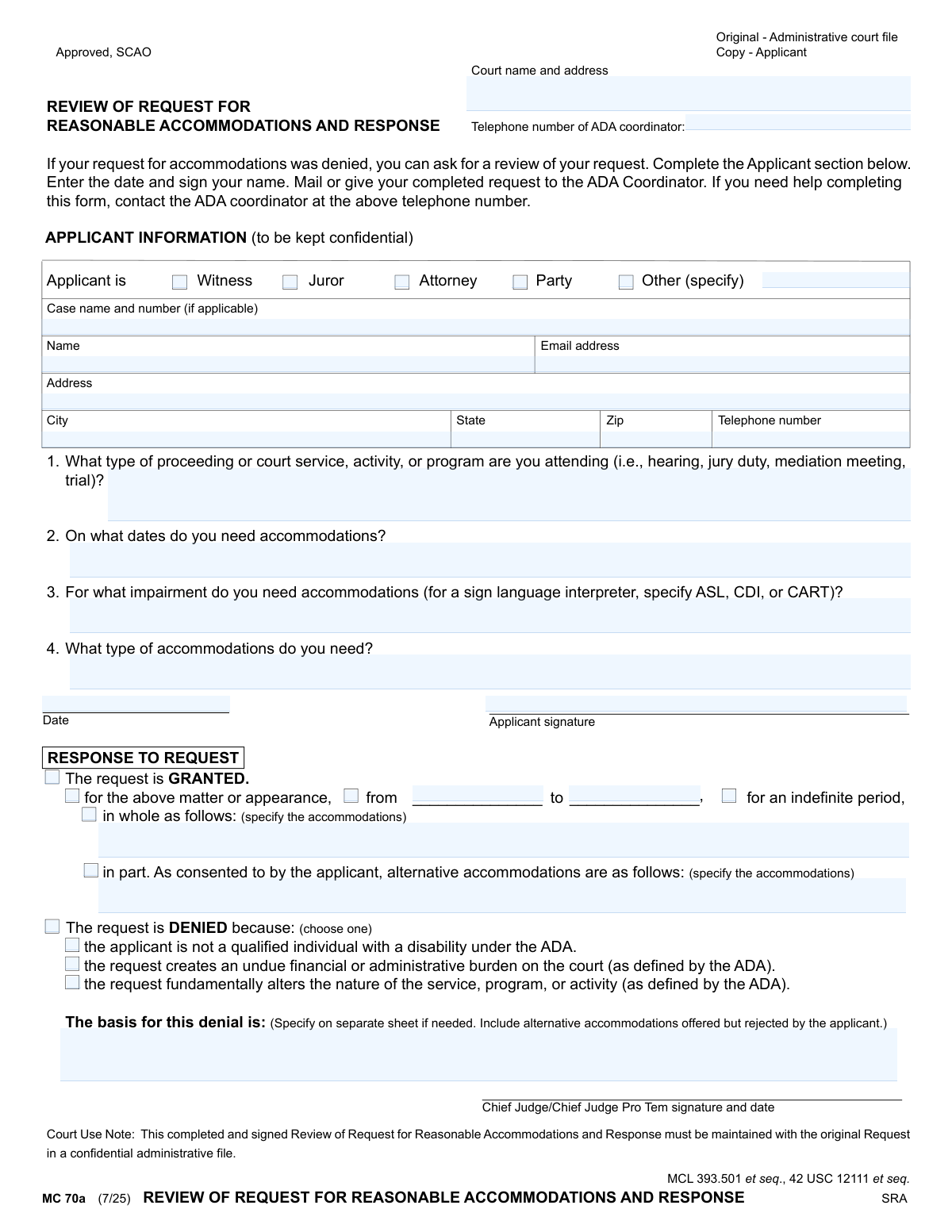
Yes! You can use AI to fill out MC 70a, Review of Request for Reasonable Accommodations and Response
Don't type 37 fields by hand. Tell our AI about yourself, or upload a document you already have, and it fills every field in seconds. You check it, then download, print or sign.
The AI does the filling. You just check it.
No typing into boxes, nothing to install.
What this form asks for
The AI fills all of it, from your answers or your documents.
The AI checks your answers before you download
14 checks built for this form, so a wrong date or a missing answer is caught before anyone else sees it.
Checks that at least one checkbox for the applicant's role (Witness, Juror, Attorney, Party, Other) is selected. This information is critical for understanding the context of the accommodation request and ensuring the applicant is eligible for court-related services. If no type is selected, the form cannot be processed as the applicant's standing is unknown.
Validates that if the 'Other' checkbox is selected for the applicant type, the corresponding 'Specify' text field is not empty. This prevents incomplete or ambiguous data entry, ensuring the court understands the applicant's specific role when it doesn't fit standard categories. Failure to specify results in an incomplete request that cannot be properly evaluated.
Ensures that the applicant's name, address, city, state, zip, and telephone number fields are all filled out. This contact information is mandatory for official correspondence, including sending the final response to the request. A submission with missing contact details would prevent the court from communicating its decision to the applicant.
Checks that the value entered in the 'Email address' field follows the standard format for an email address (e.g., '[email protected]'). While optional, if an email is provided, it must be valid to be used for communication. An invalid format would lead to failed email delivery and communication breakdowns.
Verifies that the applicant's 'Telephone number' and the 'Telephone number of ADA coordinator' fields adhere to a standard 10-digit phone number format. This ensures the numbers are syntactically correct and can be used to establish contact. An incorrectly formatted number is unusable and hinders communication.
Confirms that the 'Zip' code field contains either a 5-digit or 9-digit (ZIP+4) numeric value. A valid ZIP code is essential for the accurate and timely delivery of mailed correspondence regarding the accommodation request. An invalid ZIP code will result in returned mail and significant delays.
And 8 more checks
- Ensures Core Request Details are Provided
- Requires Applicant Signature and Date
- Validates Signature Date is Not in the Future
- Ensures a Definitive Response Decision is Made
- Requires Denial Basis if Request is Denied
- Requires Accommodation Details if Request is Granted
- Validates Granted Accommodation Date Range
- Ensures Granted Accommodation Duration is Specified
Let AI fill out your MC 70a
No typing. Every field filled in seconds, checked, ready to sign.
How to Fill Out MC 70a Online for Free in 2026
What the AI walks you through.
- Navigate to Instafill.ai and upload or select the MC 70a form.
- Provide your personal details, including your role in the court proceeding (e.g., witness, juror) and any applicable case information.
- Describe the court proceeding, the dates you require accommodations, and the specific impairment for which you need assistance.
- Clearly state the type of accommodations you originally requested.
- Review all the information populated by the AI to ensure accuracy and completeness.
- Electronically sign and date the form in the designated applicant signature section.
- Download the completed form to mail or deliver to the court's ADA Coordinator as instructed.
Common Mistakes in Completing MC 70a
The ones the AI is built to catch.
Using the Review Form for an Initial Request
Providing a Vague or Unspecific Accommodation Request
Forgetting to Include the Case Name and Number
Failing to Specify the Type of Sign Language Interpreter
Entering Ambiguous or Incomplete Dates
Submitting an Unsigned or Undated Form
Providing Incorrect or Outdated Contact Information
Filling Out Court-Use-Only Sections
Selecting 'Other' Applicant Type Without Providing Details
Submitting the Form to the Wrong Office
Frequently Asked Questions About MC 70a
Is it really free for 7 days?
Can I fill other forms too?
How do I cancel?
How does the AI fill out MC 70a?
What happens to my information?
How complex is MC 70a to fill out?
What is the purpose of the 'Review of Request for Reasonable Accommodations' form?
Who should fill out this form?
What information do I need to have ready to complete this form?
Where do I submit this form after I fill it out?
What should I do if I need help filling out this form?
Is the information I provide on this form kept private?
What happens after I submit my request for review?
Why might my request for review be denied?
What if I don't have a case number?
How specific should I be when describing the accommodations I need?
Can I use an AI tool to help me fill out this form?
How can I use Instafill.ai to complete this form online?
The PDF version of this form I have isn't fillable. What can I do?
Do I need to physically sign this form?
Get your MC 70a filled out by AI
$0 today. Cancel before Nov 11 and you pay nothing.
Other forms like this one
Michigan court forms: Form MC 03, Answer, Civil, Form MC 02, Appearance, Form MC 6, Notice to Appear, Form MC 01, Summons, State of Michigan, Form MC 01a, Complaint, Form MC 01b, Motion for Second Summons and Order, State of Michigan Blank Court Form, Form MC 07, Default Request and Entry, Form MC 07a, Default Request, Entry, and Judgment (Sum Certain), Form MC 09, Dismissal, Form MC 09a, Dismissal, Nonservice/No Progress, Form MC 10, Judgment, Civil, Form MC 11, Subpoena, Order to Appear and/or Produce, Request and Writ for Garnishment (Periodic), Form MC 13, Request and Writ for Garnishment (Nonperiodic), Form MC 14, Garnishee Disclosure, Form MC 15, Motion and Affidavit for Installment Payments/To Amend Order for Installment Payments, Form MC 15a, Order Regarding Installment Payments, Form MC 16, Motion to Set Aside Order for Installment Payments, State of Michigan, Form MC 16a, Order on Motion to Set Aside Order for Installment Payments
court response forms: Form MC 03, Answer, Civil, Request for Reasonable Accommodations and Response, Form CH-120, Response to Request for Civil Harassment Restraining Orders, Form CH-178, Response to Request for Release of Minor's Confidential Information (Civil Harassment Prevention), Form CH-620, Response to Request to Modify/Terminate Civil Harassment Restraining Order (Civil Harassment Prevention), Form DV-120, Response to Request for Domestic Violence Restraining Order (Domestic Violence Prevention), Form DV-178, Response to Request for Release of Minor's Confidential Information (Domestic Violence Prevention), Form EA-720, Response to Request to Renew Restraining Order (Elder or Dependent Adult Abuse Prevention), Form CR-402, Prosecuting Agency's Response to Petition/Application Under Health and Safety Code Section 11361.8—Adult Crimes, Form CR-417, Response by District Attorney to Petition to Terminate Sex Offender Registration, Form EA-250, Proof of Service of Response by Mail (Elder or Dependent Adult Abuse Prevention), Form EA-320, Response to Request for Elder or Dependent Adult Restraining Order Allowing Contact, Form CH-720, Response to Request to Renew Restraining Order (Civil Harassment Prevention), Form DV-720, Response to Request to Renew Restraining Order (Domestic Violence Prevention), Form EA-120, Response to Request for Elder or Dependent Adult Abuse Restraining Orders, Form FL-220, Response to Petition to Determine Parental Relationship (Uniform Parentage), Judicial Council of California Form GV-020, Response to Gun Violence Emergency Protective Order (Gun Violence Prevention), Form GV-120, Response to Petition for Gun Violence Restraining Order, Form FL-270, Response to Petition for Custody and Support of Minor Children, Form SC-224, Response to Declaration of Default in Payment of Judgment (Small Claims)
Let AI fill out your MC 70a
Your trial starts once a card is added. You pay nothing before Nov 11.
Our AI already knows this form, all 37 fields of it. Skip the typing: tell it about yourself, or upload what you have, and it fills the whole form in seconds.
- AI fills every field on the form, checkboxes included
- No typing into boxes: answer a few questions, or upload a document you already have, an old copy of this form, a photo of a document
- The AI checks the answers; you review and change anything before you download
- Download the finished PDF, print it, or sign it online
- Encrypted, and never used to train AI
Cancel before Nov 11 and you pay nothing.
A card is needed to start the trial. Cancel in two clicks from your account.
Terms · Privacy