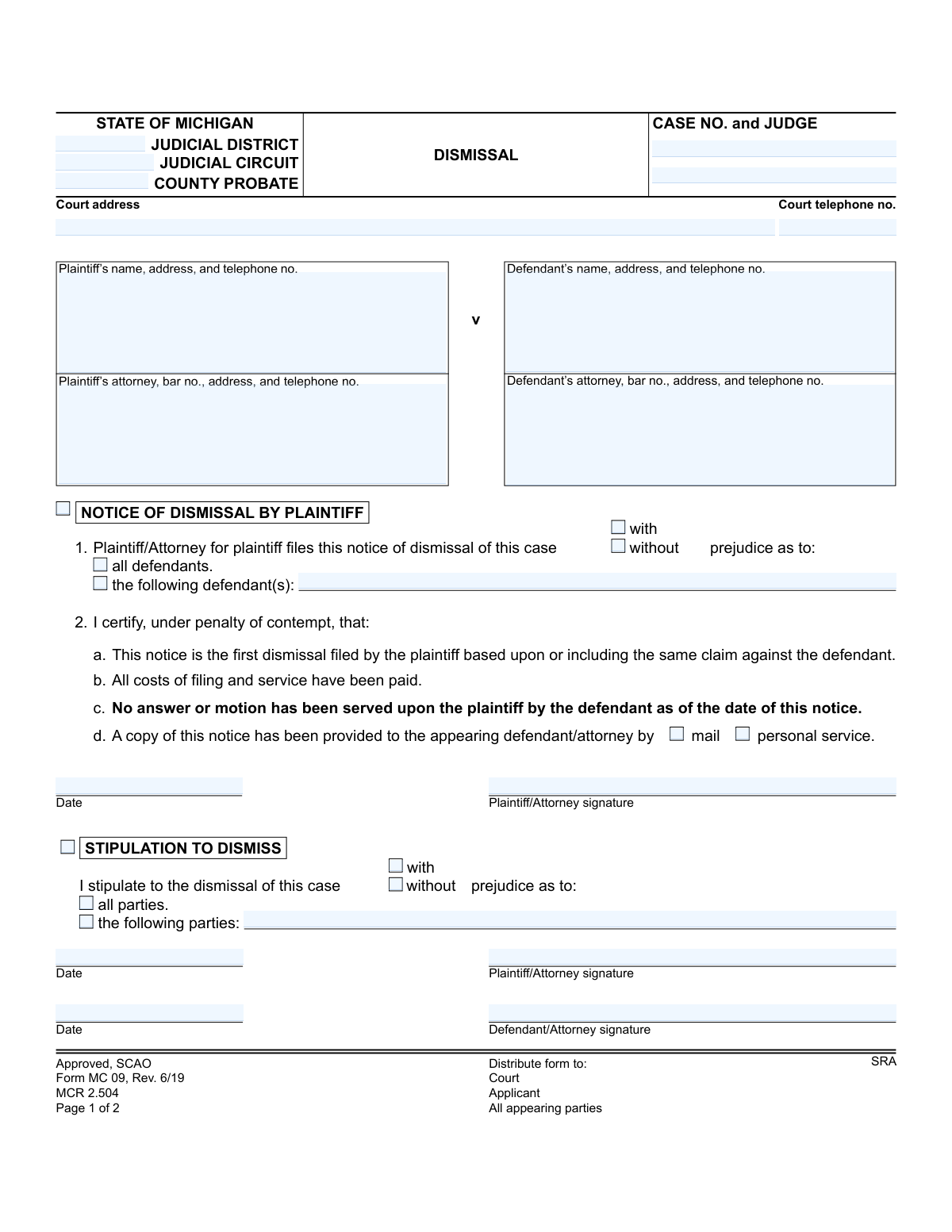
Yes! You can use AI to fill out Form MC 09, Dismissal
Form MC 09 is a legal document used in the State of Michigan court system to formally dismiss a case. It can be initiated by the plaintiff as a notice of dismissal or by all parties as a stipulation to dismiss, indicating whether the dismissal is with or without prejudice. This form is essential for officially closing a legal matter in the court's records. Today, this form can be filled out quickly and accurately using AI-powered services like Instafill.ai, which can also convert non-fillable PDF versions into interactive fillable forms.
MC 09 is part of the
Michigan court forms category on Instafill.
Our AI automatically handles information lookup, data retrieval, formatting, and form filling.
It takes less than a minute to fill out MC 09 using our AI form filling.
Securely upload your data. Information is encrypted in transit and deleted immediately after the form is filled out.
Form specifications
| Form name: | Form MC 09, Dismissal |
| Number of fields: | 39 |
| Number of pages: | 1 |
| Language: | English |
More forms in Michigan court forms
Instafill Demo: How to fill out PDF forms in seconds with AI
How to Fill Out MC 09 Online for Free in 2026
Are you looking to fill out a MC 09 form online quickly and accurately? Instafill.ai offers the #1 AI-powered PDF filling software of 2026, allowing you to complete your MC 09 form in just 37 seconds or less.
Follow these steps to fill out your MC 09 form online using Instafill.ai:
- 1 Navigate to Instafill.ai and upload or select the Michigan Dismissal form, MC 09.
- 2 Provide the case information, including the court, case number, and judge's name, into the designated fields.
- 3 Enter the full names, addresses, and contact details for the plaintiff, defendant, and their respective attorneys.
- 4 Select the appropriate section, either 'Notice of Dismissal' or 'Stipulation to Dismiss', and indicate if the dismissal is with or without prejudice and which parties it applies to.
- 5 Use the AI-assisted tool to review all entered information for accuracy and completeness before finalizing.
- 6 Electronically sign and date the form in the required signature blocks for the plaintiff, defendant, or attorneys.
- 7 Download the completed Form MC 09, ready for distribution to all parties and filing with the appropriate Michigan court.
Our AI-powered system ensures each field is filled out correctly, reducing errors and saving you time.
Why Choose Instafill.ai for Your Fillable MC 09 Form?
Speed
Complete your MC 09 in as little as 37 seconds.
Up-to-Date
Always use the latest 2026 MC 09 form version.
Cost-effective
No need to hire expensive lawyers.
Accuracy
Our AI performs 10 compliance checks to ensure your form is error-free.
Security
Your personal information is protected with bank-level encryption.
Frequently Asked Questions About Form MC 09
This form is used in Michigan courts to formally end a civil lawsuit. It can be initiated by the plaintiff, by a mutual agreement between parties, or ordered by a judge.
The plaintiff fills out the 'Notice of Dismissal' section, or both the plaintiff and defendant fill out the 'Stipulation to Dismiss' section. The final 'Order to Dismiss' is completed and signed by the judge.
Dismissing 'with prejudice' is final and permanently prevents the plaintiff from filing the same lawsuit again. Dismissing 'without prejudice' allows the plaintiff the possibility of refiling the same case in the future.
A 'Notice of Dismissal' is filed by the plaintiff alone, typically before the defendant has filed an answer. A 'Stipulation to Dismiss' is a mutual agreement signed by both the plaintiff and defendant to end the case at any time.
A plaintiff can use this section only if the defendant has not yet served an answer or a motion, and it is the first time the plaintiff is dismissing this claim. All filing and service costs must also be paid.
If the defendant has filed an answer, you can no longer use the unilateral 'Notice of Dismissal.' You must either get the defendant to sign a 'Stipulation to Dismiss' or file a motion asking the court for a dismissal order.
You will need the court name, case number, judge's name, and the full names and addresses for the plaintiff, defendant, and their attorneys, if any.
Yes, both the 'Notice' and 'Stipulation' sections provide a checkbox to dismiss the case against specific defendants you list, rather than all of them.
After filing the original with the court, you must provide a copy to all parties who have appeared in the case, such as the defendant or their attorney.
Yes, a judge must sign the 'Order to Dismiss' on page two to make the dismissal official and close the case in the court's records.
This means the dismissal is subject to certain requirements that must be met by one or both parties. For example, a condition could be that each party pays their own attorney fees.
Yes, services like Instafill.ai use AI to accurately auto-fill form fields with your case and personal information, which can save you time and help prevent errors.
You can use a service like Instafill.ai to upload the form, and its AI will help you fill in the required fields like case number and party names before you download it for printing and filing.
You can upload the non-fillable PDF to a platform like Instafill.ai. It can convert flat PDFs into interactive, fillable forms that you can easily complete on your computer.
Compliance MC 09
Validation Checks by Instafill.ai
1
Exclusive Section Completion
This check ensures that only one of the three main sections (Notice of Dismissal, Stipulation to Dismiss, or Order to Dismiss) is filled out. The form is designed for one of these actions per submission, and completing multiple sections creates ambiguity. If more than one section is completed, the submission should be rejected for clarification on the intended action.
2
Case Number Format and Consistency
Validates that the 'Case No.' field follows the standard Michigan court format (e.g., YY-######-XX) and is present on both pages of the form. This is critical for correctly associating the document with the case file in the court's system. A mismatched or improperly formatted case number will lead to filing errors and delays.
3
Notice of Dismissal - Prejudice Selection
If the 'Notice of Dismissal' section is used, this validation confirms that exactly one of the 'with prejudice' or 'without prejudice' checkboxes is selected. This distinction is legally critical as it determines whether the plaintiff can file the same claim again. Failure to select one and only one option makes the notice legally unclear and must be corrected.
4
Notice of Dismissal - Defendant Specification
When filing a 'Notice of Dismissal', the user must specify if it applies to 'all defendants' or 'the following defendant(s)'. If 'the following defendant(s)' is chosen, this check ensures the corresponding text field is not empty. This prevents ambiguity about which parties are being dismissed from the case.
5
Notice of Dismissal - Signature and Date Required
This check verifies that if the 'Notice of Dismissal' section is completed, the Plaintiff/Attorney signature and the date fields are both filled. An unsigned or undated notice is not legally valid. The submission cannot be processed without this information, as it authenticates the request and establishes the date of the action.
6
Stipulation to Dismiss - All Signatures Required
For a 'Stipulation to Dismiss' to be valid, it must be agreed upon by both sides. This validation ensures that signature and date fields for both the Plaintiff/Attorney and the Defendant/Attorney are all completed. A missing signature or date indicates a lack of agreement, rendering the stipulation invalid and unenforceable.
7
Stipulation to Dismiss - Party Specification
In the 'Stipulation to Dismiss' section, if the 'the following parties' option is selected, this validation ensures the text field listing the specific parties is populated. This is crucial for clarity when a case involves multiple parties and not all are part of the stipulation. An empty field would create an ambiguous and potentially invalid stipulation.
8
Attorney Bar Number Format
This check validates that if an attorney's name is provided for either the plaintiff or defendant, the associated bar number field is also filled and follows the correct format (e.g., 'P' followed by digits). The bar number is a unique identifier required for official court records and communications. An invalid or missing bar number can cause processing delays and issues with attorney verification.
9
Order to Dismiss - Judicial Authority
This validation ensures that for an 'Order to Dismiss', the Judge/Magistrate signature and the date of the order are present. An order from the court is only effective with the signature of an authorized judicial officer. Submissions lacking this information are not official orders and cannot be acted upon to close a case.
10
Order to Dismiss - Prejudice Status Required
When an 'Order to Dismiss' is issued, this check confirms that either 'with prejudice' or 'without prejudice' is selected. This status has significant legal consequences for future litigation and must be explicitly stated in the court's order. An order without this specification is incomplete and would require amendment.
11
Case Closure Status Check
This validation flags the importance of the 'This order resolves the last pending claim and closes the case' checkbox within the 'Order to Dismiss' section. While not an error if unchecked, its status is critical for court administration to know whether to officially close the case file in their management system. The system should prompt the user to confirm the status if the order is for a dismissal of all claims.
12
Mandatory Party Identification
This check ensures that the names of the primary plaintiff and defendant are provided in their respective fields. These fields are fundamental to identifying the case and the parties involved. A form submitted without this core information is incomplete and cannot be filed, as it's impossible to determine which case it pertains to.
13
Logical Date Validation
Verifies that all date fields on the form contain valid, correctly formatted dates that are not in the future. This ensures the chronological integrity of the legal record. A future date is illogical and would be rejected, while an invalid format would prevent the system from properly recording the event date.
14
Court Type Specification
This validation ensures that the filing party has indicated the specific court type by selecting or filling in 'Judicial District', 'Judicial Circuit', or 'County Probate'. This information is essential for routing the document to the correct court and clerk's office. Failure to specify the court will result in the document being rejected or misfiled.
Common Mistakes in Completing MC 09
This is a critical legal choice with significant consequences. Filers often misunderstand the distinction: 'with prejudice' permanently bars the claim from being refiled, while 'without prejudice' allows it to be brought again. Choosing incorrectly can lead to unintentionally giving up legal rights or failing to fully resolve a matter. Always confirm the legal implications before checking either box, and ensure all parties agree on the status if filing a stipulation.
The 'Notice of Dismissal by Plaintiff' can only be used under specific conditions, primarily before the defendant has filed an answer or motion. A common mistake is for a plaintiff to file this notice after the defendant has already participated in the case, rendering the notice invalid. This leads to the court rejecting the dismissal and the case remaining active, wasting time and filing fees. To avoid this, verify that no answer has been served by the defendant before using the Notice section; otherwise, you must obtain the defendant's signature on the 'Stipulation to Dismiss' section.
The 'Stipulation to Dismiss' section is a binding agreement between parties and is invalid without signatures from both the plaintiff and defendant (or their attorneys). Filers frequently submit the form with only their own signature, assuming the other party will sign later. Courts will reject an incompletely signed stipulation, delaying the case's dismissal. To prevent this, coordinate with the opposing party to have all necessary signatures on the document before it is filed with the court.
The case number is the unique identifier for the entire legal proceeding, and it must be perfectly accurate on both pages of the form. People often mistype the number, use an incorrect format, or forget to fill it in on the second page. An incorrect case number can cause the document to be rejected by the clerk, misfiled in the wrong case, or not processed at all, leading to major delays and confusion. AI-powered tools like Instafill.ai can help prevent this by auto-populating the correct case number consistently across all pages of a document.
When filing a 'Notice of Dismissal', the plaintiff must certify under penalty of contempt that certain conditions are met, such as it being the first dismissal and that no answer has been served. People sometimes sign this certification without verifying the facts, which can have serious legal consequences, including sanctions from the judge. Before signing, you must confirm the case history to ensure every statement in the certification is true and accurate.
In lawsuits with multiple defendants or parties, the form requires you to specify whether you are dismissing the case against 'all' parties or only 'the following' specific ones. A common error is to check the box for dismissing some parties but then fail to clearly list their full names. This ambiguity creates legal uncertainty about who remains in the lawsuit, potentially leading to further disputes. Always be explicit by listing the full, correct names of every party being dismissed.
The 'Order to Dismiss' section is reserved for the judge to sign. A frequent mistake by self-represented litigants is to fill out and sign this section themselves. While a party may prepare the order for the judge by checking the appropriate boxes (e.g., 'with/without prejudice'), the signature and date lines must be left blank for the judge. Submitting a form with a party's signature in the judge's section will result in its immediate rejection.
The 'Order to Dismiss' contains a checkbox stating, 'This order resolves the last pending claim and closes the case.' This is a critical instruction for the court clerk's office. Parties preparing the proposed order often forget to check this box when the dismissal is meant to be final. This oversight can cause the case to remain technically 'open' in the court's system, leading to administrative problems and potential confusion about the case's status down the line.
Many court forms are only available as flat, non-fillable PDFs, forcing users to print and fill them out by hand. Illegible handwriting for critical information like names, addresses, and case numbers is a very common reason for rejection. A court clerk may be unable to decipher the information or may enter it incorrectly into the system, causing delays. To avoid this, you can use a service like Instafill.ai, which can convert any non-fillable form into a fillable one, allowing you to type your information for a clean, professional, and error-free submission.
It is surprisingly common for individuals, especially those representing themselves, to confuse the plaintiff and defendant roles. This leads to entering names and addresses in the wrong fields or signing on the wrong line. Such errors create a legally confusing document that the court clerk will likely reject, forcing the filer to start over. Before filling out the form, carefully review the original court filing to confirm who is the plaintiff (the party who started the lawsuit) and who is the defendant.
Saved over 80 hours a year
“I was never sure if my IRS forms like W-9 were filled correctly. Now, I can complete the forms accurately without any external help.”
Kevin Martin Green
Your data stays secure with advanced protection from Instafill and our subprocessors
Robust compliance program
Transparent business model
You’re not the product. You always know where your data is and what it is processed for.
ISO 27001, HIPAA, and GDPR
Our subprocesses adhere to multiple compliance standards, including but not limited to ISO 27001, HIPAA, and GDPR.
Security & privacy by design
We consider security and privacy from the initial design phase of any new service or functionality. It’s not an afterthought, it’s built-in, including support for two-factor authentication (2FA) to further protect your account.
Fill out MC 09 with Instafill.ai
Worried about filling PDFs wrong? Instafill securely fills form-mc-09-dismissal forms, ensuring each field is accurate.