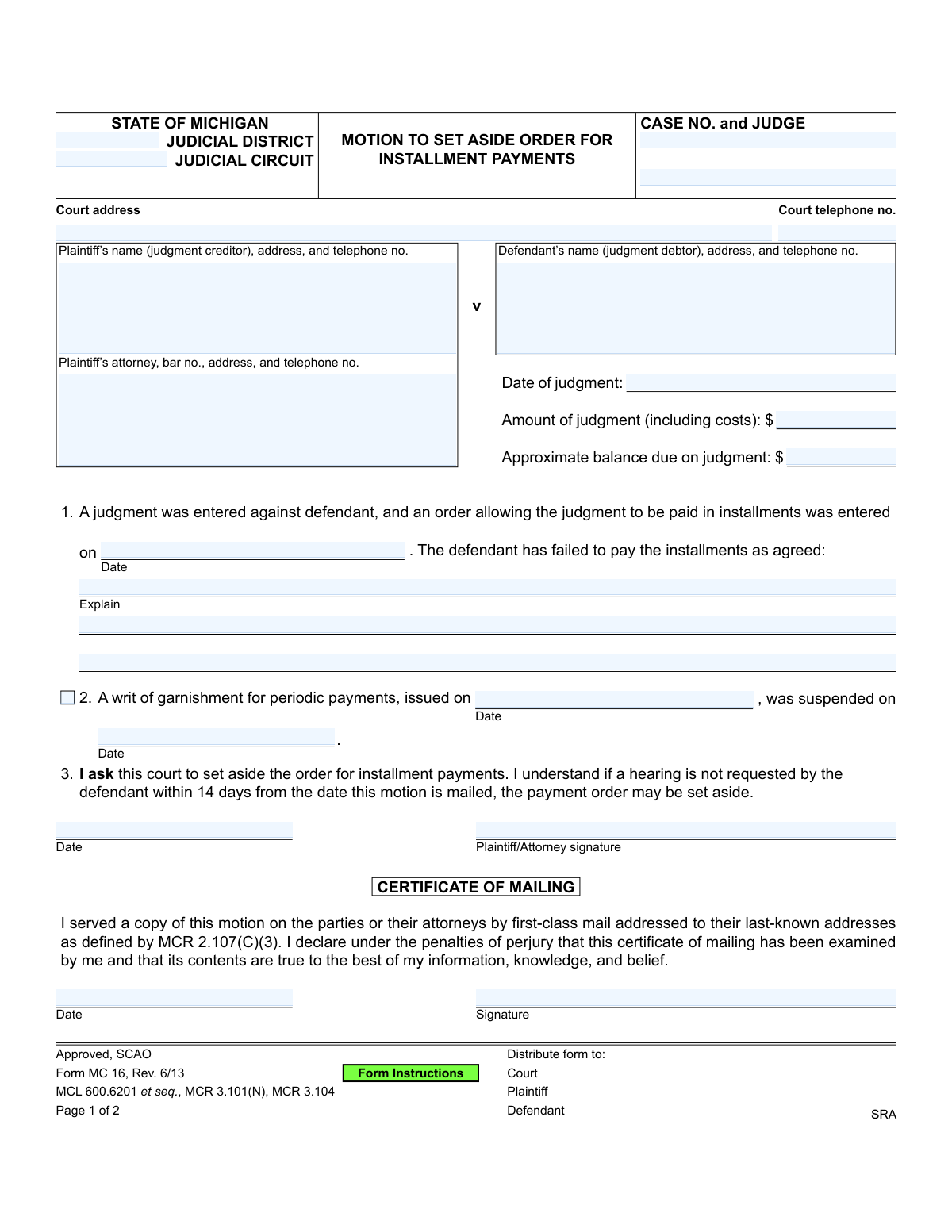
Yes! You can use AI to fill out Form MC 16, Motion to Set Aside Order for Installment Payments
Form MC 16, Motion to Set Aside Order for Installment Payments, is a legal document filed in a Michigan court by a judgment creditor. It is used to request that the court terminate a previously approved installment payment plan because the judgment debtor has defaulted on the payments. If the motion is granted, the creditor can pursue other collection methods, such as wage garnishment. Today, this form can be filled out quickly and accurately using AI-powered services like Instafill.ai, which can also convert non-fillable PDF versions into interactive fillable forms.
MC 16 is part of the
Michigan court forms category on Instafill.
Our AI automatically handles information lookup, data retrieval, formatting, and form filling.
It takes less than a minute to fill out MC 16 using our AI form filling.
Securely upload your data. Information is encrypted in transit and deleted immediately after the form is filled out.
Form specifications
| Form name: | Form MC 16, Motion to Set Aside Order for Installment Payments |
| Number of fields: | 25 |
| Number of pages: | 1 |
| Language: | English |
More forms in Michigan court forms
Instafill Demo: How to fill out PDF forms in seconds with AI
How to Fill Out MC 16 Online for Free in 2026
Are you looking to fill out a MC 16 form online quickly and accurately? Instafill.ai offers the #1 AI-powered PDF filling software of 2026, allowing you to complete your MC 16 form in just 37 seconds or less.
Follow these steps to fill out your MC 16 form online using Instafill.ai:
- 1 Navigate to Instafill.ai and upload or select Form MC 16, Motion to Set Aside Order for Installment Payments.
- 2 Use the AI assistant to populate the court information, including the judicial district/circuit, court address, and case number.
- 3 Enter the full details for the plaintiff (judgment creditor) and defendant (judgment debtor), including names, addresses, and contact information.
- 4 Provide the specifics of the judgment, such as the date it was entered, the total amount, and the current approximate balance due.
- 5 Indicate the date the original installment payment order was entered and provide a clear explanation of how the defendant has failed to make the agreed-upon payments.
- 6 Carefully review all entered information for accuracy, then digitally sign and date the motion and the Certificate of Mailing section.
- 7 Download the completed Form MC 16, ready for filing with the court and serving to the defendant as required.
Our AI-powered system ensures each field is filled out correctly, reducing errors and saving you time.
Why Choose Instafill.ai for Your Fillable MC 16 Form?
Speed
Complete your MC 16 in as little as 37 seconds.
Up-to-Date
Always use the latest 2026 MC 16 form version.
Cost-effective
No need to hire expensive lawyers.
Accuracy
Our AI performs 10 compliance checks to ensure your form is error-free.
Security
Your personal information is protected with bank-level encryption.
Frequently Asked Questions About Form MC 16
This form is used by a judgment creditor (the person owed money) to ask the court to cancel an existing payment plan because the debtor has failed to make the agreed-upon payments.
The plaintiff, also known as the judgment creditor, should complete this form. This is the person or entity who won the original court judgment and is not receiving payments as ordered.
You should use this form when a defendant, who was ordered by the court to pay a judgment in installments, has missed payments or otherwise defaulted on the payment agreement.
You will need the case number, court information, the names and addresses of both parties, the original judgment date and amount, and the date the installment order was entered.
In this section, you should briefly and clearly state how the defendant has failed to pay. For example, list the dates of missed payments or state that no payments have been received since a specific date.
After you file the motion and mail a copy to the defendant, the defendant has 14 days to request a hearing. If they don't, the judge may grant your motion and cancel the payment plan without a hearing.
If the motion is approved, the installment payment order is canceled. This allows you to pursue other collection methods, such as obtaining a periodic writ of garnishment to collect the debt from the defendant's wages.
The Certificate of Mailing is your sworn statement to the court that you have legally notified the defendant by mailing them a copy of the motion. This is a required step to ensure the process is fair and the defendant has a chance to respond.
You must file the original form with the court that issued the judgment. You are also required to mail a copy to the defendant (or their attorney) at their last-known address.
This notice officially warns the defendant that if they do not request a court hearing within 14 days, the installment plan will be canceled, and the plaintiff can then seek to garnish their wages.
Yes, services like Instafill.ai use AI to accurately auto-fill form fields with your case information, which can save you time and help prevent common errors.
Simply upload the MC 16 form to the Instafill.ai platform. The AI will identify all the fields, allowing you to input your information and automatically populate the document before you download and file it.
If you have a non-fillable or 'flat' PDF, you can use a service like Instafill.ai. It can convert the document into an interactive, fillable form so you can easily type your information into the correct fields.
Compliance MC 16
Validation Checks by Instafill.ai
1
Case Number Format and Presence
This check ensures the 'CASE NO.' field is not empty and conforms to the standard format for Michigan court cases. The case number is a critical unique identifier for the legal proceeding, and an incorrect or missing number would prevent the motion from being filed in the correct case file. If validation fails, the system should flag the field for correction, as it's essential for all court processing.
2
Judgment Balance vs. Original Amount
This validation verifies that the 'Approximate balance due on judgment' is less than or equal to the 'Amount of judgment'. It is a logical impossibility for the balance due to be greater than the original judgment amount. This check prevents typographical errors that could misrepresent the financial status of the judgment and lead to legal disputes.
3
Chronological Order of Judgment and Installment Dates
This check ensures the 'Date' the installment order was entered is on or after the 'Date of judgment'. An installment plan cannot be ordered before a judgment has been officially entered by the court. This validation maintains the logical and legal timeline of events, preventing the submission of forms with nonsensical date sequences.
4
Motion Justification Completeness
This validation confirms that the 'Explain' section under point 1 is not empty. The filer must provide a reason for the motion, which is typically that the defendant has failed to make payments. Without this explanation, the motion lacks a legal basis, and the court would have no grounds upon which to grant it.
5
Motion and Mailing Date Consistency
This check verifies that the 'Date' on the Certificate of Mailing is the same as or later than the 'Date' the motion itself is signed. A document cannot be certified as mailed before it has been formally executed by the plaintiff or their attorney. This ensures the integrity of the service process and the timeline presented to the court.
6
Plaintiff (Judgment Creditor) Information Completeness
This validation ensures that the plaintiff's name, address, and telephone number are all present. This information is required to properly identify the party filing the motion and to ensure all official communications from the court and the defendant can be correctly directed. Incomplete information could delay the legal process or invalidate the filing.
7
Defendant (Judgment Debtor) Information Completeness
This check confirms that the defendant's name, address, and telephone number are provided. Correctly identifying and locating the defendant is crucial for ensuring they are properly served with the motion, as required by due process. Failure to provide this information could result in the motion being rejected or a subsequent order being overturned.
8
Conditional Attorney Bar Number
This validation checks that if the 'Plaintiff’s attorney' field is filled, the corresponding 'bar no.' field is also completed. The bar number is the unique identifier for a licensed attorney, and its inclusion is mandatory for legal professionals filing on behalf of a client. This ensures the person filing is authorized to practice law and is accountable for the filing.
9
Garnishment Date Chronology
This check applies if fields under point 2 are filled, verifying that the 'writ suspension date' is on or after the 'writ issue date'. A writ of garnishment cannot be suspended before it has been issued. This logical check prevents data entry errors regarding the history of garnishment actions related to the judgment.
10
Plaintiff/Attorney Signature Presence
This validation ensures that the 'Plaintiff/Attorney signature' field is not blank. A signature is a legal requirement that signifies the filer attests to the truthfulness of the motion's contents and formally requests the court's action. An unsigned motion is legally invalid and will be rejected by the court clerk.
11
Certificate of Mailing Signature Presence
This check verifies that the 'Signature' field within the 'CERTIFICATE OF MAILING' section has been signed. This signature confirms, under penalty of perjury, that a copy of the motion was properly mailed to the defendant. This is a critical step in proving proper service, and a missing signature invalidates the certificate.
12
Judgment Amount Format
This validation ensures the 'Amount of judgment' is a valid, positive numeric currency value. The field represents a specific monetary amount and must be formatted correctly for calculations and legal clarity. Non-numeric or negative values would be nonsensical and would prevent the form from being processed correctly.
13
Past Date for Judgment
This check validates that the 'Date of judgment' is a valid date that occurs in the past, not on the current day or in the future. A judgment is a historical event, and this motion is based on that prior action. This check prevents impossible dates from being entered due to user error.
Common Mistakes in Completing MC 16
Users often enter the wrong case number, leave the judge's name blank, or list the incorrect judicial district or circuit. This typically happens when referencing memory or incomplete records instead of the original judgment documents. An incorrect case number can lead to the motion being rejected by the clerk's office or filed in the wrong case, causing significant delays and requiring refiling. To avoid this, always have the original judgment order in front of you and double-check that the case number and court information match exactly.
The motion is invalid if the defendant is not properly notified, which requires their current address. Filers may use an old address from the original lawsuit, not realizing the defendant has moved. This mistake will nullify the motion, as the 14-day notice period is dependent on proper service, forcing the plaintiff to start the process over. Always verify the defendant's last-known address using reliable methods before filling out this section to ensure compliance with MCR 2.107(C)(3).
In Section 1, filers often write a generic statement like 'Defendant stopped paying' without providing necessary details. The court needs to know specifically which payments were missed and the dates they were due to understand the extent of the default. A vague explanation can result in the judge denying the motion for lack of specific evidence, delaying the process. Be specific: list the due dates and the amounts of the payments that the defendant failed to make.
Calculating the remaining balance can be complex, involving subtracting payments made from the original judgment and potentially adding accrued interest. People frequently make simple math errors or forget to account for all payments, leading to an incorrect balance figure. This can create confusion and may be challenged by the defendant, potentially requiring an amended filing. To prevent this, create a clear ledger of all payments received and carefully calculate the remaining principal and any applicable interest before entering the final amount.
An unsigned or undated motion is legally invalid and will be immediately rejected by the court clerk. This simple oversight often happens when filers are in a hurry or are focused on the more complex sections of the form. The consequence is a complete halt in the process until a properly signed and dated motion is resubmitted, wasting valuable time. Always perform a final review of the form specifically to check for signatures and dates in both the main motion section and the Certificate of Mailing.
The Certificate of Mailing must be signed by the person who physically places the document in the mail. An attorney might sign it when their paralegal or assistant actually performed the mailing, which technically constitutes perjury. This can be grounds for the defendant to challenge the validity of the service if discovered. To avoid this serious error, ensure the individual who is responsible for mailing the motion is the one who signs and dates the Certificate of Mailing.
The form includes a field for the case number at the top of the first page and at the bottom of the second page. It is a very common mistake for filers to overlook the field on the second page. If the pages become separated during court processing, the second page (containing the crucial 'Notice to Defendant') could be lost or misfiled, causing administrative delays. Using an AI-powered form filler like Instafill.ai can prevent this by automatically populating recurring fields across all pages of a document.
Section 1 requires the exact date the original installment payment order was entered. Filers may guess, use the date of the judgment, or misread the document, leading to an incorrect date on the motion. This inaccuracy can be grounds for the motion to be contested or denied, as it refers to a non-existent or incorrect prior order. Always refer directly to the 'Order for Installment Payments' to find the precise date it was entered by the court.
Many legal forms are non-fillable PDFs, forcing individuals to print and complete them by hand. Poor handwriting can make critical information like names, dates, and case numbers unreadable to court clerks and judges. This can lead to data entry errors by court staff, misdirected mail, or outright rejection of the form, requiring the filer to start over. To avoid this, it's best to use a tool like Instafill.ai, which can convert flat PDFs into fillable forms, allowing you to type your information clearly and professionally.
While it seems straightforward, self-represented individuals can sometimes get confused by the legal terms 'Plaintiff (judgment creditor)' and 'Defendant (judgment debtor)'. They may accidentally put their own name in the defendant's field or vice versa, especially if they were the defendant in the original case. This error creates significant confusion and will cause the form to be rejected. Carefully read the parenthetical descriptions to ensure you are placing the correct party's information in each field.
Saved over 80 hours a year
“I was never sure if my IRS forms like W-9 were filled correctly. Now, I can complete the forms accurately without any external help.”
Kevin Martin Green
Your data stays secure with advanced protection from Instafill and our subprocessors
Robust compliance program
Transparent business model
You’re not the product. You always know where your data is and what it is processed for.
ISO 27001, HIPAA, and GDPR
Our subprocesses adhere to multiple compliance standards, including but not limited to ISO 27001, HIPAA, and GDPR.
Security & privacy by design
We consider security and privacy from the initial design phase of any new service or functionality. It’s not an afterthought, it’s built-in, including support for two-factor authentication (2FA) to further protect your account.
Fill out MC 16 with Instafill.ai
Worried about filling PDFs wrong? Instafill securely fills form-mc-16-motion-to-set-aside-order-for-installment-payments forms, ensuring each field is accurate.