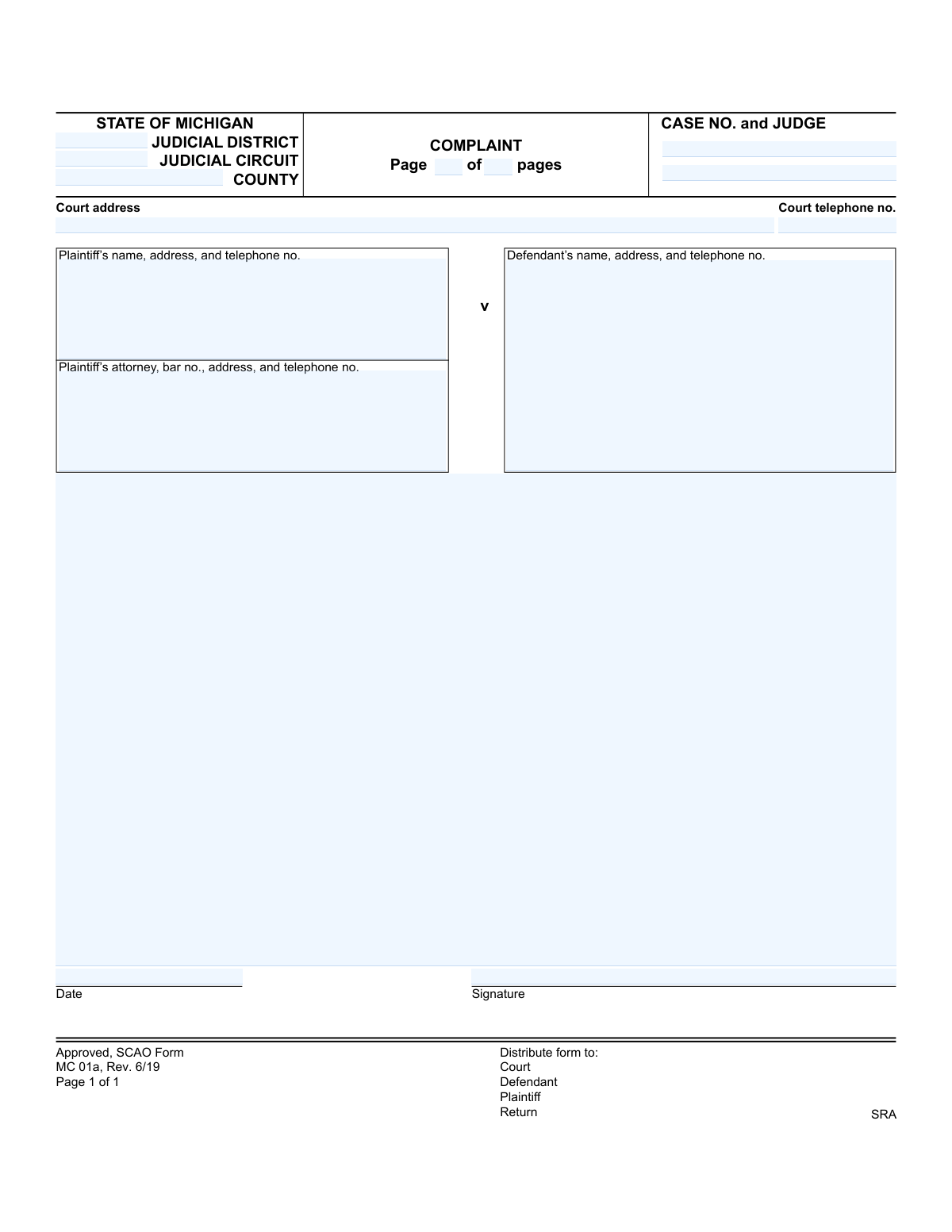
Yes! You can use AI to fill out State of Michigan, Form MC 01a, Complaint

Form MC 01a is a legal document used in the Michigan court system to formally begin a civil lawsuit. The plaintiff uses this form to state their claims and allegations against a defendant, outlining the reasons for the lawsuit and the relief sought. Today, this form can be filled out quickly and accurately using AI-powered services like Instafill.ai, which can also convert non-fillable PDF versions into interactive fillable forms.
MC 01a is part of the Michigan court forms category on Instafill.
Our AI automatically handles information lookup, data retrieval, formatting, and form filling.
It takes less than a minute to fill out MC 01a using our AI form filling.
Securely upload your data. Information is encrypted in transit and deleted immediately after the form is filled out.

Form specifications

Form name: State of Michigan, Form MC 01a, Complaint
Number of fields: 15
Number of pages: 1
Language: English
main-image

Instafill Demo: How to fill out PDF forms in seconds with AI

How to Fill Out MC 01a Online for Free in 2026

Are you looking to fill out a MC 01A form online quickly and accurately? Instafill.ai offers the #1 AI-powered PDF filling software of 2026, allowing you to complete your MC 01A form in just 37 seconds or less.
Follow these steps to fill out your MC 01A form online using Instafill.ai:
  1. 1 Navigate to Instafill.ai and upload or select the Michigan Complaint Form MC 01a.
  2. 2 Enter the court information, including the judicial district/circuit, county, case number, and judge's name.
  3. 3 Provide the complete name, address, and contact information for the plaintiff and their attorney, including the bar number.
  4. 4 Input the name, address, and contact details for the defendant(s).
  5. 5 Carefully draft and enter the body of the complaint, detailing the facts, claims, and the relief being sought from the court.
  6. 6 Review all the information for accuracy, then date and apply a digital signature to the form.
  7. 7 Download the completed MC 01a to file with the appropriate court and serve to the defendant.

Our AI-powered system ensures each field is filled out correctly, reducing errors and saving you time.

Why Choose Instafill.ai for Your Fillable MC 01a Form?

Speed

Complete your MC 01a in as little as 37 seconds.

Up-to-Date

Always use the latest 2026 MC 01a form version.

Cost-effective

No need to hire expensive lawyers.

Accuracy

Our AI performs 10 compliance checks to ensure your form is error-free.

Security

Your personal information is protected with bank-level encryption.

Frequently Asked Questions About Form MC 01a

This form is used to officially begin a civil lawsuit in a Michigan court. The plaintiff (the person filing the lawsuit) uses it to state their legal claims against the defendant (the person being sued).

The plaintiff, who is the individual or entity initiating the lawsuit, or their attorney must complete and file this form with the appropriate Michigan court.

You should leave the 'CASE NO. and JUDGE' fields blank when you first file the complaint. The court clerk will assign a case number and a judge to your case upon filing.

If you are representing yourself (also known as 'pro se'), you can leave the attorney section blank. You must still provide your own name, address, and telephone number in the plaintiff's information section.

This section is where you must clearly state the facts of your case, the legal reasons you are suing the defendant, and what you are asking the court to do as a result. This may require attaching additional pages.

You must provide a valid address to legally serve the defendant with the complaint. If you cannot find their address, you may need to hire a private investigator or ask the court for permission to serve them in an alternative way.

You must file the original complaint with the court clerk, pay the filing fee, and then arrange for a copy to be legally served on the defendant. Keep one copy for your own records as indicated by the distribution list on the form.

This form is often the first page of a longer document, as the details of a complaint can require multiple pages. If your complaint is longer than one page, you should number all pages sequentially (e.g., Page 1 of 3, Page 2 of 3).

The correct court is determined by factors like where the defendant lives or where the incident occurred. You can find this information on the Michigan Courts website or by contacting a local court clerk's office for guidance.

Yes, AI-powered services like Instafill.ai can help you accurately auto-fill form fields with your personal information, saving time and reducing errors. However, AI cannot provide legal advice for the substance of your complaint.

Simply upload the MC 01a form to the Instafill.ai platform. The AI will identify the fields, allowing you to quickly fill them out online, save your progress, and download the completed document.

If you have a non-fillable or 'flat' PDF, you can upload it to Instafill.ai. The service uses AI to convert it into an interactive, fillable form that you can complete directly on your computer.

Compliance MC 01a
Validation Checks by Instafill.ai

1
Case Number Format Validation
Verifies that the 'Case Number' follows the standard Michigan court case numbering format, which typically includes the year and a unique identifier (e.g., YY-######-XX). This format is critical for correctly filing and tracking the case within the judicial system. An incorrect format could lead to the complaint being rejected or misfiled, causing significant delays.
2
Michigan Bar Number Validation
Checks that the 'Plaintiff's Attorney Bar Number' is a valid, active Michigan State Bar number, which follows a 'P' followed by numbers format. This validation confirms the attorney is licensed and in good standing to practice law in the state. An invalid or inactive bar number would mean the attorney is not authorized to represent the plaintiff, potentially nullifying the filing.
3
Date Field Format and Plausibility
Validates that the 'Date' field is in a recognized format (e.g., MM/DD/YYYY) and represents a plausible, non-future date. The date of signing is legally significant, establishing the timeline of the legal action. An invalid format, a date far in the past, or a future date would be considered a clerical error and could lead to the document's rejection.
4
Signature Presence Check
Verifies that the 'Signature' field contains data, indicating it has been signed either physically or digitally. A signature is required to certify that the information in the complaint is true and correct to the best of the filer's knowledge. An unsigned complaint is not legally valid and will be rejected by the court.
5
Complaint Text Presence
Ensures that the 'Complaint' field, which contains the body of the legal grievance, is not empty. The complaint text is the core of the filing, outlining the facts and legal claims against the defendant. A submission without this essential text is incomplete, has no legal standing, and would be rejected by the court clerk.
6
Jurisdiction and County Consistency
Checks if the specified 'Judicial District' or 'Judicial Circuit' logically corresponds with the entered 'County'. Each court has a specific geographic jurisdiction, and a mismatch indicates a filing error. This check prevents the complaint from being filed in the wrong court, which would cause rejection and significant delays.
7
Valid Michigan County Check
Cross-references the entered 'County' against a master list of all 83 Michigan counties. This is important for ensuring the case is filed in a valid jurisdiction and for proper record-keeping. An invalid or misspelled county name would lead to immediate rejection or misrouting of the legal document.
8
Defendant Service Information Check
Ensures the 'Defendant's Name, Address, and Telephone Number' field contains a complete name and a valid physical address. This information is legally required for the 'service of process,' which is the formal act of notifying the defendant of the lawsuit. Without a valid address, the court cannot confirm the defendant has been properly notified, which is a fundamental requirement of due process.
9
Page Number Consistency Check
Ensures that the 'Page Number' is a positive integer and is less than or equal to the 'Of Total Pages' number. This is crucial for document integrity, especially in multi-page complaints, to ensure no pages are missing. If the page number is greater than the total, it indicates a data entry error or a missing page, which could invalidate the document.
10
Mutually Exclusive Judicial Jurisdiction
This check ensures that either the 'Judicial District' or the 'Judicial Circuit' is filled, but not both, as they represent different court levels with distinct jurisdictions. Filling both could indicate confusion about where the case should be filed. This validation prevents filing errors and ensures the case is routed to the correct court system from the outset.
11
Attorney vs. Pro Se Plaintiff Logic
This validation checks that if the 'Plaintiff's Attorney' field is filled, the plaintiff is represented by counsel. Conversely, if this field is empty, it implies the plaintiff is representing themselves (pro se), and the system should ensure the plaintiff's own contact information is complete. This logic ensures clarity on representation and proper communication channels.
12
Court Telephone Number Format
This check validates that the 'Court Telephone Number' is in a standard US phone number format, such as (XXX) XXX-XXXX or XXX-XXX-XXXX. A correctly formatted number is essential for communication and verification purposes by all parties involved. If the format is incorrect, it may be an invalid number, hindering the ability to contact the court.

Common Mistakes in Completing MC 01a

Filing in the Wrong Court Jurisdiction

A frequent error is entering the incorrect Judicial District, Circuit, or County. This often happens when a plaintiff files in the county where they live, rather than where the defendant resides or where the incident occurred. Filing in the wrong venue can lead to the case being dismissed, forcing the plaintiff to refile and restart the process, wasting valuable time and money. Always verify the proper jurisdiction based on Michigan's rules of civil procedure before filling out this section.

Incorrectly Filling the 'Case No. and Judge' Field

For a new lawsuit, this section must be left blank, as the court clerk will assign the case number and judge upon filing. People often mistakenly try to invent a number or copy one from an unrelated case. This will cause the filing to be rejected. For amended complaints or subsequent filings in an existing case, using the wrong number can cause the document to be misfiled and lost.

Using an Outdated Version of the Form

The form footer clearly indicates its revision date ('Rev. 6/19'). Courts update their forms periodically, and using an outdated version is a common reason for a filing to be rejected by the clerk. This mistake occurs when people download forms from unofficial websites or reuse old files. To avoid this, always download the latest version directly from the official Michigan Courts (SCAO) website.

Providing Incomplete or Incorrect Party Information

Mistakes in the plaintiff's or defendant's name, address, or phone number are very common and can have serious consequences. Misspelling a name can be grounds for dismissal, and an incorrect defendant address can lead to improper service of process, invalidating the entire lawsuit. Double-check all spellings and verify the defendant's current address for service to prevent significant delays. AI-powered tools like Instafill.ai can help by storing and accurately populating this information across multiple documents.

Improper Formatting of the Complaint Body

The main 'Complaint' section is often filled out as a long, unstructured narrative. Legal complaints require a specific format, including numbered paragraphs for each factual allegation, distinct counts for each cause of action, and a statement of jurisdiction. A poorly formatted complaint may be dismissed for failing to state a claim, forcing the plaintiff to redraft and refile. Since this form is a non-fillable PDF, a tool like Instafill.ai can convert it into a fillable version, making it easier to attach and manage properly formatted supplemental pages.

Missing or Invalid Signature and Date

Forgetting to sign the complaint or using the wrong date are critical errors. An unsigned complaint is invalid and will be rejected outright by the court. Similarly, post-dating the form or using a date that doesn't match the signature date can create legal challenges regarding the statute of limitations. Always sign the document on the day you date it, just before filing.

Confusion in the Attorney Information Section for Pro Se Litigants

Individuals representing themselves (pro se) often get confused by the 'Plaintiff’s attorney' section. They might leave it blank while also failing to put their own contact details in the main plaintiff section, leaving the court with no way to contact them. If you are self-represented, you should leave the attorney section blank (or write 'Pro Se') and ensure your own full name, address, and phone number are listed clearly in the 'Plaintiff’s name, address, and telephone no.' field.

Failing to Include a 'Prayer for Relief'

A common substantive mistake is detailing the entire story of what went wrong without explicitly stating what remedy is being sought from the court. The complaint must end with a 'Prayer for Relief' that clearly lists the damages or actions requested, such as a specific amount of money, return of property, or an injunction. Without this, the court cannot grant a remedy, and the defendant is not properly notified of their potential liability.

Incorrect Page Numbering

The 'Page __ of __ pages' fields are often left blank, filled in incorrectly, or guessed. This happens because the filer may not know the total page count, especially when including attachments, until the very end. Incomplete page numbering can lead to confusion and raises questions about whether the filing is complete, especially if pages become separated. It's best practice to assemble the entire document first, then fill in the page numbers as the final step before filing.
Saved over 80 hours a year

“I was never sure if my IRS forms like W-9 were filled correctly. Now, I can complete the forms accurately without any external help.”

Kevin Martin Green

Your data stays secure with advanced protection from Instafill and our subprocessors

Robust compliance program

Transparent business model

You’re not the product. You always know where your data is and what it is processed for.

ISO 27001, HIPAA, and GDPR

Our subprocesses adhere to multiple compliance standards, including but not limited to ISO 27001, HIPAA, and GDPR.

Security & privacy by design

We consider security and privacy from the initial design phase of any new service or functionality. It’s not an afterthought, it’s built-in, including support for two-factor authentication (2FA) to further protect your account.

Fill out MC 01a with Instafill.ai

Worried about filling PDFs wrong? Instafill securely fills state-of-michigan-form-mc-01a-complaint forms, ensuring each field is accurate.