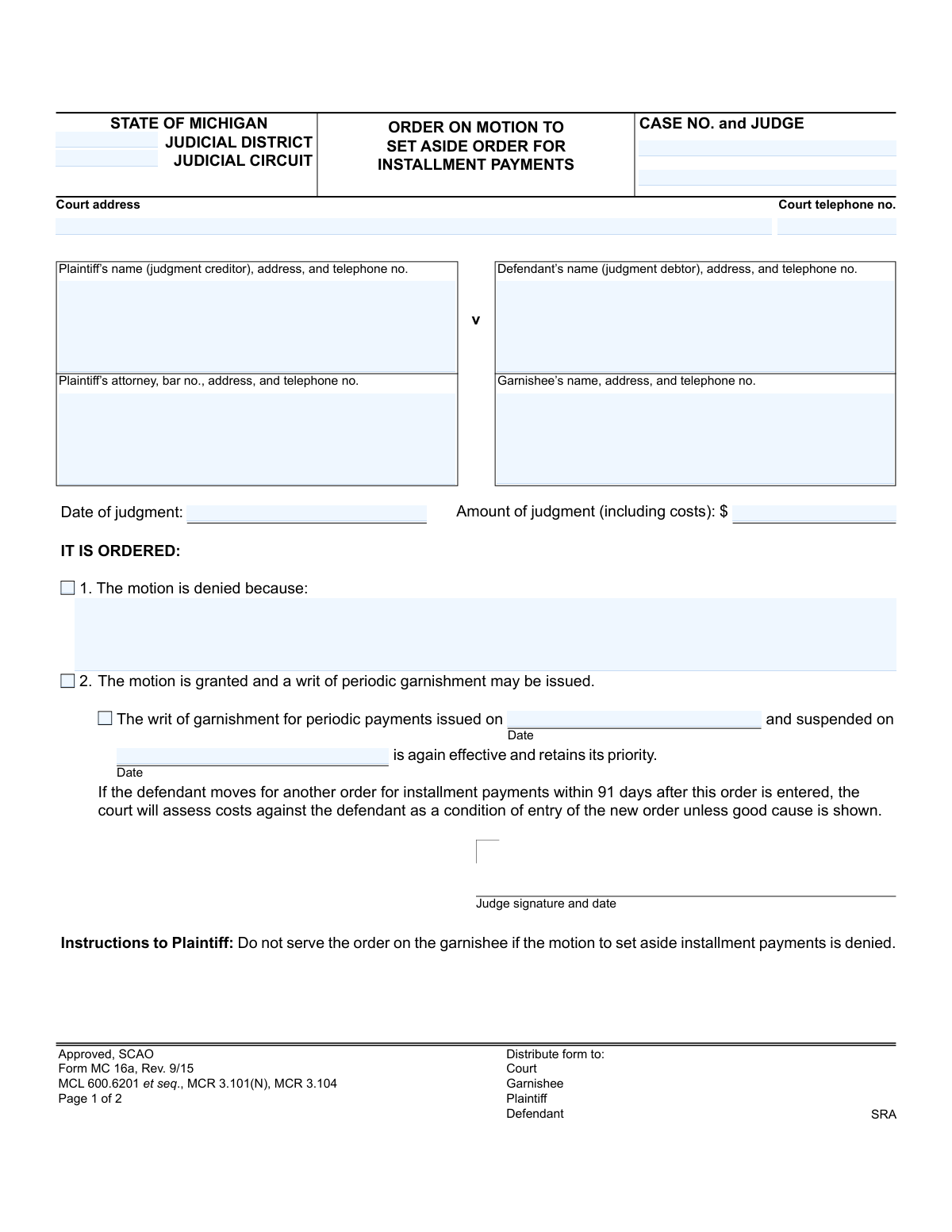
Yes! You can use AI to fill out State of Michigan, Form MC 16a, Order on Motion to Set Aside Order for Installment Payments
Form MC 16a is a legal document issued by a Michigan court to rule on a motion to cancel a previously established installment payment plan for a judgment debtor. This order determines whether the installment plan is set aside, potentially allowing for the reinstatement of a writ of garnishment. Today, this form can be filled out quickly and accurately using AI-powered services like Instafill.ai, which can also convert non-fillable PDF versions into interactive fillable forms.
MC 16a is part of the
Michigan court forms category on Instafill.
Our AI automatically handles information lookup, data retrieval, formatting, and form filling.
It takes less than a minute to fill out MC 16a using our AI form filling.
Securely upload your data. Information is encrypted in transit and deleted immediately after the form is filled out.
Form specifications
| Form name: | State of Michigan, Form MC 16a, Order on Motion to Set Aside Order for Installment Payments |
| Number of fields: | 21 |
| Number of pages: | 1 |
| Language: | English |
More forms in Michigan court forms
Instafill Demo: How to fill out PDF forms in seconds with AI
How to Fill Out MC 16a Online for Free in 2026
Are you looking to fill out a MC 16A form online quickly and accurately? Instafill.ai offers the #1 AI-powered PDF filling software of 2026, allowing you to complete your MC 16A form in just 37 seconds or less.
Follow these steps to fill out your MC 16A form online using Instafill.ai:
- 1 Navigate to Instafill.ai and upload or select the MC 16a form.
- 2 Enter the case information, including the judicial district/circuit, case number, judge, and court address.
- 3 Provide the full names, addresses, and contact information for the plaintiff (judgment creditor), defendant (judgment debtor), and garnishee.
- 4 Input the date and total amount of the original judgment.
- 5 Indicate the court's decision by checking the appropriate box for whether the motion is granted or denied, and if denied, state the reason.
- 6 If the motion is granted, enter the dates related to the writ of garnishment being issued and suspended.
- 7 Review all entered information for accuracy before the judge signs and dates the order, then download the completed form for filing and distribution.
Our AI-powered system ensures each field is filled out correctly, reducing errors and saving you time.
Why Choose Instafill.ai for Your Fillable MC 16a Form?
Speed
Complete your MC 16a in as little as 37 seconds.
Up-to-Date
Always use the latest 2026 MC 16a form version.
Cost-effective
No need to hire expensive lawyers.
Accuracy
Our AI performs 10 compliance checks to ensure your form is error-free.
Security
Your personal information is protected with bank-level encryption.
Frequently Asked Questions About Form MC 16a
This is a court order issued by a judge that decides whether to cancel a defendant's existing installment payment plan. It is the court's official ruling on a motion filed by the plaintiff (creditor) to resume other collection methods like garnishment.
A judge completes and signs this form to issue an official court order. The plaintiff, defendant, and garnishee receive a copy for their records, but they do not fill out the form themselves.
This means the judge has approved the plaintiff's request and has canceled the defendant's installment payment plan. This allows the plaintiff to proceed with or resume collection efforts, such as a writ of garnishment.
This means the judge has rejected the plaintiff's request to cancel the installment plan. The defendant must continue making the agreed-upon payments, and the plaintiff cannot proceed with garnishment at this time.
This applies if a garnishment was already in place but was paused when the installment plan was approved. It means that the original garnishment is now active again and the garnishee (e.g., an employer) should resume withholding funds.
You must serve a copy of this signed order on the garnishee (like the defendant's employer or bank). This informs them that the installment plan is no longer in effect and that they should comply with the writ of garnishment.
The form warns that if your installment plan is set aside and you file for a new one within 91 days, the court will likely make you pay the plaintiff's costs as a condition. This is to discourage repeatedly stopping and starting payment plans.
The garnishee is a third party who holds money or property belonging to the defendant (judgment debtor). This is typically the defendant's employer (for wage garnishment) or a bank where they have an account.
This section is completed and signed by the person who mails the order, typically a court clerk. It serves as official proof that copies of the judge's order were sent to all parties involved in the case.
Yes, while a judge fills out the original, you can use services like Instafill.ai to manage your case documents. AI can help you extract key data like case numbers, dates, and amounts for your records, saving you time and ensuring accuracy.
You can upload the PDF of the order to Instafill.ai to automatically read and organize the information into a digital format. This is useful for tracking case progress, managing deadlines, and keeping all your legal documents organized and searchable.
Services like Instafill.ai can convert any flat, non-fillable PDF into an interactive form. This allows you to easily add your own annotations, notes, or internal tracking information for case management purposes.
A judge might deny the motion if the defendant is current on their payments and the plaintiff has not shown a good reason to cancel the plan. The specific reason for the denial may be written on the line provided in section 1 of the order.
Compliance MC 16a
Validation Checks by Instafill.ai
1
Exclusive Order Outcome Selection
Validates that either the 'motion is denied' checkbox or the 'motion is granted' checkbox is selected, but not both. The order must have a single, unambiguous outcome to be legally effective. If both or neither are selected, the form is considered contradictory or incomplete and cannot be processed.
2
Required Reason for Denial
Ensures that if the 'motion is denied' checkbox is selected, the corresponding 'because' text field is not empty. Providing a reason for denial is critical for legal transparency and due process, informing the parties of the court's reasoning. An order denying a motion without a stated reason is procedurally deficient and may be subject to appeal.
3
Conditional Requirement for Grant Details
Verifies that if the 'motion is granted' checkbox is selected, both the 'writ of garnishment for periodic payments issued on' date and the 'suspended on' date are provided. These dates are essential for reactivating the garnishment correctly and maintaining its legal priority. Failure to provide these dates renders the grant order incomplete and unenforceable.
4
Case Number Format and Consistency
Checks that the 'Case No.' is present on both pages of the form and that the values match exactly. It should also validate the number against the expected format for the specified judicial circuit/district. An incorrect or mismatched case number could lead to the order being filed in the wrong case file, causing significant legal and administrative errors.
5
Logical Date Chronology
Performs a consistency check on multiple dates. It verifies that the 'suspended on' date is on or after the 'writ of garnishment... issued on' date. It also ensures the 'Certificate of Mailing Date' is on or after the date the judge signed the order. This validation prevents logical impossibilities and ensures the timeline of events is accurate.
6
Garnishment and Judgment Date Logic
Verifies that the 'writ of garnishment for periodic payments issued on' date is chronologically after the 'Date of judgment'. A writ of garnishment is a post-judgment remedy and cannot be issued before a judgment has been officially entered by the court. This check ensures the legal process is followed in the correct sequence.
7
Judgment Date Validation
Checks that the 'Date of judgment' is a valid, fully-formed date (e.g., MM/DD/YYYY) and that it occurs on or before the current processing date. A future or invalid judgment date is impossible and would invalidate the entire order, as the order is predicated on a pre-existing, valid judgment.
8
Judgment Amount Numeric Format
Validates that the 'Amount of judgment' field contains a valid positive numeric or currency value, allowing for digits, commas, and a decimal point. This ensures the financial basis for the garnishment is clear and correctly recorded for calculation purposes. Non-numeric characters would cause processing failures.
9
Judge Signature and Date Presence
Validates that the judge's signature is present and that the date field next to the signature is filled out. An unsigned or undated order is not legally binding and has no effect. This is one of the most critical checks for the document's overall validity and enforceability.
10
Certificate of Mailing Completeness
Ensures that both the date and signature fields in the 'Certificate of Mailing' section are completed. This certificate serves as legal proof that all parties were properly notified of the court's order as required by court rules. An incomplete certificate can invalidate the service and nullify the order's effect on the parties.
11
Party Information Completeness
Ensures that the fields for Plaintiff, Defendant, and Garnishee information are not empty. Each party must be clearly identified with at least a name and address for the order to be legally effective and properly served. Missing this information makes it impossible to know who the order applies to or how to notify them.
12
Attorney Bar Number Presence
Checks that if the 'Plaintiff’s attorney' name field is filled, the corresponding 'bar no.' field is also filled and contains a valid number. The bar number is a unique identifier that confirms the attorney is licensed and authorized to practice. Its absence when an attorney is named raises questions about their authority to act.
13
Court Jurisdiction Identification
Checks that either the 'Judicial District' or 'Judicial Circuit' field is filled. This information is fundamental for identifying the court with jurisdiction over the case. Without it, the document cannot be filed, routed, or associated with the correct legal venue.
14
Denial and Grant Field Exclusivity
Validates that if the 'motion is denied' checkbox is selected, the fields related to a granted motion (i.e., 'writ of garnishment... issued on' date and 'suspended on' date) are left blank. Populating these fields when a motion is denied would create a contradictory and confusing document, making the court's decision unclear.
Common Mistakes in Completing MC 16a
Users often transpose digits in the case number or forget to include the assigned judge's name due to manual data entry errors. An incorrect case number can lead to the order being rejected by the court clerk or filed in the wrong case, causing significant delays. To avoid this, always double-check the case number against official court documents. AI-powered tools like Instafill.ai can help by saving and auto-filling correct case information across multiple forms, reducing the risk of errors.
When listing the garnishee (e.g., an employer or bank), people may use a general corporate address instead of the specific address for the payroll or legal department. This causes the garnishment order to be misdirected or significantly delayed, preventing the collection of funds. It is crucial to obtain the precise contact information for the department responsible for processing garnishments. Tools like Instafill.ai can store detailed contact profiles for frequently used garnishees, ensuring the correct, complete address is used every time.
A common error is entering the date the current motion was filed instead of the date the original judgment was entered. The 'Date of judgment' field refers to the final decision that established the debt, which is a critical date for legal calculations. This mistake can affect calculations for interest and deadlines, potentially jeopardizing the enforceability of the debt. Always refer to the original 'Judgment' document to confirm the correct date.
Filers might accidentally transpose numbers, omit cents, or fail to include all court-awarded costs in the 'Amount of judgment' field. An incorrect amount can lead to legal disputes, require a corrected order to be filed, and delay the collection process. The amount must precisely match the original judgment, including all specified costs. Using a tool like Instafill.ai helps by allowing you to save the definitive judgment amount and auto-populate it, preventing transcription errors.
The form specifically labels the Plaintiff as the 'judgment creditor' and the Defendant as the 'judgment debtor.' People unfamiliar with legal terminology may accidentally switch these parties, invalidating the entire order. This mistake misidentifies who owes money and who is owed money, leading to rejection by the court. Using a tool like Instafill.ai helps by creating clear profiles for each party and consistently populating their information in the correct fields.
In a rush, a user might inadvertently check both the box for 'The motion is denied' and the box for 'The motion is granted.' This is a critical error that makes the order ambiguous and legally unenforceable, as a judge cannot both deny and grant the same motion. The court will reject the form, requiring a corrected version to be submitted. Advanced form-filling software can flag mutually exclusive selections to prevent such logical errors.
When a motion is granted, the form requires the dates the writ of garnishment was originally 'issued on' and 'suspended on.' People often forget to fill in these dates, creating ambiguity about the garnishment's history and priority. This information is vital for the garnishee to understand the timeline and correctly reinstate the garnishment. AI-powered tools like Instafill.ai can prompt users to fill in all required fields based on conditional logic, preventing incomplete submissions.
When filling in the plaintiff's attorney information, the bar number is frequently forgotten. This unique identifier is essential for the court to verify the attorney's credentials and good standing. Omitting the bar number can lead to processing delays or rejection of the filing until the information is completed. Form-filling tools can store complete attorney profiles, including the bar number, to ensure this field is never left blank.
The Certificate of Mailing on page 2 is the official proof that all parties were served with a copy of the order, but it is often left unsigned or undated. This oversight invalidates the proof of service, allowing an opposing party to claim they were never notified of the order and challenge any subsequent actions. Since this form is a non-fillable PDF, a tool like Instafill.ai can convert it into a fillable version, making it easy to add a digital signature and date before printing.
Filers may incorrectly identify the court as a 'Judicial District' when the case is in a 'Judicial Circuit,' or vice versa. This confusion arises from not knowing the specific jurisdiction where the original judgment was entered. Filing in the wrong court system results in immediate rejection and requires the filer to start the process over, wasting time and resources. Always verify the exact court name and level from the original judgment paperwork.
Saved over 80 hours a year
“I was never sure if my IRS forms like W-9 were filled correctly. Now, I can complete the forms accurately without any external help.”
Kevin Martin Green
Your data stays secure with advanced protection from Instafill and our subprocessors
Robust compliance program
Transparent business model
You’re not the product. You always know where your data is and what it is processed for.
ISO 27001, HIPAA, and GDPR
Our subprocesses adhere to multiple compliance standards, including but not limited to ISO 27001, HIPAA, and GDPR.
Security & privacy by design
We consider security and privacy from the initial design phase of any new service or functionality. It’s not an afterthought, it’s built-in, including support for two-factor authentication (2FA) to further protect your account.
Fill out MC 16a with Instafill.ai
Worried about filling PDFs wrong? Instafill securely fills state-of-michigan-form-mc-16a-order-on-motion-to-set-aside-order-for-installment-payments forms, ensuring each field is accurate.