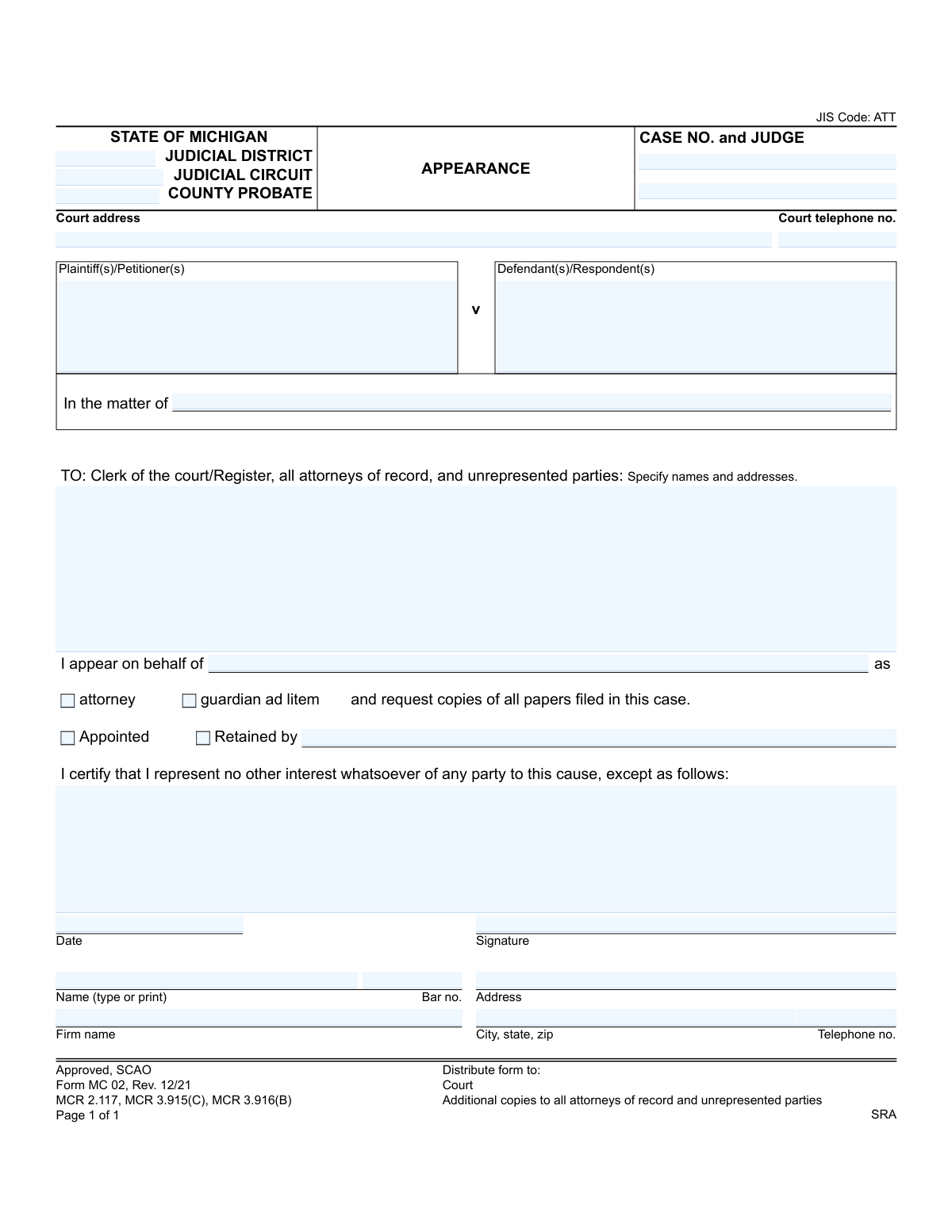
Yes! You can use AI to fill out Form MC 02, Appearance

Form MC 02, Appearance, is a legal document filed in Michigan courts by an attorney or guardian ad litem to officially state that they are representing a party in a specific case. Filing this form ensures the representative receives all official notices and documents related to the case. Today, this form can be filled out quickly and accurately using AI-powered services like Instafill.ai, which can also convert non-fillable PDF versions into interactive fillable forms.
MC 02 is part of the Michigan court forms category on Instafill.
Our AI automatically handles information lookup, data retrieval, formatting, and form filling.
It takes less than a minute to fill out MC 02 using our AI form filling.
Securely upload your data. Information is encrypted in transit and deleted immediately after the form is filled out.

Form specifications

Form name: Form MC 02, Appearance
Number of fields: 26
Number of pages: 1
Language: English
main-image

Instafill Demo: How to fill out PDF forms in seconds with AI

How to Fill Out MC 02 Online for Free in 2026

Are you looking to fill out a MC 02 form online quickly and accurately? Instafill.ai offers the #1 AI-powered PDF filling software of 2026, allowing you to complete your MC 02 form in just 37 seconds or less.
Follow these steps to fill out your MC 02 form online using Instafill.ai:
  1. 1 Navigate to Instafill.ai and upload or select the Michigan Appearance form, MC 02.
  2. 2 Provide the court and case information, including the judicial district/circuit, case number, and judge's name.
  3. 3 Enter the names of the plaintiff(s)/petitioner(s) and defendant(s)/respondent(s).
  4. 4 Specify the party you are representing and your role (e.g., attorney, guardian ad litem).
  5. 5 Indicate whether you were appointed or retained and by whom, noting any exceptions to your representation.
  6. 6 Input your professional details, including your name, bar number, address, and contact information.
  7. 7 Review the auto-filled form for accuracy, then e-sign and date it before downloading for submission to the court and relevant parties.

Our AI-powered system ensures each field is filled out correctly, reducing errors and saving you time.

Why Choose Instafill.ai for Your Fillable MC 02 Form?

Speed

Complete your MC 02 in as little as 37 seconds.

Up-to-Date

Always use the latest 2026 MC 02 form version.

Cost-effective

No need to hire expensive lawyers.

Accuracy

Our AI performs 10 compliance checks to ensure your form is error-free.

Security

Your personal information is protected with bank-level encryption.

Frequently Asked Questions About Form MC 02

This form is used by an attorney or guardian ad litem to officially notify the court and all other parties that they are representing a specific person or entity in a legal case. Filing it ensures they receive all future notices and documents related to the case.

An attorney or a court-appointed guardian ad litem who is beginning to represent a party in a Michigan court case must file this form. It is not intended for individuals representing themselves (pro se litigants).

Select 'Appointed' if the court has assigned you to represent the party. Select 'Retained' if the client (or someone on their behalf) has hired you directly.

This information is located on previously filed court documents, such as the Summons and Complaint. If you do not have access to these, you can contact the Clerk of the Court where the case was filed.

You must file the original form with the Clerk of the Court. Additionally, you are required to send a copy to all other attorneys of record and any unrepresented parties involved in the case.

This section is for disclosing any potential conflicts of interest. If you have any other interest or represent another party in the same case, you must describe it here; otherwise, you can leave it blank or write 'None'.

Use the 'Plaintiff vs. Defendant' fields for lawsuits where one party is suing another. Use the 'In the matter of' field for cases that don't involve a direct dispute, such as probate matters, adoptions, or guardianship proceedings.

A guardian ad litem (GAL) is an individual appointed by the court to represent the best interests of a person who cannot represent themselves, such as a minor or an incapacitated adult, during a legal proceeding.

Yes, services like Instafill.ai use AI to help you complete forms like this one accurately and efficiently. The AI can auto-fill your contact information, bar number, and other recurring details, saving you time and reducing errors.

You can use a service like Instafill.ai to complete the form digitally. Simply upload the MC 02 form to the platform, and it will become an interactive, fillable document that you can complete, sign, and download.

If you have a non-fillable or 'flat' PDF, you can use a tool like Instafill.ai to make it interactive. Upload the document, and the platform will automatically convert it into a fillable form you can complete online.

Yes, if you are filing as an attorney, you must include your Michigan State Bar number (P-number). This is a mandatory field that identifies you as a licensed attorney in the state.

Yes, a separate Appearance form must be filed for each individual case in which you are representing a client. The form is specific to the case number and parties involved.

Compliance MC 02
Validation Checks by Instafill.ai

1
Case Identifier Completeness
This check ensures that the 'case no' field is filled and that at least one of the party identifier fields ('p name'/'d name' or 'in the matter of') is also completed. These fields are essential for uniquely identifying the case to which this appearance applies. A failure to provide this information would make it impossible to file the document correctly, leading to its rejection.
2
Michigan Attorney Bar Number Format
Validates that the 'attorney bar no' field follows the specific format for Michigan attorneys, which is typically a 'P' followed by a sequence of digits (e.g., P12345). This is a critical check to verify the attorney's credentials and their authority to practice in the state. An invalid bar number could indicate a data entry error or an unauthorized filer, and the submission would be rejected pending correction.
3
Exclusive Role Selection
This validation ensures that exactly one of the role checkboxes, 'attorney' or 'guardian ad litem', is selected. The filer must clearly define their capacity for this appearance, and these roles are mutually exclusive for a single filing. If neither or both are selected, the form is ambiguous and cannot be processed, requiring the user to clarify their role.
4
Exclusive Engagement Type Selection
Verifies that exactly one of the engagement type checkboxes, 'appointed' or 'retained', is selected. This information is required to understand the basis of the attorney's involvement (i.e., court-appointed or privately hired). An omission or dual selection creates an incomplete record and would cause the form to be returned for clarification.
5
Conditional 'Retained By' Field
This is a logical check that requires the 'appearance retained by' field to be filled if the 'retained' checkbox is selected. If an attorney is privately retained, the court needs to know who the client is. Failure to provide this information when 'retained' is chosen results in an incomplete and logically inconsistent form.
6
Client Name Presence
Ensures the 'appearance for' field, which specifies the party the attorney is representing, is not empty. This is the primary purpose of the form and is absolutely mandatory. The submission is meaningless without identifying the client, and it would be immediately rejected if this field is blank.
7
Case Type Logic
This check validates that either the Plaintiff/Defendant fields ('p name', 'd name') are used OR the 'in the matter of' field is used, but not both sets simultaneously. This enforces the distinction between adversarial proceedings (Plaintiff v. Defendant) and non-adversarial ones ('in the matter of'). Using both would create a confusing and logically flawed case caption, leading to rejection.
8
Signature Presence
Validates that the 'appearance signature' field is not empty. A signature is a legal requirement to execute the document and attest to the information provided. An unsigned appearance form is not legally valid and will be rejected by the court clerk.
9
Appearance Date Plausibility
This check ensures the 'appearance date' is a valid, correctly formatted date that is not in the future or unreasonably far in the past. This is important for establishing an accurate timeline of court records. An invalid or nonsensical date would cause filing errors and require correction.
10
Attorney Contact Information Completeness
Verifies that all essential attorney contact fields ('attorney name', 'attorney bar no', 'attorney address', 'attorney city state zip', 'attorney telephone no') are filled. Complete and accurate contact information is crucial for the court and opposing counsel to communicate with the filing attorney. Missing information would halt communication and likely result in the form's rejection.
11
Court Identifier Presence
This validation ensures that at least one of the court location fields ('Judicial district', 'Judicial circuit', or 'County probate') is filled out. This information is necessary to route the document to the correct courthouse and jurisdiction. Without a court identifier, the filing cannot be directed to the proper venue and will be rejected.
12
Telephone Number Format
This check validates that the 'court telephone no' and 'attorney telephone no' fields adhere to a standard phone number format (e.g., 10 digits, possibly with parentheses, spaces, or hyphens). This ensures the data is clean and the phone numbers are usable for communication. An improperly formatted number could lead to processing errors or failed communication attempts.

Common Mistakes in Completing MC 02

Incorrect or Missing Case Number and Judge Information

Filers often make typos in the case number or leave the judge's name blank. Since the case number is the primary identifier for the court file, any error can lead to the document being filed in the wrong case or rejected by the clerk. This causes significant delays and can result in missed deadlines. Always double-check the case number against official court documents and confirm the assigned judge's name before filing.

Selecting the Incorrect Court Jurisdiction

The form requires specifying whether the case is in District, Circuit, or County Probate court. Filers, especially those unfamiliar with a particular county's court structure, may select the wrong court type. This common error results in the document being misfiled and rejected, forcing the filer to restart the process at the correct courthouse and losing valuable time. It is crucial to verify the precise court where the case is pending before completing this section.

Failing to List All Parties for Service

The 'TO:' line requires a complete list of all attorneys of record and any unrepresented parties who must receive a copy. A frequent and serious mistake is omitting a party or providing an incorrect address. Failure to properly notify all parties can invalidate the appearance, lead to motions to set aside court orders, and cause significant procedural delays. A careful review of the case file is necessary to create a complete and accurate service list.

Ambiguous Client Identification

In the 'I appear on behalf of' field, attorneys sometimes use abbreviations, nicknames, or incomplete names for their client. This creates ambiguity, especially in cases with multiple parties or similarly named entities, and can lead to challenges regarding the scope of representation. To prevent confusion, always use the client's full, official name exactly as it appears in the case caption.

Omitting Appointment or Retention Details

The form requires the attorney to specify if they were 'Appointed' or 'Retained' and, if retained, by whom. A common oversight is checking the 'Retained by' box but failing to write in the name of the person or entity that hired them. This incomplete information can cause the clerk's office to question the validity of the appearance and delay its processing. It is essential to check the correct box and provide the full name of the retaining party or appointing authority.

Entering an Incorrect or Missing Bar Number

The attorney's bar number is a unique identifier essential for verification by the court. Forgetting to include it or making a data entry error like transposing digits is a frequent mistake. A missing or incorrect bar number can prevent the court from verifying the attorney's standing to practice, leading to filing rejections and delays. AI-powered form filling tools like Instafill.ai can help prevent this by storing and accurately auto-populating this information every time.

Submitting an Unsigned or Undated Form

A legal document like an Appearance is invalid without a signature and date. In the rush of preparing filings, it is easy to forget this final, critical step. An unsigned form will be rejected by the court clerk, which can be catastrophic if the filing is time-sensitive. Always perform a final check for a valid signature and the correct date before submission.

Improperly Completing the Conflict of Interest Certification

The certification 'I certify that I represent no other interest whatsoever... except as follows:' is a critical ethical declaration that is often overlooked. Attorneys may fail to disclose a potential conflict, such as representing another party in a related matter, which is a serious ethical breach. This can lead to disqualification or disciplinary action. This section must be carefully considered, and any potential conflicts must be described with complete transparency.

Incorrectly Using the 'In the matter of' Field

This field is intended for specific case types, like probate or juvenile proceedings, that do not have traditional plaintiffs and defendants. A common error is for filers in standard civil litigation to mistakenly put party information here. This creates a confusing and improperly formatted case caption that may need to be corrected via a subsequent filing. It's essential to understand the case type and use this field only when appropriate.

Submitting an Illegible or Poorly Formatted Document

This form is often a non-fillable PDF, leading people to fill it out by hand. Illegible handwriting can make critical information like names and case numbers unreadable, leading to rejection or data entry errors in the court's system. To avoid this, use a tool like Instafill.ai, which can convert flat PDFs into fillable forms, ensuring all entries are clear, legible, and professionally aligned.
Saved over 80 hours a year

“I was never sure if my IRS forms like W-9 were filled correctly. Now, I can complete the forms accurately without any external help.”

Kevin Martin Green

Your data stays secure with advanced protection from Instafill and our subprocessors

Robust compliance program

Transparent business model

You’re not the product. You always know where your data is and what it is processed for.

ISO 27001, HIPAA, and GDPR

Our subprocesses adhere to multiple compliance standards, including but not limited to ISO 27001, HIPAA, and GDPR.

Security & privacy by design

We consider security and privacy from the initial design phase of any new service or functionality. It’s not an afterthought, it’s built-in, including support for two-factor authentication (2FA) to further protect your account.

Fill out MC 02 with Instafill.ai

Worried about filling PDFs wrong? Instafill securely fills form-mc-02-appearance forms, ensuring each field is accurate.