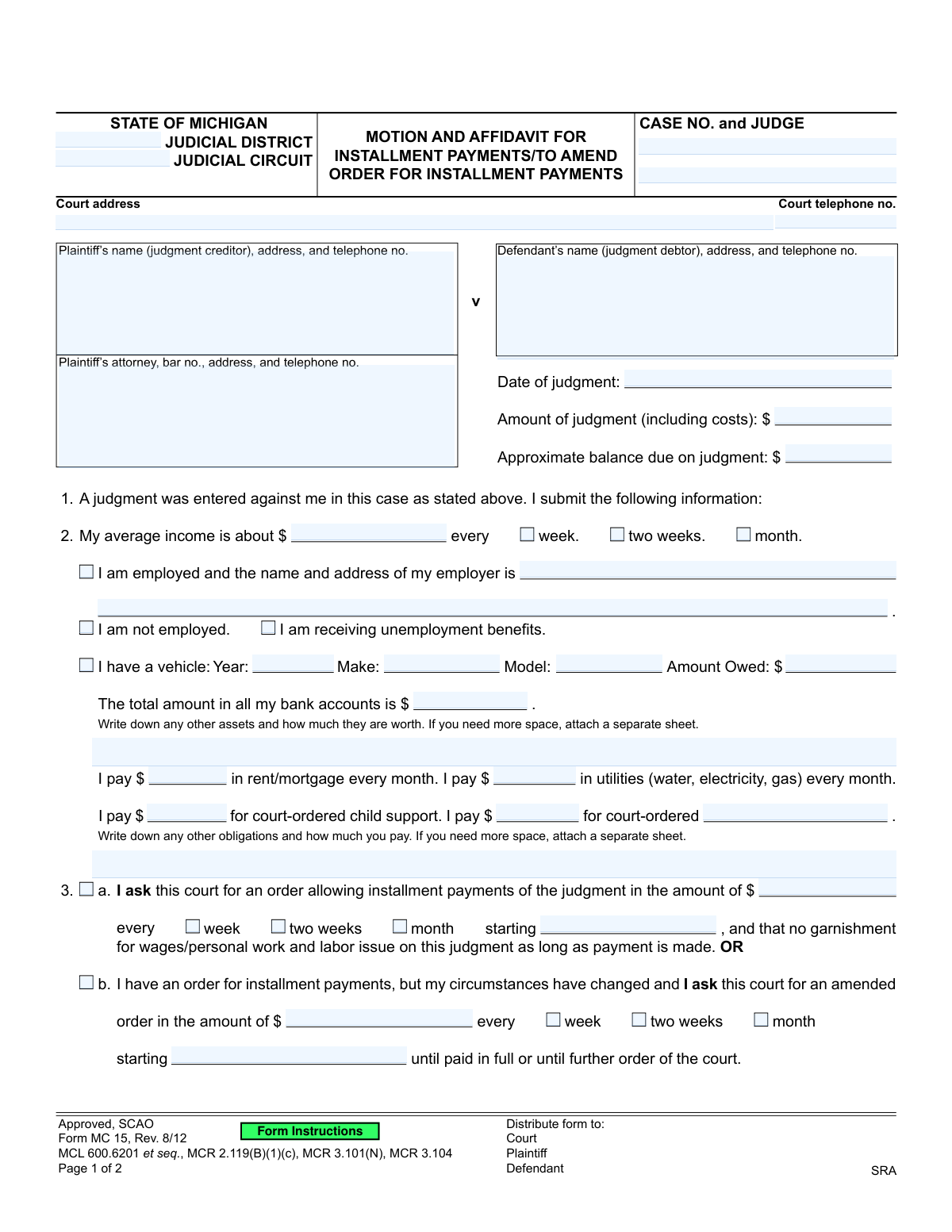
Yes! You can use AI to fill out Form MC 15, Motion and Affidavit for Installment Payments/To Amend Order for Installment Payments

Form MC 15, the Motion and Affidavit for Installment Payments, is a crucial legal document for individuals in Michigan who owe money due to a court judgment. By submitting this form, a judgment debtor provides the court with a detailed financial statement and formally requests to make payments in manageable installments, potentially halting wage garnishments. This motion can also be used to modify a previously approved payment plan if financial circumstances have changed. Today, this form can be filled out quickly and accurately using AI-powered services like Instafill.ai, which can also convert non-fillable PDF versions into interactive fillable forms.
MC 15 is part of the Michigan court forms category on Instafill.
Our AI automatically handles information lookup, data retrieval, formatting, and form filling.
It takes less than a minute to fill out MC 15 using our AI form filling.
Securely upload your data. Information is encrypted in transit and deleted immediately after the form is filled out.

Form specifications

Form name: Form MC 15, Motion and Affidavit for Installment Payments/To Amend Order for Installment Payments
Number of fields: 61
Number of pages: 1
Language: English
main-image

Instafill Demo: How to fill out PDF forms in seconds with AI

How to Fill Out MC 15 Online for Free in 2026

Are you looking to fill out a MC 15 form online quickly and accurately? Instafill.ai offers the #1 AI-powered PDF filling software of 2026, allowing you to complete your MC 15 form in just 37 seconds or less.
Follow these steps to fill out your MC 15 form online using Instafill.ai:
  1. 1 Navigate to Instafill.ai and upload or select the MC 15 form.
  2. 2 Provide the court and case information, including the judicial district/circuit, case number, judge, and details for both the plaintiff and defendant.
  3. 3 Enter the specifics of the judgment, including the date it was entered, the total amount, and the approximate balance remaining.
  4. 4 Complete the financial affidavit by detailing your income, employment status, assets (like vehicles and bank accounts), and monthly financial obligations (rent, utilities, child support).
  5. 5 Clearly state your request by either proposing a new installment payment amount and frequency or asking to amend an existing order due to changed circumstances.
  6. 6 Review all the information populated by the AI for accuracy, then sign and date the affidavit. Note that this section may require notarization.
  7. 7 Complete the Certificate of Mailing and follow the instructions to serve the motion on the plaintiff and file it with the court.

Our AI-powered system ensures each field is filled out correctly, reducing errors and saving you time.

Why Choose Instafill.ai for Your Fillable MC 15 Form?

Speed

Complete your MC 15 in as little as 37 seconds.

Up-to-Date

Always use the latest 2026 MC 15 form version.

Cost-effective

No need to hire expensive lawyers.

Accuracy

Our AI performs 10 compliance checks to ensure your form is error-free.

Security

Your personal information is protected with bank-level encryption.

Frequently Asked Questions About Form MC 15

This form is used by a person who owes money on a court judgment (a judgment debtor) to ask the court to allow them to pay the debt in smaller, regular installments. It can also be used to change an existing payment plan if your financial situation has changed.

You should fill out this form if a court has ordered you to pay a judgment and you are unable to pay the full amount at once. It allows you to propose a manageable payment plan to the court and the person you owe money to (the judgment creditor).

You must provide detailed information about your finances, including your income, employment status, assets like vehicles and bank accounts, and monthly expenses such as rent, utilities, and court-ordered support.

You should fill out section 3a if you are requesting an installment payment plan for the first time. Fill out section 3b if you already have an approved payment plan but need to change the payment amount or frequency due to a change in your circumstances.

You must sign the form in front of a notary or deputy court clerk, then mail a copy to the plaintiff (the person you owe). The plaintiff has 14 days to object; if they don't, your proposed plan will likely be approved by the court.

By filing this motion, you can ask the court to suspend an existing wage garnishment as long as you make the proposed installment payments. You would indicate this in section 4 of the form.

Yes, your signature on the affidavit must be witnessed and signed by a deputy clerk or a notary public. This confirms that you are swearing to the truthfulness of the information provided.

If the plaintiff files a timely objection with the court, the judge will review the documents from both sides to make a decision. The court may also schedule a hearing for both parties to present their case.

The form states that if you need more space, you should attach a separate sheet of paper with the additional information. Be sure to label the extra sheet clearly and reference the corresponding section of the form.

Yes, services like Instafill.ai use AI to accurately auto-fill form fields from your saved profile, which can save you time and help reduce errors.

You can use a service like Instafill.ai to fill out the form electronically. Simply upload the PDF, and the tool will allow you to type your information directly into the fields before printing for signature and filing.

If you have a non-fillable or 'flat' PDF, you can upload it to a platform like Instafill.ai. The service can convert it into an interactive, fillable form for you to complete on your computer.

This section is your sworn statement that you have sent a copy of the completed motion to the plaintiff or their attorney. You must sign and date this section to certify that you have properly notified the other party.

Compliance MC 15
Validation Checks by Instafill.ai

1
Exclusive Motion Type Selection
Ensures that the defendant selects either option 3a (requesting a new installment order) or 3b (requesting to amend an existing order), but not both. This is critical to prevent ambiguity in the motion's purpose. If both or neither are selected, the form submission should be rejected with an error asking the user to clarify their request.
2
Conditional Requirement for Motion Details
Validates that if a motion type (3a or 3b) is selected, all associated fields (payment amount, payment frequency, and start date) are completed. For example, if 3a is checked, the 'judgment in the amount of', frequency, and 'starting' date fields must be filled. This ensures the court receives a complete and actionable request.
3
Judgment Balance Logical Consistency
Checks that the 'Approximate balance due on judgment' is less than or equal to the 'Amount of judgment'. It is logically impossible for the balance due to be greater than the original judgment amount. This validation prevents data entry errors that could complicate legal and financial processing.
4
Judgment Date Chronology
Verifies that the 'Date of judgment' is a valid date that occurs on or before the current submission date. A judgment date cannot be in the future. This check maintains the chronological integrity of the legal timeline and prevents nonsensical data entry.
5
Mutually Exclusive Employment Status
Ensures that only one of the employment status checkboxes ('I am employed', 'I am not employed', 'I am receiving unemployment benefits') is selected. A person cannot simultaneously be employed and not employed. This validation enforces logical consistency in the defendant's declared financial situation.
6
Conditional Employer Information
Requires the 'name and address of my employer' field to be filled out if the 'I am employed' checkbox is selected. This information is essential for the court and plaintiff to verify income and is a prerequisite for potential wage garnishments. Failure to provide this information when employed would render the affidavit incomplete.
7
Income Details Completeness
Validates that if an amount is entered for 'My average income', a corresponding payment frequency ('week', 'two weeks', or 'month') must also be selected. The income amount is meaningless without its frequency. This check is crucial for the court to accurately assess the defendant's ability to make payments.
8
Proposed Payment vs. Income Sanity Check
Compares the proposed installment payment amount against the defendant's stated average income for the same period. The system should flag or prevent a submission where the proposed payment exceeds the stated income. This prevents the defendant from proposing a payment plan that is demonstrably unsustainable based on the information provided.
9
Monetary Field Format Validation
Ensures that all fields representing dollar amounts (e.g., 'Amount of judgment', 'Average income', 'Amount Owed' on vehicle) contain only valid numeric characters and currency symbols. This prevents data corruption and calculation errors by rejecting entries with alphabetic text or invalid formats. Clean financial data is essential for the form's purpose.
10
Notary Commission Expiration Date
Verifies that the notary's commission expiration date ('My commission expires on') is a date in the future. A document notarized by someone with an expired commission is legally invalid. This check is critical to ensure the affidavit's legal standing and admissibility in court.
11
Conditional Garnishment Date
Checks that if the box in section 4 ('A writ of garnishment for periodic payments was issued...') is selected, the corresponding date field is filled with a valid past date. The motion to suspend a garnishment is irrelevant without specifying when the writ was issued. This ensures the request is complete and contextually valid.
12
Affidavit Signature Date Presence
Confirms that the 'Subscribed and sworn to before me on' date field is completed. An affidavit is a sworn statement, and the date of the swearing is a fundamental component of its legal validity. A missing date can lead to the motion being rejected by the court clerk.

Common Mistakes in Completing MC 15

Incorrect or Missing Case Number

Failing to enter the correct and complete case number and judge's name on both pages of the form. This often happens when referencing an old document or by simple oversight, especially on the second page. An incorrect case number will cause the court clerk to reject the filing or misfile the motion, leading to significant delays and requiring you to start the process over.

Confusing Judgment Amount with Balance Due

Users often enter the same number for 'Amount of judgment' and 'Approximate balance due.' The 'Amount of judgment' is the original total from the court's decision, while the 'balance due' should reflect any payments already made or interest accrued. Providing inaccurate figures can undermine the credibility of your affidavit and may cause the judge to question your entire financial statement.

Inconsistent or Vague Income Reporting

Stating an income amount without correctly checking the corresponding frequency box (week, two weeks, month) is a frequent error. For example, entering a monthly income figure but checking the 'week' box. This inconsistency makes it impossible for the court to assess your actual ability to pay, which can result in the motion being denied or a payment plan being set at an unsustainable level.

Omitting Assets and Bank Accounts

Defendants may forget or intentionally omit assets like secondary bank accounts, vehicles, or other valuables to appear more financially distressed. Because this is a sworn affidavit, any omission is considered perjury and can have severe consequences, including immediate denial of the motion and potential legal penalties. It is crucial to provide a complete and honest list of all assets, regardless of their value.

Forgetting to List All Financial Obligations

Many people only fill in the specific expense lines for rent and utilities, neglecting to list other significant monthly payments in the 'other obligations' section. Common omissions include car payments, insurance premiums, medical bills, and other loan payments. This provides an incomplete financial picture to the court, which may result in a payment order that is much higher than you can realistically afford.

Incorrectly Selecting Motion Type (3a vs. 3b)

A common point of confusion is whether to request a new order (3a) or amend an existing one (3b). Filling out both sections or the wrong one will lead the court to reject the form as unclear. Carefully determine if you are making an initial request for a payment plan (3a) or asking to change a pre-existing plan due to changed circumstances (3b).

Signing the Affidavit Without a Notary Present

People often sign the form at home before taking it to be notarized, which invalidates the affidavit. The signature in section 5 must be witnessed by a deputy clerk or notary public. Signing the form beforehand will force you to get a new form and start over, delaying the suspension of any garnishments. Always wait to sign until you are in the physical presence of the notary.

Failing to Complete the Certificate of Mailing

The defendant must mail a copy of the completed motion to the plaintiff (or their attorney) and then sign the 'Certificate of Mailing' to certify they have done so. Forgetting this step means the motion has not been properly served, and the court cannot legally act on it. This is a critical step that, if missed, will halt the entire process until service is properly completed and certified.

Submitting an Illegible or Incomplete Form

Handwritten forms with illegible writing, crossed-out information, or blank required fields are often rejected by court clerks. This forces the filer to redo the paperwork, causing unnecessary delays. To avoid this, print clearly in black ink. AI-powered tools like Instafill.ai can be particularly helpful, as they can convert a non-fillable PDF like this into a typed, clean, and professional-looking document, ensuring all data is legible and properly formatted.
Saved over 80 hours a year

“I was never sure if my IRS forms like W-9 were filled correctly. Now, I can complete the forms accurately without any external help.”

Kevin Martin Green

Your data stays secure with advanced protection from Instafill and our subprocessors

Robust compliance program

Transparent business model

You’re not the product. You always know where your data is and what it is processed for.

ISO 27001, HIPAA, and GDPR

Our subprocesses adhere to multiple compliance standards, including but not limited to ISO 27001, HIPAA, and GDPR.

Security & privacy by design

We consider security and privacy from the initial design phase of any new service or functionality. It’s not an afterthought, it’s built-in, including support for two-factor authentication (2FA) to further protect your account.

Fill out MC 15 with Instafill.ai

Worried about filling PDFs wrong? Instafill securely fills form-mc-15-motion-and-affidavit-for-installment-paymentsto-amend-order-for-installment-payments forms, ensuring each field is accurate.