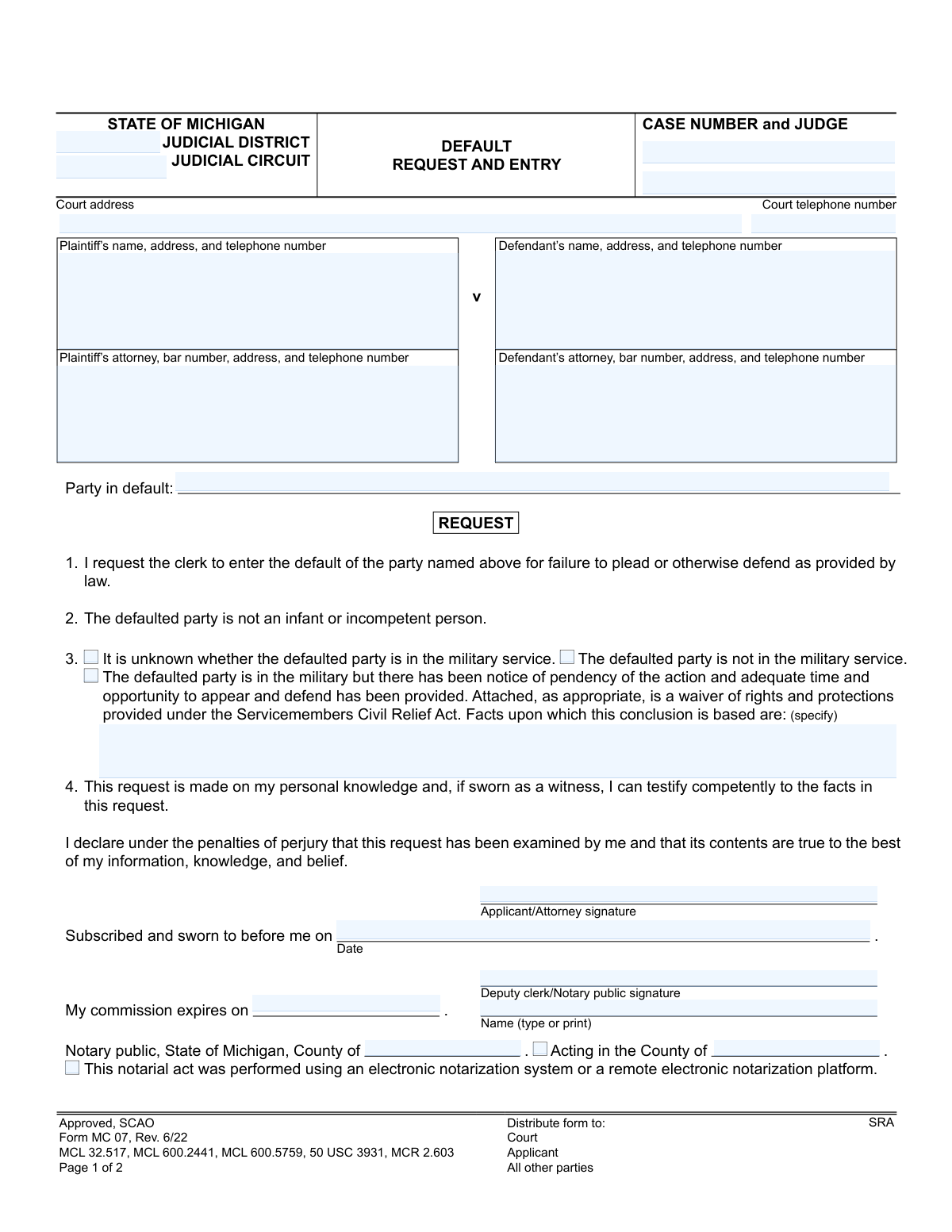
Yes! You can use AI to fill out Form MC 07, Default Request and Entry

The Michigan Form MC 07, Default Request and Entry, is a legal document filed in a judicial circuit or district court to formally request the court clerk to enter a default against a party who has failed to plead or otherwise defend themselves in a legal action. This is a critical step for a plaintiff to proceed with a case when the defendant is unresponsive. Today, this form can be filled out quickly and accurately using AI-powered services like Instafill.ai, which can also convert non-fillable PDF versions into interactive fillable forms.
MC 07 is part of the Michigan court forms category on Instafill.
Our AI automatically handles information lookup, data retrieval, formatting, and form filling.
It takes less than a minute to fill out MC 07 using our AI form filling.
Securely upload your data. Information is encrypted in transit and deleted immediately after the form is filled out.

Form specifications

Form name: Form MC 07, Default Request and Entry
Number of fields: 28
Number of pages: 1
Language: English
main-image

Instafill Demo: How to fill out PDF forms in seconds with AI

How to Fill Out MC 07 Online for Free in 2026

Are you looking to fill out a MC 07 form online quickly and accurately? Instafill.ai offers the #1 AI-powered PDF filling software of 2026, allowing you to complete your MC 07 form in just 37 seconds or less.
Follow these steps to fill out your MC 07 form online using Instafill.ai:
  1. 1 Navigate to Instafill.ai and upload the MC 07 form or select it from the template library.
  2. 2 Provide the essential case details, including the court, case number, and judge's name.
  3. 3 Enter the names and contact information for the plaintiff, defendant, and their respective attorneys.
  4. 4 Clearly identify the party in default and confirm they are not an infant or incompetent person.
  5. 5 Indicate the military service status of the defaulted party, providing factual support if required.
  6. 6 Review the AI-populated information for accuracy, then electronically sign and date the request section.
  7. 7 Download the completed form to be filed with the court and served to all relevant parties.

Our AI-powered system ensures each field is filled out correctly, reducing errors and saving you time.

Why Choose Instafill.ai for Your Fillable MC 07 Form?

Speed

Complete your MC 07 in as little as 37 seconds.

Up-to-Date

Always use the latest 2026 MC 07 form version.

Cost-effective

No need to hire expensive lawyers.

Accuracy

Our AI performs 10 compliance checks to ensure your form is error-free.

Security

Your personal information is protected with bank-level encryption.

Frequently Asked Questions About Form MC 07

This form is used to ask the court clerk to officially record that a party in a lawsuit has failed to respond or defend themselves within the required time. This 'entry of default' is the first step toward obtaining a default judgment against that party.

The 'Request' section is typically completed by the plaintiff (the person who started the lawsuit) or their attorney. It is filed when the defendant has not filed an answer or otherwise appeared in the case as required.

This legal phrase means the party has not responded to the lawsuit as required by court rules. This could mean they failed to file a formal answer to the complaint or take any other legal action within the allowed timeframe.

This is required by the Servicemembers Civil Relief Act (SCRA), a federal law that provides legal protections to active-duty military members. The court must know the defendant's military status before a default can be entered against them.

If you do not know the defendant's military status after a reasonable effort to find out, you can check the box for 'It is unknown whether the defaulted party is in the military service.' The court may require further action from you before proceeding.

An 'entry of default,' which this form requests, is simply the court's official recognition that a party has failed to respond. A 'default judgment' is a separate, subsequent order from the judge that actually decides the case in your favor and grants the relief you requested.

After completing and signing the 'Request' section, you must file the form with the clerk of the court where your case is pending. You must also mail a copy to the defaulted party and any other parties involved in the case.

The form includes a section for notarization, but your signature is made under the penalties of perjury, which is often sufficient. Always check your specific local court rules to determine if notarization is required for your case.

After the clerk signs the 'Default Entry' section, the default is officially on record. You must then file a separate motion with the court to ask the judge for a default judgment to finalize the case.

Yes, services like Instafill.ai use AI to help you accurately fill out legal forms like the MC 07. The AI can recognize form fields and help you input information quickly, reducing the chance of errors and saving you time.

You can use a service like Instafill.ai to complete the form online. Simply upload the form to the platform, and it will become an interactive document where you can type your information directly into the fields before printing.

If you have a non-fillable or 'flat' PDF, you can use a service like Instafill.ai to make it interactive. The platform converts static PDFs into fillable forms online, allowing you to easily type in your information without printing and writing by hand.

Compliance MC 07
Validation Checks by Instafill.ai

1
Case Number Consistency Across Pages
This check ensures the 'CASE NUMBER' field is identical on both page 1 and page 2 of the form. Maintaining a consistent case number is critical for document integrity and ensures that both pages are correctly associated with the same legal case file. A mismatch could lead to filing errors, rejection by the court clerk, or incorrect processing of the default entry.
2
Mandatory Defaulting Party Identification
Validates that the 'Party in default' field is not empty. This field identifies the specific individual or entity against whom the default is being requested, which is the primary purpose of the form. If this field is left blank, the request is ambiguous and cannot be processed, leading to an immediate rejection of the submission.
3
Exclusive Military Status Selection
This validation ensures that exactly one of the three military status checkboxes is selected. The Servicemembers Civil Relief Act (SCRA) provides specific protections, so the party's military status must be clearly and unambiguously declared. Selecting none, or more than one, of these options makes the declaration invalid and legally insufficient, preventing the court from proceeding.
4
Conditional Military Service Justification
Checks that if the box for 'The defaulted party is in the military' is selected, the corresponding 'Facts upon which this conclusion is based are:' text field is filled out. This justification is legally required to demonstrate that the servicemember has been properly notified and had an opportunity to defend themselves. Failure to provide these facts will result in the rejection of the default request due to non-compliance with SCRA.
5
Logical Applicant Signature Date
Verifies that the 'Date' associated with the 'Applicant/Attorney signature' is a valid date and is not set in the future. This date establishes when the declaration was made and must be chronologically sound. An invalid or future date would undermine the authenticity of the sworn statement and cause the document to be rejected.
6
Chronological Notarization Date
Ensures the date the notary signs ('Subscribed and sworn to before me on') is on or after the applicant's signature date. The notarization legally confirms the identity and signature of the applicant, an act which must logically occur at the same time or after the applicant signs. A notarization date preceding the applicant's signature date is impossible and would invalidate the entire notarization.
7
Valid and Active Notary Commission
This check validates that the 'My commission expires on' date is a valid date that occurs after the date of notarization. A notary can only perform notarial acts while their commission is active and valid. If the commission is expired at the time of signing, the notarization is legally void, rendering the sworn request invalid.
8
Complete Notary County Information
Verifies that both the 'Notary Public, State of Michigan, County of' field (county of commission) and the 'Acting in the County of' field (county of notarization) are completed. This information is required by law to establish the notary's jurisdiction and authority to perform the notarial act. Missing county information can invalidate the notarization and lead to the form's rejection.
9
Jurisdiction Identification Check
Ensures that at least one of the 'JUDICIAL DISTRICT' or 'JUDICIAL CIRCUIT' fields is filled out. This information is essential for routing the document to the correct court and associating it with the proper jurisdiction. Without this information, the form cannot be filed correctly, causing significant processing delays or rejection.
10
Logical Clerk Entry Date
Validates that the 'Date' of the 'DEFAULT ENTRY' on page 2, entered by the court clerk, is on or after the applicant's request 'Date' from page 1. The entry of default is a response to the request, so it must chronologically follow the request. An entry date that precedes the request date is a logical impossibility and would indicate a data entry error.
11
Required Plaintiff and Defendant Names
This check ensures that the 'Plaintiff’s name' and 'Defendant’s name' fields are both populated. These fields identify the primary parties to the lawsuit, which is fundamental context for the default request. Omitting either party's name makes the document incomplete and un-filable, as it's impossible to know who is suing whom.
12
Attorney Bar Number Presence
Verifies that if an attorney's name is provided in either the 'Plaintiff’s attorney' or 'Defendant’s attorney' field, the corresponding bar number is also included. Bar numbers are unique identifiers for attorneys and are required by court rules for official filings to verify the attorney's credentials and good standing. A missing bar number for a listed attorney will result in the filing being deemed deficient.

Common Mistakes in Completing MC 07

Incorrect or Incomplete Case Number

Users often mistype the case number or forget to enter it on the second page. The case number is the primary identifier for the legal action, and an error can lead to the document being misfiled, rejected by the clerk, or associated with the wrong case. To avoid this, carefully double-check the case number against official court documents and ensure it is entered identically on both pages of the form.

Improper Military Status (SCRA) Declaration

The Servicemembers Civil Relief Act (SCRA) section is frequently mishandled. Common errors include checking a box without providing a factual basis, checking conflicting boxes, or failing to perform due diligence. For example, checking 'The defaulted party is not in the military service' requires stating the facts for this conclusion, such as citing a search of the official Department of Defense database. Failure to comply with SCRA can invalidate the default and lead to legal penalties.

Missing or Defective Notarization

The applicant's signature on the request must be notarized or witnessed by a deputy clerk. People often sign the document beforehand, not in the presence of the notary, which invalidates the oath. Other errors include the notary failing to complete all fields, such as their commission expiration date or county. This defect will cause the court clerk to reject the filing, requiring the filer to repeat the process correctly.

Forgetting the Certificate of Mailing

After the clerk enters the default, the filing party is responsible for mailing a copy to all other parties. Filers often overlook the 'CERTIFICATE OF MAILING' section on page two, failing to sign and date it to certify that this service has been completed. This procedural error can be grounds for setting aside the default later, as it violates the notice requirements under court rule MCR 2.603(A)(2).

Ambiguous Identification of the Defaulting Party

In cases with multiple defendants, filers may write 'Defendant' in the 'Party in default' field instead of the specific name of the defendant who has failed to respond. This ambiguity can cause the clerk to reject the request, as it's unclear which party the default should be entered against. Always list the full, correct legal name of each specific party being defaulted to ensure the request is processed accurately.

Failure to State Factual Basis for SCRA Conclusion

This is a specific but critical error within the military status declaration. Even when the correct box is checked (e.g., 'not in the military'), filers frequently leave the 'Facts upon which this conclusion is based are:' field blank. The court needs to know how you determined the person's military status. A proper entry would be 'A search of the DMDC SCRA website on MM/DD/YYYY returned no record of active duty.' Omitting this justification can lead to the rejection of the default request.

Confusing Plaintiff and Defendant Information

A surprisingly common data entry error is transposing the plaintiff and defendant information, listing the plaintiff in the defendant's field and vice-versa. This fundamental error creates a confusing and legally incorrect document that will be rejected by the court. It often happens due to haste or inattention. AI-powered form filling tools like Instafill.ai can help prevent this by saving party information and auto-populating the correct fields for each case.

Incomplete Court Identification

The top of the form requires specifying the Judicial District or Circuit, court address, and telephone number. Filers sometimes leave these fields blank or provide partial information, assuming the clerk will know it. This can cause processing delays or misrouting, especially in jurisdictions with multiple court locations. Always fill out the complete and specific court information as it appears on previous case documents.

Using an Outdated Version of the Form

Court forms are periodically updated to reflect changes in laws and rules, indicated by the revision date (e.g., 'Rev. 6/22'). Using an old version of the MC 07 form may result in the submission being rejected because it lacks required fields or contains outdated language. Always check the court's official website for the most current version of any form before filling it out to avoid unnecessary delays and refiling.

Illegible Handwriting or Typographical Errors

When forms are filled out by hand, illegible writing can make names, addresses, and case numbers impossible for the court clerk to decipher. This leads to rejection or, worse, data entry errors by the clerk that can affect the case record. If the form is a non-fillable PDF, tools like Instafill.ai can convert it into a fillable version, allowing you to type information clearly and avoid issues with handwriting. This ensures all entries are legible and accurate.
Saved over 80 hours a year

“I was never sure if my IRS forms like W-9 were filled correctly. Now, I can complete the forms accurately without any external help.”

Kevin Martin Green

Your data stays secure with advanced protection from Instafill and our subprocessors

Robust compliance program

Transparent business model

You’re not the product. You always know where your data is and what it is processed for.

ISO 27001, HIPAA, and GDPR

Our subprocesses adhere to multiple compliance standards, including but not limited to ISO 27001, HIPAA, and GDPR.

Security & privacy by design

We consider security and privacy from the initial design phase of any new service or functionality. It’s not an afterthought, it’s built-in, including support for two-factor authentication (2FA) to further protect your account.

Fill out MC 07 with Instafill.ai

Worried about filling PDFs wrong? Instafill securely fills form-mc-07-default-request-and-entry forms, ensuring each field is accurate.