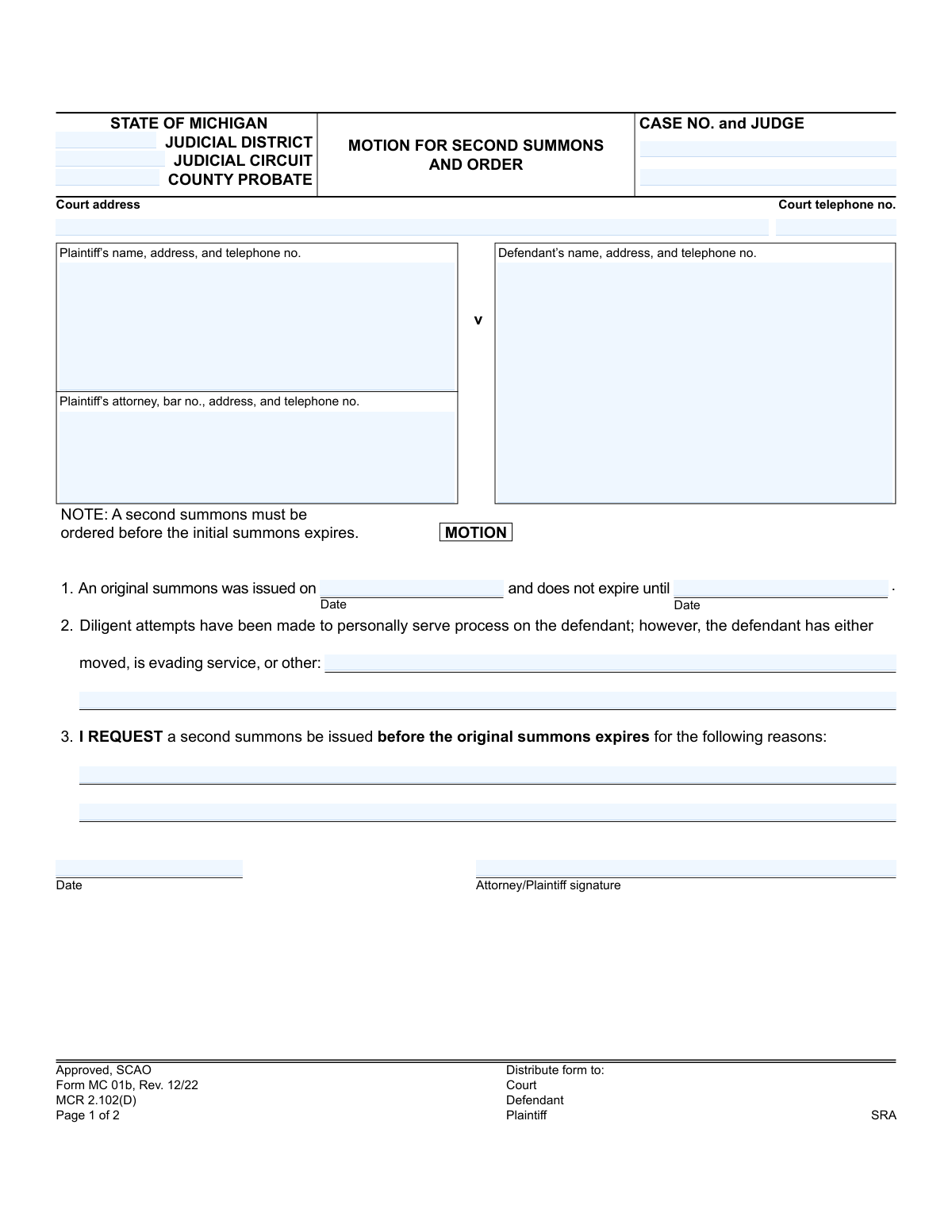
Yes! You can use AI to fill out Form MC 01b, Motion for Second Summons and Order
Form MC 01b, Motion for Second Summons and Order, is a legal document filed in Michigan courts to request an extension for serving a defendant and the issuance of a new summons. It is used when the plaintiff has been unable to serve the defendant within the time limit of the original summons due to evasion of service, a change of address, or other specified reasons. Today, this form can be filled out quickly and accurately using AI-powered services like Instafill.ai, which can also convert non-fillable PDF versions into interactive fillable forms.
MC 01b is part of the
Michigan court forms category on Instafill.
Our AI automatically handles information lookup, data retrieval, formatting, and form filling.
It takes less than a minute to fill out MC 01b using our AI form filling.
Securely upload your data. Information is encrypted in transit and deleted immediately after the form is filled out.
Form specifications
| Form name: | Form MC 01b, Motion for Second Summons and Order |
| Number of fields: | 23 |
| Number of pages: | 1 |
| Language: | English |
More forms in Michigan court forms
Instafill Demo: How to fill out PDF forms in seconds with AI
How to Fill Out MC 01b Online for Free in 2026
Are you looking to fill out a MC 01B form online quickly and accurately? Instafill.ai offers the #1 AI-powered PDF filling software of 2026, allowing you to complete your MC 01B form in just 37 seconds or less.
Follow these steps to fill out your MC 01B form online using Instafill.ai:
- 1 Navigate to Instafill.ai and upload or select Michigan Form MC 01b.
- 2 Use the AI assistant to accurately fill in the case information, including the court, case number, and judge's name.
- 3 Enter the complete details for the plaintiff, their attorney (if applicable), and the defendant.
- 4 Provide the date the original summons was issued and its expiration date in the designated fields.
- 5 Clearly explain the diligent attempts made to serve the defendant and the reasons why a second summons is necessary.
- 6 Date and digitally sign the motion to certify your request.
- 7 Review all the information for accuracy before downloading the completed form for filing with the court.
Our AI-powered system ensures each field is filled out correctly, reducing errors and saving you time.
Why Choose Instafill.ai for Your Fillable MC 01b Form?
Speed
Complete your MC 01b in as little as 37 seconds.
Up-to-Date
Always use the latest 2026 MC 01b form version.
Cost-effective
No need to hire expensive lawyers.
Accuracy
Our AI performs 10 compliance checks to ensure your form is error-free.
Security
Your personal information is protected with bank-level encryption.
Frequently Asked Questions About Form MC 01b
This form is used to request that the court issue a new (second) summons when you have been unable to serve the original summons on the defendant. It includes both your request (the motion) and the space for the judge's decision (the order).
The plaintiff or the plaintiff's attorney should fill out this form if they have tried but failed to serve the defendant with the initial summons before its expiration date.
Yes, it is critical to file this motion *before* the original summons expires. The form notes that the judge can deny the request if the original summons has already expired.
You will need the case information, the date the original summons was issued, and its expiration date. You must also briefly explain the 'diligent attempts' made to serve the defendant and why a second summons is needed.
This means you have made reasonable and persistent efforts to locate and serve the defendant, such as a process server trying multiple times at various addresses or times of day. You must describe these efforts on the form.
The 'ORDER' section is completed by the judge. After reviewing your motion, the judge will either grant or deny your request and sign the form.
If the motion is granted, the court will issue a second summons with a new expiration date. You must then attempt to serve this new summons on the defendant before it expires.
If your motion is denied, a second summons will not be issued. This often occurs if the original summons had already expired, and you may need to consult an attorney about how to proceed with your case.
You must file the completed motion with the clerk of the court where your case is being heard. After it is signed by the judge, you must distribute copies as indicated on the form, typically to yourself and the defendant.
You should list the defendant's last known address. The reason for the motion is often because the defendant has moved or is evading service, so it is understood that the address may no longer be current.
Yes, services like Instafill.ai use AI to help you accurately auto-fill form fields with your case information. This can save you time and help prevent common errors.
To use Instafill.ai, you upload the MC 01b form to the platform. The AI will identify all the fillable fields, allowing you to enter your information once and have it populate the form correctly.
If you have a non-fillable or 'flat' PDF, you can use a tool like Instafill.ai. It can convert the static document into an interactive, fillable form that you can easily complete and save on your computer.
Compliance MC 01b
Validation Checks by Instafill.ai
1
Case Number Consistency
This check ensures the 'Case No.' field on page 1 is identical to the 'Case No.' field on page 2. This is critical for ensuring the order is correctly associated with the motion and the overall case file. A mismatch could lead to severe filing errors, where a judge's order is not applied or is applied to the wrong case.
2
Motion Timeliness
Validates that the 'motion date' is on or before the 'original summons expiration date'. The form explicitly notes that a second summons must be ordered before the initial one expires. If the motion is filed after the expiration, it is invalid and should be rejected, as the proper procedure would be different.
3
Original Summons Date Logic
Ensures the 'original summons expiration date' is on or after the 'original summons date'. It is logically impossible for a summons to expire before it is issued. This check prevents data entry errors that would make the motion's core premise invalid and cause processing exceptions.
4
Conditional Order Expiration Date
If the 'order granted' checkbox is selected, this validation confirms that the 'order expiration date' field is populated with a valid, future date. A granted motion for a second summons is meaningless without a new expiration date for service. Failure to provide this date would render the order incomplete and unenforceable.
5
Exclusive Order Decision
Verifies that only one of the primary order outcomes, 'order granted' or 'order denied', is selected. A motion cannot be simultaneously granted and denied. This check maintains the logical integrity of the judge's decision and prevents ambiguity in the court record.
6
Reason for Motion Completeness
This check ensures that a reason for requesting a second summons has been provided. It verifies that either one of the predefined checkboxes is selected or the 'other' or 'reasons' text fields are not empty. A motion lacking a justification is incomplete and cannot be properly evaluated by the court.
7
Case Number Format
Validates that the 'Case No.' field conforms to the standard format required by the Michigan judicial system. The case number is the primary identifier for a legal action, and an incorrect format can lead to misfiling, delays, or rejection of the document by the court clerk. This ensures the document is routed and recorded correctly.
8
Plaintiff Information Completeness
Verifies that the plaintiff's name, address, and telephone number are all provided in the designated field. This contact information is essential for the court to communicate with the filing party regarding hearings, notices, or issues with the filing. Incomplete information can cause significant delays in the legal process.
9
Attorney Bar Number Presence
If the 'Plaintiff’s attorney' field is filled out, this check ensures the corresponding 'bar no.' is also present. The bar number is a unique identifier that confirms the attorney is licensed and in good standing, which is a requirement for representing a client in court. A missing bar number would make the attorney's representation on the document invalid.
10
Motion Signature Requirement
Ensures that the 'Attorney/Plaintiff signature' field is not empty and that the 'motion date' is present. The signature and date serve to authenticate the motion, confirming that the plaintiff or their legal representative attests to the facts stated within. An unsigned motion is not a valid legal request and will be rejected.
11
Judge's Signature on Finalized Order
This validation checks that if the Order section is completed (i.e., 'granted' or 'denied' is selected), the 'Judge signature and date' field is also filled. A judge's order is not legally binding until it has been signed and dated. This check prevents the distribution of incomplete or invalid orders.
12
Standard Date Formatting
Verifies that all date fields on the form ('original summons date', 'original summons expiration date', 'motion date', 'order expiration date') are entered in a valid and consistent format, such as MM/DD/YYYY. This prevents data ambiguity and ensures that date-based logical checks, like comparing the motion date to the expiration date, can be performed accurately.
13
Telephone Number Format
This check validates that all telephone number fields contain a plausible phone number format (e.g., 10 digits, with optional formatting like parentheses or dashes). Correctly formatted contact information is crucial for ensuring court staff or opposing parties can successfully make contact. Invalid formats lead to communication breakdowns and process delays.
Common Mistakes in Completing MC 01b
This mistake occurs when the filer submits the motion after the expiration date listed for the original summons. The form explicitly notes that a second summons must be ordered before the initial one expires, and the 'Order' section includes a specific checkbox for denial on these grounds. This error results in an automatic denial of the motion, wasting time and filing fees, and potentially jeopardizing the entire case if the statute of limitations runs out. To avoid this, meticulously track the summons expiration date and file this motion well in advance.
Filers often complete the first page thoroughly but forget to carry over the case number to the top of the second page. This happens due to oversight when dealing with multi-page documents. A missing case number on subsequent pages can lead to the pages being separated, misfiled by the court clerk, or the order being incorrectly associated with another case, causing significant administrative delays. Always double-check that the case number is present and correct on all pages of the submission.
Plaintiffs, especially those without legal representation (pro se), sometimes mistakenly fill out Section 4, the 'Order' section. This section is exclusively for the judge to grant or deny the motion. Filling it out yourself can confuse court staff, lead to the form's rejection, and require you to resubmit a clean copy, delaying the legal process. Remember to only complete the 'Motion' portion of the form (Sections 1-3) and leave the 'Order' section completely blank.
In Section 2, simply checking a box for 'moved' or 'evading service' without providing specific details can be insufficient. The court needs to see that 'diligent attempts' were made, and a vague justification may lead the judge to deny the motion. It is crucial to provide a clear, concise explanation of the service attempts in the space provided or in an attached document. This demonstrates due diligence and strengthens the argument for needing a second summons.
Mistyping the issue date or, more critically, the expiration date of the original summons in Section 1 is a frequent error. This can happen from misreading the original document or a simple data entry slip. An incorrect date can lead the judge to believe the motion is untimely (filed too late) or unnecessary (filed too early), resulting in a denial. To prevent this, carefully reference the original summons document and verify the dates before submission. AI-powered tools like Instafill.ai can help by validating date formats and ensuring consistency across related documents.
Filers may leave the 'Judicial District,' 'Judicial Circuit,' or 'County Probate' fields blank or enter incorrect information. This often stems from uncertainty about the specific court handling the case. Filing a motion with incorrect court identifiers can cause it to be rejected outright or routed to the wrong courthouse, leading to major delays. Always confirm the exact court details from previous case documents before filling out the form.
An unsigned or undated motion is legally invalid and will be rejected by the court clerk upon filing. This oversight commonly occurs when filers are in a hurry or are focused on the substantive details of the form. A rejected motion halts all progress until a properly signed version is resubmitted, delaying the issuance of a new summons. Always perform a final review to ensure the signature and date fields are completed before filing.
The motion may be denied if the defendant's address listed on the form is the same one where service previously failed, with no new information provided. The purpose of the second summons is to provide another opportunity for successful service, which often requires a new address or service strategy. Failing to update this information suggests a lack of diligence and may lead the judge to believe a second attempt would be futile. Always include the most current and complete contact information known for the defendant.
A surprisingly common data entry error is transposing the information for the plaintiff and the defendant. A person filing without an attorney might accidentally put their own name and address in the 'Defendant's name, address, and telephone no.' field. This creates significant confusion for the court and will require an amended filing, causing delays. Using a tool like Instafill.ai can help prevent this by saving contact profiles and correctly populating them into the right fields. If the form is a non-fillable PDF, Instafill.ai can also convert it into an interactive, fillable version to make data entry easier and more accurate.
Saved over 80 hours a year
“I was never sure if my IRS forms like W-9 were filled correctly. Now, I can complete the forms accurately without any external help.”
Kevin Martin Green
Your data stays secure with advanced protection from Instafill and our subprocessors
Robust compliance program
Transparent business model
You’re not the product. You always know where your data is and what it is processed for.
ISO 27001, HIPAA, and GDPR
Our subprocesses adhere to multiple compliance standards, including but not limited to ISO 27001, HIPAA, and GDPR.
Security & privacy by design
We consider security and privacy from the initial design phase of any new service or functionality. It’s not an afterthought, it’s built-in, including support for two-factor authentication (2FA) to further protect your account.
Fill out MC 01b with Instafill.ai
Worried about filling PDFs wrong? Instafill securely fills form-mc-01b-motion-for-second-summons-and-order forms, ensuring each field is accurate.