Yes! You can use AI to fill out Form MC 09a, Dismissal, Nonservice/No Progress

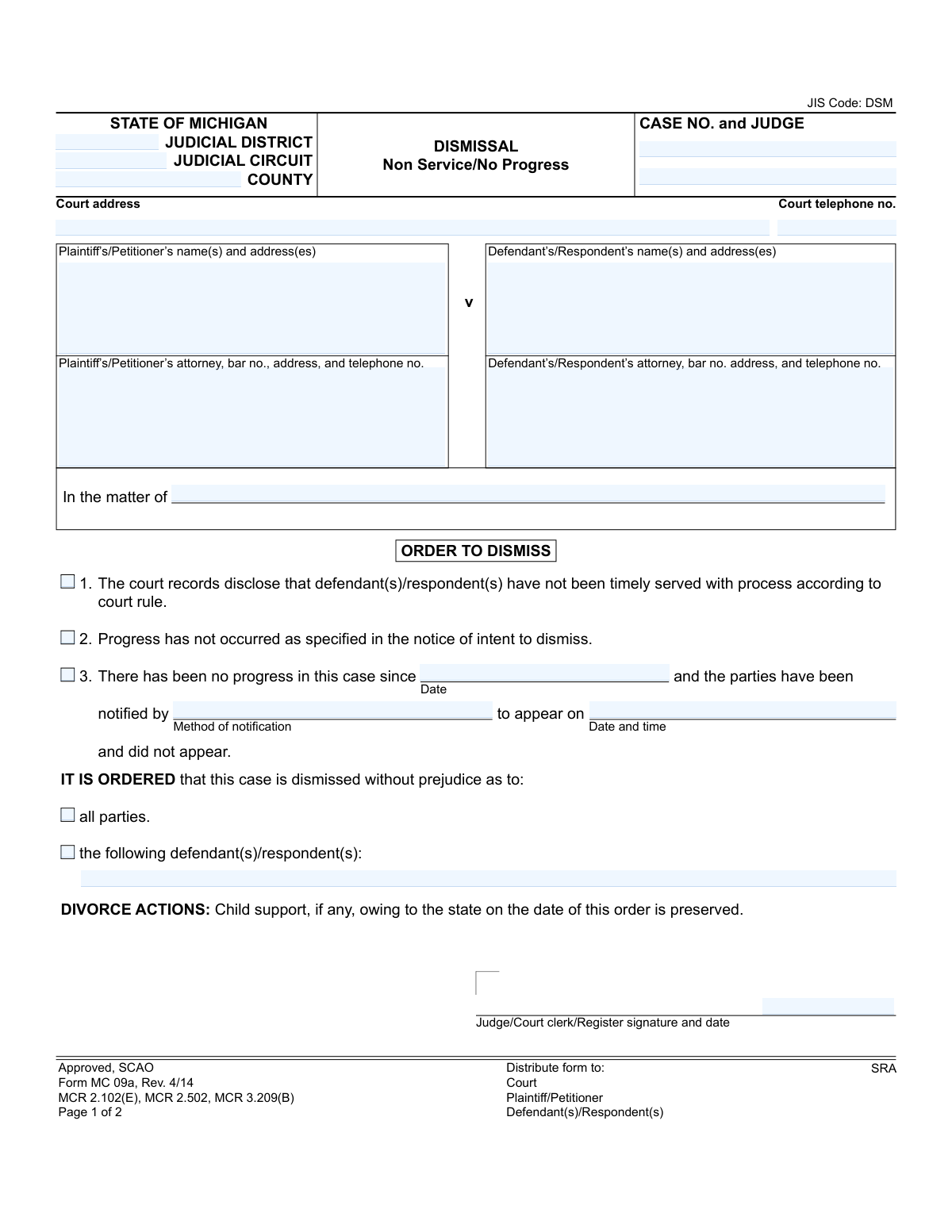
This is Form MC 09a, an official State of Michigan judicial form titled "Dismissal, Nonservice/No Progress." It is used by the court to formally dismiss a case without prejudice when a defendant has not been timely served or when there has been a lack of progress as defined by court rules. This order finalizes the dismissal for the specified parties while noting that in divorce actions, any child support owed to the state is preserved. Today, this form can be filled out quickly and accurately using AI-powered services like Instafill.ai, which can also convert non-fillable PDF versions into interactive fillable forms.
MC 09a is part of the Michigan court forms category on Instafill.
Our AI automatically handles information lookup, data retrieval, formatting, and form filling.
It takes less than a minute to fill out MC 09a using our AI form filling.
Securely upload your data. Information is encrypted in transit and deleted immediately after the form is filled out.

Form specifications

Form name: Form MC 09a, Dismissal, Nonservice/No Progress
Number of fields: 24
Number of pages: 1
Language: English
main-image

Instafill Demo: How to fill out PDF forms in seconds with AI

How to Fill Out MC 09a Online for Free in 2026

Are you looking to fill out a MC 09A form online quickly and accurately? Instafill.ai offers the #1 AI-powered PDF filling software of 2026, allowing you to complete your MC 09A form in just 37 seconds or less.
Follow these steps to fill out your MC 09A form online using Instafill.ai:
  1. 1 Navigate to Instafill.ai and upload or select the Michigan Form MC 09a.
  2. 2 Provide the essential case information, including the judicial district/circuit, county, case number, and judge's name.
  3. 3 Enter the full names, addresses, and attorney details for both the plaintiff/petitioner and the defendant/respondent.
  4. 4 Indicate the reason for dismissal by selecting the appropriate option: non-service, no progress, or failure to appear after notification.
  5. 5 Specify whether the dismissal applies to all parties or list the specific defendants/respondents being dismissed.
  6. 6 Review all the information auto-populated by the AI to ensure accuracy and completeness before finalizing the document.
  7. 7 Download the completed form, sign it, and distribute copies to the court, plaintiff, and defendant(s) as required.

Our AI-powered system ensures each field is filled out correctly, reducing errors and saving you time.

Why Choose Instafill.ai for Your Fillable MC 09a Form?

Speed

Complete your MC 09a in as little as 37 seconds.

Up-to-Date

Always use the latest 2026 MC 09a form version.

Cost-effective

No need to hire expensive lawyers.

Accuracy

Our AI performs 10 compliance checks to ensure your form is error-free.

Security

Your personal information is protected with bank-level encryption.

Frequently Asked Questions About Form MC 09a

This form is an official court order used in Michigan to dismiss a case. The dismissal is typically due to the plaintiff's failure to serve the defendant, a lack of activity in the case, or failure to appear at a hearing.

A judge, court clerk, or register of the court completes and signs this form. It is an order from the court, not a form for the parties to fill out themselves, though they will receive a copy.

Being 'dismissed without prejudice' means the case is closed for now, but the plaintiff is allowed to refile the same lawsuit at a later date. It does not permanently prevent the case from being brought to court again.

Your case could be dismissed for one of three main reasons listed on the form: the defendant was not served with the lawsuit papers in time, there has been no progress in the case as required, or you failed to appear for a scheduled court date after being notified.

According to the form, if your divorce action is dismissed, any child support that was owed to the state of Michigan as of the dismissal date is preserved. This means you are still obligated to pay that amount.

Page 1 is the official court order that legally dismisses the case and states the reason. Page 2 is a formal notice confirming that the dismissal has been filed and that all parties have been sent a copy as required by court rules.

If you are the plaintiff and wish to continue the lawsuit, you may need to file a new case. If you are the defendant, this order means the current case against you is closed, but be aware that it could be refiled.

'Nonservice' refers to the failure of the plaintiff (the person who started the lawsuit) to properly deliver the legal documents to the defendant within the time limit set by court rules.

'No progress' means that for an extended period, no meaningful steps have been taken to move the case forward, such as filing motions or scheduling hearings. Courts issue these dismissals to clear inactive cases from their dockets.

The form indicates that copies are distributed to the court, the plaintiff/petitioner, and the defendant(s)/respondent(s). This ensures all involved parties are officially notified of the dismissal.

Since this is a court-issued order, you do not fill it out yourself. However, for other legal documents you need to prepare, services like Instafill.ai use AI to auto-fill form fields accurately and save you time.

For other fillable court forms, you can upload the PDF to Instafill.ai. The platform's AI will identify the fields, allowing you to easily enter your information online before printing for submission.

Instafill.ai can convert flat, non-fillable PDFs into interactive, fillable forms. This allows you to easily type your information into the correct fields online, saving you from having to print and fill by hand.

Compliance MC 09a
Validation Checks by Instafill.ai

1
Case Number Format and Presence
This check ensures the 'CASE NO.' field is not empty and conforms to the standard Michigan court case number format (e.g., YY-######-XX). The case number is the primary identifier for the legal action and is crucial for accurate filing and record-keeping. A submission with an invalid or missing case number should be rejected or flagged for immediate manual review to prevent it from being lost or misfiled.
2
Case Number Consistency Across Pages
Validates that the 'Case No.' entered on Page 1 matches the 'Case No.' on Page 2. This is a critical integrity check to ensure that both pages of the document belong to the same case and are processed together. A mismatch could lead to incomplete filings or the second page being associated with the wrong case file, causing significant legal and administrative problems.
3
Mandatory Dismissal Reason Selection
Ensures that at least one of the three reasons for dismissal (non-service, no progress, or no progress/no show) is selected. The form's purpose is to order a dismissal, and the legal basis for that action must be clearly indicated as per court rules. If no reason is selected, the order is legally insufficient and must be rejected for correction.
4
Conditional Fields for 'No Show' Dismissal
If the third checkbox for dismissal ('There has been no progress...') is selected, this validation confirms that the 'Date' of no progress, 'Method of notification', and 'Date and time' of the hearing are all filled out. These details are required to substantiate this specific reason for dismissal. Failure to provide this information when the 'no show' reason is chosen would make the order incomplete and legally questionable.
5
Logical Date Sequence for 'No Show' Reason
When the 'no show' dismissal reason is used, this check verifies that the 'no progress since' date is chronologically before the 'appear on' date. It is logically impossible for a hearing about a lack of progress to occur before the period of no progress began. This validation prevents nonsensical data entry and ensures the timeline of events recorded on the form is plausible.
6
Mutually Exclusive Dismissal Scope
This validation ensures that exactly one of the two dismissal scope options ('all parties' or 'the following defendant(s)/respondent(s)') is selected. These options are mutually exclusive and define the scope of the court's order. Selecting both or neither creates ambiguity, and the form should be considered invalid until a single, clear choice is made.
7
Required Names for Partial Dismissal
If the option to dismiss 'the following defendant(s)/respondent(s)' is selected, this check verifies that the corresponding text field is not empty and contains one or more names. The order must explicitly name the parties being dismissed to be enforceable and clear. An order that indicates a partial dismissal without specifying who is being dismissed is invalid and must be corrected.
8
Order Date Presence and Validity
Verifies that the signature date for the Judge or Clerk is present, is a valid date, and is not a future date. This date is legally significant as it marks when the dismissal order is officially entered. The validation ensures the order is properly dated for legal effect and should be rejected if the date is missing or invalid.
9
Mandatory Party Identification
This check ensures that the names of the Plaintiff/Petitioner and the Defendant/Respondent are provided in the case caption. A court case is defined by the parties involved, and a dismissal order must clearly identify them to be valid. A form lacking the primary parties is fundamentally incomplete and cannot be processed.
10
Court Identifier Presence
Validates that at least one of the court identifiers (Judicial District, Judicial Circuit, or County) is filled in. This information is essential for routing the document to the correct courthouse and ensuring it is filed in the proper jurisdiction. Without this information, the document has no clear destination and cannot be processed.
11
Attorney Bar Number Format
If an attorney's information is provided, this check validates that the associated bar number follows the Michigan State Bar format (a 'P' followed by a series of digits). This is a standard requirement on legal forms to verify the attorney is licensed and in good standing. An invalid format could indicate a data entry error or an issue with the attorney's credentials, warranting a flag for review.
12
Telephone Number Format Validation
This check ensures that the 'Court telephone no.' and any other phone numbers on the form adhere to a standard 10-digit format (e.g., XXX-XXX-XXXX). While not legally critical, valid contact information is vital for administrative follow-up and communication. This validation improves data quality and ensures the court or attorneys can be contacted if questions arise.

Common Mistakes in Completing MC 09a

Incorrect or Mismatched Case Number

The case number is the primary identifier for the legal action and must be entered perfectly on both pages of the form. People often make typos, transpose digits, or forget to enter the number on the second page, which can lead to the order being rejected or filed in the wrong case. This causes significant administrative delays and requires correction and resubmission.

Ambiguous Reason for Dismissal

The form provides three distinct reasons for dismissal, and the filer must select the single, correct basis for the order. A common mistake is checking multiple, potentially contradictory reasons (e.g., both 'no service' and 'no progress') or failing to check any box at all. This ambiguity makes the order legally deficient and will result in its rejection by the court clerk.

Incomplete 'No Show' Justification

When selecting option 3, which states parties failed to appear, it is mandatory to fill in all three associated fields: the date since progress stalled, the method of notification, and the date of the missed appearance. Filers frequently check the box but leave one or more of these fields blank, which invalidates this justification for dismissal and makes the order defective.

Contradictory Dismissal Scope

The order must clearly state whether the case is dismissed against 'all parties' or only specific defendants. A critical error is checking both boxes simultaneously, or checking the box for 'the following defendant(s)' but then failing to list their names. This creates an unenforceable order that must be amended to clarify its scope.

Incomplete Party or Attorney Information

Filers often provide incomplete information for plaintiffs, defendants, or their attorneys, such as missing addresses, phone numbers, or state bar numbers. This information is not optional; it is required for the court to properly serve the notice of dismissal to all parties of record. Incomplete data can halt the case closure process until the information is provided.

Omitting the Assigned Judge's Name

The header field 'CASE NO. and JUDGE' requires both the case number and the name or official code of the presiding judge. Forgetting to include the judge's name is a frequent oversight that complicates internal court processing. It forces clerks to manually look up the case to route the order to the correct judge for signature, causing unnecessary delays.

Incorrect Court Jurisdiction Details

Attorneys and paralegals who work in multiple jurisdictions may accidentally enter the wrong Judicial District, Circuit, or County name. This often happens from reusing old templates and can lead to the document being sent to the wrong courthouse. This mistake can cause weeks of delay and requires a complete re-filing in the correct jurisdiction.

Failing to Specify Parties in a Partial Dismissal

In cases with multiple defendants, if the order only dismisses some of them, their full and correctly spelled names must be written in the space provided. A common error is to vaguely describe the parties or misspell names, creating legal uncertainty about who remains in the lawsuit. This ambiguity can lead to future legal challenges and requires clarification from the court.

Forgetting the Signature Date

An order is not effective until it is signed and dated by a judge or authorized court clerk. People preparing the form for signature sometimes neglect the date field, and it can be overlooked during signing. An undated order is legally incomplete and its effective date is ambiguous, which can impact critical deadlines for appeals or other post-judgment actions.

Transposing Plaintiff and Defendant Information

In a rush, filers can accidentally enter the plaintiff's information in the defendant's fields and vice versa. This fundamental error creates a confusing and incorrect legal record, indicating the wrong party is being dismissed or is the subject of the order. Such a document would be immediately rejected and require careful correction. AI-powered tools like Instafill.ai can prevent this by mapping data to the correct fields every time, even on non-fillable PDFs it can convert into interactive forms.
Saved over 80 hours a year

“I was never sure if my IRS forms like W-9 were filled correctly. Now, I can complete the forms accurately without any external help.”

Kevin Martin Green

Your data stays secure with advanced protection from Instafill and our subprocessors

Robust compliance program

Transparent business model

You’re not the product. You always know where your data is and what it is processed for.

ISO 27001, HIPAA, and GDPR

Our subprocesses adhere to multiple compliance standards, including but not limited to ISO 27001, HIPAA, and GDPR.

Security & privacy by design

We consider security and privacy from the initial design phase of any new service or functionality. It’s not an afterthought, it’s built-in, including support for two-factor authentication (2FA) to further protect your account.

Fill out MC 09a with Instafill.ai

Worried about filling PDFs wrong? Instafill securely fills form-mc-09a-dismissal-nonserviceno-progress forms, ensuring each field is accurate.