
Yes! You can use AI to fill out Form MC 01, Summons
Don't type 51 fields by hand. Tell our AI about yourself, or upload a document you already have, and it fills every field in seconds. You check it, then download, print or sign.
The AI does the filling. You just check it.
No typing into boxes, nothing to install.
What this form asks for
The AI fills all of it, from your answers or your documents.
The AI checks your answers before you download
12 checks built for this form, so a wrong date or a missing answer is caught before anyone else sees it.
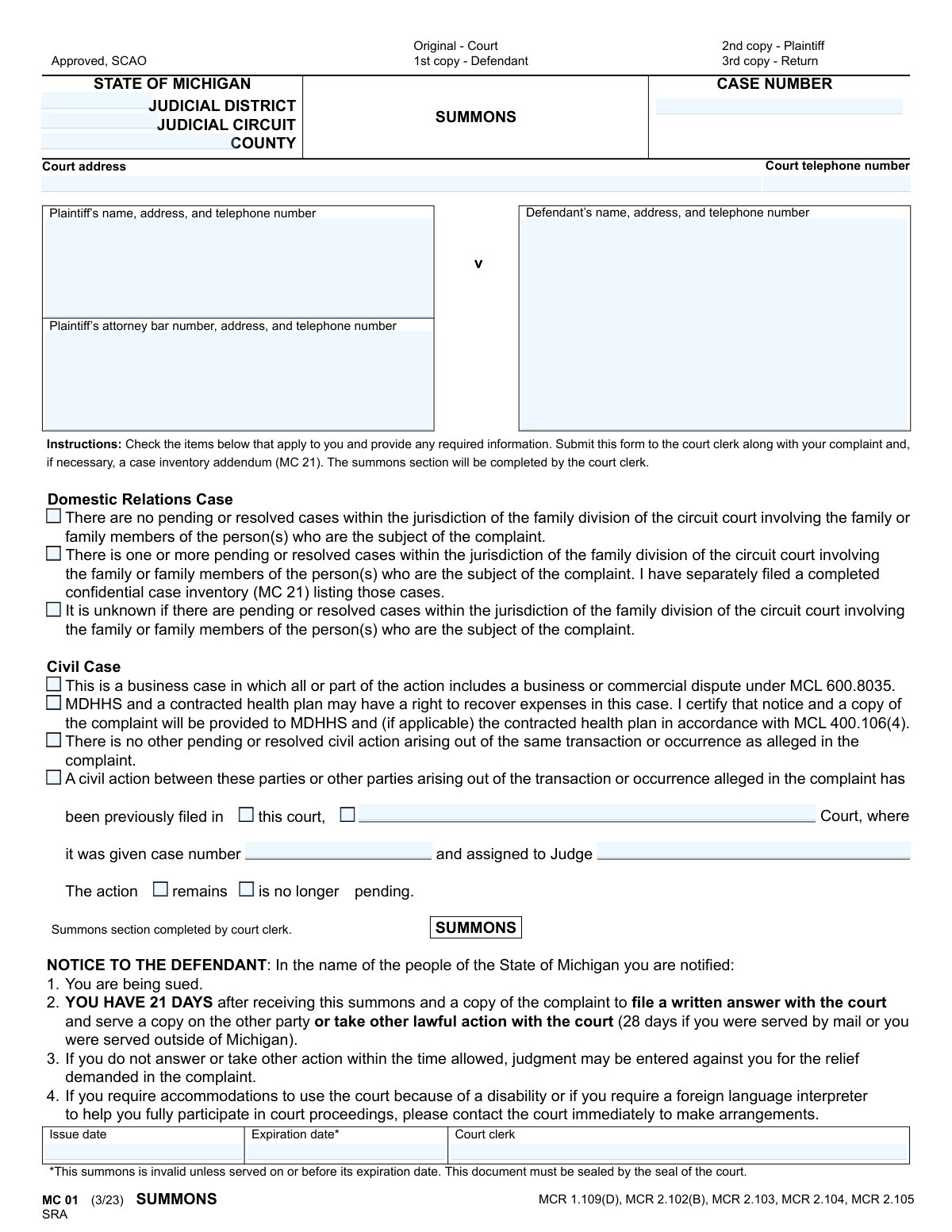
This check ensures that only one of the three checkboxes under 'Domestic Relations Case' is selected. These options ('no pending cases', 'one or more pending cases', 'unknown') are mutually exclusive. Allowing multiple selections would create a logical contradiction in the filing, leading to confusion and potential rejection by the court clerk.
Validates that the filer has not selected both 'There is no other pending or resolved civil action' and 'A civil action between these parties... has been previously filed'. These two statements are contradictory. If this validation fails, the form should be rejected and the user prompted to clarify the history of civil actions related to the case.
If the checkbox 'A civil action between these parties... has been previously filed' is selected, this validation ensures that the 'case number' and 'assigned to Judge' fields are not empty. This information is critical for the court to link related cases and understand the litigation history. A failure to provide these details would result in an incomplete and potentially un-processable filing.
When a prior civil action is indicated, this check verifies that either the 'remains' or 'is no longer pending' checkbox is selected. This status is essential for the court to understand if there is concurrent litigation, which affects case management and judicial assignment. An omission here leaves a critical piece of information ambiguous.
This validation ensures the 'Expiration date' of the summons is on or after the 'Issue date'. A summons is only valid for a specific period, and an expiration date before the issue date is a logical impossibility. This check prevents the issuance of an invalid legal document that would be immediately void.
Verifies that the 'Plaintiff’s attorney bar number' conforms to the standard Michigan State Bar format (e.g., a 'P' followed by a series of digits). This is important for uniquely identifying the attorney of record and confirming their standing with the bar. An invalid format could indicate a typo or an unauthorized person attempting to file, and would prevent proper record-keeping.
And 6 more checks
- Phone Number Format Validation
- Proof of Service Completeness
- Mutually Exclusive Service Status
- Process Server Status Selection
- Fee Calculation Verification
- Case Number Format and Presence
Let AI fill out your MC 01
No typing. Every field filled in seconds, checked, ready to sign.
How to Fill Out MC 01 Online for Free in 2026
What the AI walks you through.
- Navigate to Instafill.ai and upload or select the Michigan Summons form, MC 01.
- Provide the court information, including the judicial district/circuit, county, and court address.
- Enter the full details for the plaintiff(s) and defendant(s), including names, addresses, and phone numbers. If an attorney is representing the plaintiff, input their bar number and contact information.
- Complete the checklist under the 'Instructions' section, indicating the case type (Domestic Relations or Civil) and disclosing any other pending or resolved actions related to the parties.
- Review the information populated by the AI. The main 'Summons' section will be completed by the court clerk upon filing.
- Once the summons is served, use the 'Proof of Service' section to document the details of service, which is typically completed by a process server.
- Download the completed form for filing with the court and service on the defendant.
Common Mistakes in Completing MC 01
The ones the AI is built to catch.
Providing an Incomplete or Inaccurate Defendant Address
Incorrectly Disclosing Prior or Pending Cases
Plaintiff Filling Out Sections Reserved for the Court
Omitting the Plaintiff's Attorney Bar Number
Failing to File the Required Case Inventory Addendum (MC 21)
Incomplete 'Proof of Service' by the Process Server
Entering Incorrect Court or Jurisdiction Information
Submitting an Illegible Handwritten Form
Incorrectly Checking Case Type Boxes
Process Server Omitting Fee and Mileage Details
Frequently Asked Questions About MC 01
Is it really free for 7 days?
Can I fill other forms too?
How do I cancel?
How does the AI fill out MC 01?
What happens to my information?
How complex is MC 01 to fill out?
What is the purpose of the Summons (MC 01) form?
Who is responsible for filling out this form?
As the defendant, how long do I have to respond after receiving this summons?
What happens if I don't answer the summons in time?
What is the 'Proof of Service' section for?
What is the difference between a 'Domestic Relations Case' and a 'Civil Case' on this form?
When do I need to file the 'confidential case inventory (MC 21)'?
Why is the 'SUMMONS' section blank when I fill out the form?
What does the expiration date on the summons mean?
Can I use an AI tool to help me fill out this form?
My PDF copy of the Summons form is not fillable. What can I do?
How do I fill out the Summons form online using Instafill.ai?
What is the 'Acknowledgment of Service'?
Get your MC 01 filled out by AI
$0 today. Cancel before Nov 10 and you pay nothing.
Other forms like this one
legal forms: Legal Aid Queensland application form (LAQAPP) – Application for Legal Aid in Queensland, Legal Aid Queensland application form (LAQAPP), Legal Aid Queensland application form (LAQAPP), Legal Aid Queensland application form (LAQAPP), Form FL-170, Declaration for Default or Uncontested Dissolution or Legal Separation, Department of Home Affairs — Appointment or cessation of a registered migration agent, legal practitioner or exempt person providing immigration assistance (Appointment notification form), Form FL-170, Declaration for Default or Uncontested Dissolution or Legal Separation (Family Law), Form 956, Appointment of a registered migration agent, legal practitioner or exempt person, Legal Entity Beneficial Ownership/Trust Certification Form, Application Form: Legal Entities | Qualified Investor Hedge Fund, Fundrock Application Form: Legal Entities | Monthly Liquidity – Qualified Investor Hedge Fund, Application Form: Legal Entities | Retail Hedge Fund - Fundrock, Fundrock Application Form: Legal Entities | Monthly Liquidity – Retail Hedge Fund, Form N461: Claim for judicial review, Friedman, Framme & Thrush, P.A. General Authorization Letter and Request for Letter or Telephone Call, Memorandum of Contract, Relinquishment of control over assets to minor form, Nova Poshta Claim Form for Legal Entities and Individual Entrepreneurs (Form F-1.5.35-1), Legal Aid Financial Eligibility Form, Form MC 6, Notice to Appear
civil court forms: Petition for Leave to Proceed In Forma Pauperis (Court of Common Pleas of Lehigh County, Pennsylvania, Civil Division), Designation of Record on Appeal (Civil) (Maricopa County Justice Courts, Arizona) (Form APP 8150-702), Certificate of Service (Civil Court Claim), Pfändungs- und Überweisungsbeschluss (Garnishment and Transfer Order) – German Civil Enforcement Court Form, AOPC 308A, Civil Complaint, Form MC 03, Answer, Civil, Form POS-040, Proof of Service—Civil, ONTARIO Form 8: Application (General), Form ATJ 601.9, Application for Waiver of Court Fees (Civil), Nevada Justice / Municipal Civil Court Cover Sheet, Form MC 10, Judgment, Civil, Form MC 99, Motion and Affidavit to Set Aside Default (Civil), Form MC 281a, Civil Mediator Application, Ex Parte Motion and Order to Renew Civil Judgment, AO 88B, Subpoena to Produce Documents, Information, or Objects or to Permit Inspection of Premises in a Civil Action, Form APP-031A, Application for Extension of Time to File Brief (Civil Case), Civil Appeal Case Information Statement, Form APP-014, Appellant's Proposed Statement on Appeal (Unlimited Civil Case), form-app-015-respondents-proposed-corrections-toadditions-to-appellants-proposed-settled-statement-unlimited-civil-case, Form APP-015, Order on Proposed Settled Statement (Unlimited Civil Case)
Michigan court forms: Form MC 03, Answer, Civil, Form MC 02, Appearance, Form MC 6, Notice to Appear, State of Michigan, Form MC 01a, Complaint, Form MC 01b, Motion for Second Summons and Order, State of Michigan Blank Court Form, Form MC 07, Default Request and Entry, Form MC 07a, Default Request, Entry, and Judgment (Sum Certain), Form MC 09, Dismissal, Form MC 09a, Dismissal, Nonservice/No Progress, Form MC 10, Judgment, Civil, Form MC 11, Subpoena, Order to Appear and/or Produce, Request and Writ for Garnishment (Periodic), Form MC 13, Request and Writ for Garnishment (Nonperiodic), Form MC 14, Garnishee Disclosure, Form MC 15, Motion and Affidavit for Installment Payments/To Amend Order for Installment Payments, Form MC 15a, Order Regarding Installment Payments, Form MC 16, Motion to Set Aside Order for Installment Payments, State of Michigan, Form MC 16a, Order on Motion to Set Aside Order for Installment Payments, State of Michigan MC 17, Certificate of Satisfied Judgment
Let AI fill out your MC 01
Your trial starts once a card is added. You pay nothing before Nov 10.
Our AI already knows this form, all 51 fields of it. Skip the typing: tell it about yourself, or upload what you have, and it fills the whole form in seconds.
- AI fills every field on both pages, checkboxes included
- No typing into boxes: answer a few questions, or upload a document you already have, an old copy of this form, a photo of a document
- The AI checks the answers; you review and change anything before you download
- Download the finished PDF, print it, or sign it online
- Encrypted, and never used to train AI
Cancel before Nov 10 and you pay nothing.
A card is needed to start the trial. Cancel in two clicks from your account.
Terms · Privacy