Yes! You can use AI to fill out Legal Entity Beneficial Ownership/Trust Certification Form

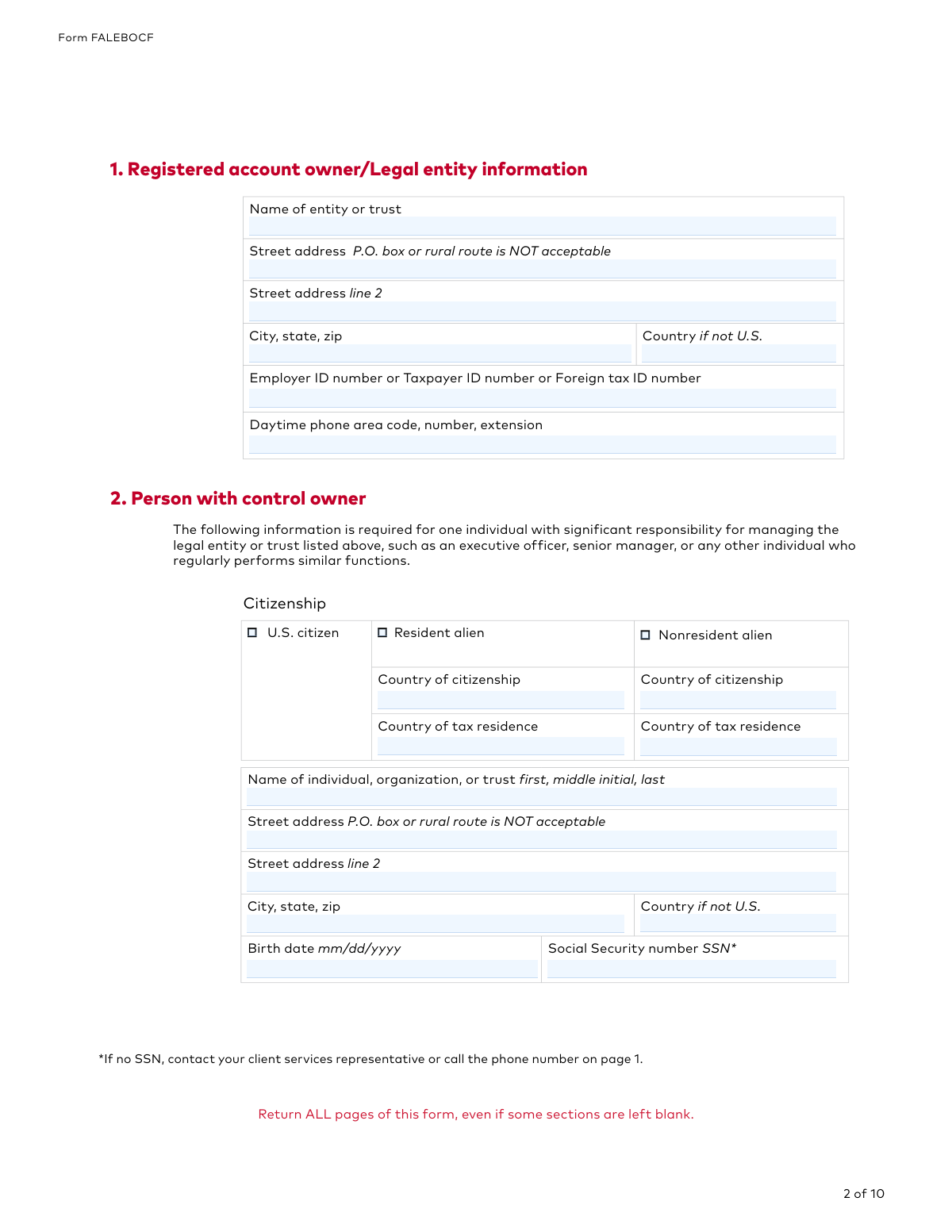
The Vanguard Legal Entity Beneficial Ownership/Trust Certification Form (FALEBOCF) is a document required by federal law for legal entities like corporations, LLCs, and trusts to establish an account. It is used to identify the individual(s) who ultimately own or control the entity, helping financial institutions prevent illicit financial activities. Today, this form can be filled out quickly and accurately using AI-powered services like Instafill.ai, which can also convert non-fillable PDF versions into interactive fillable forms.
Our AI automatically handles information lookup, data retrieval, formatting, and form filling.
It takes less than a minute to fill out FALEBOCF using our AI form filling.
Securely upload your data. Information is encrypted in transit and deleted immediately after the form is filled out.

Form specifications

Form name: Legal Entity Beneficial Ownership/Trust Certification Form
Number of pages: 1
Language: English
Categories: NY legal forms, legal forms, trust forms, certification forms
main-image

Instafill Demo: How to fill out PDF forms in seconds with AI

How to Fill Out FALEBOCF Online for Free in 2026

Are you looking to fill out a FALEBOCF form online quickly and accurately? Instafill.ai offers the #1 AI-powered PDF filling software of 2026, allowing you to complete your FALEBOCF form in just 37 seconds or less.
Follow these steps to fill out your FALEBOCF form online using Instafill.ai:
  1. 1 Navigate to Instafill.ai and upload or select the Vanguard Legal Entity Beneficial Ownership/Trust Certification Form.
  2. 2 Use the AI assistant to provide the registered account owner/legal entity information in Section 1.
  3. 3 Enter the details for the individual with significant control over the entity in Section 2.
  4. 4 Identify and list all direct and indirect beneficial owners who hold a 25% or greater stake in the entity in Section 3.
  5. 5 If the form is for a trust, provide the information for all trustees in Section 4.
  6. 6 Review all the auto-filled information for accuracy, then have an authorized person electronically sign and date the form in Section 5.
  7. 7 Download the completed, signed form and submit it to Vanguard as instructed on the final page.

Our AI-powered system ensures each field is filled out correctly, reducing errors and saving you time.

Why Choose Instafill.ai for Your Fillable FALEBOCF Form?

Speed

Complete your FALEBOCF in as little as 37 seconds.

Up-to-Date

Always use the latest 2026 FALEBOCF form version.

Cost-effective

No need to hire expensive lawyers.

Accuracy

Our AI performs 10 compliance checks to ensure your form is error-free.

Security

Your personal information is protected with bank-level encryption.

Frequently Asked Questions About Form FALEBOCF

This form is required by federal law for Vanguard to collect and verify information about the individuals who ultimately own or control a legal entity or trust that is opening a new account.

This form is for corporations, LLCs, partnerships, trusts, foundations, and endowments. It is generally not required for U.S. publicly traded companies, government entities, or U.S.-regulated financial institutions.

This is a single individual with significant management responsibility, such as an executive officer, senior manager, or anyone who regularly performs similar functions for the legal entity.

A direct owner holds 25% or more of the entity opening the account. An indirect owner is an individual who owns 25% or more of another company that is a direct owner of the account entity.

If there are no beneficial owners who meet the 25% threshold, you should check the box provided in Section 3 to indicate this.

You must list all current individual or entity trustees for the trust account, regardless of their ownership percentage. If a board of trustees exists, you must list the individual names of all trustees.

The form must be signed by an individual designated as an 'Authorized signatory' on the Organization Resolution Form or other official authorization documents previously submitted to Vanguard.

Federal regulations require a physical street address to verify the identity of the entity and its owners. The form explicitly states that P.O. boxes and rural routes are not acceptable.

Yes, the instructions clearly state that you must return all pages of the form, even if some sections or pages are left blank.

You can submit the signed form via fax or mail to the P.O. box or street address listed on the final page. Existing web users may also be able to upload the form directly.

The form instructs you to contact your client services representative or call the phone number on page 1 for guidance if an individual does not have an SSN.

Yes, services like Instafill.ai use AI to accurately auto-fill form fields with your saved information, which can save time and help ensure accuracy.

You can use a service like Instafill.ai to upload the PDF and fill it out on your computer. The platform lets you type into the fields, add your signature, and download the completed document for submission.

If you have a non-fillable or 'flat' PDF, you can upload it to a platform like Instafill.ai. It uses technology to convert the document into an interactive, fillable form that you can complete online.

Compliance FALEBOCF
Validation Checks by Instafill.ai

1
Prohibits P.O. Box for Street Address
This validation ensures that no street address fields contain 'P.O. Box' or 'Rural Route'. Federal regulations for identity verification require a physical street address for the legal entity and all specified individuals. If a non-physical address is provided, the form submission will be rejected, and the user will be prompted to provide a valid physical location to proceed with account opening.
2
Social Security Number (SSN) Format
This check verifies that any Social Security Number entered is in a valid 9-digit format (e.g., XXX-XX-XXXX or XXXXXXXXX). This is crucial for identity verification of U.S. citizens and resident aliens as required by law. A malformed SSN will cause a validation failure, preventing form submission until the number is corrected, as it cannot be processed for identity verification.
3
Employer Identification Number (EIN) Format
This validation ensures that any Employer ID Number provided follows the standard XX-XXXXXXX format. The EIN is the primary taxpayer identification number for business entities, and its accuracy is critical for tax reporting and legal entity verification. An incorrectly formatted EIN will result in an error, requiring the user to correct the entry before the form can be accepted.
4
Date Format and Logical Validity
This check validates that all date fields (Birth date, Signature date) are in the 'mm/dd/yyyy' format and represent a real calendar date. It also ensures that birth dates are in the past and signature dates are not in the future. This prevents data entry errors and ensures the legal and temporal validity of the information provided, which is essential for identity verification and document certification.
5
Control Owner Section Completeness
This validation confirms that Section 2, 'Person with control owner,' is fully completed for one individual. The form requires identifying a person with significant managerial control for compliance purposes. An incomplete or missing Section 2 will halt the submission, as this information is mandatory for establishing the account.
6
Beneficial Ownership Declaration Logic
This check enforces the logic in Section 3 regarding beneficial owners. If the checkbox 'no beneficial owners who hold at least 25%' is checked, the system verifies that no owner information is provided in Sections 3A or 3B. Conversely, if the box is unchecked, it ensures at least one beneficial owner is listed. This prevents contradictory information and ensures compliance with beneficial ownership reporting rules.
7
Citizenship and Identification Number Consistency
This validation ensures that the type of identification number provided matches the declared status of the party. If an individual is marked as a 'U.S. citizen' or 'Resident alien', an SSN is expected; if the party is an 'Entity', an EIN is expected. This cross-field check maintains data integrity and is essential for the correct application of identity verification procedures.
8
Conditional Requirement for Country of Citizenship/Tax Residence
This check ensures that if an individual's citizenship is marked as 'Resident alien' or 'Nonresident alien', the 'Country of citizenship' and 'Country of tax residence' fields are mandatory. This information is critical for international tax compliance and anti-money laundering (AML) screening. Failure to provide these details will result in a validation error, blocking the submission.
9
Indirect Owner Linkage Verification
This validation verifies that for every indirect beneficial owner listed in Section 3B, the 'Ownership link' field is completed. It also checks that the entity name provided in the 'Ownership link' field corresponds to an entity listed in Section 3A. This is crucial for establishing a clear and auditable ownership chain from the indirect owner to the primary legal entity.
10
Individual vs. Entity Field Exclusivity
This check ensures that when a party is identified as an 'Entity' in Sections 3 or 4, fields specific to individuals like 'Birth date' and 'Social Security number' are left blank. Conversely, if a party is an individual, the 'Employer ID number' field should be empty. This prevents illogical data combinations and ensures the data collected is appropriate for the type of party being identified.
11
Signature Block Integrity
This validation ensures that at least one signature block in Section 5 is fully completed, including the printed name of the signer, a valid signature, and a properly formatted signature date. The signature certifies the correctness of all information on the form, making it a legally binding document. An incomplete signature block invalidates the entire form submission.
12
Beneficial Owner Percentage Threshold
This check validates that the ownership percentage entered for any direct or indirect owner in Section 3 is a number greater than or equal to 25. The form's purpose is to identify owners who meet this specific threshold as defined by financial regulations. An entry below this value would be considered invalid unless specific instructions for a 10% threshold are applicable and met.

Common Mistakes in Completing FALEBOCF

Failing to Identify Ultimate Indirect Owners

In Section 3B, users often list an intermediate holding company instead of tracing ownership down to the individual person as required by the instructions. This happens in multi-layered corporate structures and results in an incomplete application that violates federal regulations. To avoid this, carefully map out the entire ownership structure to identify all individuals with 25% or more ultimate ownership before filling out the form.

Providing a P.O. Box for a Physical Address

The form explicitly states 'P.O. box or rural route is NOT acceptable' for all street address fields. This mistake occurs when people use their mailing address instead of their physical residential or business address, leading to immediate rejection and processing delays. Always provide a valid street address for the entity and all listed individuals.

Incorrectly Identifying the 'Person with Control'

Section 2 requires information for one individual with significant managerial control, such as a CEO or Senior Manager. A common error is to list a passive owner, a junior employee, or another entity, which misunderstands the 'control prong' of the beneficial ownership rule. This will require correction and significantly delay the account opening process.

Submitting an Incomplete Form Packet

The instructions on every page state, 'Return ALL pages of this form, even if some sections are left blank.' People often only submit the pages they filled out, assuming the blank ones are unnecessary. This results in an incomplete submission that will be rejected by the processing department, requiring the entire form to be sent again.

Using an Unauthorized Signatory

Section 5 requires the signature of a person who is officially designated as an 'Authorized signatory' on the entity's Organization Resolution Form. A frequent and critical mistake is having a different manager or owner sign the form. This invalidates the entire certification and will be rejected, as Vanguard must verify the signer's authority against previously submitted documents.

Incomplete Trustee Information for Trusts

When the legal entity is a trust, filers sometimes overlook Section 4, assuming the beneficial owner section is sufficient. The form requires listing all current trustees, regardless of ownership percentage. A common error is simply writing 'Board of Trustees' instead of listing each individual member as required, which leads to an incomplete application.

Missing the 'Ownership Link' for Indirect Owners

Section 3B includes a specific field called 'Ownership link' to connect an indirect owner to the entity they directly own within the structure. This field is often missed, leaving a critical gap in the ownership chain. Failing to provide this link makes it impossible for the financial institution to verify the ownership structure, causing delays and requests for more information.

Incorrectly Checking the 'No Beneficial Owners' Box

In Section 3, filers may incorrectly check the box for 'no beneficial owners who hold at least 25%' without fully analyzing complex, multi-layered ownership structures. They might only consider direct owners and forget to calculate ownership percentages for indirect owners. This is a significant error that misrepresents the entity's ownership and will lead to rejection upon review.

Using Incorrect or Inconsistent Tax ID Numbers

The form requires different ID numbers (EIN for entities, SSN for individuals). A common error is entering an individual's SSN in the entity's Employer ID Number (EIN) field, or vice-versa across different sections. This data mismatch will fail automated verification checks and halt the account opening process. AI tools like Instafill.ai can help prevent these errors by validating the format of SSNs and EINs as they are entered.

Illegible Handwriting or Using Wrong Ink Color

The form specifies 'Print in black letters and use black ink.' Submissions with illegible handwriting or that use other ink colors like blue can be rejected by the scanning and processing systems. Since this is a non-fillable PDF, it must be printed and filled manually, making clarity essential. To avoid this, consider using a tool like Instafill.ai to convert the PDF into a fillable version, allowing you to type directly into the fields for maximum legibility before printing for signature.
Saved over 80 hours a year

“I was never sure if my IRS forms like W-9 were filled correctly. Now, I can complete the forms accurately without any external help.”

Kevin Martin Green

Your data stays secure with advanced protection from Instafill and our subprocessors

Robust compliance program

Transparent business model

You’re not the product. You always know where your data is and what it is processed for.

ISO 27001, HIPAA, and GDPR

Our subprocesses adhere to multiple compliance standards, including but not limited to ISO 27001, HIPAA, and GDPR.

Security & privacy by design

We consider security and privacy from the initial design phase of any new service or functionality. It’s not an afterthought, it’s built-in, including support for two-factor authentication (2FA) to further protect your account.

Fill out FALEBOCF with Instafill.ai

Worried about filling PDFs wrong? Instafill securely fills legal-entity-beneficial-ownershiptrust-certification-form forms, ensuring each field is accurate.