Yes! You can use AI to fill out Legal Aid Financial Eligibility Form
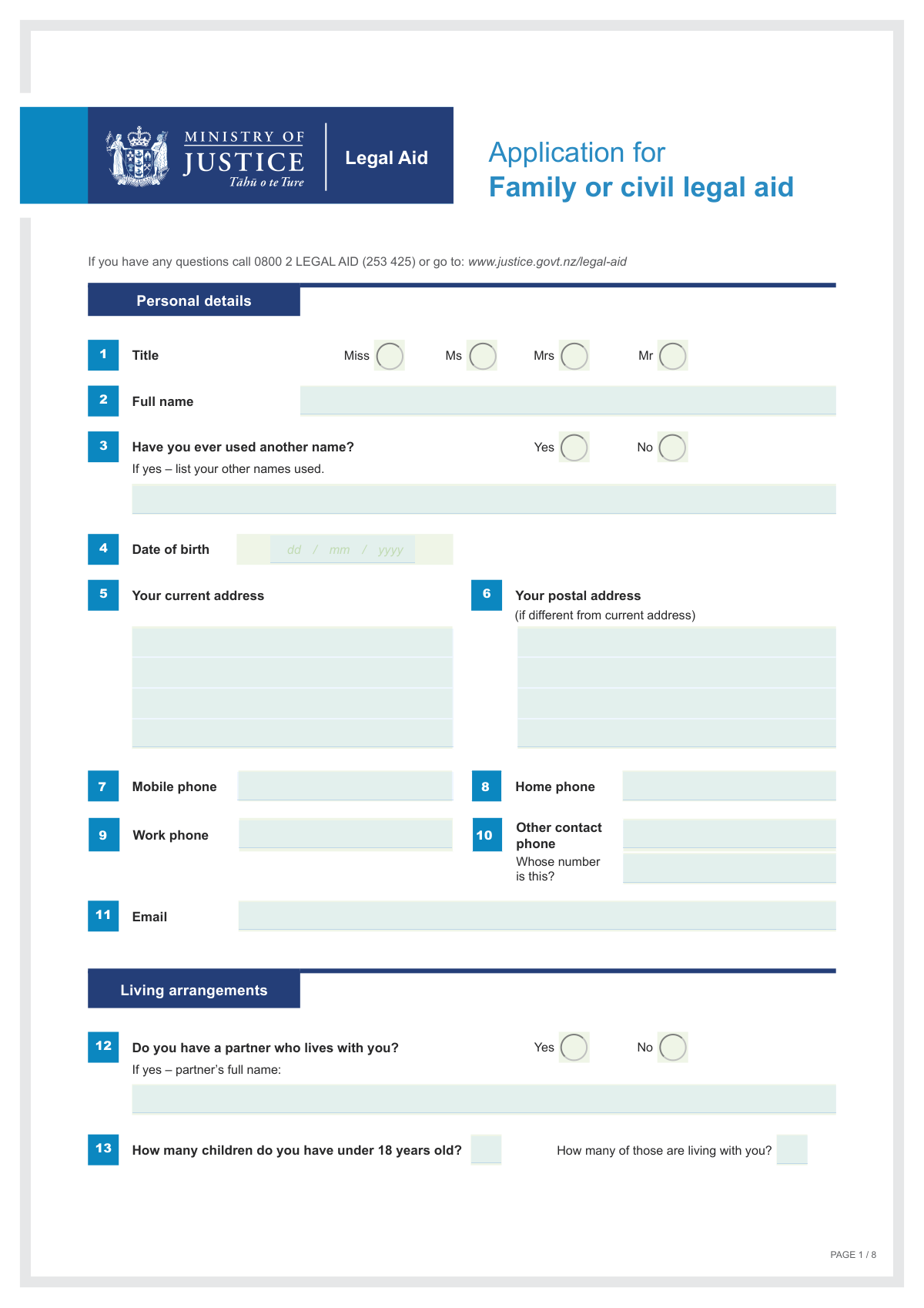
The Legal Aid Financial Eligibility Form is a comprehensive document required by the New Zealand Ministry of Justice to evaluate an applicant's financial means for legal aid. It requires a detailed declaration of all income, assets, and financial responsibilities for both the applicant and their partner to determine qualification for subsidized legal services, ensuring that assistance is provided to those who genuinely cannot afford it. Today, this form can be filled out quickly and accurately using AI-powered services like Instafill.ai, which can also convert non-fillable PDF versions into interactive fillable forms.
Legal Aid Application is part of the
EU legal forms, financial aid forms, financial forms, legal forms and NY legal forms categories on Instafill.
Our AI automatically handles information lookup, data retrieval, formatting, and form filling.
It takes less than a minute to fill out Legal Aid Application using our AI form filling.
Securely upload your data. Information is encrypted in transit and deleted immediately after the form is filled out.
Form specifications
| Form name: | Legal Aid Financial Eligibility Form |
| Number of fields: | 240 |
| Number of pages: | 8 |
| Filled form examples: | Form Legal Aid Application Examples |
| Language: | English |
Instafill Demo: How to fill out PDF forms in seconds with AI
How to Fill Out Legal Aid Application Online for Free in 2026
Are you looking to fill out a LEGAL AID APPLICATION form online quickly and accurately? Instafill.ai offers the #1 AI-powered PDF filling software of 2026, allowing you to complete your LEGAL AID APPLICATION form in just 37 seconds or less.
Follow these steps to fill out your LEGAL AID APPLICATION form online using Instafill.ai:
- 1 Navigate to Instafill.ai and upload or select the Legal Aid Financial Eligibility Form.
- 2 Use the AI assistant to automatically fill in your personal details, such as your full name, date of birth, contact information, and WINZ number.
- 3 Provide comprehensive details about all income sources for you and your partner, including wages, self-employment, benefits (like Jobseeker Support or NZ Super), and investments.
- 4 Declare your assets and liabilities, including information about property, vehicles, bank accounts, and any money owed to you by a trust.
- 5 Answer the questions regarding your partner, dependents, and living situation to provide a complete financial overview.
- 6 Carefully review all the information pre-filled by the AI for accuracy, make any necessary corrections, and then sign and date the declaration section.
- 7 Download, print, or securely share the completed form with your lawyer or the relevant legal aid authority as required for your application.
Our AI-powered system ensures each field is filled out correctly, reducing errors and saving you time.
Why Choose Instafill.ai for Your Fillable Legal Aid Application Form?
Speed
Complete your Legal Aid Application in as little as 37 seconds.
Up-to-Date
Always use the latest 2026 Legal Aid Application form version.
Cost-effective
No need to hire expensive lawyers.
Accuracy
Our AI performs 10 compliance checks to ensure your form is error-free.
Security
Your personal information is protected with bank-level encryption.
Frequently Asked Questions About Form Legal Aid Application
This form is designed to collect detailed personal and financial information about you and your partner. It is likely used for applications requiring a financial assessment, such as for benefits, loans, or legal aid.
You must provide your partner's information if you have a partner who lives with you. The form requires a comprehensive overview of the household's financial situation, so their income and details are mandatory.
When the form asks for income 'before tax,' you should enter your gross income amount. This is the total amount you earn before any deductions like taxes or other contributions are taken out.
If you have ever used another name, such as a maiden name or a former married name, check 'Yes' to the relevant question. Then, list all previous names in the 'Other names ever used' field.
You only need to fill out the 'Postal address' field if it is different from your 'Current address'. If they are the same, you can leave the postal address section blank.
A WINZ number is your unique client number for Work and Income in New Zealand. You can typically find this 9-digit number on letters from WINZ or on your Community Services Card.
If you have no income, you should explain your financial situation in the field that asks 'How you are financially supported?'. Describe how you cover your living expenses, such as through family help, savings, or other means.
The form asks for the total number of your children under 18 and how many of them live with you. You only need to provide these two counts, not individual details for each child.
If you are employed, you must provide your employer's full name, contact phone number, and address. This information is required to verify the wage or salary income you have declared on the form.
Yes, services like Instafill.ai use AI to help you fill out forms accurately and quickly. These tools can auto-fill your personal and financial details, saving time and reducing the chance of errors.
To fill this form out online, you can upload the PDF to the Instafill.ai platform. The service will make the form interactive, allowing you to easily type your information into the correct fields directly in your browser.
If you have a non-fillable PDF, you can use a service like Instafill.ai to convert it into an interactive, fillable form. This allows you to complete it digitally without needing to print it and fill it out by hand.
You must declare all sources of income for both yourself and your partner. This includes wages, business income, government benefits, pensions, rent, interest, dividends, and income from a trust.
Compliance Legal Aid Application
Validation Checks by Instafill.ai
1
Exclusive Title Selection
This validation ensures that only one of the title checkboxes (Miss, Ms, Mrs, Mr) is selected. It is important to capture a single, unambiguous title for formal communication and record-keeping. If more than one title is selected, the form submission should be blocked, and the user prompted to choose only one option.
2
Conditional 'Other Names' Requirement
This check validates the dependency between answering 'Have you ever used another name?' and filling the 'Other names ever used' field. If the user checks 'Yes', the 'Other names ever used' text field becomes mandatory and cannot be empty. Conversely, if 'No' is checked, the text field must be empty to prevent extraneous data entry.
3
Date of Birth Logical Range
This validation confirms that the 'Date of birth' is a valid date in the past and represents a plausible age for an applicant. It should check that the date is not in the future and that the calculated age is within a reasonable range (e.g., over 16 and under 120). This prevents data entry errors and ensures the applicant meets potential age-related eligibility criteria.
4
At Least One Contact Phone Number
This check ensures that at least one of the phone number fields ('Mobile phone', 'Home phone', 'Work phone') is filled out. Providing a contact number is critical for the organization to communicate with the applicant regarding their submission. If all phone fields are left blank, the form should display an error message prompting the user to provide at least one number.
5
Partner Data Consistency
This validation enforces logical consistency for all partner-related data based on the 'Partner living with you' question. If the user selects 'Yes', the 'Partner's full name' field becomes mandatory, and partner income fields are enabled. If 'No' is selected, all partner-specific fields (name, income, employer) must be empty or disabled to ensure data integrity and prevent contradictory information.
6
Children Count Logical Integrity
This check verifies that the number entered in 'Children under 18 living with you' is not greater than the number in 'Total children under 18'. This maintains logical consistency in the applicant's dependent information. A validation failure would indicate a data entry mistake and should prompt the user to correct the counts before proceeding.
7
Conditional Employer Details for Wage Earners
This validation ensures that if an applicant enters an amount greater than zero in 'Your wages or salary (before tax)', the corresponding 'Your employer - name, phone, address' field becomes mandatory. This rule links declared income to its source, which is essential for verification purposes. The same logic applies to the partner's wage and employer details.
8
Contradictory 'Sole Parent Benefit' and Partner Status
This check prevents an applicant from claiming 'Sole parent benefit' while also indicating they have a 'partner who currently lives with you'. These two statuses are mutually exclusive and claiming both indicates a logical error or misunderstanding. If both conditions are met, the system should flag an error, requiring the user to correct their declaration.
9
Mandatory 'No Income' Explanation
This validation rule checks if all income fields across the form are zero or empty. If no income is declared, the 'How you are financially supported' field becomes mandatory. This ensures that the application provides a complete financial picture, even in the absence of traditional income, which is crucial for assessment.
10
WINZ Number Structural Validation
This check validates the format of the three parts of the 'WINZ number'. It should ensure each part conforms to its expected format (e.g., numeric, specific length). This is important for correctly identifying the client in the WINZ system and avoiding errors when linking the application to an existing file.
11
Paired 'Other Contact' Information
This validation ensures that if the 'Other contact phone' field is filled, the 'Whose number is this' field is also completed. These two fields provide context for the alternative contact information, making it useful. If one is filled without the other, the information is incomplete and the user should be prompted to provide the missing detail.
12
Email Address Format
This validation verifies that the entry in the 'Email address' field follows the standard format of a valid email (e.g., '[email protected]'). This is a critical check as email is a primary method of communication for application updates and notifications. An invalid format would lead to failed communication, so the user must correct it before submission.
13
Signature Date Validity
This check ensures the 'Signature Date Applicant' is a valid date that is not in the future. It should also be logically after the applicant's date of birth. This validation is crucial for establishing the legal date of the declaration and preventing nonsensical or erroneous date entries.
14
Conditional Trust Amount Owed
This validation enforces the rule that the 'Trust amount owed' field can only be filled if the 'Trust owes money - Yes' box is checked. Furthermore, it makes the amount field mandatory if 'Yes' is selected. This prevents inconsistent data and ensures that a declared debt from a trust has an associated monetary value.
Common Mistakes in Completing Legal Aid Application
Applicants frequently enter their take-home pay (net) because it's the amount they see in their bank account, but the form explicitly requires the gross (before tax) figure. This error leads to under-reporting income, which can cause processing delays, requests for correction, or even application rejection. To avoid this, always refer to your official payslip for the 'gross earnings' amount before any deductions are made.
A common oversight is entering a dollar amount for income (e.g., '$1000') but failing to specify the corresponding pay frequency (e.g., weekly, fortnightly, monthly). An income figure is meaningless without this context and prevents the accurate calculation of your financial situation. This omission always results in follow-up questions and significant processing delays. Always ensure that for every income amount you provide, you also state how often it is received.
Applicants often check 'Yes' to 'Have you ever used another name?' but then leave the field for listing those names blank. This happens due to simple oversight or uncertainty about what to include (e.g., maiden names, aliases). This creates a data conflict that must be resolved, halting the application. To prevent this, if you check 'Yes', ensure you list all relevant former names; if you have none, check 'No'.
The form has parallel fields for the applicant ('Your') and their partner ('Partner's'). It is easy to accidentally enter the partner's salary in the applicant's field, or to combine household income into a single field. This error completely skews the financial assessment and can lead to incorrect eligibility decisions. Carefully read each field's label to ensure you are entering your information and your partner's information in the correct, separate fields.
Applicants frequently omit crucial parts of their address, such as the unit/apartment number or postcode. Another common mistake is failing to fill out the separate 'Postal address' section when mail is not received at the residential address. These errors can lead to returned mail and critical communication breakdowns, delaying your application. Always provide your full, detailed residential address and specify a separate postal address if it is different.
The form asks for two distinct figures: 'Total children under 18' and 'Children under 18 living with you.' Applicants sometimes enter the same number in both fields, even if some children live elsewhere (e.g., in a shared custody arrangement). This misrepresentation can affect eligibility for certain benefits or services. It is crucial to accurately report the total number of your children and then, separately, only the number who reside at your current address.
The form provides specific sections for different income sources like wages, business income, rent, and interest. Some applicants try to simplify this by adding everything together and placing the total in one field, such as 'Wages or salary' or 'Other income.' This lack of detail makes verification impossible and will require the form to be clarified or re-submitted. You must break down your income and enter each type in its designated field for a smooth assessment.
When declaring wage or salary income, applicants are required to provide their employer's full name, phone number, and address. A frequent mistake is providing partial information, like just the business name (e.g., 'Starbucks') without the specific branch address or contact number. This prevents the processing body from verifying employment, causing significant delays. Always provide the complete, specific details for your place of employment as requested.
The WINZ number is requested in three separate fields, but applicants often try to fit the entire number into the first box or misread their card and split the number incorrectly. This leads to a data mismatch and fails automated system checks, requiring manual correction and delaying processing. To avoid this, carefully look at your WINZ card or correspondence and enter each segment of the number into the corresponding box exactly as it appears.
Many fields are conditional; for example, answering 'Yes' to 'partner lives with you' requires you to fill out the partner's name and income fields. People often complete the first part of a conditional question but then neglect to provide the required follow-up details. This leaves the application incomplete and forces the processor to halt and request the missing information. Using an AI-powered tool like Instafill.ai can help by automatically highlighting required fields based on your answers, ensuring you don't miss anything. If the form is a non-fillable PDF, Instafill.ai can also convert it into an interactive version.
Saved over 80 hours a year
“I was never sure if my IRS forms like W-9 were filled correctly. Now, I can complete the forms accurately without any external help.”
Kevin Martin Green
Your data stays secure with advanced protection from Instafill and our subprocessors
Robust compliance program
Transparent business model
You’re not the product. You always know where your data is and what it is processed for.
ISO 27001, HIPAA, and GDPR
Our subprocesses adhere to multiple compliance standards, including but not limited to ISO 27001, HIPAA, and GDPR.
Security & privacy by design
We consider security and privacy from the initial design phase of any new service or functionality. It’s not an afterthought, it’s built-in, including support for two-factor authentication (2FA) to further protect your account.
Fill out Legal Aid Application with Instafill.ai
Worried about filling PDFs wrong? Instafill securely fills legal-aid-financial-eligibility-form forms, ensuring each field is accurate.