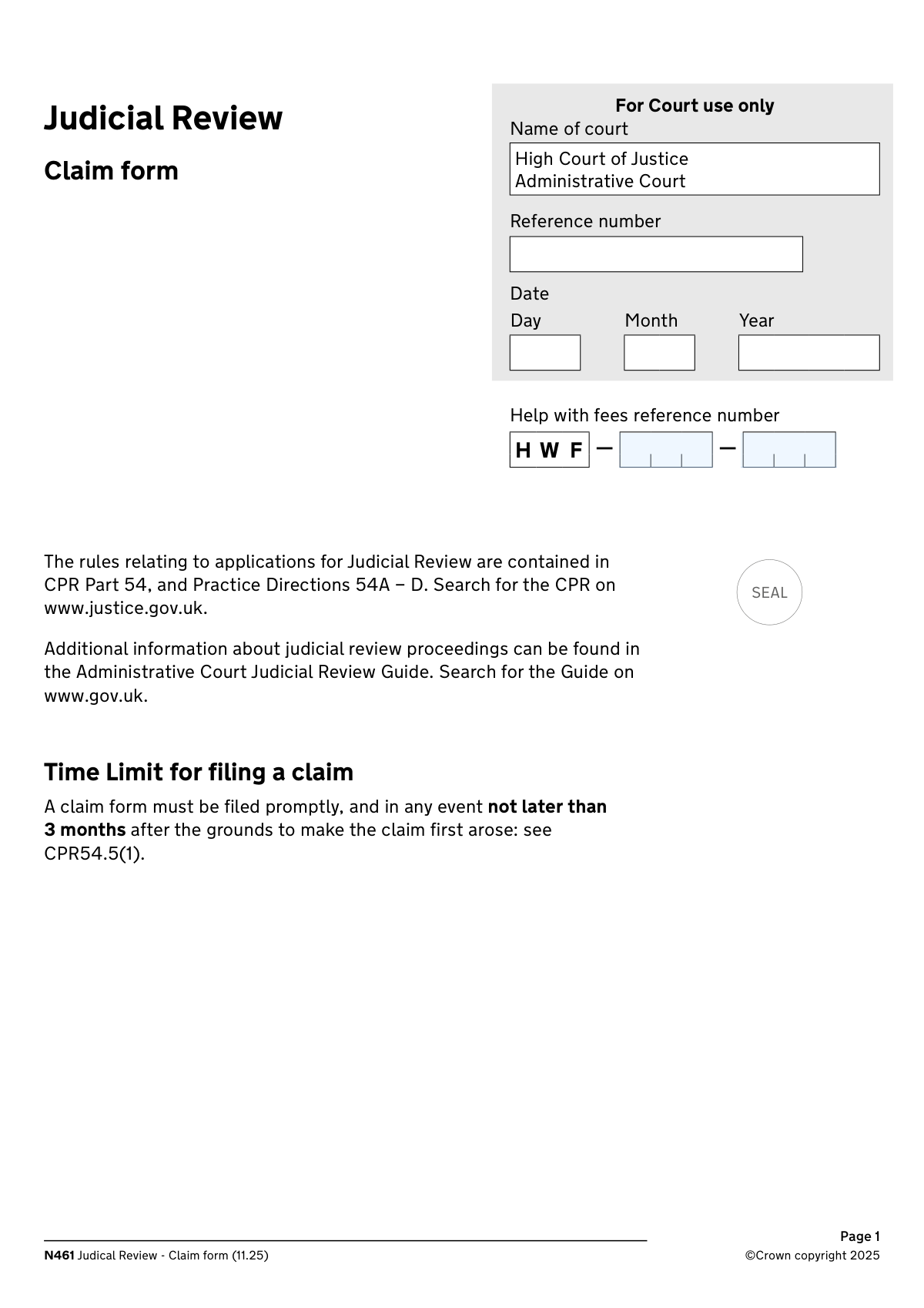
Yes! You can use AI to fill out Form N461: Claim for judicial review

Form N461, the Claim for Judicial Review, is a legal document used in the UK to ask the Administrative Court to review the lawfulness of a decision or action by a public authority. It is the essential first step for challenging decisions on grounds of illegality, irrationality, or procedural impropriety. Today, this form can be filled out quickly and accurately using AI-powered services like Instafill.ai, which can also convert non-fillable PDF versions into interactive fillable forms.
Our AI automatically handles information lookup, data retrieval, formatting, and form filling.
It takes less than a minute to fill out N461 using our AI form filling.
Securely upload your data. Information is encrypted in transit and deleted immediately after the form is filled out.

Form specifications

Form name: Form N461: Claim for judicial review
Number of pages: 17
Language: English
main-image

Instafill Demo: How to fill out PDF forms in seconds with AI

How to Fill Out N461 Online for Free in 2026

Are you looking to fill out a N461 form online quickly and accurately? Instafill.ai offers the #1 AI-powered PDF filling software of 2026, allowing you to complete your N461 form in just 37 seconds or less.
Follow these steps to fill out your N461 form online using Instafill.ai:
  1. 1 Navigate to Instafill.ai and upload your Form N461, or select it from the platform's template library.
  2. 2 Provide your details as the claimant, along with contact information for your legal representative and counsel if you have them.
  3. 3 Enter the details of the defendant (the public body) and the specific decision you are seeking to have reviewed.
  4. 4 Carefully complete the sections for the statement of facts and the detailed grounds for your claim, explaining why the decision was unlawful.
  5. 5 Specify the remedy you are seeking from the court (e.g., a quashing order) and detail any other applications you are making.
  6. 6 Use the checklist in Section 10 to gather and attach all required supporting documents, such as the decision letter and written evidence.
  7. 7 Review all entered information, then complete the Statement of Truth by signing and dating the form before downloading it for filing.

Our AI-powered system ensures each field is filled out correctly, reducing errors and saving you time.

Why Choose Instafill.ai for Your Fillable N461 Form?

Speed

Complete your N461 in as little as 37 seconds.

Up-to-Date

Always use the latest 2026 N461 form version.

Cost-effective

No need to hire expensive lawyers.

Accuracy

Our AI performs 10 compliance checks to ensure your form is error-free.

Security

Your personal information is protected with bank-level encryption.

Frequently Asked Questions About Form N461

This form is used to start a legal claim for judicial review. It allows you to ask a court to review the lawfulness of a decision or action made by a public body, court, or tribunal.

The 'claimant' is the person or organization challenging the decision. The 'defendant' is the public body, court, or person who made the decision you are seeking to have reviewed.

Your address is where you live, while the 'address for service' is the official address where all court documents for this case should be sent. This may be your address or, if you have one, your legal representative's office.

This is a reference number you receive if you have applied for and been granted assistance with paying court fees. You must enter it exactly as it appears on your fee-assistance paperwork.

If your claim needs to be decided within 7 days, you must check the box indicating urgency. You also need to complete and file form N463 for an urgent application alongside this claim form.

The pre-action protocol outlines steps you should take to try and resolve the issue with the defendant before starting court proceedings. If you haven't complied, you must explain why in the designated section.

The 'statement of facts' is a summary of the events leading to your claim. The 'statement of grounds' explains the legal reasons why you believe the decision you are challenging was unlawful.

You must include several documents, such as the statement of facts and grounds, a copy of the decision being challenged, and any written evidence you are relying on. A full checklist is provided near the end of the form.

If you cannot provide a required document at the time of filing, you must explain why it is unavailable and state when you expect to be able to provide it.

The Statement of Truth is a mandatory declaration confirming that you believe the facts presented in the form are true. Signing this without an honest belief in its truth can lead to proceedings for contempt of court.

An Aarhus Convention claim typically relates to environmental matters and has specific rules regarding legal costs. You should refer to CPR 45.41 or seek legal advice to determine if your claim qualifies.

Yes, services like Instafill.ai use AI to help you accurately auto-fill form fields with your saved information, which can save time and help prevent errors on complex forms.

You can use a service like Instafill.ai to complete this form digitally. Simply upload the form to the platform to type directly into the fields, save your progress, and download the completed document.

If you have a non-fillable or 'flat' PDF, you can upload it to Instafill.ai. The service's technology can convert it into an interactive, fillable form that you can easily complete on your computer.

Compliance N461
Validation Checks by Instafill.ai

1
Validates the Help with Fees Reference Number Format
This check ensures the combined reference number from both parts matches the expected format (e.g., HWF-XXX-XXX). This is crucial for the system to correctly look up and verify the fee assistance status. An invalid format will prevent verification of the fee waiver, potentially delaying or halting the claim submission.
2
Ensures UK Postcode Format is Valid
This validation verifies that all entered postcode fields adhere to the standard UK postcode format. Correct postcodes are critical for mail delivery and for correctly routing the case to the appropriate regional court. An invalid postcode will cause a submission failure and require the user to correct the entry before proceeding.
3
Validates the Date of Decision is a Valid Past Date
This check ensures the day, month, and year entered for the 'Date of decision' form a valid calendar date that is not in the future. This is crucial for establishing the case timeline and determining if the claim is filed within statutory time limits. An invalid or future date will be rejected as it represents a logical impossibility.
4
Enforces Mutually Exclusive Urgency Selection
This validation ensures that the user selects either the checkbox indicating the claim is urgent or the one indicating it is not, but not both. This selection dictates the processing priority and required accompanying forms. Selecting both options creates ambiguity and will result in a validation error, forcing the user to make a clear choice.
5
Requires Reason for Pre-Action Protocol Non-Compliance
This check is triggered if the user indicates they have not complied with the pre-action protocol. It validates that the corresponding text box for explaining the reasons for non-compliance is filled out. This explanation is a mandatory part of the legal process, and failure to provide it will prevent the form from being submitted.
6
Requires Details for Human Rights Act Breach Claim
If the user checks the box alleging a breach of Convention rights under the Human Rights Act, this validation ensures the associated text box specifying which rights were breached is not empty. This detail is fundamental to the grounds of the claim and must be provided for the claim to be properly assessed. The form cannot be submitted without this information if the breach is alleged.
7
Verifies Standard Email Address Format
This check confirms that any value entered into an email address field follows the standard '[email protected]' format. This is vital for ensuring that electronic communications regarding the case are deliverable. An incorrectly formatted email address will trigger an error, preventing submission until it is corrected or removed.
8
Validates the Statement of Truth Signature Date
This check ensures the day, month, and year for the Statement of Truth signature date form a valid calendar date that is not in the future. The signature date legally attests to the truthfulness of the form's contents as of that day. A future or invalid date would invalidate the statement, so the form will be rejected until a valid, present or past date is entered.
9
Ensures a Single Signatory Role is Selected for Statement of Truth
This validation confirms that exactly one role (Claimant, Litigation Friend, or Legal Representative) is selected for the person signing the Statement of Truth. This clarifies the capacity in which the signatory is acting, which has legal significance. Selecting zero or more than one role creates ambiguity and will block the form submission.
10
Ensures First Defendant's Name and Address are Provided
This validation checks that the name and essential address details (first line, town/city, postcode) for the first defendant are completed. This information is legally required to properly serve the claim and notify the defendant of the proceedings. A claim cannot proceed without identifying and providing a service address for at least one defendant.
11
Validates that Details of Remedy are Provided
This check ensures that the text field for 'Details of remedy' is not empty. The claimant must state precisely what they are asking the court to do, which is the core purpose of the claim. Without this information, the court has no action to consider, making the submission incomplete and invalid.
12
Requires Firm Name if Signed by Legal Representative
This check is triggered if the user signing the Statement of Truth identifies as the 'claimant’s legal representative'. It then validates that the 'name of the legal representative’s firm' field is filled out. This information is necessary to identify the firm responsible for the claim, and the submission will fail if this field is empty when a legal representative is the signatory.
13
Ensures Completeness of Decision Details
This validation confirms that the user has provided the name of the body that made the decision and a description of the decision itself. This information is fundamental as it defines the subject matter of the judicial review. Without these details, the claim lacks a clear target and is considered incomplete, thus blocking submission.
14
Enforces Statement of Facts Source Selection
This validation ensures the user has selected one of the two mutually exclusive options: that the statement of facts is set out in the form or that it is attached as a separate document. This is a critical requirement to ensure the court receives the factual basis for the claim. The form cannot be submitted until one of these options is chosen.

Common Mistakes in Completing N461

Confusing 'Claimant Address' with 'Address for Service'

Applicants often mistakenly enter their own home address as the 'Address for Service' even when they have a legal representative. The 'Address for Service' is the official address for all legal correspondence and must be the solicitor's address if one is instructed. This error can cause crucial documents and deadlines to be missed, jeopardizing the case.

Incorrectly Entering the 'Help with Fees' Reference Number

The 'Help with Fees' reference is split into two fields, and users frequently transpose the parts, enter it as one long string, or make typos. Since this number is essential for processing the court fee waiver, any mistake can lead to the application being rejected for non-payment. Always double-check the number against your fee-assistance paperwork, entering each block into its corresponding field.

Forgetting to Include All Required Supporting Documents

The form requires a long list of attachments, such as the statement of grounds, a copy of the decision being challenged, and any written evidence. It is very common for applicants to overlook one or more of these required documents, which will result in the application being deemed incomplete and returned. This causes significant delays and requires a complete refiling of the paperwork.

Incorrectly Marking the Claim as Urgent or Failing to File Form N463

Applicants may believe their case is urgent, but courts have a very high and specific threshold for expedition. Ticking the 'urgent' box without meeting the criteria, or more critically, without also filing the mandatory accompanying Form N463, will cause the request to be ignored. This wastes valuable time and fails to get the intended fast-tracked attention from the court.

Providing an Inadequate Statement of Grounds in the Form Box

The 'Statement of Grounds' is the legal core of the claim, yet applicants often try to squeeze complex arguments into the small text box provided. This results in a weak, unclear, and incomplete presentation of their case. It is crucial to attach a separate, clearly structured document that methodically sets out each ground of challenge, as the form instructions suggest.

Selecting Contradictory or No Options in Checkbox Pairs

The form contains several sets of mutually exclusive checkboxes, such as those regarding compliance with pre-action protocol or whether the claim is an Aarhus Convention claim. Accidentally ticking both boxes in a pair, or leaving both blank, creates ambiguity that halts the form's processing. This simple oversight forces court staff to seek clarification, leading to unnecessary administrative delays.

Vaguely Describing the Remedy Being Sought

In the 'Details of remedy' section, applicants often write generic requests like 'overturn the decision' instead of specifying the precise legal order sought. The form requires you to state the exact remedy, such as 'a quashing order' or 'a mandatory order,' as defined in the Civil Procedure Rules. A vague request can lead the court to misinterpret the claim's objective or deem the application deficient.

Incorrectly Identifying the Defendant

A common error is naming an individual civil servant as the defendant instead of the correct public body that made the decision. In judicial review, the defendant is the official entity, such as a government department or local authority. Naming the wrong party can lead to the claim being struck out or requiring a costly and time-consuming amendment to proceed.

Making Errors in the 'Statement of Truth' Section

The Statement of Truth legally validates the form, and mistakes here can invalidate the entire claim. Common errors include forgetting to date the signature, failing to check the box that indicates the signer's capacity (e.g., claimant or legal representative), or neglecting to print the signatory's full name. An improperly executed Statement of Truth is a serious procedural flaw.

Misunderstanding the 'Aarhus Convention Claim' Section

This question relates to specific environmental law cases and has significant implications for legal costs, but applicants in other types of cases are often confused by it. Incorrectly identifying a claim as an Aarhus claim, or failing to do so when it is, can lead to the wrong cost-capping rules being applied. If unsure, it is vital to seek legal advice rather than guessing, as it can create significant financial risk.

Using the Wrong Format for Dates

The form explicitly requires dates to be entered in separate two-digit day, two-digit month, and four-digit year fields (DD, MM, YYYY). Applicants often use incorrect formats like MM/DD/YYYY or use single digits, which can cause data entry errors or rejection. To avoid this, carefully enter each part of the date in its designated box. AI-powered form filling tools like Instafill.ai can automatically format dates correctly to prevent this issue.

Failing to Distinguish Between Counsel and Legal Representative

The form has separate sections for the 'claimant’s legal representative’s' details and the 'claimant’s counsel’s' details. Users often confuse the two or enter the same information in both sections. The legal representative is typically the solicitor's firm managing the case, while counsel is the barrister instructed for advocacy; their details must be entered in the correct, distinct sections to ensure proper communication.
Saved over 80 hours a year

“I was never sure if my IRS forms like W-9 were filled correctly. Now, I can complete the forms accurately without any external help.”

Kevin Martin Green

Your data stays secure with advanced protection from Instafill and our subprocessors

Robust compliance program

Transparent business model

You’re not the product. You always know where your data is and what it is processed for.

ISO 27001, HIPAA, and GDPR

Our subprocesses adhere to multiple compliance standards, including but not limited to ISO 27001, HIPAA, and GDPR.

Security & privacy by design

We consider security and privacy from the initial design phase of any new service or functionality. It’s not an afterthought, it’s built-in, including support for two-factor authentication (2FA) to further protect your account.

Fill out N461 with Instafill.ai

Worried about filling PDFs wrong? Instafill securely fills form-n461-claim-for-judicial-review forms, ensuring each field is accurate.