
Yes! You can use AI to fill out SBA Form 413, Personal Financial Statement
Don't type 147 fields by hand. Tell our AI about yourself, or upload a document you already have, and it fills every field in seconds. You check it, then download, print or sign.
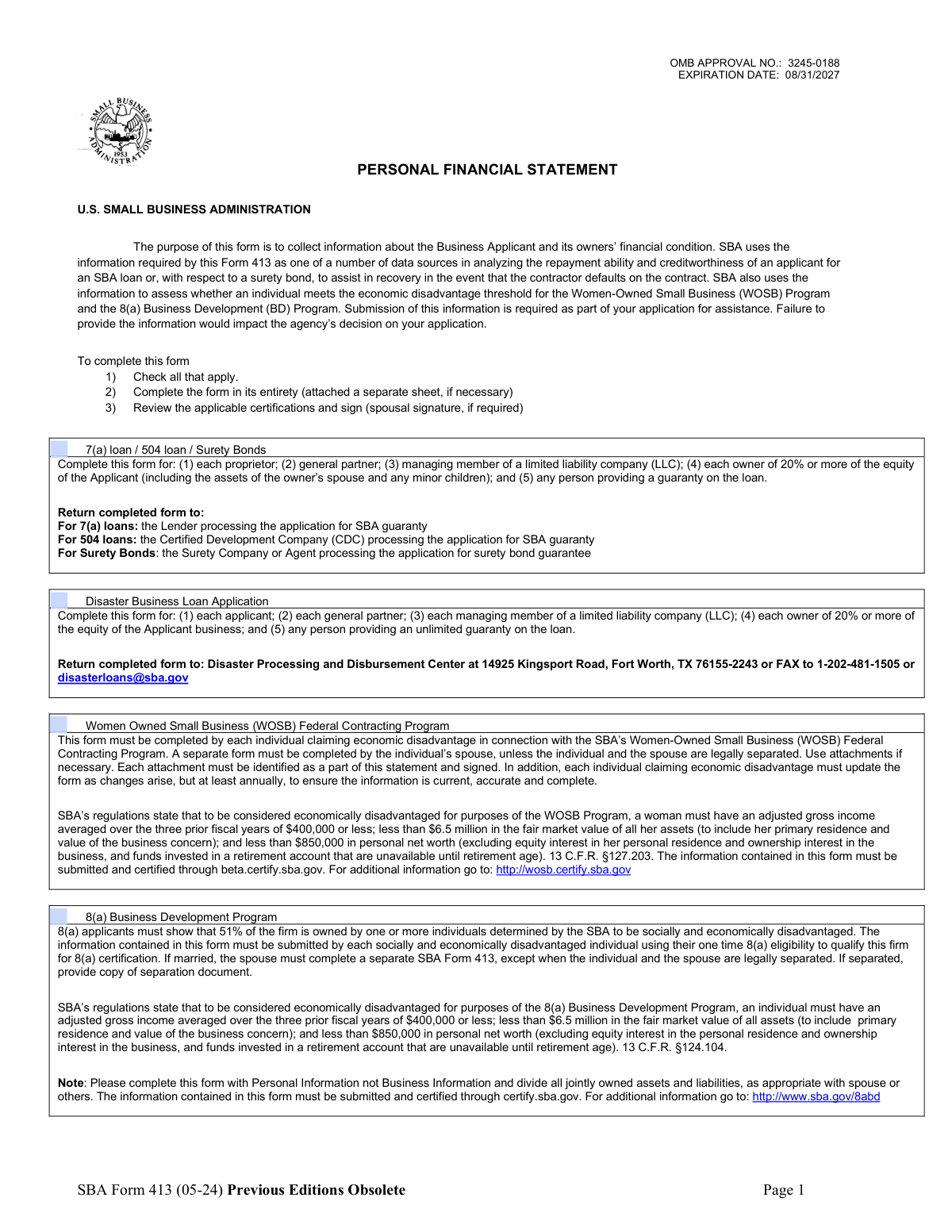
The AI does the filling. You just check it.
No typing into boxes, nothing to install.
What this form asks for
The AI fills all of it, from your answers or your documents.
The AI checks your answers before you download
16 checks built for this form, so a wrong date or a missing answer is caught before anyone else sees it.
Validate that the applicant selected at least one applicable program/purpose (e.g., 7(a)/504/Surety Bonds, Disaster Business Loan, WOSB, 8(a) BD). This is required to determine which submission rules apply (e.g., recency window, spouse form requirements, where to submit). If no option is selected, the submission should be rejected and the user prompted to choose the applicable program(s).
Validate that the “This information is current as of” date is present, uses mm/dd/yyyy format, and is a real calendar date. Then validate recency: within 90 days for Disaster submissions and within 120 days for 7(a)/504/SBG/8(a) BD/WOSB, based on the selected program. If the date is missing, malformed, or outside the allowed window, the form should fail validation because the financial snapshot is considered stale.
Ensure the following are not blank: Name, Home Address, City/State/ZIP, Business Name of Applicant/Borrower, and Business Type selection. Also require at least one reachable phone number (business phone and/or home phone) depending on system policy, but enforce format rules for any provided phone. If required fields are missing, the submission should be blocked because the statement cannot be attributed to a specific individual and applicant business.
Validate that any phone number entered matches the required pattern (xxx-xxx-xxxx) and contains exactly 10 digits (allowing hyphens). This prevents downstream contact failures and reduces manual correction. If a phone number fails format validation, the system should flag the field and require correction before submission.
Validate that the ZIP code is 5 digits (or ZIP+4 if allowed) and that the state is a valid US state/territory abbreviation. Optionally cross-check that the ZIP code is plausible for the selected state to catch common data entry errors. If invalid, the address should be rejected or routed to a correction workflow because it impacts identity verification and correspondence.
Validate that Business Type is selected from the allowed set (Corporation, S-Corp, LLC, Partnership, Sole Proprietor) and that only one is chosen if the UI allows multiple selections. Business type drives eligibility and interpretation of ownership/guaranty requirements. If missing or multiple/invalid values are provided, the submission should fail validation.
And 10 more checks
- SSN Format and Basic Plausibility Validation
- Signature and Signature Date Required for Each Required Signer
- WOSB Marital Status Required When WOSB Program Selected
- Numeric Fields Must Be Whole Dollars and Non-Negative Where Applicable
- Assets Total Must Equal Sum of Asset Line Items
- Liabilities Total Must Equal Sum of Liability Line Items
- Net Worth and Balance Check (Assets = Liabilities + Net Worth)
- Installment Account Monthly Payment Required When Installment Balance Provided
- Section Detail Required When Summary Line Items Are Non-Zero
- Real Estate Detail Completeness and Mortgage Consistency
Let AI fill out your SBA Form 413
No typing. Every field filled in seconds, checked, ready to sign.
How to Fill Out SBA Form 413 Online for Free in 2026
What the AI walks you through.
- Select the purpose(s) for completing the form (e.g., 7(a)/504/Surety Bonds, Disaster Business Loan, WOSB, 8(a) BD) and confirm who must complete it (owners/guarantors and, when required, spouse).
- Enter personal and applicant/borrower information (name, addresses, phone numbers, business name/type) and set the “information is current as of” date within the required timeframe.
- Complete the Assets and Liabilities sections (omit cents), ensuring totals balance and calculating net worth; include monthly payments where requested.
- Fill out Section 1 (Source of Income) and Contingent Liabilities, adding descriptions for “Other Income” as needed.
- Provide required schedules and details: Section 2 (Notes Payable), Section 3 (Stocks and Bonds), Section 4 (Real Estate Owned), and Section 5 (Other Personal Property/Other Assets), using signed attachments when necessary.
- Complete remaining disclosures: Section 6 (Unpaid Taxes), Section 7 (Other Liabilities), and Section 8 (Life Insurance Held), including lienholders, terms, and beneficiaries where applicable.
- Review the authorizations and certifications, then sign and date (and obtain spousal signature if required); submit to the correct destination (lender/CDC/surety, Disaster Processing Center, or via certify.sba.gov/beta.certify.sba.gov for WOSB/8(a) as applicable).
Common Mistakes in Completing SBA Form 413
The ones the AI is built to catch.
Not checking the correct program box (7(a)/504/Surety, Disaster, WOSB, 8(a))
Using business financials instead of personal financials
Missing or stale “information is current as of” date
Not dividing jointly owned assets and liabilities with spouse/others
Forgetting required spouse form/signature (especially WOSB/8(a) and 20%+ owners)
Totals don’t reconcile (Assets ≠ Liabilities + Net Worth)
Including cents or inconsistent rounding (ignoring “Omit Cents”)
Leaving required detail sections blank (Notes Payable, Stocks/Bonds, Real Estate, Other Assets/Liabilities, Unpaid Taxes)
Misstating asset values (cost vs present market value vs cash surrender value)
Omitting contingent liabilities and unpaid taxes
Incorrect or incomplete identification/contact information (phones, addresses, SSN format)
Failing to sign/date and sign attachments
Frequently Asked Questions About SBA Form 413
Is it really free for 7 days?
Can I fill other forms too?
How do I cancel?
How does the AI fill out SBA Form 413?
What happens to my information?
How complex is SBA Form 413 to fill out?
What is SBA Form 413 (Personal Financial Statement) used for?
Who is required to complete SBA Form 413 for a 7(a) loan, 504 loan, or Surety Bond?
Who must complete SBA Form 413 for a Disaster Business Loan application?
Do WOSB or 8(a) applicants need a spouse to complete a separate Form 413?
Where do I submit the completed form?
How recent must the financial information be when I submit the form?
Should I list business assets and business debts on this form?
How do I report jointly owned assets and liabilities with my spouse or someone else?
What supporting details are required for “Notes Payable to Banks and Others” (Section 2)?
How do I complete the “Stocks and Bonds” section (Section 3)?
What information is required for real estate (Section 4)?
Do I need to include retirement accounts and life insurance values?
Do I have to disclose alimony or child support as income?
What happens if I leave sections blank or don’t provide the requested information?
What are the consequences of providing false information on SBA Form 413?
Get your SBA Form 413 filled out by AI
$0 today. Cancel before Nov 1 and you pay nothing.
Other forms like this one
financial forms: Form 8938, Statement of Specified Foreign Financial Assets, Form 12.902(b), Family Law Financial Affidavit (Short Form), Form I-361, Affidavit of Financial Support, Form CJA-23, Financial Affidavit, Form 107, Statement of Financial Affairs, Personal Financial Statement (REV 06/2018) – Northwest Federal Credit Union, NSFAS Consent Form (National Student Financial Aid Scheme) – APP2026, International Student Application for Financial Aid 2026-2027 (International Student Application for Financial Assistance 2026-2027), State of Hawaii Department of Commerce and Consumer Affairs (DCCA) Contractors License Board – Application for Contractor's License (Sole Proprietor) (CT-36) with supporting forms (Experience Certificate CT-03, Contractors Financial Statement CT-02, and Chronological History of Projects/Project List), Colorado Judicial Department Form JDF 1111SC (Form 35.2), Sworn Financial Statement, Northwestern University Office of Undergraduate Financial Aid International Applicant Document Upload Cover Sheet, Vanguard Super Apply for a financial hardship payment, Selbstauskunft/ Vermögensaufstellung (Financial Self-Disclosure/Statement of Assets), Selbstauskunft - vertraulich - (Financial Self-Disclosure), Empower Financial Services, Inc. (EFSI) and Empower Advisory Group, LLC (EAG) Form CRS Customer Relationship Summary, Rollover Form (Principal Financial Group), Principal Financial 401(k) Withdrawal Form, Principal Financial Group Pre-Approved Basic Savings Plan - Plus, DoD 7000.14-R, Department of Defense Financial Management Regulation, Volume 12: Special Accounts, Funds and Programs, Principal Financial Group Notice of Data Breach
PA state forms: Form 1095-A, Health Insurance Marketplace Statement, Form W-2, Wage and Tax Statement, Form 593, Real Estate Withholding, Form 8938, Statement of Specified Foreign Financial Assets, Form CMS-2567, Statement of Deficiencies, Form 1098, Mortgage Interest Statement, Form 1098-T, Tuition Statement, Form 1099-S, Proceeds From Real Estate Transactions, Form 1098-E, Student Loan Interest Statement, Form DS-3053, Statement of Consent, Form DS-86, Statement of Non-Receipt of a U.S. Passport, Form DS-86, Statement of Non-Receipt of a U.S. Passport, Form 108, Statement of Intention, Form 107, Statement of Financial Affairs, Form 121, Statement About Your SSNs, Form 122A-1, Chapter 7 Statement of Current Monthly Income, Center for Infertility & Reproductive Surgery – New Patient Questionnaire and Patient/Guarantor Statement (Brigham and Women’s Hospital, Department of Obstetrics and Gynecology), Adult Travel Document Application for Stateless and Protected Persons in Canada (16 years of age or over) (PPTC 190), Form W-8IMY (Rev. October 2021), Certificate of Foreign Intermediary, Foreign Flow-Through Entity, or Certain U.S. Branches for United States Tax Withholding and Reporting, Form W-2, Wage and Tax Statement (2025)
NJ state forms: Form 1095-A, Health Insurance Marketplace Statement, Form W-2, Wage and Tax Statement, Form 593, Real Estate Withholding, Form 8938, Statement of Specified Foreign Financial Assets, Form CMS-2567, Statement of Deficiencies, Form 1098, Mortgage Interest Statement, Form 1098-T, Tuition Statement, Form 1099-S, Proceeds From Real Estate Transactions, Form 1098-E, Student Loan Interest Statement, Form DS-3053, Statement of Consent, Form DS-86, Statement of Non-Receipt of a U.S. Passport, Form DS-86, Statement of Non-Receipt of a U.S. Passport, Form 108, Statement of Intention, Form 107, Statement of Financial Affairs, Form 121, Statement About Your SSNs, Form 122A-1, Chapter 7 Statement of Current Monthly Income, Center for Infertility & Reproductive Surgery – New Patient Questionnaire and Patient/Guarantor Statement (Brigham and Women’s Hospital, Department of Obstetrics and Gynecology), Adult Travel Document Application for Stateless and Protected Persons in Canada (16 years of age or over) (PPTC 190), Form W-8IMY (Rev. October 2021), Certificate of Foreign Intermediary, Foreign Flow-Through Entity, or Certain U.S. Branches for United States Tax Withholding and Reporting, Form W-2, Wage and Tax Statement (2025)
state ID forms: Application for Renewal or Duplicate of Alabama Driver License or ID card, Form 1095-A, Health Insurance Marketplace Statement, Form W-2, Wage and Tax Statement, Form 593, Real Estate Withholding, Form 8938, Statement of Specified Foreign Financial Assets, Form CMS-2567, Statement of Deficiencies, Form 1098, Mortgage Interest Statement, Form 1098-T, Tuition Statement, Form 1099-S, Proceeds From Real Estate Transactions, Form 1098-E, Student Loan Interest Statement, Form DS-3053, Statement of Consent, Form DS-86, Statement of Non-Receipt of a U.S. Passport, Form 108, Statement of Intention, Form 107, Statement of Financial Affairs, Form 121, Statement About Your SSNs, Form 122A-1, Chapter 7 Statement of Current Monthly Income, Center for Infertility & Reproductive Surgery – New Patient Questionnaire and Patient/Guarantor Statement (Brigham and Women’s Hospital, Department of Obstetrics and Gynecology), Adult Travel Document Application for Stateless and Protected Persons in Canada (16 years of age or over) (PPTC 190), Form W-8IMY (Rev. October 2021), Certificate of Foreign Intermediary, Foreign Flow-Through Entity, or Certain U.S. Branches for United States Tax Withholding and Reporting, Form W-2, Wage and Tax Statement (2025)
Let AI fill out your SBA Form 413
Your trial starts once a card is added. You pay nothing before Nov 1.
Our AI already knows this form, all 147 fields of it. Skip the typing: tell it about yourself, or upload what you have, and it fills the whole form in seconds.
- AI fills every field on all 4 pages, tables and checkboxes included
- No typing into boxes: answer a few questions, or upload a document you already have, an old copy of this form, a photo of a document
- The AI checks the answers; you review and change anything before you download
- Download the finished PDF, print it, or sign it online
- Encrypted, and never used to train AI
Cancel before Nov 1 and you pay nothing.
A card is needed to start the trial. Cancel in two clicks from your account.
Terms · Privacy