
Yes! You can use AI to fill out Legal Aid Queensland application form (LAQAPP) – Application for Legal Aid in Queensland
Don't type 489 fields by hand. Tell our AI about yourself, or upload a document you already have, and it fills every field in seconds. You check it, then download, print or sign.
The AI does the filling. You just check it.
No typing into boxes, nothing to install.
What this form asks for
The AI fills all of it, from your answers or your documents.
The AI checks your answers before you download
20 checks built for this form, so a wrong date or a missing answer is caught before anyone else sees it.
Validate that Family name and First name are provided, and that a Title option is selected. If Title is set to “Other”, require the “Give details” text to be completed and non-trivial (not blank/whitespace). If this validation fails, the submission should be rejected or routed for correction because the applicant cannot be reliably identified or addressed.
If the applicant indicates they have used other names, require at least one other-name entry with Family name, First name, and Type of name. If “No” is selected, ensure the other-name fields are empty to avoid conflicting data. Failure should block submission because identity matching and conflict checks may be inaccurate without complete alias information.
Validate Birth date fields are in DDMMYYYY format and represent a real calendar date (including leap-year rules). Also check plausibility (e.g., not in the future and not unreasonably old such as >120 years). If invalid, prompt correction because age-based routing (e.g., financial section skip for 17 or younger) and identity verification depend on a valid DOB.
If the applicant answers “Yes” to being 17 years or younger, enforce that the financial details section (Questions 4–9) is not required and the workflow proceeds to Question 10 as instructed. If they answer “No”, require completion of the financial details section. If inconsistent (e.g., DOB indicates 16 but they answered “No”), flag for review and require confirmation to prevent incorrect eligibility assessment.
Ensure exactly one gender option is selected, and if “Other” is selected, require the accompanying details field to be completed. If “Male” or “Female” is selected, the “Other details” field should be empty to avoid ambiguity. Failure should prevent submission because demographic fields are used for records accuracy and may affect service delivery.
If the applicant indicates they need an interpreter, require the language and dialect field to be completed with meaningful text. If they indicate “No”, ensure the language/dialect field is blank. If this fails, the form should be returned for correction because service accessibility and communication depend on accurate interpreter needs.
And 14 more checks
- Disability and access-help conditional detail validation
- Address completeness and Australian postcode/state validation
- Postal/contact address rule (blank means same as home) and partial-entry prevention
- Contact details format validation (phones and email) and minimum contact method
- Prison status and IOMS number conditional requirement
- Financial help and self-employment conditional attachments/details
- Centrelink/Veterans payment selection and card details validation
- Household income and dependents numeric validation and employment situation consistency
- Assets section completeness and equity arithmetic checks (Question 7 a/b/c required)
- Court/tribunal details required when court involvement is 'Yes'
- Legal problem section gating and mandatory narrative at Question 18
- Criminal law consistency: charges, plea, record, and proceeds-of-crime attachments
- Family/relationship details: orders, parties, children, and relationship dates validation
- Declaration, authority, and signature/date completion (including third-party completion authority)
Let AI fill out your LAQAPP
No typing. Every field filled in seconds, checked, ready to sign.
How to Fill Out LAQAPP Online for Free in 2026
What the AI walks you through.
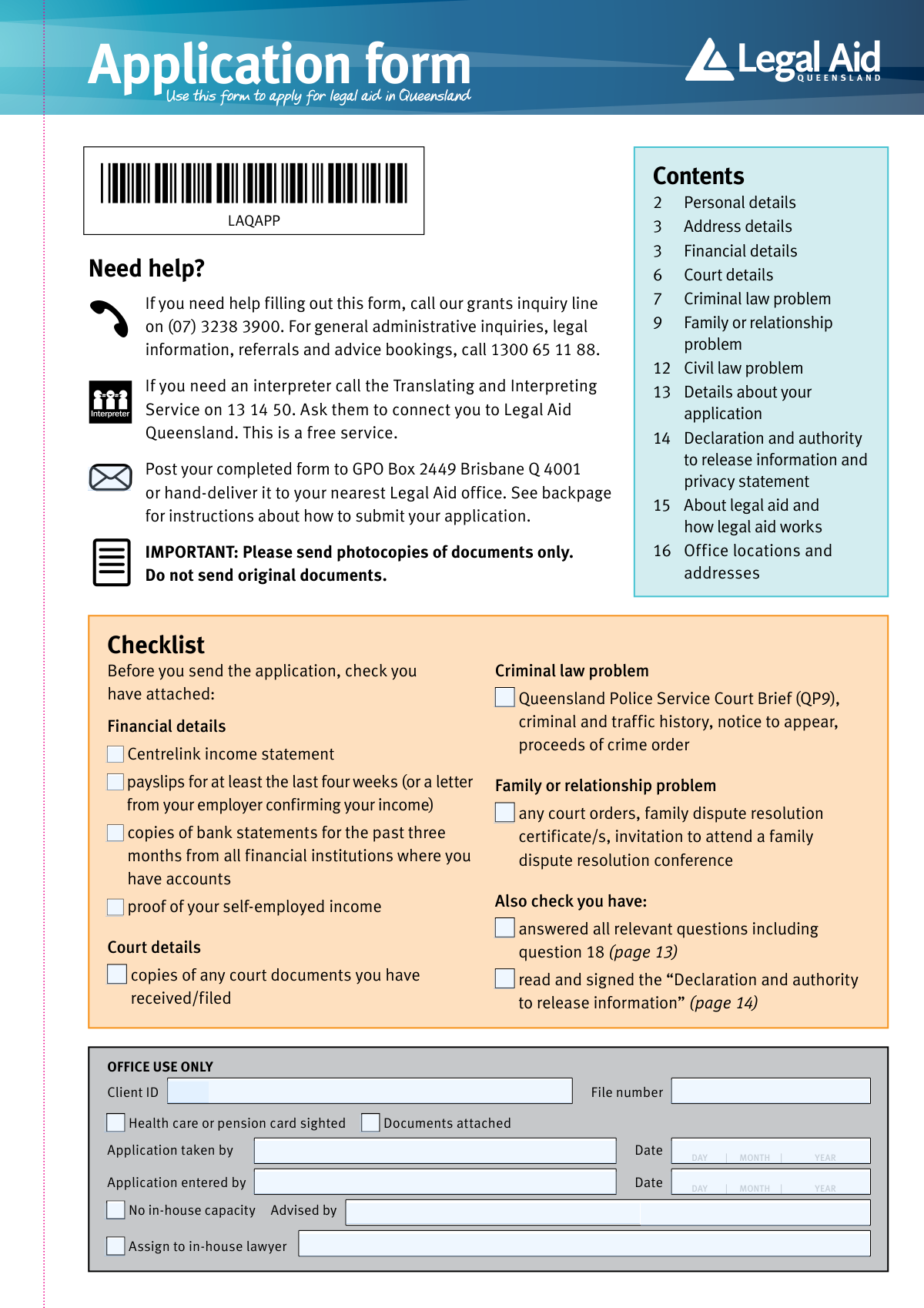
- Confirm you are using the Legal Aid Queensland application form (LAQAPP) and review the checklist of required attachments (income evidence, bank statements, court documents, and any QP9/criminal history if applicable).
- Complete Personal Details (Q1) and Address/Contact Details (Q2), including interpreter/disability access needs, prison status, and any special circumstances to be explained later in Q18.
- Fill out Financial Details (Q3–Q9): disclose income, Centrelink/Veterans’ Affairs payments, household situation, dependent children, assets (home/real estate/vehicles), bank balances, and other valuable assets; upload supporting documents (payslips/Centrelink statements/bank statements/tax returns if self-employed).
- Enter Court Details (Q10) and upload copies of any court or tribunal documents; include next court date/time, court type, and any current lawyer details.
- Complete the section(s) that match your legal issue: Criminal law (Q11–Q12), Family/relationship (Q13–Q16), and/or Civil law (Q17), attaching required orders, applications, and certificates (e.g., family dispute resolution certificates) where relevant.
- Write a clear narrative in Q18 describing the legal problem, who is involved, key dates/events, and any special circumstances or missing income details, ensuring all relevant questions are answered (including Q18).
- Read the privacy/conflict statement and sign/date the Declaration and Authority to Release Information (page 14), then submit the completed PDF and attachments by email (PDF only, one email, max 25MB) or post/hand-deliver photocopies to Legal Aid Queensland.
Common Mistakes in Completing LAQAPP
The ones the AI is built to catch.
Sending original documents instead of photocopies
Emailing photos or non-PDF files (or using cloud links) instead of scanned PDFs
Splitting documents across multiple emails or attaching each page as separate files
Providing incomplete financial evidence (wrong time period or missing institutions)
Using ATM receipts or transaction screenshots instead of official bank statements
Not disclosing financial help from another person (or misunderstanding what counts)
Leaving required parts of Question 7 blank (home/other real estate/vehicles) or not calculating equity
Incorrect date formats or missing key dates (birth date, court date, charge date, relationship dates)
Failing to attach court/criminal documents (QP9, notices, orders, existing family orders)
Providing too little detail in Question 18 (the narrative section)
Missing signatures/authority or not completing the consent section correctly
Frequently Asked Questions About LAQAPP
Is it really free for 7 days?
Can I fill other forms too?
How do I cancel?
How does the AI fill out LAQAPP?
What happens to my information?
How complex is LAQAPP to fill out?
What is this form used for?
Who should fill out this application form?
What documents do I need to attach with my application?
Do I need to provide bank statements even if my account balance is low or zero?
Can I use ATM receipts or screenshots instead of bank statements?
What if I am self-employed, a small business owner, or a farmer?
What does 'financial help from another person' mean, and do I need to include their details?
I’m in prison—do I still need to complete the financial details section?
I am 17 years old or younger—do I have to fill out the financial details section?
What if I don’t receive any income?
What court information do I need to provide in the court details section?
For a criminal law problem, what documents should I attach?
For a family or relationship problem, what supporting documents are needed?
What is question 18 and why is it important?
How do I submit the application, and are there rules for emailing documents?
Should I send original documents?
How long does it take for Legal Aid Queensland to process my application?
Get your LAQAPP filled out by AI
$0 today. Cancel before Nov 1 and you pay nothing.
Other forms like this one
NY legal forms: Legal Aid Queensland application form (LAQAPP), Legal Aid Queensland application form (LAQAPP), Legal Aid Queensland application form (LAQAPP), Form FL-170, Declaration for Default or Uncontested Dissolution or Legal Separation, Department of Home Affairs — Appointment or cessation of a registered migration agent, legal practitioner or exempt person providing immigration assistance (Appointment notification form), Form FL-170, Declaration for Default or Uncontested Dissolution or Legal Separation (Family Law), Form 956, Appointment of a registered migration agent, legal practitioner or exempt person, Legal Entity Beneficial Ownership/Trust Certification Form, Application Form: Legal Entities | Qualified Investor Hedge Fund, Fundrock Application Form: Legal Entities | Monthly Liquidity – Qualified Investor Hedge Fund, Application Form: Legal Entities | Retail Hedge Fund - Fundrock, Fundrock Application Form: Legal Entities | Monthly Liquidity – Retail Hedge Fund, Nova Poshta Claim Form for Legal Entities and Individual Entrepreneurs (Form F-1.5.35-1), Legal Aid Financial Eligibility Form
legal application forms: Legal Aid Queensland application form (LAQAPP), Legal Aid Queensland application form (LAQAPP), Legal Aid Queensland application form (LAQAPP), Application Form: Legal Entities | Qualified Investor Hedge Fund, Fundrock Application Form: Legal Entities | Monthly Liquidity – Qualified Investor Hedge Fund, Application Form: Legal Entities | Retail Hedge Fund - Fundrock, Fundrock Application Form: Legal Entities | Monthly Liquidity – Retail Hedge Fund, Form N463, Judicial Review Application for urgent consideration, ONTARIO Form 8: Application (General), New Jersey Judiciary, Board on Continuing Legal Education, Individual Attorney Application for CLE Credit, Supreme Court of New Jersey, Board on Continuing Legal Education, Application for an Extension of Time
legal forms: Legal Aid Queensland application form (LAQAPP), Legal Aid Queensland application form (LAQAPP), Legal Aid Queensland application form (LAQAPP), Form FL-170, Declaration for Default or Uncontested Dissolution or Legal Separation, Department of Home Affairs — Appointment or cessation of a registered migration agent, legal practitioner or exempt person providing immigration assistance (Appointment notification form), Form FL-170, Declaration for Default or Uncontested Dissolution or Legal Separation (Family Law), Form 956, Appointment of a registered migration agent, legal practitioner or exempt person, Legal Entity Beneficial Ownership/Trust Certification Form, Application Form: Legal Entities | Qualified Investor Hedge Fund, Fundrock Application Form: Legal Entities | Monthly Liquidity – Qualified Investor Hedge Fund, Application Form: Legal Entities | Retail Hedge Fund - Fundrock, Fundrock Application Form: Legal Entities | Monthly Liquidity – Retail Hedge Fund, Form N461: Claim for judicial review, Friedman, Framme & Thrush, P.A. General Authorization Letter and Request for Letter or Telephone Call, Memorandum of Contract, Relinquishment of control over assets to minor form, Nova Poshta Claim Form for Legal Entities and Individual Entrepreneurs (Form F-1.5.35-1), Legal Aid Financial Eligibility Form, Form MC 6, Notice to Appear, Form MC 01, Summons
EU legal forms: Form A, Claim Form, European Small Claims Procedure, Legal Aid Queensland application form (LAQAPP), Legal Aid Queensland application form (LAQAPP), Legal Aid Queensland application form (LAQAPP), Form FL-170, Declaration for Default or Uncontested Dissolution or Legal Separation, Department of Home Affairs — Appointment or cessation of a registered migration agent, legal practitioner or exempt person providing immigration assistance (Appointment notification form), Form FL-170, Declaration for Default or Uncontested Dissolution or Legal Separation (Family Law), Form 956, Appointment of a registered migration agent, legal practitioner or exempt person, Legal Entity Beneficial Ownership/Trust Certification Form, Application Form: Legal Entities | Qualified Investor Hedge Fund, Fundrock Application Form: Legal Entities | Monthly Liquidity – Qualified Investor Hedge Fund, Application Form: Legal Entities | Retail Hedge Fund - Fundrock, Fundrock Application Form: Legal Entities | Monthly Liquidity – Retail Hedge Fund, Nova Poshta Claim Form for Legal Entities and Individual Entrepreneurs (Form F-1.5.35-1), Legal Aid Financial Eligibility Form
Let AI fill out your LAQAPP
Your trial starts once a card is added. You pay nothing before Nov 1.
Our AI already knows this form, all 489 fields of it. Skip the typing: tell it about yourself, or upload what you have, and it fills the whole form in seconds.
- AI fills every field on all 16 pages, tables and checkboxes included
- No typing into boxes: answer a few questions, or upload a document you already have, an old copy of this form, a photo of a document
- The AI checks the answers; you review and change anything before you download
- Download the finished PDF, print it, or sign it online
- Encrypted, and never used to train AI
Cancel before Nov 1 and you pay nothing.
A card is needed to start the trial. Cancel in two clicks from your account.
Terms · Privacy