Yes! You can use AI to fill out NSFAS Consent Form (National Student Financial Aid Scheme) – APP2026
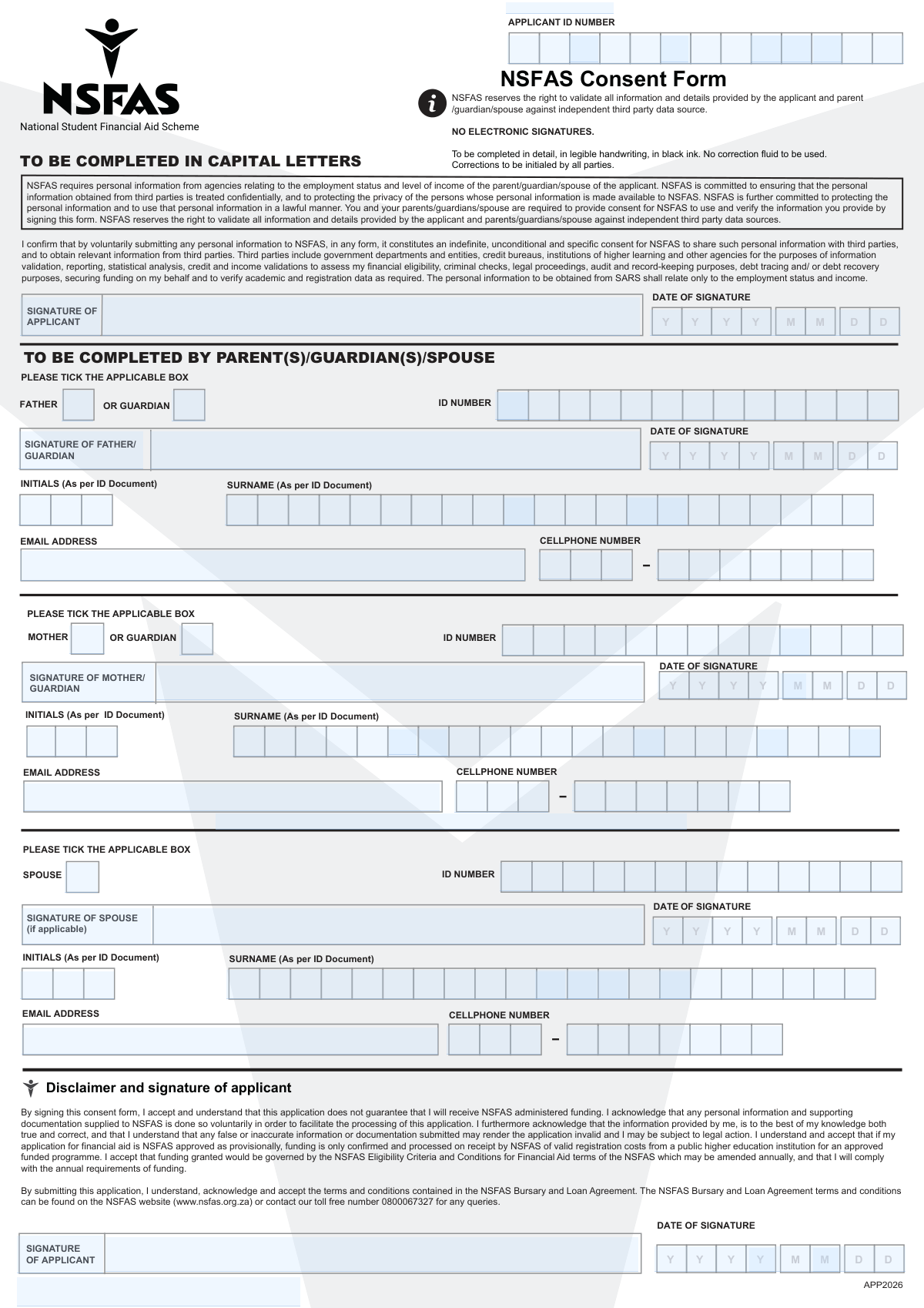
The NSFAS Consent Form is an official authorization document required as part of a NSFAS financial aid application. By signing it, the applicant and (where applicable) their parent(s)/guardian(s) and spouse give NSFAS permission to collect, share, and validate personal information with third parties such as government departments, credit bureaus, and higher education institutions. This consent enables NSFAS to confirm income/employment details (including limited SARS-related checks) and validate application information to determine eligibility and prevent fraud. The form also confirms the applicant understands that submitting an application does not guarantee funding and that false information may lead to invalidation and legal action.
Our AI automatically handles information lookup, data retrieval, formatting, and form filling.
It takes less than a minute to fill out NSFAS Consent Form (APP2026) using our AI form filling.
Securely upload your data. Information is encrypted in transit and deleted immediately after the form is filled out.
Form specifications
| Form name: | NSFAS Consent Form (National Student Financial Aid Scheme) – APP2026 |
| Number of pages: | 1 |
| Filled form examples: | Form NSFAS Consent Form (APP2026) Examples |
| Language: | English |
| Categories: | financial forms, student aid forms, financial aid forms |
Instafill Demo: filling out a legal form in seconds
How to Fill Out NSFAS Consent Form (APP2026) Online for Free in 2026
Are you looking to fill out a NSFAS CONSENT FORM (APP2026) form online quickly and accurately? Instafill.ai offers the #1 AI-powered PDF filling software of 2026, allowing you to complete your NSFAS CONSENT FORM (APP2026) form in just 37 seconds or less.
Follow these steps to fill out your NSFAS CONSENT FORM (APP2026) form online using Instafill.ai:
- 1 Enter the applicant’s identifying details in CAPITAL LETTERS: Applicant ID number, initials and surname (as per ID document), ID number, email address, and cellphone number.
- 2 Review the consent and disclaimer text carefully, noting that NSFAS may verify information against third-party data sources and that electronic signatures are not accepted.
- 3 Complete the parent/guardian section(s): for father/guardian and mother/guardian, provide initials and surname (as per ID), ID number, email address, and cellphone number, and tick any applicable boxes indicated on the form.
- 4 If applicable, complete the spouse section with the spouse’s required details and tick the applicable box(es).
- 5 Sign in ink (no electronic signatures): applicant signs and dates; father/guardian signs and dates; mother/guardian signs and dates; spouse signs and dates (if applicable).
- 6 If any corrections are made, ensure they are initialed by all required parties, and confirm the form is legible, completed in black ink, and contains no correction fluid before submission with the NSFAS application.
Our AI-powered system ensures each field is filled out correctly, reducing errors and saving you time.
Why Choose Instafill.ai for Your Fillable NSFAS Consent Form (APP2026) Form?
Speed
Complete your NSFAS Consent Form (APP2026) in as little as 37 seconds.
Up-to-Date
Always use the latest 2026 NSFAS Consent Form (APP2026) form version.
Cost-effective
No need to hire expensive lawyers.
Accuracy
Our AI performs 10 compliance checks to ensure your form is error-free.
Security
Your personal information is protected with bank-level encryption.
Frequently Asked Questions About Form NSFAS Consent Form (APP2026)
This form gives NSFAS permission to verify the information in your application with third parties (such as SARS, government departments, credit bureaus, and your institution). It supports NSFASâs assessment of your financial eligibility and validation of your details.
The applicant must sign, and the parent(s)/guardian(s) must sign where applicable. A spouse must also sign if the applicant is married or has a spouse whose details are relevant to the application.
The form provides signature sections for father/guardian and mother/guardian, indicating NSFAS may require consent from parent(s)/guardian(s) involved in the application. If only one parent/guardian is applicable, complete the relevant section and ensure the information is consistent with your household situation.
You must provide the applicant ID number, initials and surname (as per ID), ID numbers, email addresses, cellphone numbers, and dates of signature. Each signing person (applicant, parents/guardians, spouse if applicable) must complete their own details.
Complete the form in CAPITAL LETTERS, using legible handwriting in black ink. Your initials and surname must match exactly what appears on your ID document.
No. The form clearly states âNO ELECTRONIC SIGNATURES,â so signatures must be handwritten.
Use the format YYYYMMDD (for example, 20260205). Make sure each signer enters their own date of signature in that format.
Do not use correction fluid. Any corrections must be initialed by all parties (the applicant and the relevant parent/guardian/spouse) to confirm the change.
NSFAS needs consent to verify employment status and income information and to validate the details provided in the application. This includes obtaining relevant information from third parties such as SARS (limited to employment status and income).
The form states NSFAS may share/obtain information with government departments and entities, credit bureaus, higher education institutions, and other agencies. This is for validation, reporting, statistical analysis, credit/income checks, criminal checks, legal/audit purposes, debt tracing/recovery, and verifying academic/registration data.
No. The form states that submitting the application and signing consent does not guarantee NSFAS-administered funding.
The form explains that even if you are provisionally approved, funding is only confirmed and processed once NSFAS receives valid registration costs from a public higher education institution for an approved funded programme.
The form states that false or inaccurate information or documents may make your application invalid. You may also be subject to legal action.
The terms are available on the NSFAS website (www.nsfas.org.za). You can also contact the NSFAS toll-free number 0800067327 for queries.
Compliance NSFAS Consent Form (APP2026)
Validation Checks by Instafill.ai
1
Applicant ID Number format and checksum validation
Validate that the applicant ID number is present and matches the expected South African ID format (13 digits) and passes the standard checksum (Luhn) where applicable. This is critical because the ID is used to uniquely identify the applicant and to validate identity against third-party sources. If the ID is missing, not 13 digits, contains non-numeric characters, or fails checksum, the submission should be rejected or routed for manual review.
2
Applicant initials and surname completeness and capitalization rule
Ensure the applicantâs initials and surname fields are completed and contain only valid alphabetic characters (plus allowed punctuation such as hyphen/apostrophe) and are provided in capital letters as instructed. This matters because the form explicitly requires capital letters and these fields are used for identity matching with official records. If the fields are blank, contain invalid characters, or are not in uppercase, the system should flag the record and request correction.
3
Applicant email address format validation
Check that the applicant email address is present and conforms to a standard email pattern (e.g., local-part@domain with a valid TLD) and does not contain spaces. Email is a primary communication channel for application status and consent-related queries. If invalid or missing, the form should fail validation and prompt the applicant to provide a correct email.
4
Applicant cellphone number format and length validation
Validate that the applicant cellphone number is present and matches an accepted South African mobile format (e.g., 10 digits starting with 0, or international format +27 with correct length), allowing optional separators but storing a normalized value. This is important for OTPs, notifications, and follow-ups. If the number is missing or not a valid length/prefix, the submission should be blocked or flagged for correction.
5
Signature presence validation for applicant (wet signature required)
Confirm that the applicant signature field is completed and that the submission method indicates a wet-ink signature (the form states 'NO ELECTRONIC SIGNATURES'). This is essential because the consent is legally dependent on a valid signature. If the signature is missing or the capture method indicates an electronic signature, the form should be rejected and resubmission requested.
6
Date of signature format validation (YYYYMMDD) for all signatories
Validate that each date of signature provided (applicant, mother/guardian, father/guardian, spouse if applicable) is in the exact YYYYMMDD format and represents a real calendar date. Correct date formatting is required for auditability and to establish when consent was granted. If any date is malformed (wrong length, non-numeric, impossible date), the system should fail validation for that section and request correction.
7
Signature date logical checks (not in the future; reasonable range)
Ensure each signature date is not in the future and falls within a reasonable window for the application cycle (e.g., not decades old and consistent with APP2026 context). This prevents fraudulent or erroneous entries and supports compliance/audit requirements. If a date is in the future or implausible, the submission should be flagged for manual review or rejected depending on policy.
8
Parent/guardian/spouse section requiredness based on applicability ticks
Validate that the 'PLEASE TICK THE APPLICABLE BOX' selections are provided and drive which sections become mandatory (e.g., spouse details required only if spouse is applicable; parent vs guardian selection determines required signatory fields). This is important to avoid missing legally required consent from the correct parties. If applicability is not selected or required sections are incomplete based on the selection, the form should be returned for completion.
9
Mother/guardian identity fields validation (ID, initials, surname)
If the mother/guardian is indicated as applicable, validate that their ID number is present and correctly formatted, and that initials and surname are completed and match allowed character rules. These fields are used for third-party income/employment verification and must be accurate. If any required identity field is missing or invalid, the mother/guardian consent section should fail validation.
10
Father/guardian identity fields validation (ID, initials, surname)
If the father/guardian is indicated as applicable, validate that their ID number is present and correctly formatted, and that initials and surname are completed and valid. This ensures NSFAS can lawfully verify income/employment status for the correct person. If invalid or incomplete, the submission should be flagged and the father/guardian section marked incomplete.
11
Spouse identity and contact fields validation (conditional)
If a spouse is marked as applicable, validate spouse ID number, initials, surname, email, cellphone number, signature, and signature date using the same rules as the applicant. Spouse consent is required for lawful verification where applicable, and missing spouse data can invalidate the consent chain. If spouse is applicable but any required field is missing/invalid, the form should be rejected until corrected.
12
Cross-field consistency: initials/surname vs ID-derived demographics (where supported)
Where the system supports it, validate that the ID numberâs embedded date of birth and gender indicators are consistent with any captured demographic data (or at minimum that the ID encodes a plausible DOB). This improves data integrity and reduces identity mismatches during third-party validation. If inconsistencies are detected, the record should be routed for manual verification before processing.
13
Duplicate contact details conflict check across parties
Check for suspicious reuse of the same email address or cellphone number across applicant and multiple parties (mother/father/guardian/spouse), allowing legitimate cases but flagging high-risk patterns. This helps detect potential fraud, coercion, or data entry errors that could prevent contacting the correct person. If duplicates exceed a defined threshold or conflict with applicability selections, flag for manual review.
14
Mandatory field completeness check per signatory block
For each signatory block that is applicable (applicant, mother/guardian, father/guardian, spouse), ensure all required fields are present: initials, surname, ID number, email (where provided on the form), cellphone number, signature, and date. Completeness is essential because partial consent blocks can invalidate the authorization to verify third-party data. If any required field is blank, the system should mark the submission incomplete and prevent final acceptance.
15
Correction/alteration compliance indicator (no correction fluid; corrections initialed)
If the submission is captured via scanning/processing with an operator checklist, require an explicit indicator that no correction fluid was used and that any corrections were initialed by all relevant parties. This is important because the form states corrections must be initialed and unverified alterations can undermine legal validity. If corrections are detected without initials (or the operator cannot confirm compliance), the form should be rejected or escalated for manual adjudication.
Common Mistakes in Completing NSFAS Consent Form (APP2026)
Applicants often write in mixed case or cursive out of habit, even though the form explicitly says âTO BE COMPLETED IN CAPITAL LETTERS.â This can make handwriting harder to read and can cause data-capture errors (e.g., wrong surname spelling or email). To avoid this, rewrite all names, addresses, and IDs in clear block CAPITAL letters and check legibility before submitting.
People frequently use whatever pen is available, but the form requires legible handwriting in black ink. Non-black ink or faint writing can scan poorly and may be rejected or misread during processing. Use a black ballpoint pen, write firmly, and avoid overly small writingâespecially for email addresses and ID numbers.
A common mistake is using a preferred name, adding extra initials, or omitting an initial compared to the ID document. This creates identity mismatches during verification and can delay processing or trigger requests for resubmission. Copy initials and surname exactly as they appear on the official ID document, including spacing and order.
Many people write dates as DD/MM/YYYY, DD-MM-YYYY, or only the day and month, but the form requires YYYYMMDD. Incorrect formatting can cause the date to be captured incorrectly or treated as missing, which may invalidate signatures or consent timing. Always write dates as 8 digits (e.g., 20260205) and double-check each signature date field.
Because the form repeats ID number fields for applicant, mother/guardian, father/guardian, and spouse, people sometimes skip a section or accidentally copy the applicantâs ID into a parent/spouse field. This leads to failed third-party verification (e.g., SARS/employment checks) and can stall the application. Ensure each signerâs ID number is completed in the correct section and matches their own ID document.
Applicants often sign only once, overlook the parent/guardian sections, or sign on the wrong line because the layout contains multiple signature blocks. Missing any required signature means consent is incomplete and NSFAS may not be able to verify income/employment information, delaying or invalidating the application. Before submission, confirm the applicant signature and date are present, and that each applicable parent/guardian/spouse has signed and dated in their own section.
People sometimes paste a scanned signature, sign on a phone/tablet, or use e-sign tools for convenience, but the form explicitly prohibits electronic signatures. This can result in outright rejection and a request to resubmit with original wet-ink signatures. Print the form and sign with pen (wet signature) for every required party.
When mistakes happen, applicants often use correction fluid or scribble over errors without following the instruction that corrections must be initialed by all parties. Alterations without proper initials can be treated as tampering and may cause the form to be rejected. If you must correct something, strike through neatly, write the correct information, and have all relevant signers initial next to the correction.
The form includes âPLEASE TICK THE APPLICABLE BOXâ prompts, and people frequently overlook them or tick multiple options incorrectly. Missing ticks can leave key consent/relationship information ambiguous and may trigger follow-ups or delays. Read each tick-box instruction carefully, tick only what applies, and ensure the spouse section is completed only if applicable.
Common errors include missing digits in cellphone numbers, using someone elseâs number, writing an email illegibly, or mixing up whose contact details belong in which section. Incorrect contact details prevent NSFAS from sending queries, status updates, or verification requests, which can delay approval. Write contact details clearly, confirm the email spelling (including @ and domain), and ensure each personâs details are placed in their own section.
Applicants sometimes complete only the applicant portion and ignore the parent/guardian/spouse completion area, not realizing NSFAS uses these details for income and employment verification. Missing these sections can prevent NSFAS from lawfully verifying information and may result in an incomplete application. Review the form end-to-end and complete every section that applies to your household situation, including signatures, IDs, and contact details for each required party.
Saved over 80 hours a year
âI was never sure if my IRS forms like W-9 were filled correctly. Now, I can complete the forms accurately without any external help.â
Kevin Martin Green
Your data stays secure with advanced protection from Instafill and our subprocessors

Robust compliance program
Transparent business model
Youâre not the product. You always know where your data is and what it is processed for.
ISO 27001, HIPAA, and GDPR
Our subprocesses adhere to multiple compliance standards, including but not limited to ISO 27001, HIPAA, and GDPR.
Security & privacy by design
We consider security and privacy from the initial design phase of any new service or functionality. Itâs not an afterthought, itâs built-in, including support for two-factor authentication (2FA) to further protect your account.
Fill out NSFAS Consent Form (APP2026) with Instafill.ai
Worried about filling PDFs wrong? Instafill securely fills nsfas-consent-form-national-student-financial-aid forms, ensuring each field is accurate.



