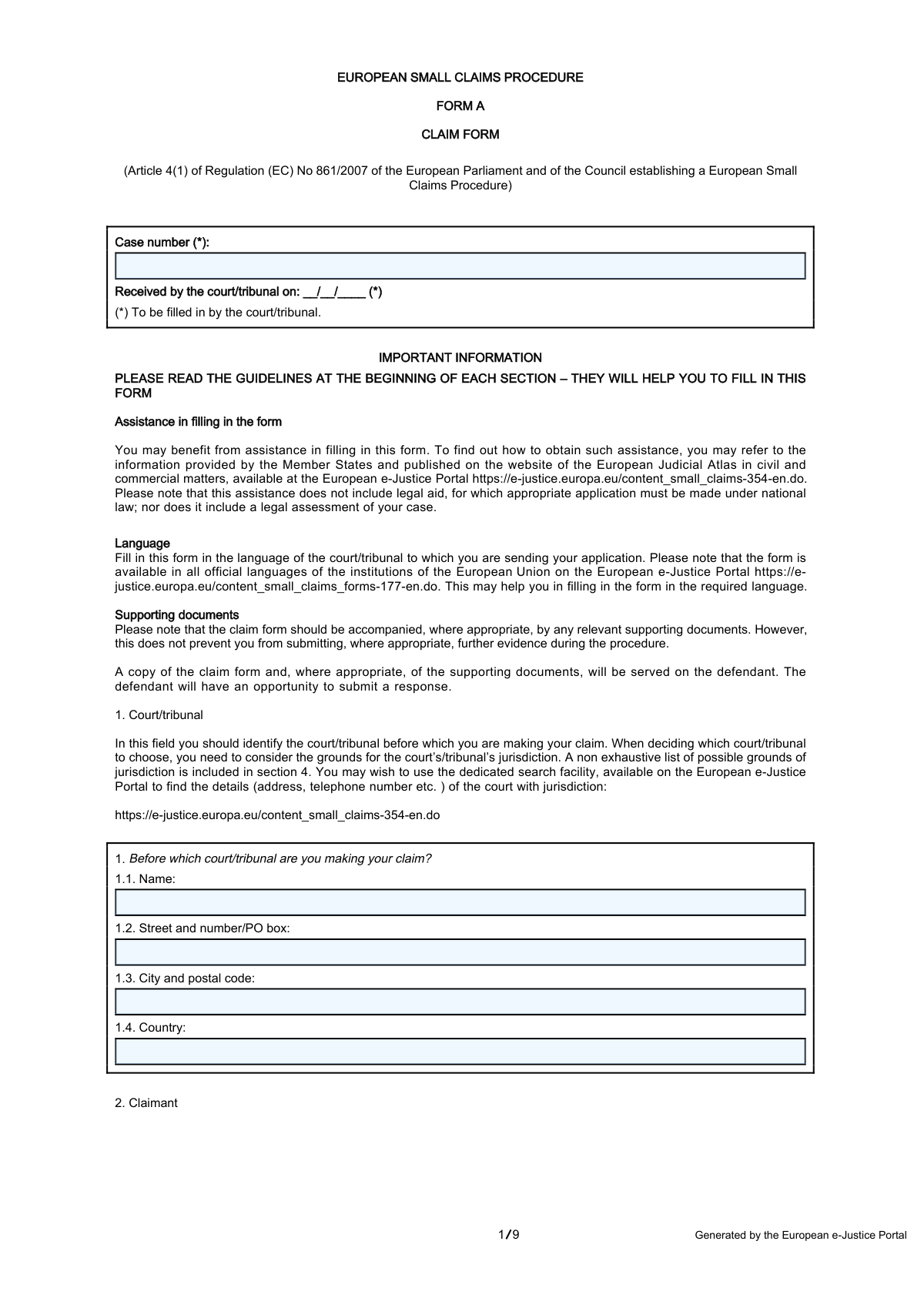
Yes! You can use AI to fill out Form A, Claim Form, European Small Claims Procedure
Form A is a standardized document established by the European Union to start a legal claim in a cross-border civil or commercial matter where the value does not exceed €5,000. It simplifies the process of litigation between parties in different EU member states, making it more accessible and less costly. Today, this form can be filled out quickly and accurately using AI-powered services like Instafill.ai, which can also convert non-fillable PDF versions into interactive fillable forms.
Our AI automatically handles information lookup, data retrieval, formatting, and form filling.
It takes less than a minute to fill out Form A using our AI form filling.
Securely upload your data. Information is encrypted in transit and deleted immediately after the form is filled out.
Form specifications
| Form name: | Form A, Claim Form, European Small Claims Procedure |
| Number of pages: | 9 |
| Language: | English |
| Categories: | small claims forms, VA claim forms |
Instafill Demo: How to fill out PDF forms in seconds with AI
How to Fill Out Form A Online for Free in 2026
Are you looking to fill out a FORM A form online quickly and accurately? Instafill.ai offers the #1 AI-powered PDF filling software of 2026, allowing you to complete your FORM A form in just 37 seconds or less.
Follow these steps to fill out your FORM A form online using Instafill.ai:
- 1 Navigate to Instafill.ai and upload or select the European Small Claims Procedure Form A.
- 2 Use the AI assistant to accurately fill in the details of the court or tribunal where the claim is being filed in Section 1.
- 3 Provide the complete details for both the claimant (you) and the defendant in Sections 2 and 3.
- 4 Clearly state the basis for the court's jurisdiction and the cross-border nature of the case in Sections 4 and 5.
- 5 Detail the claim in Section 7, specifying the amount, currency, and any interest or costs being claimed, and provide the reasons and evidence in Section 8.
- 6 Indicate your preferences for an oral hearing, electronic communication, and obtaining a certificate for enforcement in Sections 9, 10, and 11.
- 7 Review all the information you've entered, then digitally sign and date the form in Section 12 before submission.
Our AI-powered system ensures each field is filled out correctly, reducing errors and saving you time.
Why Choose Instafill.ai for Your Fillable Form A Form?
Speed
Complete your Form A in as little as 37 seconds.
Up-to-Date
Always use the latest 2026 Form A form version.
Cost-effective
No need to hire expensive lawyers.
Accuracy
Our AI performs 10 compliance checks to ensure your form is error-free.
Security
Your personal information is protected with bank-level encryption.
Frequently Asked Questions About Form Form A
This form is used to initiate a legal claim against a person or company in another EU member state for civil or commercial matters where the claim value is €5,000 or less. It is designed to simplify and speed up cross-border litigation for small claims.
You should fill out this form if you are a claimant wishing to start a European Small Claims Procedure. This applies when you have a claim against a party domiciled in a different EU Member State than the court handling the case.
Yes, the value of your claim cannot exceed €5,000. This amount excludes any interest and costs you might also be claiming.
You should attach any relevant documents that prove your claim, such as contracts, invoices, receipts, email correspondence, or photos. You must list and describe this evidence in section 8 of the form.
No, it is not mandatory to be represented by a lawyer or another legal professional. The procedure is designed to be accessible for individuals and businesses to use directly.
The form provides several grounds for jurisdiction in section 4, such as the defendant's place of residence. You can use the European e-Justice Portal to find the specific court with the correct jurisdiction for your case.
After you submit the form, the court will review it and, if accepted, serve a copy to the defendant. The defendant will then have an opportunity to respond to your claim.
Yes, you can request an oral hearing in section 9 of the form. However, the court will decide if a hearing is necessary and may refuse your request if the judgment can be made based on the written evidence alone.
The certificate is issued by the court after a judgment is made in your favor. It allows the judgment to be recognized and enforced in another Member State without needing further legal proceedings.
Section 6 outlines payment options like bank transfer or credit card, but you must check with the specific court to see which methods they accept. The Appendix to the form is used to provide sensitive payment details securely.
Yes, services like Instafill.ai use AI to accurately auto-fill form fields, which can save you time and help avoid errors. This is particularly useful for ensuring all required information is entered correctly.
You can use a service like Instafill.ai to complete the form digitally. Simply upload the PDF, and the platform will make it an interactive, fillable form that you can type into directly from your computer.
If you have a non-fillable or 'flat' PDF, you can use a tool like Instafill.ai. It can convert the document into an interactive, fillable form online, allowing you to easily complete and save it.
Compliance Form A
Validation Checks by Instafill.ai
1
Verifies Claim Value Does Not Exceed EUR 5000 Limit
This check ensures that the principal amount in field 7.1.1 or the estimated value in 7.2.2 does not exceed EUR 5000. If a different currency is used, it must be converted to EUR for this check. This is a fundamental eligibility requirement for the European Small Claims Procedure, and claims exceeding this value must be rejected and filed under a different procedure.
2
Ensures Cross-Border Nature of the Case
This validation confirms that the case is of a 'cross-border nature' by comparing the countries listed in fields 5.1 (Claimant), 5.2 (Defendant), and 1.4 (Court). The procedure is only applicable if at least one party is domiciled in a Member State different from the Member State of the court. A failure indicates the case may not be eligible for this specific procedure, leading to rejection of the form.
3
Validates Completeness of Mandatory Claimant Details
This check ensures that the claimant's core identification fields (2.1 Name, 2.3 Street, 2.4 City/Postal Code, 2.5 Country) are all filled. Incomplete claimant information can make the claim legally invalid and prevent the court from communicating with the claimant. The form submission will be blocked until all required fields are completed.
4
Validates Completeness of Mandatory Defendant Details
This check verifies that the defendant's core identification fields (3.1 Name, 3.3 Street, 3.4 City/Postal Code, 3.5 Country) are all populated. This information is critical for the court to properly serve the claim documents to the defendant, which is a legal requirement to begin proceedings. Failure to provide this information will halt the process as the claim cannot be legally delivered.
5
Confirms Jurisdiction Ground Selection
This validation ensures that the claimant has selected at least one basis for the court's jurisdiction in Section 4 (fields 4.1 through 4.7) or has provided a specification in 4.8 if 'Other' is chosen. Establishing jurisdiction is a primary legal step for any court case. If no ground is selected, the court cannot confirm its authority to hear the case, and the application will be deemed incomplete.
6
Requires Substantiation of Claim
This check verifies that field 8.1, 'Please give reasons for your claim', is not empty. The claimant must provide a description of the events and reasons for the claim to establish a basic cause of action. Without this information, the defendant cannot understand the case against them and the court has no basis on which to proceed, leading to an immediate rejection for being unsubstantiated.
7
Ensures Claim Type is Specified
This validation confirms that the claimant has detailed their claim in either Section 7.1 (for a monetary claim) or Section 7.2 (for a non-monetary claim). A claim must be for a specific remedy, either money or an action. If neither section is completed, the form is considered incomplete as it does not specify what the claimant is asking for.
8
Conditional Validation for Claimed Costs
This is a logical check that triggers if the claimant answers 'Yes' in field 7.3.1 ('Are you claiming the costs of proceedings?'). It then validates that field 7.3.3, which specifies the costs, is not empty. This ensures that a claim for costs is properly detailed and quantified, preventing ambiguity. If 7.3.3 is empty, the user will be prompted to either provide details or change the answer in 7.3.1 to 'No'.
9
Conditional Validation for Claimed Interest
This logical check activates if 'Yes' is selected for claiming interest in Section 7.4. It then ensures that the claimant completes the details for either contractual interest (7.4.1) or statutory interest (7.4.2), including the rate and start date. A claim for interest without specifying its basis and calculation is invalid. The form will be rejected if these subsequent details are missing.
10
Validates IBAN Format
This check verifies that the value entered in field 6.2.3 ('Account number/IBAN') follows the correct International Bank Account Number format if provided. A valid IBAN is crucial for ensuring any awarded payments can be transferred to the claimant without errors. An invalid format will trigger a warning to prevent future payment processing failures.
11
Validates Claimant's Email Format
This check ensures that if an email address is provided in field 2.7, it conforms to a standard email format (e.g., [email protected]). Since electronic communication is an option for serving documents, a valid email is essential for timely and legally sound correspondence. An invalid format would prevent submission or show an error, as it could jeopardize the entire communication chain.
12
Ensures All Court Details are Provided
This validation confirms that all fields in Section 1 (1.1 Name, 1.2 Street, 1.3 City/Postal Code, 1.4 Country) are completed. These details are mandatory to identify the specific court where the claim is being filed. Without this information, the form cannot be routed or processed, and the submission will be blocked.
13
Verifies Completion of Signature Block
This check ensures that the 'Done at' (location), 'Date', and 'Name of the person signing the form' fields in Section 12 are all filled out. These elements are part of the claimant's formal declaration and are legally required to execute the document. An incomplete signature block renders the entire claim form invalid and will prevent its submission.
14
Validates Currency Specification for Monetary Claims
This check ensures that if an amount is entered in the monetary claim field (7.1.1) or the estimated value field (7.2.2), a currency is also selected or specified. The amount is meaningless without a currency unit. This is critical for calculating the claim's value against the EUR 5000 limit and for any potential judgment, so the form will be considered incomplete without it.
Common Mistakes in Completing Form A
Claimants often misunderstand the complex rules of jurisdiction and select the wrong court in Section 1. This happens because they may not be familiar with Regulation (EU) No 1215/2012 or may assume their local court is always correct. An incorrect jurisdiction choice will lead to the court rejecting the claim, forcing the claimant to start the entire process over with the correct court and causing significant delays. To avoid this, carefully use the search facility on the European e-Justice Portal as linked in the form to find the court with proper jurisdiction.
Users frequently provide incomplete details for the defendant in Section 3, such as only a P.O. Box or a partial company name, which is insufficient for legal service in many countries. This prevents the court from successfully serving the claim documents, halting the case before it can even begin. It is crucial to provide a full street address and the complete legal name of the person or company to ensure the claim can be officially delivered and the procedure can move forward.
A fundamental error is filing a claim where the principal amount in Section 7.1.1 exceeds the EUR 5,000 threshold. Claimants may miscalculate the principal by wrongly including interest and costs, or simply be unaware of the limit for this specific procedure. If the claim exceeds this value, it will be rejected or transferred to a more complex and costly ordinary civil procedure. Always ensure the principal amount alone is EUR 5,000 or less before filing.
In Section 8.1, claimants often write a narrative that is emotional, disorganized, or lacks key facts like dates, locations, and a clear sequence of events. This makes it difficult for the court to understand the legal basis of the claim and can undermine an otherwise valid case. To avoid this, structure the description chronologically, state the facts clearly and concisely, and explain exactly what happened, when, and where, avoiding personal opinions or insults.
Claimants may list their supporting documents or witnesses in Section 8.2 but fail to explain what each piece of evidence is meant to prove. The court is not obligated to guess the relevance of an attached receipt or email, which can lead to the evidence being disregarded. For each piece of evidence listed, explicitly state which part of your claim narrative it supports (e.g., 'Receipt from 15 May 2023 supports the point that payment was made').
In Section 7.4, users often make errors when claiming interest, such as applying the wrong rate, specifying incorrect start/end dates, or confusing contractual and statutory interest. This can result in the court awarding a lower amount of interest than entitled or rejecting the interest claim altogether. Double-check the terms of any contract for the interest rate and date, and verify the applicable statutory interest rules. AI-powered form filling tools like Instafill.ai can help prevent simple entry errors by validating date formats.
This procedure is exclusively for cross-border cases, meaning at least one party must be domiciled in a different EU Member State than the court. Claimants sometimes file a purely domestic dispute where all parties and the court are in the same country. This makes the claim ineligible from the outset, leading to its immediate rejection. Before starting, confirm in Section 5 that the claimant, defendant, and court are not all based in the same Member State.
It is a surprisingly common and simple mistake to leave the signature and date fields in Section 12 blank, often due to oversight. An unsigned or undated application is legally invalid and will be returned by the court, halting the entire process until a correctly signed form is resubmitted. Always perform a final check to ensure you have physically or digitally signed and dated the form in the designated area before sending it.
In Section 6.2, claimants may enter their bank details with typos, particularly in the long IBAN or account number. This mistake often goes unnoticed until after a judgment is won and payment from the defendant is delayed or sent to the wrong account. To prevent this, carefully copy the IBAN and BIC/SWIFT code from an official bank statement and double-check every character. Tools like Instafill.ai can help by using format validation to catch structurally incorrect IBANs.
When a claim is for something other than money (e.g., delivery of goods) as described in Section 7.2, claimants often forget to provide an estimated monetary value. This information is crucial for the court to confirm the case falls within the EUR 5,000 jurisdictional limit of the procedure. Omitting the value will cause the court to request this information, delaying the case. Always provide a reasonable, good-faith estimate of the non-monetary claim's value and specify the currency.
The form states that the claim should be accompanied by relevant supporting documents, yet claimants often forget to attach them or assume they can be provided later. While further evidence can be submitted, failing to provide key documents like contracts or receipts with the initial claim weakens its credibility and can cause delays. Always attach copies of all documents mentioned in Section 8.2 to the submission. If the form is a non-fillable PDF, a tool like Instafill.ai can convert it to a fillable version, making it easier to manage and attach files digitally.
Saved over 80 hours a year
“I was never sure if my IRS forms like W-9 were filled correctly. Now, I can complete the forms accurately without any external help.”
Kevin Martin Green
Your data stays secure with advanced protection from Instafill and our subprocessors

Robust compliance program
Transparent business model
You’re not the product. You always know where your data is and what it is processed for.
ISO 27001, HIPAA, and GDPR
Our subprocesses adhere to multiple compliance standards, including but not limited to ISO 27001, HIPAA, and GDPR.
Security & privacy by design
We consider security and privacy from the initial design phase of any new service or functionality. It’s not an afterthought, it’s built-in, including support for two-factor authentication (2FA) to further protect your account.
Fill out Form A with Instafill.ai
Worried about filling PDFs wrong? Instafill securely fills form-a-claim-form-european-small-claims-procedure forms, ensuring each field is accurate.