Yes! You can use AI to fill out Form SC-114, Request to Amend Party Name Before Hearing (Small Claims)
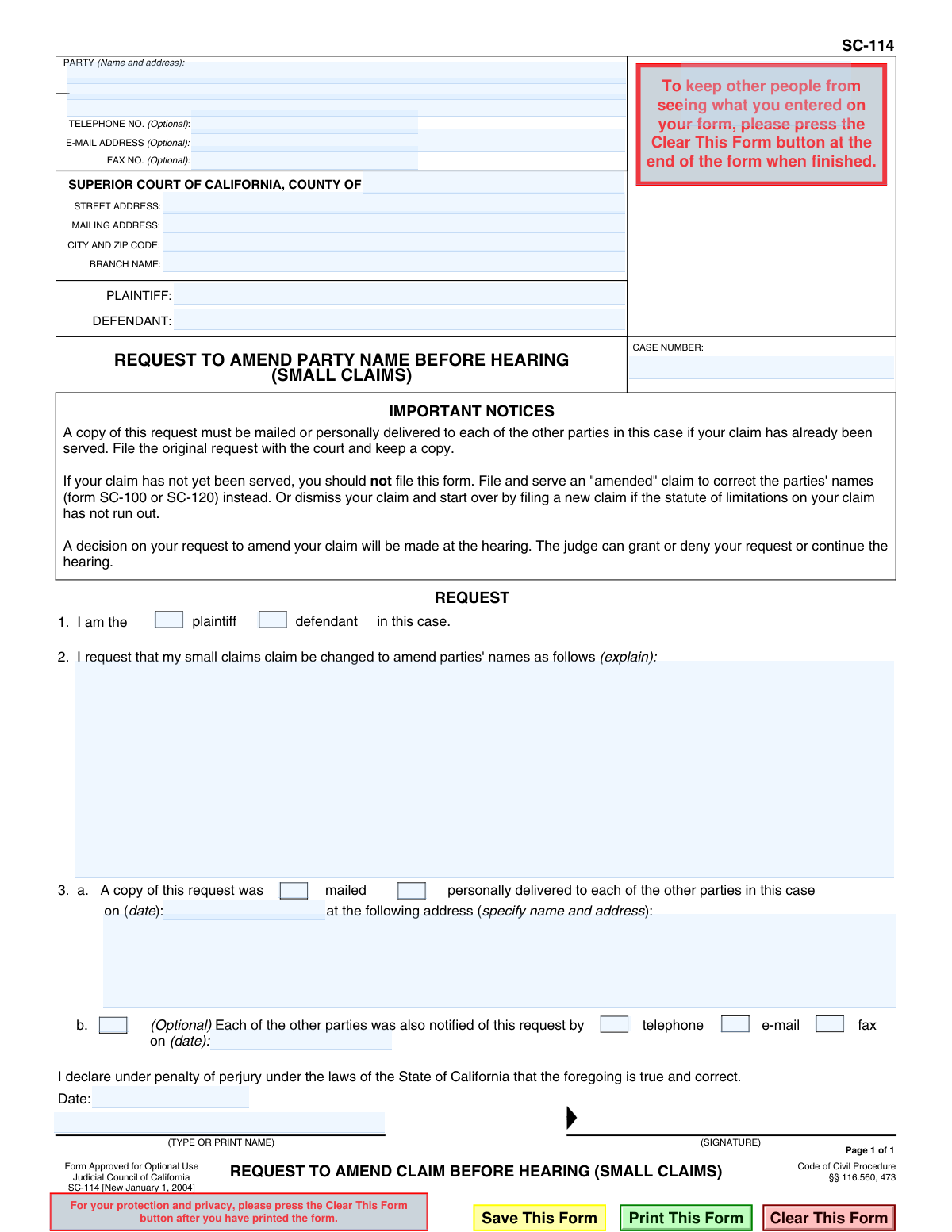
Form SC-114 is a legal request submitted to the Superior Court of California to amend the name of a party (plaintiff or defendant) in an existing small claims case before the court hearing. This is crucial for ensuring that the case records are accurate and that any resulting judgment is legally enforceable against the correct individual or entity. Today, this form can be filled out quickly and accurately using AI-powered services like Instafill.ai, which can also convert non-fillable PDF versions into interactive fillable forms.
SC-114 is part of the
California court forms, court claim forms and small claims forms categories on Instafill.
Our AI automatically handles information lookup, data retrieval, formatting, and form filling.
It takes less than a minute to fill out SC-114 using our AI form filling.
Securely upload your data. Information is encrypted in transit and deleted immediately after the form is filled out.
Form specifications
| Form name: | Form SC-114, Request to Amend Party Name Before Hearing (Small Claims) |
| Number of fields: | 34 |
| Number of pages: | 1 |
| Language: | English |
Instafill Demo: How to fill out PDF forms in seconds with AI
How to Fill Out SC-114 Online for Free in 2026
Are you looking to fill out a SC-114 form online quickly and accurately? Instafill.ai offers the #1 AI-powered PDF filling software of 2026, allowing you to complete your SC-114 form in just 37 seconds or less.
Follow these steps to fill out your SC-114 form online using Instafill.ai:
- 1 Navigate to Instafill.ai and upload or select Form SC-114, Request to Amend Party Name Before Hearing.
- 2 Use the AI assistant to input your case information, including the court name, branch, and case number.
- 3 Indicate whether you are the plaintiff or the defendant in the case by checking the appropriate box.
- 4 Clearly state the requested name change in section 2, explaining which party's name needs to be amended and what the correct name should be.
- 5 Complete section 3 to certify that you have served a copy of this request on all other parties involved in the case, providing the date and method of delivery.
- 6 Review all the auto-filled information for accuracy, then electronically sign and date the declaration under penalty of perjury.
- 7 Download the completed form to file with the court and retain a copy for your records.
Our AI-powered system ensures each field is filled out correctly, reducing errors and saving you time.
Why Choose Instafill.ai for Your Fillable SC-114 Form?
Speed
Complete your SC-114 in as little as 37 seconds.
Up-to-Date
Always use the latest 2026 SC-114 form version.
Cost-effective
No need to hire expensive lawyers.
Accuracy
Our AI performs 10 compliance checks to ensure your form is error-free.
Security
Your personal information is protected with bank-level encryption.
Frequently Asked Questions About Form SC-114
Form SC-114, Request to Amend Party Name Before Hearing, is used to ask the court to correct or change the name of a plaintiff or defendant in a small claims case after the claim has already been served on the other parties.
Either the plaintiff (the person who filed the lawsuit) or the defendant (the person being sued) can file this form to request a name change for any party involved in the case.
No, if you have not yet served the other party, you should not use this form. Instead, you should file an amended claim (Form SC-100 or SC-120) with the correct name and serve that new form.
This form is for correcting errors like a misspelled name, adding a middle initial, or changing a business name to the owner's name (or vice versa). It is not meant for substituting a completely different person into the lawsuit.
In Section 2, you should clearly state the current, incorrect name and the new, correct name you are requesting. For example: 'Change Defendant's name from Jon Smith to Jonathan Smith.'
Yes, you are required to mail or personally deliver a copy of the completed form to all other parties in the case. You must then complete Section 3 to certify that you have done so.
File the original, signed request with the court clerk at the courthouse where your small claims case is being heard. Always keep a copy for your own records.
No, the request is not automatically approved. A judge will review your request and make a decision at the hearing; they can grant it, deny it, or postpone (continue) the hearing.
No, this form is for correcting a name, not for substituting a different person. You may need to dismiss your current case and file a new one against the correct party, provided the statute of limitations has not expired.
At the hearing, the judge will consider your request to amend the party name. The judge can then grant your request, deny it, or decide to continue the hearing to a later date.
Yes, services like Instafill.ai use AI to help you accurately auto-fill forms like the SC-114. This can save you time and help reduce errors by pulling information from your case file.
Simply upload the SC-114 form to the Instafill.ai platform. The AI will identify the fields, allowing you to fill them out interactively and ensure all required information is entered correctly before printing.
You can use a service like Instafill.ai, which can convert flat, non-fillable PDFs into interactive, fillable forms. This allows you to type your information directly onto the form before printing it for filing and service.
Compliance SC-114
Validation Checks by Instafill.ai
1
Validates Case Number Presence and Format
Checks that the 'CASE NUMBER' field is not empty and conforms to the standard format used by the court. The case number is the primary identifier for the legal proceeding, and its absence or incorrect format would make it impossible to file the request with the correct case. A failed validation would prevent submission until a valid case number is entered.
2
Ensures Requester Role is Identified
Verifies that the user has selected either 'plaintiff' or 'defendant' in section 1. This selection is mandatory to identify the role of the person submitting the request within the case. The form is considered incomplete and cannot be processed if this information is missing.
3
Verifies Amendment Explanation is Provided
Ensures the text field in section 2, which details the requested name change, is not empty. This explanation is the fundamental purpose of the form, and without it, the request is void of any meaning. The submission will be rejected if this field is left blank.
4
Confirms Selection of Primary Service Method
Validates that in section 3.a, the user has selected either 'mailed' or 'personally delivered' as the method of service. Notifying other parties is a legal requirement, making this selection mandatory to create a valid proof of service. The form is incomplete if no method is chosen.
5
Requires Service Date
Checks that the date of service in section 3.a is filled out. This date is a critical component of the proof of service, documenting when the other parties were officially notified of the amendment request. A missing date invalidates the proof of service and will cause the form to be rejected.
6
Validates Service Date Format and Logic
Ensures the date of service in section 3.a is in a valid format (e.g., MM/DD/YYYY) and is not a date in the future. An invalid format or a future date would render the declaration of service illogical and legally unsound. The system should prevent submission until a valid, past or present date is entered.
7
Ensures Served Party Details are Complete
Verifies that the name and address of the party served, as specified in section 3.a, are fully provided. This information is essential for the court to confirm that the correct opposing party was properly notified of the request. Incomplete information will lead to the rejection of the filing.
8
Validates Presence of Declaration Date
Confirms that the 'Date' field in the declaration section is filled out. This date establishes when the declaration was made under penalty of perjury. A missing date makes the declaration legally incomplete, and the form cannot be accepted by the court.
9
Verifies Chronological Order of Service and Signature Dates
This check compares the service date from section 3.a with the declaration signature date. The service date must be on or before the signature date, as a person cannot legally declare they have completed an action that is set to happen in the future. An illogical date sequence invalidates the sworn statement and must be corrected before submission.
10
Requires Printed Name of Signatory
Ensures the 'TYPE OR PRINT NAME' field is completed. This clearly identifies the individual who is signing the form and making the declaration under penalty of perjury. Without a printed name, the signature's identity is ambiguous, making the form invalid for legal purposes.
11
Validates Optional Email Address Format
If an email address is provided in the optional 'E-MAIL ADDRESS' field, this check ensures it conforms to a standard format (e.g., '[email protected]'). While the field is optional, providing an invalidly formatted email can lead to critical communication failures from the court. The user should be alerted to correct the format if it's incorrect.
12
Validates Optional Phone Number Format
If a telephone number is provided in the optional 'TELEPHONE NO.' field, this check verifies it follows a recognizable format (e.g., 10 digits, possibly with parentheses and hyphens). Although optional, an incorrectly formatted number can prevent the court from contacting the filer if needed. This check helps ensure the data is usable if provided.
Common Mistakes in Completing SC-114
A frequent error is filing form SC-114 before the original small claims case has been served on the other party. The form's instructions explicitly state that if the claim has not yet been served, you must file an 'amended' claim (Form SC-100 or SC-120) instead. Using the wrong form leads to rejection by the court clerk, wasting time and potentially causing you to miss important deadlines. Always confirm the service status of your original claim before selecting a form.
Users often mistakenly enter their own personal address in the header section designated for the court's information (Street Address, City and Zip Code, Branch Name). This section must contain the address of the specific Superior Court branch where the case is filed. This error can cause the document to be rejected or misrouted, leading to significant processing delays. To avoid this, carefully copy the court's information from previous case documents.
In Section 2, filers frequently provide an unclear request, such as 'Correct defendant's name.' This is insufficient for the court. The request must be explicit, stating both the current, incorrect name and the proposed correct name (e.g., 'Amend the name of Defendant from Jane Smith to Jane Smith-Jones'). A vague request may be denied by the judge, forcing you to refile and potentially delaying your hearing.
Forgetting to include the case number or making a typographical error when entering it is a critical mistake. The case number is the primary identifier the court uses to locate your file and associate this request with it. Without a correct case number, the clerk cannot process the filing, and the form will be returned, halting all progress on your amendment request. AI-powered tools like Instafill.ai can help prevent this by auto-filling the case number accurately across related forms.
Many people fill out and file this form with the court before they have notified the other parties. Section 3 requires you to declare under penalty of perjury that you have *already* mailed or personally delivered a copy to the other parties on a specific date. Filing before serving makes your declaration false and invalidates the request, which will not be considered by the judge. Always serve the other parties first, then complete Section 3 and file the form.
Submitting an unsigned or undated form is one of the most common and easily avoidable errors. The signature under the 'penalty of perjury' clause is a legal requirement that validates the document. An unsigned form is legally worthless and will be immediately rejected by the court. Always perform a final check for a signature and date before filing. Smart form-filling tools can often flag empty signature or date fields to prevent this oversight.
In Section 3.a, filers may enter the wrong date of service, provide an incomplete name or address for the party they served, or forget to check the box for 'mailed' or 'personally delivered'. These inaccuracies can give the opposing party grounds to challenge the validity of the service, potentially causing the judge to delay the hearing. To avoid this, fill out this section immediately after serving the documents while the details are fresh in your mind.
This form is exclusively for amending a party's name. A common mistake is attempting to use it for other actions, such as adding a completely new defendant, changing the dollar amount of the claim, or adding a new cause of action. Using the form for a purpose it was not designed for will result in the judge denying the request. You must use the appropriate, separate legal forms for any other type of amendment.
A procedural misunderstanding leads some people to mail the original, signed document to the opposing party and a copy to the court. The correct procedure is the reverse: the original signed form must be filed with the court clerk. The other parties receive only copies. Filing a copy instead of the original will lead to rejection, as the court requires the document with the 'wet' or original signature.
Many court forms are only available online as flat, non-fillable PDFs, leading to messy handwritten submissions that are prone to errors and may be difficult for the court to read. This can result in data entry mistakes by court staff or rejection of the form if it's deemed illegible. To avoid this, use a service like Instafill.ai, which can convert any non-fillable PDF into an interactive, fillable form, ensuring a clean, professional, and accurate submission.
Saved over 80 hours a year
“I was never sure if my IRS forms like W-9 were filled correctly. Now, I can complete the forms accurately without any external help.”
Kevin Martin Green
Your data stays secure with advanced protection from Instafill and our subprocessors

Robust compliance program
Transparent business model
You’re not the product. You always know where your data is and what it is processed for.
ISO 27001, HIPAA, and GDPR
Our subprocesses adhere to multiple compliance standards, including but not limited to ISO 27001, HIPAA, and GDPR.
Security & privacy by design
We consider security and privacy from the initial design phase of any new service or functionality. It’s not an afterthought, it’s built-in, including support for two-factor authentication (2FA) to further protect your account.
Fill out SC-114 with Instafill.ai
Worried about filling PDFs wrong? Instafill securely fills form-sc-114-request-to-amend-party-name-before-hearing-small-claims forms, ensuring each field is accurate.