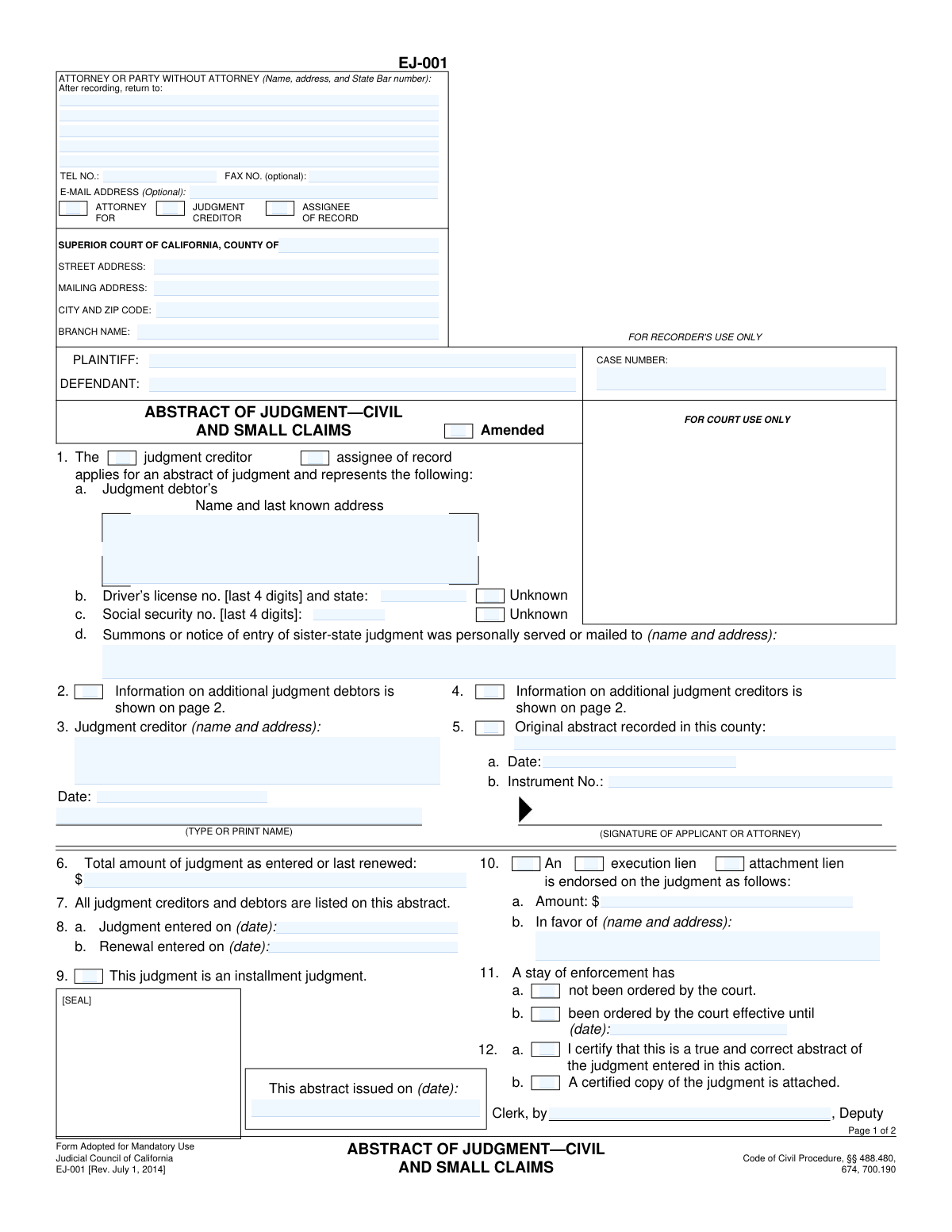
Yes! You can use AI to fill out Form EJ-001, Abstract of Judgment—Civil and Small Claims
Form EJ-001, Abstract of Judgment—Civil and Small Claims, is a legal document issued by the Superior Court of California that summarizes the key details of a money judgment from a civil or small claims case. Filing this abstract with the county recorder's office creates a lien on any real property owned by the judgment debtor within that county, which is a crucial step for a judgment creditor seeking to enforce the judgment and collect the debt. Today, this form can be filled out quickly and accurately using AI-powered services like Instafill.ai, which can also convert non-fillable PDF versions into interactive fillable forms.
EJ-001 is part of the
California court forms, civil court forms, civil enforcement forms, court claim forms, judgment enforcement forms and small claims forms categories on Instafill.
Our AI automatically handles information lookup, data retrieval, formatting, and form filling.
It takes less than a minute to fill out EJ-001 using our AI form filling.
Securely upload your data. Information is encrypted in transit and deleted immediately after the form is filled out.
Form specifications
| Form name: | Form EJ-001, Abstract of Judgment—Civil and Small Claims |
| Number of fields: | 84 |
| Number of pages: | 1 |
| Language: | English |
Instafill Demo: How to fill out PDF forms in seconds with AI
How to Fill Out EJ-001 Online for Free in 2026
Are you looking to fill out a EJ-001 form online quickly and accurately? Instafill.ai offers the #1 AI-powered PDF filling software of 2026, allowing you to complete your EJ-001 form in just 37 seconds or less.
Follow these steps to fill out your EJ-001 form online using Instafill.ai:
- 1 Navigate to Instafill.ai and upload or select the Form EJ-001.
- 2 Provide the court and case information, including the county, court address, plaintiff and defendant names, and the case number.
- 3 Enter the full names and last known addresses for all judgment creditors and judgment debtors. Include the last four digits of the debtor's driver's license and social security number, if known.
- 4 Input the details of the judgment, including the total amount as entered or last renewed, and the dates of entry or renewal.
- 5 Indicate if a stay of enforcement has been ordered by the court or if an execution or attachment lien is endorsed on the judgment.
- 6 Review all the information populated by the AI for accuracy, make any necessary corrections, and then date and sign the application.
- 7 Download the completed abstract of judgment, ready for the court clerk to issue and for you to record with the appropriate county recorder's office.
Our AI-powered system ensures each field is filled out correctly, reducing errors and saving you time.
Why Choose Instafill.ai for Your Fillable EJ-001 Form?
Speed
Complete your EJ-001 in as little as 37 seconds.
Up-to-Date
Always use the latest 2026 EJ-001 form version.
Cost-effective
No need to hire expensive lawyers.
Accuracy
Our AI performs 10 compliance checks to ensure your form is error-free.
Security
Your personal information is protected with bank-level encryption.
Frequently Asked Questions About Form EJ-001
This form is used to create a public record of a money judgment from a civil or small claims case. Recording it with a county recorder creates a lien on the judgment debtor's real property in that county, which helps in collecting the debt.
The judgment creditor (the person or entity who won the case and is owed money) or their attorney should complete this form to begin the process of enforcing a money judgment.
You must provide the debtor's full name and last known address. If you have them, you should also include the last four digits of their Social Security number and driver's license number, or check the 'Unknown' box if you don't.
List the first judgment debtor on the front page in section 1. Use the second page of the form (sections 16-19) to provide the required information for any additional judgment debtors.
First, you submit the form to the clerk of the court where the judgment was entered to have it certified and issued. After that, you must take the issued abstract to the county recorder's office in any county where the debtor owns or may own property.
The 'Judgment entered on' date is when the court originally granted the judgment. The 'Renewal entered on' date is only filled in if you have gone through the legal process to renew your judgment, which is typically done as it approaches its 10-year expiration date.
A stay of enforcement is a court order that temporarily pauses your ability to collect on the judgment. You must accurately report whether a stay has been ordered by the court and, if so, when it ends.
You should check the 'Amended' box if you are filing this form to correct an error on a previously issued Abstract of Judgment for the same case.
Once recorded by the county recorder, the abstract creates a lien on the debtor's real property in that county. This means the debtor cannot sell or refinance the property without paying off the debt owed to you.
Yes, services like Instafill.ai use AI to accurately auto-fill form fields from your case information, which can save you significant time and help prevent errors.
You can use a service like Instafill.ai to fill out the form online. Simply upload the PDF, and the platform will make it interactive, allowing you to type your information directly into the fields before printing for submission.
If you have a non-fillable or 'flat' PDF, you can use a tool like Instafill.ai. It can convert non-interactive PDFs into fillable forms that you can easily complete on your computer.
Compliance EJ-001
Validation Checks by Instafill.ai
1
Ensures Case Number is Provided
This check verifies that the 'CASE NUMBER' field is not empty. The case number is the unique identifier for the legal action within the court system and is essential for linking the abstract of judgment to the correct case file. Submitting the form without a case number would result in immediate rejection as it cannot be processed or recorded.
2
Requires Both Plaintiff and Defendant Names
This validation ensures that both the 'PLAINTIFF' and 'DEFENDANT' name fields are filled out on page 1. An abstract of judgment is a public record of debt owed by a specific defendant to a specific plaintiff. Failure to clearly identify both primary parties makes the judgment ambiguous and legally unenforceable.
3
Validates Total Judgment Amount Format
This check ensures that the 'Total amount of judgment as entered or last renewed' in field 6 is a valid positive numerical or currency value. The monetary amount is the core component of the judgment, and it must be clear and unambiguous for enforcement purposes. The validation prevents non-numeric characters or negative values, which would render the abstract invalid.
4
Verifies Judgment Entry Date is a Valid Past Date
This validation confirms that the 'Judgment entered on' date in field 8a is present, correctly formatted, and represents a date in the past or present, not the future. The entry date establishes the legal start of the judgment and is critical for calculating interest and statutes of limitation. A missing, invalid, or future date would make the abstract legally defective.
5
Ensures Renewal Date is Logically After Entry Date
If a 'Renewal entered on' date is provided in field 8b, this check verifies that it is on or after the 'Judgment entered on' date from field 8a. A judgment can only be renewed after it has been officially entered. A renewal date that precedes the entry date is a logical impossibility and indicates a significant data entry error that must be corrected.
6
Conditional Requirement for Debtor's SSN/DL
This rule checks the judgment debtor's information in sections 1, 16, 17, 18, and 19. If the 'Unknown' checkbox for either the Social Security number or Driver's license number is not checked, the corresponding field must be filled. This information is critical for uniquely identifying the debtor for credit reporting and asset location, so it must be provided if it is known and the 'Unknown' box is not selected.
7
Validates 4-Digit Format of SSN and Driver's License Numbers
This check ensures that if a Social Security number or Driver's license number is provided (fields 1b, 1c, 16-19), it consists of exactly four characters as specified on the form. The form explicitly requests only the last 4 digits for privacy and identification purposes. Submitting data in a different format would violate the form's instructions and could lead to rejection or processing errors.
8
Conditional Requirement for Stay of Enforcement Date
This validation applies to section 11. If the checkbox for 'been ordered by the court effective until' (11b) is selected, a valid date must be entered in the corresponding text field. This date is legally significant as it defines the period during which the creditor cannot enforce the judgment. The form is incomplete if a stay is indicated but the end date is missing.
9
Ensures Lien Details are Complete if a Lien is Indicated
This check verifies that if either 'execution lien' or 'attachment lien' is checked in section 10, then both the lien amount (10a) and the 'in favor of' name and address (10b) are filled out. A lien cannot be endorsed on the judgment without specifying its value and beneficiary. Missing this information would make the lien endorsement incomplete and legally ineffective.
10
Verifies Data for 'Additional Parties' Checkboxes
This rule checks for consistency between the checkboxes in sections 2 and 4 and the data on page 2. If checkbox 2 ('Information on additional judgment debtors is shown on page 2') is checked, at least one additional debtor section (16-19) must contain data. This prevents submitting a form that claims additional parties exist but fails to provide their details, which would be confusing and incomplete.
11
Ensures Case Information is Consistent Across Pages
This validation compares the 'PLAINTIFF', 'DEFENDANT', and 'COURT CASE NO.' fields on page 2 with the corresponding fields on page 1. These core identifiers must match exactly to ensure that page 2 is correctly associated with page 1. A mismatch could lead to incorrect filing or the pages being separated and misattributed to the wrong case.
12
Requires Identification of Applicant and Creditor
This check validates that the applicant is identified by checking one of 'judgment creditor' or 'assignee of record' in section 1, and that the Judgment Creditor's name and address are provided in section 3. The abstract must clearly state who is applying for it and who the legal beneficiary of the judgment is. Without this information, the document lacks a clear purpose and legal standing.
13
Requires Applicant Signature and Date
This validation ensures that the signature line for the applicant or attorney is signed and that the date field next to it is filled. The signature certifies the accuracy of the information provided on the form. An unsigned or undated application is not legally valid and will be rejected by the court clerk.
Common Mistakes in Completing EJ-001
Filers often misspell party names, use unofficial abbreviations, or fail to list the names exactly as they appear on the official court judgment. This is critical because the abstract of judgment creates a lien against the debtor's property, and an incorrect name may render the lien invalid or unenforceable. To avoid this, meticulously copy the names of all plaintiffs and defendants from the final judgment document without any alterations.
The case number is the primary identifier linking the abstract to the court file, but it's easy to transpose digits or omit prefixes/suffixes. An incorrect case number will cause the court clerk to reject the form or, worse, result in an abstract that is completely invalid and fails to create a lien. Always double-check the case number against official court documents before submission.
In section 6, filers may incorrectly enter only the principal award, forgetting to include court costs, accrued interest, and other fees that constitute the total judgment. This results in a lien for an incorrect amount, which can lead to future disputes and legal challenges to correct. Always refer to the final judgment order and any cost memoranda to calculate and enter the precise total amount owed.
The form asks for the last 4 digits of the debtor's Social Security and Driver's License numbers. If this information is not known, filers often leave the fields blank, which can lead to rejection for being incomplete. The correct procedure is to explicitly check the 'Unknown' box next to each respective field. This signals to the court that the information is unavailable, not just overlooked.
A common error is to confuse the date of the trial or hearing with the date the judgment was officially entered by the court clerk in section 8a. Using the wrong date can affect the lien's validity period and priority. The correct date is found on the 'Notice of Entry of Judgment' or in the court's official case record, and it must be transcribed accurately.
When a case involves multiple judgment debtors or creditors, filers sometimes list only the first party on page 1 and forget to check the box indicating more parties (e.g., Box 2 or 4) and complete the required information on page 2. This oversight means the abstract is only effective for the parties listed, potentially leaving some debtors free of the lien. Ensure every party is listed, using page 2 and checking the corresponding boxes on page 1.
When using page 2 for additional parties, filers frequently forget to fill in the Plaintiff, Defendant, and Case Number in the header at the top of the page. If the pages are separated during processing, this 'orphaned' second page becomes unidentifiable, rendering the information on it useless and the abstract incomplete. Always complete the header on every page of your submission.
In section 11, a filer might be unaware of a court-ordered stay of enforcement and incorrectly check box 11a ('not been ordered'). Recording an abstract while a stay is active is a violation that can lead to court sanctions. Before filling out this section, it is crucial to verify the current case status to confirm whether any stay is in effect.
This form is often provided as a non-fillable PDF, leading to manual data entry that is prone to errors, illegible handwriting, and misaligned text. These issues can cause the form to be rejected by the court clerk, delaying the creation of the judgment lien. AI-powered tools like Instafill.ai can convert such documents into smart, fillable forms, which helps prevent data entry errors by validating and formatting information correctly.
Filers often write a generic court name, such as 'Superior Court of Los Angeles County,' while omitting the specific street address and branch name (e.g., 'Stanley Mosk Courthouse'). This ambiguity can lead to the form being misrouted or rejected, as it must be filed with the court that issued the judgment. Always provide the complete and specific address and branch name of the courthouse.
Saved over 80 hours a year
“I was never sure if my IRS forms like W-9 were filled correctly. Now, I can complete the forms accurately without any external help.”
Kevin Martin Green
Your data stays secure with advanced protection from Instafill and our subprocessors

Robust compliance program
Transparent business model
You’re not the product. You always know where your data is and what it is processed for.
ISO 27001, HIPAA, and GDPR
Our subprocesses adhere to multiple compliance standards, including but not limited to ISO 27001, HIPAA, and GDPR.
Security & privacy by design
We consider security and privacy from the initial design phase of any new service or functionality. It’s not an afterthought, it’s built-in, including support for two-factor authentication (2FA) to further protect your account.
Fill out EJ-001 with Instafill.ai
Worried about filling PDFs wrong? Instafill securely fills form-ej-001-abstract-of-judgmentcivil-and-small-claims forms, ensuring each field is accurate.