
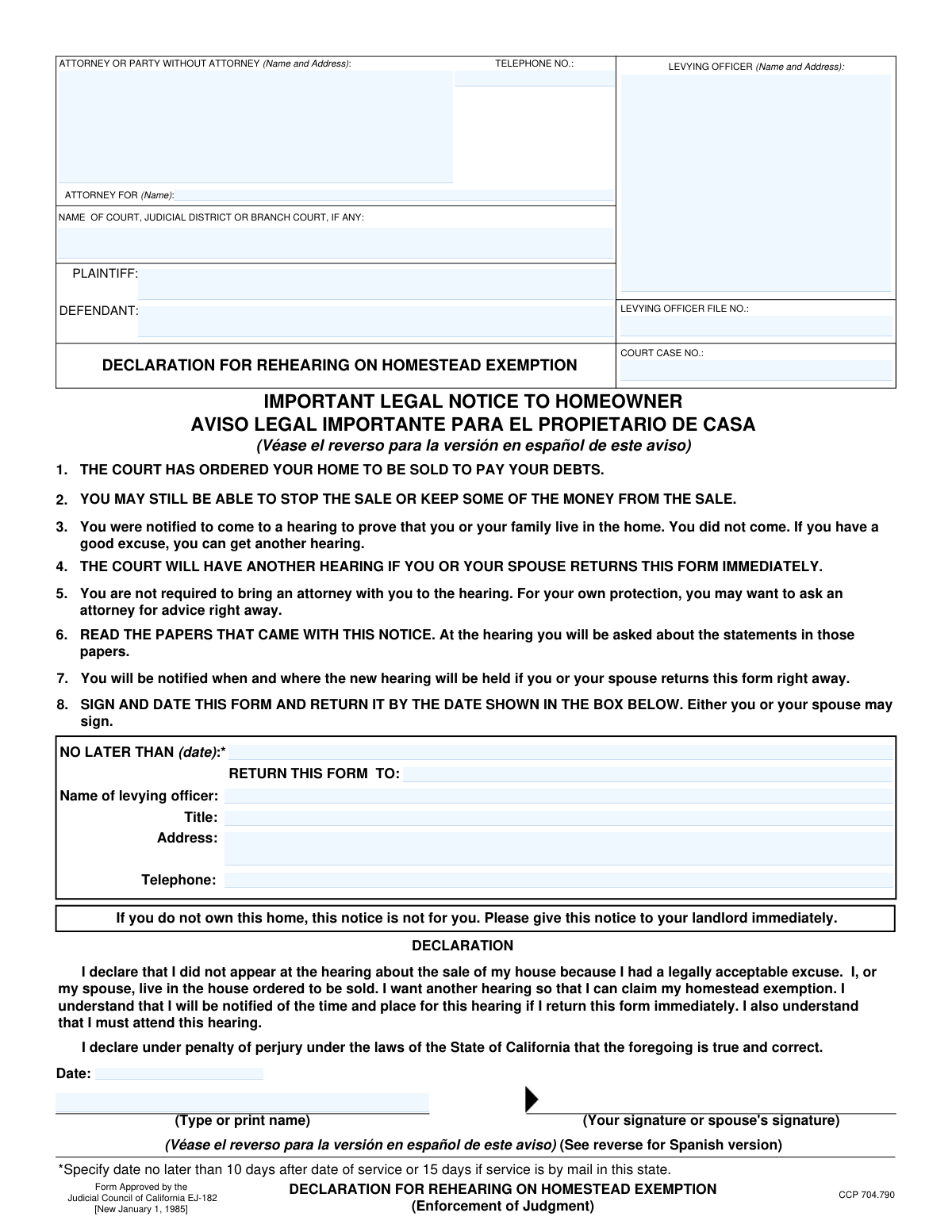
Yes! You can use AI to fill out Form EJ-182, Declaration for Rehearing on Homestead Exemption (Enforcement of Judgment)
Don't type 31 fields by hand. Tell our AI about yourself, or upload a document you already have, and it fills every field in seconds. You check it, then download, print or sign.
The AI does the filling. You just check it.
No typing into boxes, nothing to install.
What this form asks for
The AI fills all of it, from your answers or your documents.
The AI checks your answers before you download
12 checks built for this form, so a wrong date or a missing answer is caught before anyone else sees it.
This validation confirms that the 'COURT CASE NO.' entered on page one is identical to the 'COURT CASE NO.' on page two. Maintaining this consistency is critical for ensuring the document is treated as a single, cohesive legal filing. A mismatch could lead to processing errors, rejection by the court clerk, or incorrect association with the case file.
This check verifies that the 'LEVYING OFFICER FILE NO.' is the same on both page one and page two of the form. This number is a key identifier for the enforcement action being taken by the levying officer. Inconsistent numbers could cause confusion, delay the processing of the rehearing request, and potentially jeopardize the homeowner's rights.
This validation ensures that the user has completed either the English declaration on page one or the Spanish declaration on page two. The form allows for either to be legally binding, so at least one must have a date and printed name. This prevents the submission of a blank or incomplete declaration, which would be invalid and fail to request the rehearing.
This rule validates that if a date is entered in a declaration section (either English or Spanish), a printed name is also provided, and vice versa. Both fields are required to constitute a complete declaration. An incomplete section could be interpreted as an abandoned or invalid request, so this check ensures all necessary components are present together.
This check ensures that the 'Date'/'Fecha' field in the signature block is entered in a valid format, such as MM/DD/YYYY. An improperly formatted date can create legal ambiguity regarding when the declaration was made under penalty of perjury. If the date is invalid, the form submission should be blocked until a recognizable date format is provided.
This validation confirms that the signature date provided in the declaration section is not a future date. A post-dated legal declaration is invalid and could be grounds for immediate rejection. This check is crucial for maintaining the integrity of the document and ensuring it reflects a truthful statement made on or before the submission date.
And 6 more checks
- Requires Attorney or Pro Se Filer Information
- Validates Telephone Number Format
- Ensures Court Name is Provided
- Requires Plaintiff and Defendant Names
- Validates 'Return No Later Than' Date Format
- Verifies Case Identifier Presence
Let AI fill out your EJ-182
No typing. Every field filled in seconds, checked, ready to sign.
How to Fill Out EJ-182 Online for Free in 2026
What the AI walks you through.
- Navigate to Instafill.ai and upload or select the EJ-182 form.
- Provide the court case information, including the court name, case number, plaintiff, and defendant names.
- Enter your attorney's information or your own if you are representing yourself.
- Input the name and address of the levying officer as specified in the notice you received.
- Complete the declaration section, affirming that you or your spouse live in the home and had a legally acceptable excuse for missing the prior hearing.
- Electronically sign and date the declaration under penalty of perjury.
- Review all the information for accuracy, then download the completed form to be returned to the levying officer by the specified deadline.
Common Mistakes in Completing EJ-182
The ones the AI is built to catch.
Missing the Critical Submission Deadline
Entering Incorrect Case or File Numbers
Returning the Form to the Wrong Office
Submitting an Unsigned or Undated Form
Leaving Header Information Incomplete
Inconsistent Information Between Page 1 and Page 2
Using Illegible Handwriting
Signing but Not Printing the Name
Failing to Fill Out the 'Return To' Information
Frequently Asked Questions About EJ-182
Is it really free for 7 days?
Can I fill other forms too?
How do I cancel?
How does the AI fill out EJ-182?
What happens to my information?
How complex is EJ-182 to fill out?
What is the purpose of the 'Declaration for Rehearing on Homestead Exemption' form (EJ-182)?
Who needs to fill out this form?
I received this notice, but I am a renter, not the homeowner. What should I do?
What information do I need to provide on this form?
Where do I send the completed Form EJ-182?
What is the deadline to submit this form?
What happens after I submit the form?
Do I need an attorney to request a rehearing or attend the hearing?
What does it mean to have a 'legally acceptable excuse' for missing the hearing?
Can I fill out and return the Spanish version of the form?
What happens if I do not return this form by the deadline?
Can AI tools help me fill out this form?
How can I use Instafill.ai to fill this form out online?
The PDF version of this form I have is not fillable. How can I fix this?
Get your EJ-182 filled out by AI
$0 today. Cancel before Nov 1 and you pay nothing.
Other forms like this one
California court forms: Judicial Council of California Form SC-105, Request for Court Order and Answer (Small Claims), Judicial Council of California Form SC-120, Defendant’s Claim and ORDER to Go to Small Claims Court (Small Claims), Judicial Council of California Form SER-001, Request for Sheriff to Serve Court Papers, Judicial Council of California Form SER-001, Request for Sheriff to Serve Court Papers, Affidavit for Collection of Personal Property California Probate Code Section 13100, Form POS-040, Proof of Service—Civil, Declaration of Facts of Death (California Superior Court), declaration-of-marriage-for-court-proceeding-california-family-law, ADOPT-200, Adoption Request, ADOPT-200, Stepparent Adoption Request, ADOPT-210, Adoption Agreement, ADOPT-310, Contact After Adoption Agreement, Judicial Council of California Form ADOPT-200, Adoption Request, Form ADR-107, Mediation Attendance Sheet, Form ADR-110, Order Appointing Referee, Form ADR-109, Stipulation or Motion for Order Appointing Referee, Form ADR-102, Request for Trial De Novo After Judicial Arbitration, Form ADR-108, Referee's Report (Code Civ. Proc., §§ 638, 639), Form ADR-106, Petition to Confirm, Correct, or Vacate Contractual Arbitration Award, Form ADR-104, Rejection of Award and Request for Trial After Attorney-Client Fee Arbitration
judgment enforcement forms: Form AT-180/EJ-185, Notice of Lien (Attachment—Enforcement of Judgment), Form WG-017/EJ-137, Application to Stay Levy or Garnishment (Wage Garnishment—Enforcement of Judgment), Form EJ-141, Application and Order to Appear for Examination—Consumer Debt, Form EJ-150, Notice of Levy (Enforcement of Judgment), Form EJ-158, Declaration Regarding Notice and Service for Ex Parte Application for Order on Deposit Account Exemption, Form EJ-190, Application for and Renewal of Judgment, Form EJ-100, Acknowledgment of Satisfaction of Judgment, Form EJ-105, Application for Entry of Judgment on Sister-State Judgment, Form EJ-146, Notice of Motion and Motion to Require Examination—Consumer Debt, Form EJ-147, Application and Order to Require Examination After Submission of Financial Statement—Consumer Debt, Form EJ-160, Claim of Exemption (Enforcement of Judgment), Form EJ-180, Notice of Hearing on Right to Homestead Exemption (Enforcement of Judgment), Form EJ-001, Abstract of Judgment—Civil and Small Claims, Declaration of Address Verification (Wage Garnishment—Enforcement of Judgment), Form WG-010/EJ-175, Notice of Hearing on Claim of Exemption (Wage Garnishment—Enforcement of Judgment), Form EJ-195, Notice of Renewal of Judgment, Form WG-007/EJ-165, Financial Statement (Wage Garnishment—Enforcement of Judgment)
Let AI fill out your EJ-182
Your trial starts once a card is added. You pay nothing before Nov 1.
Our AI already knows this form, all 31 fields of it. Skip the typing: tell it about yourself, or upload what you have, and it fills the whole form in seconds.
- AI fills every field on both pages, checkboxes included
- No typing into boxes: answer a few questions, or upload a document you already have, an old copy of this form, a photo of a document
- The AI checks the answers; you review and change anything before you download
- Download the finished PDF, print it, or sign it online
- Encrypted, and never used to train AI
Cancel before Nov 1 and you pay nothing.
A card is needed to start the trial. Cancel in two clicks from your account.
Terms · Privacy