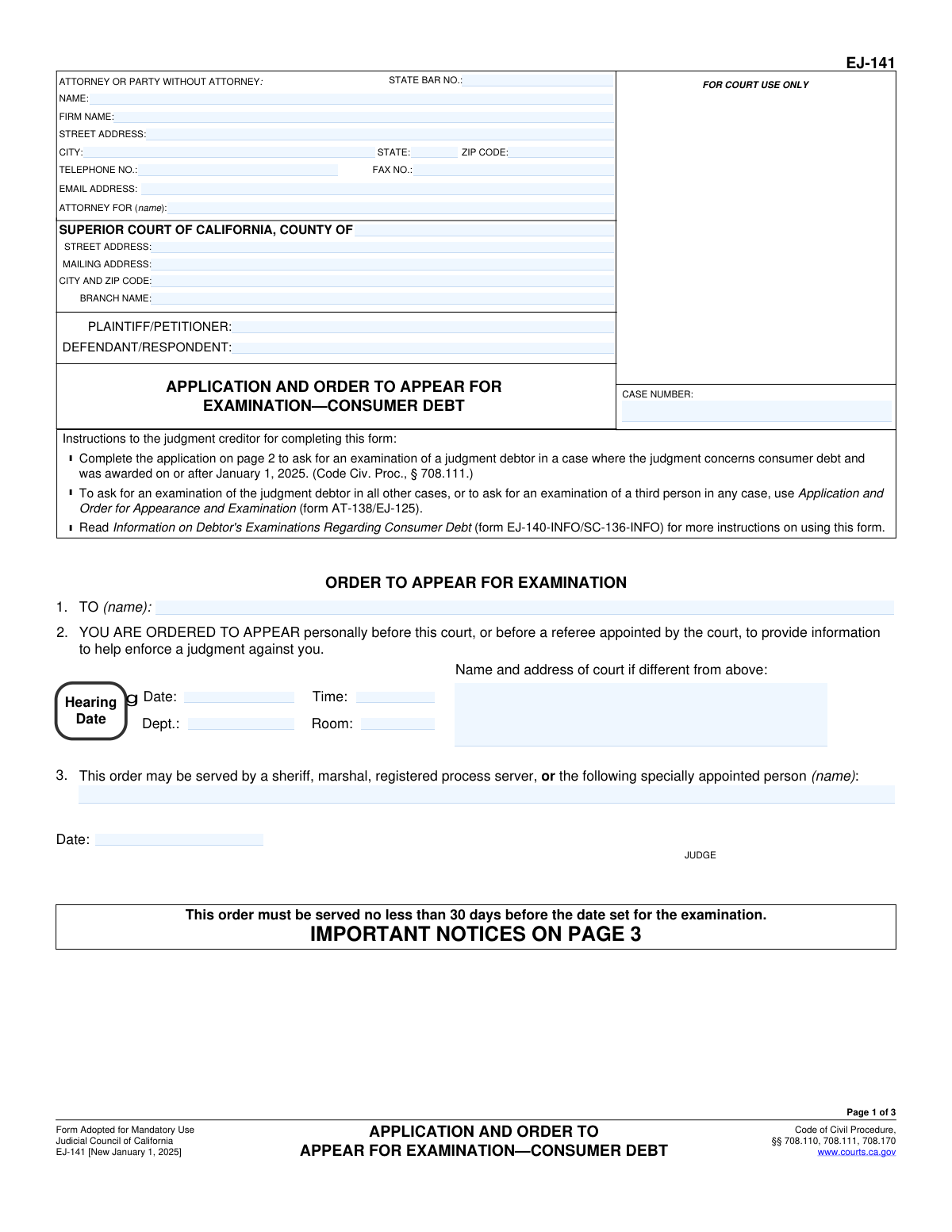
Yes! You can use AI to fill out Form EJ-141, Application and Order to Appear for Examination—Consumer Debt

Form EJ-141, Application and Order to Appear for Examination—Consumer Debt, is a legal document used in the California court system. A judgment creditor files this application to ask the court to compel a judgment debtor to appear and provide information about their financial status to help enforce a judgment on a consumer debt. Today, this form can be filled out quickly and accurately using AI-powered services like Instafill.ai, which can also convert non-fillable PDF versions into interactive fillable forms.
EJ-141 is part of the California court forms, consumer debt forms and judgment enforcement forms categories on Instafill.
Our AI automatically handles information lookup, data retrieval, formatting, and form filling.
It takes less than a minute to fill out EJ-141 using our AI form filling.
Securely upload your data. Information is encrypted in transit and deleted immediately after the form is filled out.

Form specifications

Form name: Form EJ-141, Application and Order to Appear for Examination—Consumer Debt
Number of fields: 47
Number of pages: 1
Language: English
main-image

Instafill Demo: How to fill out PDF forms in seconds with AI

How to Fill Out EJ-141 Online for Free in 2026

Are you looking to fill out a EJ-141 form online quickly and accurately? Instafill.ai offers the #1 AI-powered PDF filling software of 2026, allowing you to complete your EJ-141 form in just 37 seconds or less.
Follow these steps to fill out your EJ-141 form online using Instafill.ai:
  1. 1 Navigate to Instafill.ai and upload or select Form EJ-141.
  2. 2 Provide the case information, including the case number and the specific Superior Court details.
  3. 3 Enter the information for the attorney or party without an attorney, as well as the plaintiff/petitioner and defendant/respondent names.
  4. 4 Complete the 'Application for Order to Appear for Examination' section by identifying the judgment debtor and confirming details about the consumer debt judgment.
  5. 5 Use the AI assistant to populate the 'Order to Appear for Examination' section, which will later be completed with the hearing date and judge's signature.
  6. 6 Review the entire form to ensure all information entered by the AI is accurate and complete.
  7. 7 Securely download the completed form to be served on the judgment debtor and filed with the court.

Our AI-powered system ensures each field is filled out correctly, reducing errors and saving you time.

Why Choose Instafill.ai for Your Fillable EJ-141 Form?

Speed

Complete your EJ-141 in as little as 37 seconds.

Up-to-Date

Always use the latest 2026 EJ-141 form version.

Cost-effective

No need to hire expensive lawyers.

Accuracy

Our AI performs 10 compliance checks to ensure your form is error-free.

Security

Your personal information is protected with bank-level encryption.

Frequently Asked Questions About Form EJ-141

This form is used by a judgment creditor to get a court order that requires a judgment debtor to appear for an examination. The purpose of the examination is to gather information about the debtor's finances to help enforce a judgment related to consumer debt.

The judgment creditor (the person or entity owed money) or their attorney fills out the 'Application for Order to Appear for Examination' on page 2. The form is then submitted to the court for a judge to review and sign the 'Order' on page 1.

You must use Form EJ-141 only when seeking to examine a debtor about a consumer debt judgment that was awarded on or after January 1, 2025. For all other debtor examinations, or for examining a third party, you must use form AT-138/EJ-125.

Consumer debt is an obligation from a transaction for personal, family, or household purposes. It specifically excludes rental debt, debts incurred through fraudulent conduct, and judgments for unpaid wages or penalties owed to an employee.

Not necessarily. You can either appear in court on the scheduled date, or you can avoid the hearing by filing a 'Notice of Financial Statement' (Form EJ-143) and serving your completed 'Financial Statement' (Form EJ-144) on the creditor no later than 15 days before the hearing.

When you serve the order, you must also provide the debtor with blank copies of several other forms: Financial Statement (EJ-144), Notice of Financial Statement (EJ-143), Information on Debtor's Examinations (EJ-140-INFO), Exemptions From the Enforcement of Judgments (EJ-155), and Current Dollar Amounts of Exemptions (EJ-156).

The signed order and all required blank forms must be personally served on the judgment debtor at least 30 calendar days before the date of the scheduled examination.

If the judgment debtor fails to appear at the examination and did not properly file their financial statement in advance, the court may order them to pay the reasonable attorney’s fees and costs you incurred for the proceeding.

Yes, but if the debtor was already examined within the past 120 days, you must attach a separate affidavit to your application that shows good cause for another examination.

Yes, services like Instafill.ai use AI to auto-fill form fields accurately with your case and personal information, which saves time and helps prevent common errors.

You can use a service like Instafill.ai to upload the PDF. The platform allows you to fill in all the required fields online, add your signature, and download the completed form for printing and filing with the court.

If you have a flat, non-fillable PDF, you can upload it to a service like Instafill.ai. The platform can convert the document into an interactive, fillable form that you can easily complete on your computer.

The examination must be held in a court within the county where the judgment debtor lives or has a place of business, or within 150 miles of that location.

If you need an accommodation like an assistive listening system or a sign language interpreter, you must request it from the court at least five days before the hearing. You can contact the clerk’s office or use the court's 'Disability Accommodation Request' form.

Compliance EJ-141
Validation Checks by Instafill.ai

1
Case Number Consistency Across Pages
This check verifies that the 'CASE NUMBER' entered on page 1 is identical to the case numbers on pages 2 and 3. It is crucial for legal document integrity that all pages are correctly associated with the same case file. If the numbers are inconsistent, the filing may be rejected or misfiled by the court clerk, causing significant delays.
2
State Bar Number Format
Validates that the 'STATE BAR NO.' is a valid numerical format, typically 5-6 digits for California. This ensures that the attorney listed is identifiable within the State Bar's records. An invalid format could prevent the court from verifying the attorney's standing and may lead to rejection of the form.
3
Applicant Type Selection (Item 4)
Ensures that exactly one of the two checkboxes in item 4 ('Original judgment creditor' or 'Assignee of record') is selected. The applicant's standing is a critical piece of information for the court. Failure to select one, or selecting both, would make the application ambiguous and likely cause it to be returned for correction.
4
Judgment Debtor Name Requirement (Item 4)
This check confirms that the name of the judgment debtor is filled in item 4. This field is mandatory as it identifies the person being ordered to appear for the examination. An application submitted without the debtor's name is incomplete and cannot be processed by the court.
5
Post-2025 Judgment Confirmation (Item 5)
Verifies that the checkbox for item 5 is marked, confirming the judgment was awarded on or after January 1, 2025. This specific form (EJ-141) is only for judgments awarded after this date. If this box is not checked, the wrong form is being used, and the application will be rejected.
6
Consumer Debt Confirmation (Item 6)
Validates that the checkbox for item 6 is marked, attesting that the judgment concerns consumer debt as defined by the code. This is a fundamental requirement for using this form. An unchecked box indicates the form may be inappropriate for the type of debt, leading to dismissal of the application.
7
Jurisdictional Confirmation (Item 9)
Ensures the checkbox for item 9 is selected, confirming the person to be examined resides or has a place of business within the court's jurisdiction (within the county or 150 miles of the examination location). This is a legal requirement for the court to have authority to compel appearance. Failure to confirm this may result in the order being unenforceable.
8
Conditional Affidavit for Prior Examination (Item 11)
This is a logical check that triggers if the checkbox in item 11 is selected. If the applicant indicates the judgment debtor has been examined within the past 120 days, the system should verify that an affidavit showing good cause for another examination is attached. Without the required affidavit, the application for a repeat examination is incomplete and will be denied.
9
Declaration Date Validity (Page 2)
Validates that the 'Date' field in the declaration section on page 2 is a valid calendar date and is not set to a future date. The date confirms when the declaration was made under penalty of perjury. An invalid or future date would invalidate the declaration and cause the court to reject the filing.
10
Hearing Date Logic (Item 2)
This check, applied when the court fills out the order, ensures the 'Date' in item 2 is a valid future date. An examination cannot be scheduled for a past date. This validation prevents clerical errors that would make the order nonsensical and unenforceable.
11
Party Name Consistency
Verifies that the 'PLAINTIFF/PETITIONER' and 'DEFENDANT/RESPONDENT' names are consistent across all three pages of the document. Inconsistent party names can create confusion and call the document's validity into question. This check ensures uniformity and prevents potential rejection by the court.
12
Email Address Format
Validates that the 'EMAIL ADDRESS' field for the attorney or party follows the standard '[email protected]' format. This ensures that electronic communications and notices from the court can be successfully delivered. An invalid email address could lead to missed deadlines and communications.
13
ZIP Code Format
This check ensures that all ZIP code fields on the form contain a valid 5-digit or 9-digit (ZIP+4) numeric format. Correctly formatted ZIP codes are essential for the proper mailing of notices and other legal documents by the court and other parties. Incorrect formats can lead to returned mail and delays in the case.
14
Completeness of Attorney/Party Information
Verifies that if an attorney is listed, their name, firm name, and full address are provided. If a party is self-represented, their name and address are required. This information is essential for proper identification, communication, and service of documents. Incomplete contact information can halt the processing of the application.

Common Mistakes in Completing EJ-141

Using the Incorrect Form for the Debt Type or Judgment Date

This form, EJ-141, is exclusively for enforcing judgments on consumer debt that were awarded on or after January 1, 2025. A common mistake is using it for business debts, older judgments, or to examine a third person holding the debtor's assets. Using the wrong form will lead to immediate rejection by the court clerk, wasting time and filing fees. Always verify the debt type and judgment date and use form AT-138/EJ-125 for all other examination types as instructed on page 1.

Inconsistent Case Information Across Pages

The Case Number, Plaintiff/Petitioner name, and Defendant/Respondent name must be entered identically on all three pages of the form. Filers often make typos or use abbreviations on one page but not another. This inconsistency can cause the court's filing system to reject the document or lead to delays while the clerk manually reconciles the information. To avoid this, carefully proofread all pages or use a tool that auto-populates repeating information consistently.

Forgetting to Attach Required Affidavits

Items 10 and 11 on page 2 require the filer to attach a separate affidavit if the corresponding box is checked. Item 10 is for when the case is in a different court, and Item 11 is for when the debtor has been examined within the last 120 days. A frequent error is checking the box but failing to include the mandatory supporting declaration. This renders the application incomplete and guarantees its rejection, requiring a refiling.

Incorrect or Incomplete Judgment Debtor Name

The name of the judgment debtor, entered in Item 1 and Item 4, must be the full, correct legal name as it appears on the official court judgment. Using nicknames, abbreviations, or misspelling the name can render the resulting court order unenforceable. If the order is issued with an incorrect name, the debtor may successfully challenge it, and service of process may fail. Double-check the name against the original judgment to ensure it is exact.

Failing to Follow Proper Service Procedures

A critical error occurs after the form is filed and the order is issued. As detailed on page 3, the creditor must personally serve the debtor with the order AND blank copies of five other specific forms (EJ-144, EJ-143, EJ-140-INFO, EJ-155, EJ-156) at least 30 days before the hearing. Many creditors fail to include all the required blank forms or miscalculate the 30-day notice period. This procedural failure means that if the debtor fails to appear, the court cannot enforce the order, and the creditor must start the process over.

Missing Signature or Date on the Application

The application on page 2 includes a declaration signed under penalty of perjury. Forgetting to physically or digitally sign this section, or omitting the date of signature, is a common oversight that invalidates the entire application. An unsigned form lacks legal effect and will be rejected by the court clerk upon submission. Always perform a final review to ensure the signature and date fields are properly completed before filing.

Filing in the Incorrect Court Venue

Item 9 on page 2 requires the applicant to affirm that the debtor resides or has a place of business in the county of the court or within 150 miles of the examination location. Applicants sometimes file in the court where the original judgment was entered, even if the debtor has since moved. Filing in the wrong venue will lead to the application being rejected or dismissed, as the court lacks jurisdiction to compel the debtor's appearance. Always verify the debtor's current address to confirm the correct venue before filing.

Submitting an Illegible Hand-Filled Form

While this form is a fillable PDF, users sometimes obtain a non-fillable or 'flat' version and fill it out by hand. Illegible handwriting for critical information like the case number, names, or addresses can lead to data entry errors by court staff and potential rejection of the filing. To ensure clarity and accuracy, always use the official fillable PDF. If only a flat version is available, AI-powered tools like Instafill.ai can convert it into a fillable format, ensuring all entries are typed and legible.

Misidentifying the Applicant's Status in Item 4

Item 4 requires the applicant to identify as either the 'Original judgment creditor' or an 'Assignee of record'. An assignee (a party who purchased the debt) who incorrectly checks the 'Original judgment creditor' box is making a false statement under penalty of perjury. This mistake can jeopardize the application and create legal complications. It is crucial to accurately represent the applicant's legal status as it relates to the judgment.

Filling in Sections Reserved for Court Use

Applicants sometimes mistakenly fill in fields that are reserved for the court. This includes the 'FOR COURT USE ONLY' box, the hearing date, time, and department in Item 2, and the judge's signature line on page 1. These sections are completed by the court clerk or judge after the application is processed. Entering information in these fields will cause the form to be returned or require correction by the clerk, delaying the issuance of the order.
Saved over 80 hours a year

“I was never sure if my IRS forms like W-9 were filled correctly. Now, I can complete the forms accurately without any external help.”

Kevin Martin Green

Your data stays secure with advanced protection from Instafill and our subprocessors

Robust compliance program

Transparent business model

You’re not the product. You always know where your data is and what it is processed for.

ISO 27001, HIPAA, and GDPR

Our subprocesses adhere to multiple compliance standards, including but not limited to ISO 27001, HIPAA, and GDPR.

Security & privacy by design

We consider security and privacy from the initial design phase of any new service or functionality. It’s not an afterthought, it’s built-in, including support for two-factor authentication (2FA) to further protect your account.

Fill out EJ-141 with Instafill.ai

Worried about filling PDFs wrong? Instafill securely fills form-ej-141-application-and-order-to-appear-for-examinationconsumer-debt forms, ensuring each field is accurate.

Related forms by category

California court forms Judicial Council of California Form SC-105, Request for Court Order and Answer (Small Claims), Judicial Council of California Form SC-120, Defendant’s Claim and ORDER to Go to Small Claims Court (Small Claims), Judicial Council of California Form SER-001, Request for Sheriff to Serve Court Papers, Judicial Council of California Form SER-001, Request for Sheriff to Serve Court Papers, Affidavit for Collection of Personal Property California Probate Code Section 13100, Form POS-040, Proof of Service—Civil, Declaration of Facts of Death (California Superior Court), declaration-of-marriage-for-court-proceeding-california-family-law, ADOPT-200, Adoption Request, ADOPT-200, Stepparent Adoption Request, ADOPT-210, Adoption Agreement, ADOPT-310, Contact After Adoption Agreement, Judicial Council of California Form ADOPT-200, Adoption Request, Form ADR-107, Mediation Attendance Sheet, Form ADR-110, Order Appointing Referee, Form ADR-109, Stipulation or Motion for Order Appointing Referee, Form ADR-102, Request for Trial De Novo After Judicial Arbitration, Form ADR-108, Referee's Report (Code Civ. Proc., §§ 638, 639), Form ADR-106, Petition to Confirm, Correct, or Vacate Contractual Arbitration Award, Form ADR-104, Rejection of Award and Request for Trial After Attorney-Client Fee Arbitration · + 268 more →
consumer debt forms form-ej-146-notice-of-motion-and-motion-to-require-examinationconsumer-debt, form-ej-147-application-and-order-to-require-examination-after-submission-of-financial-statementconsumer-debt
judgment enforcement forms Form AT-180/EJ-185, Notice of Lien (Attachment—Enforcement of Judgment), Form WG-017/EJ-137, Application to Stay Levy or Garnishment (Wage Garnishment—Enforcement of Judgment), Form EJ-150, Notice of Levy (Enforcement of Judgment), Form EJ-158, Declaration Regarding Notice and Service for Ex Parte Application for Order on Deposit Account Exemption, Form EJ-190, Application for and Renewal of Judgment, form-ej-100-acknowledgment-of-satisfaction-of-judgment, form-ej-105-application-for-entry-of-judgment-on-sister-state-judgment, form-ej-146-notice-of-motion-and-motion-to-require-examinationconsumer-debt, form-ej-147-application-and-order-to-require-examination-after-submission-of-financial-statementconsumer-debt, form-ej-160-claim-of-exemption-enforcement-of-judgment, form-ej-180-notice-of-hearing-on-right-to-homestead-exemption-enforcement-of-judgment, form-ej-182-declaration-for-rehearing-on-homestead-exemption-enforcement-of-judgment