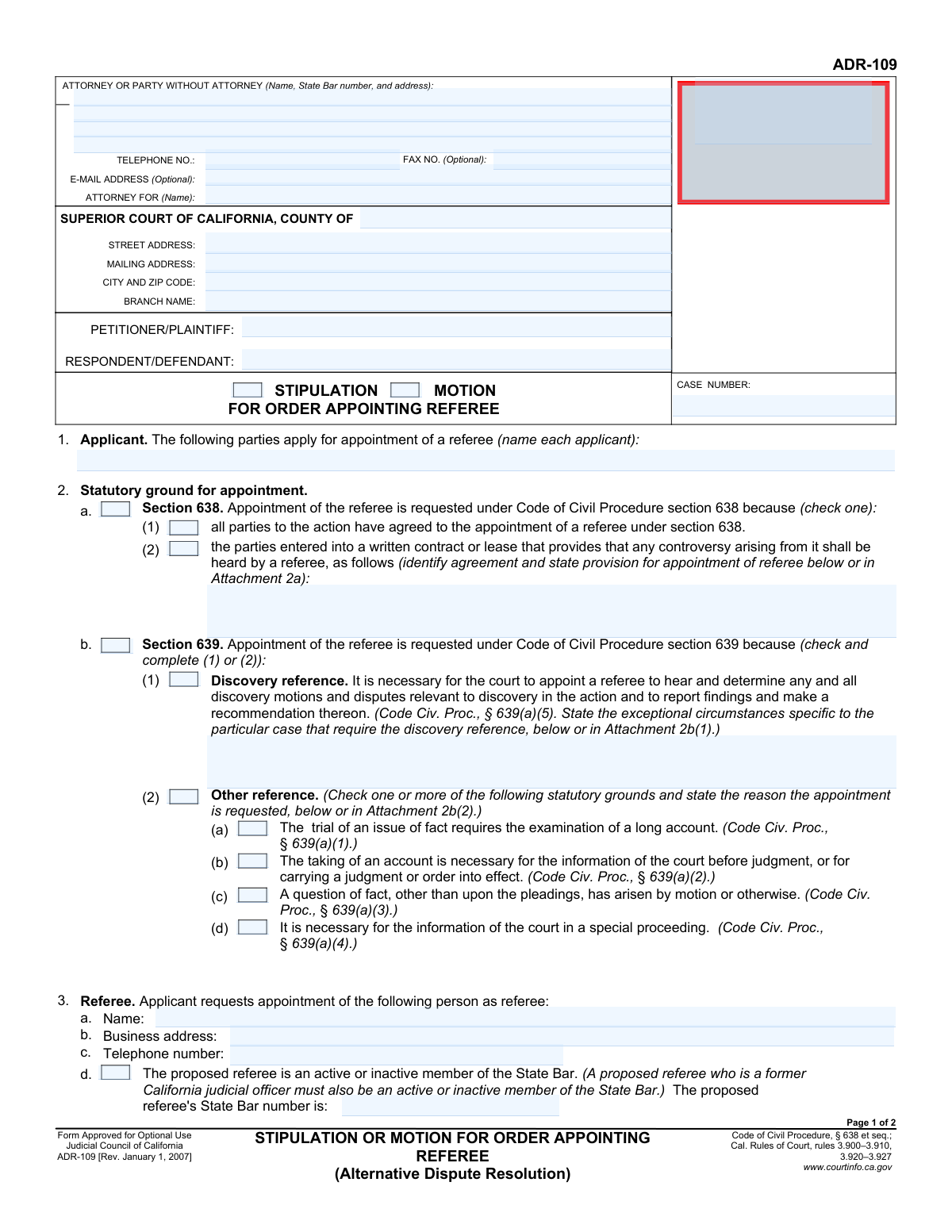
Yes! You can use AI to fill out Form ADR-109, Stipulation or Motion for Order Appointing Referee
Form ADR-109, Stipulation or Motion for Order Appointing Referee, is a legal document filed in the Superior Court of California to request the appointment of a referee. Parties use this form to either jointly agree (stipulate) or individually ask the court (motion) to assign a neutral third party to hear and decide on specific matters within a lawsuit, such as discovery disputes or the examination of a complex account, under Code of Civil Procedure sections 638 or 639. Today, this form can be filled out quickly and accurately using AI-powered services like Instafill.ai, which can also convert non-fillable PDF versions into interactive fillable forms.
Our AI automatically handles information lookup, data retrieval, formatting, and form filling.
It takes less than a minute to fill out ADR-109 using our AI form filling.
Securely upload your data. Information is encrypted in transit and deleted immediately after the form is filled out.
Form specifications
| Form name: | Form ADR-109, Stipulation or Motion for Order Appointing Referee |
| Number of fields: | 68 |
| Number of pages: | 2 |
| Language: | English |
Instafill Demo: How to fill out PDF forms in seconds with AI
How to Fill Out ADR-109 Online for Free in 2026
Are you looking to fill out a ADR-109 form online quickly and accurately? Instafill.ai offers the #1 AI-powered PDF filling software of 2026, allowing you to complete your ADR-109 form in just 37 seconds or less.
Follow these steps to fill out your ADR-109 form online using Instafill.ai:
- 1 Navigate to Instafill.ai and upload your Form ADR-109, or select it from their library of official documents.
- 2 Use the AI assistant to accurately fill in the attorney, party, court, and case number information at the top of the form.
- 3 Indicate whether the request is a stipulation or a motion, and specify the legal grounds for the appointment under Code of Civil Procedure section 638 or 639, providing any required explanations.
- 4 Enter the proposed referee's information and clearly define the specific issues or subject matter that the referee will be tasked to handle.
- 5 Detail the arrangement for the referee's compensation, including whether the parties have agreed on how fees will be paid.
- 6 Provide information on the use of court facilities and the hearing location contact details.
- 7 Review all entered information for accuracy, then have the applicant(s) or their attorney(s) sign and date the form before downloading it for filing.
Our AI-powered system ensures each field is filled out correctly, reducing errors and saving you time.
Why Choose Instafill.ai for Your Fillable ADR-109 Form?
Speed
Complete your ADR-109 in as little as 37 seconds.
Up-to-Date
Always use the latest 2026 ADR-109 form version.
Cost-effective
No need to hire expensive lawyers.
Accuracy
Our AI performs 10 compliance checks to ensure your form is error-free.
Security
Your personal information is protected with bank-level encryption.
Frequently Asked Questions About Form ADR-109
This form is used to request that the Superior Court of California appoint a referee, who is a neutral third party assigned to handle specific parts of a legal case, such as discovery disputes or complex factual determinations.
This form should be completed by a party in a lawsuit, or their attorney, who is requesting the appointment of a referee. The request can be made either by agreement with the other parties (stipulation) or by a formal request to the court (motion).
A Section 638 reference is based on an agreement between all parties, either in a prior contract or by stipulation in the current case. A Section 639 reference is ordered by the court, often without full agreement, for specific reasons like resolving discovery disputes or examining a long financial account.
You must provide the proposed referee's full name, business address, and telephone number. If the referee is an active or inactive member of the State Bar, you must also provide their State Bar number.
In this section, you must provide a detailed explanation of why your case is unusual and requires a referee for discovery. This could include an extremely high volume of disputes, complex technical issues, or a history of non-cooperation that is delaying the case.
In the 'Referee's Compensation' section, you must indicate if the referee will be privately paid by the parties. If so, you must state whether the parties have agreed on how to split the fees and provide details of that agreement.
If the referee will be privately compensated but you have not reached an agreement on payment, check the box indicating this. This action formally requests the court to step in and make a decision on how the fees should be allocated among the parties.
Yes, you can request the use of court facilities and personnel by checking the appropriate box. You must then provide a written justification explaining why this use is necessary and would further the interest of justice.
Filing by 'Stipulation' means all parties in the case agree to the request to appoint a referee. Filing by 'Motion' means you are formally asking the court to grant the request, and other parties may or may not agree and have the right to file an opposition.
Once the form is completed and signed, it must be filed with the clerk of the Superior Court where your case is being heard. Be sure to follow the court's specific rules for filing documents, which may include electronic filing or in-person submission.
Yes, services like Instafill.ai use AI to auto-fill form fields accurately and save time. This can help you complete the form more efficiently and reduce the chance of errors.
Simply upload the form to the Instafill.ai platform. The AI will identify the fields, allowing you to provide your information once and have it automatically and accurately populated throughout the document.
You can use a service like Instafill.ai, which is designed to convert flat, non-fillable PDFs into interactive, fillable forms. This allows you to easily type your information directly into the fields online without needing to print and write by hand.
Compliance ADR-109
Validation Checks by Instafill.ai
1
Exclusive Filing Type Selection
Ensures that only one of the filing type checkboxes, 'Stipulation' or 'Motion', is selected. A request for an order can be made either by agreement of the parties (stipulation) or by a formal request to the court (motion), but not both. If both or neither are selected, the form submission should be rejected to prevent ambiguity in the filing's legal basis.
2
Exclusive Grounds for Appointment Selection
Validates that the user has selected grounds for appointment under either 'Section 638' or 'Section 639' (CheckBox2100), but not both. These sections of the Code of Civil Procedure represent distinct legal bases for appointing a referee. Selecting both would create a logical conflict, so the form must enforce a single choice to ensure clarity for the court.
3
Conditional Requirement for Discovery Justification
Checks that if the 'Discovery reference' box is checked under Section 639, the 'Exceptional Circumstances for Discovery Reference' text field must be filled out. The law requires a showing of exceptional circumstances for this type of reference. Failure to provide this justification would result in an incomplete and likely denied request.
4
Conditional Requirement for State Bar Number
Verifies that if the 'Proposed Referee is State Bar Member' checkbox is selected, the 'State Bar Number' field is populated with a value. This is a critical data point for verifying the proposed referee's credentials and active status with the State Bar. An empty field would prevent the court from confirming the referee's qualifications.
5
Case Number Presence and Format
Ensures the 'Case Number' field is not empty and follows the expected format for the specified court jurisdiction. The case number is the primary identifier for the legal proceeding and is essential for correctly associating the document with the case file. An invalid or missing case number will cause the filing to be rejected.
6
Exclusive Referee Compensation Selection
Validates that only one of the two compensation options, 'Referee Not Privately Compensated' or 'Referee Privately Compensated', is selected. The source of the referee's payment is a fundamental detail of the appointment that must be clearly established. The form should prevent submission if both or neither option is chosen.
7
Conditional Requirement for Fee Agreement Details
Checks that if 'Referee Privately Compensated' and 'Parties Agreed on Fees' are both selected, the 'Referee Fee Payment Agreement' text area must contain details of the agreement. This information is required for the court to understand and approve the financial arrangements. An empty field would indicate an incomplete stipulation.
8
Conditional Requirement for Use of Facilities Justification
Ensures that if 'Requests use of facilities/personnel' is checked, the 'Requested Use and Justification' text field is filled out. The court requires a specific reason and a justification that it serves the interest of justice, especially for privately compensated referees. Failure to provide this information will lead to the request being denied.
9
Signature Date Validity
Validates that the 'First Applicant/Attorney Signature Date' is a valid calendar date and is not set in the future. This date authenticates when the document was signed, which has legal significance. An invalid or future date would call the document's authenticity into question and should be flagged as an error.
10
Completeness of Core Party Information
Verifies that the 'Petitioner/Plaintiff Name' and 'Respondent/Defendant Name' fields are both populated. These fields identify the primary parties to the case, which is fundamental information for any legal filing. Omitting this information would make the document contextually incomplete and un-fileable.
11
Logical Consistency Between Grounds and Subject Matter (Section 638)
Ensures that if 'Section 638' is checked as the grounds for appointment, then the corresponding 'Section 638 Reference' checkbox in the 'Subject Matter' section is also checked. This cross-field validation maintains logical consistency throughout the form. A mismatch indicates a user error and would create confusion about the scope of the requested reference.
12
Conditional Requirement for Described Issues (Section 638)
Checks that if the 'Following Issues (Section 638)' checkbox is selected, the 'Section 638 Described Issues' text area must be populated. This is required to specify which limited issues the referee is being appointed to address. If this field is left blank, the scope of the reference is undefined, making the request invalid.
13
Completeness of Court Information
Validates that the 'County', 'Street Address', and 'City and Zip Code' fields under 'Court Information' are all filled in. This information is essential for identifying the correct court where the document is to be filed. Incomplete address information could lead to the document being sent to the wrong location or rejected by the clerk's office.
14
Telephone Number Format Validation
Checks that the 'Telephone Number (Attorney or Party Information)' and 'Contact Telephone Number (Hearing Location Information)' fields adhere to a standard phone number format (e.g., 10 digits, possibly with parentheses, spaces, or hyphens). This ensures that the contact information is valid and usable for communication. An improperly formatted number could hinder communication between the court and the parties.
Common Mistakes in Completing ADR-109
Filers often enter a generic county court address instead of the specific street address and branch name where the case is being heard. This can happen due to unfamiliarity with the court system or simple oversight. An incorrect court address can lead to the document being misfiled or rejected, causing significant delays in the legal process. To avoid this, always verify the exact branch name and address from the court's official website before filling out the form.
Attorneys or their staff frequently forget to include the attorney's State Bar number in the 'Attorney/Party Information' section. This number is a crucial identifier for the court to verify the attorney's standing and eligibility to practice. Leaving it out can result in the clerk rejecting the filing until the information is corrected, delaying the motion or stipulation. Ensure the State Bar number is clearly entered along with the attorney's name and address.
A common error is checking the 'Other reference' box under Section 639 without selecting one of the specific statutory grounds listed below it (e.g., 'Trial of issue of fact - long account'). This leaves the legal basis for the request unclear and is a reason for the court to deny the motion. To avoid this, if you select 'Other reference,' you must also check at least one of the corresponding sub-options that applies to your case.
When requesting a referee for discovery purposes under Section 639, filers often provide a weak or generic explanation—or no explanation at all—in the 'Exceptional Circumstances' field. The court requires a detailed, case-specific justification to grant such a request. Failure to provide a compelling reason will almost certainly lead to the denial of the motion. Clearly articulate why the complexity or contentiousness of discovery in this specific case necessitates a referee.
People frequently check the box for 'Following Issues (Section 638)' but then fail to describe those issues in the 'Section 638 Described Issues' text box or an attachment. This ambiguity makes the order unenforceable, as the referee's jurisdiction is not clearly defined. If you are not referring all issues, you must explicitly and clearly list every issue the referee is being appointed to handle. If the form is a non-fillable PDF, a tool like Instafill.ai can convert it to a fillable version, making it easier to add these details.
When indicating that the referee will be 'Privately Compensated', filers often neglect to complete the subsequent required fields. For example, they may not specify whether the 'Parties Agreed on Fees' or not, and if they have, fail to describe the terms of the agreement. This missing information prevents the court from issuing a complete order on compensation, leading to future disputes. AI-powered form fillers like Instafill.ai can enforce these conditional rules, prompting the user to provide details on the payment agreement.
If the proposed referee is an attorney or former judicial officer, the form requires their State Bar number. Filers often check the box indicating the referee is a 'State Bar Member' but then forget to enter the corresponding number. This is a critical piece of verification data for the court that can cause delays if omitted. To prevent this, double-check all conditional fields; tools like Instafill.ai can automatically prompt for the State Bar number when the relevant box is checked.
Data entry errors, such as transposing digits in the 'Case Number' or misspelling party names, are very common and can lead to filing rejections. The document might not be correctly associated with the case file, causing it to be lost or ignored. Carefully proofread this information against official court documents. AI tools like Instafill.ai can store and reuse case information across multiple forms, drastically reducing the risk of such data entry errors.
Parties sometimes check the box to 'Requests use of facilities/personnel' for a privately compensated referee without providing the required justification. The rules of court require a compelling explanation of why using public resources 'would further the interests of justice.' Simply wanting a convenient location is not a sufficient reason, and failure to provide a strong justification will result in this part of the request being denied.
When a request is made jointly by multiple parties, such as in a stipulation, the form requires the printed name and signature of each applicant or their attorney. It is a frequent mistake to only have one party sign the document. This invalidates the joint nature of the request and can lead to its rejection. Before filing, confirm that all co-applicants or their counsel are listed and have signed the form.
Saved over 80 hours a year
“I was never sure if my IRS forms like W-9 were filled correctly. Now, I can complete the forms accurately without any external help.”
Kevin Martin Green
Your data stays secure with advanced protection from Instafill and our subprocessors

Robust compliance program
Transparent business model
You’re not the product. You always know where your data is and what it is processed for.
ISO 27001, HIPAA, and GDPR
Our subprocesses adhere to multiple compliance standards, including but not limited to ISO 27001, HIPAA, and GDPR.
Security & privacy by design
We consider security and privacy from the initial design phase of any new service or functionality. It’s not an afterthought, it’s built-in, including support for two-factor authentication (2FA) to further protect your account.
Fill out ADR-109 with Instafill.ai
Worried about filling PDFs wrong? Instafill securely fills form-adr-109-stipulation-or-motion-for-order-appointing-referee forms, ensuring each field is accurate.