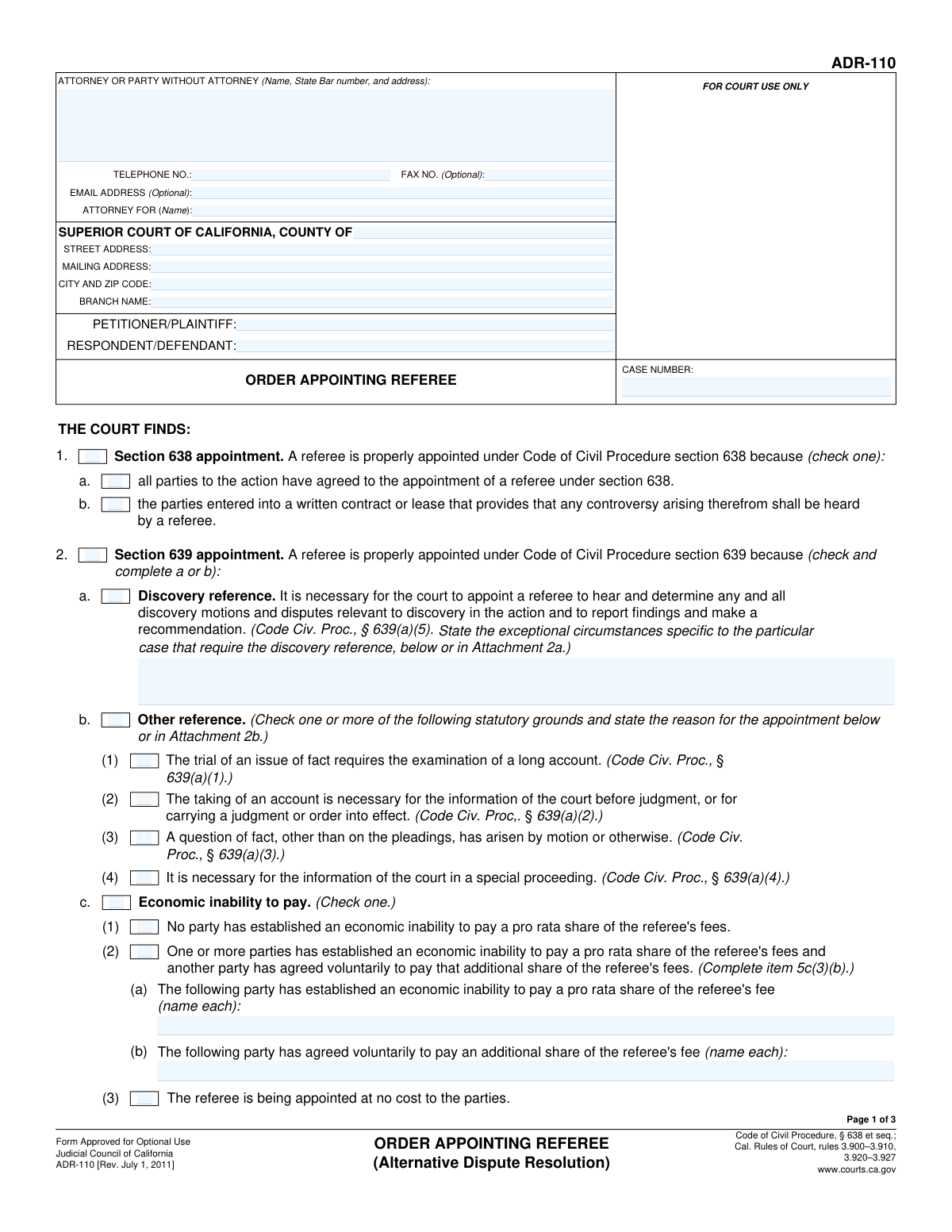
Yes! You can use AI to fill out Form ADR-110, Order Appointing Referee

Form ADR-110, Order Appointing Referee, is a legal document used by the Superior Court of California to officially appoint a neutral third party, known as a referee, to handle specific aspects of a case. This appointment can be made by agreement of the parties (under Code of Civil Procedure § 638) or by court order for matters like discovery disputes (under § 639), delegating tasks to expedite legal proceedings. Today, this form can be filled out quickly and accurately using AI-powered services like Instafill.ai, which can also convert non-fillable PDF versions into interactive fillable forms.
Our AI automatically handles information lookup, data retrieval, formatting, and form filling.
It takes less than a minute to fill out ADR-110 using our AI form filling.
Securely upload your data. Information is encrypted in transit and deleted immediately after the form is filled out.

Form specifications

Form name: Form ADR-110, Order Appointing Referee
Number of fields: 95
Number of pages: 3
Language: English
main-image

Instafill Demo: How to fill out PDF forms in seconds with AI

How to Fill Out ADR-110 Online for Free in 2026

Are you looking to fill out a ADR-110 form online quickly and accurately? Instafill.ai offers the #1 AI-powered PDF filling software of 2026, allowing you to complete your ADR-110 form in just 37 seconds or less.
Follow these steps to fill out your ADR-110 form online using Instafill.ai:
  1. 1 Navigate to Instafill.ai and upload or select the Form ADR-110, Order Appointing Referee.
  2. 2 Provide the basic case information, including the court details, case number, and the names of the petitioner/plaintiff and respondent/defendant.
  3. 3 Specify the legal basis for the appointment by selecting either a Section 638 (by agreement) or Section 639 (by court motion) appointment and completing the relevant sub-sections.
  4. 4 Enter the appointed referee's contact information, including their name, address, and State Bar details if applicable.
  5. 5 Detail the referee's compensation, including the maximum hourly rate, how fees will be apportioned between the parties, and any findings on economic inability to pay.
  6. 6 Define the scope and logistics of the reference, such as the subject matter, reporting requirements, and whether court facilities will be used.
  7. 7 Review the completed form generated by the AI for accuracy, then download, print, and file the official order with the court.

Our AI-powered system ensures each field is filled out correctly, reducing errors and saving you time.

Why Choose Instafill.ai for Your Fillable ADR-110 Form?

Speed

Complete your ADR-110 in as little as 37 seconds.

Up-to-Date

Always use the latest 2026 ADR-110 form version.

Cost-effective

No need to hire expensive lawyers.

Accuracy

Our AI performs 10 compliance checks to ensure your form is error-free.

Security

Your personal information is protected with bank-level encryption.

Frequently Asked Questions About Form ADR-110

This form is a court order used to officially appoint a referee in a legal case under the California Code of Civil Procedure. It specifies the reason for the appointment, the referee's duties, how they will be paid, and their reporting obligations to the court.

This form is an official court order signed by a judge. It is typically prepared by an attorney for one of the parties and submitted to the court for the judge's signature, or it may be prepared by court staff.

A Section 638 appointment is made when all parties agree to have a referee, often based on a pre-existing written contract. A Section 639 appointment is ordered by the court, even without the parties' consent, for specific tasks like resolving discovery disputes or examining a complex financial account.

You will need the referee's full name, business address, and phone number. If the referee is an attorney, you must also provide their State Bar number and confirm their membership status.

The form outlines how the referee's fees will be paid, which can be based on an agreement between the parties or ordered by the court. The court can order fees to be split equally or apportioned differently among the parties.

The form includes a section for the court to address a party's economic inability to pay. If the court finds you are unable to pay, it may order another party to cover your share or appoint a referee at no cost to the parties.

For a Section 639 appointment, the court sets the maximum hourly rate the referee can charge. The court may also specify the maximum number of hours and will issue an order on how the fees are to be divided among the parties.

A referee may be appointed to handle discovery if the court finds there are 'exceptional circumstances' in the case. This helps manage complex discovery issues, hear motions, and provide recommendations to the judge, saving court time.

If the reference is conducted in a private facility, the form requires providing the facility's address and a contact person's name and phone number. This information allows the court clerk to post a public notice on how to attend the proceedings.

The referee must submit a written report to the court, usually within 20 days after the hearing is complete. The report includes findings, recommendations on the disputed issues, and a statement of the hours spent and fees charged.

Yes, services like Instafill.ai use AI to auto-fill form fields accurately and save time. This is particularly useful for entering repetitive information like case details, party names, and attorney information.

You can use a service like Instafill.ai to easily complete this form online. Simply upload the PDF, and the platform will make it an interactive, fillable form that you can type into directly from your browser.

If you have a flat, non-fillable PDF, you can use a tool like Instafill.ai to convert it into an interactive form. This allows you to easily type your information into the fields, save, and print the completed document.

This section requires the full name, address, and telephone number of the attorney or the party if they are representing themselves. You must also include the attorney's State Bar number and the name of the party they represent.

No, the fields for 'Fax Number' and 'Email Address' in the attorney/party information section are marked as optional. You are not required to fill them in, but it can be helpful for communication.

Compliance ADR-110
Validation Checks by Instafill.ai

1
Ensures Mutual Exclusivity of Appointment Sections
This check verifies that only one of 'Section 638 Appointment' or 'Section 639 appointment' is selected. These sections represent different legal grounds for appointing a referee and are mutually exclusive. If both are selected, the form submission should be rejected to prevent legal ambiguity in the court order.
2
Validates Case Number Consistency Across Form
This validation ensures that the 'Case Number' entered in the header, the main body, and the footer sections are identical. The case number is the primary identifier for the legal proceeding, and any inconsistency could lead to filing errors or misapplication of the order. A mismatch will trigger an error requiring the user to correct the entries to match.
3
Validates Party Name Consistency Across Form
This check confirms that the 'Petitioner/Plaintiff Name' and 'Respondent/Defendant Name' are consistent wherever they appear on the form. Consistent naming is crucial for the legal validity and clarity of the document. If the names do not match across all instances, the user will be prompted to correct the discrepancy before submission.
4
Requires Referee Details if Appointed
This validation ensures that if either 'Section 638 appointment' or 'Section 639 appointment' is checked, the referee's contact information ('Referee Name', 'Referee Business Address', 'Referee Telephone Number') must be provided. Appointing a referee without identifying them makes the order unenforceable. Failure to provide these details will block submission.
5
Enforces Conditional Requirement for Discovery Circumstances
This check verifies that if the 'Discovery reference' box is checked under Section 639, the 'Exceptional Circumstances for Discovery Reference' text field must be filled out. The law requires a specific justification for a discovery reference, so this field cannot be left blank. An empty field will result in a validation error, prompting the user to provide the necessary explanation.
6
Validates Telephone Number Formatting
This check ensures that all telephone number fields ('Telephone Number', 'Fax Number', 'Referee Telephone Number', 'Contact Telephone Number') adhere to a standard format, such as (XXX) XXX-XXXX or XXXXXXXXXX. Proper formatting is essential for data integrity and ensures the contact information is usable. An invalid format will trigger an error message.
7
Requires Details for Economic Inability Payment Arrangement
If the 'One or more parties unable to pay, another pays' checkbox is selected, this validation confirms that both the 'Party with Economic Inability' and 'Voluntary Paying Party' fields are completed. This information is critical for the court to understand and approve the specific financial arrangement for the referee's fees. Missing names will prevent the form from being submitted.
8
Validates State Bar Number and Status Logic
This check is triggered if 'Referee is State Bar Member' is selected. It verifies that the 'State Bar Number' field is filled and that exactly one membership status ('Active', 'Inactive', or 'Other') is chosen. This ensures complete and unambiguous information about the referee's professional standing is provided as required.
9
Enforces 'Other' Field Specification
This validation rule applies to any checkbox pair where an 'Other' option exists, such as 'Membership Status - Other'. If the 'Other' checkbox is selected, the corresponding text field (e.g., 'Other Membership Status') must contain a value. This prevents incomplete selections and ensures that when a non-standard option is chosen, the necessary details are provided.
10
Requires Maximum Rate and Hours for Section 639 Referee
When 'Section 639 appointment' is checked, this validation ensures the 'Maximum Hourly Rate' is specified as a valid monetary value. Furthermore, if the 'Maximum Number of Hours' checkbox is selected, the corresponding 'Maximum Number of Hours Referee May Charge' field must contain a valid number. This is crucial for controlling the costs associated with a court-ordered referee.
11
Ensures Completeness of Court Information
This validation confirms that all fields under 'Court Information' ('County', 'Street Address', 'Mailing Address', 'City and Zip Code', 'Branch Name') are completed. This information is fundamental for identifying the correct court venue. An incomplete court address will result in a submission failure, as the document cannot be properly filed without it.
12
Validates Private Facility Information Requirement
This check ensures that if 'The reference will be conducted in a private facility' is selected, the 'Contact Person Name', 'Facility Address', and 'Contact Telephone Number' fields are all filled out. This information is legally required to be posted by the clerk so the public can make arrangements to attend the proceedings. Missing information would prevent the fulfillment of public access requirements.
13
Requires Sub-Selection for Section 639 'Other reference'
If the 'Other reference' checkbox under 'Section 639 appointment' is selected, this validation ensures that at least one of the subsequent reasons (e.g., 'Trial of an issue of fact requires examination of a long account') is also checked. Selecting 'Other reference' without specifying the statutory ground is an incomplete entry. The form should prompt the user to select a specific reason to proceed.
14
Validates Certification Date Format
This check verifies that the 'Certification Date' field contains a valid date in a standard format (e.g., MM/DD/YYYY). A properly formatted date is essential for establishing a clear timeline and for the legal validity of the certification. An invalid or improperly formatted date will result in a validation error.

Common Mistakes in Completing ADR-110

Confusing Section 638 and 639 Appointments

Users often misunderstand the distinction between a Section 638 appointment (by agreement of the parties) and a Section 639 appointment (ordered by the court without full agreement). Selecting the wrong one, or both, makes the legal basis for the order invalid. This fundamental error will cause the form to be rejected by the court, requiring correction and refiling. To avoid this, carefully determine the statutory basis for the appointment before filling out the form.

Failing to Complete Dependent Checkboxes and Fields

This form contains extensive conditional logic where checking one box requires filling out subsequent fields or checkboxes. For example, a user might check 'Section 639 appointment' but fail to select a reason like 'Discovery reference' or 'Other reference'. This leaves the order incomplete and ambiguous, leading to rejection or clarification requests. Always review the form to ensure all required sub-sections for your selections are fully completed.

Omitting Critical Case and Attorney Identifiers

In the top section, people frequently enter an incomplete Case Number or forget to include the attorney's State Bar number. These identifiers are essential for the court clerk to file the document correctly. An incorrect or missing case number can cause the document to be misfiled or rejected outright, delaying the legal process. Double-check that these numbers are entered completely and accurately.

Using Inconsistent Party Names

The form asks for Petitioner/Plaintiff and Respondent/Defendant names in multiple locations. Users sometimes use abbreviations, misspell names, or enter them differently in separate sections. This creates legal ambiguity regarding who the order applies to and can be grounds for rejection. To prevent this, use the full, official legal names as they appear on the initial court filings consistently throughout the entire document.

Providing Insufficient Justification for a Reference

When a discovery reference is requested under Section 639, the form requires a description of the 'Exceptional Circumstances'. Filers often provide a vague or conclusory statement instead of a detailed, case-specific explanation. An insufficient justification can lead a judge to deny the request for a referee. Be sure to clearly articulate the specific facts and complexities of the case that make a referee necessary.

Incomplete 'Economic Inability' Section

When indicating that one party is unable to pay their share of referee fees and another party has agreed to cover it, users often check the box but forget to enter the names of the respective parties. This makes the payment portion of the order unenforceable as it doesn't specify who is excused and who is paying. If you check box 'One or more parties unable to pay, another pays', you must fill in the 'Party with Economic Inability' and 'Voluntary Paying Party' fields.

Missing Referee Compensation Details for Section 639

For a court-ordered Section 639 appointment, the form requires specifying the 'Maximum hourly rate' the referee may charge and how fees will be apportioned. These fields are frequently left blank, making the order incomplete. This omission can lead to future disputes over fees and requires an amended order, causing delays. Ensure all compensation terms ordered by the court are explicitly stated on the form.

Incomplete Referee State Bar Information

If the appointed referee is a member of the State Bar, users may check the box but then neglect to enter the referee's State Bar number and select their membership status (Active, Inactive, etc.). This fails to properly document the referee's qualifications on the record, which can cause the clerk to question the filing. Always have the referee's professional information on hand and complete all related fields to ensure proper verification.

Omitting Public Access Information for Private Facilities

If the proceedings will occur in a 'private facility', the form requires the name, address, and telephone number of a contact person to arrange public attendance. This information is crucial for legal compliance but is often overlooked. Failure to provide it violates public access rules and could be grounds to challenge the validity of the proceedings. If this box is checked, ensure all contact details for the private location are provided.

Making Contradictory Selections for Fee Apportionment

The section on fee apportionment contains several mutually exclusive options. A common mistake is to check 'All parties pay equal shares' while also checking a box to excuse a specific party from paying, creating a direct contradiction. Such errors make the order illogical and will result in its rejection. To avoid this, carefully read all options in the section and select only the single, correct method of apportionment. AI-powered tools like Instafill.ai can help prevent these logical errors by validating selections. If you only have a flat PDF, Instafill.ai can also convert it into an interactive, fillable form.
Saved over 80 hours a year

“I was never sure if my IRS forms like W-9 were filled correctly. Now, I can complete the forms accurately without any external help.”

Kevin Martin Green

Your data stays secure with advanced protection from Instafill and our subprocessors

Robust compliance program

Transparent business model

You’re not the product. You always know where your data is and what it is processed for.

ISO 27001, HIPAA, and GDPR

Our subprocesses adhere to multiple compliance standards, including but not limited to ISO 27001, HIPAA, and GDPR.

Security & privacy by design

We consider security and privacy from the initial design phase of any new service or functionality. It’s not an afterthought, it’s built-in, including support for two-factor authentication (2FA) to further protect your account.

Fill out ADR-110 with Instafill.ai

Worried about filling PDFs wrong? Instafill securely fills form-adr-110-order-appointing-referee forms, ensuring each field is accurate.