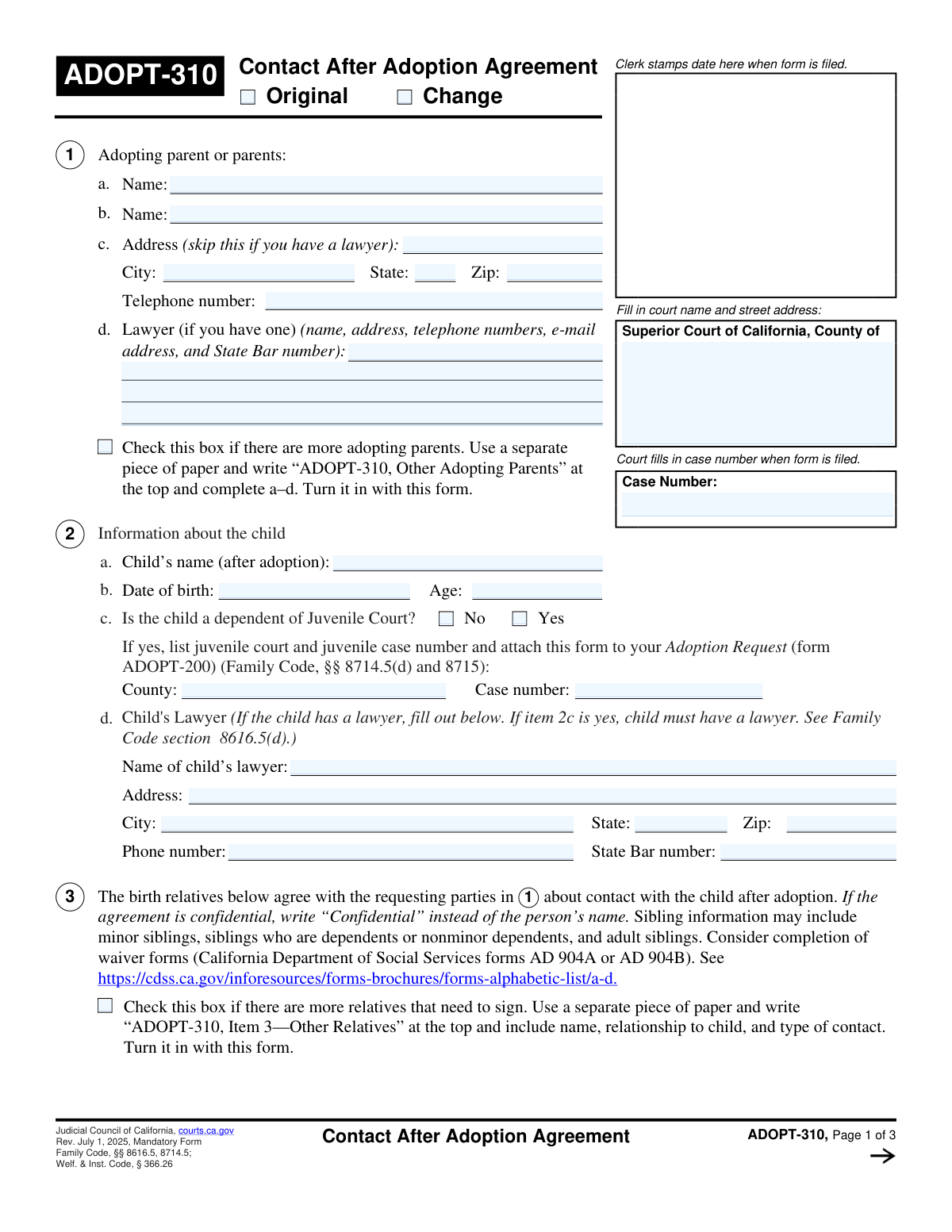
Yes! You can use AI to fill out ADOPT-310, Contact After Adoption Agreement
Form ADOPT-310 is a formal agreement filed with the court that outlines the nature and frequency of communication and visits between an adopted child and their birth family members post-adoption. This document is crucial for establishing clear, enforceable expectations for all parties involved, ensuring the child's best interests are maintained. Today, this form can be filled out quickly and accurately using AI-powered services like Instafill.ai, which can also convert non-fillable PDF versions into interactive fillable forms.
Our AI automatically handles information lookup, data retrieval, formatting, and form filling.
It takes less than a minute to fill out ADOPT-310 using our AI form filling.
Securely upload your data. Information is encrypted in transit and deleted immediately after the form is filled out.
Form specifications
| Form name: | ADOPT-310, Contact After Adoption Agreement |
| Number of fields: | 109 |
| Number of pages: | 3 |
| Language: | English |
| Categories: | adoption forms |
Instafill Demo: How to fill out PDF forms in seconds with AI
How to Fill Out ADOPT-310 Online for Free in 2026
Are you looking to fill out a ADOPT-310 form online quickly and accurately? Instafill.ai offers the #1 AI-powered PDF filling software of 2026, allowing you to complete your ADOPT-310 form in just 37 seconds or less.
Follow these steps to fill out your ADOPT-310 form online using Instafill.ai:
- 1 Navigate to Instafill.ai and upload or select the ADOPT-310 form.
- 2 Use the AI assistant to accurately fill in the court name, address, and case number.
- 3 Provide the full names, addresses, and contact information for the adopting parents and the child.
- 4 Detail the specific contact arrangements for each birth relative, checking boxes for visits, phone calls, emails, or other forms of communication.
- 5 Indicate the child's juvenile court dependency status and provide lawyer information if required.
- 6 Review all the information for accuracy, then proceed to have all required parties, including the adopting parents, the child (if 12 or older), and specified relatives, electronically sign the document.
- 7 Download the completed and signed ADOPT-310, ready for filing with the appropriate court.
Our AI-powered system ensures each field is filled out correctly, reducing errors and saving you time.
Why Choose Instafill.ai for Your Fillable ADOPT-310 Form?
Speed
Complete your ADOPT-310 in as little as 37 seconds.
Up-to-Date
Always use the latest 2026 ADOPT-310 form version.
Cost-effective
No need to hire expensive lawyers.
Accuracy
Our AI performs 10 compliance checks to ensure your form is error-free.
Security
Your personal information is protected with bank-level encryption.
Frequently Asked Questions About Form ADOPT-310
This form is used to legally document an agreement between adopting parents and a child's birth relatives regarding future communication or visits after an adoption is finalized. It is filed with the court to make the agreement part of the official record.
The adopting parent or parents must fill out the form. It needs to be signed by the adopting parents, the participating birth relatives, and the child if they are 12 years of age or older.
Check 'Original' if this is the first Contact After Adoption Agreement being filed for this case. Check 'Change' if you are modifying or amending an agreement that was previously filed with the court.
If the child is a dependent, you must check 'Yes' and provide the county of the Juvenile Court, the dependency case number, and the full contact information for the child's lawyer, including their State Bar number.
Yes, if the child is 12 years of age or older, their signature is required on the agreement. The form has specific signature fields that apply only when the child meets this age requirement.
Check the 'More Relatives Indicator' box and attach a separate sheet with the additional relatives' information. For signatures, check the 'Need More Space for Relatives' box and attach a page titled 'ADOPT-310, Item 6—Signatures of Other Relatives' with their names, relationships, signatures, and dates.
Yes, you must complete this form to summarize the agreement for the court. Check the box indicating you have a signed, written agreement and be sure to attach a full copy of it when you file.
For the relevant person, check the 'Other' box. You must then attach a separate piece of paper titled 'ADOPT-310, Item 3—Other Types of Contact' and describe the specific type of contact for that person.
The case number must be entered in the 'Court Information' section at the top of the first page. It is also required on subsequent pages to ensure all parts of the document are correctly associated with your case.
Yes, services like Instafill.ai use AI to accurately auto-fill form fields with your information. This can save you significant time and help prevent common errors.
You can use a service like Instafill.ai to complete the form online. Simply upload the document, and the platform will make it interactive so you can type your information directly into the fields before saving or printing.
Tools like Instafill.ai can convert flat, non-fillable PDFs into interactive, fillable forms. This allows you to easily type your information instead of having to print the form and fill it out by hand.
You must provide the lawyer's full name, complete address, telephone number, email address, and their official State Bar number.
Compliance ADOPT-310
Validation Checks by Instafill.ai
1
Exclusive Agreement Type Selection
This check ensures that exactly one of the agreement type checkboxes, 'Original' or 'Change', is selected. It is crucial to define whether this is a new agreement or a modification of an existing one for legal processing. If neither or both are selected, the form submission should be blocked with an error message prompting the user to select one option.
2
Child's Age and Date of Birth Consistency
This validation cross-references the child's 'Date of Birth' with the entered 'Child's Age'. The system calculates the age based on the birth date and flags a discrepancy if it does not match the manually entered age. This prevents data entry errors and ensures the child's legal status, particularly regarding consent requirements for children 12 and older, is accurately represented.
3
Conditional Juvenile Court Details Requirement
This check enforces a conditional logic rule: if the 'Yes' checkbox for 'Juvenile Court Dependency Status' is selected, then the 'Juvenile Court County' and 'Juvenile Court Case Number' fields must be filled. This information is essential for cross-referencing with the juvenile court system. Failure to provide these details when required will result in a validation error, preventing form submission until the information is supplied.
4
Contact Person Completeness Check
For each of the seven contact person sections, this validation ensures that if a name is provided, at least one corresponding contact method checkbox ('Visits', 'Phone', 'Email', etc.) must also be selected. This prevents incomplete entries where a person is listed without any defined terms of contact. An error will be shown if a contact person's name is present but no contact type is specified.
5
Attachment Page Count Logic
This validation ensures that if the checkbox indicating a signed agreement is attached is checked, the 'Number of Attached Pages' field must contain a positive integer (e.g., > 0). Conversely, if a number is entered in the page count field, the checkbox must be checked. This maintains logical consistency and ensures the court is aware of all accompanying documents.
6
Case Number Consistency Across Form
This check verifies that the 'Case Number' entered in the 'Court Information' section at the top of the form is identical to the 'Case Number' entered at the bottom. Maintaining consistency is critical for document integrity and correct filing within the court system. A mismatch will trigger an error, requiring the user to correct the entry before proceeding.
7
Conditional Signature Requirement for Older Child
This validation activates if the 'Child's Age' is 12 or greater, making the signature fields (e.g., 'First Signature Date', 'First Signer's Name and Relationship') required. This is based on legal requirements where a child of a certain age must also consent to the adoption contact agreement. If the child is 12 or older and these fields are left blank, the form cannot be submitted.
8
Adopting Parent's Telephone Number Format
This check validates that the 'Adopting Parent's Telephone Number' field conforms to a standard phone number format (e.g., 10 digits, possibly with parentheses, spaces, or hyphens). Proper formatting ensures the contact information is valid and usable for communication by the court or other parties. An invalid format will prompt the user to correct the number.
9
Adopting Parent's Zip Code Format
This validation ensures the 'Adopting Parent's Zip Code' is a valid 5-digit or 9-digit (ZIP+4) US postal code. Correct zip codes are essential for mail delivery and for verifying the address's jurisdiction. An entry that does not match the format will be rejected, requiring the user to enter a valid zip code.
10
Date of Birth Chronological Validity
This check confirms that the 'Date of Birth' entered for the child is a valid calendar date and occurs in the past. It prevents the entry of impossible dates, such as future dates or non-existent dates like February 30th. Ensuring a valid past date is fundamental for the accuracy of all age-related calculations and legal determinations on the form.
11
Completeness of Court Information
This validation verifies that the 'Court Name and Address' and 'Case Number' fields are not left empty. This information is the primary identifier for the legal case and is absolutely essential for the document to be filed and processed correctly. The form submission will be blocked if these critical fields are missing.
12
Exclusive Juvenile Dependency Status Selection
This check ensures that the user has selected exactly one option, either 'Yes' or 'No', for the 'Juvenile Court Dependency Status'. This is a mandatory choice that determines which subsequent fields are required and provides critical context about the child's legal situation. The form will show an error if neither or both options are selected.
13
Signature Date Chronological Order
This validation ensures that any signature date entered on the form is not a future date. It also checks that all party signature dates occur on or before the 'Judge or Judicial Officer Signature Date', if provided. This maintains the logical and legal timeline of the agreement's execution, preventing invalid date entries.
14
Contact Person Relationship Requirement
This check ensures that if a contact person's name is entered, their 'Relationship to Child' must also be specified. This context is vital for the court to understand the nature of the post-adoption contact being requested. The form will be considered incomplete if a contact is listed without defining their relationship to the child.
Common Mistakes in Completing ADOPT-310
The form asks for the 'Case Number' in multiple locations, and users often mistype it or enter different numbers in different fields. This inconsistency creates confusion for court clerks and can significantly delay the processing of the agreement. To avoid this, carefully copy the official case number from court documents and double-check that it is entered identically in every field. AI-powered tools like Instafill.ai can prevent this by auto-populating the number across all relevant fields after a single entry.
This section contains conditional logic that is frequently missed. Filers either check 'Yes' that the child is a dependent but forget to provide the mandatory Juvenile Court County and Case Number, or they check 'No' but fill out the dependent details anyway. This error leads to an incomplete or contradictory filing that will be returned. Always complete the follow-up fields if you select 'Yes' and leave them blank if you select 'No'. Instafill.ai can manage this logic automatically, only showing the required fields based on your 'Yes' or 'No' selection.
People often manually calculate the child's age incorrectly or enter an outdated age, creating a discrepancy with the entered Date of Birth. This is a critical error, as signature requirements for the child are dependent on them being 12 or older, and a mismatch can invalidate the form. To prevent this, use an online age calculator or an intelligent form filler like Instafill.ai, which can compute the age automatically from the date of birth, ensuring accuracy.
When specifying contact methods, users may check the 'Other' box but fail to attach the required separate page with a detailed explanation as instructed by the form. This leaves the terms of the agreement ambiguous and is a common reason for rejection. If 'Other' is selected, you must attach a document titled 'ADOPT-310, Item 3—Other Types of Contact'; smart tools can provide reminders to attach necessary documents based on such selections.
The form explicitly states that several signature fields are only required if the 'Child's Age' is 12 or older. Filers frequently overlook this age-based rule, either failing to get the child's signature when needed or getting it when not required. A missing required signature will invalidate the agreement. Always verify the child's age and ensure all correct parties sign; using a tool like Instafill.ai can help by highlighting required signature fields based on the age entered.
Users often submit the form with partial information, such as omitting the county from the court's address or forgetting the lawyer's State Bar number. This incomplete data prevents officials from verifying information, causing processing to stall until the filer provides the missing details. Always provide the full, complete address and all requested professional details. If the form is a non-fillable PDF, a tool like Instafill.ai can convert it to a smart, fillable version that can validate data formats.
The form has checkboxes to indicate that supplemental pages are attached, but people often forget to check the box or fail to fill in the 'Number of Attached Pages' field. This results in an incomplete filing, as the court is unaware of the additional information that should be part of the record. To avoid rejection, ensure you check the relevant box, securely attach all extra pages, and accurately state the total page count.
The form specifically asks for the 'child's full name after adoption,' but filers sometimes mistakenly enter the child's birth name. This creates legal confusion and requires a corrected filing, delaying the finalization of the contact agreement. It is critical to use the child's new legal name as it will appear on the final adoption decree. Using a profile-based filler can help ensure the correct name is used consistently.
At the top of the form, the user must check a box to specify if the filing is an 'Original' agreement or a 'Change' to a previous one. This simple checkbox is easily overlooked, but its absence leaves the court unable to process the document correctly, leading to its return. Always double-check that you have selected one of these two crucial options. AI form fillers can prevent this by flagging mandatory fields to ensure they are not missed.
The form splits the lawyer's information into two fields: 'Lawyer's Name and Initial Details' and 'Lawyer's Additional Information'. Users are often confused by this and may put all information in the first box or omit details like the State Bar number from the second. This can be read as an incomplete entry. Ensure the lawyer's name is in the first field and all other contact details are fully entered in the second.
Saved over 80 hours a year
“I was never sure if my IRS forms like W-9 were filled correctly. Now, I can complete the forms accurately without any external help.”
Kevin Martin Green
Your data stays secure with advanced protection from Instafill and our subprocessors

Robust compliance program
Transparent business model
You’re not the product. You always know where your data is and what it is processed for.
ISO 27001, HIPAA, and GDPR
Our subprocesses adhere to multiple compliance standards, including but not limited to ISO 27001, HIPAA, and GDPR.
Security & privacy by design
We consider security and privacy from the initial design phase of any new service or functionality. It’s not an afterthought, it’s built-in, including support for two-factor authentication (2FA) to further protect your account.
Fill out ADOPT-310 with Instafill.ai
Worried about filling PDFs wrong? Instafill securely fills adopt-310-contact-after-adoption-agreement forms, ensuring each field is accurate.