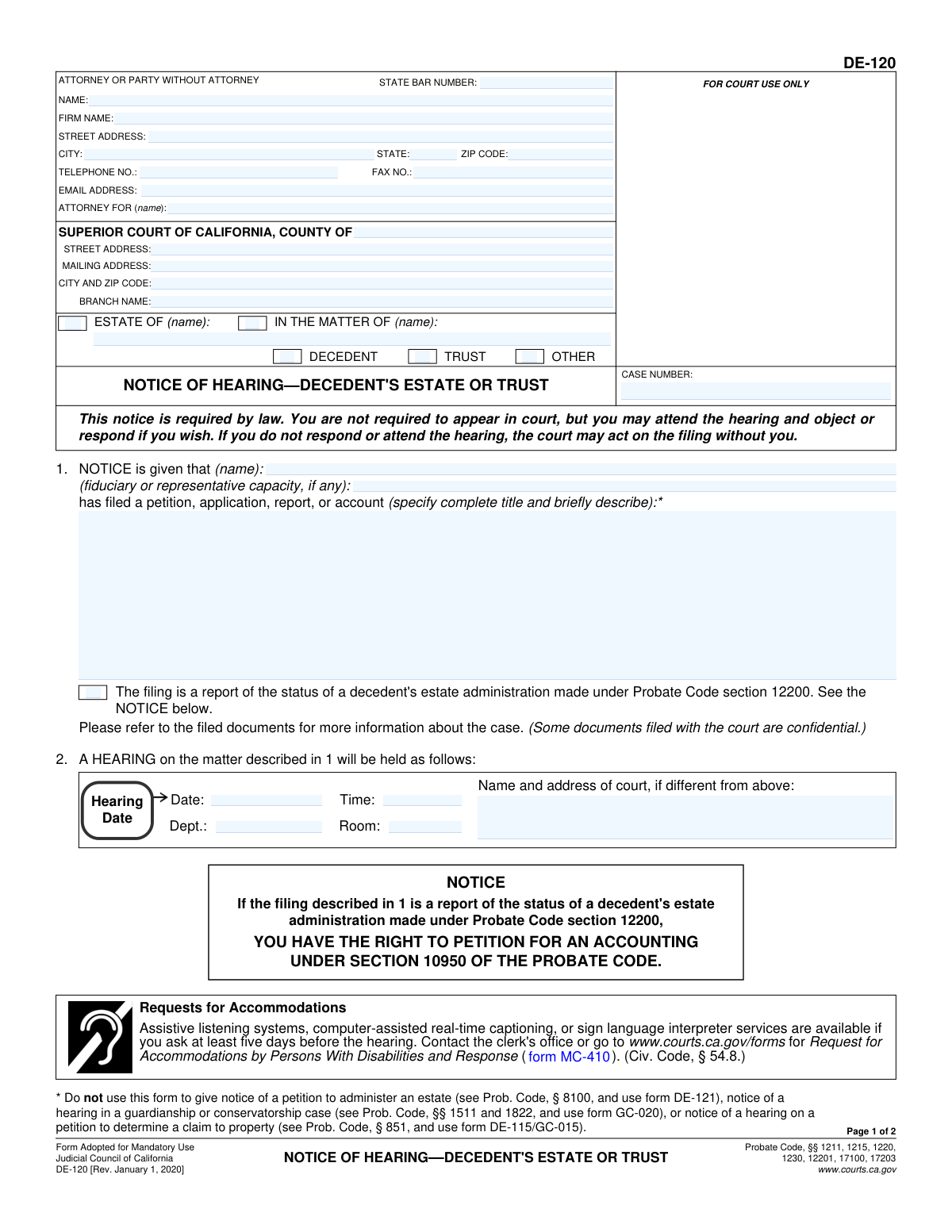
Yes! You can use AI to fill out Judicial Council of California Form DE-120, Notice of Hearing—Decedent's Estate or Trust

DE-120 (Notice of Hearing—Decedent's Estate or Trust) is a mandatory California Judicial Council probate form used to give legally required notice that a petition, application, report, or account has been filed and that a hearing has been set. It identifies the case, the type of matter (decedent’s estate, trust, or other), the hearing date/time/location, and includes sections for a clerk’s certificate of posting and proof of service by mail to show notice was properly provided. Proper completion and service are important because the court may proceed on the filing even if recipients do not appear, and defective notice can delay or jeopardize the hearing. Today, this form can be filled out quickly and accurately using AI-powered services like Instafill.ai, which can also convert non-fillable PDF versions into interactive fillable forms.
Our AI automatically handles information lookup, data retrieval, formatting, and form filling.
It takes less than a minute to fill out DE-120 using our AI form filling.
Securely upload your data. Information is encrypted in transit and deleted immediately after the form is filled out.

Form specifications

Form name: Judicial Council of California Form DE-120, Notice of Hearing—Decedent's Estate or Trust
Number of pages: 2
Language: English
Categories: California court forms, Judicial Council forms, estate forms, California judicial forms, California probate forms, trust forms
main-image

Instafill Demo: filling out a legal form in seconds

How to Fill Out DE-120 Online for Free in 2026

Are you looking to fill out a DE-120 form online quickly and accurately? Instafill.ai offers the #1 AI-powered PDF filling software of 2026, allowing you to complete your DE-120 form in just 37 seconds or less.
Follow these steps to fill out your DE-120 form online using Instafill.ai:
  1. 1 Go to Instafill.ai and upload the DE-120 PDF (or select DE-120 from the form library).
  2. 2 Enter the attorney/party information (name, State Bar number if applicable, firm, address, phone, email) and specify who the attorney represents.
  3. 3 Fill in the court and case details (county, branch, court addresses, and the probate case number) and identify the estate/matter name.
  4. 4 Complete the notice section by selecting the case type (decedent’s estate, trust, or other), listing the filing party/capacity, and describing the petition/application/report/account being noticed (including whether it is a Probate Code § 12200 status report, if applicable).
  5. 5 Enter the hearing information (date, time, department, room, and any different court name/address for the hearing).
  6. 6 Complete service sections as needed: clerk’s certificate of posting (if applicable) and proof of service by mail (server address, mailing method, mailing date/place, recipients’ names/addresses, and whether additional documents were served).
  7. 7 Use Instafill.ai to validate required fields, generate a clean final PDF, then download/print for filing and signature where required and for serving copies to all listed recipients.

Our AI-powered system ensures each field is filled out correctly, reducing errors and saving you time.

Why Choose Instafill.ai for Your Fillable DE-120 Form?

Speed

Complete your DE-120 in as little as 37 seconds.

Up-to-Date

Always use the latest 2026 DE-120 form version.

Cost-effective

No need to hire expensive lawyers.

Accuracy

Our AI performs 10 compliance checks to ensure your form is error-free.

Security

Your personal information is protected with bank-level encryption.

Frequently Asked Questions About Form DE-120

DE-120 is used to give legally required notice that a petition, application, report, or account has been filed in a probate estate or trust matter and that a hearing has been scheduled. It tells interested persons when and where the court will hear the matter and how they can respond.

The person or attorney who is requesting the court hearing (the filing party) typically completes DE-120 and ensures it is served on the required people. The server (someone over 18 who is not a party) completes the Proof of Service by Mail section if service is done by mail.

No—this notice states you are not required to appear. However, you may attend the hearing and object or respond if you wish; if you do nothing, the court may act on the filing without you.

You’ll need the case number, the court’s county/branch and address, the estate or trust name, the type of matter (decedent’s estate, trust, or other), and the hearing date/time/department/room. You must also describe the exact title of the petition/application/report/account being heard.

Enter the complete title of the document filed (as it appears on the filing) and add a brief description of what it requests. This helps recipients understand what the hearing is about.

Check “Decedent” for probate estate matters, “Trust” for trust proceedings, and “Other” only if the case type doesn’t fit those categories. Use the “IN THE MATTER OF/ESTATE OF” fields to match the case caption used by the court.

Do not use DE-120 to give notice of a petition to administer an estate (use DE-121), for guardianship or conservatorship hearings (use GC-020), or for a petition to determine a claim to property under Probate Code § 851 (use DE-115/GC-015). The form itself lists these exclusions.

Check this only if the filing is specifically a status report under Probate Code section 12200. If it is, the notice explains recipients may have the right to petition for an accounting under Probate Code section 10950.

Often you must include a copy of the petition or other document referenced in item 1—there is a checkbox in the Proof of Service section confirming you served it. Check local court rules or your attorney to confirm what must be included for your specific filing.

A non-party adult server fills it out, listing their address, the mailing date and city/state, the mailing method used, and the names/addresses of everyone served. The server must sign under penalty of perjury and date the declaration.

Check “Continued on an attachment” and attach additional pages listing names and addresses. The form suggests using DE-120(MA)/GC-020(MA) as the attachment for additional recipients.

No, that section is for the clerk/deputy clerk to complete when the court posts the notice. Leave it blank unless the court specifically instructs you otherwise.

The form states you should request accommodations at least five days before the hearing. You can contact the clerk’s office or use the Judicial Council accommodations form referenced on DE-120.

Yes—AI form-filling tools can help you map your case details (court, case number, hearing info, parties, and service list) into the correct fields and reduce errors. Services like Instafill.ai use AI to auto-fill form fields accurately and save time.

Upload the DE-120 PDF to Instafill.ai, provide or import your case details (caption, hearing date/time/department, and service recipients), and let the AI populate the fields for review before downloading. If your PDF is flat/non-fillable, Instafill.ai can convert it into an interactive fillable form so you can complete and sign it more easily.

Compliance DE-120
Validation Checks by Instafill.ai

1
Requires Case Number and enforces California probate case-number format
Validates that the Case Number field is present and matches the court’s expected case-number pattern (e.g., alphanumeric with optional dashes/spaces) and is not placeholder text. This is critical for docketing, routing, and ensuring the notice is associated with the correct proceeding. If validation fails, the submission should be rejected or flagged for manual review because the notice cannot be reliably linked to a court file.
2
Ensures exactly one primary case type is selected (Decedent / Trust / Other)
Checks that one—and only one—of Case Type Decedent, Case Type Trust, or Case Type Other is selected for the notice. This prevents ambiguous classification and ensures the correct statutory notice rules and workflows apply. If multiple or none are selected, the system should block submission and prompt the filer to correct the case type selection.
3
Validates matter/estate naming consistency across 'IN THE MATTER OF' and 'ESTATE OF'
Ensures the Case Name / IN THE MATTER OF (name) and ESTATE OF (name) fields are completed as applicable and do not conflict (e.g., different estate names for the same case). Consistent naming is important for matching the notice to the petition and for accurate service lists. If inconsistent, the submission should be flagged and require correction to avoid misidentification of the estate or trust.
4
Requires petition/application/report/account title and brief description (Item 1) and disallows prohibited use cases
Validates that the 'Petition, Application, Report, or Account Description' includes a complete title and a brief description, not just a generic phrase (e.g., 'see filed documents'). It should also detect prohibited uses noted on the form (e.g., petition to administer an estate requiring DE-121, guardianship/conservatorship requiring GC-020, or property claim under Prob. Code § 851 requiring DE-115/GC-015). If missing or prohibited, the system should prevent filing or route to the correct form selection workflow.
5
Hearing date is present, valid, and not in the past
Checks that Hearing Date is provided, is a real calendar date, and is not earlier than the submission date (unless the system explicitly supports historical notices). This prevents issuing notices for invalid or already-occurred hearings. If validation fails, the submission should be blocked and the filer prompted to enter a correct hearing date.
6
Hearing time format validation and business-hours reasonableness check
Validates Hearing Time is in an acceptable format (e.g., HH:MM with AM/PM) and represents a valid time. Optionally checks reasonableness (e.g., typical court hours) to catch data-entry errors like 00:00 or 25:61. If invalid, the system should require correction to avoid misinforming recipients and causing due process issues.
7
Requires at least one hearing location identifier (Room or Department) and validates numeric formatting
Ensures Hearing Room Number and/or Hearing Department Number is provided, and that values are in an expected format (often numeric, sometimes alphanumeric depending on court). This is important so recipients can locate the correct courtroom/department. If both are blank or malformed, the submission should be rejected or flagged for correction.
8
Court information completeness and internal consistency (County, addresses, city/ZIP)
Validates that Court County is present and that the court address fields are complete enough to identify the venue (street or mailing address plus city/ZIP). If 'Court Name and Address (if different from above)' is provided, it should not duplicate the primary court address verbatim and should be complete on its own. If incomplete or inconsistent, the system should prompt for correction because incorrect venue/address can invalidate notice and confuse recipients.
9
Attorney/party identity completeness based on whether a State Bar Number is provided
If a State Bar Number is entered, requires Attorney Name and 'Attorney For Name' to be present (indicating representation) and disallows obviously invalid bar numbers (non-numeric where numeric is expected, too short/long). If no bar number is provided, requires Filing Party Name and sufficient contact/address information for a self-represented party. If validation fails, the submission should be blocked because the notice must clearly identify who is giving notice and in what capacity.
10
Contact information format validation (phone, fax, email) with conditional requirements
Validates Telephone Number and Fax Number (if provided) follow acceptable formats (10-digit US numbers with optional punctuation and extensions) and that Email Address (if provided) matches standard email syntax. Optionally requires at least one reliable contact method (phone or email) for the attorney/party. If invalid, the system should require correction to ensure the court and recipients can contact the noticing party.
11
Mailing method selection must be exclusive and required for Proof of Service by Mail
Ensures exactly one of 'Depositing with U.S. Postal Service' or 'Placing for Collection and Mailing' is checked when Proof of Service by Mail is being submitted. This is necessary because the declaration must specify the method used to establish proper service. If neither or both are selected, the proof of service should be rejected as legally insufficient.
12
Proof of service mailing date/place required and logically consistent with hearing date
Validates Mailing Date and Mailing Place (city, state) are present and properly formatted (date valid; place includes both city and a valid US state/territory abbreviation or full name). Also checks Mailing Date is not after the Hearing Date and not after the Declaration Date, and can optionally enforce minimum notice periods if configured by court rules. If inconsistent, the system should flag or block because improper timing can invalidate notice.
13
Server eligibility and declarant fields completeness (over 18, not a party, signature/printed name/date)
Requires Server's Address, Declarant Printed Name, Declaration Date, and an electronic signature/attestation indicator to be present for the proof of service. While 'over 18 and not a party' is a statement, the system should at least ensure the declarant identity fields are complete to support accountability and perjury attestation. If missing, the proof of service should be rejected because it is not a complete declaration.
14
Recipient list completeness and attachment logic for continued recipients
Validates that at least one recipient name and address is provided unless 'Continued on an attachment' is checked, in which case an attachment reference/upload must exist. For each listed recipient, requires both Name and a complete Address including street, city, state, and ZIP. If validation fails, the system should block submission because service cannot be verified without identifying who was served and where.
15
Clerk’s Certificate of Posting fields required only when certificate section is used
If any Clerk’s Certificate of Posting fields are populated (Posting Address, Posting Date, Deputy Clerk Name, Certificate Date), the system should require all of them and validate date formats. This prevents partial certificates that could be misconstrued as complete proof of posting. If incomplete, the system should flag for correction or require the section to be cleared if not applicable.
16
Status report checkbox consistency with petition description (Prob. Code § 12200)
If 'Filing is Report of Status' is checked, the petition/application/report description should indicate it is a status report under Probate Code section 12200 (or contain equivalent wording), and the matter type should align with a decedent’s estate administration context. This ensures the special notice language is applied appropriately and avoids misleading recipients about their rights. If inconsistent, the system should warn and require confirmation/correction before acceptance.

Common Mistakes in Completing DE-120

Using DE-120 for the wrong type of notice

People often use DE-120 as a “generic probate notice” even when the law requires a different form (e.g., DE-121 for a petition to administer an estate, GC-020 for guardianship/conservatorship hearings, or DE-115/GC-015 for a Probate Code § 851 property claim). This can lead to rejected filings, continuances, or defective notice that forces you to re-serve and re-calendar the hearing. Avoid this by confirming the exact petition type and the statute referenced in your filing before selecting the notice form; AI-powered tools like Instafill.ai can flag mismatches between the filing type and the correct Judicial Council form.

Leaving the “petition/application/report/account” title too vague or incomplete

A very common error is writing a generic description like “petition” or “report” instead of the complete title and a brief, specific description required in item 1. Vague descriptions confuse recipients and can trigger objections or court questions because parties cannot tell what relief is being requested. Copy the exact caption/title from the filed document (including any “First/Second Amended,” “Account and Report,” etc.) and add a one-sentence summary; Instafill.ai can pull the title from your source document and format it consistently.

Not selecting the correct case type (Decedent / Trust / Other) or selecting multiple

Filers frequently check the wrong box (or more than one) for whether the matter is a decedent’s estate, trust, or other proceeding. This creates confusion about the governing code sections and can cause clerks or parties to treat the notice as defective or misrouted. Avoid this by matching the box to the underlying petition and case caption exactly; Instafill.ai can validate that the selected case type aligns with the case name and filing description.

Case number and caption inconsistencies across sections

People often enter the case number or estate/matter name differently in different places (e.g., missing middle initials, using a nickname for the decedent, or transposing digits in the case number). Inconsistencies can cause the clerk to reject the form, delay processing, or lead to service disputes because recipients cannot reliably match the notice to the correct case. Always copy the case number and caption directly from the court’s filed documents and paste consistently; Instafill.ai can auto-fill and cross-check these fields to prevent mismatches.

Missing fiduciary/representative capacity for the filing party

Item 1 asks for the fiduciary or representative capacity (e.g., “personal representative,” “trustee,” “conservator,” “guardian,” “beneficiary objector”), but many filers leave it blank or put a role that doesn’t match the petition. This can create standing/authority questions and may prompt objections or court requests for clarification. Avoid this by using the exact capacity stated in the petition and letters/orders, and have Instafill.ai validate role language and placement.

Hearing date/time/department/room entered incorrectly or left blank

A frequent mistake is using the date from a prior hearing, leaving the time blank, or mixing up “Dept.” and “Room,” especially when the court uses one but not the other. Incorrect hearing details can result in parties missing the hearing, defective notice, and continuances that require re-service. Confirm the hearing information from the court’s notice/order or online calendar and enter it exactly; Instafill.ai can format dates/times correctly and reduce transposition errors.

Not completing the “Court name and address if different” field when required

Some counties have multiple probate locations, and filers forget to list the specific hearing location when it differs from the main court address. This can misdirect attendees and undermine the practical effectiveness of notice, leading to complaints and requests to continue. Avoid this by checking the hearing assignment for the correct branch/location and listing it when different; Instafill.ai can prompt for this when branch information suggests multiple venues.

Attorney/party contact block errors (missing State Bar number, email, or incomplete address)

Common issues include leaving the State Bar number blank, using an outdated firm address, omitting ZIP+4/ZIP, or entering an email/phone number in the wrong format. These errors can prevent parties from contacting counsel, cause returned mail, and may trigger clerk rejection in some courts that require complete attorney identification. Double-check the attorney block against current State Bar records and firm letterhead; Instafill.ai can automatically format phone numbers, validate emails, and ensure required fields are not skipped.

Proof of Service by Mail completed by an ineligible server or missing server address

People sometimes sign the proof of service even though they are a party to the case, are under 18, or fail to provide the server’s residence/business address. An invalid proof of service can make notice legally ineffective, forcing re-service and potentially delaying the hearing. Use a qualified non-party adult to mail and sign, and ensure the server’s full address is listed; Instafill.ai can include eligibility reminders and require completion of the server address field.

Mailing method box not checked or inconsistent with how service actually occurred

Filers often forget to check either “depositing with U.S. Postal Service” or “placing for collection and mailing,” or they check the wrong one for their situation. This creates ambiguity and can be used to challenge service, especially if timing is disputed. Avoid this by selecting the method that matches the actual mailing process and keeping internal mailing logs; Instafill.ai can guide selection based on whether the server is an individual or a business mailroom process.

Incomplete recipient list or poorly formatted addresses (missing city/state/ZIP)

A very common mistake is listing names without full mailing addresses, using old addresses, or omitting apartment/unit numbers and ZIP codes. Returned mail or incomplete addressing can lead to claims of defective notice and may require re-mailing and updated proofs. Verify addresses against recent correspondence, court filings, or skip-trace results when appropriate, and use the attachment form when more space is needed; Instafill.ai can standardize address formatting and help catch missing components.

Forgetting to include the referenced petition/report with the notice when required

Item 5 indicates whether a copy of the petition or other document referenced in item 1 was served along with the notice, but filers often forget to include it or forget to check the box accurately. If recipients do not receive the underlying filing, they may object, request continuance, or argue they were deprived of meaningful notice. Always include the referenced document unless rules/orders say otherwise and ensure the checkbox reflects what was actually mailed; Instafill.ai can generate a service packet checklist to reduce omissions.
Saved over 80 hours a year

“I was never sure if my IRS forms like W-9 were filled correctly. Now, I can complete the forms accurately without any external help.”

Kevin Martin Green

Your data stays secure with advanced protection from Instafill and our subprocessors

Robust compliance program

Transparent business model

You’re not the product. You always know where your data is and what it is processed for.

ISO 27001, HIPAA, and GDPR

Our subprocesses adhere to multiple compliance standards, including but not limited to ISO 27001, HIPAA, and GDPR.

Security & privacy by design

We consider security and privacy from the initial design phase of any new service or functionality. It’s not an afterthought, it’s built-in, including support for two-factor authentication (2FA) to further protect your account.

Fill out DE-120 with Instafill.ai

Worried about filling PDFs wrong? Instafill securely fills judicial-council-of-california-form-de-120-notice-of-hearingdecedents-estate-or-trust-1 forms, ensuring each field is accurate.