
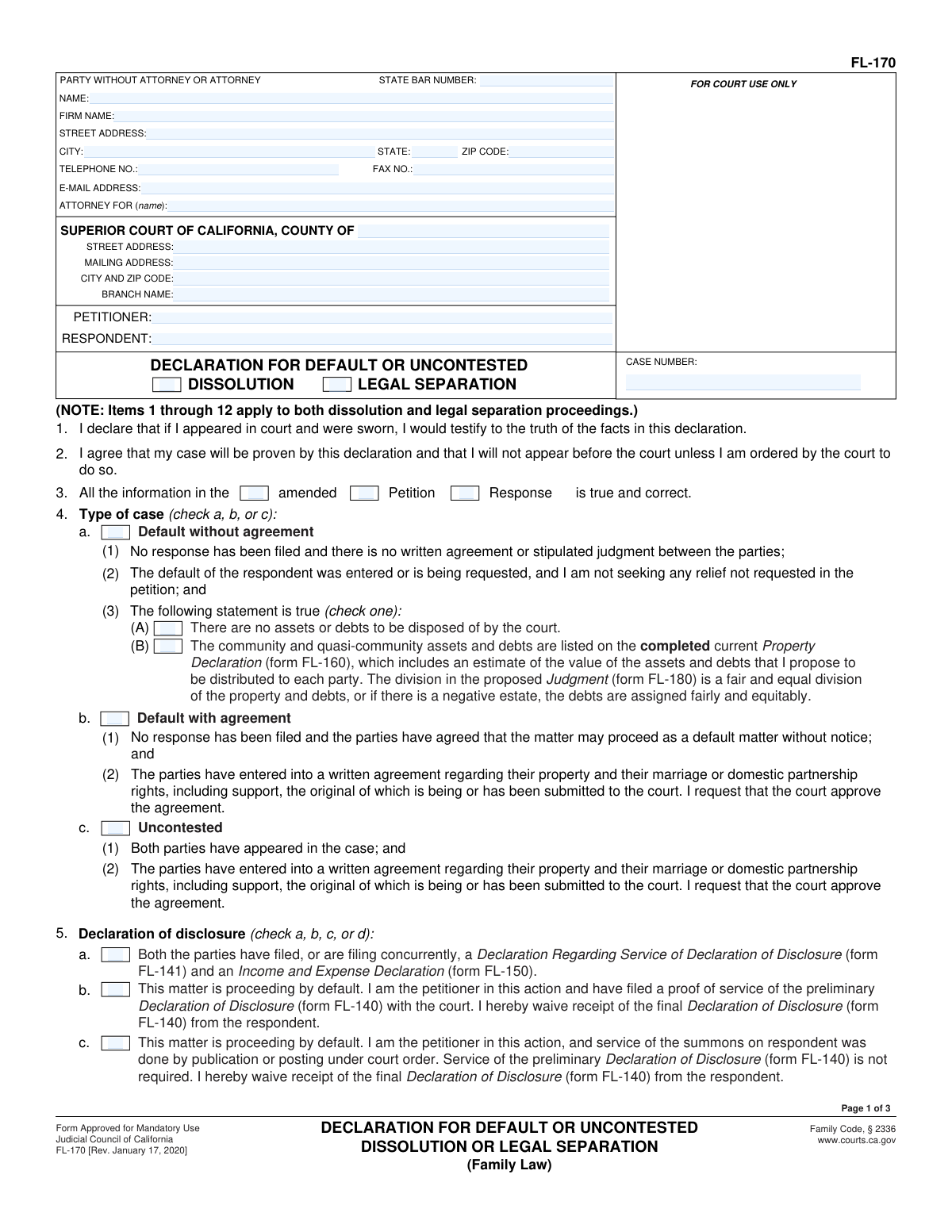
Yes! You can use AI to fill out Form FL-170, Declaration for Default or Uncontested Dissolution or Legal Separation (Family Law)
Don't type 106 fields by hand. Tell our AI about yourself, or upload a document you already have, and it fills every field in seconds. You check it, then download, print or sign.
The AI does the filling. You just check it.
No typing into boxes, nothing to install.
What this form asks for
The AI fills all of it, from your answers or your documents.
The AI checks your answers before you download
16 checks built for this form, so a wrong date or a missing answer is caught before anyone else sees it.
Validate that the filer selects either 'Dissolution' or 'Legal Separation' and not both or neither. These are mutually exclusive proceedings and drive which statements (e.g., dissolution residency requirement vs. legal separation advisement) apply. If validation fails, block submission and prompt the user to choose exactly one declaration type.
Check that exactly one of the three case-type checkboxes is marked. The form’s logic and required supporting documents differ depending on whether the matter is uncontested or default (with/without agreement). If multiple or none are selected, the submission should be rejected because the court cannot determine the correct procedural track.
Require at least one of 'Petition', 'Response', or 'Amended' to be selected to identify what filing the declarant is attesting is true and correct. If the case type indicates no response has been filed (default scenarios), flag an error if 'Response' is selected without an explanation/attachment indicating why response information is being used. On failure, require correction or an attachment clarifying the source.
Ensure the filer selects one—and only one—disclosure pathway (both filed, default with proof of service, default by publication/posting, or mutual waiver in uncontested action). These options represent different legal prerequisites and waivers and should not be combined. If validation fails, prevent filing and require the user to select the single applicable disclosure scenario.
If 5a is selected, require confirmation that FL-141 and FL-150 are filed or being filed concurrently (and optionally capture filing dates/receipt IDs if your system supports it). If 5d (mutual waiver) is selected, require FL-144 or a settlement agreement/proposed judgment containing the executed waiver provision; if 5b is selected, require proof of service for preliminary FL-140; if 5c is selected, require indication of court-ordered publication/posting service. If the required supporting document is missing, mark the submission incomplete and block acceptance.
Check that the filer selects either 'No assets or debts to be disposed of' or 'Assets and debts listed in FL-160'—not both. These statements are logically inconsistent and affect whether a Property Declaration (FL-160) must be provided. If both or neither are selected, reject submission and prompt the filer to correct the assets/debts section.
And 10 more checks
- Requires FL-160 Property Declaration when assets/debts are listed for division
- Validates child-related sections are complete when custody/visitation or child support orders are requested
- UCCJEA (FL-105) change status validation and updated form requirement
- Validates 'Existing custody order in another case' details when selected
- Validates 'Child support enforced in another case' details when selected
- Earning ability request requires party selection and supporting facts/attachment
- Public assistance status must be singular and triggers LCSA routing requirements
- Spousal/partner support selections are mutually exclusive and require supporting basis when ordered
- Attorney/party contact and attorney credential format validation (email/phone/fax/State Bar number)
- Signature block completeness: declarant name, date, and signature presence
Let AI fill out your FL-170
No typing. Every field filled in seconds, checked, ready to sign.
How to Fill Out FL-170 Online for Free in 2026
What the AI walks you through.
- Go to Instafill.ai and upload the FL-170 PDF (or select “FL-170” from the form library).
- Enter case and court details (county, branch, addresses), and party information (petitioner, respondent, case number, attorney/party contact details).
- Choose the case posture and type (default/uncontested; default with or without agreement) and confirm you are not requesting relief beyond the petition.
- Complete the disclosure section by selecting the correct disclosure/waiver option (e.g., FL-141/FL-150 filed; waiver due to publication; waiver of final disclosures; or mutual waiver with FL-144).
- Provide property/debt statements (no assets/debts or reference the FL-160 Property Declaration) and confirm the proposed division in the FL-180 Judgment is fair/equitable.
- If applicable, complete children/support sections (UCCJEA FL-105 status, custody/visitation, child support details, public assistance, spousal/partner support requests/waivers, parentage, and attorney fees—referencing FL-150, FL-157, FL-319 as needed).
- Review the AI validation checks, generate any needed attachments, then finalize by entering the date, printing/creating an e-signature-ready version, and saving for filing with the court along with the proposed FL-180 and supporting forms.
Common Mistakes in Completing FL-170
The ones the AI is built to catch.
Checking the wrong “Type of case” (Uncontested vs. Default with/without agreement)
Inconsistent disclosure selections (FL-140/FL-141/FL-144) and missing required waivers
Claiming publication/posting service (default) without matching the court-ordered service history
Not attaching FL-160 Property Declaration when assets/debts exist (or checking “no assets/debts” incorrectly)
Proposed Judgment (FL-180) doesn’t match what’s checked on FL-170
Leaving the “facts that support the requested judgment” blank or too vague (especially in default cases)
UCCJEA (FL-105) status checked incorrectly or not updated when circumstances changed
Missing county/case number details for “another case” (custody or child support enforcement)
Contradictory spousal/partner support selections (waive vs. reserve vs. terminate vs. order)
Requesting attorney fees without the required support (FL-150 and/or FL-319 facts)
Signature/date and identity fields incomplete or inconsistent (names, case number, party roles)
Frequently Asked Questions About FL-170
Is it really free for 7 days?
Can I fill other forms too?
How do I cancel?
How does the AI fill out FL-170?
What happens to my information?
How complex is FL-170 to fill out?
What is Form FL-170 used for?
Who needs to fill out FL-170?
What’s the difference between “Uncontested,” “Default with agreement,” and “Default without agreement” on this form?
Do I have to complete the Declaration of Disclosure forms (FL-140/FL-141) to file FL-170?
When can I check the box that says preliminary disclosure (FL-140) is not required due to service by publication or posting?
What does it mean to “waive receipt of the final Declaration of Disclosure (FL-140)”?
What should I do about property and debts—do I need FL-160?
How do I complete the child custody and visitation section if we already have a schedule?
What is the UCCJEA form (FL-105), and what does it mean if it “has changed”?
How does FL-170 handle child support, including cases enforced in another county?
Do I need to file an Income and Expense Declaration (FL-150) with FL-170?
What does it mean to permanently waive or terminate spousal/partner support on FL-170?
What is a “status-only judgment,” and when would I check that box?
Can AI help me fill out Form FL-170 accurately?
How can I fill out this form online using Instafill.ai if the PDF is not fillable?
Get your FL-170 filled out by AI
$0 today. Cancel before Oct 31 and you pay nothing.
Other forms like this one
NY legal forms: Legal Aid Queensland application form (LAQAPP) – Application for Legal Aid in Queensland, Legal Aid Queensland application form (LAQAPP), Legal Aid Queensland application form (LAQAPP), Legal Aid Queensland application form (LAQAPP), Form FL-170, Declaration for Default or Uncontested Dissolution or Legal Separation, Department of Home Affairs — Appointment or cessation of a registered migration agent, legal practitioner or exempt person providing immigration assistance (Appointment notification form), Form 956, Appointment of a registered migration agent, legal practitioner or exempt person, Legal Entity Beneficial Ownership/Trust Certification Form, Application Form: Legal Entities | Qualified Investor Hedge Fund, Fundrock Application Form: Legal Entities | Monthly Liquidity – Qualified Investor Hedge Fund, Application Form: Legal Entities | Retail Hedge Fund - Fundrock, Fundrock Application Form: Legal Entities | Monthly Liquidity – Retail Hedge Fund, Nova Poshta Claim Form for Legal Entities and Individual Entrepreneurs (Form F-1.5.35-1), Legal Aid Financial Eligibility Form
legal forms: Legal Aid Queensland application form (LAQAPP) – Application for Legal Aid in Queensland, Legal Aid Queensland application form (LAQAPP), Legal Aid Queensland application form (LAQAPP), Legal Aid Queensland application form (LAQAPP), Form FL-170, Declaration for Default or Uncontested Dissolution or Legal Separation, Department of Home Affairs — Appointment or cessation of a registered migration agent, legal practitioner or exempt person providing immigration assistance (Appointment notification form), Form 956, Appointment of a registered migration agent, legal practitioner or exempt person, Legal Entity Beneficial Ownership/Trust Certification Form, Application Form: Legal Entities | Qualified Investor Hedge Fund, Fundrock Application Form: Legal Entities | Monthly Liquidity – Qualified Investor Hedge Fund, Application Form: Legal Entities | Retail Hedge Fund - Fundrock, Fundrock Application Form: Legal Entities | Monthly Liquidity – Retail Hedge Fund, Form N461: Claim for judicial review, Friedman, Framme & Thrush, P.A. General Authorization Letter and Request for Letter or Telephone Call, Memorandum of Contract, Relinquishment of control over assets to minor form, Nova Poshta Claim Form for Legal Entities and Individual Entrepreneurs (Form F-1.5.35-1), Legal Aid Financial Eligibility Form, Form MC 6, Notice to Appear, Form MC 01, Summons
family law forms: Form 12.902(b), Family Law Financial Affidavit (Short Form), Florida Supreme Court Approved Family Law Form 12.901(b)(3), Petition for Dissolution of Marriage with No Dependent or Minor Child(ren) or Property (02/18), Form FL-100, Petition—Marriage/Domestic Partnership (Family Law), declaration-of-marriage-for-court-proceeding-california-family-law, Florida Supreme Court Approved Family Law Form 12.902(d), Uniform Child Custody Jurisdiction and Enforcement Act (UCCJEA) Affidavit, Florida Family Law Rules of Procedure Form 12.910(a), Summons: Personal Service on an Individual, Florida Supreme Court Approved Family Law Form 12.941(a), Petition for Enforcement of Out-of-State Custody Decree and for Order to Pick Up Minor Child(ren), Florida Supreme Court Approved Family Law Form 12.970(a), Petition for Temporary Custody by Extended Family, Form FL-110, Summons (Family Law), Form FL-120, Response—Marriage/Domestic Partnership (Family Law), ADOPT-200, Adoption Request, ADOPT-200, Stepparent Adoption Request, ADOPT-210, Adoption Agreement, ADOPT-310, Contact After Adoption Agreement, Adoption Assistance Program Nonrecurring Adoption Expense Agreement and Claim, Adoption Request (Stepparent), Adoption and Safe Families Act (ASFA) Survey, Florida Family Law Rules of Procedure Form 12.900(b), Notice of and Consent to Limited Appearance, Florida Family Law Rules of Procedure Form 12.900(d), Termination of Limited Appearance, Florida Family Law Rules of Procedure Form 12.900(e), Acknowledgment of Assistance by Attorney
legal separation forms: Form FL-170, Declaration for Default or Uncontested Dissolution or Legal Separation, Form FL-115, Proof of Service of Summons (Family Law—Uniform Parentage—Custody and Support), Form FL-140, Declaration of Disclosure (Family Law), Form FL-145, Form Interrogatories—Family Law, Form FL-160, Property Declaration (Family Law), Form FL-191, Child Support Case Registry Form, Form FL-195, Income Withholding for Support, Form FL-141, Declaration Regarding Service of Declaration of Disclosure and Income and Expense Declaration, Form FL-190, Notice of Entry of Judgment (Family Law—Uniform Parentage—Custody and Support), Form FL-180, Judgment (Family Law), Proposed Divorce / Legal Separation Resolution Statement
EU legal forms: Form A, Claim Form, European Small Claims Procedure, Legal Aid Queensland application form (LAQAPP) – Application for Legal Aid in Queensland, Legal Aid Queensland application form (LAQAPP), Legal Aid Queensland application form (LAQAPP), Legal Aid Queensland application form (LAQAPP), Form FL-170, Declaration for Default or Uncontested Dissolution or Legal Separation, Department of Home Affairs — Appointment or cessation of a registered migration agent, legal practitioner or exempt person providing immigration assistance (Appointment notification form), Form 956, Appointment of a registered migration agent, legal practitioner or exempt person, Legal Entity Beneficial Ownership/Trust Certification Form, Application Form: Legal Entities | Qualified Investor Hedge Fund, Fundrock Application Form: Legal Entities | Monthly Liquidity – Qualified Investor Hedge Fund, Application Form: Legal Entities | Retail Hedge Fund - Fundrock, Fundrock Application Form: Legal Entities | Monthly Liquidity – Retail Hedge Fund, Nova Poshta Claim Form for Legal Entities and Individual Entrepreneurs (Form F-1.5.35-1), Legal Aid Financial Eligibility Form
Let AI fill out your FL-170
Your trial starts once a card is added. You pay nothing before Oct 31.
Our AI already knows this form, all 106 fields of it. Skip the typing: tell it about yourself, or upload what you have, and it fills the whole form in seconds.
- AI fills every field on all 3 pages, checkboxes included
- No typing into boxes: answer a few questions, or upload a document you already have, an old copy of this form, a photo of a document
- The AI checks the answers; you review and change anything before you download
- Download the finished PDF, print it, or sign it online
- Encrypted, and never used to train AI
Cancel before Oct 31 and you pay nothing.
A card is needed to start the trial. Cancel in two clicks from your account.
Terms · Privacy