Yes! You can use AI to fill out Consent to Adoption by Parent

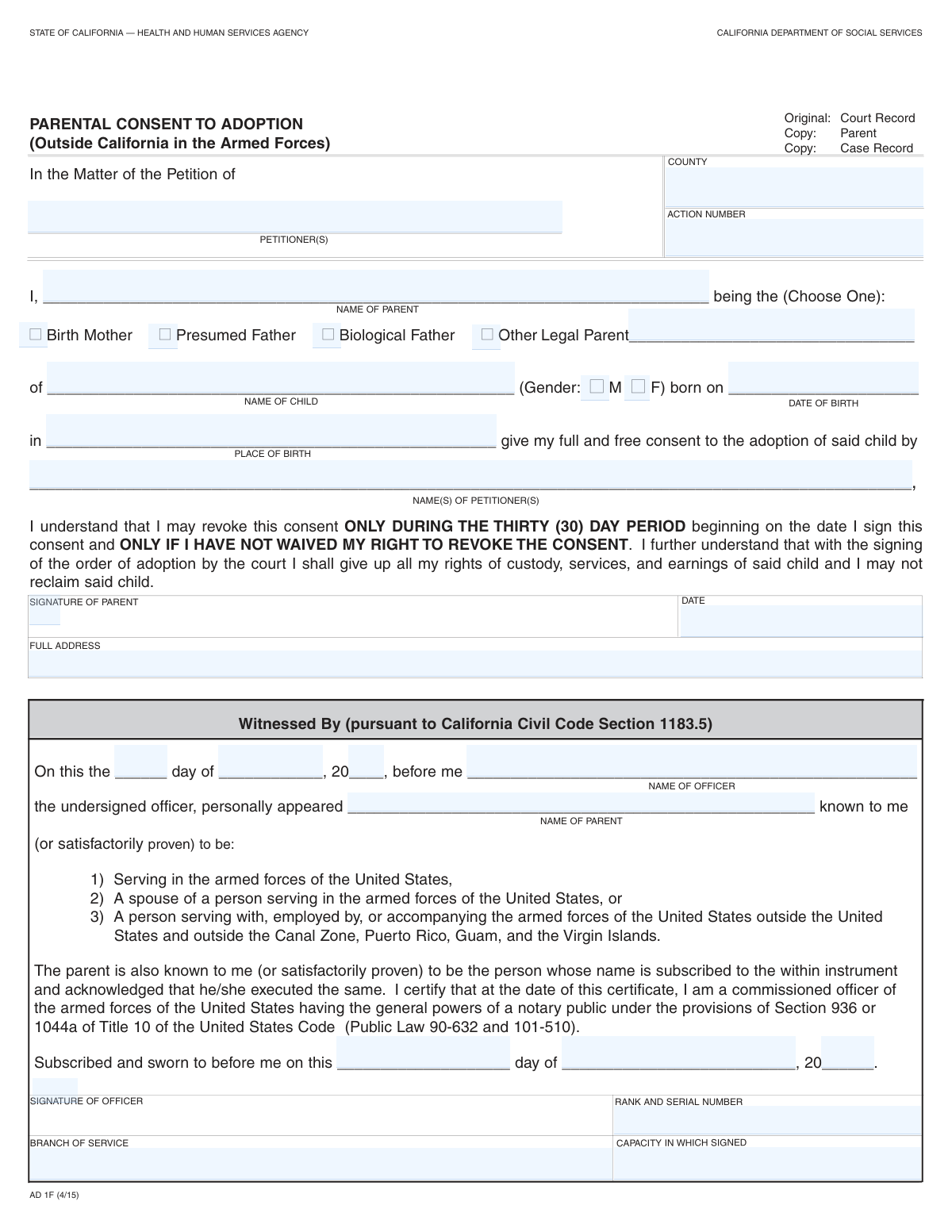
The Consent to Adoption by Parent is a legally binding document where a parent formally agrees to the adoption of their child by specific individuals, known as petitioners. This sworn statement is a critical component of the adoption process, ensuring the parent's consent is voluntary, informed, and legally sound, often requiring a witness like a notary or military officer. Today this form can be filled out quickly and accurately using AI-powered services like Instafill.ai, which can also convert non-fillable PDF versions into interactive fillable forms.
Our AI automatically handles information lookup, data retrieval, formatting, and form filling.
It takes less than a minute to fill out Parental Consent to Adoption using our AI form filling.
Securely upload your data. Information is encrypted in transit and deleted immediately after the form is filled out.

Form specifications

Form name: Consent to Adoption by Parent
Number of fields: 30
Number of pages: 1
Language: English
Categories: adoption forms
main-image

Instafill Demo: How to fill out PDF forms in seconds with AI

How to Fill Out Parental Consent to Adoption Online for Free in 2026

Are you looking to fill out a PARENTAL CONSENT TO ADOPTION form online quickly and accurately? Instafill.ai offers the #1 AI-powered PDF filling software of 2026, allowing you to complete your PARENTAL CONSENT TO ADOPTION form in just 37 seconds or less.
Follow these steps to fill out your PARENTAL CONSENT TO ADOPTION form online using Instafill.ai:
  1. 1 Navigate to Instafill.ai and upload or select the Consent to Adoption by Parent form.
  2. 2 Use the AI assistant to automatically fill in case information, such as the petitioners' names, county, and action number.
  3. 3 Provide the consenting parent's information, checking the box that corresponds to their relationship with the child (e.g., Birth Mother, Presumed Father).
  4. 4 Enter the child's full name, date and place of birth, and other required personal details.
  5. 5 Carefully review all the information entered by you and the AI for complete accuracy before preparing the document for signature.
  6. 6 Print the completed form to be signed by the parent in the physical presence of a qualified witness.
  7. 7 Have the witnessing officer (e.g., notary public, military officer) fill out their respective section, sign, and date the document to finalize the consent.

Our AI-powered system ensures each field is filled out correctly, reducing errors and saving you time.

Why Choose Instafill.ai for Your Fillable Parental Consent to Adoption Form?

Speed

Complete your Parental Consent to Adoption in as little as 37 seconds.

Up-to-Date

Always use the latest 2026 Parental Consent to Adoption form version.

Cost-effective

No need to hire expensive lawyers.

Accuracy

Our AI performs 10 compliance checks to ensure your form is error-free.

Security

Your personal information is protected with bank-level encryption.

Frequently Asked Questions About Form Parental Consent to Adoption

This form is a legal document used by a parent to formally give their consent for their child to be adopted by the specific individuals named as petitioners.

The child's legal parent who is consenting to the adoption must complete and sign this form. This could be the birth mother, presumed father, biological father, or another legal parent.

The 'Action Number' is the unique case number assigned by the court where the adoption petition was filed. You can typically find this on other court documents related to the case or by contacting the petitioners' attorney.

A 'Presumed Father' is someone legally recognized as the father (e.g., by being married to the mother at the time of birth), while a 'Biological Father' is the genetic father. You should check the box that accurately reflects your legal relationship to the child.

These fields refer to the same people: the individual(s) who are seeking to adopt your child. You should enter their full legal names in both sections for consistency.

You should have the child's full name and birth information, the full names of the adopting petitioners, and the court case information, including the county and Action Number.

This form must be signed in the presence of a witnessing officer, who then also signs the document. Based on the fields for rank, serial number, and branch of service, this is likely a commissioned officer in the U.S. Armed Forces.

You only need to fill this field if you checked the 'Other Legal Parent' box. In that case, you would specify your relationship, for example, 'adoptive parent' or as defined by a prior court order.

Yes, services like Instafill.ai use AI to accurately auto-fill form fields, which can save you time and help prevent errors on important documents like this.

To fill this form online, upload the PDF to the Instafill.ai platform. Their service will make the fields interactive, allowing you to type your information directly, and then you can download the completed form for printing and signing.

If your PDF is not fillable, you can use a service like Instafill.ai. It can convert flat, non-interactive PDFs into fillable forms that you can easily complete on your computer.

Because this is a legal consent document, you should not use correction fluid or cross things out. If you make a mistake, it is best to print and complete a new, clean form to ensure it is accepted by the court.

Compliance Parental Consent to Adoption
Validation Checks by Instafill.ai

1
Parent Role Selection Requirement
This validation ensures that at least one of the parent relationship checkboxes ('Birth Mother', 'Presumed Father', 'Biological Father', 'Other Legal Parent') is selected. It is critical to establish the legal standing of the parent giving consent for the adoption. If no role is selected, the form cannot be processed as the relationship to the child is undefined.
2
Conditional 'Other Legal Parent' Description
This check verifies that the 'Parent's Relationship to Child' text field is filled out if, and only if, the 'Other Legal Parent' checkbox is selected. This rule prevents ambiguity by ensuring that a specific relationship is provided when a standard category is not chosen. Failure to comply would result in incomplete information about the consenting parent's legal status.
3
Exclusive Child Gender Selection
This validation ensures that for the child's information, either the 'Male' checkbox or the 'Female' checkbox is selected, but not both. This prevents contradictory or ambiguous data entry for a fundamental piece of the child's identifying information. An error would be flagged if zero or both options are checked, requiring the user to make a single, valid selection.
4
Child's Date of Birth Logical Validity
This check confirms that the child's 'Date of Birth' is a valid, full date that occurs in the past, before the 'Date of Consent'. It is logically impossible for a child to be born in the future or for consent to be given before the child exists. This validation prevents data entry errors that would invalidate the entire legal document.
5
Petitioner Name Consistency Across Sections
This validation verifies that the name(s) entered in the 'Case Petitioners' field match the name(s) in the 'Adoption Petitioners' field. This cross-reference is crucial to ensure that the consent for adoption is being granted to the correct parties who initiated the legal case. A mismatch could lead to legal challenges and invalidation of the consent.
6
Consenting Parent Name Consistency
This check confirms that the name entered in 'Parent's Name (Parent Information)', 'Parent's Name (Parent's Consent)', and 'Appearing Parent Name (Witnessed Parties)' are identical. This consistency is paramount for legally establishing the identity of the single individual who is giving consent. Any discrepancy would raise questions about who actually signed the document, potentially voiding the consent.
7
Witnessing Date Assembly and Validity
This validation combines the separate 'Day of Month', 'Month', and 'Year (last two digits)' fields to form a single date and verifies its validity. It checks for impossible dates, such as April 31st, and correctly interprets the two-digit year (e.g., '24' becomes '2024'). This ensures the legal date of witnessing is accurately recorded and is a real calendar date.
8
Sworn Date Assembly and Validity
Similar to the witnessing date check, this validation assembles the 'Sworn Date Day', 'Sworn Date Month', and 'Sworn Date Year' fields into a complete, valid calendar date. The integrity of legal documents depends on accurate and valid dates for when actions like swearing an oath occurred. This check prevents the submission of forms with nonsensical or incorrectly formatted sworn dates.
9
Chronological Integrity of Dates
This validation ensures that the key dates on the form follow a logical chronological order: Child's Date of Birth must be before the Date of Consent, which must be on or before the Witnessing and Sworn Dates. This sequence is legally required, as one cannot consent to or witness an event that has not yet happened. A failure would indicate a significant data entry error that undermines the document's timeline.
10
Witnessing Officer Name Consistency
This check ensures the name entered in 'Witnessing Officer Name (Witnessed Parties)' is identical to the name in 'Officer Name (Officer's Information)'. This cross-references the identity of the officer who witnessed the parent's signature with the officer whose details are provided. A mismatch would create ambiguity about who officially witnessed the act, compromising the document's legal standing.
11
Completeness of Officer's Information
This validation verifies that if the 'Officer Name' field is filled, then the associated 'Officer Rank and Serial Number', 'Officer Branch of Service', and 'Officer Capacity' fields are also completed. For a military officer's witness to be legally valid, their full identification is typically required. Incomplete information would prevent proper verification of the officer's authority to act as a witness.
12
Action Number Presence and Format
This check ensures the 'Action Number' field is not empty and, if possible, conforms to the expected format for the specified 'County'. The action number is the primary identifier for the case in the court system, and its accuracy is essential for associating this consent form with the correct legal proceeding. An invalid or missing number would cause the document to be rejected or misfiled.
13
Completeness of Case Information
This validation ensures that the 'Case Petitioners', 'County', and 'Action Number' fields are all filled out. This block of information is fundamental for identifying the legal case to which this consent document pertains. Missing any of this information would make it impossible to file the document correctly with the court.
14
Parent's Full Address Requirement
This check verifies that the 'Parent's Full Address' field is not empty and contains a plausible address format. This address is required for legal notifications and to properly identify the consenting parent. An incomplete or missing address could halt legal proceedings if the court or other parties need to contact the parent.

Common Mistakes in Completing Parental Consent to Adoption

Inconsistent Petitioner and Parent Names

The form asks for petitioner and parent names in multiple sections. People often introduce slight variations, such as including a middle initial in one field but not another, which can create legal ambiguity. This can lead to questions about the identity of the parties and may require clarification or amendments, delaying the case. To avoid this, use the full, consistent legal name in every field where it is requested.

Incorrect Parent Relationship Selection

Users may mistakenly check the wrong box for their relationship to the child (e.g., 'Presumed Father' vs. 'Biological Father') or check multiple boxes. Each status has specific legal implications, and an incorrect selection can invalidate the consent document, leading to significant legal complications and delays. Carefully read the legal definitions for each parent type and select only the one that accurately reflects your legal status.

Mishandling the 'Other Legal Parent' Field

The form requires a written description of the parent's relationship only if the 'Other Legal Parent' box is checked. A common error is either checking the box and failing to provide the required explanation, or providing an explanation when a different box (like 'Birth Mother') was checked. This omission or superfluous information can confuse court clerks and may cause the form to be returned for correction.

Date Formatting Errors

The form requires dates to be split into separate fields for day, month, and year, and specifically asks for only the last two digits of the year. People frequently enter the full four-digit year (e.g., '2024' instead of '24') or mix up the month and day. These formatting errors can lead to the document being rejected and needing to be re-executed, wasting time and resources.

Missing or Guessed Case Information

The 'Action Number' and 'County' are critical for linking the consent form to the correct court case. Individuals may not have this information when they fill out the form and either leave it blank or guess. Submitting a form with incorrect or missing case information will almost certainly result in its rejection by the court clerk, halting the adoption process until a corrected form is filed.

Incomplete Place of Birth for the Child

The form requires the child's full place of birth, including city, state, and country. It is common for people to only enter the city and state, omitting the country, especially if born in the United States. For official records, the complete information is necessary, and its absence can lead to requests for more information, delaying the finalization of the adoption.

Illogical or Inconsistent Dates

The form includes multiple date fields: 'Date of Consent,' 'Witnessing Date,' and 'Sworn Date.' These dates must be chronologically logical (e.g., the witnessing date cannot be before the consent date). People filling out the form at different times can easily make mistakes, creating a timeline that invalidates the document's legal standing. It is crucial to review all dates to ensure they are accurate and sequential.

Incomplete Witnessing Officer Details

The section for the witnessing officer requires specific details like rank, serial number, branch of service, and capacity. The consenting parent often does not have this information and may leave the fields blank, intending to fill them in later. Forgetting to complete this section before filing makes the sworn statement invalid and will cause the form to be rejected.

Using Informal Names or Nicknames

This is a legal document that requires full legal names for all individuals, including the parent, child, and petitioners. Using nicknames or shortened names (e.g., 'Jen' instead of 'Jennifer') can create identity discrepancies and may lead to legal challenges or rejection of the form. Always use the name as it appears on official government identification and birth certificates.

Ambiguous Gender Selection

With separate checkboxes for 'Male' and 'Female', there is a risk of human error, such as checking both boxes or neither. This creates an ambiguity in the child's official record that must be clarified. Such errors, while simple, require correction and resubmission, adding unnecessary delays to the adoption proceedings. AI-powered tools like Instafill.ai can help prevent this by ensuring only one option is selected.
Saved over 80 hours a year

“I was never sure if my IRS forms like W-9 were filled correctly. Now, I can complete the forms accurately without any external help.”

Kevin Martin Green

Your data stays secure with advanced protection from Instafill and our subprocessors

Robust compliance program

Transparent business model

You’re not the product. You always know where your data is and what it is processed for.

ISO 27001, HIPAA, and GDPR

Our subprocesses adhere to multiple compliance standards, including but not limited to ISO 27001, HIPAA, and GDPR.

Security & privacy by design

We consider security and privacy from the initial design phase of any new service or functionality. It’s not an afterthought, it’s built-in, including support for two-factor authentication (2FA) to further protect your account.

Fill out Parental Consent to Adoption with Instafill.ai

Worried about filling PDFs wrong? Instafill securely fills consent-to-adoption-by-parent forms, ensuring each field is accurate.