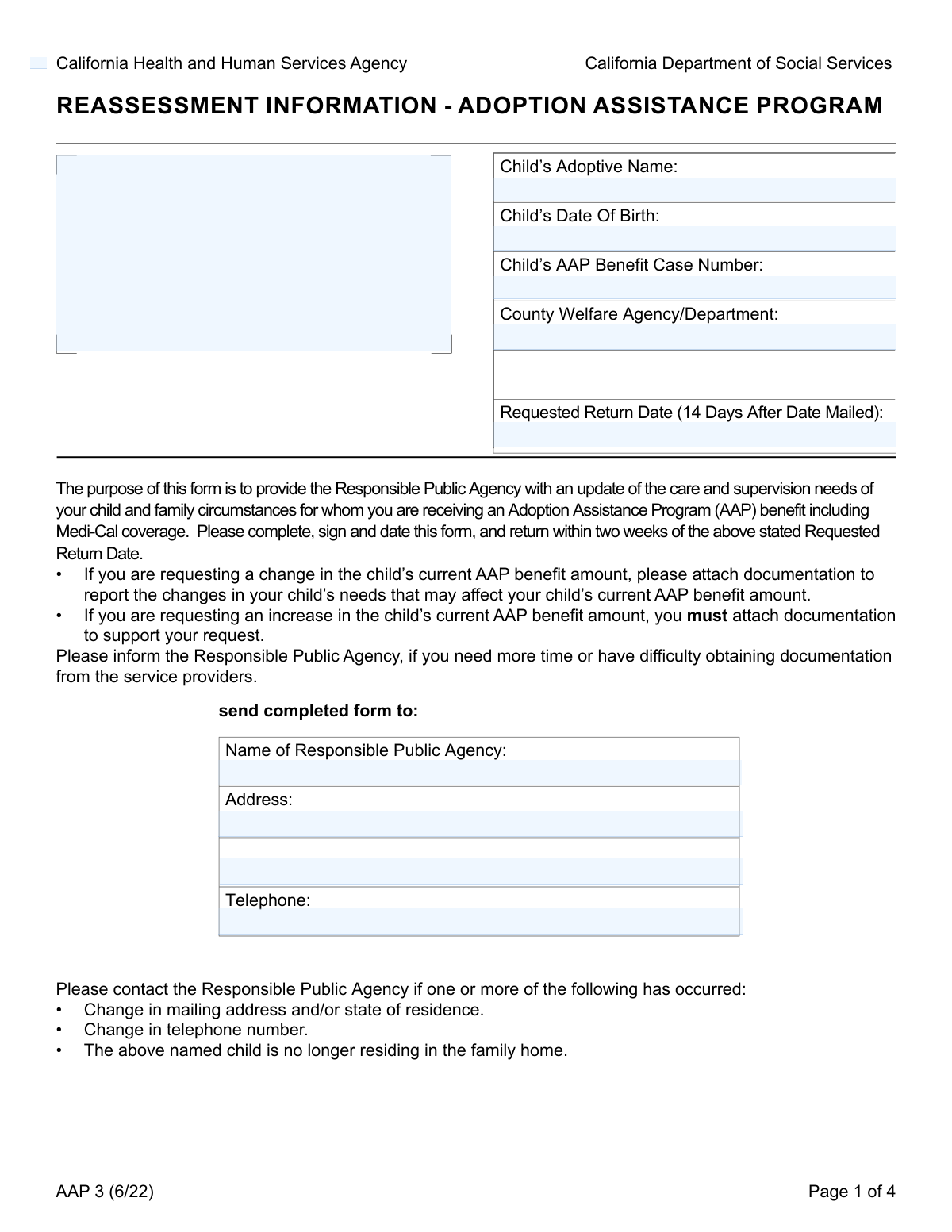
Yes! You can use AI to fill out AAP 2, Reassessment Information - Adoption Assistance Program
Form AAP 2, Reassessment Information - Adoption Assistance Program, is a crucial document for adoptive families in California receiving AAP benefits. It serves as a periodic reassessment to report on the child's needs and family circumstances, allowing parents to maintain, increase, or decrease their assistance payments accordingly. Completing this form accurately ensures continued support for the adopted child's well-being. Today, this form can be filled out quickly and accurately using AI-powered services like Instafill.ai, which can also convert non-fillable PDF versions into interactive fillable forms.
Our AI automatically handles information lookup, data retrieval, formatting, and form filling.
It takes less than a minute to fill out AAP 2 using our AI form filling.
Securely upload your data. Information is encrypted in transit and deleted immediately after the form is filled out.
Form specifications
| Form name: | AAP 2, Reassessment Information - Adoption Assistance Program |
| Number of fields: | 51 |
| Number of pages: | 4 |
| Language: | English |
| Categories: | adoption forms |
Instafill Demo: How to fill out PDF forms in seconds with AI
How to Fill Out AAP 2 Online for Free in 2026
Are you looking to fill out a AAP 2 form online quickly and accurately? Instafill.ai offers the #1 AI-powered PDF filling software of 2026, allowing you to complete your AAP 2 form in just 37 seconds or less.
Follow these steps to fill out your AAP 2 form online using Instafill.ai:
- 1 Navigate to Instafill.ai and upload or select the AAP 2 form.
- 2 Use the AI assistant to accurately fill in the child's information, such as their name, date of birth, and AAP case number, along with the responsible agency details.
- 3 Indicate your current legal and financial responsibility status for the child by checking the appropriate boxes.
- 4 Select your desired action regarding the AAP benefit, whether it's to maintain the current amount, request an increase or decrease, or terminate the agreement.
- 5 Provide details about your family's health insurance coverage and the current breakdown of your monthly AAP benefit amount. If requesting an increase, describe the reasons and attach supporting documents.
- 6 Enter your current contact information, then review the entire form for accuracy before electronically signing and dating it.
- 7 Download your completed AAP 2 form and submit it to the appropriate county welfare agency as instructed.
Our AI-powered system ensures each field is filled out correctly, reducing errors and saving you time.
Why Choose Instafill.ai for Your Fillable AAP 2 Form?
Speed
Complete your AAP 2 in as little as 37 seconds.
Up-to-Date
Always use the latest 2026 AAP 2 form version.
Cost-effective
No need to hire expensive lawyers.
Accuracy
Our AI performs 10 compliance checks to ensure your form is error-free.
Security
Your personal information is protected with bank-level encryption.
Frequently Asked Questions About Form AAP 2
This form is used by adoptive parents to report their child's status to the Adoption Assistance Program (AAP). You can use it to maintain your current benefit, request an increase or decrease, or terminate the benefit.
This form must be completed by the adoptive parent(s) who are receiving benefits from the Adoption Assistance Program (AAP) for their adopted child.
You will need your child's full adoptive name, date of birth, and their AAP benefit case number. You should also have details about your current monthly AAP benefit amount and any private health insurance information.
If there have been no changes to your child's care needs or your family's circumstances, you should check the box to 'Maintain Current AAP Benefit'.
To request an increase, check the 'Request AAP Benefit Increase' box and provide a detailed written explanation for the request. You must also indicate if you have attached supporting documentation.
This option allows you to stop receiving monthly AAP payments and/or Medi-Cal, but it keeps your child eligible for future benefits. This is useful if your circumstances change and you need to reactivate assistance later.
In the 'Responsibility Status' section, you should check the box indicating the 'Child Attained Age 18 or 21'. This officially notifies the agency of this change, which may affect benefit eligibility.
The Specialized Care Increment (SCI) is an additional payment for children who require more care and supervision than is typical for their age. You would provide details about this if you are requesting a benefit increase based on these needs.
The form should be returned by the 'Requested Return Date' printed on the form. This date is typically 14 days after the form was mailed to you.
Yes, you must report whether your family has health insurance and if the adopted child is covered by that plan. If the child is not covered by your insurance, you will need to state the reason why.
You should check the box for 'No Longer Legally and Financially Responsible' or 'No Longer Providing Any Support' in the 'Responsibility Status' section, depending on your specific situation.
Yes, services like Instafill.ai use AI to auto-fill form fields accurately and save time. This can help you complete your information quickly and reduce the chance of errors.
To fill this form out online, you can use a service like Instafill.ai. Simply upload the document, and the platform will make the fields interactive for you to complete, save, and print from your device.
If your PDF is a flat, non-fillable file, you can use a tool like Instafill.ai. It can convert the document into an interactive form that you can easily fill out on your computer.
Compliance AAP 2
Validation Checks by Instafill.ai
1
Mutually Exclusive AAP Benefit Request
This check ensures that only one of the AAP benefit request options ('Maintain Current', 'Request Increase', 'Request Decrease', 'Terminate') is selected. A user cannot simultaneously request to maintain, increase, and decrease their benefits. If more than one option is selected, the form submission should be blocked with an error message prompting the user to choose only one action.
2
Conditional Requirement for Benefit Increase Reason
Validates that if the 'Request AAP Benefit Increase' checkbox is selected, the 'Reason for Increased AAP Benefit' text area must be filled out. This justification is critical for the agency to evaluate the request for a higher benefit amount. A failure to provide this reason would result in an incomplete application and prevent the request from being processed.
3
Conditional Requirement for Benefit Decrease Amount
Ensures that if the 'Request AAP Benefit Decrease' checkbox is selected, the 'AAP Benefit Decrease Amount' field is populated with a valid monetary value. The agency needs to know the new requested amount to process the change. If this field is left empty or contains non-numeric data, the submission will fail, requiring the user to input the specific amount.
4
Mutually Exclusive Health Insurance Status
This validation confirms that the user selects either 'Family has health insurance - Yes' or 'Family has health insurance - No', but not both. These two options are mutually exclusive and provide a clear starting point for the health insurance section. An invalid selection would create ambiguity and require clarification, so the form should prompt the user to make a single choice.
5
Conditional Logic for Child's Insurance Coverage
If 'Family has health insurance - Yes' is selected, this check verifies that one of the 'Child currently covered by insurance' options ('Yes' or 'No') is also selected. This information is dependent on the family having a plan in the first place. If the parent condition is met but the child's status is not provided, the form is incomplete and cannot be submitted.
6
Child's Date of Birth Validity
This check validates that the 'Child's Date of Birth' is a real, correctly formatted date that occurs in the past. It prevents the entry of future dates or impossible dates (e.g., February 30th). This is fundamental for calculating the child's age and determining eligibility for certain benefits, so an invalid date must be corrected before submission.
7
Age Consistency with Responsibility Status
This validation cross-references the 'Child's Date of Birth' with the 'Child Attained Age 18 or 21' checkbox. It calculates the child's current age and flags a discrepancy if the checkbox is selected for a child who is younger than 18. This logical check ensures data integrity and prevents incorrect status declarations that could affect benefit eligibility.
8
AAP Benefit Amount Summation
Verifies that the 'Total Monthly Amount' field correctly equals the sum of its component parts ('AAP Basic Rate', 'Specialized Care Increment', 'Wraparound Amount', etc.). This acts as a self-audit to ensure the financial data entered is consistent and accurate. If the numbers do not add up, an error is flagged to prompt the user to review and correct the individual benefit amounts.
9
Primary Signature Requirement
Ensures that the 'Signature' field for the first adoptive parent is not empty. A signature is a legal requirement to certify the information provided and authorize the agency to take action. A form submitted without a primary signature is invalid and cannot be processed.
10
Signature Date Logical Check
Validates that the 'Signature Date' is a valid date that is not in the future and is on or after the 'Child's Date of Birth'. This ensures the signature was made after the child was born and on a plausible date. An invalid signature date would call the document's authenticity into question and must be corrected.
11
Telephone Number Format Validation
This check ensures that the 'Agency Telephone Number' and the contact 'Telephone Number' fields adhere to a standard phone number format (e.g., 10 digits, with or without common separators). Proper formatting is essential for ensuring the agency can successfully contact the family or other relevant parties. An invalid format would trigger an error, asking the user to correct the number.
12
Email Address Format Validation
Verifies that the value entered in the 'Email Address' field follows the standard '[email protected]' format. This is crucial for ensuring that electronic communications from the agency will be successfully delivered. If the format is invalid, the system should prevent submission and prompt the user to enter a valid email address.
13
Conditional Insurance Plan Name Requirement
This check ensures that if 'Child currently covered by insurance - Yes' is selected, the 'Insurance Plan Name' field is not empty. Knowing the specific plan is necessary for coordination of benefits and agency records. If the child is marked as covered but no plan name is provided, the form submission should be halted until the information is entered.
14
Conditional No Coverage Reason
Validates that if 'Child currently covered by insurance - No' is selected, the 'Reason for No Coverage' field must be filled out. This information is important for the agency to understand the child's situation and determine if assistance is needed to obtain coverage. An empty reason field would result in an incomplete submission, requiring the user to provide an explanation.
Common Mistakes in Completing AAP 2
The Adoption Assistance Program (AAP) case number is the unique identifier for the child's file. Entering this number incorrectly can cause the form to be misfiled, applied to the wrong case, or rejected outright, leading to significant processing delays and potential disruption of benefits. To avoid this, carefully copy the case number from official agency correspondence and double-check it for accuracy before submission.
Users often check multiple, mutually exclusive boxes, such as selecting both 'Maintain Current AAP Benefit' and 'Request AAP Benefit Increase'. This creates ambiguity and forces the agency to halt processing and contact the family for clarification, delaying any requested changes. Carefully read each option in a section and select only the single choice that accurately reflects your request.
When requesting a benefit increase, applicants frequently check the box but fail to provide the mandatory detailed written justification in the 'Reason for Increased AAP Benefit' field. Forgetting to attach supporting documentation and check the corresponding box is also common. An incomplete request cannot be evaluated and will be denied or delayed until all required information is submitted.
Applicants often make mathematical errors when itemizing their monthly benefit, where the sum of the individual rates (e.g., Basic Rate, Specialized Care Increment) does not match the 'Total Monthly Amount' entered. This discrepancy requires manual review and correction by the agency, slowing down the entire process. Always use a calculator to confirm that the breakdown components add up to the correct total.
An unsigned or undated form is legally invalid and will be immediately returned for completion, stopping the process entirely. This common oversight often happens when filers are in a hurry. Always perform a final review of the form, specifically looking for the signature and date fields for all required parents, before submitting it.
This form contains many fields that should only be filled out if a specific previous option is selected (e.g., providing an 'Insurance Plan Name' only if 'Family has health insurance - Yes' is checked). People either miss these required follow-up fields or fill out sections that don't apply, creating a confusing submission. AI-powered form-filling tools like Instafill.ai can prevent this by dynamically showing only the relevant fields based on your answers.
Submitting an old address, disconnected phone number, or an email address with a typo is a frequent and critical mistake. If the agency cannot contact you to clarify information or provide updates, your case may be delayed or benefits could be impacted. Always verify that your street address, email, and phone number are current and entered correctly.
The 'Responsibility Status' section requires a clear declaration of your legal and financial relationship with the child. Some filers either skip this section entirely or check conflicting boxes (e.g., 'Legally and Financially Responsible' and 'No Longer Legally and Financially Responsible'). This ambiguity can have serious legal and financial implications, so it is crucial to read each option carefully and select the one that accurately describes your current status.
If the form is a non-fillable PDF, it must be printed and completed by hand. Illegible handwriting can cause agency staff to make critical data entry errors, such as misspelling a name or transposing digits in a case number. To prevent this, write clearly in block letters or use a tool like Instafill.ai, which can convert flat PDFs into digitally fillable forms to eliminate handwriting issues.
A common error is to check 'Family has health insurance - Yes' but then fail to answer the mandatory follow-up question about whether the adopted child is specifically covered by that plan. This missing information is critical for determining Medi-Cal eligibility and coordinating benefits. If you indicate the family has insurance, you must also specify whether or not the child is covered under that plan.
Saved over 80 hours a year
“I was never sure if my IRS forms like W-9 were filled correctly. Now, I can complete the forms accurately without any external help.”
Kevin Martin Green
Your data stays secure with advanced protection from Instafill and our subprocessors

Robust compliance program
Transparent business model
You’re not the product. You always know where your data is and what it is processed for.
ISO 27001, HIPAA, and GDPR
Our subprocesses adhere to multiple compliance standards, including but not limited to ISO 27001, HIPAA, and GDPR.
Security & privacy by design
We consider security and privacy from the initial design phase of any new service or functionality. It’s not an afterthought, it’s built-in, including support for two-factor authentication (2FA) to further protect your account.
Fill out AAP 2 with Instafill.ai
Worried about filling PDFs wrong? Instafill securely fills aap-2-reassessment-information-adoption-assistance-program forms, ensuring each field is accurate.