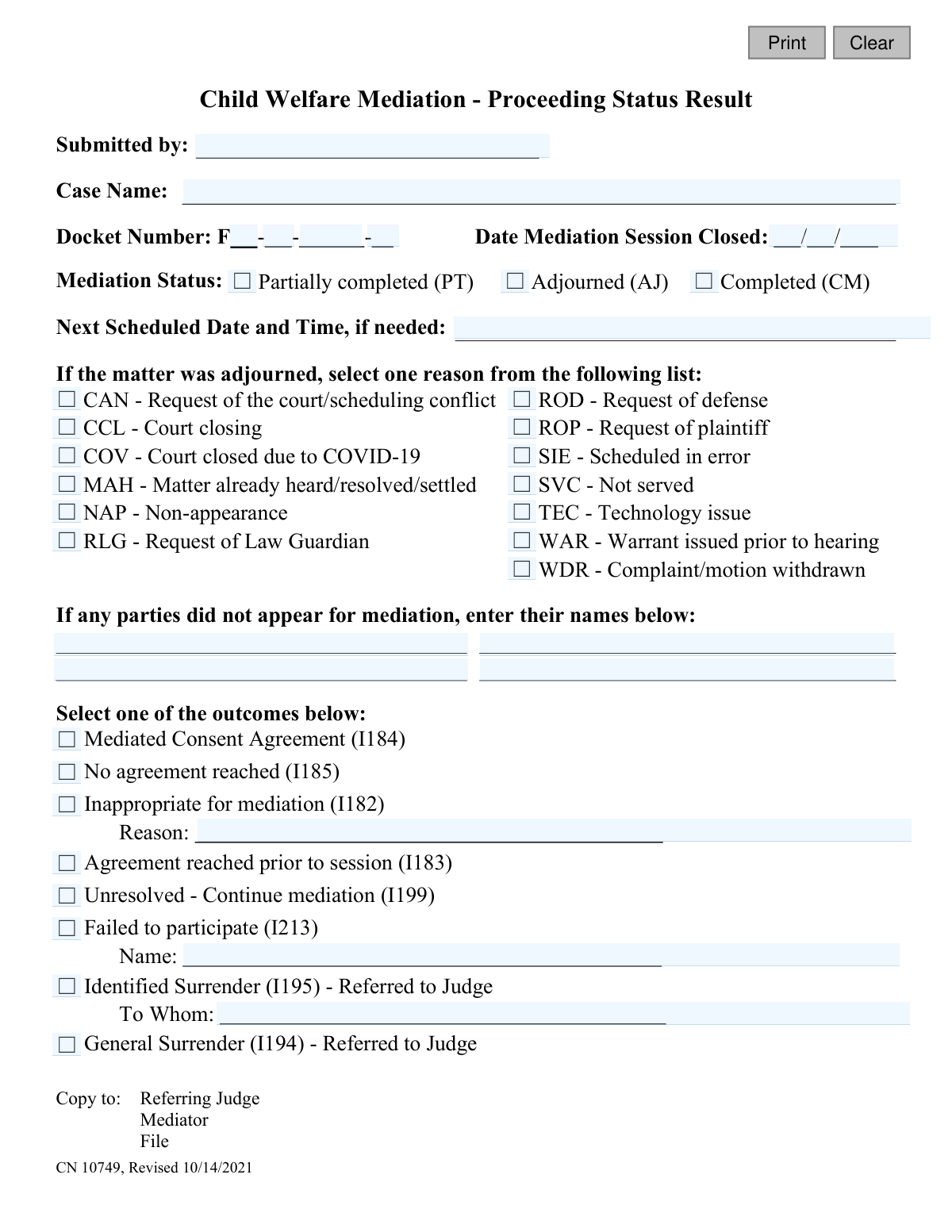
Yes! You can use AI to fill out Child Welfare Mediation Case Status Report
This form, CN 10749, serves as an official report to the court detailing the status and results of a child welfare mediation proceeding. It documents key information such as whether the mediation was completed, adjourned, or if an agreement was reached, providing a clear record for the case file. Using AI-powered services like Instafill.ai, you can fill out this form quickly and accurately, and even convert non-fillable PDF versions into interactive, fillable forms.
Our AI automatically handles information lookup, data retrieval, formatting, and form filling.
It takes less than a minute to fill out CN 10749 using our AI form filling.
Securely upload your data. Information is encrypted in transit and deleted immediately after the form is filled out.
Form specifications
| Form name: | Child Welfare Mediation Case Status Report |
| Number of fields: | 43 |
| Number of pages: | 1 |
| Language: | English |
Instafill Demo: How to fill out PDF forms in seconds with AI
How to Fill Out CN 10749 Online for Free in 2026
Are you looking to fill out a CN 10749 form online quickly and accurately? Instafill.ai offers the #1 AI-powered PDF filling software of 2026, allowing you to complete your CN 10749 form in just 37 seconds or less.
Follow these steps to fill out your CN 10749 form online using Instafill.ai:
- 1 Navigate to Instafill.ai and upload or select the Child Welfare Mediation Case Status Report (CN 10749).
- 2 Provide the case name, docket number, and the date the mediation session was closed. The AI can assist by pre-filling information from your case files.
- 3 Select the mediation status, such as 'Completed', 'Partially completed', or 'Adjourned'.
- 4 If the matter was adjourned, choose the appropriate reason from the provided list and note the next scheduled date if applicable.
- 5 Indicate the final outcome of the mediation by checking the relevant box, like 'Mediated Consent Agreement' or 'No agreement reached', and provide any required additional details.
- 6 List the names of any parties who failed to appear for the mediation session.
- 7 Review all the AI-populated and manually entered information for accuracy, then download, print, or electronically submit the completed report to the referring judge and other required parties.
Our AI-powered system ensures each field is filled out correctly, reducing errors and saving you time.
Why Choose Instafill.ai for Your Fillable CN 10749 Form?
Speed
Complete your CN 10749 in as little as 37 seconds.
Up-to-Date
Always use the latest 2026 CN 10749 form version.
Cost-effective
No need to hire expensive lawyers.
Accuracy
Our AI performs 10 compliance checks to ensure your form is error-free.
Security
Your personal information is protected with bank-level encryption.
Frequently Asked Questions About Form CN 10749
This form is used by a mediator to officially report the status and outcome of a child welfare mediation session to the court and other parties involved in the case.
The mediator who conducted the child welfare mediation session is responsible for completing and submitting this report.
You will need the case name, docket number, the date the mediation session was closed, and specific details about the outcome, such as whether an agreement was reached or why the session was adjourned.
The 'Mediation Status' indicates if the session itself was completed, partially done, or adjourned. The 'Outcome' section specifies the legal result, such as 'Mediated Consent Agreement' or 'No agreement reached'.
If the session was adjourned, check the 'Adjourned (AJ)' box, enter the next scheduled date and time, and select the appropriate reason for the adjournment from the provided list.
You should list the names of any parties who did not appear for the mediation session in the designated fields below the list of adjournment reasons.
No, you must select only one outcome from the list that best describes the final result of the session.
Once completed, copies of the report must be distributed to the referring judge and the mediator, with another copy placed in the official case file.
If you select 'Inappropriate for mediation', you must also provide a brief explanation for this determination in the 'Reason' field provided on the form.
Yes, services like Instafill.ai use AI to accurately auto-fill form fields with your case information, which can save significant time and help prevent errors.
Simply upload the PDF of the Case Status Report to the Instafill.ai platform. Their service will make the form fillable online, and you can use its AI to help populate the fields quickly and accurately.
You can use a tool like Instafill.ai, which specializes in converting non-fillable PDFs into interactive, fillable forms that you can easily complete and save on your computer.
The docket number should be entered in the format shown on the form: F - [County] - [Serial Number] - [Year]. Each part of the number corresponds to a separate field.
This outcome indicates that while no final agreement was reached during this session, the parties have agreed to continue the mediation process at a future date.
Compliance CN 10749
Validation Checks by Instafill.ai
1
Ensures Docket Number is Complete and Formatted
This validation verifies that all components of the Docket Number (County, Serial, and Year) are filled in and contain only numeric characters. A complete and accurate docket number is essential for linking the report to the correct case file in the court system. If any part is missing or contains non-numeric characters, the submission will fail, preventing misfiling.
2
Validates Mediation Session Closed Date
This check ensures that the 'Date Mediation Session Closed' is a valid calendar date and is not a future date. This date marks a key event in the case timeline and must be historically accurate for legal and record-keeping purposes. An invalid or future date would compromise the integrity of the case record, so the user will be prompted to enter a valid date in the past or present.
3
Requires Selection of a Mediation Status
This validation confirms that one and only one option from the 'Mediation Status' list (Partially completed, Adjourned, Completed) has been selected. This status is a primary piece of information on the report, defining the overall state of the proceeding. Failure to select a status would make the report ambiguous and incomplete, so the form cannot be submitted without this choice.
4
Requires Selection of a Case Outcome
This check ensures that exactly one outcome from the provided list is selected. The outcome is the official result of the mediation session and dictates the next steps in the legal process. Submitting the form without a clear outcome would require manual follow-up and delay case processing, so a selection is mandatory.
5
Conditional Requirement for Adjournment Reason
This validation rule is triggered if the 'Mediation Status' is set to 'Adjourned (AJ)'. It requires the user to select a specific reason from the adjournment list. This information is critical for court administrators to understand scheduling delays and case impediments. If the status is 'Adjourned' and no reason is provided, the submission will be blocked until a reason is selected.
6
Conditional Requirement for 'Inappropriate for Mediation' Reason
This check ensures that if the outcome 'Inappropriate for mediation (I182)' is selected, the corresponding 'Reason' text field is not empty. This explanation is vital for the referring judge to understand why the case could not be mediated and to make an informed decision on how to proceed. Without this reason, the form submission will be rejected.
7
Conditional Requirement for 'Failed to Participate' Name
This validation ensures that if the outcome 'Failed to participate (I213)' is selected, the associated 'Name' field is populated. Identifying the non-participating party is crucial for accountability and potential judicial action. The form will be considered incomplete and rejected if this outcome is chosen without specifying the name of the party who failed to participate.
8
Conditional Requirement for 'Identified Surrender' Referral Name
If the outcome 'Identified Surrender (I195) - Referred to Judge' is selected, this check verifies that the 'To Whom' field is filled out. This field must contain the name of the judge to whom the matter is being referred for finalization. A missing referral name would create a dead end in the workflow, so the submission is prevented until the judge's name is provided.
9
Logical Requirement for Next Scheduled Date
This validation checks if a 'Next Scheduled Date and Time' is provided when logically necessary. The date is required if the 'Mediation Status' is 'Adjourned (AJ)' or if the 'Outcome' is 'Unresolved - Continue mediation (I199)'. This ensures that cases requiring further action are not left in limbo without a scheduled follow-up. The submission will fail if a future date is not provided under these conditions.
10
Ensures Next Scheduled Date is in the Future
This check validates that the 'Next Scheduled Date and Time', if provided, is a date and time that occurs after the 'Date Mediation Session Closed'. Scheduling a future event in the past is a logical impossibility and indicates a data entry error. This check prevents nonsensical data from entering the system and ensures accurate scheduling.
11
Prevents Logical Conflict Between Status and Outcome
This is a cross-field validation that checks for logical inconsistencies between the selected 'Mediation Status' and 'Outcome'. For example, a status of 'Completed (CM)' cannot be paired with an outcome of 'Unresolved - Continue mediation (I199)'. This check maintains the logical integrity of the report, preventing contradictory information from being filed and causing confusion.
12
Ensures Submitter Name is Provided
This validation confirms that the 'Submitted by' field is not left blank. Knowing who submitted the report is essential for accountability and for any necessary follow-up questions. An anonymous or empty submission would be invalid, so the form cannot be processed without this information.
13
Ensures Case Name is Provided
This check verifies that the 'Case Name' field has been filled in. Along with the docket number, the case name is a primary identifier for the legal matter. Submitting a report without a case name would make it extremely difficult to file correctly, leading to processing delays and potential errors.
14
Exclusive Population of Adjournment Reason
This validation ensures that an 'Adjournment Reason' can only be selected if the 'Mediation Status' is 'Adjourned (AJ)'. If the status is 'Completed' or 'Partially completed', the adjournment reason field should be disabled or cleared. This prevents irrelevant and potentially confusing data from being submitted with the form.
Common Mistakes in Completing CN 10749
Users often enter the docket number incorrectly, either by omitting the 'F' prefix, combining all numbers into one field, or misplacing the county, serial, and year components. This happens due to rushing or misunderstanding the segmented format. An incorrect docket number can lead to significant delays as the report cannot be matched to the correct case file in the court's system. To avoid this, carefully enter each part of the docket number into its designated slot as shown on the form.
A frequent error is selecting a 'Mediation Status' that conflicts with the chosen 'Outcome'. For example, marking the status as 'Completed (CM)' but then selecting the outcome as 'Unresolved - Continue mediation (I199)'. This creates a logical inconsistency that confuses the case record and requires clarification. Ensure the final outcome logically follows from the overall mediation status to provide a clear and accurate report for the court.
When a user selects 'Adjourned (AJ)' as the 'Mediation Status', they often forget to select the corresponding reason from the provided list. This leaves the court without the necessary context to understand why the mediation was postponed, which can affect future scheduling and case management. To prevent this, always select one of the specific adjournment reasons if you have marked the case as adjourned. AI-powered tools like Instafill.ai can automatically prompt for this information when 'Adjourned' is selected.
Several outcomes require additional information, such as a 'Reason' for 'Inappropriate for mediation (I182)' or a 'Name' for 'Failed to participate (I213)'. Submitters frequently check the box but neglect to fill in the mandatory text field. This omission renders the report incomplete and may require follow-up, delaying case proceedings. Always double-check if a selected outcome requires you to provide a name, reason, or other clarification in an adjacent field.
Users sometimes check more than one box in sections where only one selection is allowed, such as choosing both 'Completed (CM)' and 'Adjourned (AJ)' for the 'Mediation Status'. This error usually occurs from uncertainty or misreading the instructions. It creates an ambiguous record that cannot be processed correctly. Remember to select only one option for 'Mediation Status' and one for 'Outcome' to ensure the report is definitive.
If the mediation is 'Partially completed (PT)' or 'Adjourned (AJ)', a 'Next Scheduled Date and Time' is almost always necessary for the case to proceed. A common mistake is to leave this field blank, which disrupts the court's scheduling process and can cause significant delays. If the mediation is not fully completed, ensure you enter the next session's date and time. Smart form-filling tools can help by reminding you to fill this field based on your status selection.
The section for listing parties who did not appear is critical for the judge, yet it is often filled out incorrectly or left blank. Mistakes include forgetting to list a no-show party or, conversely, listing someone who was actually present. Such errors can lead to improper judicial actions, like issuing a warrant for the wrong person. Carefully verify attendance and accurately record the full names of any individuals who failed to appear for the mediation.
The form includes several nuanced outcomes that can be easily confused, such as 'Mediated Consent Agreement (I184)' versus 'Agreement reached prior to session (I183)'. A user might select the former when the agreement was actually finalized before the session even began. This misclassification can affect case statistics and procedural next steps. Read each outcome description carefully to ensure you are selecting the one that most accurately reflects the situation.
The form has several text boxes that are conditional upon a specific outcome (e.g., 'Reason' for I182, 'Name' for I213). A common data entry error is typing information into the wrong box, for instance, writing the name of the person who failed to participate in the 'Reason' field for 'Inappropriate for mediation'. This jumbles the report data, making it difficult for court staff to understand. Always align your written details with the corresponding checkbox. Using a tool like Instafill.ai, which can convert flat PDFs into interactive forms, helps by clearly linking input fields to their specific options.
The 'Submitted by' field is sometimes left blank, filled with an illegible signature on paper copies, or completed with a vague title like 'Mediator' instead of a full, printed name. This lack of clear identification makes it difficult to know who is accountable for the report's content if questions arise. Always provide your full, clear name to ensure proper record-keeping and accountability. AI-powered form fillers can help by pre-filling this information consistently across all documents.
Saved over 80 hours a year
“I was never sure if my IRS forms like W-9 were filled correctly. Now, I can complete the forms accurately without any external help.”
Kevin Martin Green
Your data stays secure with advanced protection from Instafill and our subprocessors

Robust compliance program
Transparent business model
You’re not the product. You always know where your data is and what it is processed for.
ISO 27001, HIPAA, and GDPR
Our subprocesses adhere to multiple compliance standards, including but not limited to ISO 27001, HIPAA, and GDPR.
Security & privacy by design
We consider security and privacy from the initial design phase of any new service or functionality. It’s not an afterthought, it’s built-in, including support for two-factor authentication (2FA) to further protect your account.
Fill out CN 10749 with Instafill.ai
Worried about filling PDFs wrong? Instafill securely fills child-welfare-mediation-case-status-report forms, ensuring each field is accurate.